Institutional Edge

SMC Pro — Smart Money Concepts All-in-One

The only indicator you need to trade like the institutions.

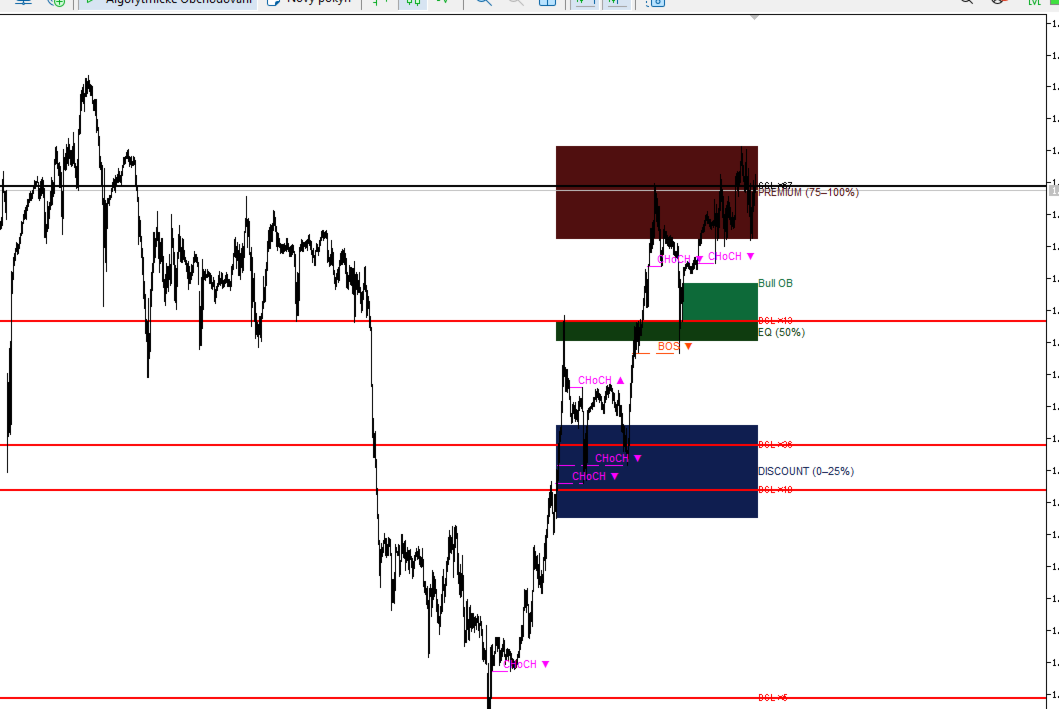
SMC Pro combines five core Smart Money Concepts tools into a single, clean, and fully customizable indicator for MetaTrader 5. No repainting. No clutter. Everything you need to read the market the way banks and hedge funds do.

What it does

🟩 Order Blocks

Automatically detects bullish and bearish Order Blocks — the price zones where institutional orders were placed before a major move. The indicator marks the OB box and its 50% midline, which often acts as a precise entry point. Mitigated OBs are filtered out by default so you only see what's still relevant.

🟦 Fair Value Gaps (FVG)

Highlights imbalances in price — gaps between candles that price tends to return and fill. Both bullish and bearish FVGs are detected and displayed as clean boxes. Filled FVGs are hidden automatically, keeping your chart uncluttered.

🔵 Break of Structure (BOS) + Change of Character (CHoCH)

Identifies the market structure in real time. BOS confirms trend continuation, while CHoCH signals a potential reversal. Both are drawn as dashed lines directly at the broken swing level with a clear label at the midpoint — not at the edge of the screen.

🟡 Liquidity Heatmap

Plots Equal Highs (Sell-Side Liquidity / SSL) and Equal Lows (Buy-Side Liquidity / BSL) as horizontal dotted lines. These are the price levels where stop losses cluster — exactly where Smart Money hunts before the real move begins. Swept levels are removed automatically.

🔴🟢 Premium / Discount Zones

Divides the current price range into three zones based on the swing high and low: Premium (75–100%), Equilibrium (50%), and Discount (0–25%). Institutional buyers look for longs in Discount, shorts in Premium.

Why SMC Pro is different

Anti-collision label system — all labels on the right edge of the chart are automatically spaced so they never overlap, no matter how many levels are active at once.

Clean visuals — boxes, lines, and labels are layered correctly (PD zones in the background, structure lines in front). Nothing covers anything it shouldn't.

Redraws only on new bar — zero performance impact during live trading. The indicator recalculates only when a new candle opens.

Fully customizable — every module has its own input group with on/off toggle, lookback period, colors, and display options. Turn off what you don't need.

Works on all symbols and timeframes — Forex, Gold, Silver, Oil, Indices, Crypto. Scalping on M5 or swing trading on D1.

Inputs overview

Group Key inputs
Order Blocks Show, Lookback, Max boxes, Show mitigated, Bull/Bear color
Fair Value Gaps Show, Lookback, Max boxes, Show filled, Bull/Bear color
BOS + CHoCH Show, Lookback, Swing length, BOS/CHoCH colors, Line width
Liquidity Show, Lookback, Tolerance %, Min touches, SSL/BSL colors
Premium/Discount Show, Lookback, Premium/EQ/Discount colors
General Object prefix

How to use

  1. Attach SMC Pro to any chart on any timeframe.
  2. Identify the current zone — are we in Premium, Discount, or EQ?
  3. Wait for price to reach an unmitigated Order Block or FVG inside Discount (for longs) or Premium (for shorts).
  4. Confirm with a CHoCH or BOS in your direction.
  5. Check that liquidity (SSL/BSL) is nearby — Smart Money often sweeps it before the move.

Requirements

  • MetaTrader 5
  • Any broker, any symbol
  • No internet connection required — fully self-contained
Altri dall’autore
If you need more information than a few numbers in the iExposure index, this indicator is for you. Better iExposure indicator is an improvement over the original information, such as: Separate profit column for BUY and SELL Separate SL column for BUY and SELL Separate TP column for BUY and SEL Average Price as Horizontal Line in Chart Pip Value Profit https://www.facebook.com/groups/prop4y iExposure will show the opening of trading positions in tabular form in the sub-window below the main wi
Cool iExposure
Zbynek Liska
5 (1)
If you need more information than a few numbers in the iExposure index, this indicator is for you. Better iExposure indicator is an improvement over the original information, such as: Separate profit column for BUY and SELL Separate SL column for BUY and SELL Separate TP column for BUY and SEL Average Price as Horizontal Line in Chart Pip Value www.foxwave.eu
Basic tool Showing annual candle, range for Day, range for Week, range for Month, range for Year. Showing fibonacci for Day fibonacci for Week, fibonacci for Month, fibonacci for Year. Showing percent change for Day, percent change for Week, percent change for Month, percent change for Year. Showing distance of the current value the previous close for Day, Week, Month, Year.
What are Fibonacci Numbers and Lines? Fibonacci numbers are used to create technical indicators using a mathematical sequence developed by the Italian mathematician, commonly referred to as "Fibonacci," in the 13th century. The sequence of numbers, starting with zero and one, is created by adding the previous two numbers. For example, the early part of the sequence is 0, 1, 1, 2, 3, 5, 8, 13, 21, 34, 55, 89,144, 233, 377, and so on. The Fibonacci sequence is significant because of the so-calle
This is a simple and very effective utility for closing in profir or in loss. Constant overview of daily Draw Down, Current profit and Daily profit This utility will save your deposit in case of a sharp market change. Just add it to any free chart and use it for your daily trading. Thanks to the minimal set of parameters, you can easily set up the utility for any symbol in MT4
Easy EA for closing positions with profit or loss. All positions of chart's symbol are counted separately. Settings: TPforSymbol — set profit amount to indicate when to close every positions for the symbol of the chart. Swap and commission are decreasing your profit. SLforSymbol — set SL amount to indicate SL for every positions for the symbol of the chart. Swap and commission are increasing your loss. SLforSyblol is always below/equal zero.
This multi-currency annual dashboard analyzes the nearest high and low to the current price for a chosen number of recent years. It displays how many pips away the price is from the nearest high or low. You can set a pip threshold, and the alert will notify you when the price gets close to the specified levels. In real-time, the dashboard also provides an overview of the closest high or low values for each specific year, helping you make informed trading decisions.
Key level analysis : The indicator tracks the nearest annual high and low to the current price over a chosen number of years. Proximity alerts : It triggers an alert when the price reaches a specified number of pips from the nearest high or low. Customizable notification intervals : You can set how often alerts repeat, for example, every 30 minutes. Historical perspective : Enables long-term tracking of market levels and effective planning of trading strategies. Multi-currency support : This ind
iExposure Fox Wave – Comprehensive Position Monitoring Indicator iExposure Fox Wave is an advanced MetaTrader indicator designed to provide detailed monitoring of all open trading positions in a clear, tabular format. This tool is perfect for traders who want all essential trade information in one place. Key Features: Symbol: Displays the instruments (currency pairs or other symbols) with open positions. Deals: Number of open trades (transactions) for each symbol. Buy lots & Buy price: Total vol
RangeDashboard – Multi-symbol Daily, Weekly, and Monthly Range Overview with Alerts RangeDashboard is a powerful and user-friendly indicator that displays the current range (high-low) of selected currency pairs or instruments over a chosen timeframe (D1, W1, MN1) directly on the chart. It allows you to input a customizable list of symbols, add suffixes if needed, and select the timeframe from which the ranges are calculated. Key Features: Dynamic calculation of ranges for any number of symbols o

Fox Wave PSAR – PSAR Dashboard for Multiple Symbols and Timeframes Description: Fox Wave PSAR is a powerful indicator for MetaTrader 5 that allows you to monitor the Parabolic SAR (PSAR) across multiple symbols and timeframes directly in a clear and convenient dashboard. It is ideal for scalping, intraday, and long-term trading strategies. Key Features: Clear dashboard with a list of symbols and their current PSAR status. Supports any number of symbols and customizable suffixes (e.g., ".m"). Di
New High / Low Dashboard Scanner is not a common indicator. It is a market-structure control system designed to monitor, in real time, the creation of new Highs and Lows across Daily, Weekly, Monthly, and Yearly time horizons — while simultaneously measuring the exact distance of price from these critical levels in pips. This tool is built for traders who do not want to react late, but instead want to stand at the origin of market movement . What the system does The dashboard continuously scan
Short Description Fox Wave Account Nexus is a professional dashboard for real-time monitoring of multiple MetaTrader 5 accounts across different terminals from a single chart. Full Description  Fox Wave Account Nexus Professional Multi-Account Monitoring Dashboard for MetaTrader 5 Fox Wave Account Nexus is a powerful visual dashboard designed for traders who operate multiple MT5 accounts simultaneously and need instant, centralized control . The indicator collects live data from all con
Fox Wave Pro Copier - Professional Multi-Master Trade Copier Copy trades from multiple Master accounts simultaneously with advanced risk management Key Features Multi-Master Architecture Copy from unlimited master accounts simultaneously Automatic master account detection or manual configuration Real-time trade synchronization via file system Independent risk management for each master Advanced Risk Management Individual risk settings per master account Automatic lot size calculation based
TREND SCANNER PRO - Multi-Timeframe Trend Analysis Dashboard Professional real-time trend scanner that monitors up to 15 currency pairs across 8 timeframes simultaneously. Get instant market overview with epic visual dashboard, smart alerts, and zero lag performance. KEY FEATURES
Professional Averaging Calculator - Essential Risk Management Tool for Every Trader Whether you're a beginner learning position averaging or a professional managing complex grid strategies, this calculator is your must-have tool. Beginners instantly see how averaging works, understand maximum loss scenarios, and learn proper risk management before entering trades - no more "I didn't know I could lose that much" surprises. Professionals save time and eliminate calculation errors with instant simu
Filtro:
Nessuna recensione
Rispondi alla recensione