
SyncTrader Risk Manager
- Utilità
- Versione: 1.27
- Aggiornato: 11 agosto 2026

SyncTrader Risk Manager
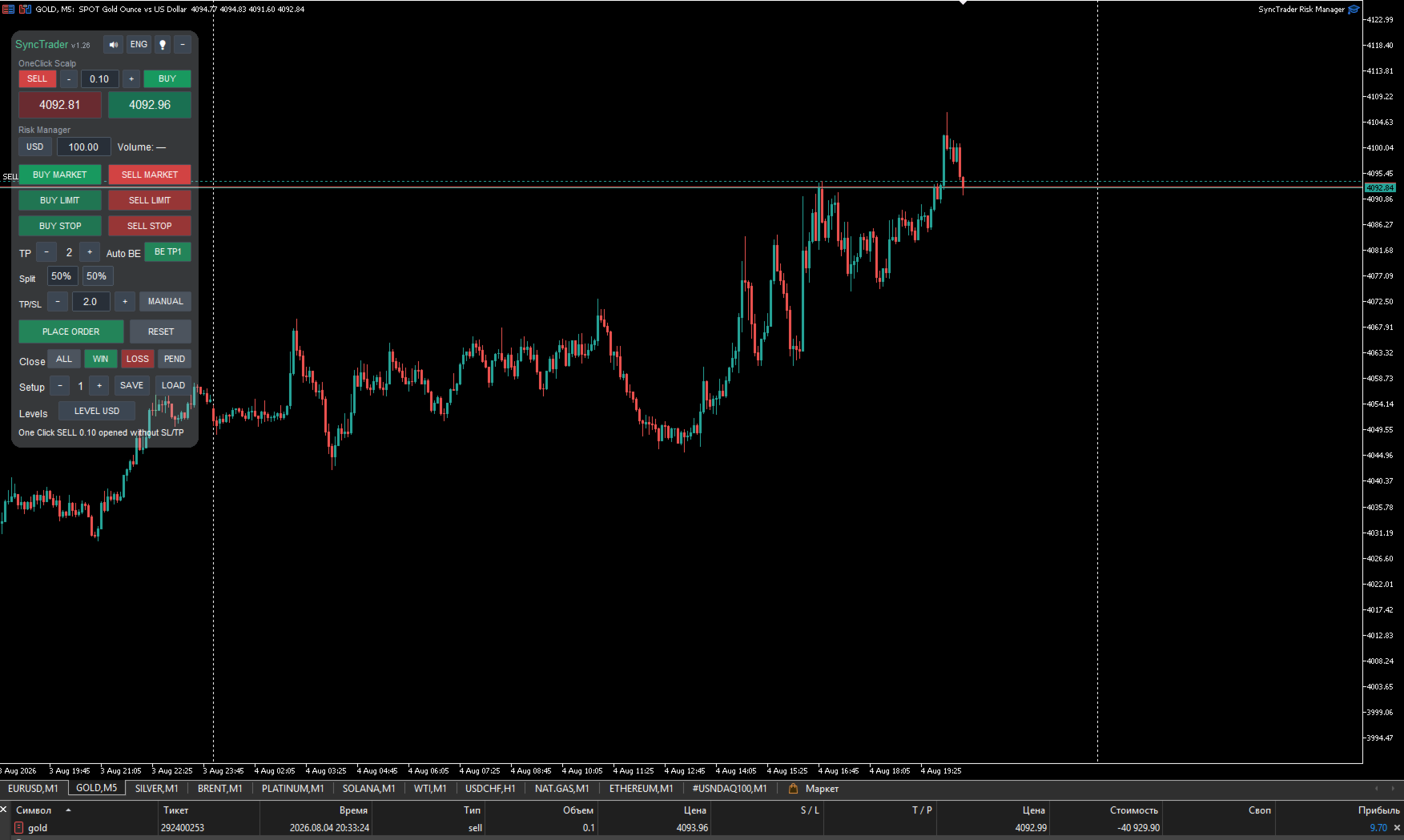
SyncTrader Risk Manager è un’utilità per il trading manuale e la gestione del rischio in MetaTrader 5. Calcola il volume della posizione in base a un rischio monetario o a una percentuale del saldo e consente di preparare un piano operativo direttamente sul grafico.
L’utilità non genera segnali e non apre operazioni autonomamente. L’utente sceglie direzione, tipo di ordine, Stop Loss e livelli di Take Profit. L’interfaccia del pannello è disponibile in inglese e russo.
Funzioni principali
- Calcolo del volume per importo di rischio o percentuale del saldo
- Ordini Market, Limit e Stop
- Da uno a quattro livelli di Take Profit
- Linee Entry, Stop Loss e Take Profit spostabili
- Valori dei livelli in valuta del conto, points o R
- Breakeven automatico dopo il Take Profit selezionato
- Nove modelli di livelli riutilizzabili
- Controlli di spread, margine libero, rischio per operazione e perdita giornaliera
- Chiusura rapida di tutte le posizioni gestite, solo in profitto o solo in perdita
- Eliminazione degli ordini pendenti gestiti
- Azioni rapide sul simbolo corrente o su tutti i simboli
- Suoni opzionali e pannello compatto richiudibile
- Supporto per conti hedging e netting
- Ripristino della gestione netting dopo il riavvio del terminale o dell’Expert Advisor
OneClick Scalp, distribuzione personalizzata e Ratio
OneClick Scalp
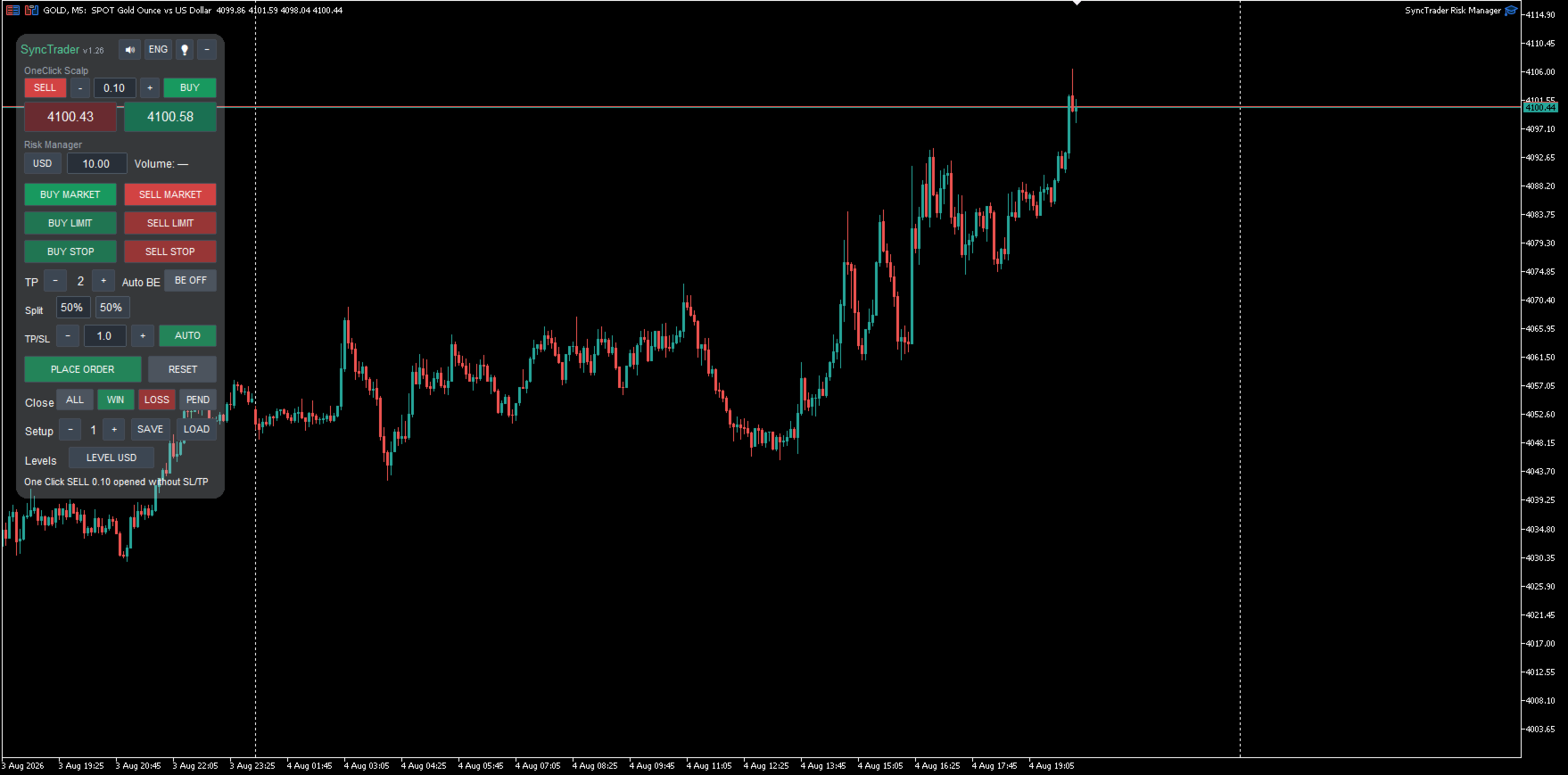
Ingresso rapido a mercato con volume fisso, prezzi Bid/Ask grandi e pulsanti BUY/SELL separati. L’ingresso viene eseguito senza Stop Loss o Take Profit preconfigurati.
Distribuzione personalizzata dei Take Profit
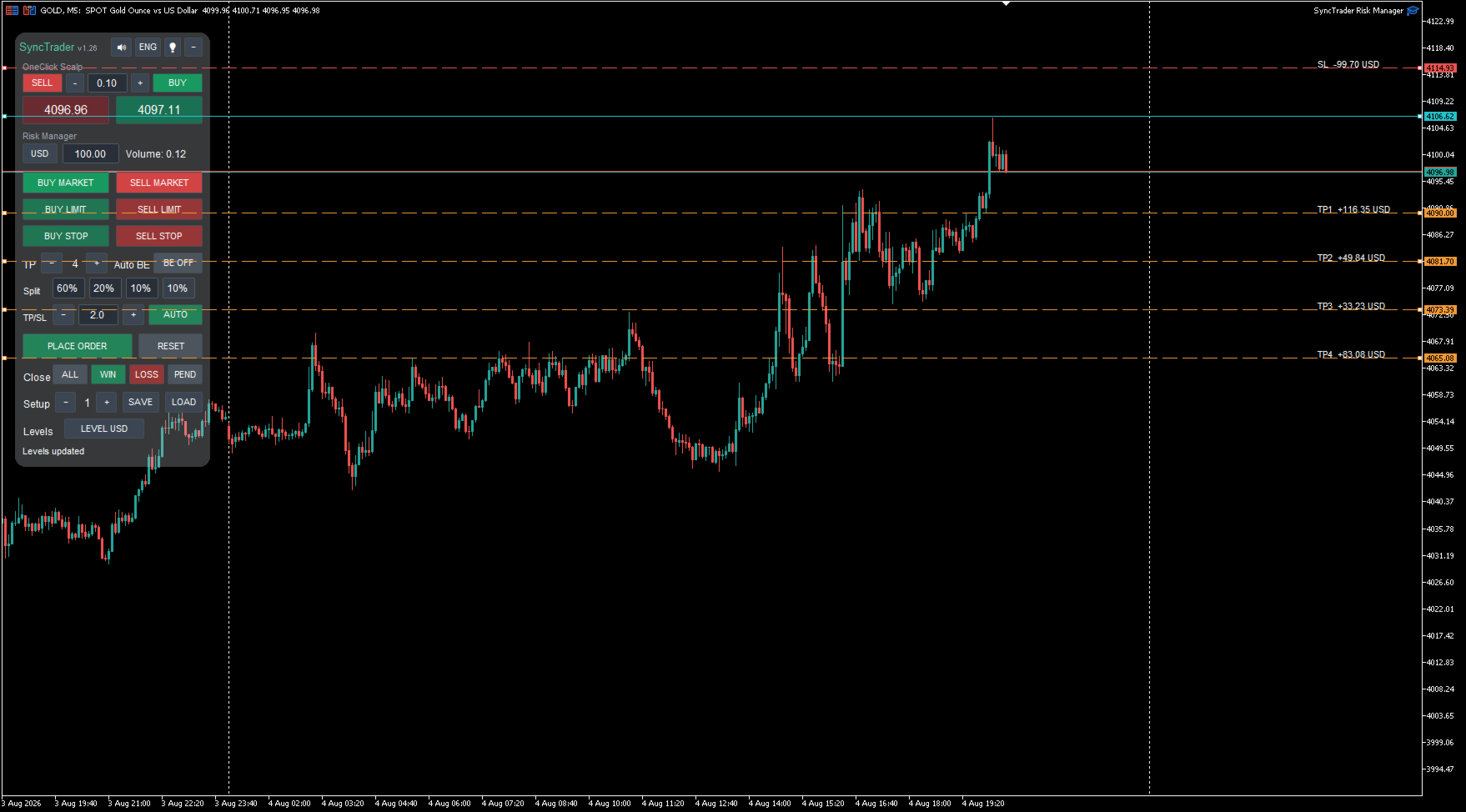
L’utente definisce la percentuale di chiusura per ciascuno dei quattro obiettivi. Modificando un valore, il volume rimanente viene redistribuito automaticamente e l’ultimo TP completa il totale fino al 100%. Le percentuali vengono salvate nei modelli e dopo il riavvio.
Ratio TP/SL automatico
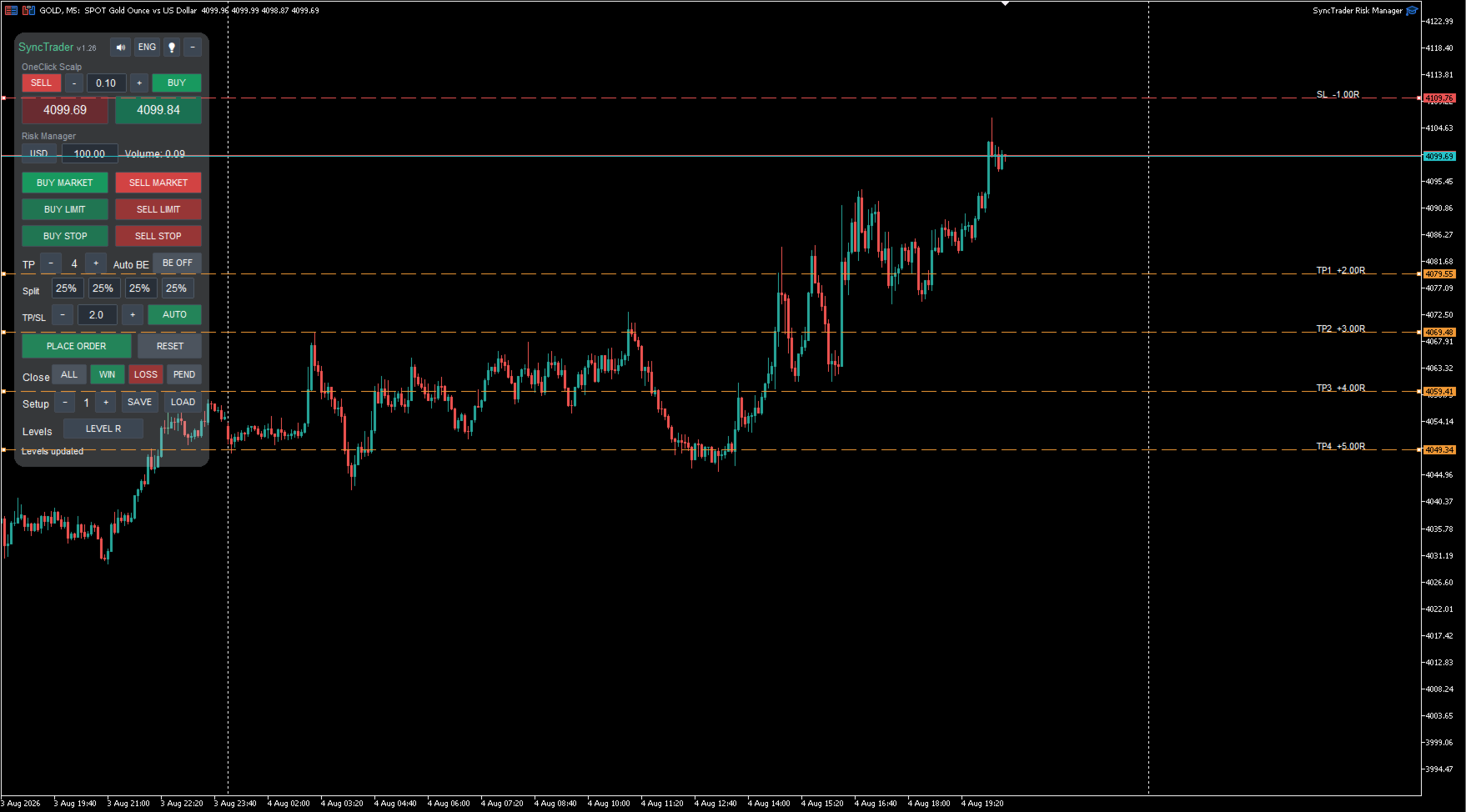
Ratio posiziona gli obiettivi rispetto alla distanza tra Entry e Stop Loss. Con 2.0, TP1 è a 2R, TP2 a 3R, TP3 a 4R e TP4 a 5R. Un TP spostato manualmente rimane fisso, mentre gli altri obiettivi automatici continuano a essere ricalcolati.
Pannello e nuovi parametri
- DefaultOneClickLot: volume iniziale di OneClick Scalp
- DefaultTPSLRatio / EnableTPSLRatioLink: valore iniziale e stato di Ratio
- ReuseFirstTradeTPsForAddOns: riutilizza gli obiettivi della prima operazione per le aggiunte
- PanelScalePercent: scala completa del pannello dal 75 al 150%
- PanelFontScalePercent: regolazione aggiuntiva del carattere
Procedura operativa
- Selezionare il rischio nella valuta del conto o come percentuale del saldo.
- Selezionare BUY MARKET, SELL MARKET, BUY LIMIT, SELL LIMIT, BUY STOP o SELL STOP.
- Spostare sul grafico le linee Entry, Stop Loss e Take Profit.
- Scegliere da uno a quattro Take Profit e, se necessario, Auto BE.
- Controllare il volume calcolato e i valori dei livelli.
- Premere PLACE ORDER. I pulsanti BUY/SELL preparano soltanto il piano e non inviano ancora l’ordine.
Conti hedging e netting
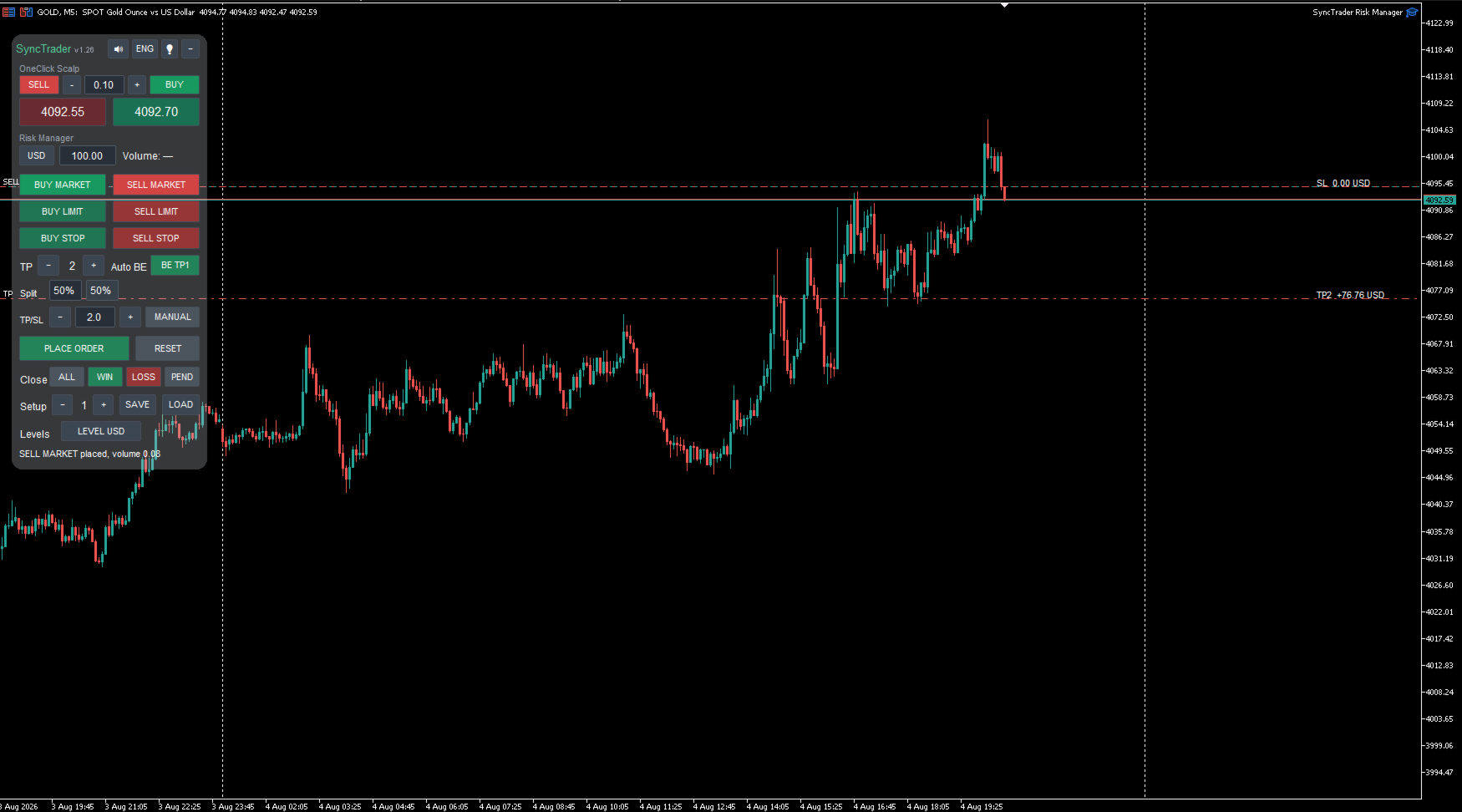
Su un conto hedging, ogni parte del piano viene aperta come posizione separata con il proprio Take Profit. Su un conto netting, MetaTrader mantiene una sola posizione per simbolo: TP1–TP3 sono gestiti come chiusure parziali virtuali, mentre il Take Profit finale e lo Stop Loss restano presso il broker.
Il terminale e l’utilità devono rimanere attivi per le chiusure parziali virtuali e il breakeven automatico. Il piano netting viene salvato e ripristinato dopo un riavvio. Le aggiunte nella stessa direzione vengono integrate nel piano attivo.
Parametri importanti
- SyncMagicNumber: identificatore degli ordini e delle posizioni gestite
- DefaultRiskMode / DefaultRiskValue: modalità e valore iniziale del rischio
- DefaultTPCount: numero iniziale di Take Profit
- MaxSpreadPoints: spread massimo per un ingresso a mercato; zero disattiva il limite
- CheckFreeMargin / MarginReservePercent: controllo e riserva del margine libero
- MaxRiskPerTradeMoney: rischio monetario massimo per operazione; zero disattiva il limite
- MaxDailyLossMoney: limite di perdita giornaliera delle operazioni gestite; zero lo disattiva
- EnableAutoBreakeven / AutoBreakevenAfterTP: impostazioni del breakeven automatico
- DefaultLevelDisplay: valori in valuta del conto, points o R
- LevelTemplateSlot: modello iniziale da 1 a 9
Domande frequenti
SyncTrader apre operazioni automaticamente?
No. BUY/SELL crea un piano modificabile. L’ordine viene inviato solo dopo aver premuto PLACE ORDER.
Perché vedo le linee ma non è stata aperta alcuna posizione?
Le linee indicano che il piano è in preparazione. Regolare Entry, Stop Loss e Take Profit e premere PLACE ORDER. Il motivo di un rifiuto appare nella riga di stato e nella scheda Experts.
Come viene calcolato il volume?
Il calcolo usa la distanza tra Entry e Stop Loss, il rischio selezionato e le specifiche del simbolo. Il volume viene arrotondato per difetto al passo consentito dal broker.
Perché il risultato reale può differire dal valore mostrato?
I valori sono stime. Spread, slippage, commissioni, gap e regole del broker possono influire sul risultato.
Quanti livelli Take Profit sono supportati?
Da uno a quattro. La percentuale di chiusura di ogni obiettivo può essere modificata. L’ultimo TP riceve automaticamente la parte restante, in modo che il totale sia sempre esattamente 100%.
MetaTrader 5 deve rimanere aperto?
Sì, per le chiusure parziali virtuali, Auto BE e la gestione software. Lo Stop Loss e il Take Profit finale restano attivi presso il broker.
Cosa salva un modello Setup?
Tipo di ordine, modalità e valore del rischio, numero di TP, Auto BE, distanza dello Stop Loss e posizione degli obiettivi rispetto al rischio iniziale. Sono disponibili nove slot.
Perché ALL, WIN, LOSS o PEND non hanno modificato un’operazione manuale?
Queste azioni riguardano solo ordini e posizioni con il SyncMagicNumber configurato, proteggendo le altre operazioni.
Windows HiDPI e macOS Retina sono supportati?
La versione 1.26 rileva il DPI e adatta automaticamente il testo del pannello. Sono disponibili anche parametri manuali di compatibilità.
Questa versione invia notifiche Telegram?
No. SyncTrader Risk Manager è un’utilità autonoma senza connessione Telegram.
L’utilità fornisce segnali?
No. L’utente decide ingresso, direzione, Stop Loss e livelli di Take Profit.
Qual è la differenza tra OneClick Scalp e Risk Manager?
OneClick Scalp entra immediatamente con volume fisso. Risk Manager calcola il volume dal rischio e prepara Entry, Stop Loss e fino a quattro obiettivi.
Posso spostare manualmente un TP con Ratio attivo?
Sì. L’obiettivo spostato viene fissato ed escluso dai successivi ricalcoli di Ratio.
Cosa accade quando viene raggiunto il limite di perdita giornaliera?
I nuovi ingressi gestiti vengono bloccati. Le posizioni aperte non vengono chiuse automaticamente. Il valore 0 disattiva il limite.
Come posso ridimensionare il pannello?
PanelScalePercent ridimensiona insieme pulsanti, spaziatura, sfondo e aree di clic dal 75 al 150%.
Importante
- Attivare il trading algoritmico in MetaTrader 5 prima di inviare ordini.
- Controllare volume minimo, passo del volume e distanze minime richieste dal broker.
- Il volume finale può differire leggermente dal rischio richiesto a causa dell’arrotondamento.
- Il trading comporta rischi. L’utilità non garantisce risultati.












































L'utente non ha lasciato alcun commento sulla valutazione.