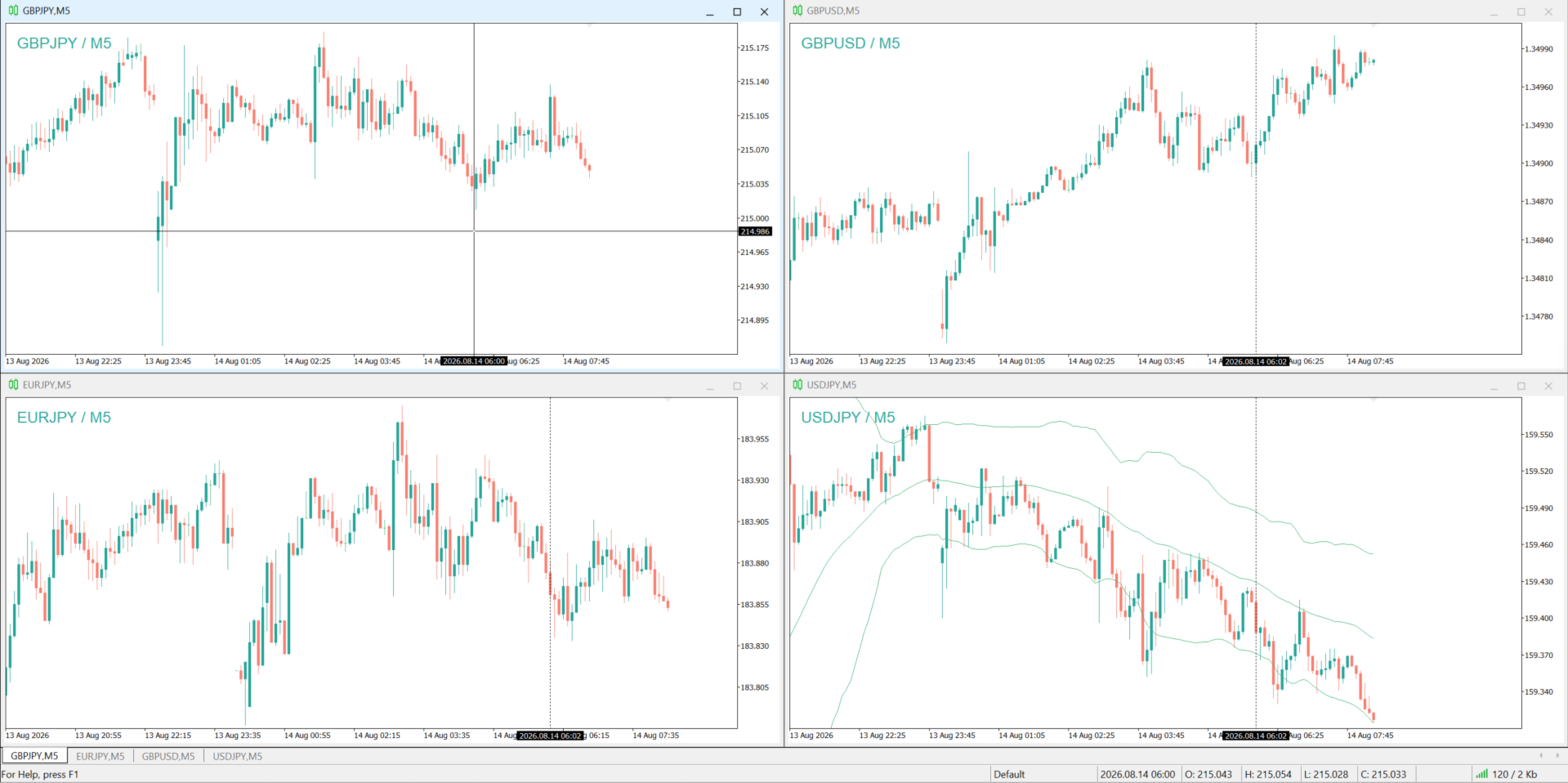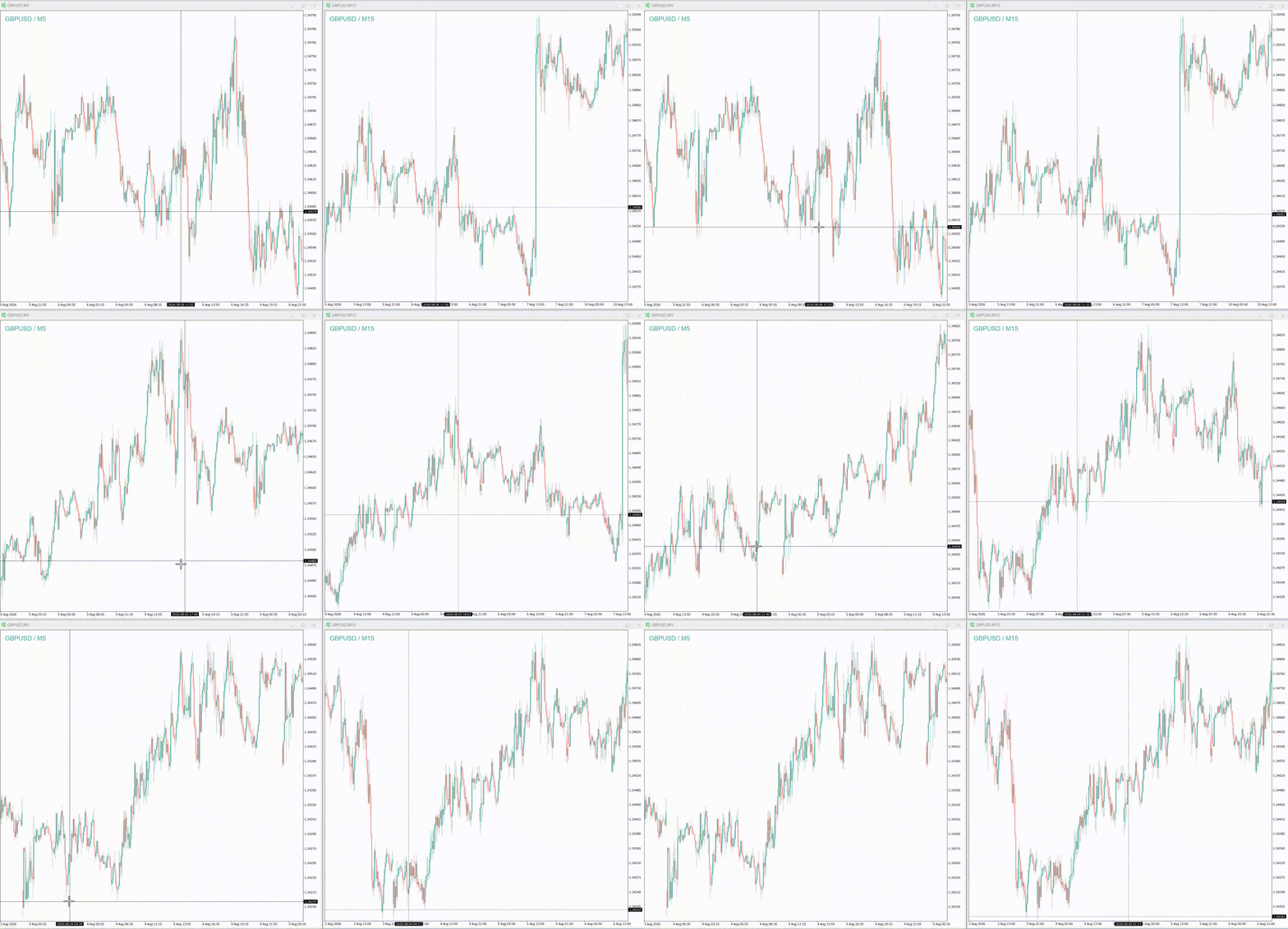
ChartSync PRO MT5

ChartSync Pro trasforma un insieme di grafici MetaTrader 5 in un unico spazio di lavoro collegato. Fai la tua analisi una volta sola, su un solo grafico, e gli altri grafici lo seguono.

Guida utente completa, esempi di configurazione e una versione di prova gratuita per conti demo: https://www.mql5.com/en/blogs/post/773654

Cosa puoi farci:

- lavorare su molti grafici contemporaneamente, senza ridisegnare la stessa analisi su ognuno
- tenere sincronizzato un intero gruppo di grafici, comandato dal grafico che scegli tu
- distribuire i grafici su più monitor e continuare a usarli come un unico insieme
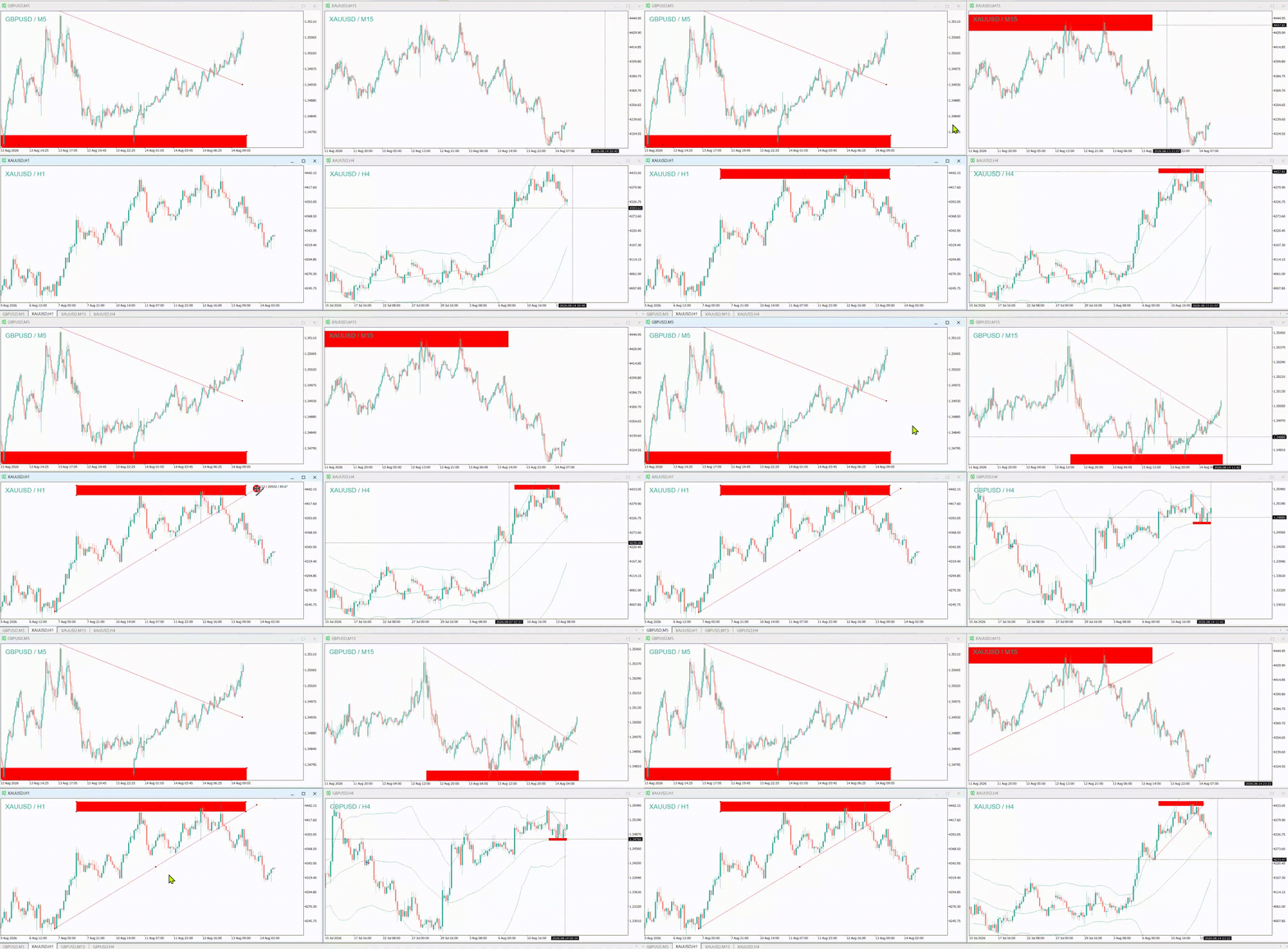
- usare la modalità avanzata (associazione degli strumenti) per assegnare a ogni grafico che segue un simbolo diverso
- far funzionare allo stesso tempo più gruppi indipendenti, per esempio valute, indici e metalli

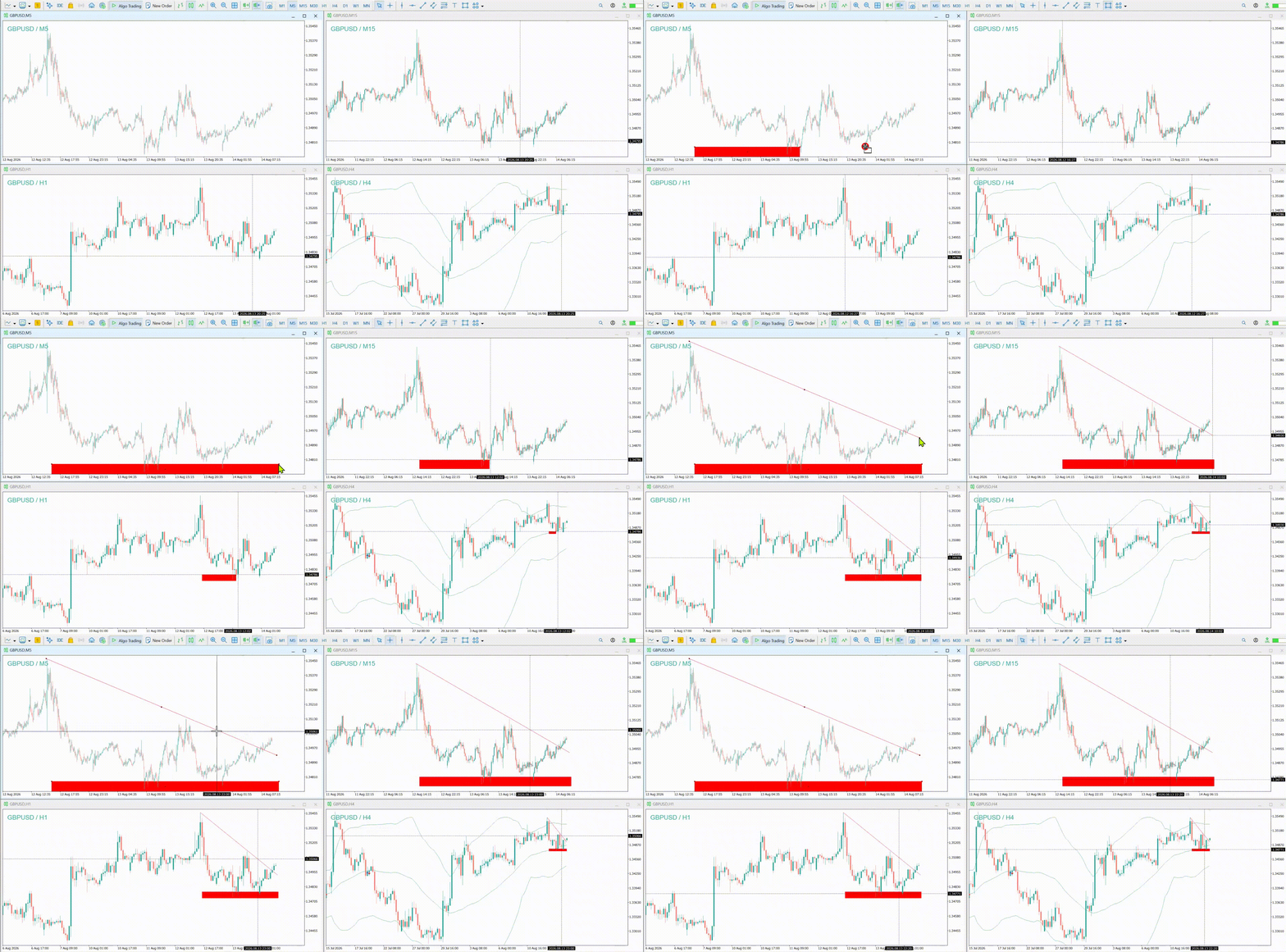
Traccia una linea di tendenza su un grafico e comparirà sugli altri. Sposta il mirino per esaminare una candela e tutti i grafici si portano allo stesso momento. Cambia il simbolo o il timeframe sul grafico principale e gli altri reagiscono come li hai configurati.

Come è organizzato. Un grafico fa da Master e guida, gli altri sono Slave e lo seguono. I grafici comunicano solo quando condividono lo stesso Group of Charts ID, così i gruppi configurati separatamente non interferiscono mai tra loro. All'interno di un gruppo hai fino a quattro canali, ed è questo a rendere possibili le disposizioni più avanzate.

Ci sono due modalità di lavoro. La modalità semplice replica il grafico principale ed è adatta all'analisi multi timeframe di un solo strumento: segna un livello su H4 e lo vedi su M5, H1 e D1. La modalità avanzata (associazione) va oltre. Assegni uno strumento diverso a ogni grafico che segue, con un timeframe fisso se vuoi, così una sola schermata può mostrare la coppia che operi insieme agli strumenti correlati a essa. Quando un grafico mostra un simbolo diverso da quello principale, vengono condivisi solo gli oggetti basati sul tempo, perché un livello di prezzo di uno strumento non vale per un altro.

La sincronizzazione riguarda il mirino, il livello di zoom e lo scorrimento, il simbolo e il timeframe, e gli oggetti che disegni: linee di tendenza, linee orizzontali e verticali, canali e strumenti di Gann, strumenti di Fibonacci ed espansioni, rettangoli, triangoli, ellissi, frecce, testo ed etichette. Ogni tipo di oggetto si può attivare o disattivare singolarmente e puoi escludere oggetti in base al prefisso del nome, così i disegni appartenenti ad altri indicatori restano intatti. Gli oggetti collocati nelle sottofinestre degli indicatori vengono mantenuti per simbolo e timeframe.

ChartSync Pro funziona interamente dentro MetaTrader 5. Non usa DLL né server esterni. Non legge il tuo conto, le tue password o i tuoi fondi, e niente esce dal tuo terminale.

Tieni presente che su un grafico Master i disegni della finestra principale vengono cancellati quando cambi il simbolo su quel grafico. Per l'analisi che vuoi conservare, usa un grafico dedicato a quello strumento.
Prodotti consigliati
**Forex Trade Manager Pro MT5** **Trade Manager MT5** è un utility completa per la gestione delle operazioni di trading per MetaTrader 5 che ti offre il controllo totale su ogni aspetto della tua posizione, dal momento in cui pianifichi un'operazione al momento in cui la chiudi. È progettato per i trader che prendono sul serio il rischio, dal principiante che costruisce disciplina allo scalper professionista che necessita di esecuzione immediata su più posizioni. Lo strumento si aggancia a qu
Boleta ata
Samuel Henrique Almeida Ferreira
BOLETA ATA is a quick-execution trading panel for MetaTrader 5, built for manual traders who want to buy, sell, and manage positions without leaving the chart. Compact, straightforward, and with built-in protection automations. Main Panel Stop Loss and Take Profit with an on/off checkbox and an editable field — click and type the value directly, no need to open settings Lot size field (Qty) , editable at any time 3 clickable lot presets : a single click applies the value to the Qty field; a doub
FREE
KS Hotkey Trading Panel Pro è un Expert Advisor per MetaTrader 5 che offre funzionalità di trading rapido tramite tastiera e una dashboard interattiva direttamente sul grafico. Caratteristiche principali Trading tramite tasti di scelta rapida (Hotkey) — Azioni attivabili con un singolo tasto per: Acquisto/Vendita a mercato (Market Buy/Sell) Buy Limit / Sell Limit Buy Stop / Sell Stop Chiusura di tutte le posizioni Chiusura solo posizioni Buy / Chiusura solo posizioni Sell Eliminazione di
Signals for Telegram
Elidio Xavier Guimaraes
It is a utility that posts customized messages on Telegram based on account trading activity. Once the utility is on the chart, with each new position opened from the same chart symbol the utility is added, a customized message will be sent to the Telegram group defined in the input parameters. The utility will post to the Telegram group if a new position is opened and if it is the same symbol as the chart the utility is running on. If you are using an Expert Advisor for Buy and Sell and want to
One Click Breakeven Function: For multiple orders of the same currency but different order types (sell or buy), under the condition that the overall position is profitable, set the same stop-loss level or take-profit level. For example: there are currently 10 EURUSD orders, including 7 sell orders and 3 buy orders. When the overall position is profitable, if the overall take-profit for sell orders is set to 50 points: (1) When the total profit of the 7 sell orders is greater than the total loss
Trade Dashboard MT5
Fatemeh Ameri
4.94 (134)
Trade Dashboard simplifies how you open, manage, and control your trades, with built-in lot size calculation. It allows you to execute trades, manage risk, and control positions directly on the chart, with tools such as partial close, breakeven, and trailing stop. Designed to reduce manual work and help you stay focused on your trading decisions. A demo version is available for testing. Detailed explanations of features are provided within the MQL5 platform. Installation instructions are include
Smart Panel Trade
Nereu Ferreira Junior
Make Trades in MetaTrader 5 with Profit Panel! If you are a MetaTrader 5 trader, you know how important it is to act quickly and accurately. With this in mind, we created the Profit Panel – an essential tool for negotiations What is the Profit Panel? Designed to make your daily trading easier. It offers a simplified and intuitive interface where you can open, manage and close transactions with just a few clicks. How does it work? The MT5 Trading Dashboard puts all the most important trading func
DTK Scalping Panel
Thiago Pereira Pinho
A powerful and intuitive trade management tool designed for scalpers and intraday traders. Created to complement the Nampim Samba Scalper strategy , it allows traders to open, manage, and close positions quickly without leaving the chart.  Key Features: Customizable trading panel – choose position (left, right, center, top, bottom). One-click trading buttons – instantly open Buy/Sell trades with pre-set lot sizes. Close management – close last 1/2/3 trades or all Buy/Sell positions with one clic
FREE
Virtual Basket TP SL Manager
Moh Nugraha Kusuma
5 (1)
"Manage multiple positions as a single unit with hidden targets." The Virtual Basket TP SL Manager is a professional MetaTrader 5 utility designed to automate the closing of positions based on the total profit or loss of a group of orders (a "basket"). By utilizing Virtual Levels , all Take Profit (TP) and Stop Loss (SL) targets are stored locally within the EA's memory and are not sent to the broker's server, keeping your strategy safe from stop-hunting and price manipulation. Key Features Virt
FREE
Close All Pro MT5 – Fast PnL Control is a powerful trade manager MT5 utility that gives you total control over your trades. With a single click, you can close all MT5 orders, monitor real-time profit and loss, and manage your floating PnL directly from a clean on-chart panel. The tool is lightweight, responsive, and built to help traders save time, reduce emotional stress, and maintain focus. Whether you trade manually or through an EA, this MT5 profit panel provides the visibility and precisio
Xiao Dan Kuai Pao is a fast and clean one-click order panel for MetaTrader 5. Open and manage your trades instantly, with Stop Loss and Take Profit placed automatically — no more typing TP distances by hand. Key features: - One-click buttons: BUY, SELL, CLOSE, BREAK EVEN - Custom Stop Loss and Take Profit (in points) — set any distance you want - Flexible risk/reward — combine SL and TP freely to build any ratio, such as 1:1, 1:2, 1:3, 1:4 or 1:5 - Real-time price display (Bid) - Bar countdown t
Advanced Risk Return Tool
Felipe Monteiro Rodrigues
Advanced Risk Return Tool è un'utilità visuale per la pianificazione e la gestione del Rischio/Rendimento in MetaTrader 5. Lo strumento consente di creare e gestire strutture di Acquisto e Vendita direttamente sul grafico, posizionando visivamente i livelli di Entrata, Target e Stop , oltre a mostrare il rapporto Rischio/Rendimento, le distanze in pip, il volume e i valori finanziari. Le strutture sono interattive e possono essere regolate direttamente con il mouse. Funzioni Principali Strutture
OB FVG Trade Copier: Unified Master & Slave EA Version: 2.00 Type: Trade Copier / Risk Management Utility Compatibility: MetaTrader 4 & MetaTrader 5 (Cross-compatible codebase) Overview The OB FVG Trade Copier is a professional-grade, unified trade copying system designed to mirror trades between Master and Slave accounts seamlessly. Built with a unified architecture, a single EA file serves as both the sender (Master) and receiver (Slave) simply by toggling the EA Mode in the settings. It uti
FREE
“One-Click Flatten — Fast, Clean, Reliable”      Close all orders and positions in your account with a single click — no hassle, no fumbling through tabs.      Time-saving tool for traders needing instant exit from the market—especially during volatile moves or news events.      Emotion-free execution reduces human errors and hesitation—just click and it's done.      Easy to use: load the EA in MT5 and let it handle the rest. Perfect for both beginners and seasoned traders.      Fu
FREE
XBOOT BOLETA PRO Professional Manual Trading Panel for MetaTrader 5 XBOOT Boleta Pro is a complete trading panel designed for traders who execute manual trades and want greater speed, organization, and control during every trading session. More than a standard Buy and Sell panel, XBOOT Boleta Pro combines powerful trading tools into a single interface, helping traders analyze the market, manage risk, execute orders, and monitor trading performance without leaving the chart. Its purpose is to sim
Click Trading
Jawad Tauheed
5 (2)
One Click Trading – Auto TP SL Developer TraderLinkz Version 1.00 Category Utility What it does Adds missing TP and SL to your manual trades and pending orders Sets them once per ticket Lets you move TP and SL afterward Works on hedging and netting accounts Scans on every tick and reacts on trade events Why you want it You place faster entries You get consistent risk and exit targets You reduce fat finger errors You keep full manual control Quick start Attach the EA to any chart Keep TP and SL e
FREE
Ultimate MT5 Auto SL/TP Assistant EA Our MT5 Expert Advisor is designed to automatically apply predefined SL and TP levels to any order you place – Fast, accurate, and fully automated, no manual errors, no delays. Perfect for scalpers, intraday traders, and anyone who values precision and speed. Auto SLTP Auto SL TP this is Utilities  Scalper Auto SL TP fast Open Close  https://www.mql5.com/en/market/product/158389
FREE
ZenTrade Manager MT5
Ian Paolo Lumba Castro
ZenTrade Manager MT5 Stop Computing. Start Trading. Are you tired of missing perfect entries because you were busy calculating pip distances, lot sizes, or monetary risk? Do you overthink your Stop Loss and Take Profit levels, only to watch the market reverse while you're adjusting lines? ZenTrade Manager MT5 removes the mental load of order management, allowing you to focus 100% on what matters: Reading the Market. You handle the high-level analysis and decide when to enter; ZenTrade handles t
PZ Trade Pad MT5
PZ TRADING SLU
4.46 (24)
This simple visual expert advisor allows you to trade easily from the chart. It handles risk management for you and can perform several useful tasks with your existing trades, saving time and making risk-management for each individual trade easier.  [ Installation Guide | Update Guide | Troubleshooting | FAQ | All Products  |  Get Help ] Trade easily from the chart Trade with precise risk management, hassle free Trade pending order with drag and drop price selection Set SL and TP levels with d
FREE
Trade Assistant MT5 — Trade Manager for Prop Firms Trade Manager for MT5 that calculates position size, manages risk, visualises your trade setup in real time and protects your account with built-in daily loss and trade limits — everything you need to trade with consistency and pass your prop firm challenge. > Trade Tab — Position Sizing & Execution **Automatic lot calculation** Enter your risk as a percentage of account balance or as a fixed dollar amount and the panel instantly calculates t
TradingX Hotkeys
Johannes Stephanus Lombard
Inputs Available Lotsizes Partial Close % You can change lotsizes as you require On an open chart click once to select chart to be able to use hotkeys on specific chart. All Pairs can be used with this expert We created this expert to be able to still trade C300 with a 0.06 Lotsize If you enter a 0.6 lot and close 0.90% you can trade with 0.06 Lot Keys to be used: B -Buy S -Sell C -Close Profitable D -Breakeven (Note if stoploss is set it won't break even) P -Partial close X -Close all
ProBridger
Marius Ovidiu Sunzuiana
How Traders and Analysts Can Use the Data Export Bridge to Improve Their Analytics The MQL Data Export Bridge unlocks a new level of analytical power by transforming MetaTrader into a real‑time data provider for any external research environment. Here are the most impactful ways different users can apply the bridge to enhance their trading performance. Build Predictive Models with Machine Learning Who benefits: Quantitative traders, data scientists, algorithm developers How it helps: Export t
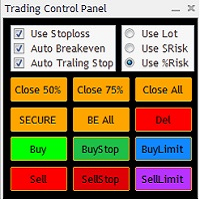
The Trading Control Panel EA let you: - Calculated lot size based on the (% or $ risk) - Place multiple (Market/Limit/Stop) trades at same time - Manage all open trades (move SL to BE, take partial profit, close all trades) This is a handy tool for those who wont to open multiple orders without spending time on lot calculations. When opening multiple orders the first order has the first TP and all other orders get the second TP.
Trade assistant pro v8
Ahmed Mohammed Bakr Bakr
2 (1)
FREE FREE FREE Trade Assistant MT5 – Professional Trading & Risk Management Panel Trade Assistant MT5 is an advanced trading panel designed to help traders execute orders faster, safer, and more professionally . It simplifies manual trading by combining smart order management , precise risk control , and one-click execution , making it ideal for both beginners and advanced traders. This tool does not trade automatically . Instead, it empowers you with full control while applying professional-gra
FREE
Trade Assistant AI MT5 Trade Assistant AI MT5 is a professional manual trading assistant for MetaTrader 5, created for traders who want a cleaner, faster, and more structured way to manage their trading workflow from one chart panel. This tool helps you plan trades, calculate risk, place manual orders, manage open positions, and stay more organized during live market conditions. It is built for traders who want better control, not unnecessary complexity. Important: Trade Assistant AI MT5 is not
Scopo: Apre automaticamente i grafici di tutti i simboli della Watchlist utilizzando il template default.tpl sul timeframe corrente (TF) , chiudendo tutti gli altri grafici (tranne quello attivo). Perfetto per analizzare rapidamente più strumenti senza sforzo manuale! Caratteristiche: Automazione: Apre decine di grafici con un clic. Sicurezza: Chiude i grafici superflui, mantenendo quello attivo. Flessibilità: Usa il tuo template default.tpl (configuralo in anticipo!). Timeframe c
FREE
Shino Trade Manager Pro
Lognie Temchin Notsa
SHINO TRADE MANAGER PRO – Sistema di gestione del trading professionale e universale per MT5 AVVISO IMPORTANTE SHINO TRADE MANAGER PRO è uno strumento di gestione del trading, non un generatore di segnali. Non prevede l'andamento del mercato né genera segnali di ingresso automatici. Il suo scopo è quello di gestire e coprire automaticamente le posizioni aperte utilizzando strumenti professionali avanzati. --- PANORAMICA SHINO TRADE MANAGER PRO è un potente e intelligente strument
This tool will perform Trailing stop loss and Break even management for orders. Helps you limit or reduce the time spend watching orders on the screen, especially when you need to go to sleep. Just add this EA to 1 chart, you can manage all pairs. You can filter orders by comment, magic number, symbol and order ticket number. When Breakeven it can add shift/offset pips (to cover the commission...). You can try in strategy tester before purchase. The EA will add Buy and Sell alternately, so you
Powerful and beautiful trading panel helps you in scheduling or placing multiple trades based on your presets in a single click. It is designed to execute orders immediately or schedule trades in advance to be executed at certain time using multiple filters to avoid non favorable market conditions (wide spread, reduced leverage etc.). Additional functionality developed to sycnhronize two instances of the expert over the internet (Master - Slave Mode), which means trader can open the panel in loc
Chart Connect
Eliel Do Rosario Batista
This EA does not perform trading operations.       It's a       auxiliary visual tool       for graphics synchronization. The “there are no trading operations” error in the validator is expected and intentional. CHARTCONNECT – Chart Synchronizer (Version 1.19) Connect all your charts to the same symbol with just one click. What is CHARTCONNECT? ChartConnect   is a lightweight and efficient tool designed to   automatically synchronize the ticker symbol   of all open charts in MetaTrader 5
Gli utenti di questo prodotto hanno anche acquistato
Trade Assistant MT5
Evgeniy Kravchenko
4.43 (216)
It helps to calculate the risk per trade, the easy installation of a new order, order management with partial closing functions, trailing stop of 7 types and other useful functions. Additional materials and instructions Installation instructions - Application instructions - Trial version of the application for a demo account Line function -   shows on the chart the Opening line, Stop Loss, Take Profit. With this function it is easy to set a new order and see its additional characteristics bef
Forex Trade Manager MT5
InvestSoft
4.98 (680)
Benvenuto a Trade Manager EA, lo strumento definitivo per la gestione del rischio , progettato per rendere il trading più intuitivo, preciso ed efficiente. Non è solo uno strumento per l'esecuzione degli ordini, ma una soluzione completa per la pianificazione delle operazioni, la gestione delle posizioni e il controllo del rischio. Che tu sia un principiante, un trader avanzato o uno scalper che necessita di esecuzioni rapide, Trade Manager EA si adatta alle tue esigenze, offrendo flessibilità s
Strategy Ledger Pro
Abdullah Uygar Tuna
5 (7)
Ora disponibile in italiano. Strategy Ledger Pro è un pannello di analisi del conto in sola lettura per MetaTrader 5. Separa i risultati del conto per Expert Advisor, strategia, simbolo e numero magic, così puoi vedere quanto contribuisce davvero ciascuno. Il pannello è disponibile in 11 lingue: English, Français, Deutsch, Español, Italiano, Português, Русский, Türkçe, 中文, 日本語 e 한국어. Prima di scaricare la demo. Il Market esegue la demo di qualsiasi prodotto a pagamento solo nello Strategy Teste
Local Trade Copier EA MT5
Juvenille Emperor Limited
4.94 (149)
Local Trade Copier EA MT5 è un trade copier rapido e flessibile per copiare e gestire operazioni tra più conti MetaTrader 5 sullo stesso computer Windows o Windows VPS. Combina la sincronizzazione locale delle operazioni con controlli lato Receiver per dimensione del lotto, gestione del rischio, filtraggio delle operazioni, mappatura dei simboli, gestione delle operazioni e protezione del conto. Configura i terminali Transmitter e Receiver in circa 1 minuto e copia operazioni manuali o aperte d
Telegram to MT5 MultiChannel Copier
Sergio Marquez Uroz
4.59 (17)
Telegram to MT5 Multi-Channel Copier   copia automaticamente i segnali di trading dai tuoi canali Telegram direttamente su MetaTrader 5. Niente bot, niente estensioni del browser, niente copia manuale. Il segnale arriva su Telegram e l'EA apre l'operazione nel tuo terminale in pochi secondi. E prima di copiare un canale, il backtester integrato ti mostra cosa avrebbe fatto quel canale sul tuo conto. Il prodotto include due componenti: un'applicazione Windows che ascolta i tuoi canali Telegram, e
================================================================================ POC BREAKOUT - V20.72. Full Professional Grade Toolkit ================================================================================ POC Breakout is a full MetaTrader 5 trading dashboard for discretionary traders who want breakout signals, Point of Control (POC) context, volume profiles, order flow, market structure, news, alerts, and advanced trade planning in one professional workspace. Attached directly to you
TradePanel MT5
Alfiya Fazylova
4.88 (169)
Trade Panel è un assistente commerciale multifunzionale. L'applicazione contiene più di 50 funzioni di trading per il trading manuale e permette di automatizzare la maggior parte delle attività commerciali. Istruzioni per l'applicazione: https://www.mql5.com/it/blogs/post/762331 Versione di prova dell'applicazione per un conto demo: https://www.mql5.com/it/blogs/post/762419 Come installare l'applicazione: https://www.mql5.com/it/blogs/post/762362 Come testare l'applicazione in modalità visuale:
Copia i segnali Telegram con le tue regole di trading Telegram to MT5 Signal Trader copia automaticamente i segnali di trading testuali dai canali e gruppi Telegram pubblici e privati in MetaTrader 5. Gestisci più fornitori e conti MT5 da un'unica applicazione desktop, con impostazioni di rischio e di trading specifiche per ogni fornitore . Per copiare i segnali non servono bot Telegram né configurazioni API. Accedi semplicemente con il tuo account Telegram tramite numero di telefono o codice QR
FarmedHedge Pair Trading Dashboard
Tanapisit Tepawarapruek
5 (5)
Farmed Hedge Yield Farming | All Markets (Manual - Hybrid - Semi/Automated EA) VERIFIED TRADING RESULTS - Farmed Hedge Yield Axi Copy:  https://www.mql5.com/en/signals/2356376 - Farmed Hedge Yield Exn Copy:   https://www.mql5.com/en/signals/2356404 - Farmed Hedge Yield V Copy:  https://www.mql5.com/en/signals/2357156 IMPORTANT NOTICE: FarmedHedge is a MANUAL-FOCUSED TRADING UTILITY ,not a fully automated EA. Results shown on this Signal include manual trades and overall strategic management.
Exp COPYLOT CLIENT for MT5
Vladislav Andruschenko
3.97 (35)
Copiatore professionale di trade per MetaTrader 5 Un copiatore di trade veloce, professionale e affidabile per MetaTrader . COPYLOT consente di copiare operazioni Forex tra terminali MT4 e MT5 con supporto per conti Hedge e Netting . La versione MT5 di COPYLOT supporta: - MT5 Hedge → MT5 Hedge - MT5 Hedge → MT5 Netting - MT5 Netting → MT5 Hedge - MT5 Netting → MT5 Netting - MT4 → MT5 Hedge - MT4 → MT5 Netting Versione MT4 Descrizione completa + DEMO + PDF Come acquistare Come installare Come ot
Power Candles Strategy Scanner - Strumento di ricerca configurazioni multi-simbolo con ottimizzazione automatica Power Candles Strategy Scanner utilizza lo stesso motore di auto-ottimizzazione che alimenta l'indicatore Power Candles, applicandolo a tutti i simboli presenti nel tuo Market Watch, uno accanto all'altro. Un unico pannello ti indica quali simboli sono statisticamente negoziabili in questo momento, quale strategia è vincente su ciascuno di essi, la coppia ottimale di Stop Loss / Take

Signal Trading View to MT5 Pro
Mirel Daniel Gheonu
4.5 (2)
Signal TradingView to MT5 Pro Automator Esecuzione professionale istantanea tra TradingView e MetaTrader 5 Automatizza la tua strategia di trading con il ponte di comunicazione più robusto tra gli alert di TradingView e l'esecuzione reale in MT5. Progettato per i trader che richiedono velocità, flessibilità e una gestione del rischio impeccabile, questo Expert Advisor trasforma qualsiasi messaggio di avviso in un preciso ordine a mercato o limite. PUNTI DI FORZA E VANTAGGI Motore di Parsing Univ
Trade copier MT5
Alfiya Fazylova
4.61 (56)
Trade Copier è un'utilità professionale progettata per copiare e sincronizzare le transazioni tra conti di trading. La copiatura avviene dal conto/terminale del fornitore al conto/terminale del destinatario, che sono installati sullo stesso computer o vps. Prima di acquistare, puoi testare la versione demo su un account demo. Versione demo qui . Istruzioni complete qui . Funzionalità e vantaggi principali: Supporta la copia degli ordini: MT5> MT5, MT4> MT5, MT5> MT4, inclusi i conti di compensaz
Premium Trade Manager - Il pannello di trading con un coach integrato Premium Trade Manager porta un coach di trading direttamente nel tuo grafico, con un motore di esecuzione completo al di sotto. Imposta il trade come fai sempre, poi lascia che Max, il tuo coach di trading IA, legga esattamente quel setup rispetto al tuo conto live e ti dia un verdetto chiaro prima che tu confermi: lo stop rispetta un approccio disciplinato, il rischio è ragionevole, c'è un evento ad alto impatto tra pochi min
MT5 to Telegram Signal Provider è un'utilità facile da usare e completamente personalizzabile che consente l'invio di segnali specificati a una chat, canale o gruppo Telegram, rendendo il tuo account un fornitore di segnali. A differenza della maggior parte dei prodotti concorrenti, non utilizza importazioni DLL. [ Dimostrativo ] [ Manuale ] [ Versione MT4 ] [ Versione Discord ] [ Canale Telegram ]  New: [ Telegram To MT5 ] Configurazione Una guida utente passo-passo è disponibile. Nessuna cono
HINN MagicEntry Extra
ALGOFLOW OÜ
4.74 (19)
HINN MAGIC ENTRY – the ultimate tool for entry and position management! SIMPLE. FASTEST. INTUITIVE. MAX AUTOMATED. Place orders by selecting a level directly on the chart! full description   ::  demo-version  :: 60-sec-video-description Key features: - Market, limit, and pending orders - Automatic lot size calculation - Automatic spread and commission accounting - Unlimited partitial take-profits  - Breakeven and trailing stop-loss and take-profit  functions - Invalidation leves - Intuitive, a
EA Overfitter
Stephen J Martret
5 (1)
That backtest looks great. But will it still be making money tomorrow, next week, next month? EA Overfitter re-runs your EA on 100 price histories it has never seen. One score tells you if the edge is real. A backtest tells you what an EA did on one price history — the one that happened to occur. What you cannot tell from it is how much of that result was the strategy and how much was the particular path. EA Overfitter answers that. It builds up to 100 synthetic price histories your EA has n
Scrivimi dopo l’acquisto per ricevere il kit completo del manuale + 3 giorni di prova dell’API OpenAI per testare le funzionalità AI + un altro regalo bonus Il prezzo attuale è uno sconto limitato per l’aggiornamento del rilancio di agosto — assicurati subito la tua edizione prima che il prezzo aumenti. Prossimo prezzo: $340 È completamente diverso da qualsiasi pannello di trading tu abbia mai provato o visto sul mercato. È uno dei pannelli di trading basati sull’IA più innovativi attualmente d
EA Slipstream
Stephen J Martret
5 (1)
Your backtest filled every order at the price it asked for. Your account does not. EA Slipstream measures what execution costs your EA, using your own fills, slippages and spreads to show you the true performance of your EA. A backtest prices every trade at the level the EA named. In live trading a pending order fills at whatever price is available when it triggers, a stop closes wherever the market is when it is hit, and the spread at that moment is whatever the account was quoting. The differ
Trade Manager DaneTrades
Levi Dane Benjamin
4.23 (30)
Trade Manager per aiutarti a entrare e uscire rapidamente dalle operazioni calcolando automaticamente il tuo rischio. Incluse funzionalità che ti aiutano a prevenire l'eccessivo trading, il vendetta trading e il trading emotivo. Le operazioni possono essere gestite automaticamente e i parametri di performance del conto possono essere visualizzati in un grafico. Queste caratteristiche rendono questo pannello ideale per tutti i trader manuali e aiuta a migliorare la piattaforma MetaTrader 5. Suppo
Dynamic Fibonacci Grid
Tsvetan Tsvetanov
5 (1)
Presentazione dell’ultima versione del Dynamic Fibonacci Grid Dashboard per MT5. Ora dotato di molte nuove funzionalità, questo nuovo dashboard trasforma la tua esperienza di trading e ti permette di osservare il mercato e l’azione dei prezzi da una prospettiva completamente nuova. Scopri nuove possibilità grazie all’analisi simultanea di più timeframe e simboli. Interfaccia user-friendly per il trading manuale e la gestione delle posizioni, con capacità ampliata di applicare strategie automati
Welcome to ENTRY IN THE ZONE AND SMC MULTI TIMEFRAME Entry In The Zone and SMC Multi Timeframe is a real-time market analysis tool based on Smart Money Concepts (SMC), designed to analyze market structure, price direction, and key trading zones. It supports both Single-Timeframe Analysis and Multi-Timeframe Analysis, providing a clearer view of the overall market structure across multiple timeframes, with real-time BUY / SELL signals that do not repaint. It is designed to help filter trading opp
Grid Manual MT5
Alfiya Fazylova
4.73 (22)
Grid Manual è un pannello di trading per lavorare con una griglia di ordini. L'utilità è universale, ha impostazioni flessibili e un'interfaccia intuitiva. Funziona con una griglia di ordini non solo nella direzione delle perdite, ma anche nella direzione dell'aumento dei profitti. Il trader non ha bisogno di creare e mantenere una griglia di ordini, lo farà l'utilità. È sufficiente aprire un ordine e il manuale di Grid creerà automaticamente una griglia di ordini per esso e lo accompagnerà fino
Telegram to MT5 Coppy
Sergey Batudayev
5 (10)
Da Telegram a MT5:   la soluzione definitiva per la copia del segnale Semplifica il tuo trading con Telegram su MT5, il moderno strumento che copia i segnali di trading direttamente dai canali e dalle chat di Telegram sulla tua piattaforma MetaTrader 5, senza bisogno di DLL. Questa potente soluzione garantisce un'esecuzione precisa dei segnali, ampie opzioni di personalizzazione, fa risparmiare tempo e aumenta la tua efficienza. [ Instructions and DEMO ] Caratteristiche principali Integrazione d
Telegram To MT5 Ultra
Mirel Daniel Gheonu
5 (5)
Telegram To MT5 — Copiatore di segnali Trasforma le indicazioni di trading dei tuoi canali Telegram in veri ordini MT5 — automaticamente, su quanti account vuoi, con rischio e regole totalmente sotto il tuo controllo. Telegram To MT5 collega i canali VIP / di segnali che già segui su Telegram al tuo terminale MetaTrader 5. Un'app desktop companion gratuita legge i messaggi (anche dai canali che bloccano i bot), e questo Expert Advisor li esegue sul tuo conto — applicando le tue impostazioni di r
DrawDown Limiter
Haidar Lionel Haj Ali
5 (22)
DrawDown Limiter v5.0 — Controller avanzato per la protezione del conto DrawDown Limiter v5.0 è un controller di protezione del conto lato client, progettato per monitorare il tuo conto di trading e reagire automaticamente quando vengono raggiunti i limiti configurati relativi a rischio, profitto, notizie, pianificazione, rollover o numero di posizioni. Può monitorare operazioni manuali, strategie automatizzate, più Expert Advisor, ordini pendenti e posizioni aperte da un unico grafico dedicato.
Basket EA MT5
Juvenille Emperor Limited
5 (7)
Basket EA MT5 è un potente strumento per la presa di profitto e un sistema completo di protezione del conto, tutto in una soluzione semplice e intuitiva. Il suo scopo principale è quello di offrire un controllo totale sul profitto e la perdita complessiva del conto, gestendo tutte le posizioni aperte a livello di "cestino" (basket) e non singolarmente. L’EA offre una serie completa di funzionalità a livello di basket, come take profit, stop loss, break even e trailing stop. Questi possono essere
Exp5 Duplicator
Vladislav Andruschenko
4.78 (9)
Duplicator per MetaTrader 5 — sistema professionale di duplicazione delle posizioni all'interno di un solo terminale Un Expert Advisor affidabile pensato per i trader che vogliono duplicare automaticamente posizioni già aperte in MetaTrader 5, aumentare il volume complessivo, applicare regole personalizzate sul lotto e gestire i duplicati con una logica precisa. È uno strumento pratico per il trading manuale, per i sistemi automatici e per una gestione più flessibile delle posizioni già esisten
Seconds Chart MT5
Boris Sedov
4.61 (18)
Seconds Chart - uno strumento unico per creare grafici in secondi su MetaTrader 5 . Con Seconds Chart , puoi generare grafici con timeframe definiti in secondi, ottenendo una flessibilità e una precisione d'analisi ideali, non disponibili nei grafici standard in minuti o ore. Ad esempio, il timeframe S15 indica un grafico con candele di 15 secondi. Puoi utilizzare qualsiasi indicatore e Expert Advisor con supporto per simboli personalizzati. Lavorare con loro è comodo quanto operare sui grafici
Equity Protect Pro: Il tuo esperto di protezione del conto completo per un trading senza preoccupazioni Se stai cercando funzionalità come protezione del conto, protezione del capitale proprio, protezione del portafoglio, protezione multi-strategia, protezione dei profitti, raccolta dei profitti, sicurezza del trading, programmi di controllo del rischio, controllo automatico del rischio, liquidazione automatica, liquidazione condizionale, liquidazione programmata, liquidazione dinamica, trailin
Filtro:
Nessuna recensione
Rispondi alla recensione