Session Box And Timer
- Indicatori
-
Nguyen Thanh Trieu
 Sono uno sviluppatore software e un trader. Creo strumenti pratici per MetaTrader 5 che uso io stesso nel trading.
Mi occupo di struttura del mercato, logica della price action, visualizzazione del rischio, indicatori e utility personalizzate. - Versione: 1.0
Session Box And Timer
Il trading intraday richiede il monitoraggio delle transizioni tra le principali sessioni di mercato, ma sovrapporre manualmente gli orari è soggetto a errori di calcolo. Senza marcatori chiari, i livelli chiave di prezzo e le zone di liquidità delle sessioni precedenti possono essere facilmente trascurati. Session Box And Timer visualizza le sessioni di trading, le tendenze di volatilità e i timer di conto alla rovescia direttamente sul tuo grafico.
Cosa mostra:
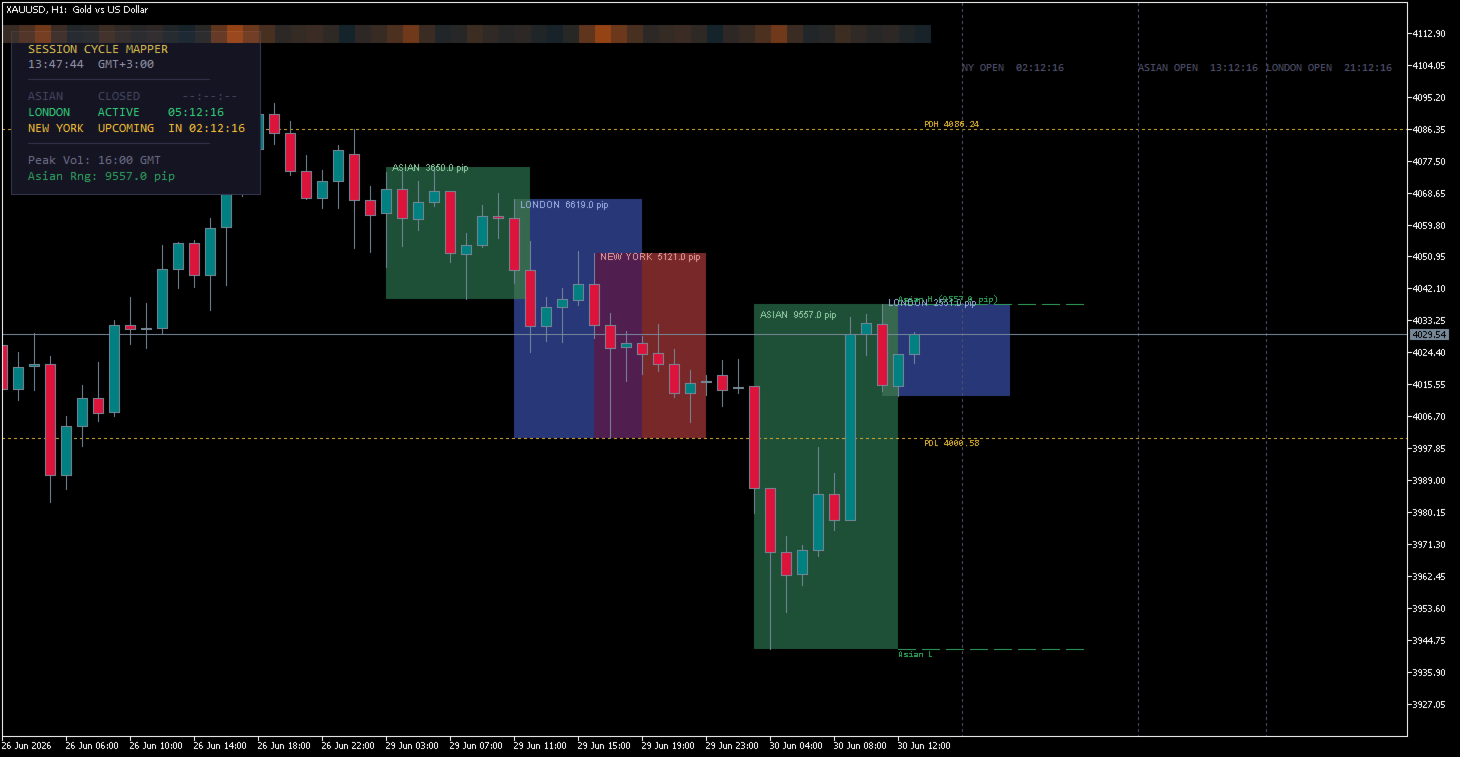
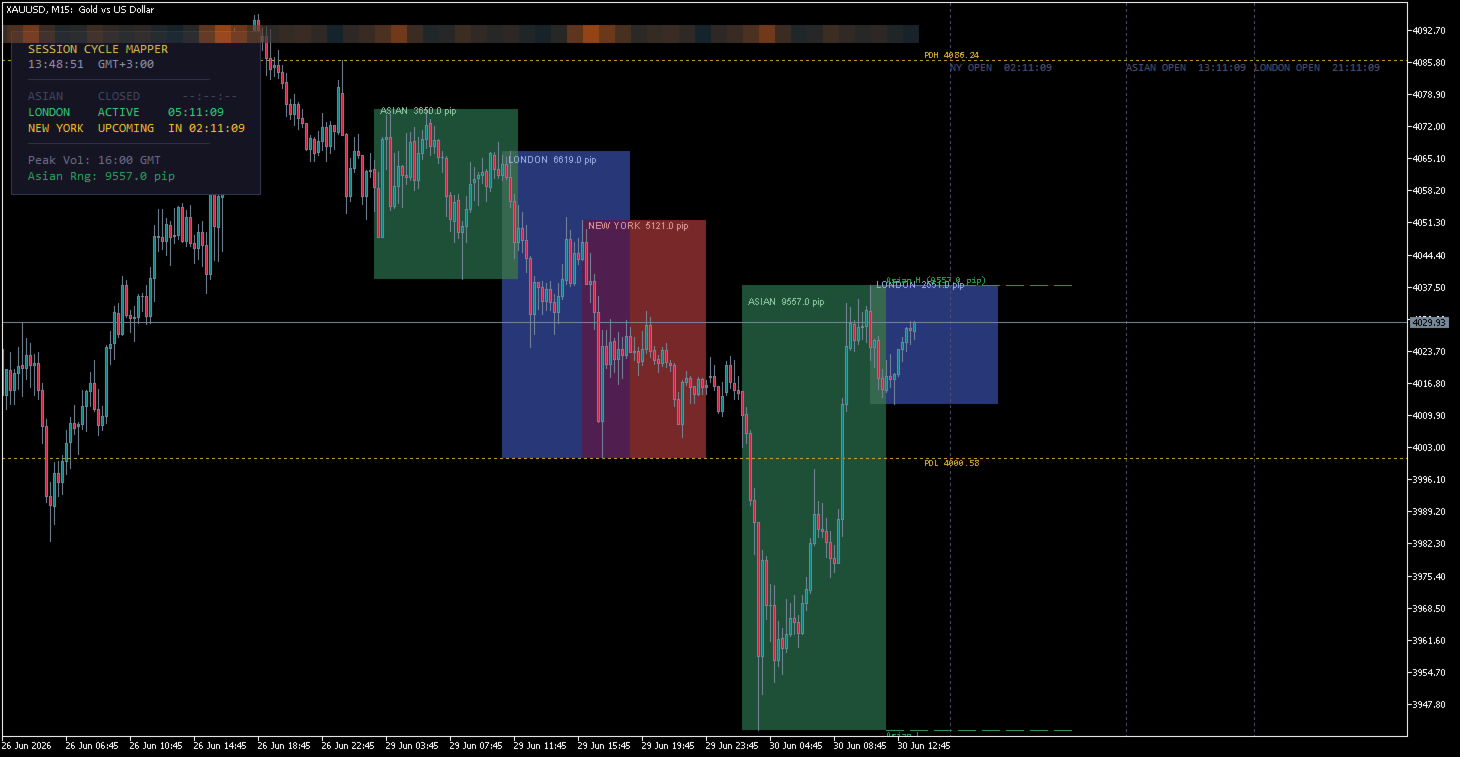
- Riquadri delle Sessioni (Session Boxes): Rettangoli colorati visivi che rappresentano le sessioni Asiatica, di Londra e di New York, con calcolo automatico dell'intervallo di pip (pip range) visualizzato nelle etichette.
- Livelli dell'Intervallo Asiatico: Proiezioni dei livelli di massimo e minimo della sessione Asiatica estese verso destra come linee orizzontali per riferimento di breakout intraday.
- Massimo/Minimo del Giorno Precedente (PDH/PDL): Linee orizzontali tratteggiate che segnano i confini di massimo e minimo del giorno precedente.
- Linee di Ciclo e Etichette di Conto alla Rovescia: Linee verticali in corrispondenza delle prossime aperture di sessione che mostrano il tempo esatto rimanente (HH:MM:SS) fino all'inizio della sessione success.
- Mappa termica della Volatilità (Volatility Heatmap): Un indicatore a blocchi multicolore continuo nella parte inferiore del grafico che mostra la volatilità oraria storica degli ultimi 20 giorni.
- Pannello Informativo (Dashboard): Un overlay pulito che mostra sessioni attive o imminenti, conti alla rovescia in tempo reale, offset GMT locale, ora di picco della volatilità e pip dell'intervallo asiatico.
Come leggerlo:
- Riferimento Breakout Intraday: Utilizza le linee di Massimo/Minimo dell'Intervallo Asiatico per individuare i breakout durante le sessioni di Londra o New York.
- Finestre di Picco della Volatilità: La mappa termica della volatilità passa a colori più caldi (ad esempio, arancione/rosso) durante le ore con il maggior movimento storico, mostrandoti quando la volatilità è solitamente alta.
- Tempistica delle Sessioni: Controlla gli indicatori di conto alla rovescia sul pannello o sulle linee del grafico per coordinare le tue esecuzioni intorno alle aperture delle sessioni.
- Confini del Giorno Precedente: Le linee PDH e PDL contrassegnano le aree chiave di supporto o resistenza che il prezzo testa spesso durante il giorno corrente.
Stabilità dei segnali:
I riquadri delle sessioni storiche e i livelli giornalieri sono statici. Il conto alla rovescia si aggiorna tick per tick o secondo per secondo in tempo real-time. La Mappa termica della Volatilità è calcolata in base ai dati storici delle barre e non ridipinge (no repaint) i segmenti storici correnti.
Ideale per:
Qualsiasi asset finanziario (Forex, indici, metalli, criptovalute) | Tutti i time frame (Ottimizzato per grafici da M1 a H1) | Strategie di trading intraday, Scalping e breakout dell'intervallo asiatico.
Cosa NON fa:
- Non genera segnali di trading né esegue ordini automaticamente.
- Non prevede i movimenti futuri dei prezzi.
- Non sostituisce i tuoi parametri di rischio o il tuo piano di trading.
Impostazioni principali:
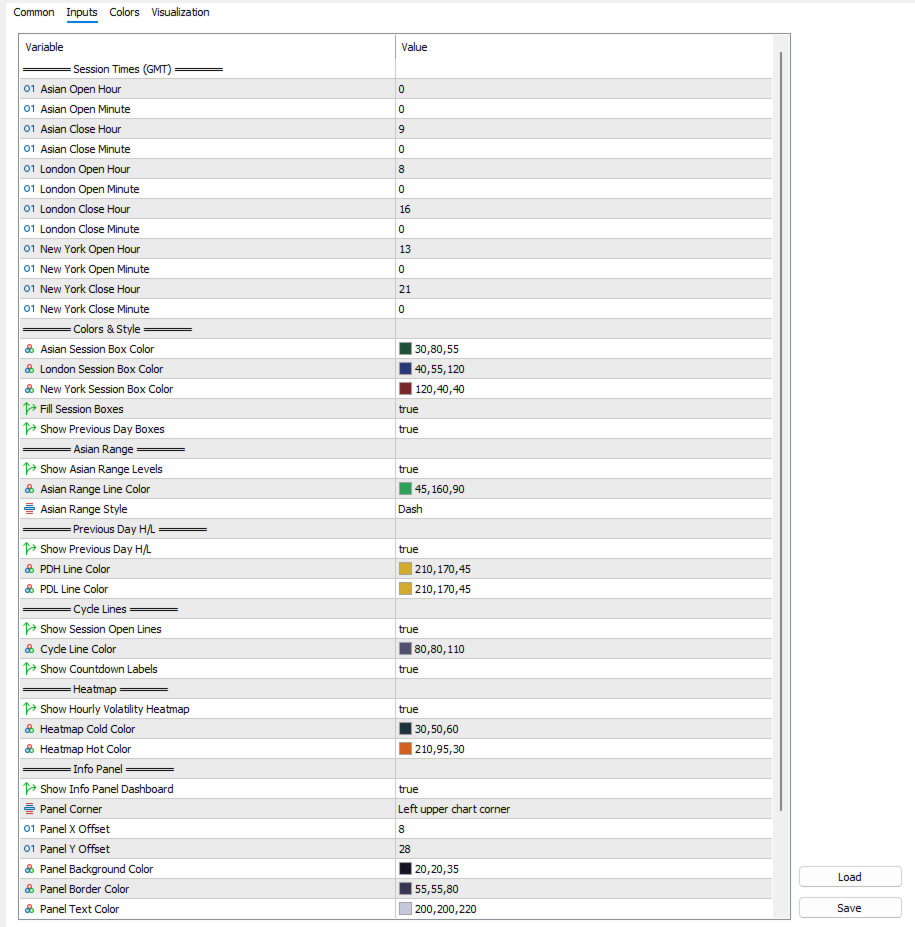
- Orari delle Sessioni (GMT): Configura ore e minuti personalizzati per le sessioni Asiatica, di Londra e di New York.
- Colori e Stile: Personalizza i colori dei riquadri, i colori dei bordi e attiva/disattiva i riquadri del giorno precedente.
- Intervallo Asiatico e PDH/PDL: Abilita/disabilita i livelli, seleziona lo stile della linea e le preferenze di colore.
- Linee di Ciclo e Conto alla Rovescia: Attiva/disattiva le linee verticali e la visualizzazione del testo del conto alla rovescia.
- Mappa Termica: Attiva/disattiva la mappa termica a 24 ore e regola il tema dei colori freddi/caldi.
- Pannello Informativo: Seleziona l'allineamento degli angoli, gli offset, i colori di sfondo, bordo e testo.
- Avvisi (Alerts): Attiva/disattiva gli avvisi sonori e visivi (pop-up) all'apertura di una sessione.
Ambito di installazione:
Collega a un solo grafico. L'indicatore gestisce automaticamente i calcoli dei dati e gli overlay grafici per ciascun simbolo.