
Smart Session Box MT5
- Indicatori
-
Nguyen Thanh Trieu
 Sono uno sviluppatore software e un trader. Creo strumenti pratici per MetaTrader 5 che uso io stesso nel trading.
Mi occupo di struttura del mercato, logica della price action, visualizzazione del rischio, indicatori e utility personalizzate. - Versione: 1.30
- Aggiornato: 7 ottobre 2026
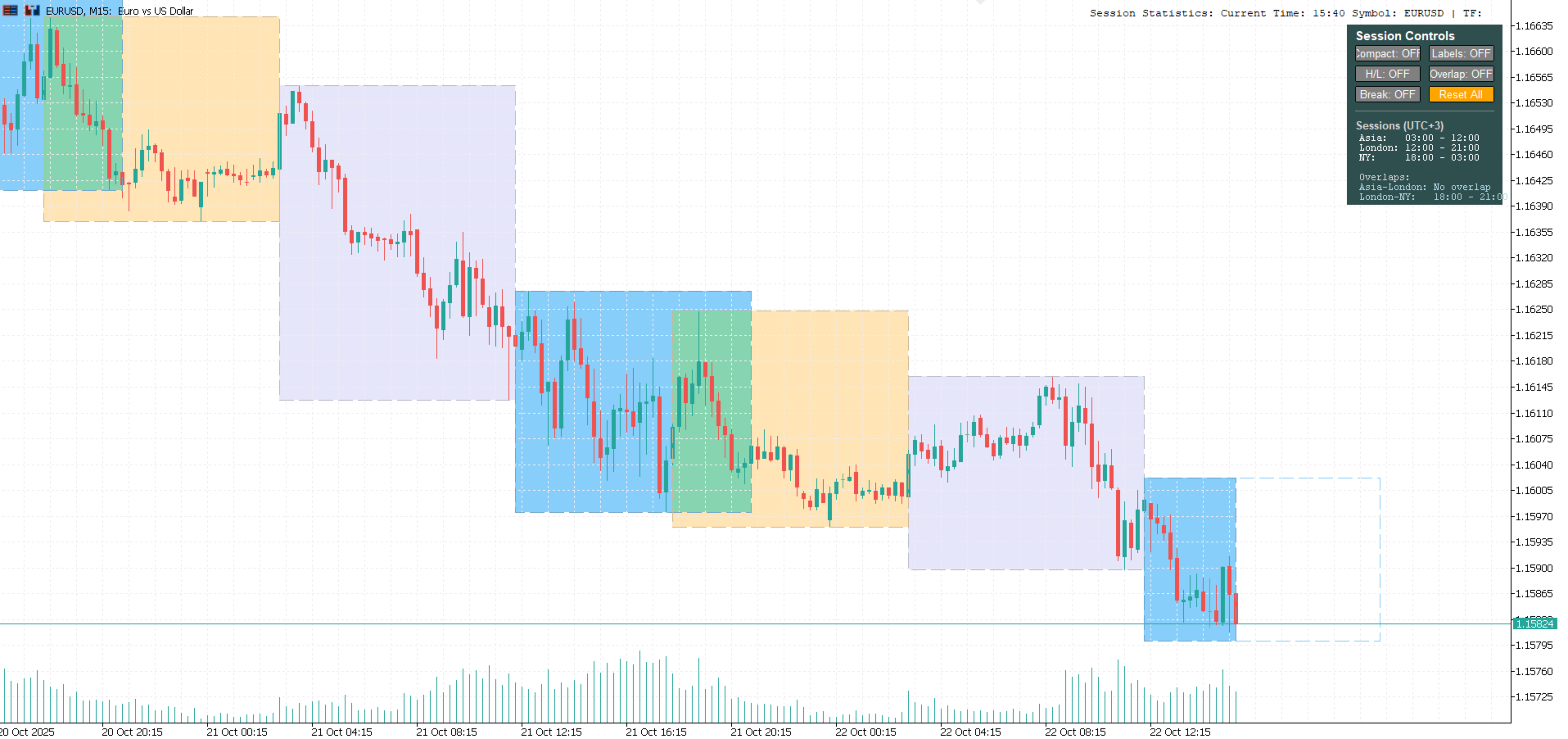
Mostra le sessioni di Sydney, Tokyo, Londra e New York come riquadri sul grafico, con un pannello live di orari e conti alla rovescia.
Orari e conto alla rovescia
Il pannello elenca gli orari di ogni sessione in UTC e nell'ora del tuo broker. Le sessioni attive mostrano il tempo restante alla chiusura, e una riga evidenziata indica quale sessione apre dopo ed entro quanto. Gli orari di riferimento delle borse di Tokyo, Londra, New York e Sydney sono inclusi per contesto.
Riquadri di sessione
Ogni sessione disegna un riquadro con le sue linee di massimo e minimo, utili come supporti e resistenze intraday. Le sovrapposizioni tra sessioni sono ombreggiate per marcare i periodi più liquidi della giornata. Quando il prezzo rompe il massimo o minimo di una sessione conclusa, viene disegnata una linea di breakout. I riquadri possono essere pieni o solo di contorno.
Sessioni
| Sessione | UTC invernale (predefinito) | Sovrapposizione |
|---|---|---|
| Sydney | 21:00 - 06:00 | con Tokyo: 00:00 - 06:00 |
| Tokyo | 00:00 - 09:00 | con Londra: 08:00 - 09:00 |
| Londra | 08:00 - 17:00 | con New York: 13:00 - 17:00 |
| New York | 13:00 - 22:00 | - |
Londra, New York e Sydney si spostano di un'ora in automatico per l'ora legale. Tokyo non ha l'ora legale. Tutti gli orari di sessione sono modificabili a passi di 15 minuti.
Pannello di controllo
I pulsanti attivano modalità compatta, etichette, linee max/min, sovrapposizioni, breakout e riempimento. La tua impostazione resta al cambio di timeframe o simbolo. La dimensione del testo è regolabile e il pannello si può nascondere.
Configurazione
Il fuso del broker è rilevato in automatico, oppure si può impostare un offset manuale. Storico, colori e trasparenza sono regolabili.
Prestazioni
I riquadri si ridisegnano solo sulle nuove barre. Le etichette del conto alla rovescia si aggiornano ogni secondo senza ridisegnare il grafico, quindi resta leggero su tutti i timeframe e simboli, inclusi forex, azioni e materie prime.
Installazione
Trascina l'indicatore su un qualsiasi grafico. Le impostazioni predefinite funzionano con la maggior parte dei broker e non serve configurare nulla per iniziare.
Avvertenza sui rischi
Avvertenza sui rischi: Il trading comporta un rischio significativo di perdita. Questo indicatore non garantisce profitti. I risultati passati non indicano risultati futuri. Pratica sempre una corretta gestione del rischio e opera solo con capitale che puoi permetterti di perdere.
Smart Session Box v1.20 - Professional Trading Session Indicator
Copyright 2026













































Not bad, but I would like to see the individual market hours as well and how much time is left before the next session starts.
UPDATE: Thanks very much for the update. However, for my purposes I need to see the individual market openings, e.g. Sydney, Tokyo, Hon Kong, etc.