TradeCast Signal Provider for Telegram
- Utilità
- Versione: 1.0
- Attivazioni: 10

Turn your MT5 account into a signal channel. TradeCast posts every trade action of your account to up to three Telegram channels, groups or private chats: new trades, pending orders, stop-loss and take-profit changes, breakeven, partial and full closes with the result in money, pips and R, a chart screenshot, and daily, weekly and monthly performance summaries. Trades opened by hand, by any Expert Advisor or from the MT5 mobile app are all detected, because TradeCast watches the account itself.
Attach it to one chart, enter your bot token and chat ID, press Send test — done. The complete manual is on this page.
What is posted
| Event | Message contains |
|---|---|
| New market trade | Direction, symbol, entry, SL, TP, lots, planned risk:reward, comment (optional) |
| Pending order placed / modified / cancelled / expired | Order type (buy/sell limit, stop, stop limit), price, SL, TP, expiry; old → new values on changes |
| Pending order filled | Posted as a reply to the pending-order message |
| SL / TP changed | Old → new value; "stop loss moved to breakeven" with the pips locked in |
| Partial close | Closed and remaining volume, exit price, result in pips, R and money (or %) |
| Trade closed | Entry → average exit, total result of the whole trade (all partial closes included) in pips, R and money, close reason (stop loss, take profit, manual, mobile, EA, stop out), duration |
| Position increased (netting) | Added volume, new average entry |
| Daily / weekly / monthly summary | Trades, won/lost, win rate, net result, % gain, total pips and R, profit factor, best/worst trade, result per symbol, open positions |
Updates are posted as replies to the entry message, so every trade forms a readable thread in your channel. SL/TP updates can be sent without a notification sound.
Key features
- Three channels with their own rules. Each channel has its own event set (all events / market trades / entries and exits / results only / summaries only), symbol filter, magic-number filter, delay in minutes and privacy level. Example: a VIP channel gets every action instantly with lots; a free channel gets only closed trades 30 minutes later, in percent.
- Privacy levels: full details; hide lot sizes; show only % gain, pips and R (no lots, no money, no balance); prices only.
- Message styles: Classic (emoji, one fact per line), Compact (two lines), Copier-friendly plain text (fixed English keywords such as BUY EURUSD 1.08500 / SL 1.08200 / TP 1.09100 , easy for signal-copy tools to read) and Custom.
- Custom templates with placeholders, either in the inputs or in a template file. A line whose value is missing (no SL, lots hidden …) is left out automatically.
- 7 message languages: English, Chinese, Spanish, German, Russian, Portuguese, French. Optional header (your channel name) and footer (e.g. a risk disclaimer).
- Chart screenshot attached to entries and exits, or to every trade event, on the timeframe you choose. If no chart of the symbol is open, TradeCast opens one in the background and closes it again.
- Smart pips: forex pips (10 points on 3/5-digit pairs), metals in pips (gold 0.1, silver 0.01), indices, stocks and crypto in whole points (Dow +120 points, BTC +350 points); or always points. R is measured against the first stop loss of the trade.
- Filters by symbol (wildcards: EUR* , *.a , !BTC* ), magic number ( 0 = manual trades, ranges 100-199 , !555 to exclude) and order comment.
- Wait for SL/TP (optional): an entry is posted as soon as both stops are set, or after N seconds, so subscribers get one complete message.
Reliable delivery
- Queue with retry: if the internet or Telegram is unavailable, messages wait and are retried with growing intervals; nothing is lost.
- Rate-limit aware: respects Telegram's per-chat limits and its "retry after" answers automatically.
- Restart-safe: the queue, open-trade snapshot, reply threads, counters and panel state are saved per account. After a restart TradeCast compares the account with the saved snapshot and posts the trades that were opened or closed while MT5 was off (catch-up window in hours), marked "sent after reconnect".
- No duplicates: every position is tracked by its ID; a close is posted only when it is confirmed by the deal history.
- Automatic switch when a group is upgraded to a supergroup; HTML formatting falls back to plain text if Telegram rejects it.
Panel
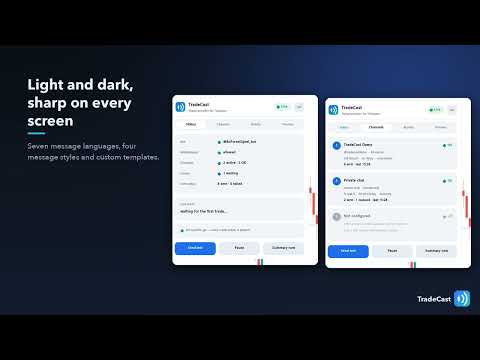
A clean panel on the chart shows the status at a glance: bot name, WebRequest permission, channels, queue, messages sent today. Tabs: Status, Channels (title of each chat, rules, sent count, last error), Activity (last events and their delivery) and Preview (the last message exactly as posted). Buttons: Send test, Pause / Resume, Summary now. Light and dark theme (automatic from the chart background), sharp at 100 % to 300 % screen scaling, movable and minimisable; position and tab are remembered.
Clear error help: when something is wrong the panel says what and how to fix it — WebRequest not allowed, bot token rejected, chat not found, bot is not an administrator of the channel, rate limit, no connection.
Setup in 3 minutes
- In Telegram, open @BotFather, send /newbot and copy the token.
- Add the bot to your channel or group as an administrator with the right to post messages. For a private chat, send /start to your bot.
- In MT5: Tools › Options › Expert Advisors → tick "Allow WebRequest for listed URL" and add https://api.telegram.org .
- Attach TradeCast to any chart (one chart is enough for the whole account), enter the token and the chat ID: @channelname for a public channel, or the numeric ID ( -100… ) for private channels and groups.
- Press Send test. The panel shows the bot name and each channel's title when everything is right.
Keep MT5 running (a VPS is recommended for 24/7 posting). TradeCast does not open, change or close trades; it only reads the account.
Placeholders for custom templates
{headline} {icon} {symbol} {side} {side_en} {entry} {price} {sl} {tp} {lots} {rr} {expiry} {comment} {ticket} {magic} {time} {date} {sl_change} {tp_change} {price_change} {note} {closed_lots} {remaining_lots} {closed_pct} {pips} {pip_unit} {r} {profit} {gain} {result} {result_plain} {reason} {duration} {balance} {currency}
Write \n for a new line in an input, or use the template file MQL5\Files\TradeCast\templates.txt with sections [open] [pending] [pending_modify] [pending_cancel] [fill] [modify] [partial] [close] . HTML tags <b> <i> <u> <code> are allowed. {?name} prints an empty value without removing the line.
Inputs
| Group | Inputs |
|---|---|
| Telegram bot | Bot token |
| Channel 1 / 2 / 3 | Chat ID or @username, events to post, symbols, magic numbers, delay (minutes), privacy, chart screenshots |
| Filters (all channels) | Symbols, magic numbers, order comment |
| Messages | Language, style, emoji, header, footer, show comment, show ticket, updates as replies, silent SL/TP updates, wait for SL/TP |
| Custom templates | Template file, templates for new trade, pending order, SL/TP change, partial close, close |
| Chart screenshots | Attach to (off / entries and exits / every event), timeframe, width, height |
| Performance summaries | Daily (time), weekly (day, time), monthly, skip empty summaries |
| Delivery | Catch-up after restart, catch-up window, post trades already open, attempts per message, minimum gap per chat |
| Panel | Show panel, theme, scale |
| Advanced | Pips or points, sample trades in the Strategy Tester |
Free demo
The Strategy Tester has no internet access, so the demo runs in preview mode: start a visual test and TradeCast places sample trades (pending order placed, modified and cancelled, market entry, breakeven, partial and full close). The panel's Preview and Activity tabs show exactly what would be posted. The input "Strategy Tester: place sample trades" turns this off.
Notes
- Works with any broker, symbol and account type (hedging and netting). Only one copy per account is needed.
- Telegram is a service of a third party; TradeCast uses the official Bot API. Your bot token stays in your terminal.
- Posting trade signals does not guarantee profits for you or your subscribers. Trading involves risk.