NexusFlow
- Experts
- Taikai Gen
- Versione: 1.1
- Aggiornato: 25 febbraio 2026
NexusFlow is a multi-strategy Expert Advisor (EA) that integrates four independent trading logics. By combining Currency Strength, Depth of Market (DOM) analysis, Zone Recognition, and an Economic Calendar filter, it aims to achieve high-precision trading.
Please note that this product does not include "set files." It is essential to perform backtests in the Strategy Tester beforehand to suit your specific margin, currency pairs, and broker environment.
Core Trading Modules
NexusFlow is composed of the following four modules:
Module A: Currency Strength
Calculates the real-time price change rates of 28 currency pairs derived from 8 major currencies (USD, EUR, JPY, GBP, AUD, CAD, CHF, NZD). This logic follows the fundamental principle of buying the strongest currency and selling the weakest.
Module B: Calendar Filter
References the economic calendar to automatically refrain from trading before and after high-impact news events. This helps mitigate the risk of losses caused by sudden volatility.
Module C: DOM Absorption
Analyzes the Depth of Market (DOM) to detect order imbalances. By monitoring actual order flow, it captures market momentum that cannot be determined by technical indicators alone.
Module D: Zone Recognition
Automatically identifies support and resistance zones based on H1 (1-hour) and D1 (Daily) timeframes. Entries are executed with a focus on price levels where reversals or breakouts are likely to occur.
Status Display and Troubleshooting
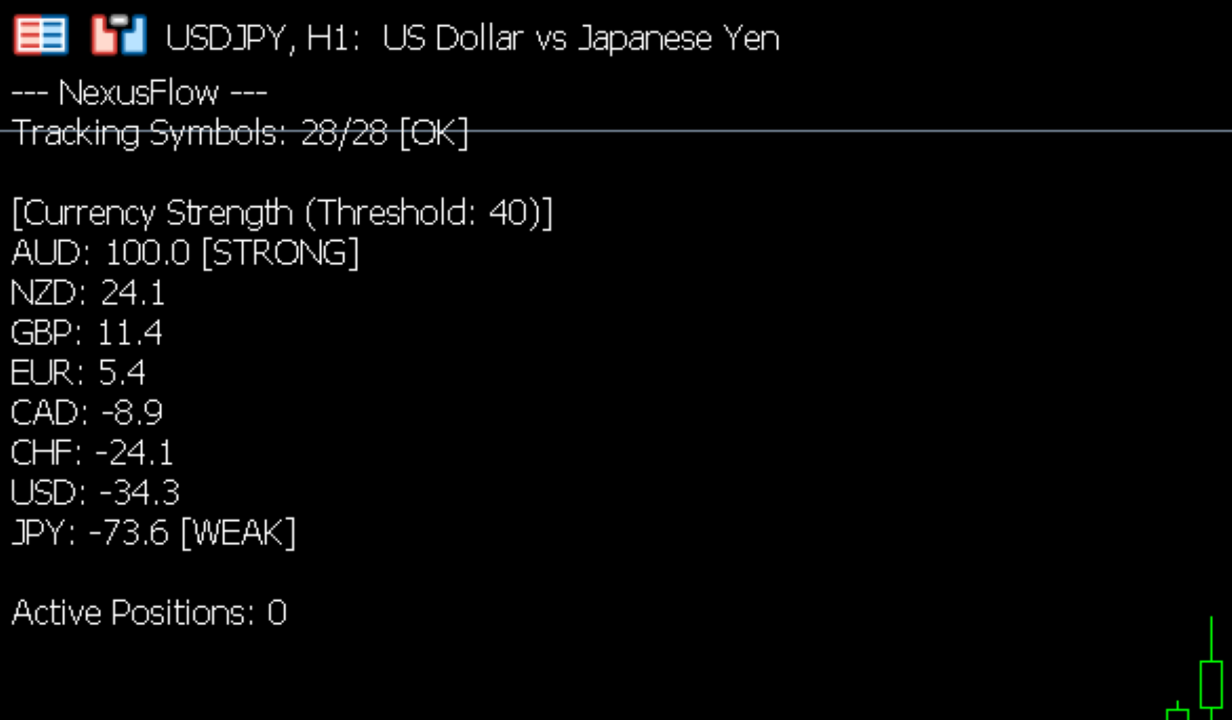
The current operating status is displayed in the upper-left corner of the chart.
When [OK] is displayed
The EA is successfully retrieving data for all 28 currency pairs and performing calculations.
When [NG] is displayed
The EA has failed to retrieve the necessary data. Please follow these steps to resolve the issue:
-
Right-click within the "Market Watch" window.
-
Select "Show All" to display all available currency pairs.
-
If your broker uses symbol suffixes (e.g., EURUSD.custom), the EA usually recognizes them automatically. However, if the error persists, please ensure your Market Watch is organized and active.
Important Notes for Strategy Tester
When performing backtests, please pay attention to the following settings:
About Depth of Market (DOM) usage
The "InpUseDOM" parameter will not function accurately in a standard Strategy Tester because historical DOM data is typically not provided. Please set "InpUseDOM" to false when running backtests.
About Currency Strength usage
When using the Currency Strength module (InpUseStrength), the tester needs access to data for all 28 pairs. If you are testing a single symbol and wish to reduce the computational load, you may set this to false.
Modeling choice
We recommend using "Every tick" or "1 minute OHLC" for the most accurate results.
Input Parameters
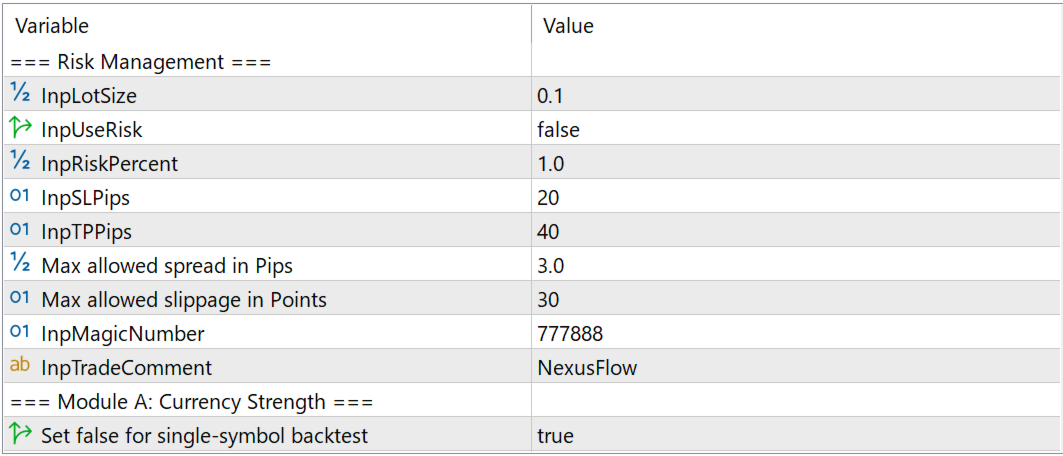
Risk Management
-
InpLotSize: Fixed lot size.
-
InpUseRisk: Enable/disable risk-based lot calculation.
-
InpRiskPercent: Allowed risk per trade (%) based on free margin.
-
InpSLPips / InpTPPips: Stop Loss and Take Profit levels in pips.
Currency Strength Settings (Module A)
-
InpUseStrength: Enable/disable the currency strength filter.
-
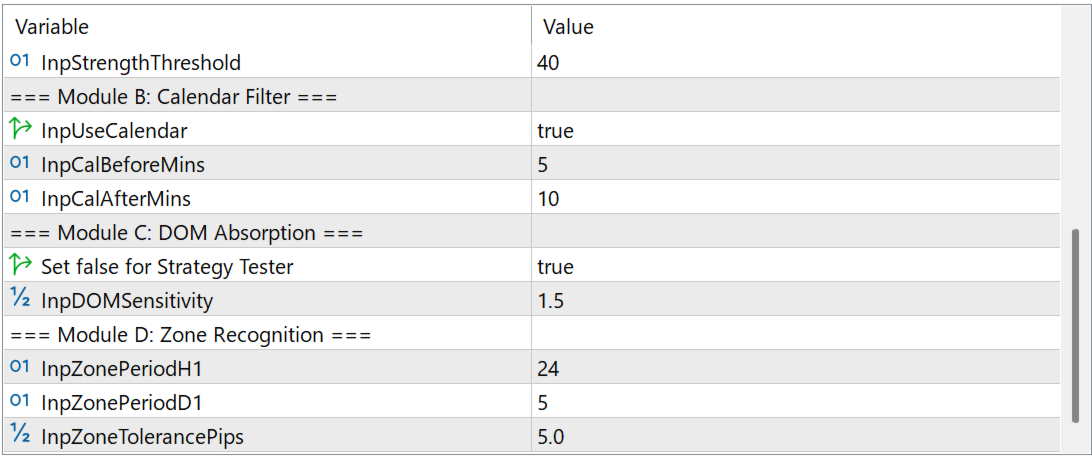
InpStrengthThreshold: Threshold for strength identification (higher values result in more selective entries).
Calendar Settings (Module B)
-
InpUseCalendar: Enable/disable the economic calendar filter.
-
InpCalBeforeMins / InpCalAfterMins: Minutes to pause trading before and after an event.
DOM Settings (Module C)
-
InpUseDOM: Enable/disable DOM filter (Recommended for live trading only).
-
InpDOMSensitivity: Sensitivity for order imbalance detection.
Zone Settings (Module D)
-
InpZonePeriodH1 / InpZonePeriodD1: Periods used for zone calculation.
-
InpZoneTolerancePips: Pips tolerance for zone detection.
Disclaimer
This tool does not guarantee profits. Foreign exchange trading involves significant risk to your invested capital. Always test on a demo account first and trade at your own discretion and responsibility.