Candle Pulse Pattern PRO
- Experts
-
Marina Dangerio
 AuroraQuantSystems è uno studio indipendente di ricerca e sviluppo quantitativo,
specializzato in strategie di trading sistematiche ed Expert Advisor,
parte del gruppo di società appartenenti aThe Morning Star Legacy LTD.
I prodotti pubblicati tramite questo account sono expert advisors - Versione: 1.1
- Attivazioni: 5
AQS CandlePulse Pattern Basket
Multi-Pattern Candlestick Expert Advisor for MetaTrader 5
Rule-based • Execution-hardened • Risk-controlled
Overview
AQS CandlePulse Pattern Basket is a rule-based candlestick pattern Expert Advisor for MetaTrader 5, designed to trade high-probability price action signals using a controlled basket approach combined with robust execution and risk-management safeguards.
The EA focuses on classical candlestick formations, evaluated on closed candles only, and integrates ATR-based risk control, optional trailing protection, and defensive execution hardening to ensure stable behaviour across brokers, symbols, and market conditions.
The system prioritises discipline, robustness, and repeatability over trade frequency or aggressive recovery techniques.
Strategy Classification
- Primary type: Price action / candlestick pattern strategy
- Trading style: Discretion-free, rule-based pattern confirmation
- Market behaviour: Short- to medium-term directional moves
- Execution model: Market orders with ATR-based SL/TP
- Basket logic: Controlled, non-martingale position stacking
This EA:
✔ trades confirmed candlestick patterns on closed bars
✔ uses ATR-based stop-loss and take-profit
✔ supports optional basket scaling with fixed spacing
✔ includes execution hardening for broker constraints
This EA does NOT:
❌ use martingale or exponential lot escalation
❌ use hedging or recovery grids
❌ average down losers
❌ scalp or trade on tick noise
Candlestick Pattern Engine
The EA evaluates pure, deterministic candlestick patterns using configurable geometric ratios.
Patterns are detected only on fully closed candles to avoid repainting or intrabar noise.
Supported Patterns
- Hammer / Inverted Hammer
- Morning Star / Evening Star
- Engulfing Twin patterns (bullish & bearish)
Each pattern contributes to a signal score, and trades are taken only when:
- The minimum score threshold is met
- Bullish and bearish signals do not conflict
- Time, spread, and execution filters allow trading
Multiple patterns can be enabled or disabled via a bitmask, allowing flexible strategy composition.
Basket & Position Logic (Entries Only)
AQS CandlePulse Pattern Basket supports controlled multi-position entries, designed for measured exposure scaling, not recovery.
Key principles:
- One directional basket at a time (no hedged baskets)
- Fixed grid spacing in pips between entries
- Maximum number of positions enforced
- No lot escalation beyond the defined sizing logic
Basket logic is strictly limited to entries only.
Risk reduction and exits are handled via ATR, trailing, and optional partial reduction, not grid recovery.
Risk Management Framework
Risk control is central to the EA’s design.
Initial Risk
- ATR-based Stop-Loss
- ATR-based Take-Profit
- Optional SL displacement buffer for broker noise
- Full StopsLevel enforcement before order submission
Optional Trailing Stop
- Configurable start distance (in pips)
- Configurable trail distance
- Hardened against:
- Stop-level violations
- Freeze-level violations
- Rapid price changes
Trailing logic is tick-driven and designed to fail safely if broker constraints are detected.
Defensive Pre-Trail Risk Reduction (Optional)
Before trailing starts, the EA can optionally perform a one-time partial position reduction if price moves against the trade toward the stop-loss.
Key characteristics:
- Triggers at a configurable percentage of entry-to-SL distance
- Executes once per ticket
- Reduces exposure without widening stops
- Designed to cut tail risk, not to manage winners
This mechanism is fully optional and disabled by default.
Execution Hardening & Broker Compatibility
The EA includes extensive safeguards to handle real-world broker constraints:
- Spread filter (in pips)
- Trading hour and weekday filters
- Stop-level compliance
- Freeze-level awareness
- Slippage control
- Volume normalization
- Symbol volume-limit awareness
- Margin pre-checks
- Validation-safe order retry (single attempt)
These protections are especially important when running on:
- Different brokers
- VPS environments
- Indices, FX, and CFD symbols
- Conservative validation environments (e.g. MQL5 Market)
Position Sizing
Two sizing modes are supported:
- Fixed lot
- Balance-scaled lot sizing (linear, non-martingale)
Volume is always:
- Normalized to symbol min / step
- Capped by symbol max
- Capped by symbol total volume limit
- Skipped cleanly if constraints are violated
If a trade cannot be placed safely, the EA does not force execution.
Time & Session Controls
Trading can be restricted by:
- Start / end hour
- Individual weekdays
- Spread conditions
All filters are evaluated before any order logic is executed.
Timeframes & Instruments
The EA is timeframe-agnostic and can be used on:
- FX pairs
- Indices
- CFDs
However, performance and behaviour are symbol- and broker-dependent.
Users should always:
- Validate spreads
- Check stop and freeze levels
- Demo-test before live deployment
Logging & Transparency
Optional verbose logging provides:
- Signal reasoning
- Entry confirmation
- Risk-reduction events
- Trailing updates
- Execution failures with error codes
This makes the EA suitable for systematic monitoring and post-analysis.
Configurations Included (5 .set Files)
This product includes 5 preconfigured .set files, each calibrated for a specific symbol and risk profile.
FX configurations included:
- USDJPY (1 configuration)
- EURUSD (1 configuration)
- AUDUSD (3 configurations):
- Aggressive
- Neutral
- Conservative
Each .set file is provided as a starting configuration and must be used only on the corresponding symbol and intended risk profile.
Important notes:
- AUDUSD includes three distinct risk presets to allow users to choose between higher return potential (Aggressive), balanced performance (Neutral), or reduced volatility (Conservative).
- Symbol names may vary by broker (e.g. suffixes such as .r, _SB, m, etc.).
If your broker uses a different symbol name, load the .set file and apply it to the matching instrument on your platform, then verify spread, contract size, and execution conditions before trading. - Users are responsible for validating broker-specific trading conditions prior to live deployment.
How preset (.set) files are provided
To ensure buyers can trade immediately with the exact tested configurations, the corresponding preset files are provided upon request after purchase.
How buyers receive the preset files
After purchase, buyers can request the preset files via:
- MQL5 private messages, or
- The official support contact (support@auroraquantsystems.com)
Preset files are delivered promptly and correspond to the same parameters used in testing, including risk, session, and execution settings.
Recommended Usage
- Designed as a portfolio component, not a single-market “all-in-one” system
- Use one configuration per symbol and timeframe
- Always validate on a demo account before live deployment
- Apply conservative risk settings appropriate to your account size and broker conditions
- If you modify parameters, re-test and re-validate execution constraints (stop levels, freeze levels, spread behaviour
Spread Conditions & Conservative Testing Assumptions
All strategies were evaluated under conservative spread assumptions and tested over 5y window (please check our website for details)
Spread statistics were measured by sampling the broker-reported spread ( SYMBOL_SPREAD ) during Strategy Tester runs and are expressed in points (MetaTrader native unit).
Unit clarification:
• On standard 5-digit FX symbols, 10 points = 1 pip
• On indices / CFDs, points correspond to the instrument’s native minimum price step (pip conversion not applicable)
To avoid best-case assumptions, we report both:
- the Median spread (50th percentile) – representative of typical conditions, and
- the 90th percentile spread – reflecting adverse conditions such as reduced liquidity or broker-imposed widening.
The strategy logic and risk controls were assessed to remain stable under 90th percentile spread levels, ensuring robustness during unfavorable trading conditions.
Spread Statistics (points with pip equivalents where applicable)
| Instrument | Median Spread | 90th Percentile Spread |
| AUDUSD | 50.0 pts (≈5.0 pips) | 50.0 pts (≈5.0 pips) |
| USDJPY | 50.0 pts (≈5.0 pips) | 50.0 pts (≈5.0 pips) |
| EURUSD | 7.0 pts (≈0.7 pips) | 10.0 pts (≈1.0 pips) |
How to interpret this table
- Median spread reflects typical execution costs.
- 90th percentile spread reflects stress conditions (e.g. off-hours, low liquidity).
- Where the median equals the 90th percentile, this indicates a broker-enforced spread cap, representing a deliberately conservative assumption.
- Pip equivalents are shown only for FX symbols and are approximate.
Recommended Usage
- Use as one component in a diversified portfolio
- One symbol / timeframe per chart
- Avoid over-leveraging basket size
- Start with conservative risk settings
- Always demo-test on your broker
Important Notes & Risk Disclaimer
- No martingale
- No grid recovery
- No hedging
- No performance guarantees
Trading involves risk.
Past performance is not indicative of future results.
Broker conditions, execution quality, and market regimes materially affect outcomes.
Always test thoroughly before trading live.
FAQ
Q: Does this EA repaint?
No. All signals are evaluated on closed candles only.
Q: Does it use martingale or recovery?
No. Position sizing is linear and capped. No recovery logic is used.
Q: Can it trade multiple positions?
Yes, but only within a strictly limited basket framework with fixed spacing and capped exposure.
Q: Is it suitable for spread-based / SB environments?
The EA includes spread filters and execution safeguards, but broker conditions vary. Demo testing is essential.
Q: Can I optimise it?
Yes, but avoid over-fitting. Validate with out-of-sample periods and realistic assumptions.
AQS CandlePulse Pattern Basket is built for traders who value
process over prediction,
risk control over aggression,
and robust execution over curve-fitting.
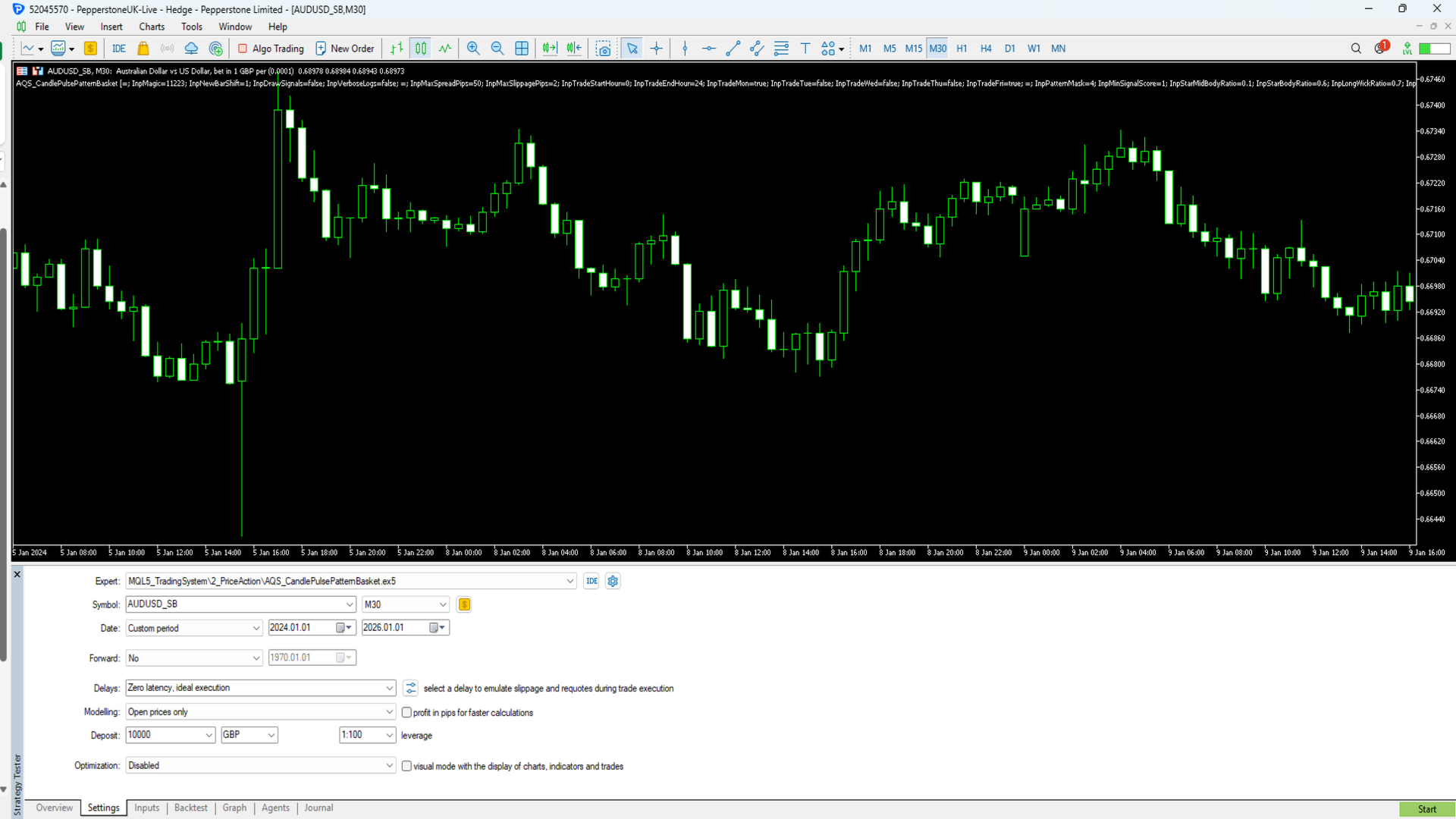
Screenshot 1 – Strategy visual execution on M30 timeframe
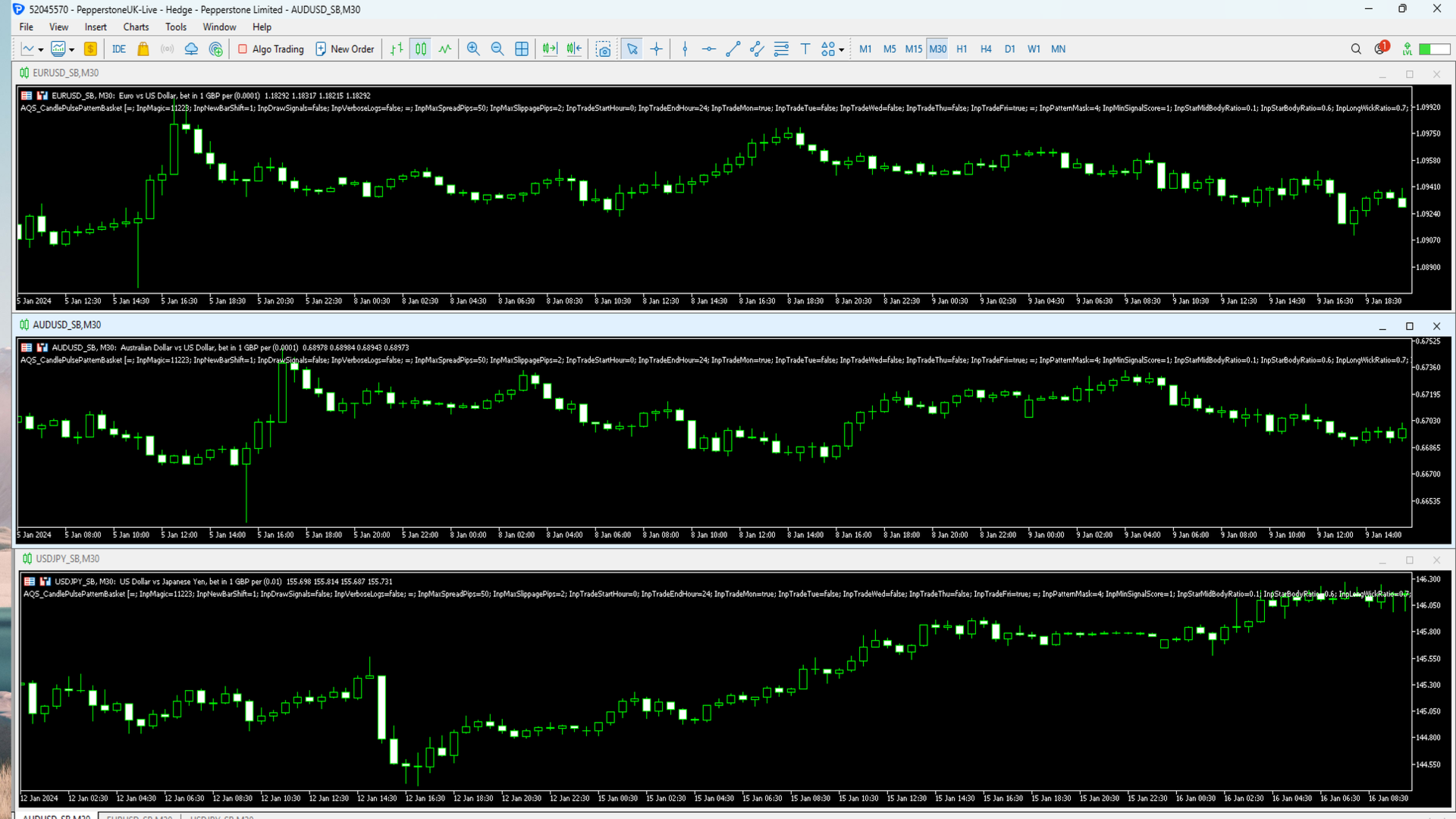
Screenshot 2 – Multi-asset examples
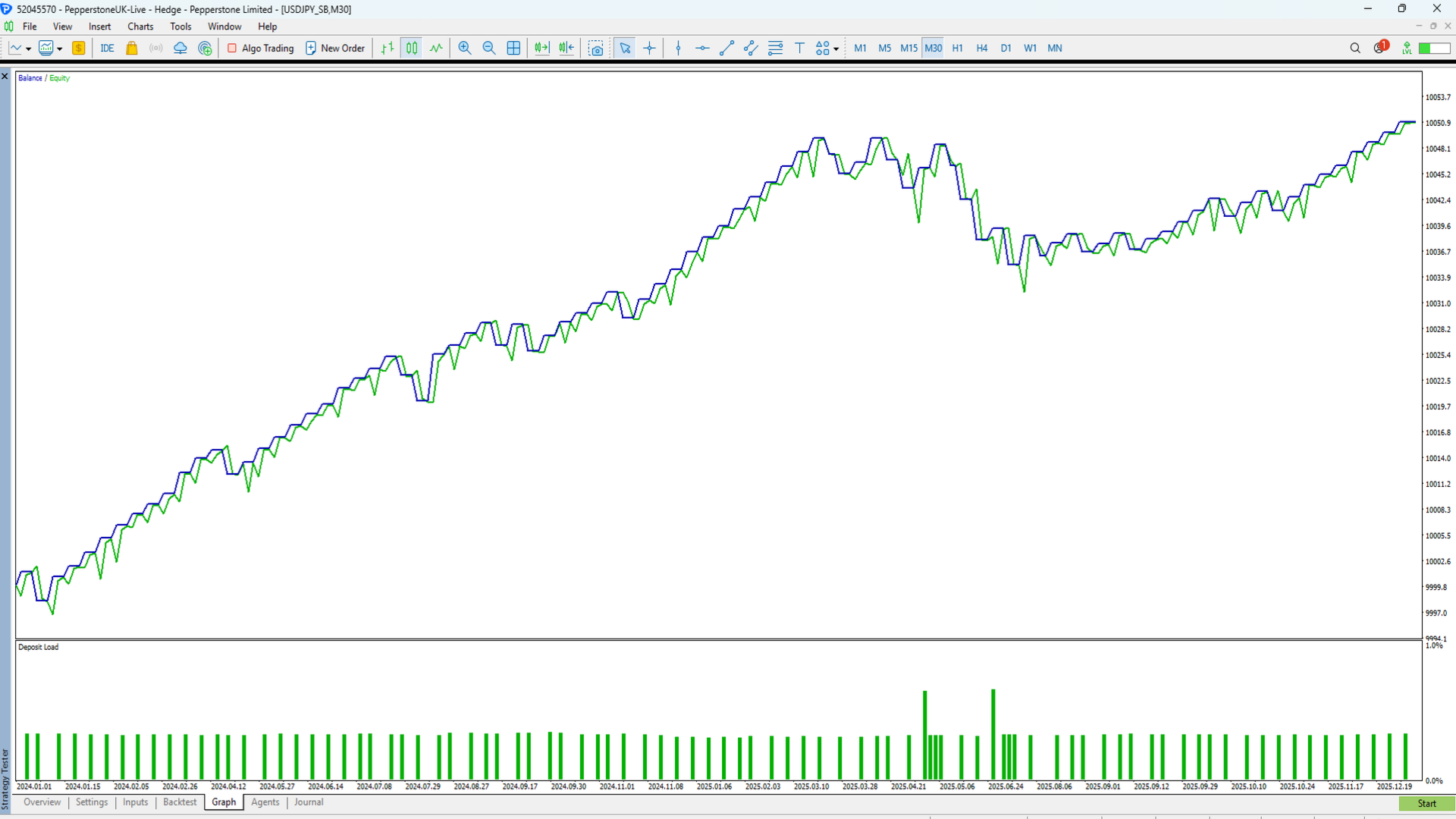
Screenshot 3 – Long-term equity curve (2+ years backtest)
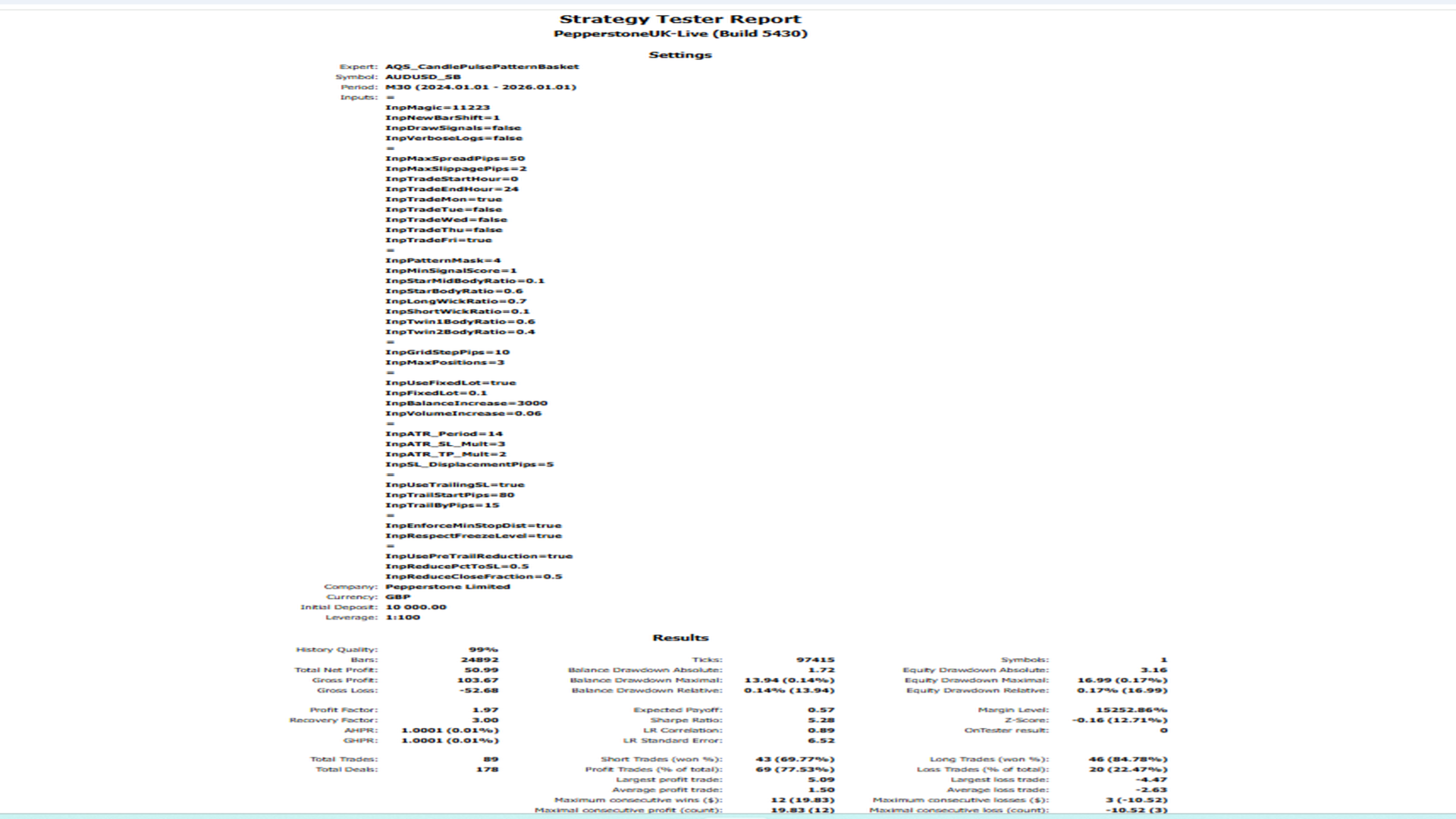
Screenshot 4 – Strategy Tester report (key statistics)
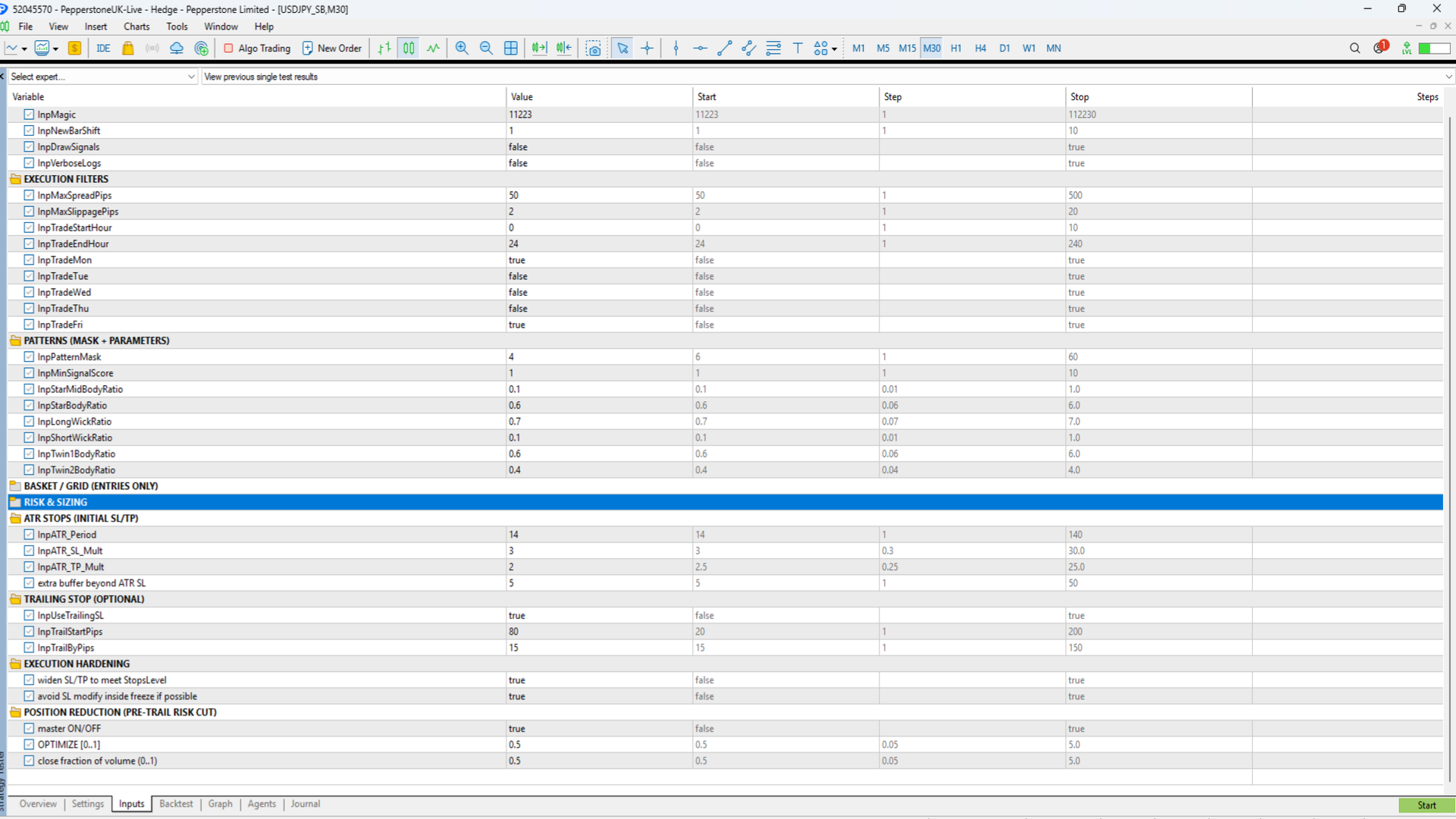
Screenshot 5 – Full input configuration and risk controls