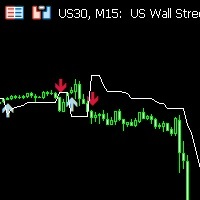
Neural scalper grade
- Indicatori
-
Ahmed Mohammed Bakr Bakr
 I am a professional MQL5 and Python developer with over 10 years of experience in algorithmic trading and automated trading systems.
 - Versione: 3.50
- Aggiornato: 5 gennaio 2026
- Attivazioni: 5
Scalp Helper Signal Settings
These settings control how the core scalping signals are generated.
-
Enable Scalp Helper Signals
Turns the main scalp signal engine on or off. -
Signal Candle Type
Selects the candle calculation method used for signals:
Candlesticks, Heikin Ashi, or Linear Regression candles. -
Signal Trigger Sensitivity
Controls how aggressive or conservative signal triggering is.
Higher values = fewer but higher-quality signals. -
Stop Loss ATR Multiplier
Defines the initial stop-loss distance based on ATR volatility.
Signal Grade Filter
Filters signals based on calculated accuracy/confidence grades.
-
A+ Signals (≥ 80%) – Highest probability trades
-
A Signals (76–79%) – Very strong setups
-
B Signals (65–75%) – Good quality trades
-
C Signals (37–64%) – Medium confidence
-
D Signals (28–36%) – Low confidence
-
F Signals (< 28%) – Very weak signals
Only enabled grades will appear on the chart.
Candlestick Settings
Controls how candles are displayed and calculated.
-
Display Candle Type
Chooses the candle visualization method. -
Linear Regression Length
Defines smoothing length when using Linear Regression candles.
SuperTrend Stop Settings
Manages dynamic trailing stop visualization.
-
Show SuperTrend Stop
Displays SuperTrend-based stop levels. -
ATR Length
ATR period used for SuperTrend calculation. -
SuperTrend Factor
Determines stop distance sensitivity. -
Bars Before Stop Appears
Delay before the stop becomes visible. -
Bars to Full Opacity
Gradual fade-in effect for stop visualization.
Velocity Filter Settings
Filters trades based on market momentum.
-
Enable Velocity Filter
Activates momentum-based filtering. -
Velocity Period
Lookback period for velocity calculation. -
Minimum Velocity
Minimum required momentum strength (0.0 – 2.0). -
Show Only High Velocity Signals
Hides all signals except strong momentum moves.