ChanLun Ultimate Structure EurUsd
- Indicatori
- Adisorn Soodkanueng
- Versione: 1.0
"Experience the full power on EURUSD!"
Title: ChanLun Structure and SMC System
Description:
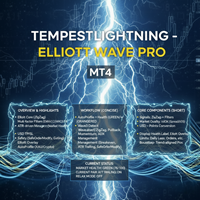
This indicator combines ChanLun Theory (Bi, Duan, Zhongshu) with Smart Money Concepts (SMC) to analyze market structure. It visualizes the market in three distinct layers—Pen, Segment, and Wave—and automatically identifies Premium, Discount, and Optimal Trade Entry (OTE) zones.
The tool features an Interactive Hybrid Control System, allowing traders to manage the chart using keyboard hotkeys or mouse interactions. Users can click on specific structure lines to project Fibonacci levels instantly.
Key Features:
-
Three-Layer Market Structure
-
Pen (Bi): Displays the foundational micro-structure using dashed lines.
-
Segment (Duan): Displays the main market structure using solid lines.
-
Wave (Trend): Displays the macro trend direction using thick lines.
-
-
Interactive Fibonacci Projection
-
Click-to-Draw: Users can click on any structure line (Pen, Segment, or Wave) to draw a Fibonacci Retracement for that specific swing automatically.
-
Workflow: Designed for efficient analysis and backtesting without manually dragging tools.
-
-
SMC Integration
-
Premium & Discount Zones: Automatically calculates and displays the Equilibrium (50%), Premium (Expensive), and Discount (Cheap) zones for the current structure.
-
OTE Zones: Highlights specific retracement levels (e.g., 61.8% - 78.6%) within the structure.
-
-
Consolidation Boxes (Zhongshu)
-
Identifies and draws boxes around consolidation areas based on ChanLun logic.
-
Controls Manual:
This indicator uses keyboard shortcuts and mouse actions for chart management.
Keyboard Hotkeys:
-
Structure Visibility:
-
[1] Toggle Pen lines
-
[2] Toggle Segment lines
-
[3] Toggle Wave lines
-
[0] Toggle Pen Box (Consolidation)
-
[Shift+0] Toggle Segment Box
-
-
Auto Tools (Current Swing):
-
[4, 5, 6] Toggle Auto Fibo for Pen, Segment, and Wave
-
[7, 8, 9] Toggle Live Regression Channels
-
-
SMC Zones (Premium/Discount/OTE):
-
[Shift + 1/2] Show Pen Zones
-
[Shift + 3/4] Show Segment Zones
-
[Shift + 5/6] Show Wave Zones
-
Mouse Actions:
-
Click: Click on any visible structure line to generate a Fibonacci Retracement.
-
Remove: Click on the generated Fibonacci line to delete it.
Parameters:
-
Visual Settings: Customizable colors, line widths, and styles for all structure layers.
-
Calculation Mode: Choose between Close Price or High/Low for structure calculation.
-
Fibonacci Levels: Custom input parameters to define specific Fibo levels (e.g., 0.786, 0.886).