FVG with Volume
- Indicatori
- Versione: 1.3
- Attivazioni: 5

FVG Volume Profile (Institutional Price Action)
Unlock the hidden liquidity inside Market Imbalances.
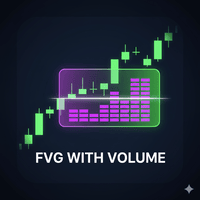
The FVG Volume Profile is an advanced Price Action indicator that goes beyond standard Fair Value Gap detection. It looks inside the gap using lower timeframe data to construct a Volume Profile specifically for that imbalance. This helps you identify exactly where the "Smart Money" is defending positions.
Key Features:
-
📊 Internal Volume Profile: Automatically scans lower timeframes (M1/M5) to draw volume histograms inside the FVG box.
-
🎯 Point of Control (POC): distinct line showing the price level with the highest volume within the gap—often acting as precise Support/Resistance.
-
🧠 Smart Action Labels: Displays bold "BUY POSSIBLE" or "SELL POSSIBLE" text inside the box to confirm market bias.
-
🛡️ Universal Compatibility: Includes a "Synthetic Volume" engine. If your broker (Crypto/CFDs) provides zero volume data, the tool calculates volume based on volatility, ensuring it works on any chart.
-
⚡ Performance Optimized: Limits active objects to prevent chart lag.
How It Works:
-
Detection: Identifies valid Fair Value Gaps based on a 3-candle sequence and filters out small, insignificant gaps using Standard Deviation.
-
Data Mining: Once a gap is found, the indicator fetches data from lower timeframes (e.g., if you are on H1, it scans M5 data) to analyze how volume was distributed during that move.
-
Projection: It draws the gap box, the internal volume bars, and the POC line.
-
Mitigation: If price closes beyond the gap limit, the FVG is automatically removed to keep your chart clean.
How to Use:
-
Trend Continuation:
-
Bullish: Wait for price to retrace into a Green FVG. Look for a reaction near the POC line or the bottom of the Volume Profile.
-
Bearish: Wait for a rally into a Purple FVG. Target the POC for short entries.
-
-
Entry Confirmation: Use the "BUY POSSIBLE" or "SELL POSSIBLE" labels as a visual filter to ensure you are trading in the right direction relative to the imbalance.
-
Stop Loss Placement: A close outside the FVG box usually invalidates the setup.
Inputs:
-
Auto Timeframe: (True/False) Automatically selects the best lower timeframe for data.
-
Gap Filter: Adjusts sensitivity to ignore small gaps.
-
Hide/Show Profile: Toggle volume bars on or off.
-
Action Labels: Toggle the Buy/Sell text hints.