Painel Nelogica ChartTrading
- Utilità
- Versione: 1.4
- Aggiornato: 5 settembre 2026
- Attivazioni: 10

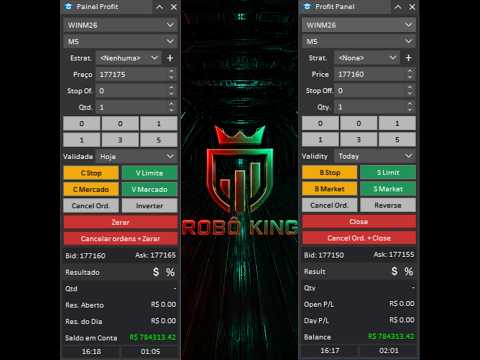
Painel Profit is an operational trading panel for MetaTrader 5 created to make manual execution and visual order management easier directly on the chart.
The operating principle is simple: the trader selects the symbol, timeframe, volume, entry type, and exit strategy. Based on these commands, the panel sends or organizes the trade through the interface, displaying the entry, take profit, and stop loss levels on the chart for visual monitoring.
This product is not a signal robot and does not make decisions for the user. It works as an execution, organization, and position management tool for traders who trade manually on MetaTrader 5.
With Painel Profit, it is possible to work with market orders, limit orders, stop orders, and OCO exit structures. The trading lines remain visible on the chart, allowing the user to monitor prices, volumes, and the estimated financial result for each trade level.
The panel also allows the user to save exit strategies. The user can configure multiple targets, stops, volume distribution, breakeven, and trailing stop. This allows frequently used strategies to be reused with just a few clicks, reducing manual steps during execution.
In addition to the operational features, Painel Profit helps organize the visual reading of the chart. It allows the user to change the symbol and timeframe directly from the panel, use quick volume buttons, customize line colors and styles, adjust label positions, show or hide trading levels, and apply a gradient background to the chart.
Main Features-
Fast buy and sell order execution directly on the chart.
-
Market orders, limit orders, and stop orders.
-
OCO exit management.
-
Visual display of entry, take profit, and stop loss lines.
-
Display of prices, volumes, and estimated financial result at each trade level.
-
Saving of user-configured exit strategies.
-
Support for multiple targets and multiple stop levels.
-
Breakeven and trailing stop configuration.
-
Configurable quick volume buttons.
-
Fast symbol and timeframe change through the panel.
-
Customization of graphic line colors and styles.
-
Customization of the chart background with a gradient.
-
Display of open result, daily result, and account balance.
-
Interface available in Portuguese or English.
Painel Profit is suitable for traders who want to trade manually with better visual organization, fewer manual steps, and quick access to the main execution and management commands in a single interface on the chart.
Input ParametersID
Magic Number (0=Off): defines the identifier of the orders and positions managed by the panel. Use 0 to disable the ID filter.
General Settings
Initial Panel Position on Chart: defines where the panel will be opened initially on the chart.
Language: defines the language of the panel interface.
Color Theme: selects the visual theme of the panel.
Volume / Lot Size
Volume (Lot Size) 1: first quick volume button.
Volume (Lot Size) 2: second quick volume button.
Volume (Lot Size) 3: third quick volume button.
Volume (Lot Size) 4: fourth quick volume button.
Volume (Lot Size) 5: fifth quick volume button.
Volume (Lot Size) 6: sixth quick volume button.
Chart Settings
Order Label Position: defines whether the information on the trading lines appears on the left or on the right.
Show Trading Levels: shows or hides the native MetaTrader 5 trading levels.
Show Trade History: shows or hides the trading history on the chart.
Pending Order Transparency (%): adjusts the visual transparency of pending orders.
Show Gradient Background: enables or disables the gradient background on the chart.
Gradient Color 1: defines the first background color.
Gradient Color 2: defines the second background color.
Gradient Direction: defines the direction of the gradient visual effect.
Buy Visual
Entry Line Color (Buy): defines the entry line color for buy operations.
Entry Button Color (Buy): defines the color of the buy entry buttons.
TakeProfit Line Color (Buy): defines the take profit line color for buy operations.
TakeProfit Button Color (Buy): defines the color of the buy take profit buttons.
StopLoss Line Color (Buy): defines the stop loss line color for buy operations.
StopLoss Button Color (Buy): defines the color of the buy stop loss buttons.
Sell Visual
Entry Line Color (Sell): defines the entry line color for sell operations.
Entry Button Color (Sell): defines the color of the sell entry buttons.
TakeProfit Line Color (Sell): defines the take profit line color for sell operations.
TakeProfit Button Color (Sell): defines the color of the sell take profit buttons.
StopLoss Line Color (Sell): defines the stop loss line color for sell operations.
StopLoss Button Color (Sell): defines the color of the sell stop loss buttons.
Graphic Line Style
Entry Line Style: defines the visual style of the entry line.
Entry Line Width: defines the width of the entry line.
TakeProfit Line Style: defines the visual style of the target line.
TakeProfit Line Width: defines the width of the target line.
StopLoss Line Style: defines the visual style of the stop line.
StopLoss Line Width: defines the width of the stop line.
Entry Information
Show Entry Close: shows or hides the entry close button.
Show Open Result: shows or hides the open result of the trade.
Show Order Type: shows or hides the order type.
Show Entry Volume (Lot Size): shows or hides the entry volume.
Show Entry Price: shows or hides the entry price.
Exit Information
Show Exit Close: shows or hides the exit close button.
Show Main TP/SL: shows or hides the main take profit and stop loss information.
Show Exit Volume (Lot Size): shows or hides the exit volume.
Show Exit Financial Result: shows or hides the estimated financial result of the exits.
Show Exit Price: shows or hides the exit price.