Market voleum profile
- Indicatori
- Versione: 1.0
- Attivazioni: 5

Here our more valuable tools
SMC Trend Trading , Easy SMC Trading , Institutional SMC Architect
SMC Trend Trading , Easy SMC Trading , Institutional SMC Architect
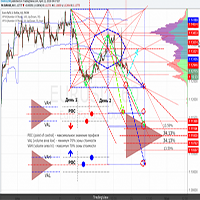
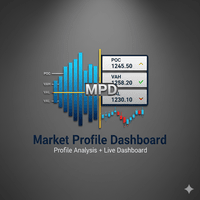
The Market Profile & Volume Profile Indicator is a powerful technical analysis tool designed to visualize market activity and price distribution over specific timeframes. Unlike standard technical indicators that focus solely on price over time, this indicator organizes price data to show where the market spent the most time (TPO) and where the most volume was traded (Volume Profile).
It automatically calculates and displays key structural levels such as the Point of Control (POC), Value Area High (VAH), and Value Area Low (VAL), allowing traders to identify fair value zones and potential support/resistance areas.
Key Features
- Dual Mode Calculation:
- Volume Profile: Calculates the profile based on actual traded volume (if enabled).
- TPO Profile: Calculates based on Time Price Opportunity (time spent at price).
- Multi-Timeframe Support: Analyze profiles for Daily (D), Weekly (W), or Monthly (M) periods.
- Value Area Calculation: Automatically determines the 70% Value Area (configurable), highlighting the range where the majority of market activity occurred.
- Virgin POC Detection: Identifies and marks "Virgin POCs" (Point of Control levels that have not been revisited by price) with a distinct color, often acting as strong magnetic levels for future price action.
- Visual Profile Histogram: Renders clear, colored histograms directly on the chart to visualize volume/TPO density.
- Statistical Info Block: Displays a neatly aligned vertical list of key data for each profile:
- POC, VAH, VAL
- Profile High, Low
- Open & Close Prices
- Total Volume
- Customizable Appearance: Adjust colors, widths, and styles for POC lines, Value Area lines, and histograms to match your chart theme.
How to Use (Trading Strategy)
This tool is best used to identify acceptance and rejection of price levels.
1. Identifying Value (The Value Area)
- The area between VAH and VAL represents the "Fair Value" of the asset for that period.
- Range Strategy: If price drifts into the Value Area without strong momentum, it often rotates back and forth inside this zone.
- Breakout Strategy: If price breaks outside the Value Area with strong momentum, it suggests the market is seeking a new fair value (trend continuation).
2. The Point of Control (POC)
- The POC is the level with the highest traded volume/time. It acts as a magnet.
- In trending markets, price often retraces to the POC before continuing.
- Virgin POC: A POC that remains "Virgin" (untouched) is a strong support/resistance level. The longer it remains untouched, the more powerful the reaction when price finally reaches it.
3. Opening Range Gaps
- If the market opens above the previous day's VAH, the previous VAH becomes support.
- If the market opens below the previous day's VAL, the previous VAL becomes resistance.
- Traders often look for price to "fill the gap" back into the previous Value Area.
Input Parameters Explained
- LookBack: Number of past periods (days/weeks/months) to draw profiles for.
- UseVolumeProfile: Set to true to use Volume data; false to use TPO (Time) data.
- ProfileTimeframe: Select D , W , or M for Daily, Weekly, or Monthly profiles.
- DayStartHour: Used to align the start of the "Day" with your broker's server time (e.g., New York Close at 17:00).
- VATPOPercent: The percentage of volume/TPOs used to calculate the Value Area (Default is 70%).
- ExtendedPocLines: How many POC lines to extend into the future for current trading.
- ShowProfileInfo: Enable the vertical text block showing POC, VAH, VAL, High, Low, Open, Close, and Volume stats.