ReplayStrategy
- Utilità
- Versione: 12.4
- Attivazioni: 5

ReplayStrategy EA v12.04 - Professional Trading Panel
🎯 Overview
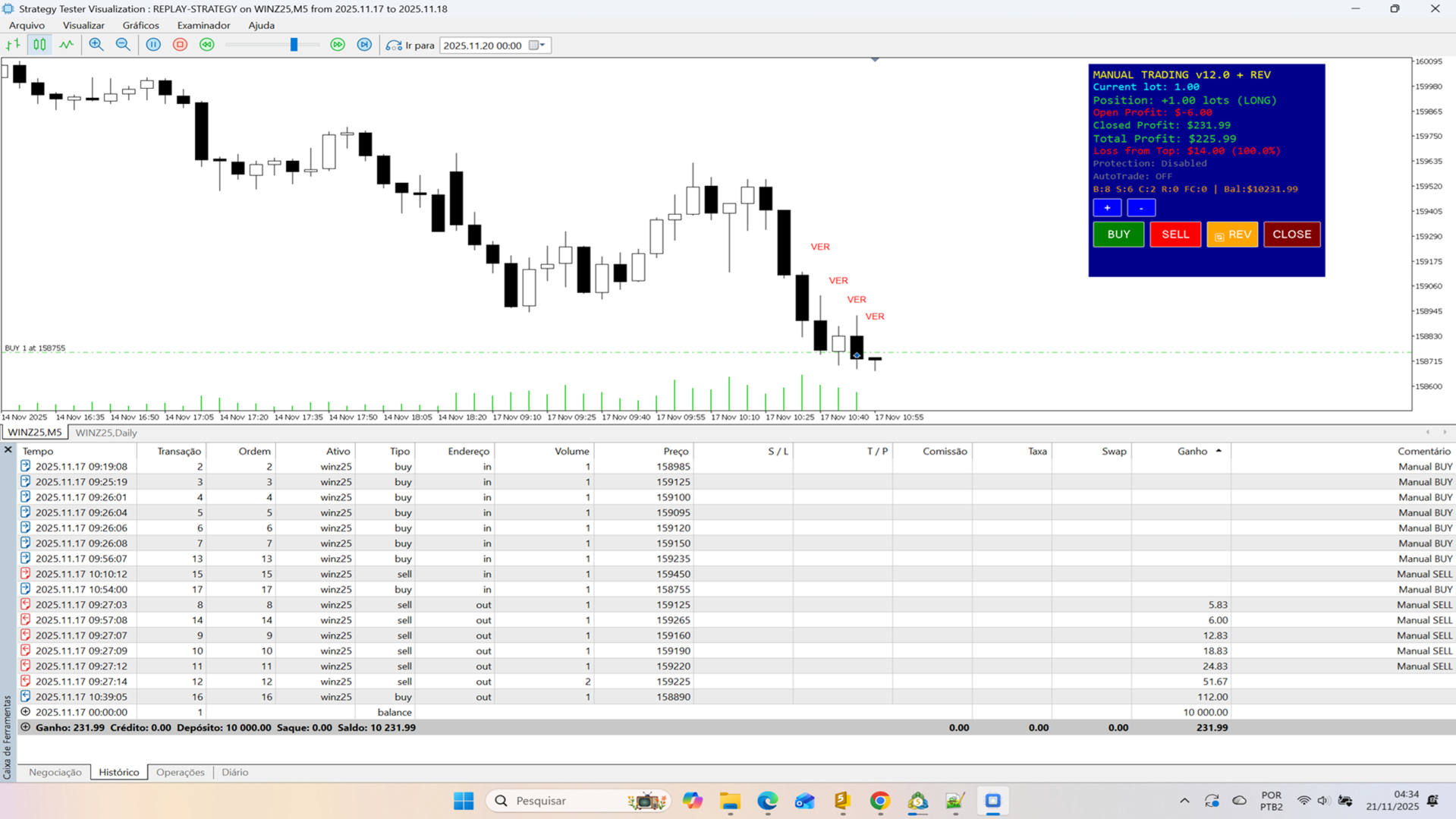
Manual Trading EA is a comprehensive visual trading assistant for discretionary traders who want enhanced control, automation features, and detailed profit tracking. This EA provides a sophisticated control panel with real-time statistics, intelligent position management, and advanced protection systems.
⚡ Key Features 📊 Complete Information Panel- Real-time position tracking (LONG/SHORT/FLAT)
- Live profit monitoring (open, closed, total)
- Configurable panel position (left/right)
- Color-coded display for instant feedback
- Detailed trade statistics
- One-click position flip using double-lot technique
- Example: SELL 1 lot → REVERSE → BUY 1 lot (executes BUY 2 lots)
- No delays, immediate execution
- Smart position management
- Loss from Top: Auto-closes when profit drops X% from peak
- Configurable threshold percentage
- Real-time peak monitoring
- Visual color-coded warnings
- Auto-reopens position after protection stop
- Indicator-based direction detection
- Configurable lot size for auto-trades
- Manual override available
- Custom indicator support (HA-V2 compatible)
- Visual chart coloring
- Trend detection system
- Optional fast close on color change
- Large, clear buttons (BUY/SELL/CLOSE/REVERSE)
- Quick lot adjustment (+/- buttons)
- Hybrid button system for 100% reliability
- Click-on-chart Quick Trade mode
- Complete historical analysis
- Zero magic support (includes manual trades)
- Balance validation
- Commission & swap included
Compatible Platforms:
- MetaTrader 5 (Build 3000+)
- Strategy Tester (Visual Mode optimized)
- ⚠️ This version: Strategy Tester only
Supported Instruments:
- Forex, Indices, Cryptocurrencies
- Any standard trading instrument
Requirements:
- Windows 7/8/10/11
- 4GB RAM minimum
- 1280x720 resolution or higher
- Load EA: Drag to chart, panel appears automatically
- Adjust Lot: Use +/- buttons (default: 1.00)
- Trade: Click BUY/SELL/CLOSE/REVERSE buttons
- Monitor: Watch real-time profit and statistics
Protection:
EnableAutoClose = true MaxLossFromTopPercent = 5.0 // Close at 5% drop from peak
AutoTrade:
EnableAutoTrade = true AutoTradeLotSize = 1.0 UseIndicatorDirection = true
Fast Close:
EnableFastClose = true MinCandlesBeforeClose = 2 // Requires 2 opposite candles ReopenAfterFastClose = true
Panel:
AlignRight = true PanelX = 150 PanelY = 10
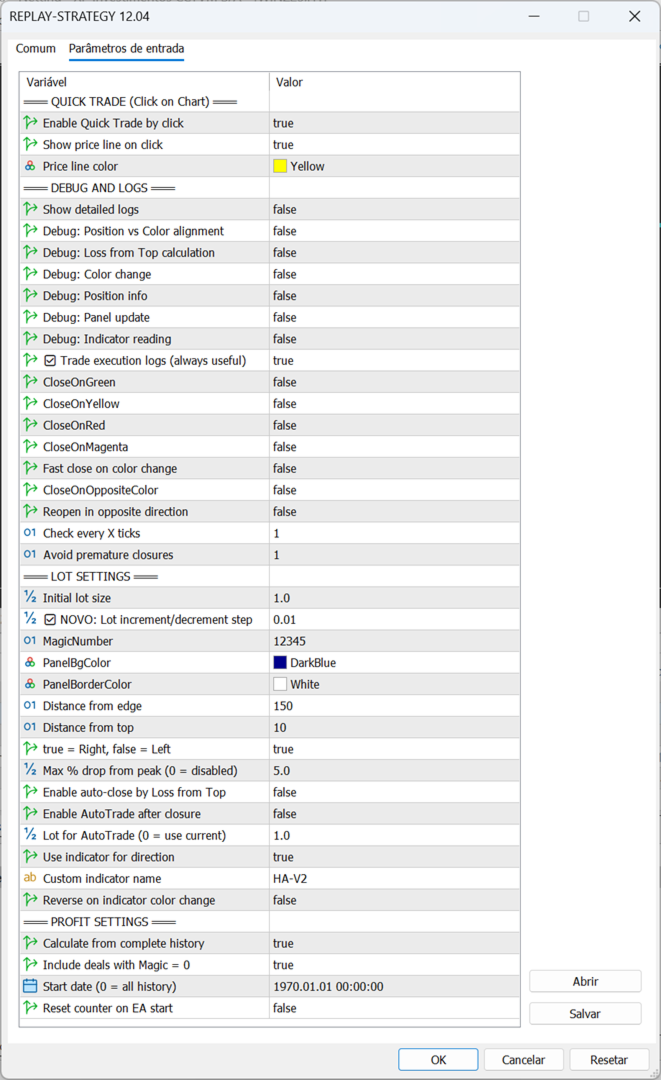
🎓 Input Parameters Quick Trade- EnableQuickTrade: Click-on-chart trading
- ShowQuickTradePrice: Display price line
- EnableDebugLogs: Detailed execution logs
- ShowTradeExecutionLogs: Trade confirmations
- ShowLossFromTopCalc: Protection calculations
- init_lot: Initial lot size
- MagicNumber: EA identifier
- MaxLossFromTopPercent: Drop limit (0 = disabled)
- EnableAutoClose: Activate protection
- EnableAutoTrade: Auto-reopen after close
- AutoTradeLotSize: Lot for auto-trades
- UseIndicatorDirection: Use indicator signal
- IndicatorName: Indicator name (default: "HA-V2")
- EnableFastClose: Close on trend change
- MinCandlesBeforeClose: Confirmation candles
- ReopenAfterFastClose: Reopen in new direction
- CalculateFromHistory: Include all trades
- IncludeZeroMagicDeals: Include manual trades
- StartCalculationFrom: Start date
The REVERSE button uses an intelligent technique:
- Current: SELL 1.0 lot
- Desired: BUY 1.0 lot
- Solution: Execute BUY 2.0 lots
- Result: Net position = BUY 1.0 lot
This eliminates the need to:
- Close current position
- Wait for confirmation
- Open new position
Advantage: Instant reversal, no execution gaps.
Loss from Top ProtectionProtects profits automatically:
- Tracks maximum profit peak
- Monitors drop percentage
- Triggers at configured threshold
- Can auto-reopen via AutoTrade
Example:
- Peak profit: $1000
- Current profit: $950
- Drop: $50 (5%)
- If MaxLossFromTopPercent = 5% → Closes position
After protection closure:
- Waits 3 seconds
- Reads indicator direction
- Opens position in trend direction
- Uses configured lot size
Direction Detection:
- UP colors (Yellow/Blue/Green) → BUY
- DOWN colors (Red/Magenta) → SELL
Why two methods?
- OnChartEvent: Instant detection (preferred)
- OnTick polling: Backup every 5 ticks (guaranteed)
Result: 100% click capture reliability in Strategy Tester.
⚠️ Important Notes Strategy Tester Version- ✅ Optimized for visual tester
- ✅ Auto-maximizes chart window
- ✅ Enhanced reliability
- ⚠️ Blocked on real/demo accounts
- 📧 Contact developer for live version
Required for AutoTrade/Fast Close:
- Install Heiken Ashi Modified (HA-V2)
- Indicator must have color buffer (buffer 4)
- EA applies indicator visually to chart
- Colors: Red(0), Yellow(1), Blue(2), Green(3), Magenta(4)
- Use Visual Mode in Strategy Tester
- Verify symbol volume limits
- Test protection settings first
- Monitor debug messages if issues occur
Ideal For:
- Discretionary traders needing enhanced control
- Strategy testing in Strategy Tester
- Learning position management
- Profit protection automation
- Detailed trade statistics
Not For:
- Fully automated trading
- High-frequency scalping
- News trading
Buttons not responding?
- Enable visual mode
- Check panel visibility
- Restart Strategy Tester
Indicator not loading?
- Verify indicator name
- Check .ex5 file exists
- Ensure color buffer present
Wrong profit calculation?
- Check MagicNumber setting
- Enable IncludeZeroMagicDeals if needed
- Verify StartCalculationFrom date
Protection not working?
- Set EnableAutoClose = true
- Set MaxLossFromTopPercent > 0
- Need minimum $10 profit peak
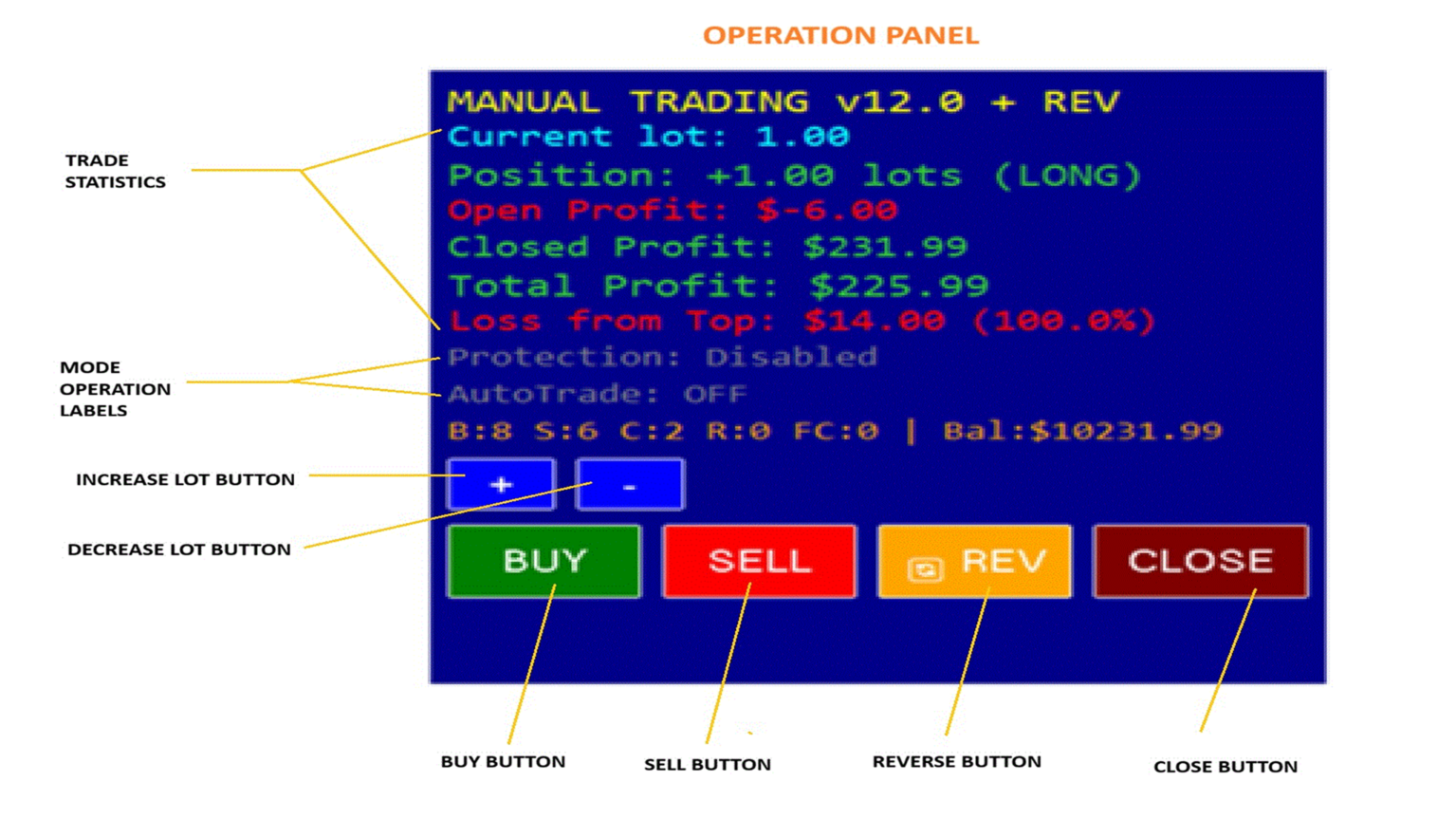
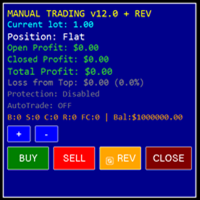
Top Section:
- Current lot size
- Position status (LONG/SHORT/FLAT)
- Open profit (real-time)
- Closed profit (accumulated)
- Total profit (combined)
Middle Section:
- Loss from Top: $ and %
- Protection status
- AutoTrade status
- Trade statistics (B/S/C/R/FC)
Bottom Section:
- Control buttons
- Lot adjustment
- Quick actions
Color Coding:
- 🟢 Green: Profit/Long position
- 🔴 Red: Loss/Short position
- ⚪ White: Flat/Neutral
- 🟡 Yellow: Warning zone
- 🟠 Orange: Danger zone
1. EA starts → Panel appears 2. Click BUY → Opens 1.0 lot LONG 3. Profit reaches $500 (peak tracked) 4. Profit drops to $475 (5% drop) 5. Protection triggers → Closes position 6. AutoTrade (if enabled) → Opens new position
Example 2: Quick Reversal1. Current: SELL 2.0 lots 2. Market reverses 3. Click REVERSE button 4. EA executes: BUY 4.0 lots 5. Result: NET BUY 2.0 lots 6. No gap, instant reversal
Example 3: Fast Close1. Position: BUY 1.0 lot 2. Indicator: Green candles 3. First red candle appears 4. Counter: 1/2 (needs 2 candles) 5. Second red candle appears 6. Counter: 2/2 → Closes position 7. If ReopenAfterFastClose → Opens SELL
🏆 Why Choose This EA?Professional Features:
- ✅ Enterprise-level code
- ✅ Dual detection system
- ✅ Transparent calculations
- ✅ Extensive documentation
- ✅ Battle-tested logic
- ✅ Regular updates
User Benefits:
- Instant visual feedback
- Intelligent automation
- Profit protection
- Complete statistics
- Easy configuration
- Reliable execution
Technical Excellence:
- Clean, organized code
- Comprehensive error handling
- Debug tools included
- Optimized performance
- Well-commented source
v12.04 (Current)
- Hybrid button system
- Reverse button
- English translation
- Enhanced debug
- Auto marker removal
Previous:
- v12.03: Quick Trade
- v12.02: Loss from Top
- v12.01: AutoTrade
- v12.00: Initial release
- One purchase = lifetime updates
- Unlimited Strategy Tester use
- Not for redistribution
- Live version separate license
ReplayStrategy EA v12.04 transforms Strategy Tester into a professional trading simulator with advanced position management, intelligent protection, and comprehensive statistics. Perfect for testing strategies, learning position management, and perfecting discretionary trading skills.
Features at a glance:
- Visual control panel with real-time data
- One-click reversal system
- Automatic profit protection
- Smart auto-reopen functionality
- Heiken Ashi integration
- Complete profit tracking
- 100% reliable button system
- Strategy Tester optimized
Get started today! 🚀
Developed by professional algorithmic traders with extensive MT5 experience.
Support: Contact via MQL5 messaging
Updates: Regular improvements
Documentation: Built-in debug system