Template Toggle Indicator
- Indicatori
- Versione: 1.421

Template Toggle Indicator
General Description
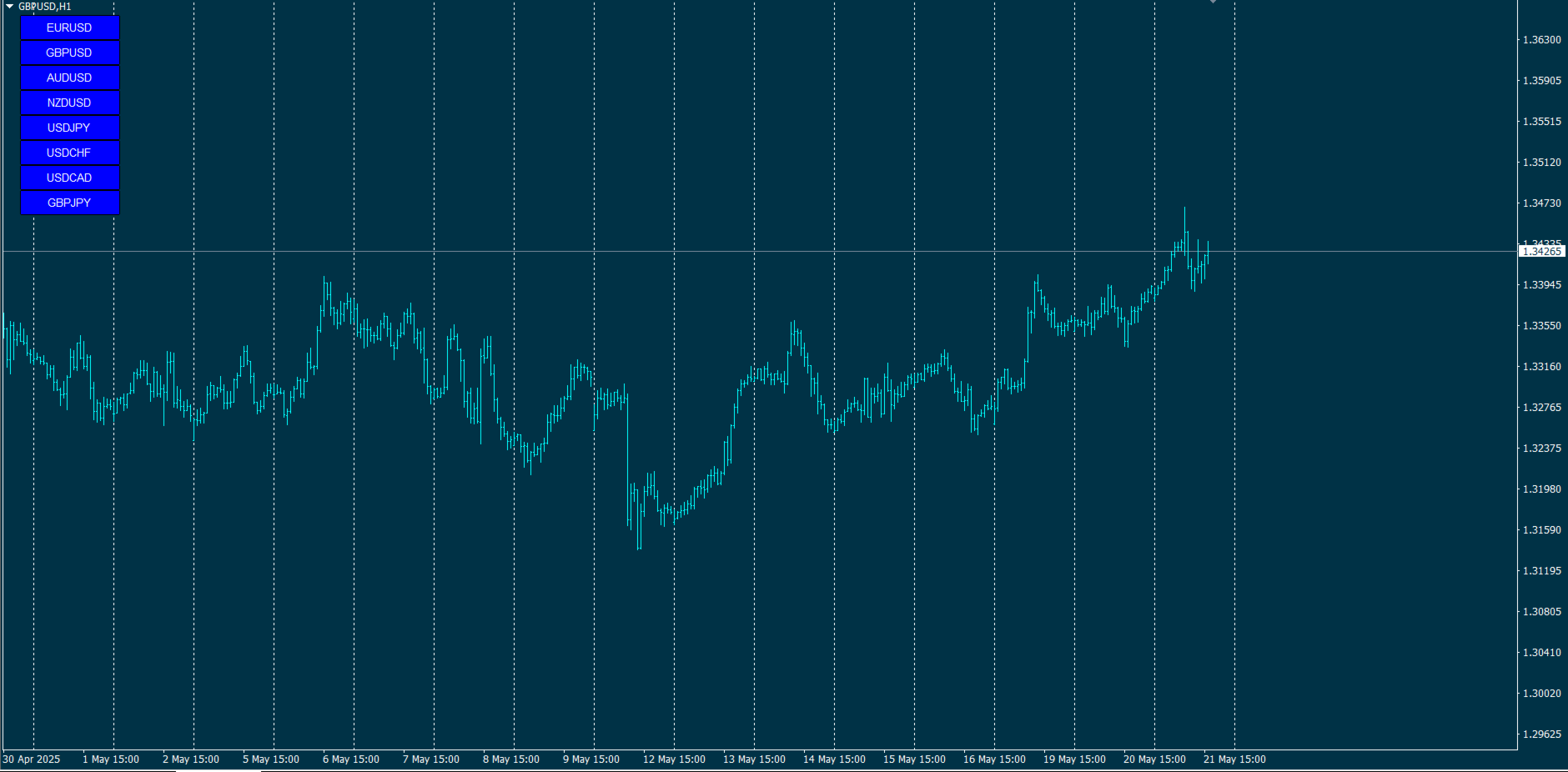
The Template Toggle indicator is a custom tool for the MetaTrader 4 platform, designed to streamline the process of switching between predefined chart templates. It displays interactive buttons on either the main chart or a sub-window, allowing traders to quickly apply different templates without manually accessing the template menu. Ideal for traders who frequently switch between chart setups for various currency pairs or trading strategies.
Key Features
- Customizable Template Selection:
- Supports up to 8 user-configurable templates (default: EURUSD, GBPUSD, AUDUSD, NZDUSD, USDJPY, USDCHF, USDCAD, GBPJPY).
- Template names can be modified via input parameters.
- Flexible Display Options:
- Buttons can be displayed on the main chart or a sub-window, based on user preference (configured via the DisplayInSubWindow parameter).
- Button positions are adjustable using the XOffset and YOffset parameters for X and Y coordinates.
- Intuitive Interface Design:
- Buttons have a fixed size (120x30 pixels) with white text, blue background, and black borders for optimal visibility.
- Font size (8) ensures clear and readable text.
- Efficient Operation:
- Requires no complex calculations, making it lightweight and platform-friendly.
- Buttons are automatically created during initialization and removed when the indicator is unloaded from the chart.
- Reliable Template Management:
- Clicking a button applies the corresponding template instantly.
- If a template fails to load, an error message is logged in the MT4 terminal.
- Button states are reset after a template is applied to avoid confusion.
Input Parameters
- Template1 to Template8: Names of the templates to be used (default: popular currency pairs like EURUSD, GBPUSD, etc.).
- DisplayInSubWindow: Choose whether buttons are displayed in a sub-window (true) or the main chart (false).
- XOffset: X-coordinate for button positioning (default: 20 pixels from the left).
- YOffset: Y-coordinate for button positioning (default: 20 pixels from the top).
How It Works
- Initialization:
- The indicator creates 8 buttons labeled according to the specified template names.
- If DisplayInSubWindow is enabled, buttons are placed in a sub-window named "TemplateToggle." If the sub-window cannot be found, buttons default to the main chart.
- The sub-window has a fixed height of 260 pixels to accommodate all buttons.
- Interaction:
- Users click a button to apply the corresponding template.
- The ApplyTemplate function ensures the template is applied correctly, logging an error if it fails.
- Cleanup:
- When the indicator is removed, all buttons are deleted from the chart to maintain a clean interface.
Benefits
- Time Efficiency: Enables one-click template switching, saving time compared to manual methods.
- Customization: Traders can tailor template names to suit their strategies or currency pairs.
- Ease of Use: A simple, button-based interface suitable for both novice and experienced traders.
- Lightweight: Requires minimal computational resources, ideal for use alongside other indicators.
Limitations
- Supports only up to 8 templates in this version.
- No options to customize button colors or sizes via input parameters.
- If the sub-window cannot be found, buttons default to the main chart without additional fallback options.
Ideal Use Cases
This indicator is ideal for traders who:
- Use multiple templates for technical analysis or different currency pairs.
- Seek a fast and efficient workflow for managing charts.
- Prefer a straightforward interface without overloading the trading platform.
Template Toggle is a practical solution for enhancing chart management efficiency in MetaTrader 4, offering a balance of functionality and user-friendliness.


















































This indi does exactly what it says. You can switch between up to eight templates with a button click. Text and button size are fixed. Very handy. Thanks!