TrendLine Auto Executor MT4

ATTENZIONE: l'applicazione non può funzionare nello Strategy Tester, se desideri provare la versione demo gratuitamente per una settimana, o hai delle domande, scrivimi una mail! Trovi il mio indirizzo sul mio profilo utente.

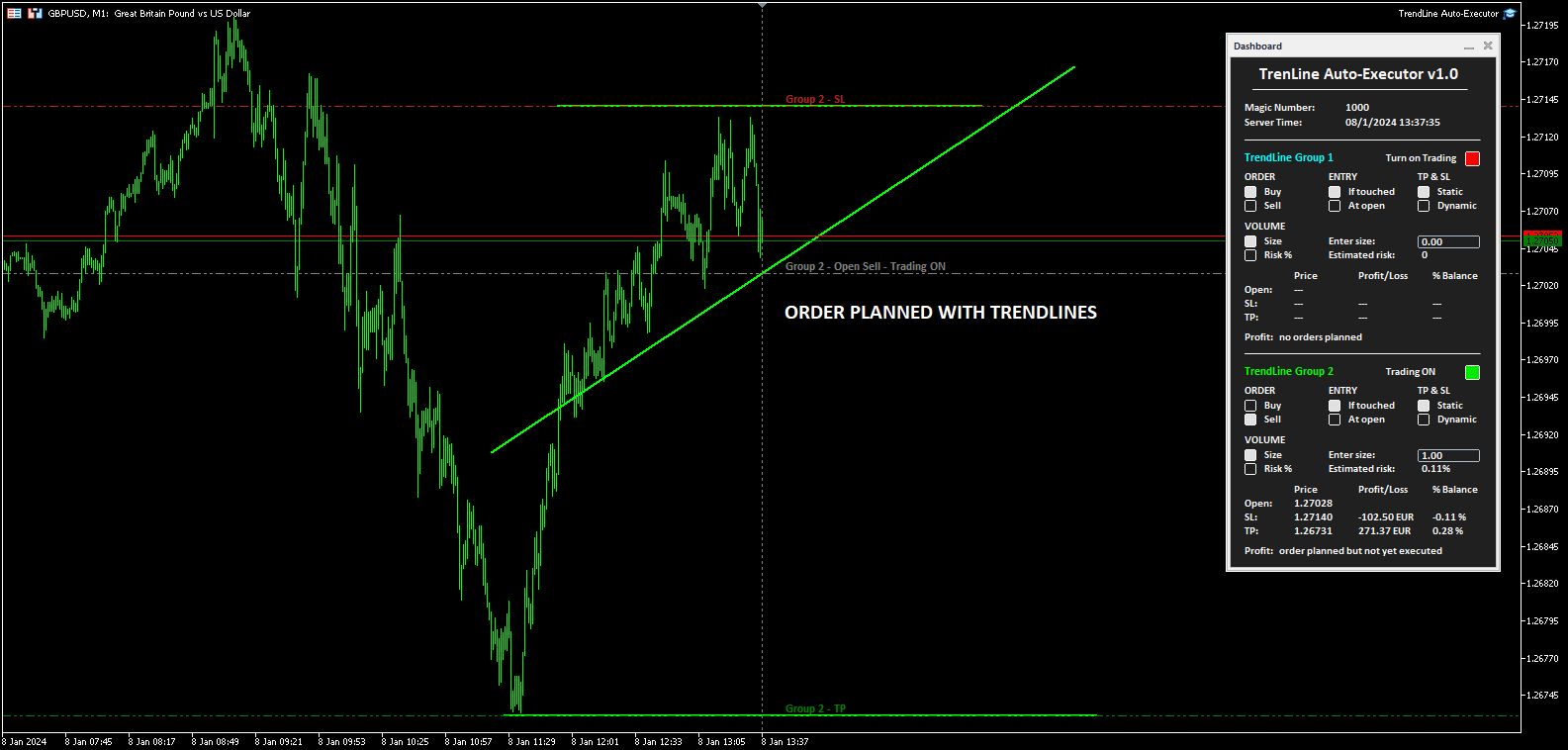
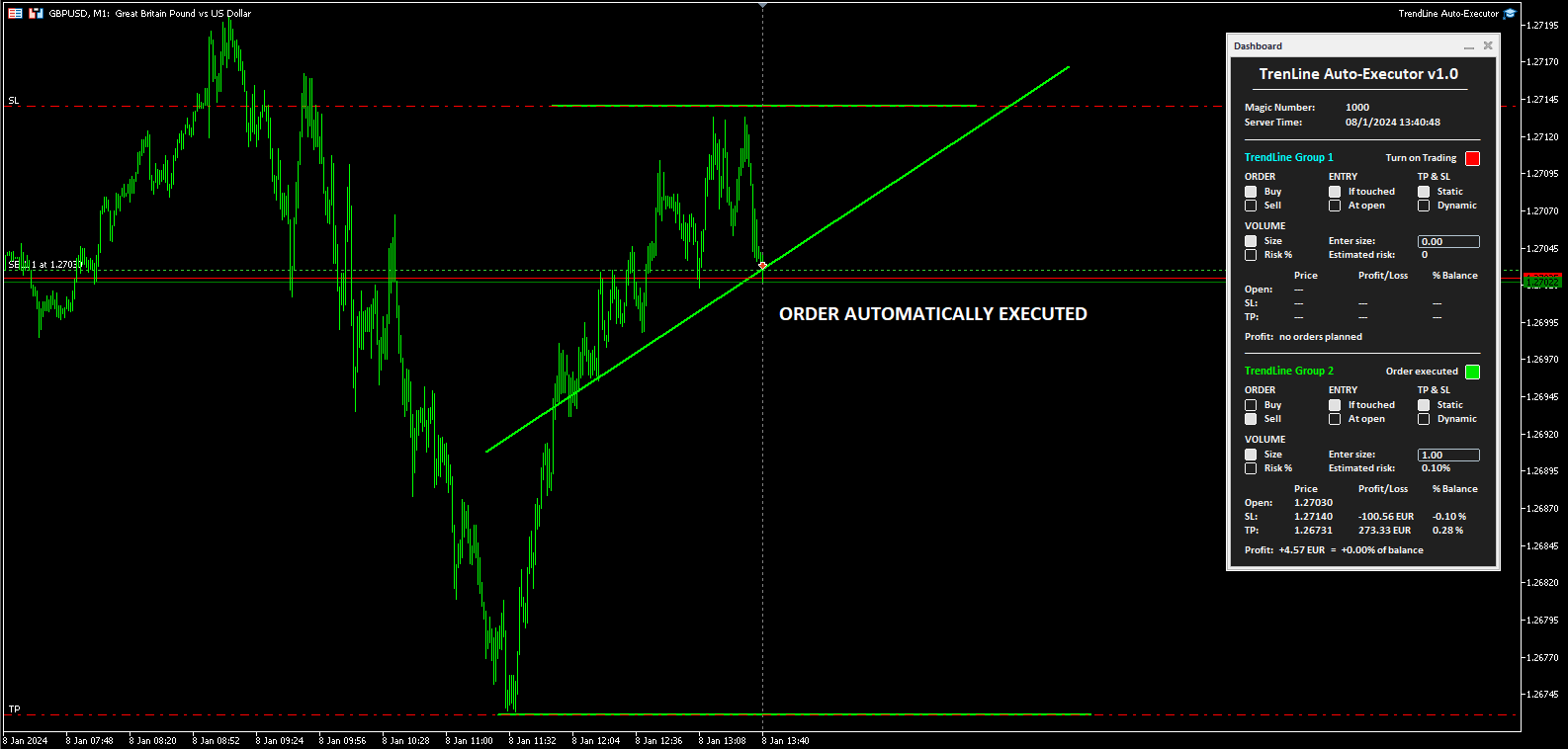
TrendLine Auto Executor è un software capace di individuare le trendline che hai tracciato sul grafico ed aprire gli ordini non appena queste vengono toccate o superate.

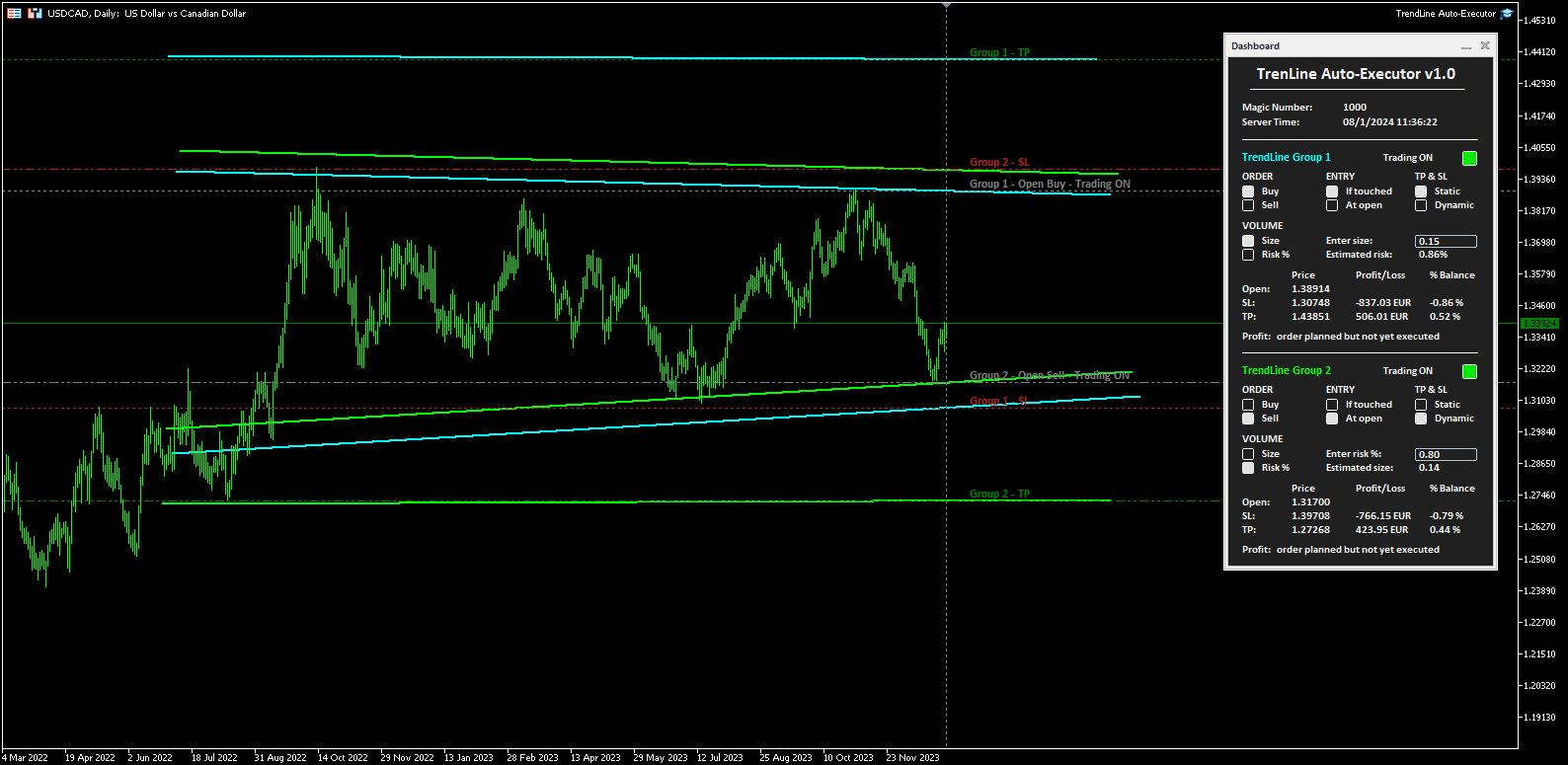
Il software permette di gestire due ordini alla volta per ogni chart tramite il tracciamento di due gruppi di trendline, una per ogni ordine, e ogni ordine viene definito tramite il tracciamento di 3 linee:

  • la prima trendline tracciata identifica il prezzo di apertura dell'ordine
  • la seconda trendline (opzionale) identifica il prezzo a cui posizionare lo stop loss
  • la terza trendline (opzionale) identifica il prezzo a cui posizionare il take profit

Una volta tracciate le trendline, TrendLine Auto Executor aggiorna automaticamente, candela dopo candela, i prezzi di apertura, take profit e stop loss seguendo l’inclinazione delle linee, fino all’apertura dell’ordine.

Il tutto viene gestito tramite un semplice e pratico pannello di controllo (dashboard) presente sul grafico dei prezzi che permette di impostare la tipologia e la size dell’ordine.


Impostazione dei parametri:

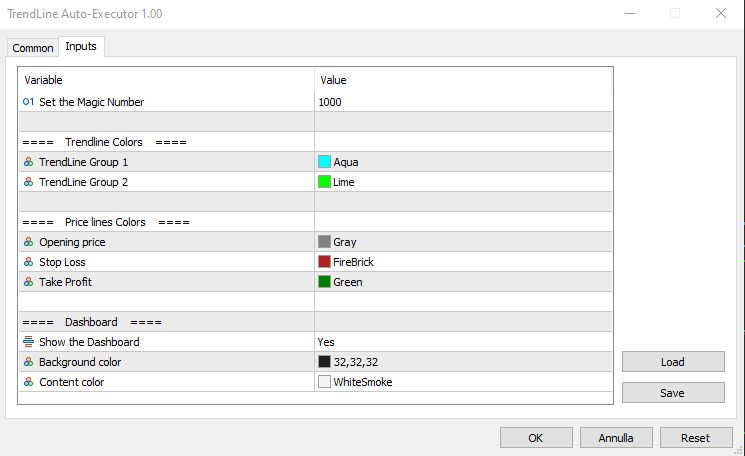
Set the Magic Number: permette di impostare il magic number del bot


Trendline Colors

  • TrendLine Group 1: permette di impostare il colore delle trendline del gruppo 1
  • TrendLine Group 2: permette di impostare il colore delle trendline del gruppo 2
Price lines Colors
  • Opening price: permette di impostare il colore della linea orizzontale tracciata automaticamente sul grafico che identifica il prezzo di apertura dell’ordine
  • Stop Loss: permette di impostare il colore della linea orizzontale tracciata automaticamente sul grafico che identifica lo stop loss
  • Take Profit: permette di impostare il colore della linea orizzontale tracciata automaticamente sul grafico che identifica il take profit
Dashboard
  • Show the Dashboard: selezionare Yes per visualizzare la dashboard, No per nasconderla
  • Background color: permette di impostare il colore di sfondo della dashboard
  • Content color: permette di impostare il colore di tutti gli elementi all’interno della dashboard


Dashboard

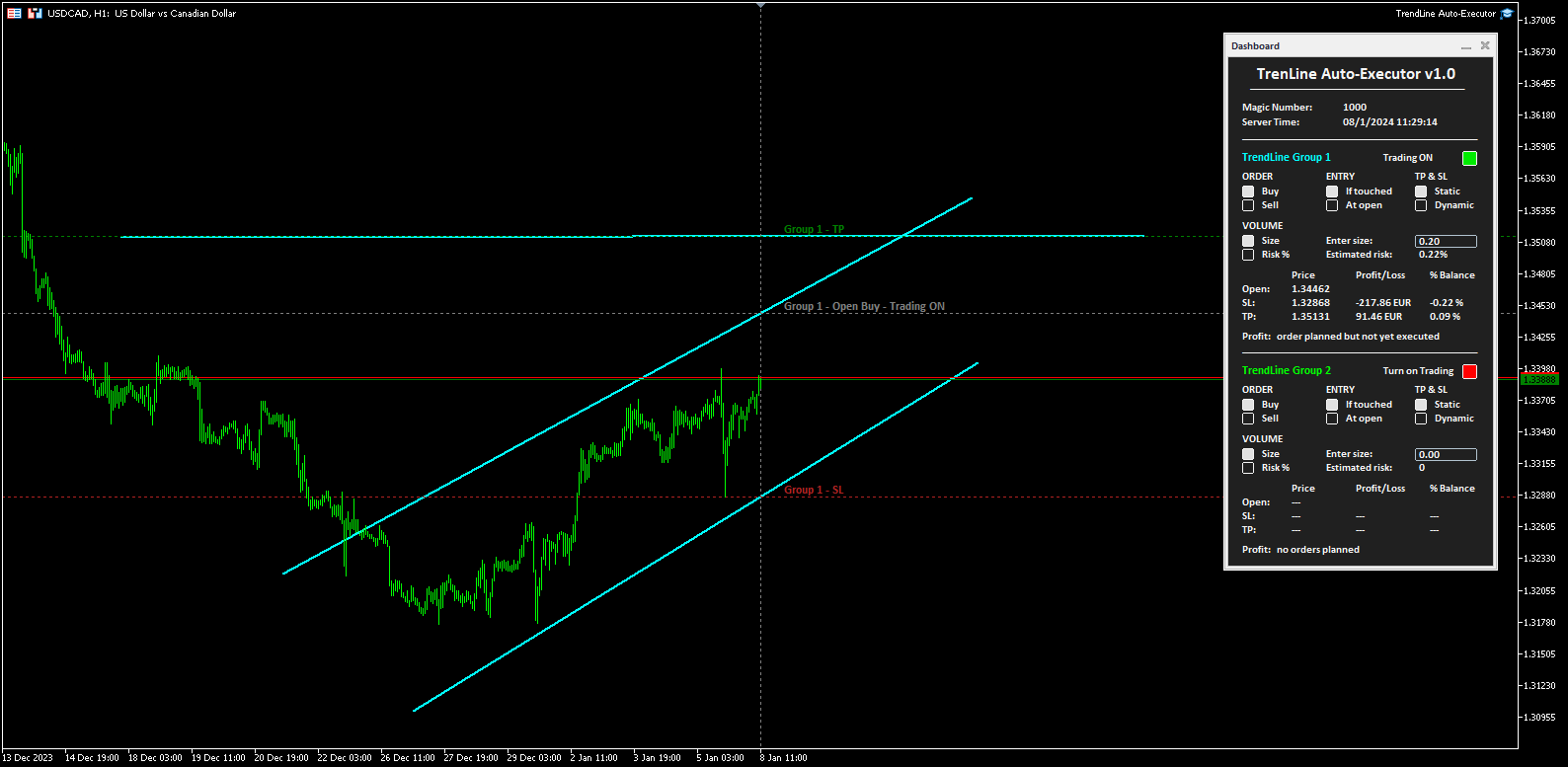
La dashboard consente di definire in maniera molto semplice, tramite l’utilizzo dei vari pulsanti, la tipologia di ordine che si desidera aprire. Nel seguito ne viene descritta ogni sua parte.

  • Magic number: indica il magic number assegnato in fase di impostazione dei parametri
  • Server Time: indica il tempo attuale del server
  • TrendLine Group 1 (e Trendline Group 2): indica l’area all’interno della dashboard dedicata al gruppo 1, o al gruppo 2, di trendline. Il colore della scritta richiama quello impostato al gruppo di trendline in fase di impostazione dei parametri.
  • Turn on Trading: cliccando sul pulsante rosso è possibile attivare il trading e l'apertura degli ordini (il pulsante diventa verde e la scritta mostra “Trading ON”). 
  • ORDER (i due pulsanti permettono di impostare il tipo di ordine)
    • Buy: per impostare l’apertura automatica di un ordine buy.
    • Sell: per impostare l’apertura automatica di un ordine sell.
  • ENTRY (i due pulsanti permettono di impostare il tipo di ingresso)
    • If touched: l’ordine verrà eseguito non appena il prezzo tocca la trendline.
    • At open: l’ordine verrà eseguito all’apertura di una nuova candela. Se è stato impostato Buy la nuova candela deve aprirsi sopra la trendline, mentre l'apertura della precedente deve essere sotto. Nel caso invece di ordine Sell la nuova candela deve aprirsi sotto la trendline, mentre l’apertura della candela precedente deve essere sopra.
  • TP & SL (i due pulsanti permettono di impostare come gestire il take profit e lo stop loss una volta aperto l’ordine)
    • Static: una volta aperto l’ordine a mercato, il TP e lo SL (se presenti) rimarranno fermi.
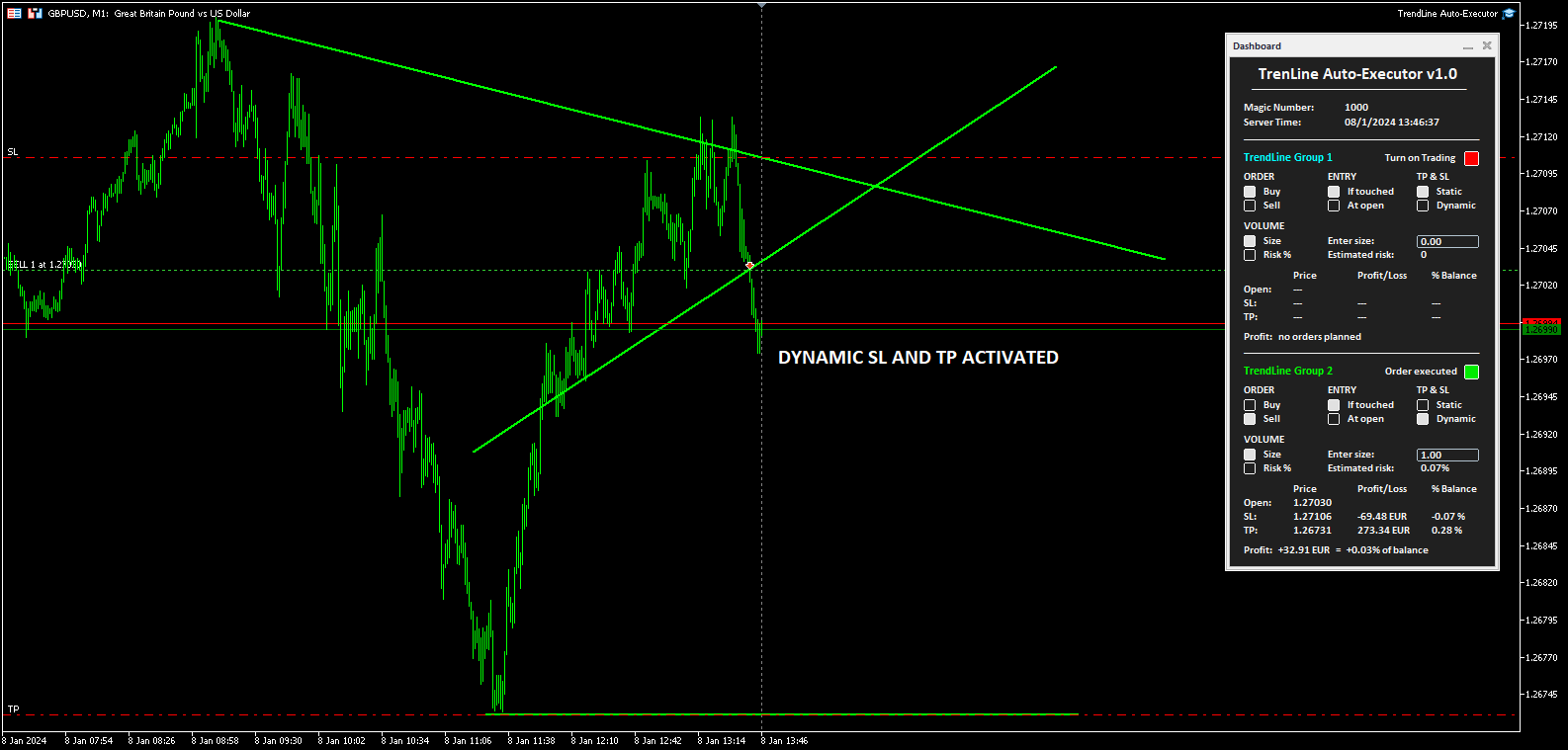
    • Dynamic: una volta aperto l’ordine a mercato, il TP e lo SL (se presenti) seguiranno le trendline tracciate assumendone gli stessi valori, inoltre spostando manualmente le trendline è possibile spostare anche il TP e lo SL.
  • VOLUME (i due pulsanti permettono di impostare il volume dell’operazione)
    • Size: il volume viene impostato definendone il numero di lotti o di contratti. Il valore va inserito nel campo a fianco indicato dalla scritta “Enter size:”. Appena sotto viene indicato il rischio percentuale stimato in rapporto al Balance (deve essere stata tracciata la linea dello Stop Loss).
    • Risk%: il volume viene impostato definendone il rischio percentuale rispetto al Balance. Il valore va inserito nel campo a fianco indicato dalla scritta “Enter risk %:”. Appena sotto viene indicata la size stimata per l’apertura dell’ordine (deve essere stata tracciata la linea dello Stop Loss per calcolare la size e quindi aprire l’ordine).

  • La tabella in fondo indica i prezzi, il profitto monetario ed in percentuale del Balance, sia dell’ordine non ancora posizionato in base a dove sono state posizionate le trendline, sia dell’ordine a mercato una volta aperto dal software.

  • Infine, la scritta Profit posizionata in fondo mostra l'indicazione:
    • “no orders planned”, se non sono tracciate trendline sul grafico e quindi non è stato pianificato alcun ordine
    • “order planned but not yet executed”, se sono tracciate delle trendline ma l’ordine non è ancora stato eseguito
    • Il profitto monetario ed il profitto rispetto al balance, se l’ordine è stato eseguito ed è a mercato


Note per il corretto utilizzo:

  • Il software è sviluppato per riconoscere solo le trendline del colore specificato in fase di impostazione dei parametri, altre tipologie di linee e altri colori non vengono presi in considerazione.
  • Le trendline per essere identificate e riconosciute devono essere tracciate fino alla candela attuale, altrimenti è come se non fossero presenti.
  • Per definire un ordine è necessario tracciare almeno una trendline per identificare il prezzo di apertura.
  • Se si imposta come ENTRY l’opzione At open, l’ordine si aprirà in accordo al timeframe del chart impostato.
  • Una volta chiuso l’ordine (manualmente, per take profit o stop loss) il bot disabilita il trading riportando il pulsante "Turn on Trading" sul colore rosso e la size a zero. Le trendline rimangono comunque posizionate sul grafico in modo da poterle riutilizzarle per pianificare nuovi ordini.
  • Una volta tracciate le trendline, il software traccia automaticamente delle linee orizzontali che indicano il prezzo di apertura dell’ordine e, se indicati, i prezzi a cui posizionare lo stop loss ed il take profit.
  • I pulsanti e le scritte sulla dashboard aggiornano il loro stato ad ogni nuovo tick del mercato, nelle fasi di scarsa liquidità può verificarsi qualche ritardo nella risposta dei pulsanti.
Prodotti consigliati
Automatically closes orders when profit per lot or total profit reaches your specified level Per a lot : The amount of wins per lot in the selected symbol. Each orders is calculated as 1 lot. Example: If EURUSD total lot is 2.05 and earnings per lot is $ 100, then 100 * 2.05 = 205 $. Orders will be closed when EURUSD has a total profit of $ 205. When the total of all orders on the selected symbol reaches the specified amount, it closes all orders belonging to the symbol. For example: There are 3
The indicator detects and displays М. Gartley's Butterfly pattern. The pattern is plotted by the extreme values of the ZigZag indicator (included in the resources, no need to install). After detecting the pattern, the indicator notifies of that by the pop-up window, a mobile notification and an email. The pattern and wave parameters are displayed on the screenshots. The default parameters are used for demonstration purposes only in order to increase the amount of detected patterns. Parameters z
The indicator detects and displays Shark harmonic pattern (see the screenshot). The pattern is plotted by the extreme values of the ZigZag indicator (included in the resources, no need to install). After detecting the pattern, the indicator notifies of that by a pop-up window, a mobile notification and an email. The indicator highlights the process of the pattern formation and not just the complete pattern. In the former case, it is displayed in the contour triangles. After the pattern is comple
News Scalping Executor Pro is an utility which helps to trade high impact and huge volatility   news . This utility helps to create two opposite orders with risk management and profit protection. It moves automatically stop loss level to avoid losses as much as possible by using many different algorithms. It helps to avoid trading the news if spread suddenly becomes very huge. It can lock profit by moving stop loss or partially closing of orders. To be profitable with this type of trading you
Bears CD HTB
Igor Semyonov
Bears CD HTB  (Bears Convergence/Divergence High Top Bottom) is a universal analytical bears convergence/divergence indicator between a financial instrument and any of the twenty two standard indicators included in МetaTrader 4 package. The indicator is the second out of the two possible versions (HBT and HTB) of the bearish convergence/divergence origins. Due to its multiple use feature, the indicator allows you to find convergences/divergences between the price and various standard indicators
Bulls CD LBT
Igor Semyonov
Description Bulls CD LBT (Bulls Convergence/Divergence Low Bottom Top) is a universal analytical bulls convergence/divergence indicator between a financial instrument and any of the twenty two standard indicators included in МT4 package. The indicator is the first out of the two possible versions (LBT and LTB) of the bullish convergence/divergence origins. Due to its multiple use feature, the indicator allows you to find convergences/divergences between the price and various standard indicators
This program sends alerts to telegram when a specified profit target or drawdown level is reached. The profit target and drawdown level are specified as percentages of the daily starting balance in the inputs. When you purchase feel free to contact me for any assistance required with the setup. I am open to adding custom functions limited to profit or drawdown alerts
The “ Ticks Overcome Signal ” indicator, as outlined in your provided code, is a custom tool designed for use with MetaTrader 4 (MT4), a popular platform for Forex trading. This indicator seems to focus on tracking the momentum and direction of price movements by counting consecutive up and down ticks. Here’s an overview of the psychological aspects, logic benefits, and usage instructions for this indicator on MT4: Decision Support : Traders often face psychological challenges in decision-making
FREE
Easy Chart Navigate
Yevhenii Levchenko
This indicator will allow you to quickly go to the chart section that interests you, without unnecessary time costs. pt_shift - step of vertical scrolling; ButtonsHeight - button height; ButtonsWidth - button width; ButtonsColor - color of buttons; ButtonsBordersColor - button border color; Font - font; TextColor - button text color; TextSize - button text size; ButtonsBack - buttons in the background; ButtonsSelection - select buttons for movements; ButtonsHidden - hide buttons in
Basic Theme Builder
Mehran Sepah Mansoor
5 (1)
Basic Theme Builder: Semplifica la Personalizzazione del Tuo Grafico Trasforma la tua esperienza di trading con l'indicatore   Basic Theme Builder , uno strumento versatile progettato per semplificare la personalizzazione dell'aspetto del tuo grafico su MetaTrader 4 .   Questo indicatore intuitivo offre un pannello facile da usare che ti consente di passare senza sforzo tra vari temi e schemi di colore, migliorando sia l'aspetto visivo che la funzionalità del tuo ambiente di trading.   Free MT5
FREE
Bulls CD LTB
Igor Semyonov
Description Bulls CD LTB (Bulls Convergence/Divergence Low Top Bottom) is a universal analytical bulls convergence/divergence indicator between a financial instrument and any of the twenty two standard indicators included in МT4 package. The indicator is the second out of the two possible versions (LBT and LTB) of the bullish convergence/divergence origins. Due to its multiple use feature, the indicator allows you to find convergences/divergences between the price and various standard indicators
红盘手交易助手,该EA不会自动交易,属于辅助工具,参考4小时图表波动率参数,自动给订单设置止损和止盈,以及追踪止损。策略带有风控标准,如下<1K为50 >1K<1W为100, >1W<5W为500, >5W<10W为1000, >10<20为2000。最大的特色是资金管理和风控功能。显示信号为5日平滑均线方向,布林线中轨平仓功能,开仓警报提醒功能,手数资金恢复功能,该EA可以在历史数据测试时下单,所以它相当于复盘工具。注意EA会修改所不带止损和止盈品种的定单,并执行风控标准。EA参数经过实盘反复验证和优化,可以直接使用默认参数。        参数与功能: FixBuy_target 指定后统一修改当前品种所有多单的止盈价; FixSell_target 指定后统一修改当前品种所有空单的止盈价; 一比一恢复资金 默认不启用,启用盈利按固定亏损金额数字平仓; Boll_close_order 默认不启用,启用后价格遇到布林线(周期30)中轨平仓; Lots 设置固定手数,开启UseMM后无效; UseMM 默认启用资金管理; 风险系数 启用; ATR止损基数 默认按4小时
Questo prodotto è una dashboard a tutto schermo che tiene costantemente monitorato l' andamento dell' account basandosi sullo storico operazioni, ha una linea grafica per bilancio ed equita  e rappresenta vincite perdite e percentuali del giorno, mese, settimana e anno in corso e in passato. Quando non ci sono posizioni aperte la linea bilance e equity sono sovrapposte, quando una posizione viene aperta si notera anche la linea gialla equity 
Tax Buddy
Eric Emmrich
5 (3)
Tax Buddy creates a simple, sortable trading report which you can send to your local tax authorities alongside your annual declaration. I've been using this kind of report for the German Finanzamt in order to declare my capital gains ("Kapitalerträge") in a readily comprehensible manner. For testing purposes, the Demo version places random trades in the Strategy Tester on the symbol of your choice and creates a demo report for them. Conveniently, all reports are stored in the common path for al
CorrelationUSD is a basic indicator, which is located on the chart. This tool allows you to monitor the relationship between assets, it reliably determines the patterns of quotation changes of one relative other asset. What is the indicator? All basic assets are interconnected, first of all, by a full complex of essential fundamental factors. For example, most currency pairs have a strong influence on measurements of each other’s quotes. Trends of this kind create macroeconomic news.
SimpleProb
Augusto Martins Lopes
SimpleProb: Il tuo nuovo alleato nel mercato finanziario! Descrizione Sei stanco di indicatori complessi che confondono più che aiutare? SimpleProb porta semplicità ed efficienza nelle tue operazioni su MetaTrader 4 ! SimpleProb è un indicatore di analisi tecnica progettato per i trader che cercano chiarezza e precisione nelle loro decisioni di acquisto e vendita. Calcola le probabilità di movimenti rialzisti ( CALL ) e ribassisti ( PUT ) basandosi sugli ultimi 14 periodi, fornendo segnali visiv
MagicExcel
Alessandro Brunelli
MagicExcel will allow you to extrapolate, from your trades, reports split down by Expert Advisor. The generated reports allow you to quickly compare statistics of trades data from different Expert Advisors, different symbols and also the behavior of an Expert Advisor against different symbols. Additionally, if selected, a report will be created that shows the behavior of the Expert Advisor over time. This is a very useful tool for a trader who works with many Expert Advisors at the same time. R
Daily Trading Dashboard – MT4 Indicator A compact and efficient tool that displays your daily trading statistics directly on the chart. Designed for traders who need a clear overview of their performance without switching screens. Key Features Real-time calculation of today’s profit/loss (with green/red color coding) Display of trade count and total trading volume Lightweight 280×160 px panel with clean blue design Automatic updates every few seconds Optional filtering by Magic Number or Comment
FREE
Current Trade Profit
Boguslaw Nejmanowski
Current Pips and Money Profit This indicator displays the results of the currently open position on the graph. Result in pips and in the invoice currency. Thanks to this, you can enlarge the chart to the entire screen and have control over the result of trading without opening a terminal window which takes a space of a screen. The display positions of this data can be adjusted at the user's discretion and colors also.
FREE
This is a MetaTrader 4 script. It helps to summarize all trades into every symbol. Input Select Period: This is 7-option input. It includes Last Month, This Month, Last Week, This Week, Today, All History, and Date Specified. Specify Starting Date: Enter a date if you selected Date Specified in "Select Period" input. Specify Ending Date: Enter a date if you selected Date Specified in "Select Period" input. The summary is saved into a file in MQL4\Files folder. Also, there is pop-up window for a
FREE
Trend Ray
Andriy Sydoruk
The indicator shows the potential trend direction by cyclical-wave dependence. Thus, all the rays of the intersection will be optimal rays, in the direction of which the price is expected to move, taking into account the indicator period. Rays can be used as a direction for potential market movement. But we must not forget that the approach must be comprehensive, the indicator signals require additional information to enter the market.
The Analytical cover trend indicator is a revolutionary trend trading and filtering solution with all the important features of a trend tool built into one tool! The Analytical cover indicator is good for any trader, suitable for any trader for both forex and binary options. You don’t need to configure anything, everything is perfected by time and experience, it works great during a flat and in a trend. The Analytical cover trend indicator is a tool for technical analysis of financial markets
BreakevenBoost
Sergey Batudayev
BreakevenBoost imposta automaticamente i livelli di Take Profit per tutti gli ordini aperti sul simbolo corrente al prezzo di pareggio più un offset specificato in punti. Ogni volta che viene aperto un nuovo ordine, l'utilità ricalcola e aggiorna il Take Profit per tutte le posizioni in base al loro prezzo di ingresso ponderato combinato. Caratteristiche principali Supporta ordini di acquisto e/o vendita Filtra gli ordini in base a un numero magico specificato Ricalcola e applica automaticamente
Hogvid Chart Scale
David Richard Hinze
Do you want tidy and attractive charts? Let Hogvid Chart Scale help you! Chart Scale automatically scales the height of the chart to a configurable percentage of the total window height. This creates space at the top and bottom of the window for additional visual elements and increases clarity without having to manually adjust the vertical scaling which can be annoying, especially if you change the chart symbol frequently. The function can be activated and deactivated at any time with a simple
FREE
MACD Divergence Finder Indicator will help you to find Divergences between your typical MACD values and the Chart Prices as potential points of actual Trend Reversion or Pull Backs to increase your positions as per the current Trend. Indicator Windows draws MACD value and Divergence arrows but not MACD Signal as it is not considered relevant to detect this kind of Classic Divergences. In some computer/VPS with old microprocessors or low RAM size, when you launch this Indicator (attach it, change
L'indicatore crea un ventaglio di linee di tendenza (dopo aver cliccato su una certa candela), simili ai classici angoli di Gann. La particolarità dell'indicatore è che costruisce angoli non solo su scala fissa, ma utilizza anche il prezzo medio di un certo numero di barre (opzionale). Esistono due modi per calcolare il prezzo medio per gli angoli nell'indicatore (opzionale): 1) calcolo del movimento medio del prezzo (per un certo numero di barre) da Alto a Basso; 2) calcolo del movimento med
Hi! Between the given time range. Adds profit and lot. This can be written on the charter in English and Hungarian. The name of the symbol must be entered exactly. Good used for it. :) Szia! A meg adott idősáv között Összeadja a profitot és lot-ot. Ezt ki írathatjuk Angolul és Magyarul a chartra. Pontosan kell beírni a szimbólum nevét. Jó használatott hozzá. :)
Charles Henry Dow felt that if the industrial average and the railroad average both moved in the same direction, it meant that a meaningful economic shift was occurring. In brief, this indicator bases on the Dow's theory. It can create an index of market symbols, almost anythings index. For example: Index of the Euro, Index of the Great Britain Pound, Index of the Japanese Yen, Index of the Swiss Franc, Index of the Gold, Index of the New Zealand Dollar, Index of the Australian Dollar, Index of
Auto Break Even Utility MT4
AL MOOSAWI ABDULLAH JAFFER BAQER
Auto Break-Even Utility MT4 Visualize Your Break-Even Levels Instantly! Auto Break-Even Utility MT4 is a powerful and straightforward tool designed for traders who want to monitor their break-even points with clarity. This utility does not move stop-loss levels or manage trades but instead provides a real-time visual representation of where your break-even levels lie for both buy and sell positions. Why Use Auto Break-Even Utility MT4? When trading multiple positions, it can be difficult to det
Program Overview: This program is a trading tool designed to monitor and analyze the 7 major currency pairs. It is a variant of a similar program used for tracking stock indices, but this version focuses on the seven major currency pairs. The program helps in identifying and calculating significant price movements (gaps) between the high and low prices of these currency pairs over a specified time frame. It then provides insights through comments and alerts based on the calculated gaps. Major Cu
Gli utenti di questo prodotto hanno anche acquistato
Local Trade Copier EA MT4
Juvenille Emperor Limited
4.96 (105)
Sperimenta una copia di trading eccezionalmente veloce con il Local Trade Copier EA MT4 . Con la sua facile configurazione in 1 minuto, questo copiatore di trading ti consente di copiare i trades tra diversi terminali di MetaTrader sullo stesso computer Windows o su Windows VPS con velocità di copia ultra veloci inferiori a 0.5 secondi. Che tu sia un trader principiante o professionista, Local Trade Copier EA MT4 offre una vasta gamma di opzioni per personalizzarlo alle tue esigenze specifiche.
Trade Assistant MT4
Evgeniy Kravchenko
4.42 (192)
It helps to calculate the risk per trade, the easy installation of a new order, order management with partial closing functions, trailing stop of 7 types and other useful functions. Additional materials and instructions Installation instructions   -   Application instructions   -   Trial version of the application for a demo account Line function -   shows on the chart the Opening line, Stop Loss, Take Profit. With this function it is easy to set a new order and see its additional characteris
Forex Trade Manager MT4
InvestSoft
4.98 (426)
Benvenuto a Trade Manager EA, lo strumento definitivo per la gestione del rischio , progettato per rendere il trading più intuitivo, preciso ed efficiente. Non è solo uno strumento per l'esecuzione degli ordini, ma una soluzione completa per la pianificazione delle operazioni, la gestione delle posizioni e il controllo del rischio. Che tu sia un principiante, un trader avanzato o uno scalper che necessita di esecuzioni rapide, Trade Manager EA si adatta alle tue esigenze, offrendo flessibilità s
Copy Cat More Trade Copier MT4 (Copia Gatto MT4) non è solo un semplice copiatore locale di operazioni; è un quadro completo di gestione del rischio ed esecuzione, progettato per le sfide del trading moderno. Dai challenge delle prop firm alla gestione dei conti personali, si adatta a ogni situazione grazie a una combinazione di esecuzione robusta, protezione del capitale, configurazione flessibile e gestione avanzata delle operazioni. Il copiatore funziona sia in modalità Master (mittente) che
The product will copy all telegram signal to MT4   ( which you are member  ) , also it can work as remote copier.  Easy to set up, copy order instant, can work with almost signal formats, image signal, s upport to translate other language to English Work with all type of channel or group, even channel have "Restrict Saving Content", work with  multi channel, multi MT5 Work as remote copier: with signal have ticket number, it will copy exactly via ticket number. Support to backtest signal. How to
Exp COPYLOT CLIENT for MT4
Vladislav Andruschenko
4.69 (65)
Copiatore commerciale per MetaTrader 4.       Copia le operazioni, le posizioni e gli ordini forex da qualsiasi conto. È uno dei migliori copiatori commerciali       MT4 - MT4, MT5 - MT4       per il       COPYLOT MT4       versione (o       MT4 - MT5 MT5 - MT5       per il       COPYLOT MT5       versione). Versione MT5 Descrizione completa   +DEMO +PDF Come comprare Come installare     Come ottenere i file di registro     Come testare e ottimizzare     Tutti i prodotti di Expforex Versione
EasyInsight AIO MT4
Alain Verleyen
4 (2)
EASY Insight AIO – La soluzione all-in-one per un trading intelligente e senza sforzo Panoramica Immagina di poter analizzare l’intero mercato — Forex, Oro, Cripto, Indici e persino Azioni — in pochi secondi, senza dover controllare manualmente i grafici, installare indicatori o affrontare configurazioni complicate. EASY Insight AIO è il tuo strumento definitivo di esportazione per il trading alimentato dall’IA, pronto all’uso. Offre una panoramica completa del mercato in un unico file CSV pul
Trade copier MT4
Alfiya Fazylova
4.58 (33)
Trade Copier è un'utilità professionale progettata per copiare e sincronizzare le transazioni tra conti di trading. La copiatura avviene dal conto/terminale del fornitore al conto/terminale del destinatario, che sono installati sullo stesso computer o vps. Prima di acquistare, puoi testare la versione demo su un account demo. Versione demo qui . Istruzioni complete qui . Funzionalità e vantaggi principali: Supporta la copia degli ordini: MT4> MT4, MT4> MT5, MT5> MT4, inclusi i conti di compensaz
Il MT4 to Telegram Signal Provider è uno strumento facile da usare e completamente personalizzabile che consente l'invio di segnali a Telegram, trasformando il tuo account in un fornitore di segnali. Il formato dei messaggi è completamente personalizzabile! Tuttavia, per un uso semplice, puoi anche optare per un modello predefinito e abilitare o disabilitare parti specifiche del messaggio. [ Dimostrativo ]  [ Manuale ] [ Versione MT5 ] [ Versione Discord ] [ Canale Telegram ]  New: [ Telegram To
TradePanel MT4
Alfiya Fazylova
4.84 (89)
Trade Panel è un assistente commerciale multifunzionale. L'applicazione contiene più di 50 funzioni di trading per il trading manuale e consente di automatizzare la maggior parte delle operazioni di trading. Attenzione, l'applicazione non funziona nel tester di strategia. Prima dell'acquisto, puoi testare la versione demo su un conto demo. Versione demo qui . Istruzioni complete qui . Commercio. Ti consente di eseguire operazioni di trading con un clic: Apri ordini e posizioni pendenti con calco
Trade Dashboard MT4
Fatemeh Ameri
4.96 (53)
Tired of complex order placement and manual calculations? Trade Dashboard is your solution. With its user-friendly interface, placing orders becomes effortless, by a single click, you can open trades, set stop loss and take profit levels, manage trade lot size, and calculate risk to reward ratios, allowing you to only focus on your strategy. Say goodbye to manual calculations and streamline your trading experience with Trade Dashboard. Download  Demo Version  right now. You can find  Details of
EchoTrade Telegram to MT4 Copier
Perpetual Chinemerem Vincent
5 (2)
EchoTrade Telegram to MT5 Copier Seamless, Instant, and Reliable Signal Copying - Direct from Telegram to MetaTrader 4! The product does not run in the strategy tester but you can get free trial version   here  for testing before purchase. Tired of manually executing trades from Telegram signals? EchoTrade automates the process, instantly copying trades from any Telegram channel or group directly into your MT5 account—accurately, efficiently, and without delay. Key Features: Universal Compatib
News Filter EA MT4
Rashed Samir
5 (9)
News Filter EA: Advanced Algo Trading Assistant News Filter EA is an advanced algo trading assistant designed to enhance your trading experience. By using the   News Filter EA , you can integrate a Forex economic news filter into your existing expert advisor, even if you do not have access to its source code. In addition to the news filter, you can also specify   trading days   and   hours   for your expert. The News Filter EA also includes   risk management   and   equity protection   features
CloseIfProfitorLoss with Trailing
Vladislav Andruschenko
4.87 (31)
Chiusura delle posizioni in MetaTrader 4 al raggiungimento del profitto/perdita totale con la funzione di trailing del profitto. Puoi abilitare le fermate virtuali (ordine separato) . Calcolo e chiusura per le posizioni ACQUISTA e VENDI separatamente (Separate BUY SELL) . Chiusura e calcolo di tutti i simboli o solo del simbolo corrente (Tutti i simboli) . Abilita il trailing per il profitto ( Trailing Profit ). Chiudi su profitti e perdite totali su valuta di deposito, punti, o percentuale del
Multi Copy
Kaijun Wang
5 (1)
Copiatrice->Interazione dell'interfaccia comoda e veloce, gli utenti possono utilizzarla subito       ->>>> Si consiglia di utilizzarlo su computer Windows o VPS Windows Funzioni di base: La velocità di interazione normale del copy trading è inferiore a 0,5 s Rileva automaticamente le sorgenti del segnale e visualizza un elenco degli account delle sorgenti del segnale Abbinamento automatico dei simboli, il 95% dei simboli di trading comunemente utilizzati su diverse piattaforme (casi speciali co
Risk Manager for MT4
Sergey Batudayev
4.6 (10)
Expert Advisor Risk Manager per MT4 è un programma molto importante e secondo me necessario per ogni trader. Con questo Expert Advisor sarai in grado di controllare il rischio nel tuo conto di trading. Il controllo del rischio e del profitto può essere effettuato sia in termini monetari che in termini percentuali. Affinché l'Expert Advisor funzioni, è sufficiente allegarlo al grafico della coppia di valute e impostare i valori di rischio accettabili nella valuta del deposito o in % del saldo
Everything for chart Technical Analysis indicator MT4 in one tool Draw your supply demand zone with rectangle and support resistance with trendline and get alerts to mobile phone or email alert -  Risk reward indicator Video tutorials, manuals, DEMO download   here .  Find contacts on my   profile . 1.   Extended rectangles and trendlines Object will be extended to the right edge of the chart when price will draw new candles on chart. This is rectangle extender or trendline extender. 2. Price to
Ultimate Extractor - Professional Trading Analytics for MT4 Ultimate Extractor transforms your MetaTrader 4 trading history into actionable insights with comprehensive analytics, interactive charts, and real-time performance tracking. Ability to combine multiple accounts and MT4 and MT5 into a single dashboard. What It Does Automatically analyzes your MT4 trading history across all Expert Advisors and generates detailed HTML reports with interactive visualizations. Tracks live performance metric
X2 Copy MT4
Liubov' Shkandrii
Scopri la Copia Istantanea dei Trade con il rivoluzionario X2 Copy MT4. Con soli 10 secondi di configurazione, otterrai uno strumento potente per sincronizzare i trade tra terminali MetaTrader su un singolo computer Windows o VPS con una velocità senza precedenti - inferiore a 0,1 secondi. Sia che tu stia gestendo più account, seguendo segnali o scalando la tua strategia, X2 Copy MT4 si adatta al tuo flusso di lavoro con una precisione e un controllo senza pari. Smetti di aspettare — inizia a co
Trailing Stop Universal MT4 / MT5 utility is a multifunctional tool for protecting floating profit on open positions and reducing possible risks in trading. To realize these goals, the tool offers the user the following features. Breakeven function - transfers a position to breakeven when the profit of the position allows it. If this function is enabled and the conditions of its operation are met, it moves the StopLoss order to the opening price of the position or even to the profitable area of
Unlimited Trade Copier Pro
Vu Trung Kien
3.86 (7)
Unlimited Trade Copier Pro is a tool to copy trade remotely to multiple MT4, MT5 and cTrader accounts at different computers/locations over internet. This is an ideal solution for you if you are a signal provider and want to copy your trades to other receivers globally on your own rules. One provider can copy trades to multiple receivers and one receiver can get trade from multiple providers as well. The provider can even set the subscription expiry for each receiver, so that receiver will not b
Trend Line Optimizer
Evgenii Aksenov
4.11 (19)
Questo è un ottimizzatore automatico dei parametri per l'indicatore Trend Line PRO Facilmente e rapidamente si selezionerà i parametri ottimali per il vostro indicatore preferito Trend Line PRO.  L'ottimizzazione richiede solo pochi secondi. L'ottimizzatore consente di trovare i migliori parametri per ogni coppia e periodo: Ampiezza, TP1-TP3, StopLoss, nonché i valori per Filtro tempo e filtro HTF nella sezione cronologia selezionata (Giorni)  Per ottimizzare tempi diversi, è necessario un div
This is a simple utility which will put Automatic Stop Loss and Take Profit. It also has Trailing Stop Loss and Break Even features. The input value of the Stop Loss and Take Profit is in Pips. Whenever you open a trade it will put stop loss and take profit in pips automatically. *If you need a more practical stop loss and take profit for your trades then you may like this ATR based stop loss utility,  Here! Inputs: 1. SL and Trailing SL - This is the Stop Loss value in Pips. Also used as Traili
Trade Manager MT4 DaneTrades
Levi Dane Benjamin
4.09 (11)
Trade Manager per aiutarti a entrare e uscire rapidamente dalle operazioni calcolando automaticamente il tuo rischio. Incluse funzionalità che ti aiutano a prevenire l'eccessivo trading, il vendetta trading e il trading emotivo. Le operazioni possono essere gestite automaticamente e i parametri di performance del conto possono essere visualizzati in un grafico. Queste caratteristiche rendono questo pannello ideale per tutti i trader manuali e aiuta a migliorare la piattaforma MetaTrader 4. Suppo
VirtualTradePad mt4 Extra
Vladislav Andruschenko
4.86 (59)
Pannello di trading per il trading in 1 clic.   Lavorare con posizioni e ordini!   Trading dal grafico o dalla tastiera. Utilizzando il nostro pannello di trading, puoi fare trading con un clic dal grafico ed eseguire operazioni di trading 30 volte più velocemente rispetto al controllo MetaTrader standard. Calcoli automatici di parametri e funzioni che semplificano la vita di un trader e lo aiutano a condurre le proprie attività di trading in modo molto più rapido e conveniente. Suggerimenti gra
The News Filter
Leolouiski Gan
5 (25)
Questo prodotto filtra tutti gli esperti consulenti e i grafici manuali durante il periodo delle notizie, così non dovrai preoccuparti di improvvisi picchi di prezzo che potrebbero distruggere le tue impostazioni di trading manuali o le negoziazioni effettuate da altri esperti consulenti. Questo prodotto viene fornito anche con un sistema completo di gestione degli ordini che può gestire le tue posizioni aperte e gli ordini in sospeso prima della pubblicazione di qualsiasi notizia. Una volta che
PnL Calendar MT4
Keni Chetankumar Gajanan -
PnL Calendar ... analyse to profit PnL Calendar transforms your trading history into a clear calendar view, helping you spot profitable days, monitor risk in real time, and unify accounts with the new Multi‑Broker data export feature. Core Features Calendar Panel: Profit breakdowns by day, week, month, and year Account Panel: Balance, equity, margin alerts, multi‑timeframe summaries, overnight gap adjustments Risk Dashboard: Leverage, drawdown, profit factor, consistency ratio, holding time, ri
Riskless Pyramid
Snapdragon Systems Ltd
5 (1)
Introduction This powerful MT4 trade mangement EA offers a way potentially to aggressively multiply trade profits in a riskfree manner. Once a trade has been entered with a defined stoploss and take profit target then the EA will add three pyramid add-on trades in order to increase the overall level of profit. The user sets the total combined profit target to be gained if everything works out. This can be specified either as a multiple of the original trade profit or as a total dollar amount. Fo
Shepherd Safety EA
AW Trading Software Limited
4.92 (13)
The work of the utility is directed at opening new market orders, maintaining them, transferring the unprofitable orders into profit using an internal loss handling algorithm, trend filtering and various types of trailing stop and take profit. Suitable for any instruments and timeframes. The algorithm works separately for buys and sells, which allows simultaneously working in both directions as well. For the event when the additional orders opened by the utility do not become profitable, a StopO
Strategy Builder offers an incredible amount of functionality. It combines a trade panel with configurable automation (covert indicators into an EA), real-time statistics (profit & draw down) plus automatic optimization of SL, TP/exit, trading hours, indicator inputs. Multiple indicators can be combined into an single alert/trade signal and can include custom indicators, even if just have ex4 file or purchased from Market. The system is easily configured via a CONFIG button and associated pop-up
Altri dall’autore
MA MTF Overlay Chart   è un software che permette di sovrapporre il grafico a candele di uno strumento finanziario con un secondo grafico a candele dello stesso, o di un altro, strumento finanziario, impostando un timeframe diverso da quello del grafico base. Il software è molto semplice da usare ed i parametri di input sono elencati di seguito. Impostazione dei parametri: Overlay chart set-up Financial instrument :   strumento finanziario che si desidera sovrapporre al grafico di base Time pe
FREE
ATTENZIONE: l'applicazione non può funzionare nello Strategy Tester, se desideri provare la versione demo gratuitamente per una settimana, o hai delle domande, scrivimi una mail! Trovi il mio indirizzo sul mio profilo utente. TrendLine Auto Executor è un software capace di individuare le trendline che hai tracciato sul grafico ed aprire gli ordini non appena queste vengono toccate o superate. Il software permette di gestire due ordini alla volta per ogni chart tramite il tracciamento di due gru
Tyrell Strategy 1
Alessandro Bertoli
Tyrell Strategy 1  è una strategia di trading professionale basata sui concetti cardine dell'Analisi Tecnica e sviluppata da un team di trader e programmatori con esperienza pluriennale. L'Expert Advisor opera posizionando ordini pendenti di tipo Stop e sfrutta gli aumenti di volatilità che si verificano alla rottura di specifici livelli di prezzi che fungono da resistenze e supporti. Tyrell Strategy 1 è dotato di diversi sistemi di gestione del rischio, tra cui 2 sistemi di trailing stop ed u

Tyrell Strategy 2
Alessandro Bertoli
Tyrell Strategy 2  è una strategia di trading professionale basata sui concetti cardine dell'Analisi Tecnica e sviluppata da un team di trader e programmatori con esperienza pluriennale. L'Expert Advisor opera posizionando ordini pendenti di tipo Buy Stop e sfrutta i movimenti del prezzo che si verificano in seguito alla creazione di specifici pattern di volatilità. Tyrell Strategy 2  è dotato di diversi sistemi di gestione del rischio, tra cui un trailing stop che interviene una volta che l'
Tyrell Strategy 3
Alessandro Bertoli
Tyrell Strategy 3  è una strategia di trading professionale basata sui concetti cardine dell'Analisi Tecnica e sviluppata da un team di trader e programmatori con esperienza pluriennale. L'Expert Advisor opera posizionando ordini pendenti di tipo Buy Stop e ha l'obiettivo di individuare le fasi di inversione e cavalcare il nuovo trend fino al suo esaurimento. Tyrell Strategy 3  è dotato di diversi sistemi di gestione del rischio, tra cui un trailing stop che interviene una volta che l'ordine
Filtro:
Nessuna recensione
Rispondi alla recensione