Trade Dashboard MT4

4.96

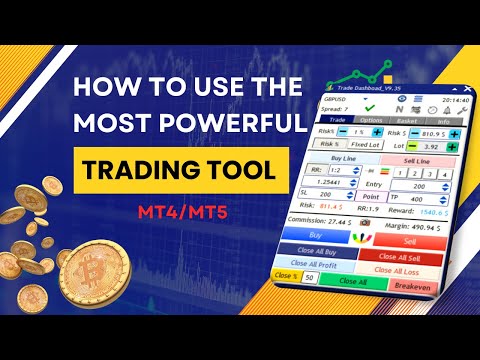
Tired of complex order placement and manual calculations? Trade Dashboard is your solution. With its user-friendly interface, placing orders becomes effortless, by a single click, you can open trades, set stop loss and take profit levels, manage trade lot size, and calculate risk to reward ratios, allowing you to only focus on your strategy. Say goodbye to manual calculations and streamline your trading experience with Trade Dashboard.

Download Demo Version right now.

You can find Details of Dashboard Functions and features here.

Watch Instructional Videos here.

Join Telegram Channel.

Please Message me after purchase for support. You can leave your ideas in the comment section of the product, if you need more features to be added, I am open to any suggestion and I want you to get the best experience from working with my products.

Purchase includes all future updates.

You can run the softwere on 10 different VPS/Computers with each purchase, 

Here is the MT5 Version.

Risk Management: Set your risk as a percentage of your balance or equity with Trade Dashboard. Or set your risk as a total amount of money, Visually define your stop loss on the chart, and let the tool accurately calculate the appropriate lot size for each currency pair. The tool also can automatically set your take profit level based on your desired risk-to-reward ratio. It even covers commission and spread fees in lot size calculations. Additionally, Your stop loss and take profit can turn to a virtual levels to keep it hidden from your broker. Take control of your risk and protect your capital with Trade Dashboard's advanced risk management capabilities.

Trade Lines: The beauty of this tool is perfect and simple visualization, you can visually set stop loss and take profit and entry levels, you can visually set risk free options, you can visually set trail start line, you can visually set expiration time for orders and again you can visually modify all of that. You can pin(lock) your stop loss to a certain price, so that when price moves, your lot size will be adjust based on new stop loss size while your stop loss price remain at its price.

Partial Close: Elevate your trading precision with our innovative Partial Close feature. Easily set multiple levels of partial stop loss or take profits visually, allowing for precise trade management. Adjust closure volumes based on initial or current lot sizes, and define distances with precision using points, RR ratio, or TP percentage.

Breakeven: Enjoy the added flexibility of setting a risk-free (breakeven) start line, ensuring your position becomes automatically risk-free after reaching a certain level of profit. The tool can set your lock profit amount in a way to compensate commission fee.

Trailig Stop Loss: With 8 types of trailing stop loss options, Trade Dashboard dynamically adjusts your stop loss as the price moves, maximizing your profit potential. Take full control of your trades and optimize your profitability with Trade Dashboard's powerful functionality. You have the option to set Regular, RRBased, Candle HH/LL, Profit, Moving Average, PSAR, ATR and Fractal based trailing stop types.

Grid: Placing Grid of orders with specified amount of distance and lot size multiplier.

Basket Management: Whether you have multiple buy or sell trades or follow a grid strategy, Trade Dashboard provides valuable insights. Visualize the breakeven price of your buy and sell orders directly on the chart. Take control of your trade baskets by setting a unified stop loss or take profit for your buy or sell positions. Additionally, define a universal stop loss and take profit for the entire basket. With the ability to close all trades at a specific equity level, Trade Dashboard proves useful for traders working with FTMO or similar firms. Simplify your trading process and gain a competitive edge with Trade Dashboard's comprehensive functionality.

Take Control of Manual trades: Trade Dashboard can identify your manual trades or trades that are taken by other EAs, You can take manual trades by your phone and let the tool set SL and TP automatically, or set partial close, risk free or trail stop functions for those trades.

Alert Tab: Do you have any support or resistance line for which you need to get notified if price touches that? This tab will alert you when price cross the lines you set on the chart.

Trade Task Schedular: Do you need to set a specified time for opening or closing a trade for example before news? Or do you want to close all positions or take an screenshot at a specified time or regularly every friday at a certain time? You can set any task to perform at a predefined time using the trade task schedular tool.

Session Indicator: Effortlessly track forex market sessions, customize time zones, and enhance your market timing. Identify optimal entry points and periods of inactivity with precision, empowering you to make informed trading decisions. It can also shows the start and end of the each session for the current day, directly on the chart.

Economic Calendar: I am sure you want to be aware of the economic news before you make trading decision, with economic calendar feature you can check the news of the current week categorized by impact and currency, the tool can put a line on the chart where the news is about to come. You can set the tool to close trades, give alert on the chart or your phone or take screenshot before or after a news. Every trader needs this feature.

Auto SL/TP: This feature is a practical one, especailly if you are a scalper, it can set your stop loss automatically based on ATR or Candle higher high or lower low prices, it can set TP automatically as well. Of course it adjust the lot size based on the auto stop loss value.


Over Trading: This feature is designed to stop you from over trading, it can restrict taking trades when you exceed a number of trades in a month, week, day, hour, minute or when you exceed an amout of loss or profit. 

Notification: When significant events, such as hitting stop-loss or take-profit, opening or closing trades, occur, you may find it essential to receive notifications or capture screenshots for reference. That is what notification settings do.

Hotkeys: Easily customize your trading experience by setting hotkeys directly on the chart for various actions. Activate or deactivate hotkeys for individual or multiple actions, and enhance flexibility by combining hotkeys with the shift key for seamless control.

Save/load settings: With Trade Dashboard, there's no need to navigate through lengthy lists in the EA input settings. Set up everything directly on the chart and save your configurations effortlessly. Additionally, you can save a default setting that automatically loads every time you run the EA, eliminating the need for manual adjustments each time.

Support 15 languages: English, German, French, Spanish, Portuguese, Italian, Russian, Chinese, Japanese, Korean, Turkish, Persian, Arabic, Vietnamese, Indonesian.

Differet Theme Colors: 9 different themes colors, Light Blue, Dark Blue, Navy Blue, All Dark, Semi Dark, Cyan, Black & White, Green, Brown.

Explore a wealth of functionalities with Trade Dashboard, including the ability to take hedge trades, execute reverse trades, utilize the close-by function, implement OCO (One-Cancels-the-Other), and virtual pending orders.

Take charge of your trading with the Trade Dashboard. Stay informed about risks, maintain control over trades and accounts. Its intuitive interface ensures quick adaptation. Our support team is available for assistance. Equip yourself with powerful tools for a competitive edge in the market.

Note: Trade Dashboard support all type of assets, including forex currencies, indices, metals, commodities, cryptocurrencies, and more.

Author: "My name is Ameri, With 8 years of finance studies and experience as both a trader and developer, I strive to simplify the lives for fellow traders. I personally use and constantly update my own product for trading, ensuring ongoing support. I look forward to connecting with you and being a part of your trading journey."

#Tags: Trade management, Risk management, Order Management, Trade Panel, Lot Size Calculator,LotSize Calculator, Visualization tools, Simplified trading, Precise position sizing, Risk-to-reward ratio,Risk Reward Tool, Alert Notifications,  Screenshot, Universal stop loss, Universal take profit, Trailing stop options, Risk-free options,Breakeven, Grid strategy, Equity protection, Scalp, Scalping, Scalper, Hotkeys, Close All, Hedge, Close By, Fast Trading, Trade basket management, Trading Panel, Trade Manager, Trading Assistant, Trade Assistant, Break Even, Partial Close, Virtual Stop Loss, Virtual Take Profit, Invisible Stop Loss, Invisible Take Profit, virtual pending order, News Panel, News Filter, Economic Calendar, Market Session, Task Schedular, Trade Timer, Auto stop loss, Auto Take Profit, Trade Notification, OverTrading. 


Avis 58
lesliez
96
lesliez 2025.10.07 10:01 
 

Awesome product and good customer service

kds778
54
kds778 2025.09.23 04:44 
 

The demo version is very fast, but the live version is extremely slow, both order processing and liquidation. What could be causing this? Is there a solution?

goldencoach27
25
goldencoach27 2025.04.24 16:08 
 

Very good Trade Dashboard! it is very useful ! Great product, i recommend it.

Produits recommandés
One more Copier MT4
Oleksii Chepurnyi
5 (1)
Yet another signal copier. Nothing special. Demo version can be downloaded here . Key Features The utility copies trades between terminals: by market, pending orders (optional), as well as their stop loss and take profit levels (optional as well). You can copy from one Master account to several Slave accounts, as well as from several Master accounts to one Slave account. Volume calculation At the moment, there are two options for calculating the volume: The trade volume is taken 1 to 1 from th
Pending Grid STOP Manual
Nantakan Leungonnam
5 (1)
Hola Traders. Lot - lot size for pending orders. Martingale - double lot size of pending orders. *(No Martingale = 1.00) TotalGridEachSide - unit each side of pending orders. SpaceOfFirstOrder - distance for the first order in points. Take Profit - profit in points. Stop Loss - loss in points. The entire positioning uses POINTS only. (10 point = 1 pip) and you can open order BUYSTOP, SELLSTOP, ALLBUYANDSELL you can Close Pending, Close orders Profit and Loss and Close All ***  ideas for using
Pending Grid LIMIT Manual
Nantakan Leungonnam
5 (3)
Hola Traders. Lot - lot size for pending orders. Martingale - double lot size of pending orders. *(No Martingale = 1.00) TotalGridEachSide - unit each side of pending orders. SpaceOfFirstOrder - distance for the first order in points. Take Profit - profit in points. Stop Loss - loss in points. The entire positioning uses POINTS only. (10 point = 1 pip) and you can open order BUYLIMIT, SELLLIMIT, ALLBUYANDSELL you can Close Pending, Close orders Profit and Loss and Close All ***  ideas for usin
Element 7
Vladimir Deryagin
The Expert Advisor works based on the analysis of candles (bars). The Expert Advisor settings are intuitive. You can use this Expert Advisor on any currency pair, having previously selected the settings using testing. Expert Advisor settings, description: Magic is a unique number of open trades. Volume - the trading volume of the initial transaction. A sign for increasing the lot with the selected coefficient-the choice of the action sign between the lot and the coefficient by which this
The panel has the most intuitive interface that every beginner can handle. In the SLp column  – you need to specify the SL size in pips. If the value turns gray and at the same time the Bay / Sell buttons are also inactive, then you have specified a SL value that is less than that allowed before it was set by your broker. In the TP% column   – you indicate TP in% of the account balance. In the settings, you can choose on the basis of what this indicator will be calculated, by equity, balance or
Watermark Symbol
Makarii Gubaydullin
Filigrane sur le graphique: Symbole + Calendrier / ou votre propre texte Mon utilitaire #1:   comprend plus de 66 fonctions |   Contactez-moi   si vous avez des questions Dans les paramètres de l'indicateur, vous pouvez configurer: Taille de la police; Couleur du texte; Nom de la Police; Position: 1 = En haut à gauche; 2 = En haut à droite; 3 = En bas à gauche; 4 = En bas à droite; 5 = Centre; Afficher la période actuelle: on / off; Le préfixe du symbole à supprimer (n_AUDCAD>> AUDCAD); Le suff
The utility is designed to send signals from MT4 to Telegram. It has several unique features, allowing not only the sending of trade signals but also the following functionalities: Send messages directly from the terminal to Telegram Send emojis along with custom text Send text and images from Telegram All of these features enable users to manage a signal channel while focusing on trading and finding quality signals. Customizable Signal Messages You can fully customize the signal message: Specif
Easy mt4 to telegram
Medilane Bernard Philippe Couratier
Jarfac Mt4ToTelegram Introduction Jarfac Mt4ToTelegram est un système MT4 conçu pour faciliter la communication en temps réel entre la plateforme MetaTrader 4 et Telegram. Ce script permet aux traders de recevoir des notifications instantanées personnalisables basées sur différents types de transactions, assurant ainsi une réactivité optimale sans avoir à surveiller constamment la plateforme de trading. Caractéristiques principales Notifications en temps réel  : Recevez des notifications directe
Pending Orders Grid Complete System opens any combination of Buy Stop, Sell Stop, Buy Limit and Sell Limit pending orders and closes all existing pending orders. You will be able to Drag-and-Drop the Script on the chart and it will pick up the start price for the first position in the grid from the "Drop" point. Usually it should be in the area of Support/Resistance lines. Input Parameters Before placing all pending orders, the input window is opened allowing you to modify all input parameters:
* The product for MT5 converted using  "BRiCK TradeByArrow MT4"  is  here. BRiCK is a simple and versatile utility.   By combining Experts, Indicators and utilities like the Lego block, various trading styles can be realized. "TradeByArrow" is Utility that executes order processing when an arrow object is created on the chart. Combined with Indicator which outputs arrow object, it can be used like Expert. Parameter [ArrowName] EntryBuy: Arrow object name for buy order (partial match) EntrySel
FREE
Order Trailing Pro
Makarii Gubaydullin
Trailing des ordres : obtenez le meilleur prix d'exécution à mesure que le marché évolue Les ordres en attente avec trailing vous permettront de maintenir la distance au prix d'entrée à la distance spécifiée. L'ordre se déplacera si le prix du marché s'éloigne de lui. Utilitaire multifonction : 66+ fonctionnalités, incluant cet outil | Contactez-moi si vous avez des questions | Version MT5 Pour activer le Trailing des Ordres, vous devez définir les 4 paramètres principaux (sur le panneau) : 1.
Session High Low Tracker
AL MOOSAWI ABDULLAH JAFFER BAQER
Session High Low Tracker - Essential Multi-Session Price Analysis Tool Powerful Market Session Analysis for Serious Traders Price: $30 Product Overview Session High Low Tracker is an advanced MetaTrader utility that automatically identifies and displays the high and low price points across Asian, London, and New York trading sessions. This professional-grade tool helps traders recognize key market levels, identify potential breakouts, and develop precise session-based trading strategies. Key Fea

Un seul graphique. Un contrôle total. Ne perdez plus de temps à gérer les objets, les couleurs et les paramètres de chaque graphique séparément.       Gestionnaire de synchronisation de graphiques   , vous pouvez       synchronisez, copiez et contrôlez tous vos graphiques MetaTrader       instantanément, en utilisant un seul panneau et quelques raccourcis. Dessinez une fois, actualisez partout. Ouvrez et fermez vos graphiques d'un simple clic. Gardez votre espace de travail propre grâce à      
Partial Close Expert   est un outil qui combine de nombreuses fonctionnalités en un seul système automatisé. Cet EA peut aider les traders à gérer leurs positions plus efficacement en offrant de multiples options pour gérer les risques et maximiser les gains potentiels. Avec Partial Close Expert, les traders peuvent définir une       fermeture partielle       niveau pour verrouiller les bénéfices, un       stop suiveur       niveau pour protéger les profits et limiter les pertes, un       seuil
Quick Lines
Andrey Vasilenko
A simple tool for trading on trend and horizontal lines. A small panel of buttons on the chart allows you to set trigger lines in one click and track their status. Market orders open automatically when the price touches the lines. The order direction (Buy or Sell) is set by the line color when it is installed. Allows you to apply an unlimited number of lines, they will work as the price touches. You can create any graphic patterns: levels, channels, triangles, flags, grids, etc. The principle

The  Silver Volatility Trend Line for MT4 is an EA that helps you trade using the trendlines, drawn on your chart. It basically allows you to send and manage orders using trend lines. It automatically calculates the True Range of your asset to allow you to send orders well calibrated with the market volatility. Take Profit and Stop Loss are calculated in number of True Range. You can do that for two different orders at the same time , so that you can trade two different kind of risk / profit rat

Shield ME
Mohamed Zein Mohamed Zein Soliman
The shield allows the trader to easily close all profit / loss positions instantly while being able to protect winning positions. Every trader needs it in their day trading with one click. Features : one click close all positions in profit. one click close all positions in loss one click protect all positions in profit. are you suggest more features ? please contact me!. NOTE:  demo will not work in backtest because it not support button action.  
Hello Trader, This EA let you manage your daily drawdown and profit. The EA close All market & pending orders  when your account reach a choosen level in daily drawdown and choosen level in profit. The level of the loss and the profit can be choosen by 3 ways;  - a pourcentage amount of your account - an amount in USD (profit and loss) - an equity target (minimum equity/maximum equity target)
Telegram Bot Signals Parser
AHMAD ALI MAHER MOHAMAD
1 (2)
MQL4 Expert parsing signals from Telegram bot and executing the orders. Install EA, Telegram. Create a telegram bot which will distribute signal and specify it's token in EA input settings as well as key words which will be used to parse a signal. You can change or add key words by your own. Default values (lot, stops) are used in case the incoming signal don't include them. Specify "Allow DLL imports" in EA Settings.
Complete Pending Orders Grid System opens any combinations of Buy Stop, Sell Stop, Buy Limit and Sell Limit pending orders and closes all existing pending orders. You just need to drop this script on the chart of a desired currency pair. Before placing all pending orders, the input window is opened allowing you to modify all input parameters: DeleteAllPendings – if true , then all pending orders (for current currency) will be deleted. BuyStop – if true , BuyStop order is opened. SellStop – if tr
Pending provider
Andrey Frolov
5 (1)
The script greatly simplifies trader's work with pending stop orders (BuyStop, SellStop). The script places any number of pending orders at a user-defined distance (in points). Order expiration time in seconds can also be specified. It is also possible to place only Buy Stop or only Sell Stop orders. All stop orders are accompanied by user-defined take profit and stop loss levels. Volume is customizable as well. Parameters Open BuyStop - place a pending Buy order Open SellStop - place a pending
Trading Board is a Tool That Help you execute Sell and Buy Operation very smoothly. General Description : This Tool has this functions: The function of Send Buy or Sell orders. The function to close all orders in the current chart. Choose the volume you need to trade. Calculate of Stop loss and Take Profit with the number of points. Draw the Fibonacci retracement.
FREE
Pending Orders Grid Complete System opens any combination of Buy Stop, Sell Stop, Buy Limit and Sell Limit pending orders and closes all existing pending orders. You will have a possibility to put a legitimate Open Price for the first position in the grid. Usually it should in the area of Support/Resistance lines. You just need to drop this script on the chart of a desired currency pair. Input Parameters Before placing all pending orders, the input window is opened allowing you to modify all in

Mt4ToTelegramAlter  is an app that communicates with a Telegram bot to share your orders flow and report open orders from Metatrader 4 terminal to a Telegram group or channel. Features Telegram channel, group, chat compatible Easy to use Report open order Configuration 1. Service -> Settings -> Expert Advisors -> Allow WebRequest for the following URLs (Add URL:   https://api.telegram.org ); 2. Create your own bot on Telegram at @BotFather. Remember Token, it looks something like this - xxxx:yy
Send mail demo
Oleksii Pidlubnyi
This Expert Advisor sends an email notification, generates an alert or outputs a message to the journal (depending on the settings) every time a new order is opened (buy, sell, limit, stop). It also sends a similar message about closure of orders. The EA can be useful for those who want to always be informed of which orders had been opened/closed on the account. Limitations: In this demo version, notifications are available only for the GBPCHF currency pair. To use notifications on all currency
FREE
The professional utilities "Ichimoku Waves Meter" to analyse graphs using the correct interpretation of Ichimoku kinkōhyō! Is a graphic program that allows traders to quickly and easily measure the proportions between the indicated points on the price graph. This time and price indicator is a basic tool for analysing the chart according to the Ichimoku strategy on the MT4 platform. Using this tool allows an insightful and complete analysis of time waves as well as price waves in a very short ti
Telegram Forwarder can forward all activities related to trades and position taking as a signal to Telegram messenger. It can also forward indicators' alert to Telegram if you modify indicator code (I can do it for you too) to hand over alerts to Telegram Forwarder. This EA is intended for business and professional usage. You can introduce your own Telegram bot and customize water mark in screenshots. Telegram forwarder is able to forward signals for "new order", "modification of order", "Pendin
Полуавтоматический торговый робот Booster Seven помогает трейдеру торговат, решения о торговле в направленнии Buy или Sell принимает трейдер. У робота на графике выведенны функции Buy, Sell, Buy Stop, Sell Stop, Buy Limit, Sell limit и AUTO S/L. Также статистические параметры торговли. При выборе функции Buy торговля начнется открытием позиции Buy начальным лотом, имеющим соответствующие Stop Loss и Take Profit. Новая позиция открывается, когда цена на указанный пункт превысит отметку предыдушег
DrawDownControl
Andrey Shvecov
This Expert Advisor is designed to control drawdown by the symbol it is set to. The Expert Advisor does not carry out trading operations on opening positions, only closing open positions on the symbol on which it is set under certain conditions! There are three drawdown levels implemented in the Expert Advisor. The drawdown size for each level is set in the input parameters and the profit size is assigned (it can be either positive or negative), upon reaching which the ADVISER will close all po
Pointer synchronization
Roger Perez Lugo
4 (1)
Pointer synchronization is an indicator with which the pointer can be synchronized in all the visible charts of the terminal. It shows a crossed cursor in all the visible charts of the terminal, in position relative to the cursor of the active chart. To activate the indicator, simply press the button that appears in one of the corners of the chart once the indicator is added to the chart. To deactivate the indicator, simply press the button again. Once the indicator has been deactivated, the cr
Les acheteurs de ce produit ont également acheté
Bienvenue sur Trade Manager EA, l’outil ultime de gestion des risques conçu pour rendre le trading plus intuitif, précis et efficace. Ce n’est pas seulement un outil d’exécution d’ordres ; c’est une solution complète pour la planification des trades, la gestion des positions et le contrôle des risques. Que vous soyez débutant, trader expérimenté ou scalpeur ayant besoin d’une exécution rapide, Trade Manager EA s’adapte à vos besoins, offrant une flexibilité sur tous les marchés, des devises et i
Trade Assistant MT4
Evgeniy Kravchenko
4.43 (191)
It helps to calculate the risk per trade, the easy installation of a new order, order management with partial closing functions, trailing stop of 7 types and other useful functions. Additional materials and instructions Installation instructions   -   Application instructions   -   Trial version of the application for a demo account Line function -   shows on the chart the Opening line, Stop Loss, Take Profit. With this function it is easy to set a new order and see its additional characteris
The product will copy all telegram signal to MT4   ( which you are member  ) , also it can work as remote copier.  Easy to set up, copy order instant, can work with almost signal formats, image signal, s upport to translate other language to English Work with all type of channel or group, even channel have "Restrict Saving Content", work with  multi channel, multi MT5 Work as remote copier: with signal have ticket number, it will copy exactly via ticket number. Support to backtest signal. How to
TradePanel MT4
Alfiya Fazylova
4.84 (89)
Trade Panel est un assistant commercial multifonctionnel. L'application contient plus de 50 fonctions de trading pour le trading manuel et vous permet d'automatiser la plupart des opérations de trading. Attention, l'application ne fonctionne pas dans le testeur de stratégie. Avant d'acheter, vous pouvez tester la version démo sur un compte démo. Version démo ici . Instructions complètes ici . Commerce. Permet d'effectuer des opérations de trading en un clic : Ouvrez des ordres et des positions e
Copy Cat More Trade Copier MT4 (Copie Chat MT4) n’est pas seulement un simple copieur de trades local ; c’est un cadre complet de gestion des risques et d’exécution conçu pour les défis actuels du trading. Des challenges de prop firms à la gestion de comptes personnels, il s’adapte à chaque situation grâce à une combinaison d’exécution robuste, de protection du capital, de configuration flexible et de traitement avancé des opérations. Le copieur fonctionne en mode Master (émetteur) et en mode Sl
Exp COPYLOT CLIENT for MT4
Vladislav Andruschenko
4.69 (64)
Copieur commercial pour MetaTrader 4.       Il copie les transactions de change, les positions et les ordres de tous les comptes. C'est l'un des meilleurs copieurs commerciaux       MT4 - MT4, MT5 - MT4       pour le       COPYLOTE MT4       version (ou       MT4 - MT5 MT5 - MT5       pour le       COPYLOTE MT5       version). Version MT5 Description complète   +DEMO +PDF Comment acheter Comment installer     Comment obtenir des fichiers journaux     Comment tester et optimiser     Tous les p
News Filter EA: Advanced Algo Trading Assistant News Filter EA is an advanced algo trading assistant designed to enhance your trading experience. By using the   News Filter EA , you can integrate a Forex economic news filter into your existing expert advisor, even if you do not have access to its source code. In addition to the news filter, you can also specify   trading days   and   hours   for your expert. The News Filter EA also includes   risk management   and   equity protection   features
PZ Trade Pad Pro MT4
PZ TRADING SLU
5 (2)
Effortlessly calculate lot sizes and manage trades to save time and avoid costly errors The Trade Pad Pro EA is a tool for the Metatrader Platform that aims to help traders manage their trades more efficiently and effectively. It has a user-friendly visual interface that allows users to easily place and manage an unlimited number of trades, helping to avoid human errors and enhance their trading activity. One of the key features of the Trade Pad Pro EA is its focus on risk and position manageme
Le MT4 to Telegram Signal Provider est un outil facile à utiliser et entièrement personnalisable qui permet d'envoyer des signaux à Telegram, transformant ainsi votre compte en fournisseur de signaux. Le format des messages est entièrement personnalisable ! Cependant, pour une utilisation simple, vous pouvez également opter pour un modèle prédéfini et activer ou désactiver des parties spécifiques du message. [ Démonstration ]   [ Manuel ] [ Version MT5 ] [ Version Discord ] [ Canal Telegram ]  N
Risk Manager for MT4
Sergey Batudayev
4.6 (10)
Expert Advisor Risk Manager pour MT4 est un programme très important et, à mon avis, nécessaire pour chaque commerçant. Avec cet Expert Advisor, vous pourrez contrôler le risque de votre compte de trading. Le contrôle des risques et des bénéfices peut être effectué à la fois en termes monétaires et en termes de pourcentage. Pour que l'Expert Advisor fonctionne, attachez-le simplement au tableau des paires de devises et définissez les valeurs de risque acceptables dans la devise du dépôt ou en
The Risk and Reward calculator is designed to place market and pending orders. You only need to set the risk size you are willing to risk in one trade and the Stop Loss level. The calculator will calculate the required lot size for this. And by setting the Risk Reward size, you can set the ratio of expected profit to risk in one position. For example, you are willing to risk one dollar in one trade and, if the market moves in your favor, you want to make a profit of 2 times more. Then you need
Everything for chart Technical Analysis indicator MT4 in one tool Draw your supply demand zone with rectangle and support resistance with trendline and get alerts to mobile phone or email alert -  Risk reward indicator Video tutorials, manuals, DEMO download   here .  Find contacts on my   profile . 1.   Extended rectangles and trendlines Object will be extended to the right edge of the chart when price will draw new candles on chart. This is rectangle extender or trendline extender. 2. Price to
Your Smart Trading Assistant for the Forex Market Introducing a powerful MetaTrader tool designed to revolutionize the way you trade. This intelligent assistant goes beyond traditional indicators to provide a comprehensive, AI-driven market analysis — so you can trade with clarity and confidence. What It Does This advanced tool continuously monitors and analyzes a wide range of market data to deliver high-quality trading insights. It reads between the lines of financial news, scans the forex ma
Telegram to MT4 Coppy
Sergey Batudayev
3.57 (7)
Télégramme vers MT4 :   la solution ultime pour copier des signaux Simplifiez votre trading avec   Telegram vers MT4   , l'utilitaire de pointe conçu pour copier les signaux de trading directement depuis les canaux et chats Telegram vers votre plateforme MetaTrader 4, sans DLL. Cette solution robuste garantit une exécution fluide des signaux avec une précision et des options de personnalisation inégalées, vous faisant gagner du temps et optimisant votre efficacité. [ Instructions and DEMO ] Cara
Telegram To MT4 Receiver
Levi Dane Benjamin
4.2 (5)
Copiez les signaux de n'importe quel canal dont vous êtes membre (y compris privé et restreint) directement sur votre MT4.  Cet outil a été conçu en pensant à l'utilisateur tout en offrant de nombreuses fonctionnalités dont vous avez besoin pour gérer et surveiller les transactions. Ce produit est présenté dans une interface graphique conviviale et visuellement attrayante. Personnalisez vos paramètres et commencez à utiliser le produit en quelques minutes ! Guide de l'utilisateur + Démo  | Ver
VirtualTradePad mt4 Extra
Vladislav Andruschenko
4.86 (58)
Panneau de trading pour trader en 1 clic.   Travailler avec des positions et des commandes!   Trading à partir du graphique ou du clavier. En utilisant notre panel de trading, vous pouvez trader en un clic à partir du graphique et effectuer des opérations de trading 30 fois plus rapidement que le contrôle MetaTrader standard. Des calculs automatiques de paramètres et de fonctions qui facilitent la vie d'un trader et aident un trader à mener ses activités de trading beaucoup plus rapidement et pl
Négociez automatiquement les zones de support et de résistance ou d'offre et de demande une fois que vous avez identifié les zones clés à partir desquelles vous souhaitez négocier. Cet EA vous permet de dessiner des zones d'achat et de vente en un seul clic, puis de les placer exactement là où vous vous attendez à ce que le prix change. L'EA surveille ensuite ces zones et effectuera automatiquement des transactions en fonction de l'action des prix que vous spécifiez pour les zones. Une fois la
EasyInsight AIO MT4
Alain Verleyen
3 (1)
EASY Insight AIO – La solution tout-en-un pour un trading intelligent et sans effort Présentation Imaginez pouvoir analyser l’ensemble du marché — Forex, Or, Crypto, Indices et même Actions — en quelques secondes, sans aucune analyse manuelle de graphiques, sans installation complexe ni configuration d’indicateurs. EASY Insight AIO est votre outil d’exportation ultime, prêt à l’emploi, pour un trading alimenté par l’IA. Il fournit une vue d’ensemble du marché dans un fichier CSV propre — prêt
Unlimited Trade Copier Pro is a tool to copy trade remotely to multiple MT4, MT5 and cTrader accounts at different computers/locations over internet. This is an ideal solution for you if you are a signal provider and want to copy your trades to other receivers globally on your own rules. One provider can copy trades to multiple receivers and one receiver can get trade from multiple providers as well. The provider can even set the subscription expiry for each receiver, so that receiver will not b
RiskManager
Roman Zhitnik
5 (4)
The Expert Advisor is a risk manager helping users to control their trading. In the settings, it is possible to specify the parameters at which the risk manager force closes the opened trades and closes the terminal as well, if it is needed to prevent opening trades on emotions, which do not correspond to the trading strategy. Risk Manager settings Check limit to close - check the equity limit Limit to close (account currency)   - equity limit that is checked when  Check limit to close is activ
Ultimate Trailing Stop EA
BLAKE STEVEN RODGER
4.33 (15)
This EA Utility allows you to manage (with advanced filtering) unlimited open orders (manual or EA) with 16 trailing stop methods: fixed, percent, ATR Exit, Chandelier Exit, Moving Average, Candle High Low Exit, Bollinger Bands, Parabolic, Envelope, Fractal, Ichimoku Kijun-Sen, Alligator, Exit After X Minutes or Bars, RSI and Stochastic. The trailing stop can be either real or virtual, and you can exit fully or with a partial close percent on touch or bar close.  Moreover, you can add (overrid
Trade Reverse Copie4
Chukwuemeka Kingsley Anyanwu
Feel free to contact me for any extra features :) [SEE MT5 VERSION  https://www.mql5.com/en/market/product/128846 The Local Reverse Copier is an Expert Advisor designed to synchronize positions between a Master account and a Slave account with a twist: it reverses the trades. When a buy position is opened on the Master account, the EA opens a sell position on the Slave account, and vice versa. This allows for a unique form of trade copying where positions are mirrored in opposite directions bet
Grid Manual MT4
Alfiya Fazylova
4.71 (17)
Grid Manual est un panneau de trading permettant de travailler avec une grille d'ordres. L'utilitaire est universel, possède des paramètres flexibles et une interface intuitive. Il fonctionne avec une grille d'ordres non seulement dans le sens des pertes, mais aussi dans le sens de l'augmentation des profits. Le commerçant n'a pas besoin de créer et de maintenir une grille d'ordres, l'utilitaire le fera. Il suffit d'ouvrir une commande et "Grid Manual" créera automatiquement une grille de comman
The Expert Advisor will help you forward all pop-up alert with screenshot from  MetaTrader 4 to Telegram channel/ group, also forward all notifications to Telegram. Parameters  -  Telegram Bot Token - create bot on Telegram and get token.  -  Telegram Chat ID  - input your Telegram user ID,  group / channel ID  -  Forward Alert - default true, to forward alert.  -  Send message as caption of Screenshot - default false, set true to send message below Screenshot  How to setup and guide  - Telegram
Trade Manager MT4 DaneTrades
Levi Dane Benjamin
4.09 (11)
Trade Manager pour vous aider à entrer et sortir rapidement des transactions tout en calculant automatiquement votre risque. Y compris des fonctionnalités pour vous aider à éviter le sur-trading, le trading de vengeance et le trading émotionnel. Les transactions peuvent être gérées automatiquement et les mesures de performances du compte peuvent être visualisées dans un graphique. Ces fonctionnalités rendent ce panneau idéal pour tous les traders manuels et contribuent à améliorer la plateforme
Consultez instantanément l'historique de vos transactions clôturées par jour et par semaine, vos transactions ouvertes actuelles et votre exposition au forex sur un seul graphique ! Utilisez la carte thermique pour identifier les transactions rentables et où se situe votre baisse actuelle au sein de votre portefeuille de trading. Boutons de fermeture rapide Utilisez les boutons de fermeture rapide pour clôturer chaque transaction sur un seul symbole, clôturer des transactions individuelles en
Remote Trade Copier   is an advanced tool designed for efficiently copying trades between accounts in both   local   and   remote   modes. It allows for lightning-fast order replication from a master account to a slave account. In local mode, trades are copied instantly, while in remote mode, the copying process takes a second.  In new version, in remote mode , the copy operation can be performed with a delay of milliseconds or zero . After purchase, ask how to activate it MT4 Version (Only Loc
Copieur ->Interaction d'interface pratique et rapide, les utilisateurs peuvent l'utiliser immédiatement       ->>>> Recommandé pour une utilisation sur des ordinateurs Windows ou VPS Windows Caractéristiques: Paramètres de copy trading diversifiés et personnalisés : 1. Différents modes de lot peuvent être définis pour différentes sources de signaux 2. Différentes sources de signaux peuvent être définies pour le copy trading avant et arrière 3. Les signaux peuvent être définis avec des commentai
Comprehensive on chart trade panel with the unique ability to be controllable from mobile as well. Plus has a library of downloadable configuration, e.g. exit rules, extra panel buttons, pending order setup and more. Please see our product video. Works with all symbols not just currency pairs. Features On chart panel plus controllable from free app for Windows, iPhone and Android Built-in script engine with library of downloadable configuration, e.g. add 'Close All Trades in Profit' button, exit
Click and Go Trade Manager
Victor Christiaanse
5 (8)
Click and Go Trade Manager, the ultimate solution for seamless trading execution. With a simple click on the chart, you can effortlessly define your stop loss, entry price, and target levels. No more hassle of inputting values manually - it's made incredibly intuitive and easy. Embedded risk management is a key feature of our Trade Manager. We understand the importance of protecting your investments, which is why the Click and Go Trade Manager incorporates risk management. When placing orders,
Plus de l'auteur
Trade Dashboard MT5
Fatemeh Ameri
4.96 (92)
Tired of complex order placement and manual calculations? Trade Dashboard is your solution. With its user-friendly interface, placing orders becomes effortless, by a single click, you can open trades, set stop loss and take profit levels, manage trade lot size, and calculate risk to reward ratios, allowing you to only focus on your strategy. Say goodbye to manual calculations and streamline your trading experience with Trade Dashboard. Download  Demo Version  right now. You can find  Details of
Pro MA Angle
Fatemeh Ameri
5 (1)
This indicator is a professional Trend identifier, it measures the angle or slope of moving averages with different methods. As this indicator calculate angles you can identify the strength of trend by magnitude of angle. It also shows if angle is increasing or decreasing which gives you the opportunity to make more information about current trend. You can combine this indicator with your strategy as a filter or you can use it alone to make your trading system. This is not a repainting indicator
FREE
Pro Close Panel
Fatemeh Ameri
3.75 (4)
This is a very simple yet useful tool to close positions with different conditions and methods. You can use panel buttons to close positions or set multiple rules to close all positions. Panel has two main tab, Active Order and Pending Orders: Active Tab: You can set profit or loss target to close all positions. You can set equity target to close all positions, You can set a special time to close all positions. Moreover, by panel buttons you can close only buy/sell positions or only negative/pos
FREE
Filtrer:
lesliez
96
lesliez 2025.10.07 10:01 
 

Awesome product and good customer service

kds778
54
kds778 2025.09.23 04:44 
 

The demo version is very fast, but the live version is extremely slow, both order processing and liquidation. What could be causing this? Is there a solution?

Fatemeh Ameri
13855
Réponse du développeur Fatemeh Ameri 2025.09.23 07:20
Hello you, thanks for purchasing TD and thanks for the review.
It is exactly the same code in demo and live, so the difference is not the product, it must be related to your broker response time and also your internet quality.
So try good brokers and make sure you have good internet connections.
goldencoach27
25
goldencoach27 2025.04.24 16:08 
 

Very good Trade Dashboard! it is very useful ! Great product, i recommend it.

maakufx
229
maakufx 2025.04.18 17:14 
 

it keeps on crashing when i move from one pair to another. and support is non existent, i posted 6 days ago and no reply

Fatemeh Ameri
13855
Réponse du développeur Fatemeh Ameri 2025.04.18 18:17
Hello, Sorry for the delay to respond, our team missed your message in the comment section, you had better text me in the MQL5 messenger or Telegram.
Please provide more information about your crash, there has been no such report from other customers. Are you log in to your account when you put the EA on the chart? what is written in the Expert tab when it crashes? plz provide some pictures or a short video of your problem. thanks.
Lord  Pepe
31
Lord Pepe 2025.04.18 14:55 
 

Made me much more consistent. Best 50 bucks ive spent!

johanesi
34
johanesi 2025.03.17 15:07 
 

Trade Dashboard by Fatemeh Ameri is a game-changer! It’s fast, user-friendly, and lets me manage multiple pairs from one panel. The built-in risk management features make trading easier and more efficient. Highly recommended for any serious trader!

Heb852
249
Heb852 2025.03.17 14:10 
 

This is a fantastic tool; I was able to do away with opening and closing multiple EA's. Completely streamlines trades in all phases from 1 dashboard. Brilliant!!!

Type636
56
Type636 2025.03.06 21:04 
 

Simply, AMAZING piece of coding!! Trading just became easier!!! Plus you can't beat the discounted price!!!

Followup: Support is just incredible, quick, friendly, and very patient!!

KKYLin
86
KKYLin 2025.01.18 23:43 
 

Just the tool that anyone needs in trading really, great UI housing lots of different tools to gear anyone for their trading style, great communication and continuous update to the tool, great job Fatemeh!!!

David Montero
34
David Montero 2024.12.28 20:54 
 

L'utilisateur n'a laissé aucun commentaire sur la note

Fatemeh Ameri
13855
Réponse du développeur Fatemeh Ameri 2024.12.28 20:57
hola, gracias por tu reseña, te enviaré un mensaje y responderé tu pregunta en privado.
sametd1
108
sametd1 2024.12.23 07:24 
 

I love it. It's one of the most useful tools I've ever seen. Thank you for bringing this to us.

mickaswah
125
mickaswah 2024.12.04 22:58 
 

This is a great product with loads of features to control and manage risk in the trading environment. Highly recommended and worthwhile for the price the developer is asking.

Hoodofcrypto
162
Hoodofcrypto 2024.11.25 20:04 
 

EA is so well packed! And seller is so very communicative in helping master everyone of those features in the EA. It is everything I ever wanted. Licensing? Fact that I can use it on iunlimited terminals is insane really I love it. Happy with my purchase.

SniFx
82
SniFx 2024.11.21 22:30 
 

Very useful tool.

SharkyTrader
921
SharkyTrader 2024.10.17 18:02 
 

the EA is such a great tool, I use it every trading day and it not only makes the main task (= risk control) easier for me but has many small functions that would mean a lot of effort if you want to do it manually (different partial take profits, trailing stops, setting breakeven etc.). And in the meantime it has also replaced other EAs that I used for grid/basket trading because it also includes these functions. I can recommend it without reservation!

Woodyz14
234
Woodyz14 2024.10.09 12:27 
 

I have tried & use multiple Trade Assistants over the years & this one is by far the best I have ever used. It ticks all the boxes & more, making it the best trade assistant on the market today IMO. What I especially like is the addition of the built in symbol changer (With no lag) I therefore highly recommend this EA to everyone wanting only the best to assist them in their trading. I would also like to say that the support for this EA is not only prompt but very good IMO.

Walter Ludwig Tengler
557
Walter Ludwig Tengler 2024.10.09 07:57 
 

It's a must have tool!

Stefan.Andras
24
Stefan.Andras 2024.10.03 23:34 
 

Absolutely a must have tool. The Swiss army knife of traders. Convenient user interface while taking up minimal space on the screen. Deserve much more than 5 star. Thank you Ameri.

Luis Eliud Velasquez Da Rocha
124
Luis Eliud Velasquez Da Rocha 2024.09.14 01:21 
 

Great EA, is all that I need for my trades. Good support and very easy to operate with it.

Fatemeh Ameri
13855
Réponse du développeur Fatemeh Ameri 2024.09.14 14:02
Hello Sir, thanks for your purchase, why don't you message me? I'll help. I already messaged you, plz respond.
DanyLbc747
1223
DanyLbc747 2024.08.20 12:42 
 

A good tool for trading. It helps me a lot.

123
Répondre à l'avis