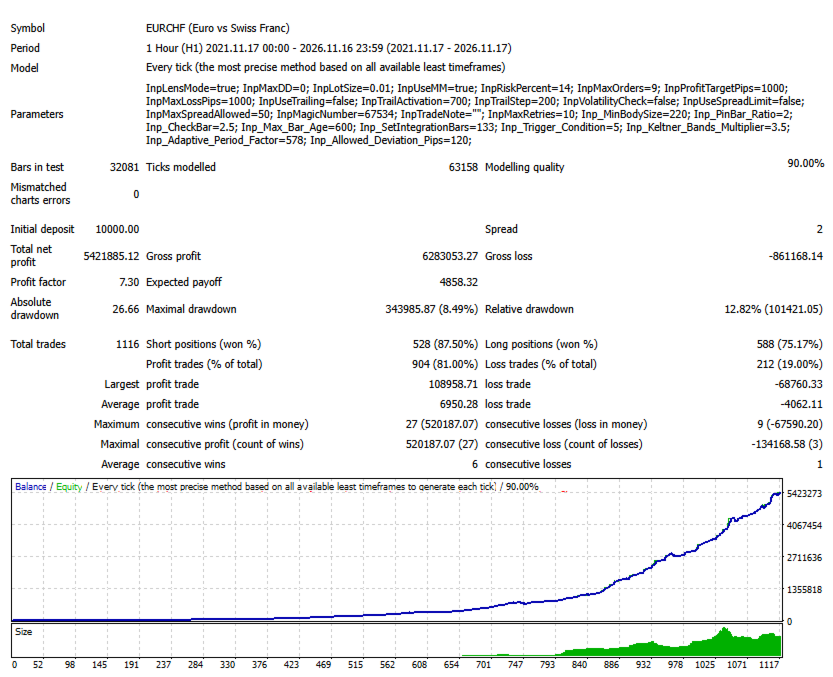
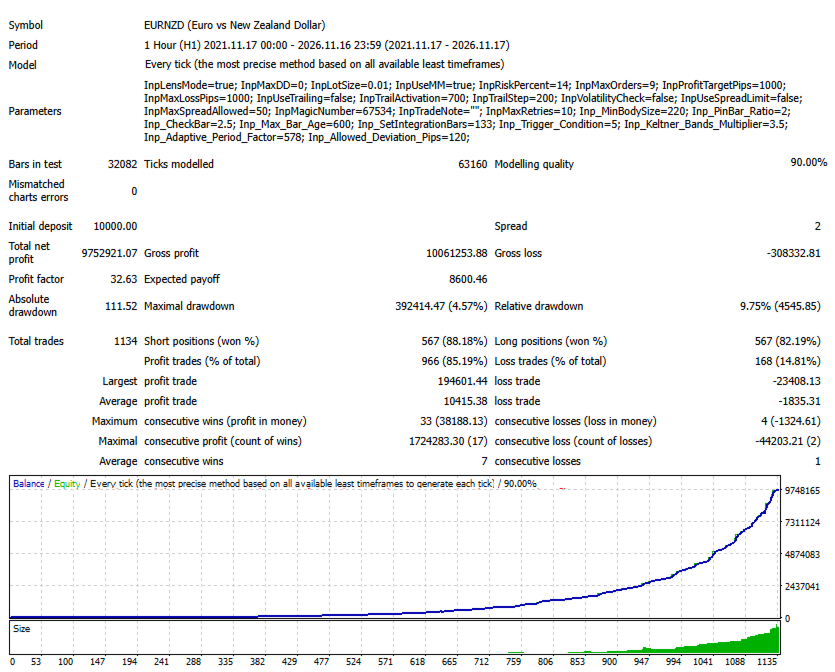
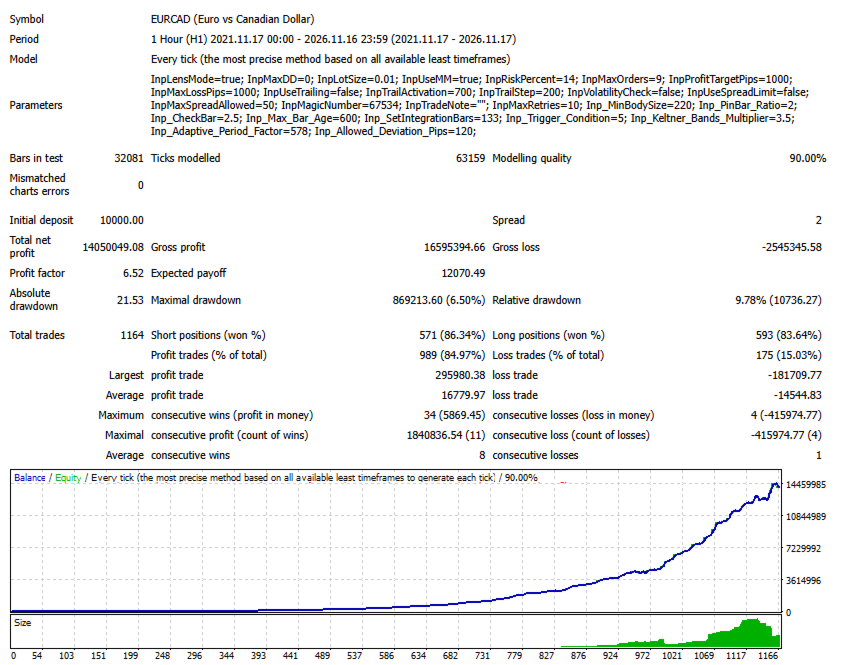
ProMeta

ProMeta — Expert Advisor for MetaTrader 4

Short Description

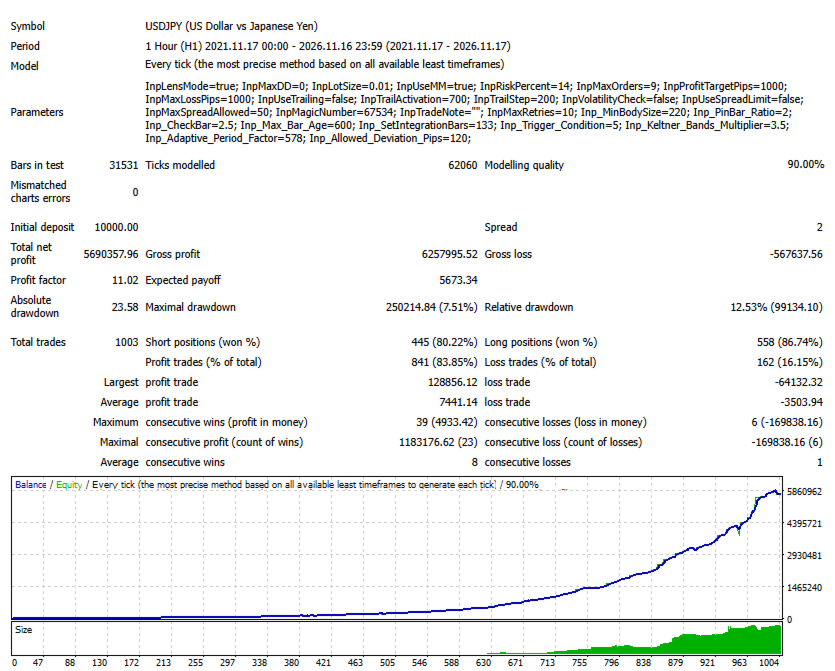
ProMeta is an automated trading solution for MetaTrader 4, designed around configurable market analysis, a multi-parameter signal framework, and flexible trade management. It offers adjustable position sizing, order limits, profit and loss targets, and optional market condition filters.

Product Overview

ProMeta is an Expert Advisor developed to handle trading operations automatically within the MetaTrader 4 environment. It processes price data, evaluates potential trading conditions, and manages orders according to the configuration selected by the user.

Its trading logic combines several adjustable analytical parameters. This gives traders the ability to fine-tune signal sensitivity, modify the behavior of the analysis process, and configure the EA according to their preferred trading instruments and market conditions.

Rather than relying on a single fixed configuration, ProMeta provides a range of input settings that allow users to customize essential aspects of its operation, including position volume, order limits, trade targets, and position management.

Configurable Market Analysis

ProMeta evaluates price activity using a collection of adjustable analytical inputs designed to define the conditions considered by its trading algorithm.

The analysis settings are divided into two parameter groups, each with its own configuration. This structure makes it possible to adjust different aspects of signal evaluation independently.

Traders can experiment with various parameter combinations to find a configuration that suits their selected instrument, timeframe, and trading preferences.

Multi-Parameter Signal Logic

The signal evaluation process uses several configurable inputs to establish the conditions under which potential trading signals are recognized.

Available settings include candle body size, Pin Bar ratio, bar validation parameters, maximum bar age, trigger conditions, and additional analytical coefficients.

The configuration also includes parameters associated with Keltner Bands and the permitted price deviation in pips.

By adjusting these inputs, users can change the overall configuration of the signal system and explore different approaches to market analysis without modifying the EA's source code.

Comprehensive Trade Management

ProMeta includes a set of controls for defining how trading operations are handled after the EA is launched.

Users can configure:

  • The maximum number of orders allowed.

  • The target profit level for trading operations.

  • The maximum loss level.

  • Trailing Stop activation conditions and movement steps.

  • The number of retry attempts for trade operations.

Additional settings include a Magic Number for identifying the EA's orders and a custom trade comment for easier order identification.

Flexible Position Sizing

ProMeta supports two position sizing approaches, allowing traders to select the method that best matches their preferences.

Fixed Lot Mode

Users can specify the desired trading volume through the InpLotSize parameter.

Automatic Money Management

When InpUseMM is enabled, the EA uses the InpRiskPercent parameter as part of its automatic position sizing configuration.

This provides an alternative to manually specifying a fixed lot size and allows users to adjust the corresponding input according to their chosen setup.

Optional Market Filters

ProMeta includes additional settings that can be used to control the market conditions under which trading operations are permitted.

The available filters include volatility checking and spread limitation.

When spread control is enabled, InpMaxSpreadAllowed defines the maximum spread threshold used by the filter.

Both options are disabled in the default configuration, giving users the freedom to decide whether these additional restrictions should be applied.

Input Parameters

General Configuration

  • InpLensMode — enables or disables Lens Mode.

  • InpMaxDD — drawdown-related configuration parameter.

  • InpMaxRetries — maximum number of retry attempts for trade operations.

Money Management

  • InpLotSize — fixed trading volume.

  • InpUseMM — enables or disables automatic money management.

  • InpRiskPercent — percentage-based input used by the automatic position sizing configuration.

Order Management

  • InpMaxOrders — maximum permitted number of orders.

  • InpProfitTargetPips — target profit level in pips.

  • InpMaxLossPips — maximum loss level in pips.

  • InpMagicNumber — unique identifier assigned to the EA's orders.

  • InpTradeNote — custom comment attached to trading operations.

Position Management

  • InpUseTrailing — enables or disables Trailing Stop.

  • InpTrailActivation — activation level for Trailing Stop.

  • InpTrailStep — Trailing Stop adjustment step.

Market Filters

  • InpVolatilityCheck — enables or disables volatility checking.

  • InpUseSpreadLimit — activates or deactivates spread limitation.

  • InpMaxSpreadAllowed — maximum permitted spread threshold.

Signal Analysis

  • Inp_MinBodySize — minimum candle body size setting.

  • Inp_PinBar_Ratio — Pin Bar ratio parameter.

  • Inp_CheckBar — additional bar validation parameter.

  • Inp_Max_Bar_Age — maximum permitted age of an analyzed bar.

  • Inp_SetIntegrationBars — bar quantity parameter for the second analysis group.

  • Inp_Trigger_Condition — signal activation condition setting.

  • Inp_Keltner_Bands_Multiplier — coefficient associated with Keltner Bands.

  • Inp_Adaptive_Period_Factor — adaptive analysis period parameter.

  • Inp_Allowed_Deviation_Pips — permitted price deviation in pips.

Default Configuration

ProMeta comes with the following initial settings:

Parameter Default Value
Lens Mode Enabled
Maximum Drawdown Parameter 0.0
Fixed Lot 0.01
Money Management Enabled
Risk Percent 14.0
Maximum Orders 9
Profit Target 1000 pips
Maximum Loss 1000 pips
Trailing Stop Disabled
Trailing Activation 700
Trailing Step 200
Volatility Check Disabled
Spread Limit Disabled
Maximum Spread 50
Magic Number 67534
Maximum Retries 10

These values provide an initial configuration. Users can review and adjust the available inputs before running the EA according to their preferred trading conditions.

Installation and Setup

  1. Launch MetaTrader 4.

  2. Select File → Open Data Folder.

  3. Navigate to the MQL4/Experts directory.

  4. Copy the ProMeta EA file into this folder.

  5. Restart MetaTrader 4 or refresh the Expert Advisors list in the Navigator window.

  6. Attach ProMeta to the chart of your chosen trading instrument.

  7. Review the input parameters and enable automated trading.

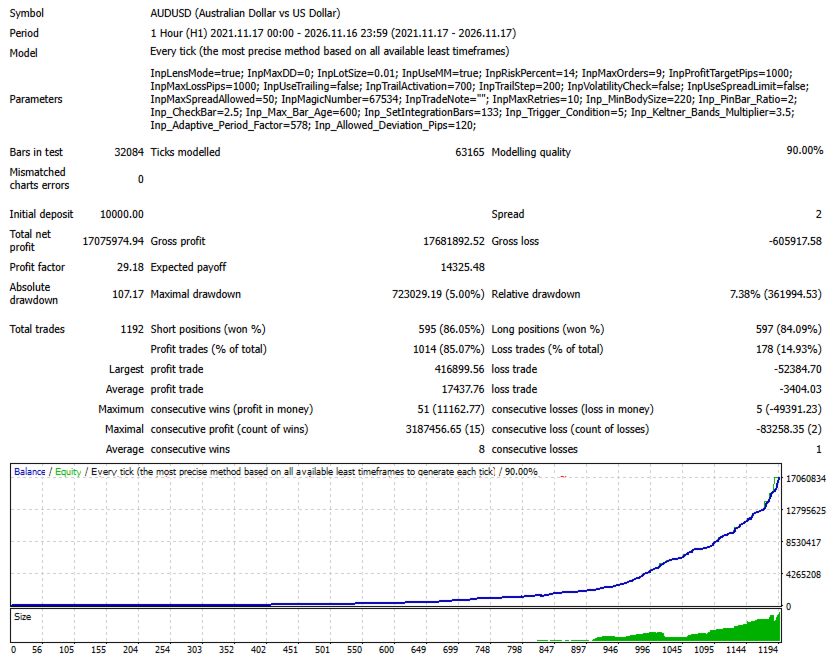
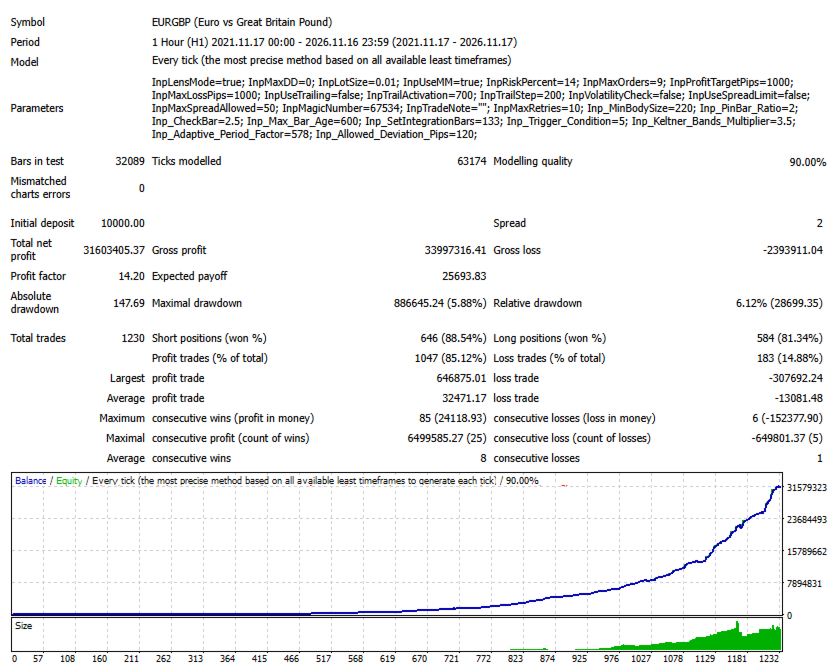
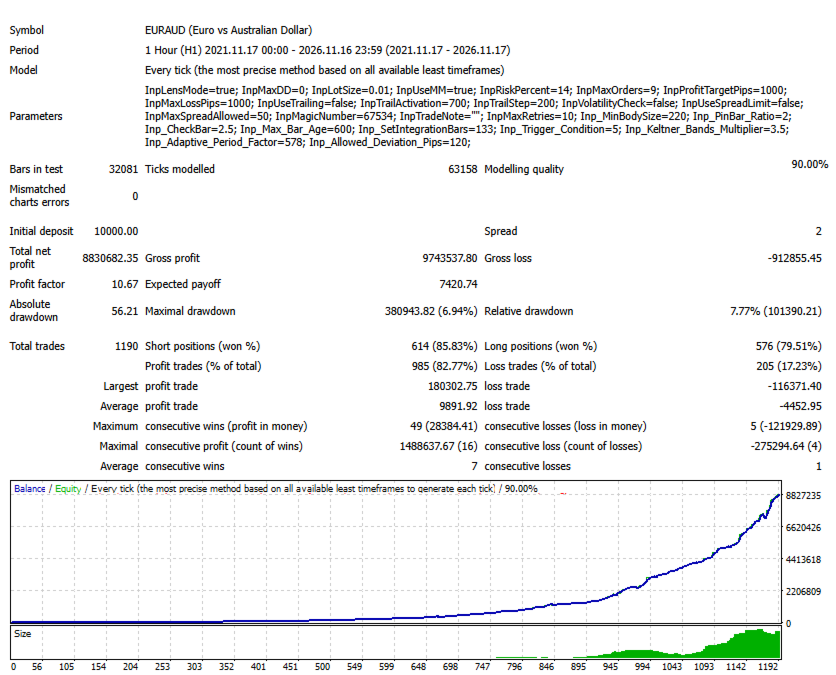
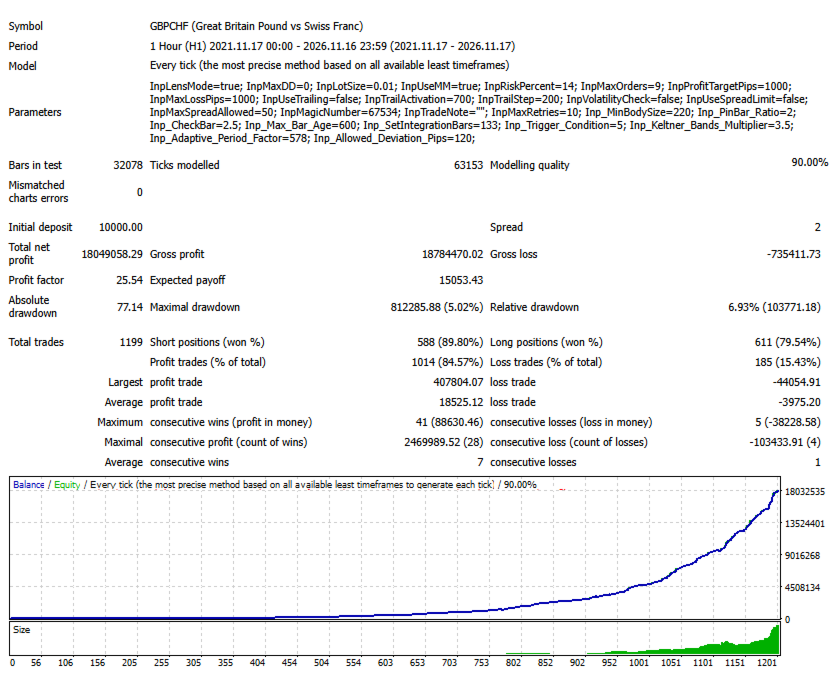
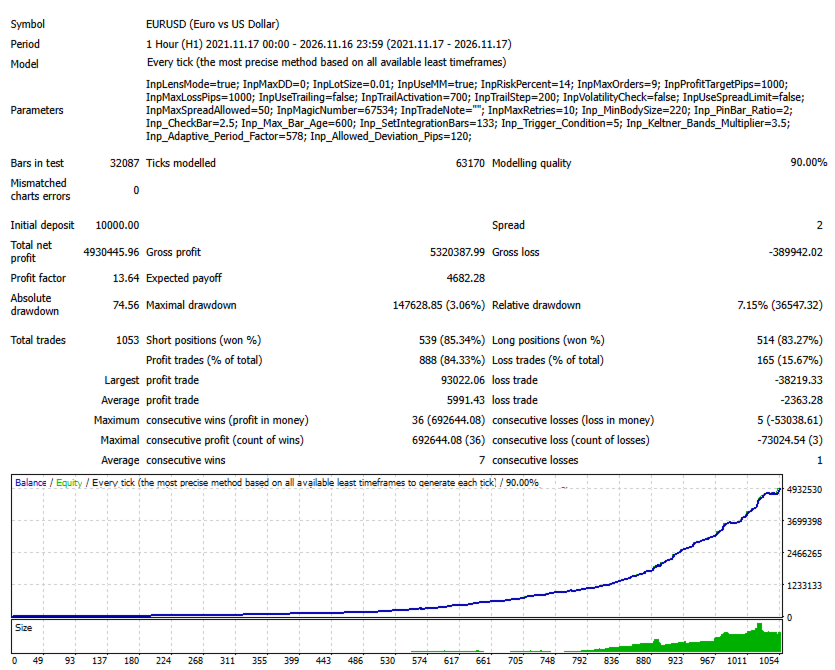
For initial evaluation, it is recommended to use the Strategy Tester and a demo account before moving to live trading.

Who Is ProMeta Designed For?

ProMeta is intended for traders who want to incorporate automation into their trading process while retaining control over the EA's configuration.

It may be suitable for users looking for:

  • Automated evaluation of trading conditions.

  • Adjustable market analysis parameters.

  • Flexible position sizing options.

  • Control over the number of trading orders.

  • Configurable profit and loss levels.

  • Optional market condition filters.

  • The ability to test different parameter combinations.

Risk Disclosure

Trading financial markets involves a substantial risk of capital loss. The performance of any automated trading system depends on market conditions, selected parameters, the trading instrument, order execution quality, and other external factors.

No Expert Advisor can guarantee profits or eliminate trading risks.

Before using ProMeta on a live account, users should conduct historical testing and evaluate its behavior on a demo account. Only trade with funds you can afford to lose.

ProMeta — A configurable approach to automated trading, built around flexibility and trade management.

SEO Keywords

ProMeta, MetaTrader 4 Expert Advisor, MT4 Trading Robot, Forex EA, Automated Forex Trading, Forex Robot, MT4 Expert Advisor, Algorithmic Trading, Automatic Trading System, Money Management EA, Risk Management, Fixed Lot Trading, Automatic Position Sizing, Trailing Stop EA, Forex Trading Software, Automated Trade Management.
More from author
Smart Analiz
Tatiana Savkevych
Working with the Smart Analiz indicator is very simple - you just react to the arrows that the indicator reflects, that is, the arrow is a command for action. The indicator signals are accurate enough and you can trade using this information! The indicator builds a very high-quality channel in which it generates entry signals! Which is the ideal strategy for a trader as the trader is always hesitant when choosing a strategy to work with. That is, this indicator will allow you to solve the dilemm
Beautiful
Tatiana Savkevych
The Beautiful indicator shows potential market reversal points. The intelligent algorithm of the indicator detects the trend well, filters out market noise and generates input signals and exit levels. Uses just one parameter for settings. Simple, visual and efficient trend detection. The indicator does not redraw and does not lag. You can set up message alerts as sound or email. Works on all currency pairs and on all timeframes. Ready-made trading system.
The Arrows Forecasters indicator is simple, visual and effective trend detection. The intelligent algorithm of the indicator determines the trend with a good probability. Uses just one parameter for settings. The indicator shows the points of potential market reversal. Ready-made trading system. The indicator does not redraw and does not lag. Works on all currency pairs and on all timeframes. You should remember that using a combination of forecasting tools, it is advisable to choose 2-3 indic
Balanced Costing
Tatiana Savkevych
Balanced Costing - shows signals - can be used with an optimal risk factor. The indicator can be used both for pipsing on small periods and for long-term trading. The Balanced Costing trend indicator uses reliable algorithms in its calculations. Shows favorable moments for entering the market with arrows, that is, using the indicator is quite simple. Works on all currency pairs and on all timeframes. Of course, the approach to trading should be complex and in order to make a decision, you shou
The Signal Point Channel indicator predicts the most likely short-term price movement based on complex mathematical calculations. One of the biggest challenges traders face is finding a trading system that's right for them. This indicator is designed to detect trends in price movement and allows you to quickly determine not only the direction of the trend, but also to understand the levels of interaction between buyers and sellers. It has no settings and therefore can be perceived as it signals.
Transition Trend
Tatiana Savkevych
The Transition Trend indicator shows the points of potential market reversal. The indicator's smart algorithm detects the trend, filters out market noise and generates entry signals and exit levels. Simple, visual and efficient trend detection. Uses just one parameter for settings. The indicator does not redraw and does not lag. You can set up message alerts as sound or email. Works on all currency pairs and all timeframes. Ready-made trading system.
World Trend
Tatiana Savkevych
5 (1)
World Trend is a hybrid trend indicator, as it is based on the signals of elementary indicators and a special algorithm for analysis. The indicator shows favorable moments for entering the market. The intelligent algorithm of the indicator determines the trend, filters out market noise and generates entry signals. You can use the indicator as the main one to determine the trend. The indicator can work both for entry points and as a filter. Uses two options for settings. The indicator uses colo
Generic Trend
Tatiana Savkevych
The Generic Trend indicator is a trend type indicator. It smooths out price fluctuations when generating a signal by averaging the data and the signal only at certain moments! In those moments when you need to make a decision to enter a position and give the trader a direction. The indicator gives the trader the opportunity to visually determine which trend will be present at a particular time interval. This indicator was created to quickly determine the situation in the market, reflect the st
Trend Privacy
Tatiana Savkevych
The Trend Privacy indicator is easy to set up and works on all pairs and all time frames. Identifies the mainstream and helps analyze the market at a selected time frame It is extremely important for any trader to correctly determine the direction and strength of the trend movement. Unfortunately, there is no single correct solution to this problem. Many traders trade on different time frames. For this reason, the received signals are perceived subjectively. Trend indicators provide an opportu
Chaos Trend
Tatiana Savkevych
Chaos Trend is an arrow indicator for identifying potential entry points. I like it, first of all, because it has a simple mechanism of work, adaptation to all time periods and trading tactics. More reliably, the Forex Chaos Trend indicator is a real trading strategy with which you can achieve the desired results. As soon as the Chaos Trend indicator is installed, the main indicators for the price of the traded pair will immediately begin to be recalculated, based on the postulates of technica
Channel Smooth
Tatiana Savkevych
Channel Smooth - Forex channel indicator is a very useful and relevant tool for any trader, thanks to which you can efficiently and competently perform plotting on the chart, including automatically, without wasting time on independent calculations and eliminating the risk of incorrect point selection. Channels are needed to trade channel strategies that involve working within a certain price range. The key difference between the Channel Smooth indicator and other channel indicators (for examp
Trend Improved
Tatiana Savkevych
Trend Improved - Arrow trend indicator, without lagging and redrawing, is used by traders in trending strategies in trading on financial markets (Forex, CFDs, binary options). Key parameter MinAngle - The parameter is set in pips. For each instrument, select individually, start from scratch. If the parameter is too large then there will be no signals. The tool, at the very least, deserves attention for its signal accuracy and intuitiveness. Increasing the Period parameters decreases the numbe
Forex Roulette
Tatiana Savkevych
Forex Roulette - Trend Following Strategy! The most reliable indicator is used for the trend - the moving average. Only for the global trend, then the strategy itself is implemented. On screenshots, testing from $ 10,000, but the bot works without problems with $ 100. The first graph is optimization, the second is forecast. You can repeat yourself on another period, observing the principle indicated below. How the bot works. Optimization for the m15 period, after which works for 3 months. Very
Projection Trend
Tatiana Savkevych
Projection Trend - a Forex arrow indicator without redrawing does not change its signals when the market situation changes, does not adjust to the chart. The signals given by him are unambiguous. Traders build a trading system that provides good signals 80-90% of the time. The indicator showing the points of entry and exit from the market with arrows is able to bring results not only in the Forex market, but also when working with binary options. You can buy it and install it in MetaTrader you
Calc Trend
Tatiana Savkevych
Calc Trend is a Forex trend indicator based on the familiar RSI, but there is one "but"! We display RSI indicator signals on a price function chart using a mathematical approach. As you know, the overbought and oversold zones that the standard RSI fixes are often broken by the price and the price goes the other way. This makes the standard indicator inapplicable for real work in its pure form. Also, for sure, each user has noticed that at any part of the history, it is possible to change the R
Calc Trend Ex
Tatiana Savkevych
Calc Trend Ex is a forex trending bot based on the Calc Trend indicator. A bot created on the basis of this Calc Trend indicator and working on the principle - if there is an indicator signal, then the bot has closed an opposite deal and opened a new deal in the specified direction, it can be downloaded and used for work. The bot is as simple as possible! The bot fully reflects the work of the indicator. Moreover, the bot can be optimized (by optimizing the parameters of the indicator itself)
First Derivative RSI is a forex indicator based on all familiar RSI, based on the first derivative of the price function. The indicator combines the functionality of an oscillator and a trend indicator. At the bottom of the chart, a part of the indicator similar to the RSI will be displayed, but only calculated as the first derivative of the price. On the chart itself, trend signals will be displayed by arrows, they are filtered by the algorithm and always alternate buy / sell. It also shows th
Trend First Derivative RSI is a Forex indicator based on all familiar RSI, based on the first derivative of the price function. On the chart itself, trend signals will be displayed by arrows, they are filtered by the algorithm and always alternate buy / sell. It also shows the number of profitable pips that the indicator can give at the specified interval (LimitCalcHistory). The indicator has a parameter (Spread), which deducts a part of the profit per spread for each signal. To control the pe
Trend First Derivative RSI is a Forex trending bot based on the First Derivative RSI indicator. In the screenshots you can see tests that show the bot can work for 1,3,6 years, the timeframe is one hour. These are demo tests that show that it is realistic to go through significant sections of history with a different indicator and simple rules. Below in the text you will see a description of the rules of work. For real work, optimization is proposed for 3-12 months and work up to 1-2 months. O
Second Derivative RSI is a forex indicator based on all familiar RSI, based on the second derivative of the price function. Just a note on the use of the indicator. The indicator requires selection of settings not only for each currency pair but also for each timeframe. If there is no setting, then as a last resort, the indicator may not show signals! In order to pick up the settings, just use a bot that will help you do it. The indicator combines the functionality of an oscillator and a tren
Trend Second Derivative RSI is a forex indicator based on the usual RSI, based on the second derivative of the price function. On the chart itself, trend signals will be displayed by arrows, they are filtered by the algorithm and always alternate buy / sell. It also shows the number of profitable pips that the indicator can give at the specified interval (LimitCalcHistory). The indicator has a parameter (Spread), which deducts a part of the profit per spread for each signal. Immediately notice
Trend Second Derivative RSI Ex is a forex trending bot based on the Trend Second Derivative RSI indicator. Principle of operation. A bot created on the basis of this Trend Second Derivative RSI indicator and working on the principle - if there is an indicator signal, then the bot has closed the opposite deal and opened a new deal in the specified direction. It is also possible to work only for buy or sell, in which case the bot will simply close the deal without opening it in the opposite dire
Intel Trend
Tatiana Savkevych
Intel Trend is a forex trend indicator based on all the usual SAR, using differential calculus to generate a signal not directly from the price but from the derivative of the function. Also, when using the SAR indicator, the first point often changes, which is why the default parameter ShiftBar = 1. To skip the first baoa and read information directly from the second bar. If you set ShiftBar = 0, there will be perfect signals, but they are false. real signals for each timeframe and for each cur
Intel Trend Ex
Tatiana Savkevych
Intel Trend Ex is a forex trending bot based on the Intel Trend indicator. Principle of operation. A bot created on the basis of this Intel Trend indicator and working on the principle - if there is an indicator signal, then the bot has closed an opposite deal and opened a new deal in the specified direction. It is also possible to work only for buy or sell, in which case the bot will simply close the deal without opening it in the opposite direction. The bot is also equipped with an adaptive
Nuremberg
Tatiana Savkevych
The Nuremberg tool presents a channel-like algorithm. The best arrow algorithms use channels without redrawing. Its settings indicate the parameters of the length and width of the channel. The indicator was created in such a way that you can fix the reaction to the channel breakout and display it in the form of an arrow. Arrow indicator Nuremberg on Forex indicates points of entry into transactions without redrawing. It generates fairly frequent and accurate signals. When an upward arrow appea
Unchained
Tatiana Savkevych
Unchained is intended for scalping trading. It is used to trade on five and fifteen-minute timeframes. But it works on H1 and higher too. According to the traders themselves, the best arrow indicator is the one that does not redraw, i.e. does not imply changes in indicators. When an upward arrow appears on the chart, the trader opens a buy order. If a downward arrow appears during trading, the buy order is closed. After analyzing the situation in this case, you can open a sell position. It is
Clustering Trend
Tatiana Savkevych
Clustering Trend is always in operation - after the first position, provided that the position is not closed with stops. You can test the bot on any part of the history, the bot is configured to pass the entire history, but if you need to increase productivity in a specific area, you can optimize the bot for more productive work, but in a shorter part of the history. The bot works without trailing stops, breakevens or anything like that. The principle of operation is that there is a signal, th
Toroid
Tatiana Savkevych
Toroid - The indicator reflects information in a visual form, it can be used both for pipsing on small periods and for long-term trading. It generates fairly frequent and accurate signals. The indicator can be used as the main one for determining the trend. The indicator can work both for entry points and as a filter. Uses two parameters for settings. The smart indicator algorithm detects the trend, filters out market noise and generates input signals. It is based on the signals of elementary in
Platoon
Tatiana Savkevych
Platoon is an indicator designed to be able to detect a bottom or top similar to the Fractals indicator, but of course a different algorithm is used. In other words, you should not enter into a buy deal if the fractal is below. And you should not enter into a sell deal if the fractal is higher. The indicator only denotes fractals on the chart without performing any additional calculations, therefore, theoretically, any trader can find these patterns by himself. But what is a fractal, how exact
Provided
Tatiana Savkevych
Provided is a trend trading Expert Advisor based on the simplest indicator strategy of following the market towards global price movements. The robot can effectively trade on almost any trading asset or currency pair, but subject to proper optimization. It is recommended to use the robot on the hourly chart of the Euro / Dollar currency pair. List of all settings: Magic - Magic number. StartVolume - Sets the lot size for entering the market. OnRisk - Activates Money Management. PercentRisk - A

Filter:
No reviews
Reply to review