ProMeta

ProMeta — Expert Advisor per MetaTrader 4

Descrizione breve

ProMeta è un Expert Advisor automatizzato per MetaTrader 4 che combina un'analisi di mercato configurabile, una logica di generazione dei segnali basata su più parametri e strumenti flessibili per la gestione delle operazioni. Consente di personalizzare il volume delle posizioni, limitare il numero di ordini, definire obiettivi di profitto e perdita e attivare filtri di mercato opzionali.

Panoramica del prodotto

ProMeta è stato sviluppato per automatizzare le attività di trading all'interno della piattaforma MetaTrader 4. L'Expert Advisor elabora i dati dei prezzi, valuta le potenziali condizioni di mercato e gestisce gli ordini in base alle impostazioni definite dall'utente.

La logica operativa si basa su diversi parametri di analisi personalizzabili. Ciò permette di modificare la sensibilità del rilevamento dei segnali, configurare il processo di analisi e adattare il funzionamento dell'EA a diversi strumenti finanziari e contesti di mercato.

Anziché imporre un'unica configurazione predefinita, ProMeta offre numerose possibilità di personalizzazione per gli aspetti principali del trading, tra cui il volume delle posizioni, i limiti degli ordini, gli obiettivi operativi e la gestione delle posizioni aperte.

Analisi di mercato configurabile

ProMeta valuta i movimenti dei prezzi attraverso diversi parametri di analisi configurabili. Questi determinano quali condizioni di mercato vengono prese in considerazione dall'algoritmo di trading.

Le opzioni di analisi sono suddivise in due gruppi distinti di parametri. Ciascun gruppo dispone delle proprie impostazioni, consentendo di modificare separatamente diversi elementi del processo di analisi.

I trader possono sperimentare diverse combinazioni di parametri per adattare l'Expert Advisor allo strumento finanziario selezionato, al timeframe utilizzato e alle proprie preferenze operative.

Logica dei segnali basata su più parametri

Il sistema di generazione dei segnali di ProMeta utilizza diversi parametri regolabili per definire le condizioni necessarie al rilevamento di potenziali opportunità di trading.

Le impostazioni disponibili comprendono la dimensione del corpo delle candele, il rapporto delle Pin Bar, parametri aggiuntivi per il controllo delle candele, l'età massima delle candele analizzate, le condizioni di attivazione dei segnali e altri coefficienti di analisi.

Sono inoltre disponibili parametri relativi alle Keltner Bands e un'impostazione per la deviazione di prezzo consentita, espressa in pips.

Modificando questi valori, l'utente può intervenire sulla configurazione complessiva del sistema di segnali e sperimentare diversi approcci di analisi senza dover modificare il codice sorgente dell'Expert Advisor.

Gestione completa delle operazioni di trading

ProMeta mette a disposizione diversi strumenti per definire le modalità di gestione delle operazioni durante il funzionamento dell'Expert Advisor.

L'utente può configurare:

  • Il numero massimo di ordini consentiti.

  • Il livello di profitto obiettivo delle operazioni.

  • Il livello massimo di perdita consentito.

  • Le condizioni di attivazione e il passo di regolazione del Trailing Stop.

  • Il numero massimo di tentativi aggiuntivi per l'esecuzione delle operazioni di trading.

È inoltre possibile impostare un Magic Number per identificare gli ordini dell'EA. Un commento personalizzato consente di distinguere ulteriormente le operazioni.

Gestione flessibile della dimensione delle posizioni

ProMeta supporta due modalità per determinare il volume delle posizioni. In questo modo ogni trader può scegliere l'approccio più adatto alle proprie preferenze.

Lotto fisso

Il volume di trading viene impostato manualmente tramite il parametro InpLotSize.

Money Management automatico

Quando InpUseMM è attivato, l'EA utilizza il parametro InpRiskPercent come componente della configurazione automatica della dimensione delle posizioni.

Questa funzionalità rappresenta un'alternativa all'impostazione manuale di un volume fisso. Il parametro corrispondente può essere regolato in base alla configurazione scelta.

Filtri di mercato opzionali

ProMeta include impostazioni aggiuntive che consentono di controllare le condizioni di mercato nelle quali le operazioni di trading possono essere eseguite.

Le funzionalità disponibili comprendono il controllo della volatilità e la limitazione dello spread.

Quando il limite dello spread è attivato, il parametro InpMaxSpreadAllowed definisce la soglia massima consentita utilizzata da questo filtro.

Entrambe le funzionalità sono disattivate nella configurazione predefinita. L'utente può decidere autonomamente se applicare queste restrizioni aggiuntive.

Parametri di input

Configurazione generale

  • InpLensMode — attiva o disattiva il Lens Mode.

  • InpMaxDD — parametro di configurazione relativo al drawdown.

  • InpMaxRetries — numero massimo di tentativi aggiuntivi per le operazioni di trading.

Money Management

  • InpLotSize — volume di trading fisso.

  • InpUseMM — attiva o disattiva il Money Management automatico.

  • InpRiskPercent — parametro percentuale utilizzato nella configurazione automatica della dimensione delle posizioni.

Gestione degli ordini

  • InpMaxOrders — numero massimo di ordini consentiti.

  • InpProfitTargetPips — obiettivo di profitto espresso in pips.

  • InpMaxLossPips — perdita massima consentita espressa in pips.

  • InpMagicNumber — identificativo univoco degli ordini dell'EA.

  • InpTradeNote — commento personalizzato per le operazioni di trading.

Gestione delle posizioni

  • InpUseTrailing — attiva o disattiva il Trailing Stop.

  • InpTrailActivation — livello di attivazione del Trailing Stop.

  • InpTrailStep — passo di regolazione del Trailing Stop.

Filtri di mercato

  • InpVolatilityCheck — attiva o disattiva il controllo della volatilità.

  • InpUseSpreadLimit — attiva o disattiva la limitazione dello spread.

  • InpMaxSpreadAllowed — soglia massima di spread consentita.

Analisi dei segnali

  • Inp_MinBodySize — impostazione della dimensione minima del corpo delle candele.

  • Inp_PinBar_Ratio — parametro relativo al rapporto delle Pin Bar.

  • Inp_CheckBar — parametro aggiuntivo per il controllo delle candele.

  • Inp_Max_Bar_Age — età massima consentita per una candela analizzata.

  • Inp_SetIntegrationBars — parametro relativo al numero di candele nel secondo gruppo di analisi.

  • Inp_Trigger_Condition — impostazione della condizione di attivazione del segnale.

  • Inp_Keltner_Bands_Multiplier — coefficiente relativo alle Keltner Bands.

  • Inp_Adaptive_Period_Factor — parametro relativo al periodo di analisi adattivo.

  • Inp_Allowed_Deviation_Pips — deviazione di prezzo consentita, espressa in pips.

Configurazione predefinita

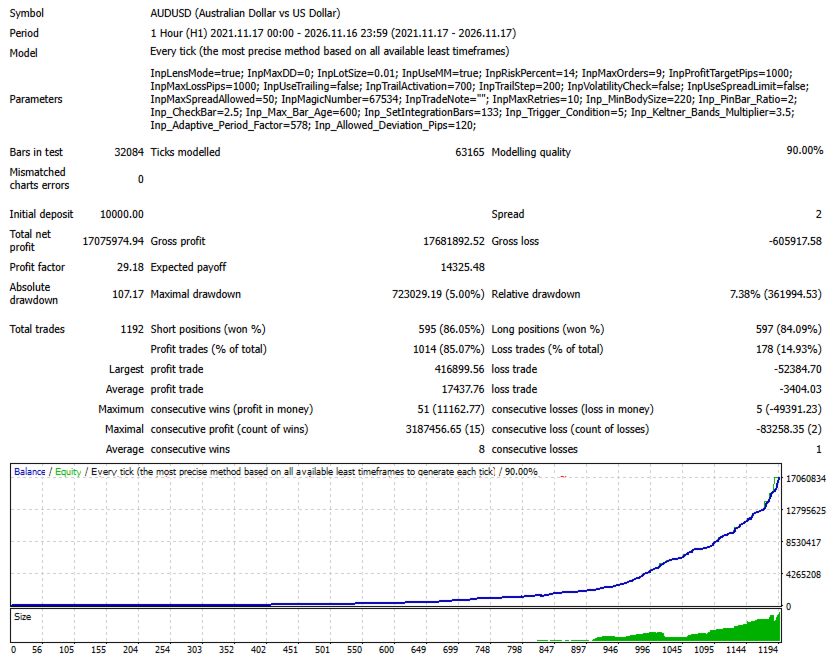
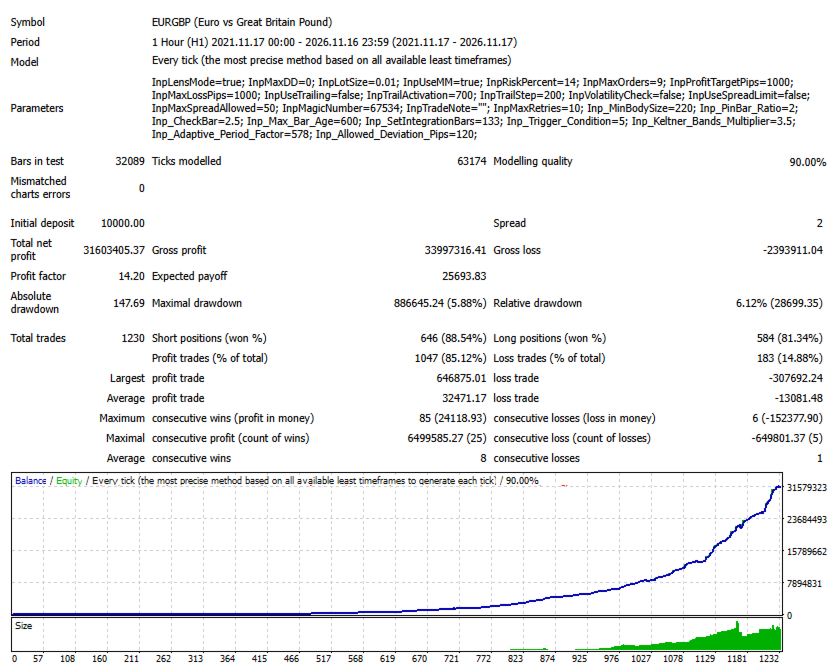
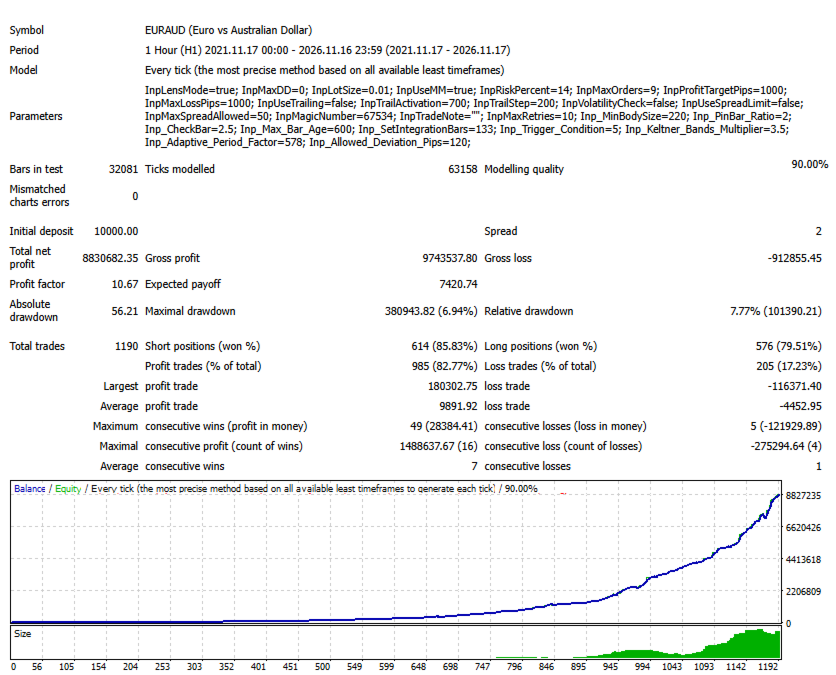
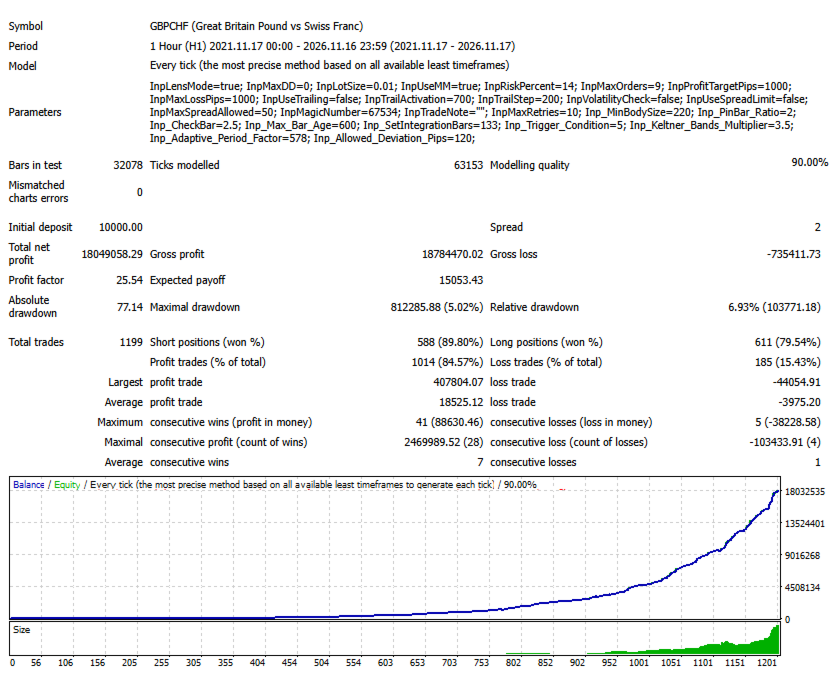
ProMeta viene fornito con i seguenti valori iniziali:

Parametro Valore predefinito
Lens Mode Attivato
Parametro Drawdown 0.0
Lotto fisso 0.01
Money Management Attivato
Percentuale di rischio 14.0
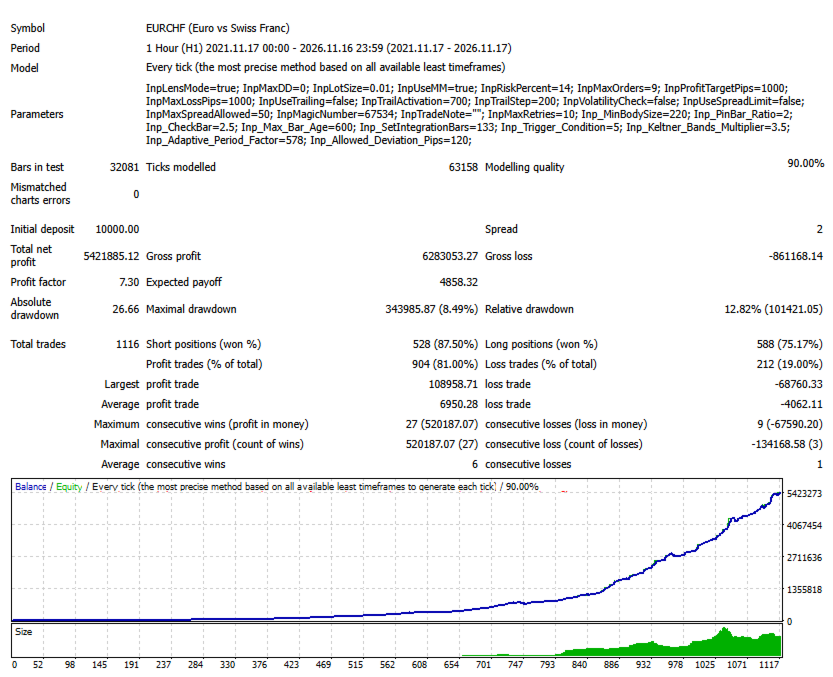
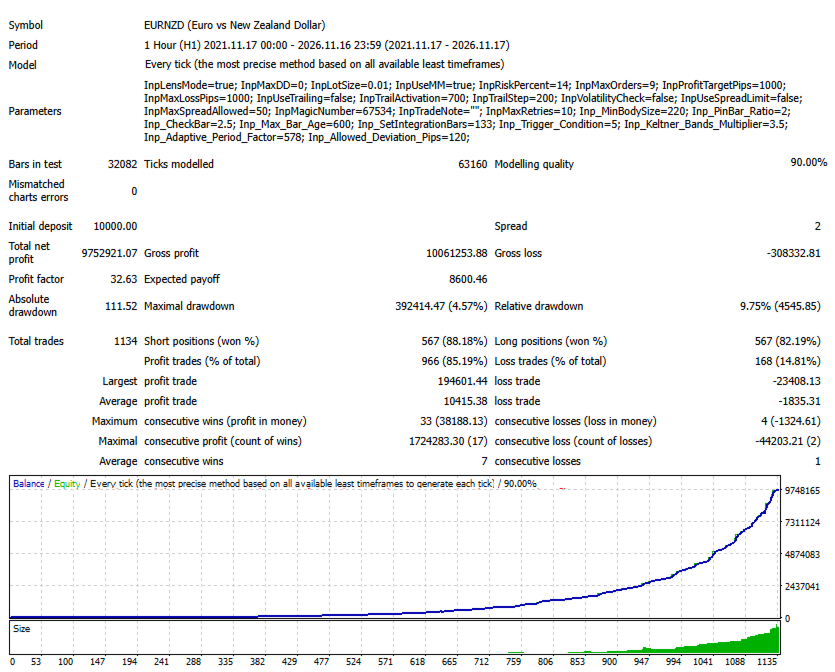
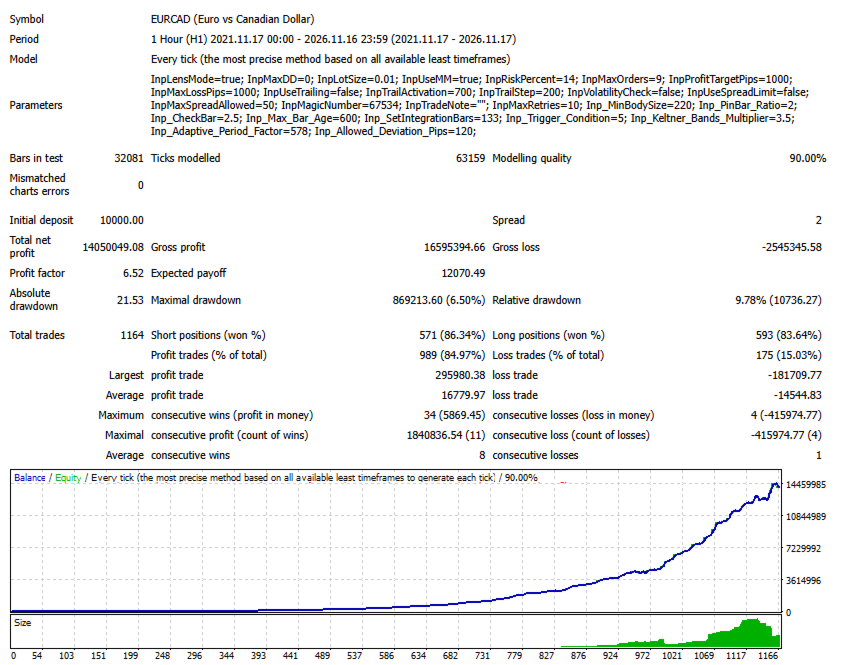
Numero massimo di ordini 9
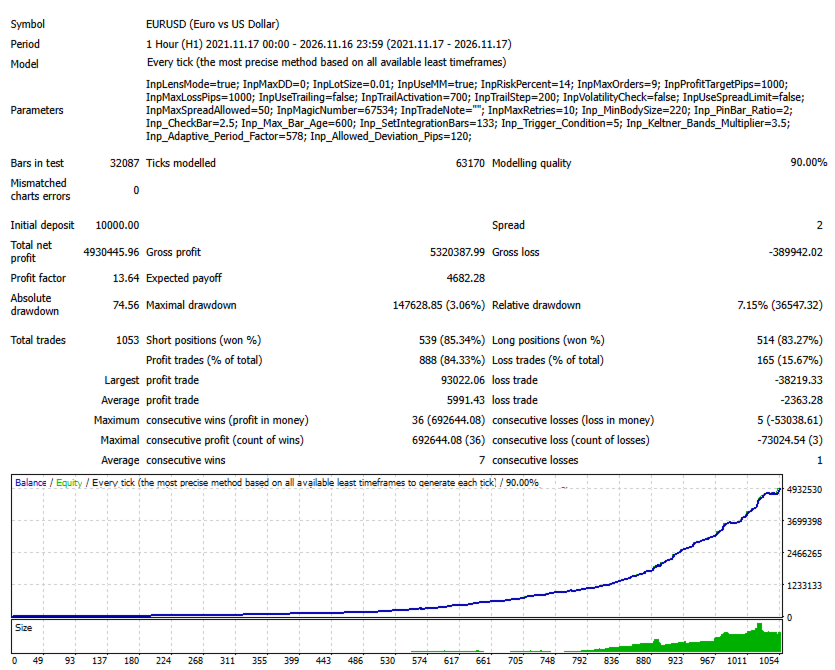
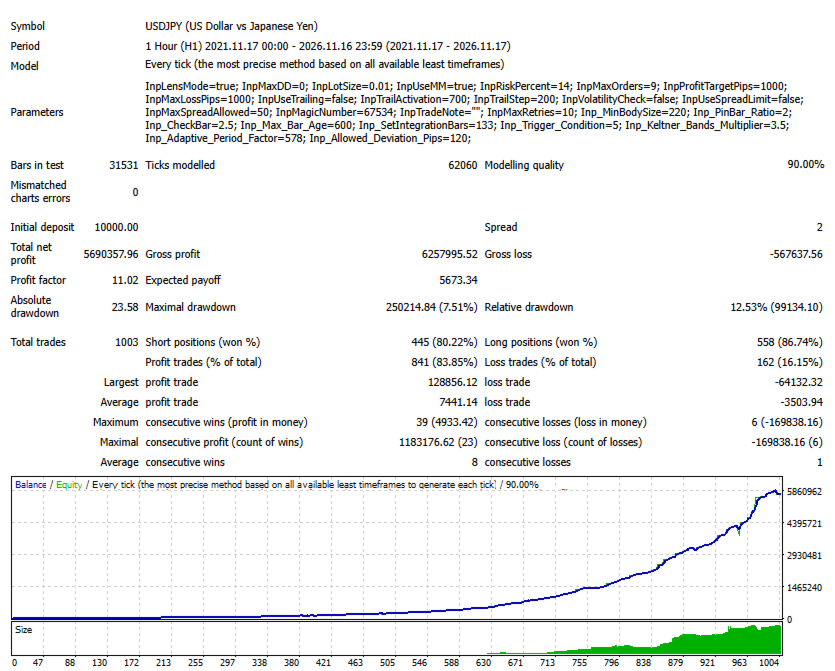
Obiettivo di profitto 1000 pips
Perdita massima 1000 pips
Trailing Stop Disattivato
Attivazione Trailing Stop 700
Passo Trailing Stop 200
Controllo della volatilità Disattivato
Limite dello spread Disattivato
Spread massimo consentito 50
Magic Number 67534
Numero massimo di tentativi aggiuntivi 10

Questi valori rappresentano una configurazione iniziale. Prima di utilizzare l'Expert Advisor, è consigliabile verificare tutti i parametri e modificarli, se necessario, in base allo strumento finanziario selezionato e alle proprie condizioni operative.

Installazione e configurazione

  1. Avvia MetaTrader 4.

  2. Seleziona File → Apri cartella dati.

  3. Accedi alla directory MQL4/Experts.

  4. Copia il file ProMeta EA in questa cartella.

  5. Riavvia MetaTrader 4 oppure aggiorna l'elenco degli Expert Advisor nella finestra Navigator.

  6. Trascina ProMeta sul grafico dello strumento finanziario desiderato.

  7. Controlla i parametri di input e attiva il trading automatico.

Per una prima valutazione, si consiglia di utilizzare il Tester di Strategia e verificare il funzionamento dell'Expert Advisor su un conto demo prima di impiegare capitale reale.

A chi è destinato ProMeta?

ProMeta è pensato per i trader che desiderano automatizzare le proprie attività operative mantenendo il controllo sulla configurazione e sul funzionamento del sistema di trading.

L'Expert Advisor può risultare particolarmente interessante per gli utenti che cercano:

  • Valutazione automatizzata delle condizioni di mercato.

  • Parametri di analisi regolabili individualmente.

  • Diverse modalità di gestione del volume delle posizioni.

  • Controllo del numero di ordini di trading.

  • Limiti personalizzabili di profitto e perdita.

  • Filtri opzionali per determinate condizioni di mercato.

  • Possibilità di testare diverse combinazioni di parametri.

Avvertenza sui rischi

Il trading sui mercati finanziari comporta un rischio significativo di perdita del capitale. I risultati di un sistema di trading automatizzato dipendono, tra gli altri fattori, dalle condizioni di mercato, dalle impostazioni selezionate, dallo strumento finanziario utilizzato, dalla qualità dell'esecuzione degli ordini e da altri fattori esterni.

Nessun Expert Advisor può garantire profitti o eliminare completamente i rischi associati al trading.

Prima di utilizzare ProMeta su un conto reale, si raccomanda di effettuare test sui dati storici e di verificare inizialmente il comportamento dell'Expert Advisor su un conto demo. Opera esclusivamente con capitale che puoi permetterti di perdere senza compromettere la tua situazione finanziaria.

ProMeta — Trading automatizzato, configurazione personalizzabile e gestione flessibile delle operazioni.

Parole chiave SEO

ProMeta, Expert Advisor MT4, MetaTrader 4 EA, robot Forex, trading Forex automatico, robot di trading MT4, Expert Advisor Forex, sistema di trading automatico, trading algoritmico, EA Money Management, gestione del rischio, lotto fisso, gestione automatica della dimensione delle posizioni, EA Trailing Stop, software di trading Forex, gestione automatica degli ordini.
Altri dall’autore
Smart Analiz
Tatiana Savkevych
Working with the Smart Analiz indicator is very simple - you just react to the arrows that the indicator reflects, that is, the arrow is a command for action. The indicator signals are accurate enough and you can trade using this information! The indicator builds a very high-quality channel in which it generates entry signals! Which is the ideal strategy for a trader as the trader is always hesitant when choosing a strategy to work with. That is, this indicator will allow you to solve the dilemm

Beautiful
Tatiana Savkevych
The Beautiful indicator shows potential market reversal points. The intelligent algorithm of the indicator detects the trend well, filters out market noise and generates input signals and exit levels. Uses just one parameter for settings. Simple, visual and efficient trend detection. The indicator does not redraw and does not lag. You can set up message alerts as sound or email. Works on all currency pairs and on all timeframes. Ready-made trading system.
The Arrows Forecasters indicator is simple, visual and effective trend detection. The intelligent algorithm of the indicator determines the trend with a good probability. Uses just one parameter for settings. The indicator shows the points of potential market reversal. Ready-made trading system. The indicator does not redraw and does not lag. Works on all currency pairs and on all timeframes. You should remember that using a combination of forecasting tools, it is advisable to choose 2-3 indic
Balanced Costing
Tatiana Savkevych
Balanced Costing - shows signals - can be used with an optimal risk factor. The indicator can be used both for pipsing on small periods and for long-term trading. The Balanced Costing trend indicator uses reliable algorithms in its calculations. Shows favorable moments for entering the market with arrows, that is, using the indicator is quite simple. Works on all currency pairs and on all timeframes. Of course, the approach to trading should be complex and in order to make a decision, you shou
The Signal Point Channel indicator predicts the most likely short-term price movement based on complex mathematical calculations. One of the biggest challenges traders face is finding a trading system that's right for them. This indicator is designed to detect trends in price movement and allows you to quickly determine not only the direction of the trend, but also to understand the levels of interaction between buyers and sellers. It has no settings and therefore can be perceived as it signals.
Transition Trend
Tatiana Savkevych
The Transition Trend indicator shows the points of potential market reversal. The indicator's smart algorithm detects the trend, filters out market noise and generates entry signals and exit levels. Simple, visual and efficient trend detection. Uses just one parameter for settings. The indicator does not redraw and does not lag. You can set up message alerts as sound or email. Works on all currency pairs and all timeframes. Ready-made trading system.
World Trend
Tatiana Savkevych
5 (1)
World Trend is a hybrid trend indicator, as it is based on the signals of elementary indicators and a special algorithm for analysis. The indicator shows favorable moments for entering the market. The intelligent algorithm of the indicator determines the trend, filters out market noise and generates entry signals. You can use the indicator as the main one to determine the trend. The indicator can work both for entry points and as a filter. Uses two options for settings. The indicator uses colo
Generic Trend
Tatiana Savkevych
The Generic Trend indicator is a trend type indicator. It smooths out price fluctuations when generating a signal by averaging the data and the signal only at certain moments! In those moments when you need to make a decision to enter a position and give the trader a direction. The indicator gives the trader the opportunity to visually determine which trend will be present at a particular time interval. This indicator was created to quickly determine the situation in the market, reflect the st
Trend Privacy
Tatiana Savkevych
The Trend Privacy indicator is easy to set up and works on all pairs and all time frames. Identifies the mainstream and helps analyze the market at a selected time frame It is extremely important for any trader to correctly determine the direction and strength of the trend movement. Unfortunately, there is no single correct solution to this problem. Many traders trade on different time frames. For this reason, the received signals are perceived subjectively. Trend indicators provide an opportu
Chaos Trend
Tatiana Savkevych
Chaos Trend is an arrow indicator for identifying potential entry points. I like it, first of all, because it has a simple mechanism of work, adaptation to all time periods and trading tactics. More reliably, the Forex Chaos Trend indicator is a real trading strategy with which you can achieve the desired results. As soon as the Chaos Trend indicator is installed, the main indicators for the price of the traded pair will immediately begin to be recalculated, based on the postulates of technica
Channel Smooth
Tatiana Savkevych
Channel Smooth - Forex channel indicator is a very useful and relevant tool for any trader, thanks to which you can efficiently and competently perform plotting on the chart, including automatically, without wasting time on independent calculations and eliminating the risk of incorrect point selection. Channels are needed to trade channel strategies that involve working within a certain price range. The key difference between the Channel Smooth indicator and other channel indicators (for examp
Trend Improved
Tatiana Savkevych
Trend Improved - Arrow trend indicator, without lagging and redrawing, is used by traders in trending strategies in trading on financial markets (Forex, CFDs, binary options). Key parameter MinAngle - The parameter is set in pips. For each instrument, select individually, start from scratch. If the parameter is too large then there will be no signals. The tool, at the very least, deserves attention for its signal accuracy and intuitiveness. Increasing the Period parameters decreases the numbe
Forex Roulette
Tatiana Savkevych
Forex Roulette - Trend Following Strategy! The most reliable indicator is used for the trend - the moving average. Only for the global trend, then the strategy itself is implemented. On screenshots, testing from $ 10,000, but the bot works without problems with $ 100. The first graph is optimization, the second is forecast. You can repeat yourself on another period, observing the principle indicated below. How the bot works. Optimization for the m15 period, after which works for 3 months. Very
Projection Trend
Tatiana Savkevych
Projection Trend - a Forex arrow indicator without redrawing does not change its signals when the market situation changes, does not adjust to the chart. The signals given by him are unambiguous. Traders build a trading system that provides good signals 80-90% of the time. The indicator showing the points of entry and exit from the market with arrows is able to bring results not only in the Forex market, but also when working with binary options. You can buy it and install it in MetaTrader you
Calc Trend
Tatiana Savkevych
Calc Trend is a Forex trend indicator based on the familiar RSI, but there is one "but"! We display RSI indicator signals on a price function chart using a mathematical approach. As you know, the overbought and oversold zones that the standard RSI fixes are often broken by the price and the price goes the other way. This makes the standard indicator inapplicable for real work in its pure form. Also, for sure, each user has noticed that at any part of the history, it is possible to change the R
Calc Trend Ex
Tatiana Savkevych
Calc Trend Ex is a forex trending bot based on the Calc Trend indicator. A bot created on the basis of this Calc Trend indicator and working on the principle - if there is an indicator signal, then the bot has closed an opposite deal and opened a new deal in the specified direction, it can be downloaded and used for work. The bot is as simple as possible! The bot fully reflects the work of the indicator. Moreover, the bot can be optimized (by optimizing the parameters of the indicator itself)
First Derivative RSI is a forex indicator based on all familiar RSI, based on the first derivative of the price function. The indicator combines the functionality of an oscillator and a trend indicator. At the bottom of the chart, a part of the indicator similar to the RSI will be displayed, but only calculated as the first derivative of the price. On the chart itself, trend signals will be displayed by arrows, they are filtered by the algorithm and always alternate buy / sell. It also shows th
Trend First Derivative RSI is a Forex indicator based on all familiar RSI, based on the first derivative of the price function. On the chart itself, trend signals will be displayed by arrows, they are filtered by the algorithm and always alternate buy / sell. It also shows the number of profitable pips that the indicator can give at the specified interval (LimitCalcHistory). The indicator has a parameter (Spread), which deducts a part of the profit per spread for each signal. To control the pe
Trend First Derivative RSI is a Forex trending bot based on the First Derivative RSI indicator. In the screenshots you can see tests that show the bot can work for 1,3,6 years, the timeframe is one hour. These are demo tests that show that it is realistic to go through significant sections of history with a different indicator and simple rules. Below in the text you will see a description of the rules of work. For real work, optimization is proposed for 3-12 months and work up to 1-2 months. O
Second Derivative RSI is a forex indicator based on all familiar RSI, based on the second derivative of the price function. Just a note on the use of the indicator. The indicator requires selection of settings not only for each currency pair but also for each timeframe. If there is no setting, then as a last resort, the indicator may not show signals! In order to pick up the settings, just use a bot that will help you do it. The indicator combines the functionality of an oscillator and a tren
Trend Second Derivative RSI is a forex indicator based on the usual RSI, based on the second derivative of the price function. On the chart itself, trend signals will be displayed by arrows, they are filtered by the algorithm and always alternate buy / sell. It also shows the number of profitable pips that the indicator can give at the specified interval (LimitCalcHistory). The indicator has a parameter (Spread), which deducts a part of the profit per spread for each signal. Immediately notice
Trend Second Derivative RSI Ex is a forex trending bot based on the Trend Second Derivative RSI indicator. Principle of operation. A bot created on the basis of this Trend Second Derivative RSI indicator and working on the principle - if there is an indicator signal, then the bot has closed the opposite deal and opened a new deal in the specified direction. It is also possible to work only for buy or sell, in which case the bot will simply close the deal without opening it in the opposite dire
Intel Trend
Tatiana Savkevych
Intel Trend is a forex trend indicator based on all the usual SAR, using differential calculus to generate a signal not directly from the price but from the derivative of the function. Also, when using the SAR indicator, the first point often changes, which is why the default parameter ShiftBar = 1. To skip the first baoa and read information directly from the second bar. If you set ShiftBar = 0, there will be perfect signals, but they are false. real signals for each timeframe and for each cur
Intel Trend Ex
Tatiana Savkevych
Intel Trend Ex is a forex trending bot based on the Intel Trend indicator. Principle of operation. A bot created on the basis of this Intel Trend indicator and working on the principle - if there is an indicator signal, then the bot has closed an opposite deal and opened a new deal in the specified direction. It is also possible to work only for buy or sell, in which case the bot will simply close the deal without opening it in the opposite direction. The bot is also equipped with an adaptive
Nuremberg
Tatiana Savkevych
The Nuremberg tool presents a channel-like algorithm. The best arrow algorithms use channels without redrawing. Its settings indicate the parameters of the length and width of the channel. The indicator was created in such a way that you can fix the reaction to the channel breakout and display it in the form of an arrow. Arrow indicator Nuremberg on Forex indicates points of entry into transactions without redrawing. It generates fairly frequent and accurate signals. When an upward arrow appea
Unchained
Tatiana Savkevych
Unchained is intended for scalping trading. It is used to trade on five and fifteen-minute timeframes. But it works on H1 and higher too. According to the traders themselves, the best arrow indicator is the one that does not redraw, i.e. does not imply changes in indicators. When an upward arrow appears on the chart, the trader opens a buy order. If a downward arrow appears during trading, the buy order is closed. After analyzing the situation in this case, you can open a sell position. It is
Clustering Trend
Tatiana Savkevych
Clustering Trend is always in operation - after the first position, provided that the position is not closed with stops. You can test the bot on any part of the history, the bot is configured to pass the entire history, but if you need to increase productivity in a specific area, you can optimize the bot for more productive work, but in a shorter part of the history. The bot works without trailing stops, breakevens or anything like that. The principle of operation is that there is a signal, th
Toroid
Tatiana Savkevych
Toroid - The indicator reflects information in a visual form, it can be used both for pipsing on small periods and for long-term trading. It generates fairly frequent and accurate signals. The indicator can be used as the main one for determining the trend. The indicator can work both for entry points and as a filter. Uses two parameters for settings. The smart indicator algorithm detects the trend, filters out market noise and generates input signals. It is based on the signals of elementary in
Platoon
Tatiana Savkevych
Platoon is an indicator designed to be able to detect a bottom or top similar to the Fractals indicator, but of course a different algorithm is used. In other words, you should not enter into a buy deal if the fractal is below. And you should not enter into a sell deal if the fractal is higher. The indicator only denotes fractals on the chart without performing any additional calculations, therefore, theoretically, any trader can find these patterns by himself. But what is a fractal, how exact
Provided
Tatiana Savkevych
Provided is a trend trading Expert Advisor based on the simplest indicator strategy of following the market towards global price movements. The robot can effectively trade on almost any trading asset or currency pair, but subject to proper optimization. It is recommended to use the robot on the hourly chart of the Euro / Dollar currency pair. List of all settings: Magic - Magic number. StartVolume - Sets the lot size for entering the market. OnRisk - Activates Money Management. PercentRisk - A
Filtro:
Nessuna recensione
Rispondi alla recensione