ProMeta

ProMeta — Expert Advisor pour MetaTrader 4

Description courte

ProMeta est un Expert Advisor automatisé pour MetaTrader 4 qui associe une analyse de marché configurable, une logique de génération de signaux reposant sur plusieurs paramètres et des outils flexibles de gestion des transactions. Il permet de personnaliser le volume des positions, de limiter le nombre d'ordres, de définir des objectifs de gain et de perte et d'activer des filtres de marché supplémentaires.

Présentation du produit

ProMeta a été conçu pour automatiser les opérations de trading au sein de la plateforme MetaTrader 4. L'Expert Advisor traite les données de prix, évalue les conditions potentielles du marché et gère les ordres conformément aux paramètres définis par l'utilisateur.

Sa logique de trading repose sur plusieurs paramètres d'analyse personnalisables. L'utilisateur peut ainsi modifier la sensibilité de détection des signaux, ajuster la configuration analytique et adapter le fonctionnement de l'EA à différents instruments financiers et contextes de marché.

Plutôt que d'imposer une configuration unique, ProMeta propose de nombreuses possibilités de réglage concernant les principaux aspects du trading : volume des positions, limites d'ordres, objectifs de résultat et gestion des positions ouvertes.

Analyse de marché personnalisable

ProMeta évalue les mouvements de prix à l'aide de différents paramètres d'analyse configurables. Ceux-ci déterminent les conditions de marché prises en compte par l'algorithme de trading.

Les options d'analyse sont réparties en deux groupes distincts de paramètres. Chaque groupe dispose de ses propres réglages, ce qui permet de modifier séparément différents éléments du processus d'analyse.

Les traders peuvent expérimenter plusieurs combinaisons de paramètres afin d'adapter l'Expert Advisor à l'instrument financier sélectionné, à l'unité de temps utilisée et à leurs préférences de trading.

Logique de signal basée sur plusieurs paramètres

Le système de génération de signaux de ProMeta utilise plusieurs paramètres réglables pour définir les conditions de détection des opportunités potentielles de trading.

Les options disponibles comprennent notamment la taille du corps des bougies, le ratio des Pin Bars, des paramètres supplémentaires de vérification des bougies, l'âge maximal des bougies analysées, les conditions de déclenchement des signaux ainsi que différents coefficients d'analyse.

Des paramètres associés aux Keltner Bands sont également disponibles, ainsi qu'un réglage de l'écart de prix autorisé exprimé en pips.

En modifiant ces valeurs, l'utilisateur peut faire évoluer la configuration globale du système de signaux et tester différentes approches analytiques sans avoir à modifier le code source de l'Expert Advisor.

Gestion complète des opérations de trading

ProMeta met à disposition plusieurs outils permettant de définir la manière dont les opérations de trading sont gérées pendant le fonctionnement de l'Expert Advisor.

L'utilisateur peut configurer les éléments suivants :

  • Nombre maximal d'ordres autorisés.

  • Objectif de profit des opérations.

  • Niveau maximal de perte autorisé.

  • Conditions d'activation et pas d'ajustement du Trailing Stop.

  • Nombre maximal de tentatives supplémentaires d'exécution des opérations de trading.

Il est également possible de définir un Magic Number pour identifier les ordres de l'EA. Un commentaire personnalisé peut être ajouté afin de faciliter l'identification des opérations.

Gestion flexible de la taille des positions

ProMeta propose deux méthodes pour déterminer le volume des positions. Chaque trader peut ainsi choisir l'approche qui correspond le mieux à ses préférences.

Lot fixe

Le volume de trading est défini manuellement à l'aide du paramètre InpLotSize.

Money Management automatique

Lorsque InpUseMM est activé, l'EA utilise le paramètre InpRiskPercent comme élément de la configuration automatique de la taille des positions.

Cette fonctionnalité constitue une alternative à la définition manuelle d'un volume fixe. Le paramètre correspondant peut être ajusté en fonction de la configuration choisie.

Filtres de marché optionnels

ProMeta comprend des paramètres supplémentaires permettant de contrôler les conditions de marché dans lesquelles les opérations de trading peuvent être exécutées.

Les fonctionnalités disponibles comprennent la vérification de la volatilité et la limitation du spread.

Lorsque la limitation du spread est activée, le paramètre InpMaxSpreadAllowed définit le seuil maximal autorisé utilisé par ce filtre.

Ces deux fonctionnalités sont désactivées dans la configuration par défaut. L'utilisateur reste libre de décider s'il souhaite appliquer ces restrictions supplémentaires.

Paramètres d'entrée

Configuration générale

  • InpLensMode — active ou désactive le Lens Mode.

  • InpMaxDD — paramètre de configuration associé au drawdown.

  • InpMaxRetries — nombre maximal de tentatives supplémentaires pour les opérations de trading.

Money Management

  • InpLotSize — volume de trading fixe.

  • InpUseMM — active ou désactive le Money Management automatique.

  • InpRiskPercent — paramètre exprimé en pourcentage utilisé dans la configuration automatique de la taille des positions.

Gestion des ordres

  • InpMaxOrders — nombre maximal d'ordres autorisés.

  • InpProfitTargetPips — objectif de profit exprimé en pips.

  • InpMaxLossPips — perte maximale autorisée exprimée en pips.

  • InpMagicNumber — identifiant unique des ordres de l'EA.

  • InpTradeNote — commentaire personnalisé pour les opérations de trading.

Gestion des positions

  • InpUseTrailing — active ou désactive le Trailing Stop.

  • InpTrailActivation — niveau d'activation du Trailing Stop.

  • InpTrailStep — pas d'ajustement du Trailing Stop.

Filtres de marché

  • InpVolatilityCheck — active ou désactive la vérification de la volatilité.

  • InpUseSpreadLimit — active ou désactive la limitation du spread.

  • InpMaxSpreadAllowed — seuil maximal de spread autorisé.

Analyse des signaux

  • Inp_MinBodySize — réglage de la taille minimale du corps des bougies.

  • Inp_PinBar_Ratio — paramètre relatif au ratio des Pin Bars.

  • Inp_CheckBar — paramètre supplémentaire de vérification des bougies.

  • Inp_Max_Bar_Age — âge maximal autorisé pour une bougie analysée.

  • Inp_SetIntegrationBars — paramètre relatif au nombre de bougies dans le deuxième groupe d'analyse.

  • Inp_Trigger_Condition — configuration de la condition de déclenchement du signal.

  • Inp_Keltner_Bands_Multiplier — coefficient associé aux Keltner Bands.

  • Inp_Adaptive_Period_Factor — paramètre relatif à la période d'analyse adaptative.

  • Inp_Allowed_Deviation_Pips — écart de prix autorisé, exprimé en pips.

Configuration par défaut

ProMeta est fourni avec les valeurs initiales suivantes :

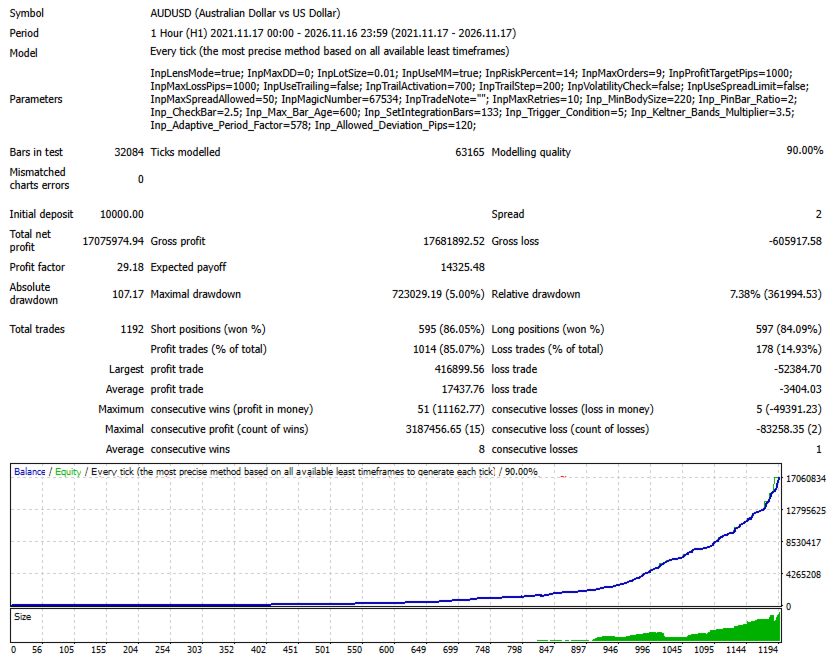
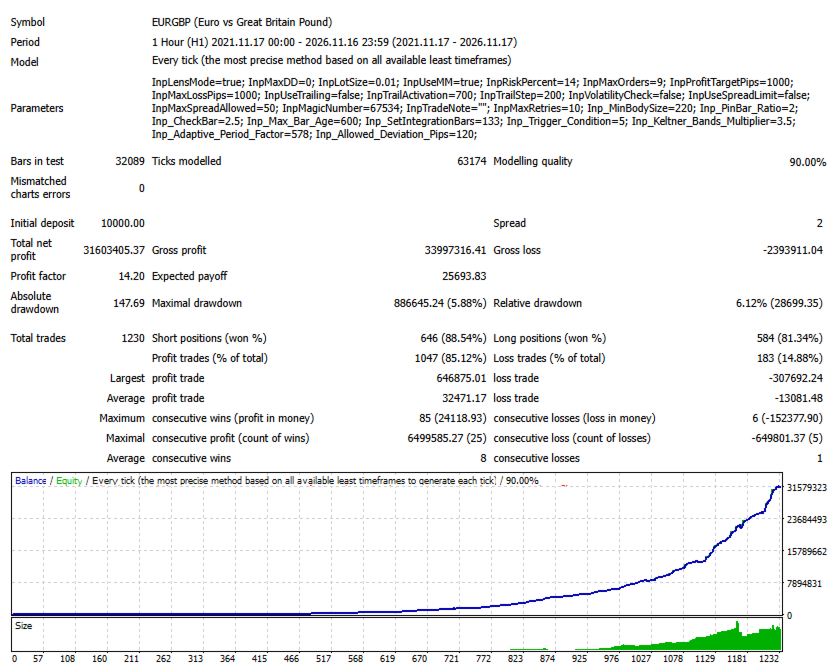
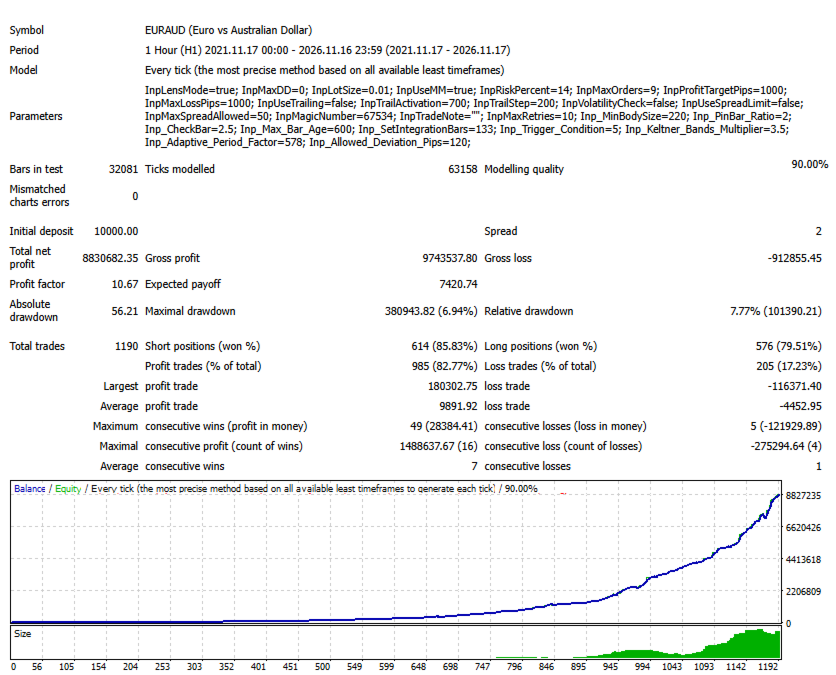
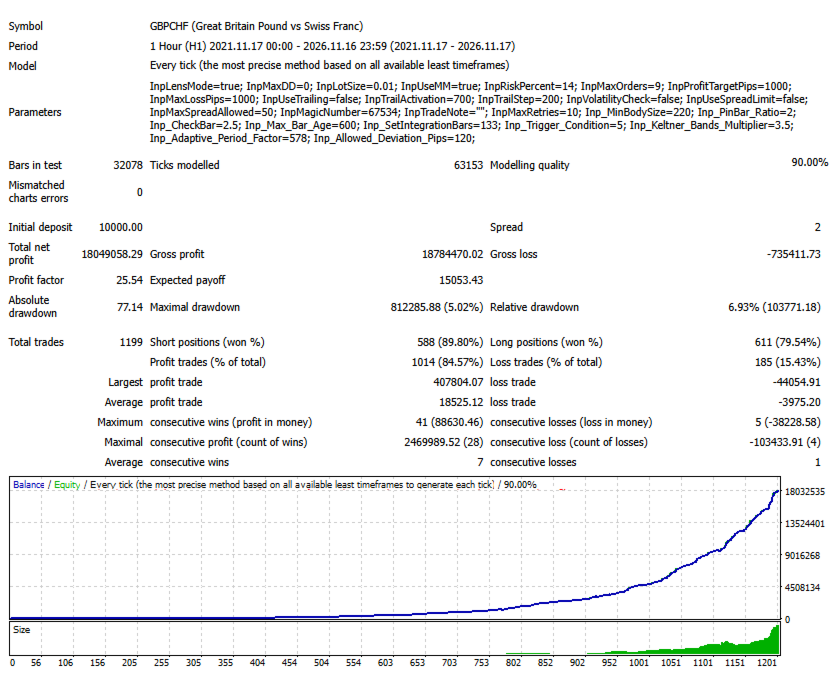
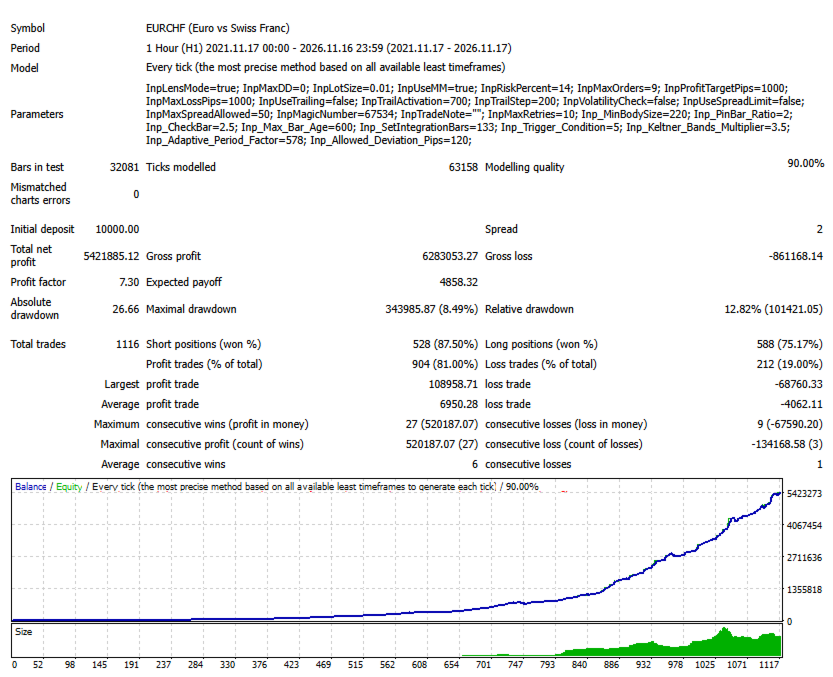
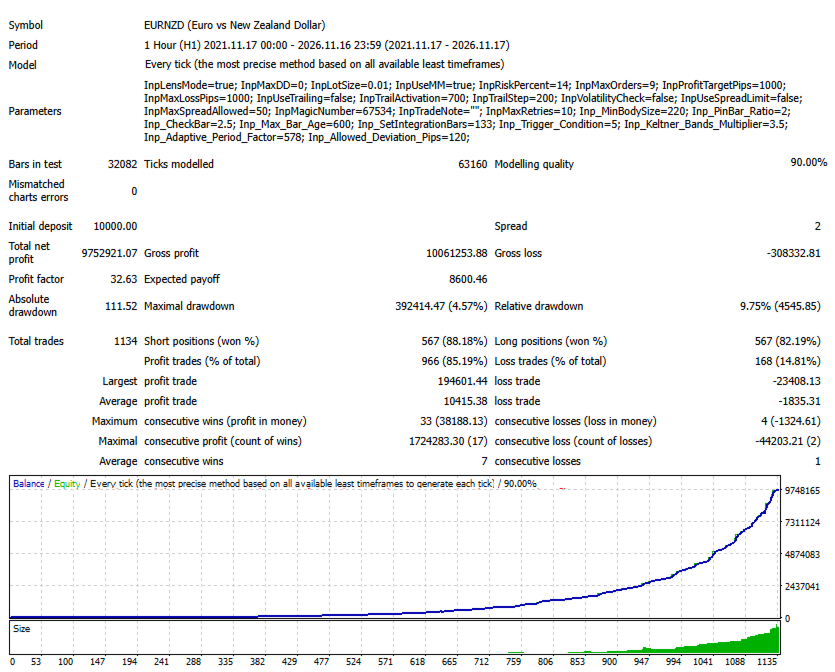
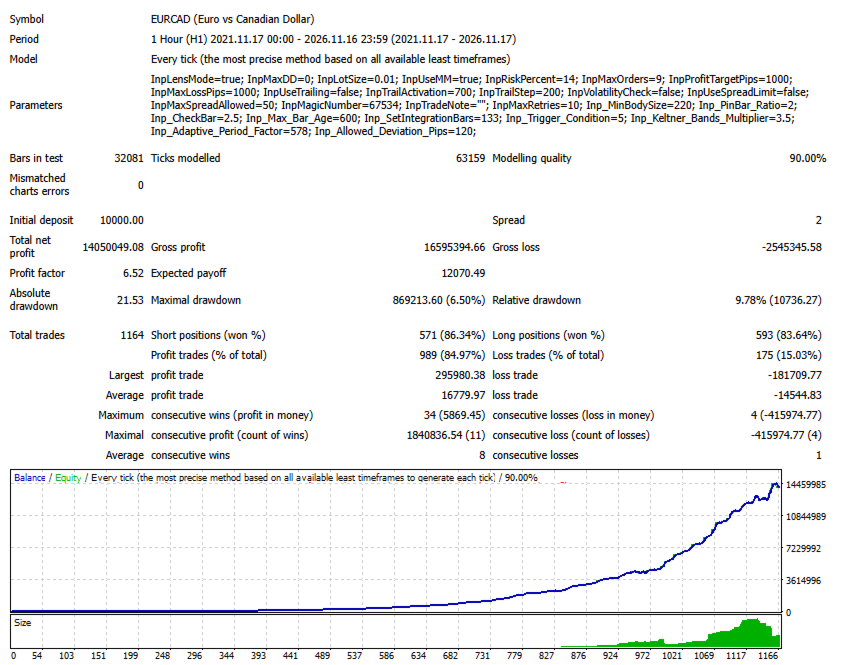
Paramètre Valeur par défaut
Lens Mode Activé
Paramètre de drawdown 0.0
Lot fixe 0.01
Money Management Activé
Pourcentage de risque 14.0
Nombre maximal d'ordres 9
Objectif de profit 1000 pips
Perte maximale 1000 pips
Trailing Stop Désactivé
Activation du Trailing Stop 700
Pas du Trailing Stop 200
Vérification de la volatilité Désactivée
Limitation du spread Désactivée
Spread maximal autorisé 50
Magic Number 67534
Nombre maximal de tentatives supplémentaires 10

Ces valeurs constituent une configuration de départ. Avant d'utiliser l'Expert Advisor, il est conseillé de vérifier tous les paramètres et de les adapter si nécessaire à l'instrument financier sélectionné et aux conditions de trading souhaitées.

Installation et configuration

  1. Lancez MetaTrader 4.

  2. Sélectionnez Fichier → Ouvrir le dossier des données.

  3. Accédez au répertoire MQL4/Experts.

  4. Copiez le fichier ProMeta EA dans ce dossier.

  5. Redémarrez MetaTrader 4 ou actualisez la liste des Expert Advisors dans la fenêtre Navigateur.

  6. Faites glisser ProMeta sur le graphique de l'instrument financier souhaité.

  7. Vérifiez les paramètres d'entrée et activez le trading automatique.

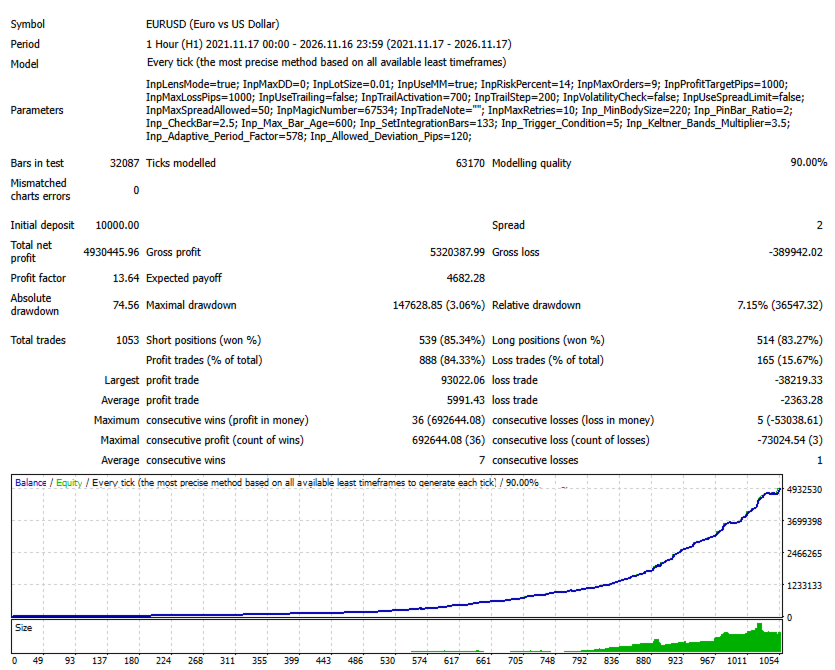
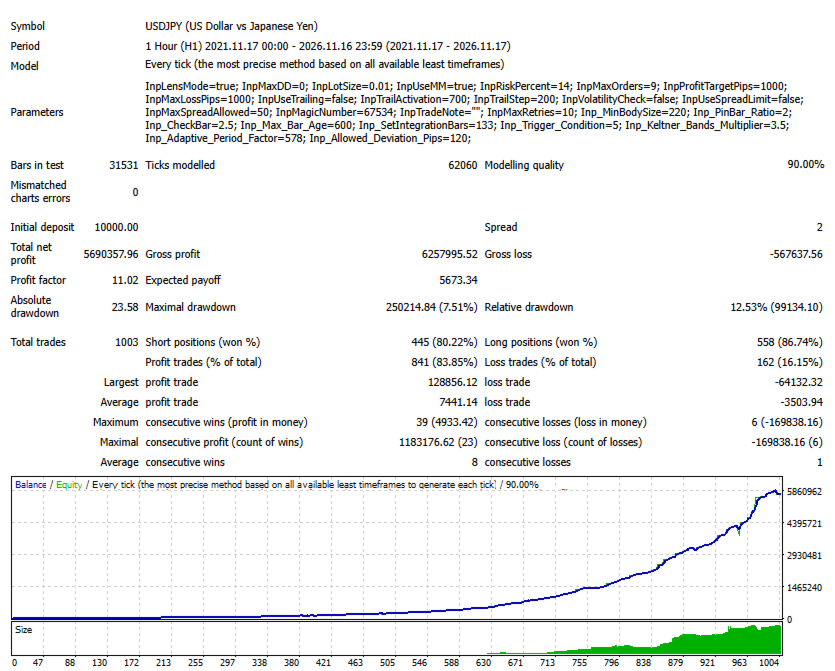
Pour une première évaluation, il est recommandé d'utiliser le testeur de stratégie et de vérifier le fonctionnement de l'Expert Advisor sur un compte de démonstration avant d'engager des fonds réels.

À quels traders ProMeta s'adresse-t-il ?

ProMeta est destiné aux traders qui souhaitent automatiser leurs opérations tout en conservant le contrôle sur la configuration et le fonctionnement de leur système de trading.

Cet Expert Advisor peut particulièrement intéresser les utilisateurs qui recherchent :

  • Une évaluation automatisée des conditions du marché.

  • Des paramètres d'analyse ajustables individuellement.

  • Plusieurs méthodes de gestion du volume des positions.

  • Un contrôle du nombre d'ordres de trading.

  • Des limites de profit et de perte personnalisables.

  • Des filtres optionnels pour certaines conditions de marché.

  • La possibilité de tester différentes combinaisons de paramètres.

Avertissement sur les risques

Le trading sur les marchés financiers comporte un risque important de perte de capital. Les résultats d'un système de trading automatisé dépendent notamment des conditions du marché, des paramètres sélectionnés, de l'instrument financier utilisé, de la qualité d'exécution des ordres et d'autres facteurs externes.

Aucun Expert Advisor ne peut garantir des profits ni éliminer totalement les risques liés au trading.

Avant d'utiliser ProMeta sur un compte réel, il est recommandé d'effectuer des tests sur données historiques et de vérifier d'abord son comportement sur un compte de démonstration. Ne tradez qu'avec des fonds dont la perte éventuelle ne compromettrait pas votre situation financière.

ProMeta — Le trading automatisé avec une configuration personnalisable et une gestion flexible des opérations.

Mots-clés SEO

ProMeta, Expert Advisor MT4, MetaTrader 4 EA, robot Forex, trading Forex automatisé, robot de trading MT4, Expert Advisor Forex, système de trading automatique, trading algorithmique, EA Money Management, gestion des risques, lot fixe, gestion automatique de la taille des positions, EA Trailing Stop, logiciel de trading Forex, gestion automatique des ordres.
Plus de l'auteur
Smart Analiz
Tatiana Savkevych
Working with the Smart Analiz indicator is very simple - you just react to the arrows that the indicator reflects, that is, the arrow is a command for action. The indicator signals are accurate enough and you can trade using this information! The indicator builds a very high-quality channel in which it generates entry signals! Which is the ideal strategy for a trader as the trader is always hesitant when choosing a strategy to work with. That is, this indicator will allow you to solve the dilemm
Beautiful
Tatiana Savkevych
The Beautiful indicator shows potential market reversal points. The intelligent algorithm of the indicator detects the trend well, filters out market noise and generates input signals and exit levels. Uses just one parameter for settings. Simple, visual and efficient trend detection. The indicator does not redraw and does not lag. You can set up message alerts as sound or email. Works on all currency pairs and on all timeframes. Ready-made trading system.

The Arrows Forecasters indicator is simple, visual and effective trend detection. The intelligent algorithm of the indicator determines the trend with a good probability. Uses just one parameter for settings. The indicator shows the points of potential market reversal. Ready-made trading system. The indicator does not redraw and does not lag. Works on all currency pairs and on all timeframes. You should remember that using a combination of forecasting tools, it is advisable to choose 2-3 indic


Balanced Costing - shows signals - can be used with an optimal risk factor. The indicator can be used both for pipsing on small periods and for long-term trading. The Balanced Costing trend indicator uses reliable algorithms in its calculations. Shows favorable moments for entering the market with arrows, that is, using the indicator is quite simple. Works on all currency pairs and on all timeframes. Of course, the approach to trading should be complex and in order to make a decision, you shou
The Signal Point Channel indicator predicts the most likely short-term price movement based on complex mathematical calculations. One of the biggest challenges traders face is finding a trading system that's right for them. This indicator is designed to detect trends in price movement and allows you to quickly determine not only the direction of the trend, but also to understand the levels of interaction between buyers and sellers. It has no settings and therefore can be perceived as it signals.
The Transition Trend indicator shows the points of potential market reversal. The indicator's smart algorithm detects the trend, filters out market noise and generates entry signals and exit levels. Simple, visual and efficient trend detection. Uses just one parameter for settings. The indicator does not redraw and does not lag. You can set up message alerts as sound or email. Works on all currency pairs and all timeframes. Ready-made trading system.
World Trend
Tatiana Savkevych
5 (1)
World Trend is a hybrid trend indicator, as it is based on the signals of elementary indicators and a special algorithm for analysis. The indicator shows favorable moments for entering the market. The intelligent algorithm of the indicator determines the trend, filters out market noise and generates entry signals. You can use the indicator as the main one to determine the trend. The indicator can work both for entry points and as a filter. Uses two options for settings. The indicator uses colo
Generic Trend
Tatiana Savkevych
The Generic Trend indicator is a trend type indicator. It smooths out price fluctuations when generating a signal by averaging the data and the signal only at certain moments! In those moments when you need to make a decision to enter a position and give the trader a direction. The indicator gives the trader the opportunity to visually determine which trend will be present at a particular time interval. This indicator was created to quickly determine the situation in the market, reflect the st
Trend Privacy
Tatiana Savkevych
The Trend Privacy indicator is easy to set up and works on all pairs and all time frames. Identifies the mainstream and helps analyze the market at a selected time frame It is extremely important for any trader to correctly determine the direction and strength of the trend movement. Unfortunately, there is no single correct solution to this problem. Many traders trade on different time frames. For this reason, the received signals are perceived subjectively. Trend indicators provide an opportu
Chaos Trend
Tatiana Savkevych
Chaos Trend is an arrow indicator for identifying potential entry points. I like it, first of all, because it has a simple mechanism of work, adaptation to all time periods and trading tactics. More reliably, the Forex Chaos Trend indicator is a real trading strategy with which you can achieve the desired results. As soon as the Chaos Trend indicator is installed, the main indicators for the price of the traded pair will immediately begin to be recalculated, based on the postulates of technica
Channel Smooth
Tatiana Savkevych
Channel Smooth - Forex channel indicator is a very useful and relevant tool for any trader, thanks to which you can efficiently and competently perform plotting on the chart, including automatically, without wasting time on independent calculations and eliminating the risk of incorrect point selection. Channels are needed to trade channel strategies that involve working within a certain price range. The key difference between the Channel Smooth indicator and other channel indicators (for examp
Trend Improved
Tatiana Savkevych
Trend Improved - Arrow trend indicator, without lagging and redrawing, is used by traders in trending strategies in trading on financial markets (Forex, CFDs, binary options). Key parameter MinAngle - The parameter is set in pips. For each instrument, select individually, start from scratch. If the parameter is too large then there will be no signals. The tool, at the very least, deserves attention for its signal accuracy and intuitiveness. Increasing the Period parameters decreases the numbe
Forex Roulette
Tatiana Savkevych
Forex Roulette - Trend Following Strategy! The most reliable indicator is used for the trend - the moving average. Only for the global trend, then the strategy itself is implemented. On screenshots, testing from $ 10,000, but the bot works without problems with $ 100. The first graph is optimization, the second is forecast. You can repeat yourself on another period, observing the principle indicated below. How the bot works. Optimization for the m15 period, after which works for 3 months. Very
Projection Trend - a Forex arrow indicator without redrawing does not change its signals when the market situation changes, does not adjust to the chart. The signals given by him are unambiguous. Traders build a trading system that provides good signals 80-90% of the time. The indicator showing the points of entry and exit from the market with arrows is able to bring results not only in the Forex market, but also when working with binary options. You can buy it and install it in MetaTrader you
Calc Trend
Tatiana Savkevych
Calc Trend is a Forex trend indicator based on the familiar RSI, but there is one "but"! We display RSI indicator signals on a price function chart using a mathematical approach. As you know, the overbought and oversold zones that the standard RSI fixes are often broken by the price and the price goes the other way. This makes the standard indicator inapplicable for real work in its pure form. Also, for sure, each user has noticed that at any part of the history, it is possible to change the R
Calc Trend Ex
Tatiana Savkevych
Calc Trend Ex is a forex trending bot based on the Calc Trend indicator. A bot created on the basis of this Calc Trend indicator and working on the principle - if there is an indicator signal, then the bot has closed an opposite deal and opened a new deal in the specified direction, it can be downloaded and used for work. The bot is as simple as possible! The bot fully reflects the work of the indicator. Moreover, the bot can be optimized (by optimizing the parameters of the indicator itself)
First Derivative RSI is a forex indicator based on all familiar RSI, based on the first derivative of the price function. The indicator combines the functionality of an oscillator and a trend indicator. At the bottom of the chart, a part of the indicator similar to the RSI will be displayed, but only calculated as the first derivative of the price. On the chart itself, trend signals will be displayed by arrows, they are filtered by the algorithm and always alternate buy / sell. It also shows th
Trend First Derivative RSI is a Forex indicator based on all familiar RSI, based on the first derivative of the price function. On the chart itself, trend signals will be displayed by arrows, they are filtered by the algorithm and always alternate buy / sell. It also shows the number of profitable pips that the indicator can give at the specified interval (LimitCalcHistory). The indicator has a parameter (Spread), which deducts a part of the profit per spread for each signal. To control the pe
Trend First Derivative RSI is a Forex trending bot based on the First Derivative RSI indicator. In the screenshots you can see tests that show the bot can work for 1,3,6 years, the timeframe is one hour. These are demo tests that show that it is realistic to go through significant sections of history with a different indicator and simple rules. Below in the text you will see a description of the rules of work. For real work, optimization is proposed for 3-12 months and work up to 1-2 months. O
Second Derivative RSI is a forex indicator based on all familiar RSI, based on the second derivative of the price function. Just a note on the use of the indicator. The indicator requires selection of settings not only for each currency pair but also for each timeframe. If there is no setting, then as a last resort, the indicator may not show signals! In order to pick up the settings, just use a bot that will help you do it. The indicator combines the functionality of an oscillator and a tren
Trend Second Derivative RSI is a forex indicator based on the usual RSI, based on the second derivative of the price function. On the chart itself, trend signals will be displayed by arrows, they are filtered by the algorithm and always alternate buy / sell. It also shows the number of profitable pips that the indicator can give at the specified interval (LimitCalcHistory). The indicator has a parameter (Spread), which deducts a part of the profit per spread for each signal. Immediately notice
Trend Second Derivative RSI Ex is a forex trending bot based on the Trend Second Derivative RSI indicator. Principle of operation. A bot created on the basis of this Trend Second Derivative RSI indicator and working on the principle - if there is an indicator signal, then the bot has closed the opposite deal and opened a new deal in the specified direction. It is also possible to work only for buy or sell, in which case the bot will simply close the deal without opening it in the opposite dire
Intel Trend
Tatiana Savkevych
Intel Trend is a forex trend indicator based on all the usual SAR, using differential calculus to generate a signal not directly from the price but from the derivative of the function. Also, when using the SAR indicator, the first point often changes, which is why the default parameter ShiftBar = 1. To skip the first baoa and read information directly from the second bar. If you set ShiftBar = 0, there will be perfect signals, but they are false. real signals for each timeframe and for each cur
Intel Trend Ex
Tatiana Savkevych
Intel Trend Ex is a forex trending bot based on the Intel Trend indicator. Principle of operation. A bot created on the basis of this Intel Trend indicator and working on the principle - if there is an indicator signal, then the bot has closed an opposite deal and opened a new deal in the specified direction. It is also possible to work only for buy or sell, in which case the bot will simply close the deal without opening it in the opposite direction. The bot is also equipped with an adaptive
Nuremberg
Tatiana Savkevych
The Nuremberg tool presents a channel-like algorithm. The best arrow algorithms use channels without redrawing. Its settings indicate the parameters of the length and width of the channel. The indicator was created in such a way that you can fix the reaction to the channel breakout and display it in the form of an arrow. Arrow indicator Nuremberg on Forex indicates points of entry into transactions without redrawing. It generates fairly frequent and accurate signals. When an upward arrow appea
Unchained
Tatiana Savkevych
Unchained is intended for scalping trading. It is used to trade on five and fifteen-minute timeframes. But it works on H1 and higher too. According to the traders themselves, the best arrow indicator is the one that does not redraw, i.e. does not imply changes in indicators. When an upward arrow appears on the chart, the trader opens a buy order. If a downward arrow appears during trading, the buy order is closed. After analyzing the situation in this case, you can open a sell position. It is
Clustering Trend
Tatiana Savkevych
Clustering Trend is always in operation - after the first position, provided that the position is not closed with stops. You can test the bot on any part of the history, the bot is configured to pass the entire history, but if you need to increase productivity in a specific area, you can optimize the bot for more productive work, but in a shorter part of the history. The bot works without trailing stops, breakevens or anything like that. The principle of operation is that there is a signal, th
Toroid
Tatiana Savkevych
Toroid - The indicator reflects information in a visual form, it can be used both for pipsing on small periods and for long-term trading. It generates fairly frequent and accurate signals. The indicator can be used as the main one for determining the trend. The indicator can work both for entry points and as a filter. Uses two parameters for settings. The smart indicator algorithm detects the trend, filters out market noise and generates input signals. It is based on the signals of elementary in
Platoon
Tatiana Savkevych
Platoon is an indicator designed to be able to detect a bottom or top similar to the Fractals indicator, but of course a different algorithm is used. In other words, you should not enter into a buy deal if the fractal is below. And you should not enter into a sell deal if the fractal is higher. The indicator only denotes fractals on the chart without performing any additional calculations, therefore, theoretically, any trader can find these patterns by himself. But what is a fractal, how exact
Provided
Tatiana Savkevych
Provided is a trend trading Expert Advisor based on the simplest indicator strategy of following the market towards global price movements. The robot can effectively trade on almost any trading asset or currency pair, but subject to proper optimization. It is recommended to use the robot on the hourly chart of the Euro / Dollar currency pair. List of all settings: Magic - Magic number. StartVolume - Sets the lot size for entering the market. OnRisk - Activates Money Management. PercentRisk - A
Filtrer:
Aucun avis
Répondre à l'avis