Wave X Pro AI Agents Indicator
- Indicators
-
Muhammad Talha
 SS7Trader is a next-gen trading brand founded by Muhammad Talha, built on the vision of merging professional trading strategies with the power of artificial intelligence. Our core strength lies in utilizing advanced neural networks and machine learning to enhance decision-making across all major
 - Version: 19.0
- Activations: 5
Wave X Pro AI Agents Indicator
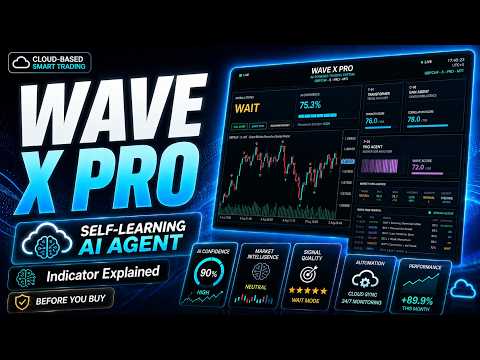
Wave X Pro is a signal-analysis indicator developed for MetaTrader 5 and designed for short-duration binary trading workflows. It operates on the M1 chart and presents directional signals with a five-minute evaluation period.
The indicator combines several specialized analytical modules in one coordinated workflow. Each module examines a different aspect of price behavior before the system presents its final signal. Wave X Pro is an analytical tool. It does not execute trades automatically But It can automate your trades in binary brokers like pocket broker with the help of mt2trading like aumation systems.
System Overview
- Platform: MetaTrader 5
- Product type: Custom indicator
- Recommended chart timeframe: M1
- Signal evaluation period: 5 minutes
- Signal output: Upward or downward directional indication
- Trading workflow: Manual decision support
- Markets: Symbols and charts available through the connected MetaTrader 5 broker
Multi-Agent Analysis
Wave X Pro organizes its analysis into specialized agents. These agents process complementary information and contribute to a unified signal decision.
GNN Analysis Agent
This module evaluates relationships between selected market features. Its purpose is to examine how different pieces of price information interact rather than treating every condition as an isolated event.
Transformer Analysis Agent
This module evaluates sequential price context and the relative importance of recent market information. It is designed to help the system distinguish relevant short-term context from less useful price movement.
PPO Decision Agent
This module contributes to the decision and validation process used by the indicator. It evaluates the combined analytical state before the final directional output is presented.
Signal Validation Layer
The validation layer combines the available analytical outputs and checks whether the current conditions satisfy the internal signal requirements. A signal is displayed only when the implemented conditions are met.
How the Signal Workflow Operates
- Attach the indicator to an M1 chart.
- The analytical modules process the available chart and market data.
- The GNN, Transformer and PPO modules contribute to the internal evaluation.
- The validation layer checks the combined directional conditions.
- When the required conditions are satisfied, the indicator displays its final directional signal.
- The intended evaluation period for the signal is five minutes from the defined signal point.
Live-Market and OTC-Style Symbols
Wave X Pro is designed to work with compatible symbols made available in the MetaTrader 5 terminal. This can include standard live-market symbols and broker-provided OTC-style symbols when suitable chart data is available.
Symbol names, price feeds, trading sessions and data quality vary between brokers. Availability on one broker does not guarantee identical behavior on another broker. The user should verify each symbol on a demo account before using the indicator in a live trading workflow.
Recommended Setup
- Open a supported symbol in MetaTrader 5.
- Select the M1 chart timeframe.
- Attach Wave X Pro to the chart.
- Review the available input parameters before use.
- Allow sufficient chart history to load.
- Use the five-minute evaluation period associated with the signal workflow.
- Test the indicator on a demo account before considering live use.
Practical Use
Wave X Pro should be used as a structured analytical aid, not as a substitute for user judgment. Market conditions can change rapidly, especially during major economic announcements, periods of low liquidity, spread changes, price-feed interruptions and unusually volatile sessions.
Users should check the current symbol, session, chart data and market conditions before acting on any signal. Applying independent confirmation and consistent risk controls is recommended.
Important Notes
- The indicator is designed for the M1 timeframe.
- The stated five-minute period describes the intended signal-evaluation horizon; it does not make the indicator multi-timeframe.
- The indicator does not place or manage trades automatically.
- Signal frequency varies according to the symbol, session, price feed and market conditions.
- Historical examples do not guarantee future behavior.
- No indicator can eliminate trading risk or provide guaranteed accuracy.
Support
Product questions and technical-support requests are handled through the MQL5 product comments and the MQL5 messaging system. When reporting an issue, please include the MetaTrader 5 build number, broker name, symbol, timeframe, indicator settings and a screenshot of the chart.
Risk Disclosure
Trading and short-duration trading involve substantial risk and may not be suitable for every user. Market conditions, broker execution, price feeds and user decisions can affect results.