
Available on the MQL5 Market: MACD Intraday Trend PRO
Risk notice. Trading involves risk of loss. This indicator measures the momentum of price in a separate window; it does not predict the market, does not place trades and does not guarantee any result. Use it together with your own analysis and risk management, and test on a demo account first.
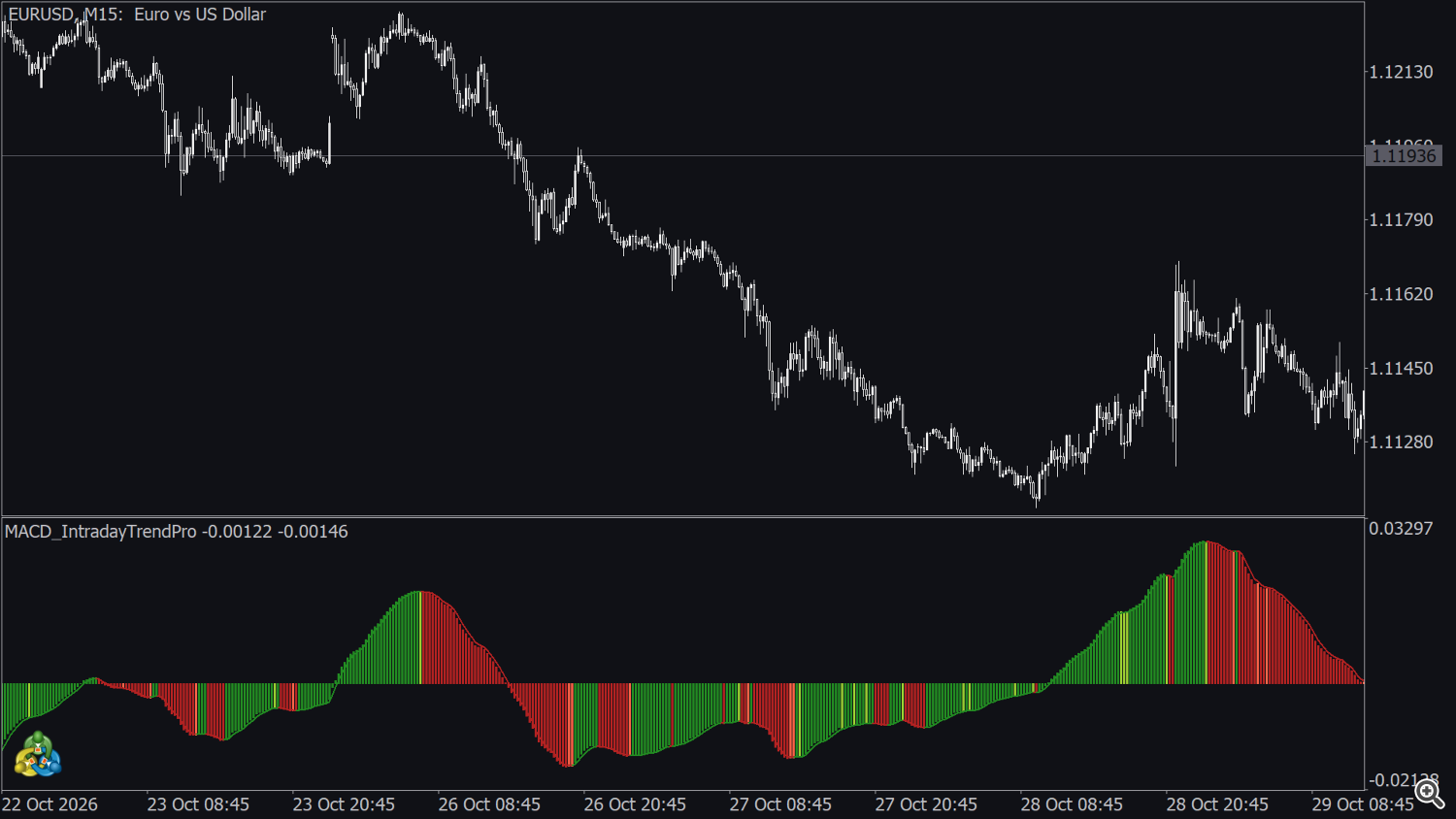
MACD Intraday Trend PRO is an intraday momentum indicator inspired by the classic MACD, tuned for intraday trading. It draws a four-colour histogram and a signal line in a separate window to show when an intraday move gains strength, when it slows down and when it turns. The PRO version adds the Detection Speed setting, six configurable alerts and buffers for Expert Advisors. Every alert and every event buffer is evaluated on a closed bar. It works on any symbol, any broker and any timeframe, on candlestick and on Renko charts.
1. Installation and first start
- Buy or rent the indicator on the MQL5 Market and install it from the Market tab of the terminal (Toolbox → Market → Purchased → Install).
- Open a chart and drag MACD Intraday Trend PRO from the Navigator (Indicators → Market) onto it.
- Keep the default inputs or adjust them (section 8) and press OK.
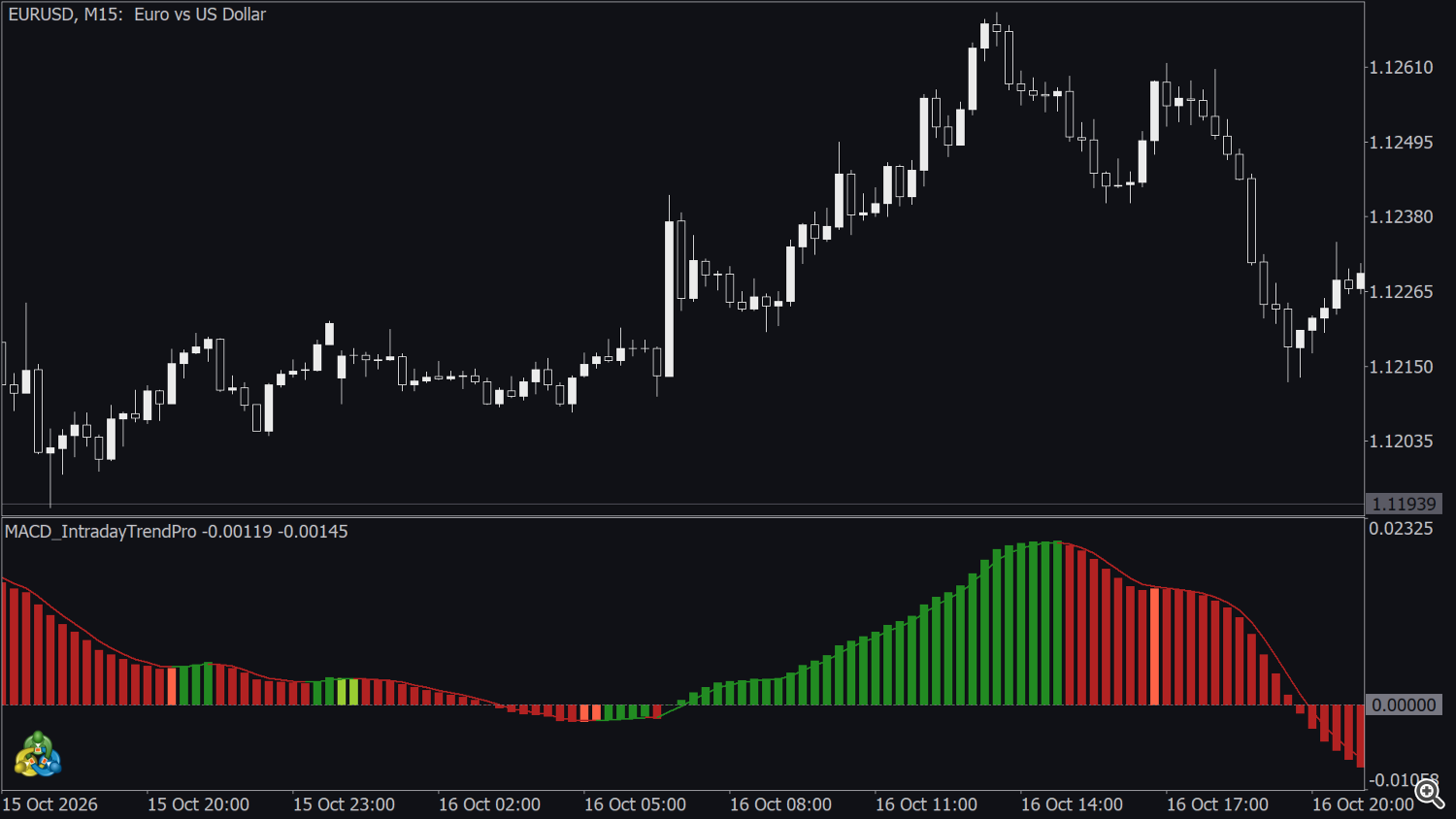
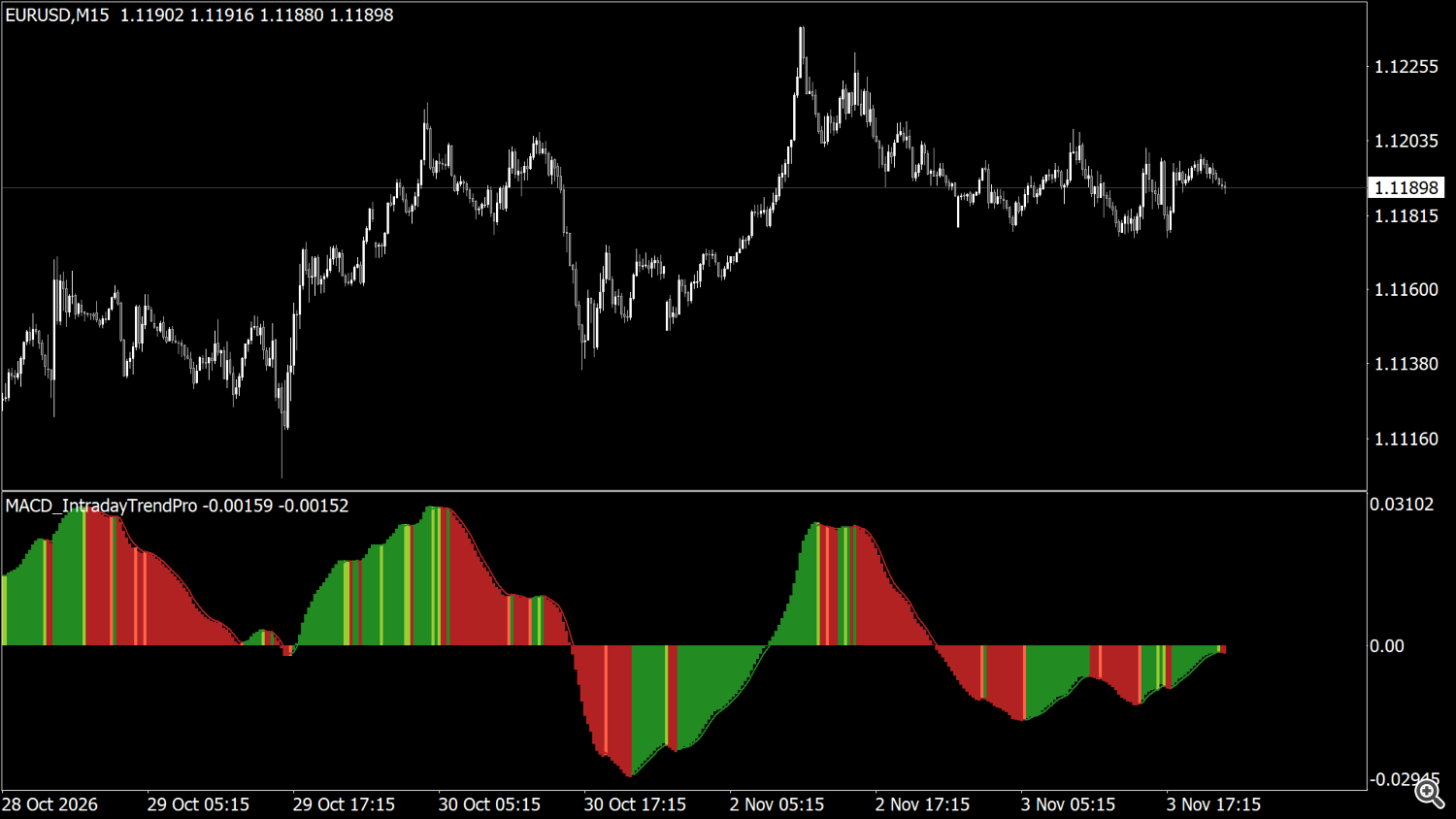
The indicator opens in its own window below the price chart. The name of that window is followed by the current values of the histogram (MACD) and of the SIGNAL line. The price used is selected in Apply to on the Parameters tab (default Close).
The indicator needs some history before it shows values: the first bars on the left of the chart are a warm-up period, and on a chart with very little history the window stays empty until more bars are available. Keep at least a few hundred bars of history on the chart (Tools → Options → Charts → Max bars in chart).
2. Indicator window legend
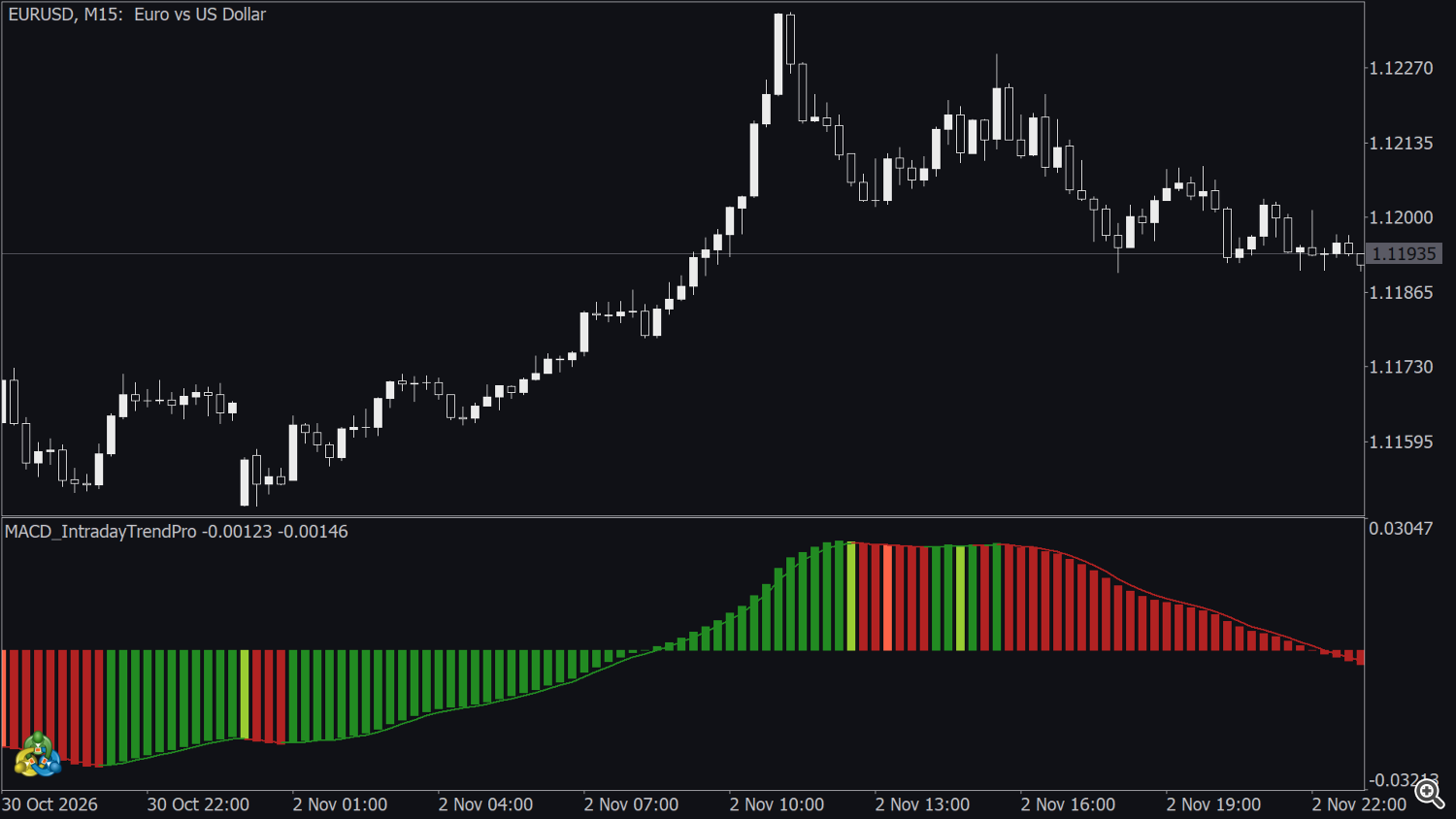
| In the indicator window | Meaning |
|---|---|
| Dark green bar | Bullish momentum is growing. |
| Light green bar | Bullish momentum is slowing down (pullback inside an up move). |
| Dark red bar | Bearish momentum is growing. |
| Light red bar | Bearish momentum is slowing down (pullback inside a down move). |
| Bars above / below zero | Positive / negative histogram. |
| Green part of the line | Signal line rising. |
| Red part of the line | Signal line falling. |
| Black part of the line | Signal line unchanged from the previous bar (rare). On a black background change this colour on the Colors tab. |
| Values after the window name | Histogram (MACD) and SIGNAL of the bar under the mouse or of the last bar. The same two values are shown in the Data Window (Ctrl+D). |
All colours can be changed on the Colors tab: the four colours of HISTOGRAM COLORS (in the order dark green, dark red, light green, light red) and the three colours of SIGNAL (rising, falling, unchanged). The indicator does not draw any object on the price chart.
3. Scale of the values
The scale of the values depends on the price scale of each symbol (very small values on a currency pair, much larger values on an index). Read the sign, the direction and the colour, not the absolute value, and do not compare levels between symbols.
4. Reading the histogram
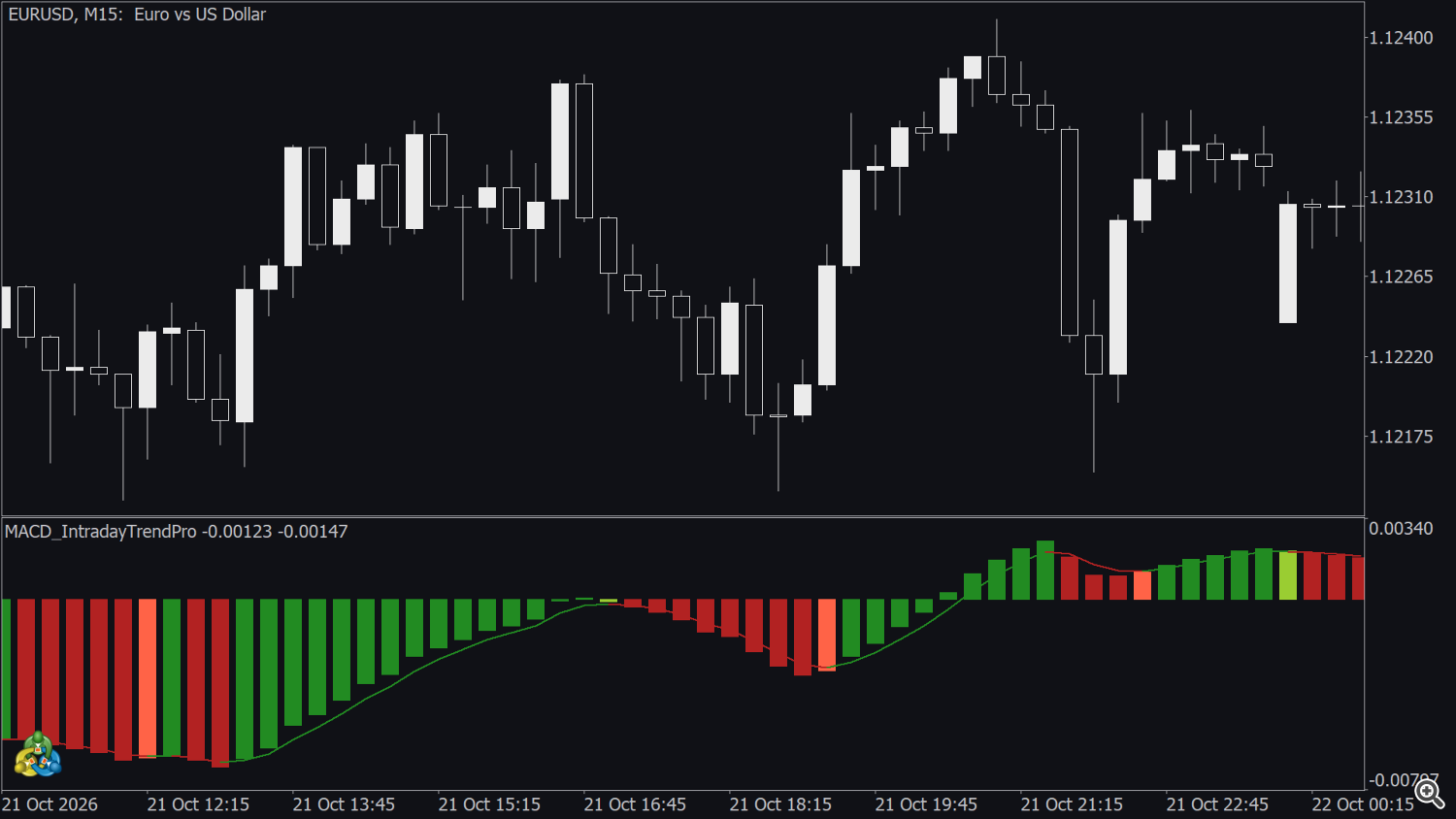
- Position (above / below zero). Above zero momentum is positive; below zero it is negative. A cross of the zero level shows that momentum has changed side.
- Colour family. Green bars (dark or light) show bullish momentum, red bars (dark or light) bearish momentum. A change of family is the earliest colour signal of a new swing of momentum.
- Dark or light. Dark bars show momentum that is still expanding; light bars show that it is losing strength. A series of light bars after a long dark series often marks the end of the impulse or a pause before it continues.
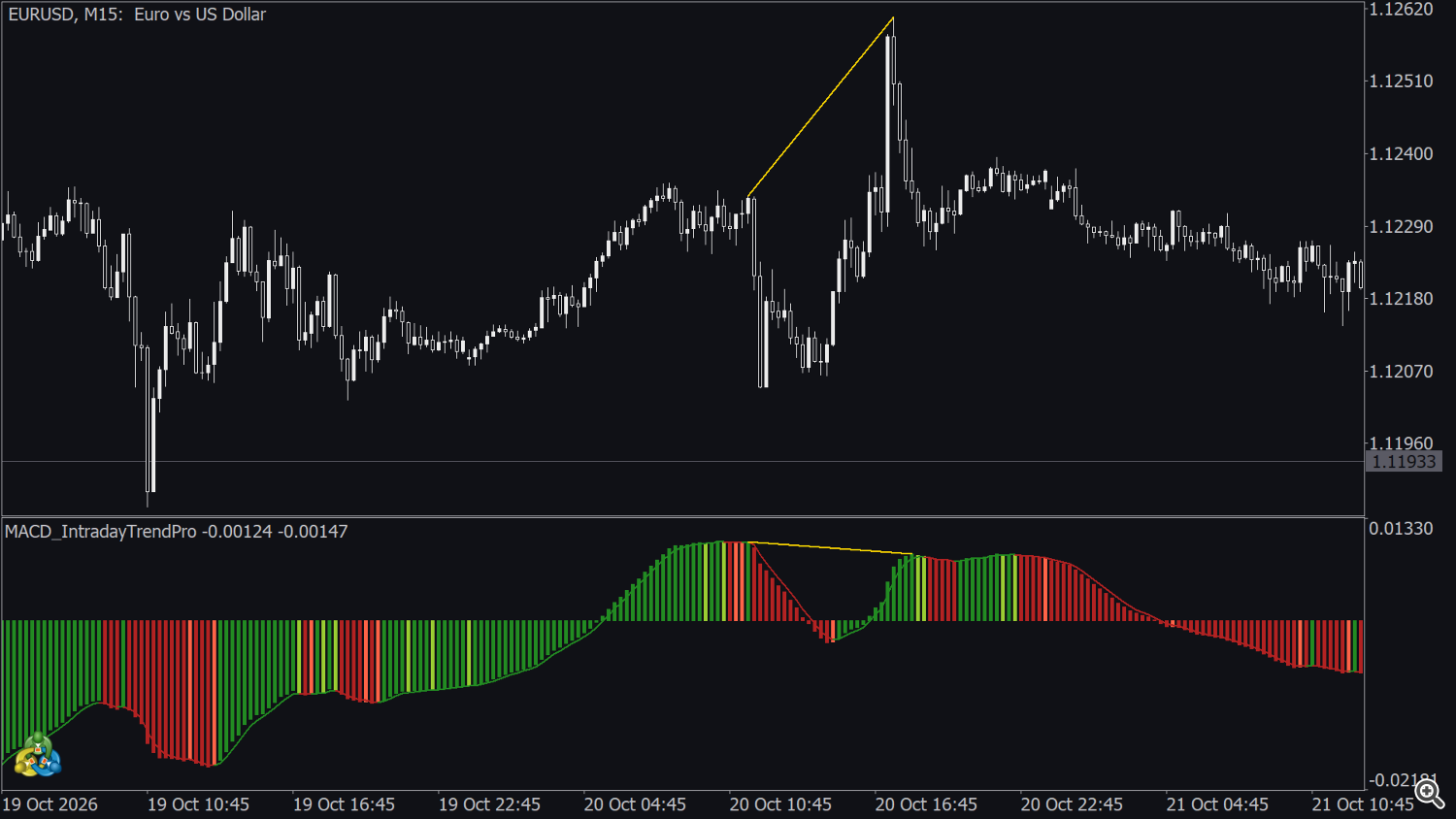
- Divergences. When price makes a higher high while the histogram makes a lower high (or a lower low in price against a higher low in the histogram), the move is losing momentum. The indicator does not detect divergences automatically; the smooth histogram only makes them easier to see.
The bar that is still forming is recalculated on every tick, like any MACD: its height and colour can change until it closes. Closed bars are not changed afterwards.
5. The signal line and Detection Speed
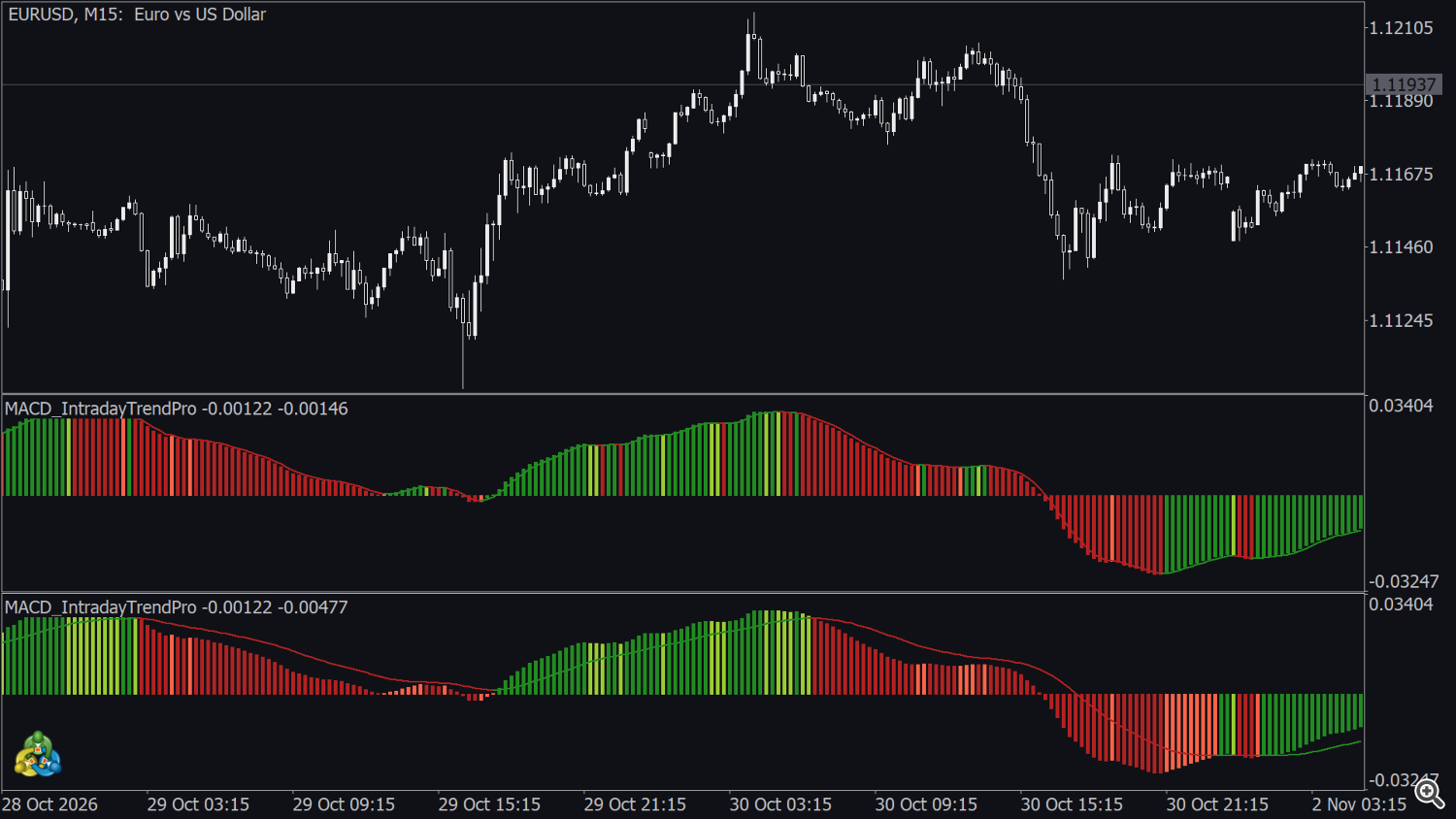
Detection Speed sets how closely the signal line follows the histogram, in five modes: FASTEST (default), FAST, NORMAL, SLOW and SLOWEST.
- A faster setting follows the histogram closely: colour changes and crosses come earlier, but there are more of them.
- A slower setting gives fewer, later and smoother changes.
- Detection Speed changes the signal line, the colours and every alert, but not the histogram itself.
6. Events
The six events below are the conditions behind the six alerts (section 7) and the event buffers 12-17 (section 9). They are evaluated on closed bars only: on every closed bar of the history when the indicator is loaded, and then on each bar that closes, when the next bar opens.
6.1 MACD pullback on the signal line (alert 1)
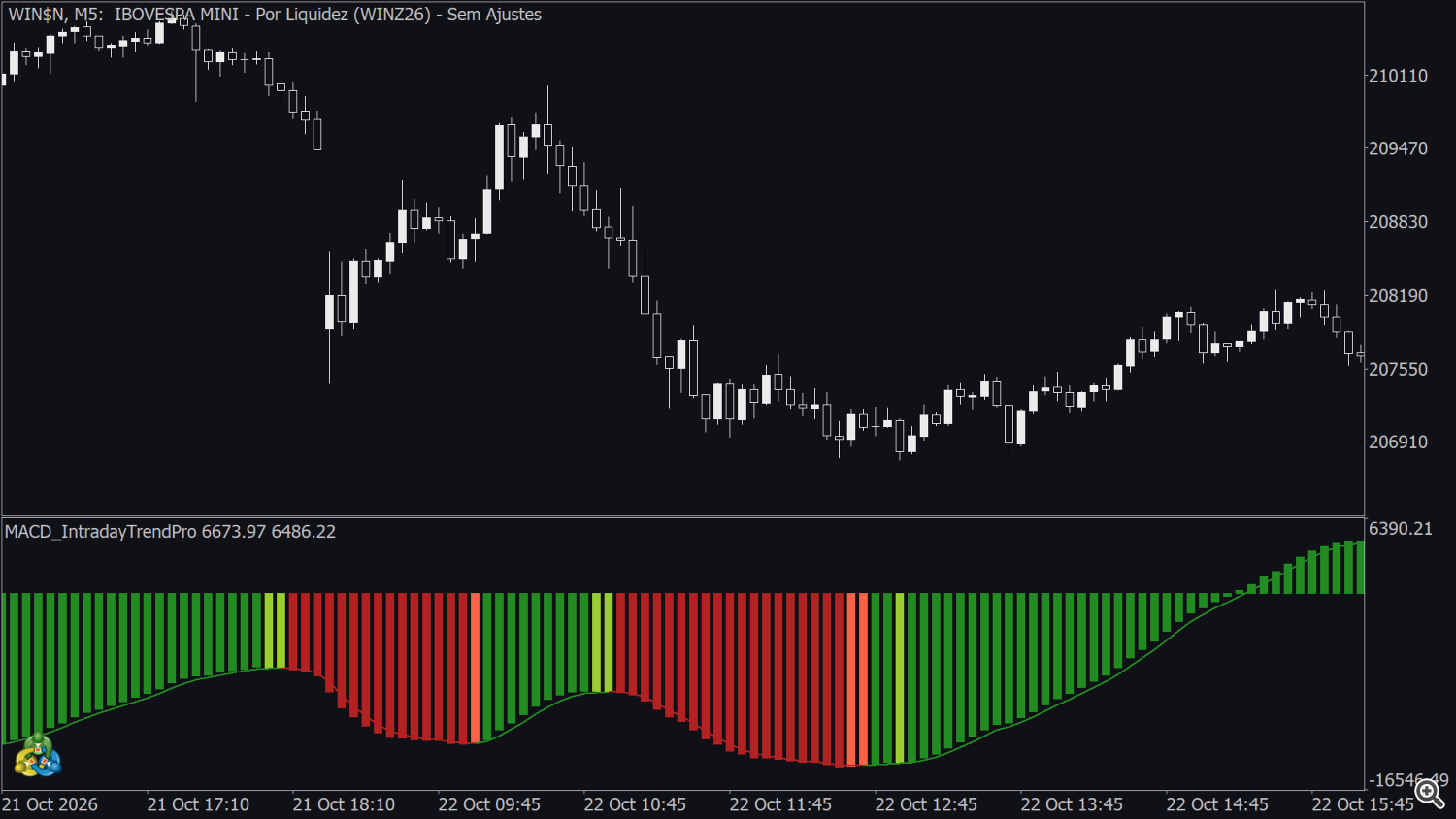
Uptrend pullback (+1) / downtrend pullback (−1).
A new swing of momentum has started (the line is turning, but has not yet crossed zero), the histogram makes a small pullback towards the line and then resumes in the same direction.
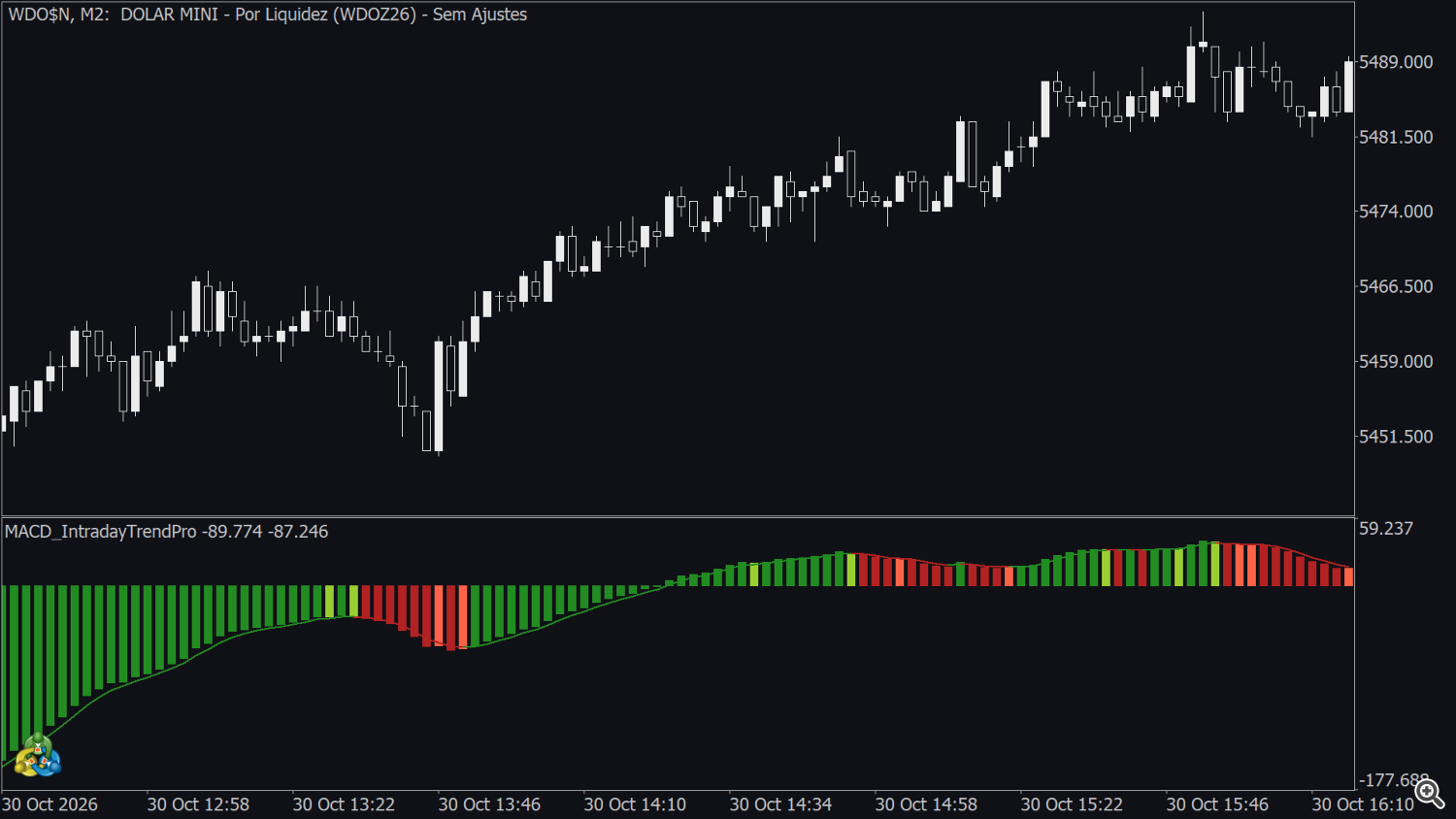
6.2 MACD crosses the signal line (alert 2)
+1 when the histogram closes above the signal line after being at or below it on the previous bar; −1 when it closes below the line after being at or above it.
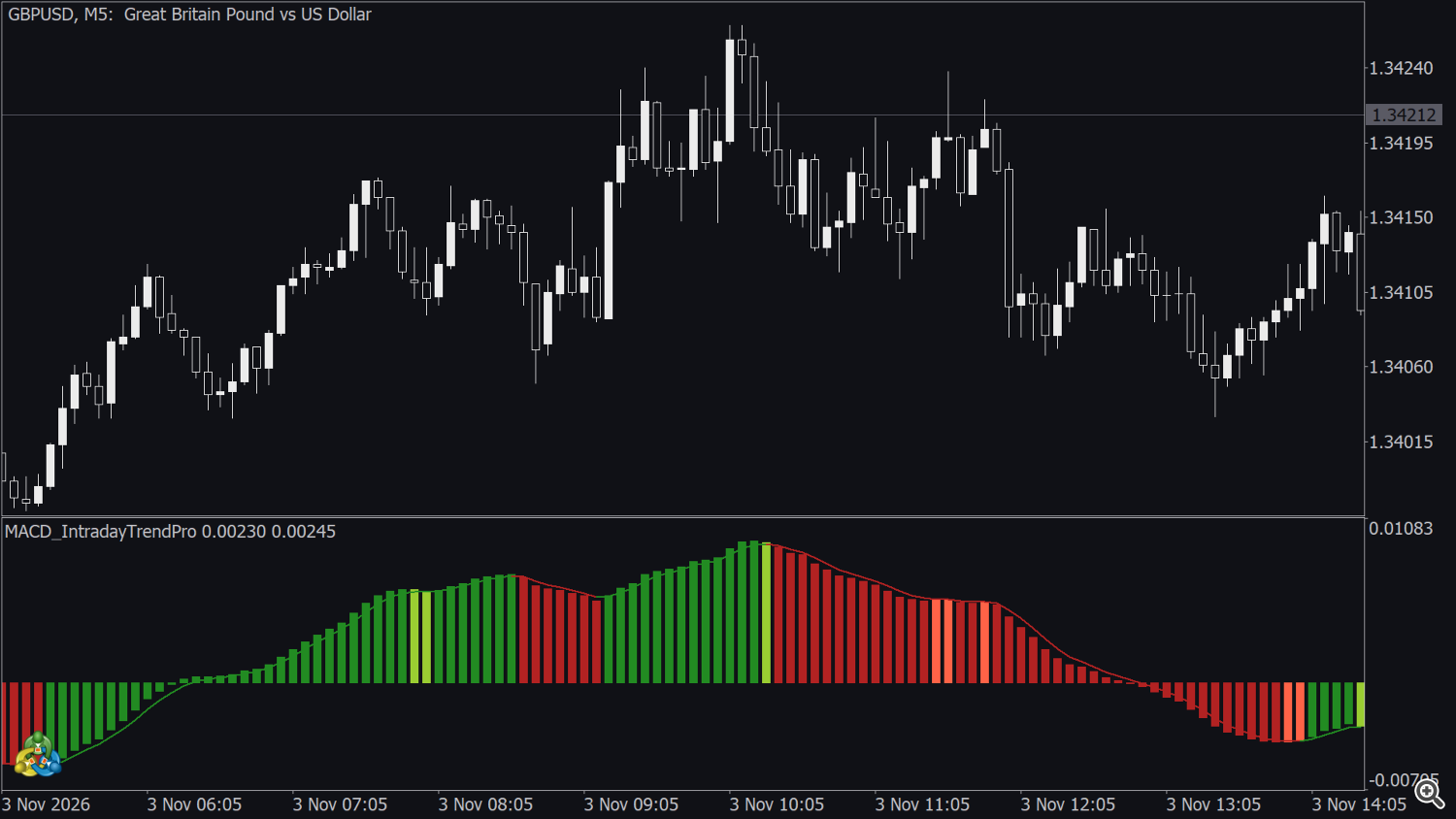
6.3 MACD crosses level zero (alert 3)
+1 when the histogram closes above zero after being at or below zero; −1 when it closes below zero after being at or above zero.
6.4 Signal line crosses level zero (alert 4)
The same rule applied to the signal line. It comes a few bars after the histogram cross, more or fewer depending on Detection Speed.
6.5 MACD changes trend colour (alert 5)
+1 when the histogram changes from a red bar (dark or light) to a green bar (dark or light); −1 for the change from green to red.
6.6 Signal line changes trend colour (alert 6)
+1 when the signal line turns from falling (red) to rising (green); −1 when it turns from rising to falling. A flat (black) bar between the two does not count as a change.
7. Alerts
| Input | Fires when | Message |
|---|---|---|
| MACD Pulback | uptrend / downtrend pullback (6.1) | Pullback UP TREND! / Pullback DOWN TREND! |
| MACD Cross Signal | the histogram crosses the signal line (6.2) | MACD Cross UP Signal Line! / MACD Cross DOWN Signal Line! |
| MACD Cross Line 0 | the histogram crosses zero (6.3) | MACD Cross UP Level 0! / MACD Cross DOWN Level 0! |
| Signal Cross Line 0 | the signal line crosses zero (6.4) | Signal Cross UP Level 0! / Signal Cross DOWN Level 0! |
| MACD Change Trend Color | the histogram changes colour family (6.5) | MACD change to UP TREND! / MACD change to DOWN TREND! |
| Signal Change Trend Color | the signal line changes colour (6.6) | Signal change to UP TREND! / Signal change to DOWN TREND! |
Each alert can be NONE (off), POPUP, SOUND, NOTIFICATION (smartphone), POPUP_SOUND, NOTIFICATION_SOUND, POPUP_NOTIFICATION or POP_SOUND_NOTIFICATION. All alerts are off by default. Each alert has its own Sound Type, one of the 13 terminal sounds: alert (default), alert2, connect, disconnect, email, expert, news, ok, request, stops, tick, timeout, wait.
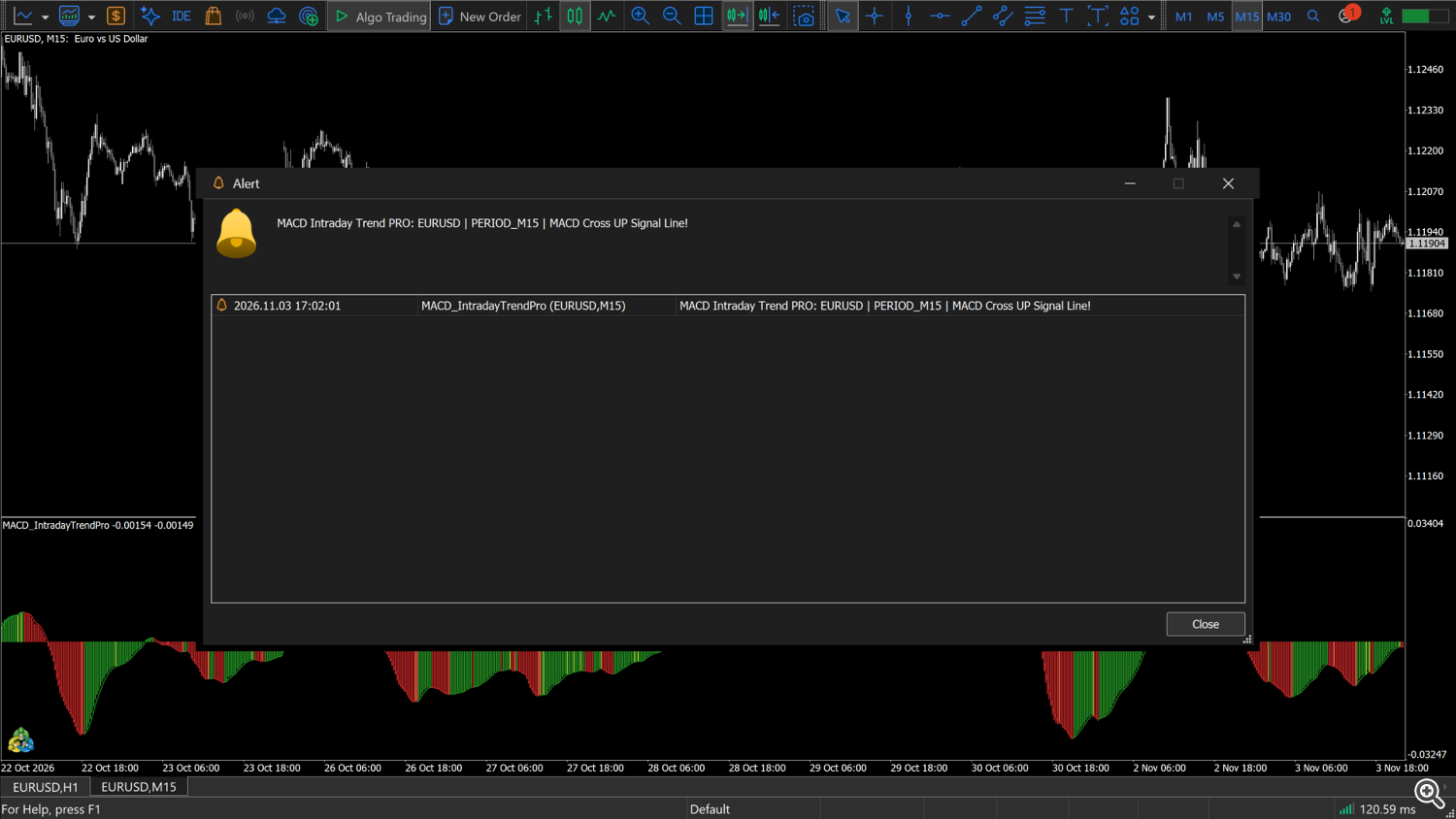
The text includes the product, symbol and timeframe, e.g. MACD Intraday Trend PRO: EURUSD | PERIOD_M15 | MACD Cross UP Signal Line! . Alerts are sent at the open of the bar that follows the event, never during a bar. Each alert type fires at most once per bar; several types can fire on the same bar. When the indicator is attached, or when the terminal recalculates it, no alerts are sent for past bars. If several bars close between two updates (for example after a reconnection), the alerts of each of those bars are sent, once per bar. Sounds are queued and played one every 1.5 seconds or so, so that consecutive sounds do not overlap; the terminal is not blocked while it waits. Push notifications need the MetaQuotes ID in Tools → Options → Notifications. There is no e-mail option. The Strategy Tester shows no pop-ups, sounds or notifications.
8. Inputs
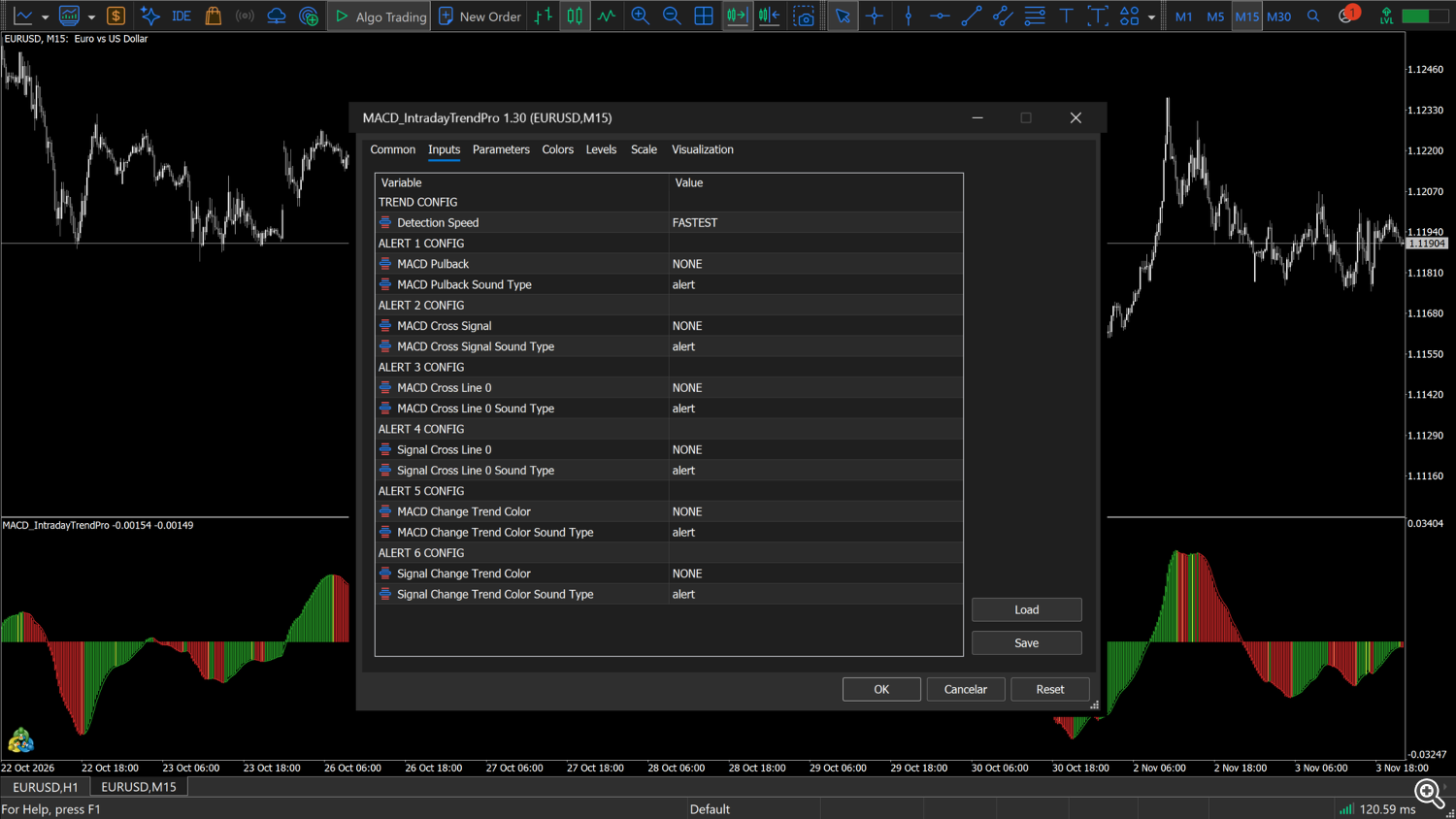
TREND CONFIG
| Input | Default | Description |
|---|---|---|
| Detection Speed | FASTEST | How fast the signal line reacts: FASTEST, FAST, NORMAL, SLOW, SLOWEST (section 5). |
ALERT 1 CONFIG
| Input | Default | Description |
|---|---|---|
| MACD Pulback | NONE | Alert mode for the pullback event (6.1). |
| MACD Pulback Sound Type | alert | Sound used by the sound modes. |
ALERT 2 CONFIG
| Input | Default | Description |
|---|---|---|
| MACD Cross Signal | NONE | Alert mode for the histogram / signal line cross (6.2). |
| MACD Cross Signal Sound Type | alert | Sound used by the sound modes. |
ALERT 3 CONFIG
| Input | Default | Description |
|---|---|---|
| MACD Cross Line 0 | NONE | Alert mode for the histogram zero cross (6.3). |
| MACD Cross Line 0 Sound Type | alert | Sound used by the sound modes. |
ALERT 4 CONFIG
| Input | Default | Description |
|---|---|---|
| Signal Cross Line 0 | NONE | Alert mode for the signal line zero cross (6.4). |
| Signal Cross Line 0 Sound Type | alert | Sound used by the sound modes. |
ALERT 5 CONFIG
| Input | Default | Description |
|---|---|---|
| MACD Change Trend Color | NONE | Alert mode for the histogram colour change (6.5). |
| MACD Change Trend Color Sound Type | alert | Sound used by the sound modes. |
ALERT 6 CONFIG
| Input | Default | Description |
|---|---|---|
| Signal Change Trend Color | NONE | Alert mode for the signal line colour change (6.6). |
| Signal Change Trend Color Sound Type | alert | Sound used by the sound modes. |
Parameters tab — Apply to (default Close): the price used by the indicator.
9. Buffers for Expert Advisors / dashboards
The indicator exposes its values through buffers 0-17, all of which can be read with iCustom + CopyBuffer . Buffers 5, 6 and 12-17 are the interface for Expert Advisors. Event buffers are filled even when the alerts are off. Only MACD and SIGNAL are shown in the Data Window; the other buffers are read by code.
| Buffer | Name | Values | When | Empty |
|---|---|---|---|---|
| 5 | MACD (histogram) | histogram value | every bar; the forming bar changes with each tick | — |
| 6 | Signal line | signal line value | as buffer 5 | — |
| 12 | Alert 1 — MACD pullback | +1 uptrend pullback, -1 downtrend pullback | on the bar whose close completed the event, for every closed bar of the history and then when the next bar opens; the forming bar is always 0 | 0 |
| 13 | Alert 2 — MACD crosses signal line | +1 cross up, -1 cross down | as buffer 12 | 0 |
| 14 | Alert 3 — MACD crosses zero | +1 cross up, -1 cross down | as buffer 12 | 0 |
| 15 | Alert 4 — signal line crosses zero | +1 cross up, -1 cross down | as buffer 12 | 0 |
| 16 | Alert 5 — MACD changes trend colour | +1 to green, -1 to red | as buffer 12 | 0 |
| 17 | Alert 6 — signal line changes trend colour | +1 to rising, -1 to falling | as buffer 12 | 0 |
Other readable buffers: 4 the histogram colour ( 0 dark green, 1 dark red, 2 light green, 3 light red) and 7 the signal line colour ( 0 rising, 1 falling, 2 unchanged). Buffers 0-3 and 8-11 are for drawing and internal use.
Event buffers and history. Buffers 12-17 are calculated for every closed bar, including the bars that were already in the history when the indicator was loaded, and they are filled again when the terminal recalculates the whole indicator (for example after a history download). If several bars close between two updates, all of them are filled. An EA can therefore read past events directly, for example the last 100 values of buffer 13. For live decisions read shift 1 on the first tick of a new bar. In the Strategy Tester the events are produced bar by bar during the test.
Warm-up. On a chart with too little history BarsCalculated() stays 0 ; wait until it is greater than zero.
Loading. The Market version is installed in MQL5\Indicators\Market\ ; check the exact file name in the Navigator. With no parameters after the name the default inputs are used. To change inputs, pass them in the order of section 8. Every input group heading is a parameter too: pass an empty string "" in its place, otherwise every following value shifts. Inputs left out at the end keep their defaults. Pass Detection Speed as its numeric code (FASTEST 0 , FAST 1 , NORMAL 2 , SLOW 3 , SLOWEST 4 ), alert modes as 0 (NONE) to 7 (POP_SOUND_NOTIFICATION) and sounds as 0 (alert) to 12 (wait).
```mql5 // every input group is one "" parameter; Detection Speed code: 0-4 int h = iCustom(_Symbol, PERIOD_M15, "Market\MACD Intraday Trend PRO", "", 2, // TREND CONFIG: Detection Speed NORMAL "", 0, 0, // ALERT 1 CONFIG: mode NONE, sound alert "", 0, 0, // ALERT 2 CONFIG "", 0, 0, // ALERT 3 CONFIG "", 0, 0, // ALERT 4 CONFIG "", 0, 0, // ALERT 5 CONFIG "", 0, 0); // ALERT 6 CONFIG if (h == INVALID_HANDLE) return(INIT_FAILED);
// the short form iCustom(..., "", 8) gives the same result: inputs left out keep their defaults
double macd[1], sig[1], cross[1], color5[1]; if (BarsCalculated(h) > 0) { if (CopyBuffer(h, 5, 1, 1, macd) == 1 && CopyBuffer(h, 6, 1, 1, sig) == 1) Print("histogram ", macd[0], " signal ", sig[0]); if (CopyBuffer(h, 13, 1, 1, cross) == 1 && cross[0] != 0.0) Print("MACD crossed the signal line ", (int)cross[0]); // +1 / -1 if (CopyBuffer(h, 16, 1, 1, color5) == 1 && color5[0] != 0.0) Print("histogram colour changed ", (int)color5[0]); } ```
Notes: an indicator created by iCustom sends its own alerts when their modes are not NONE — keep them off in the EA call. Wait until BarsCalculated(h) > 0 before the first read (history may still be loading). Use only the five Detection Speed codes above.
10. Renko charts
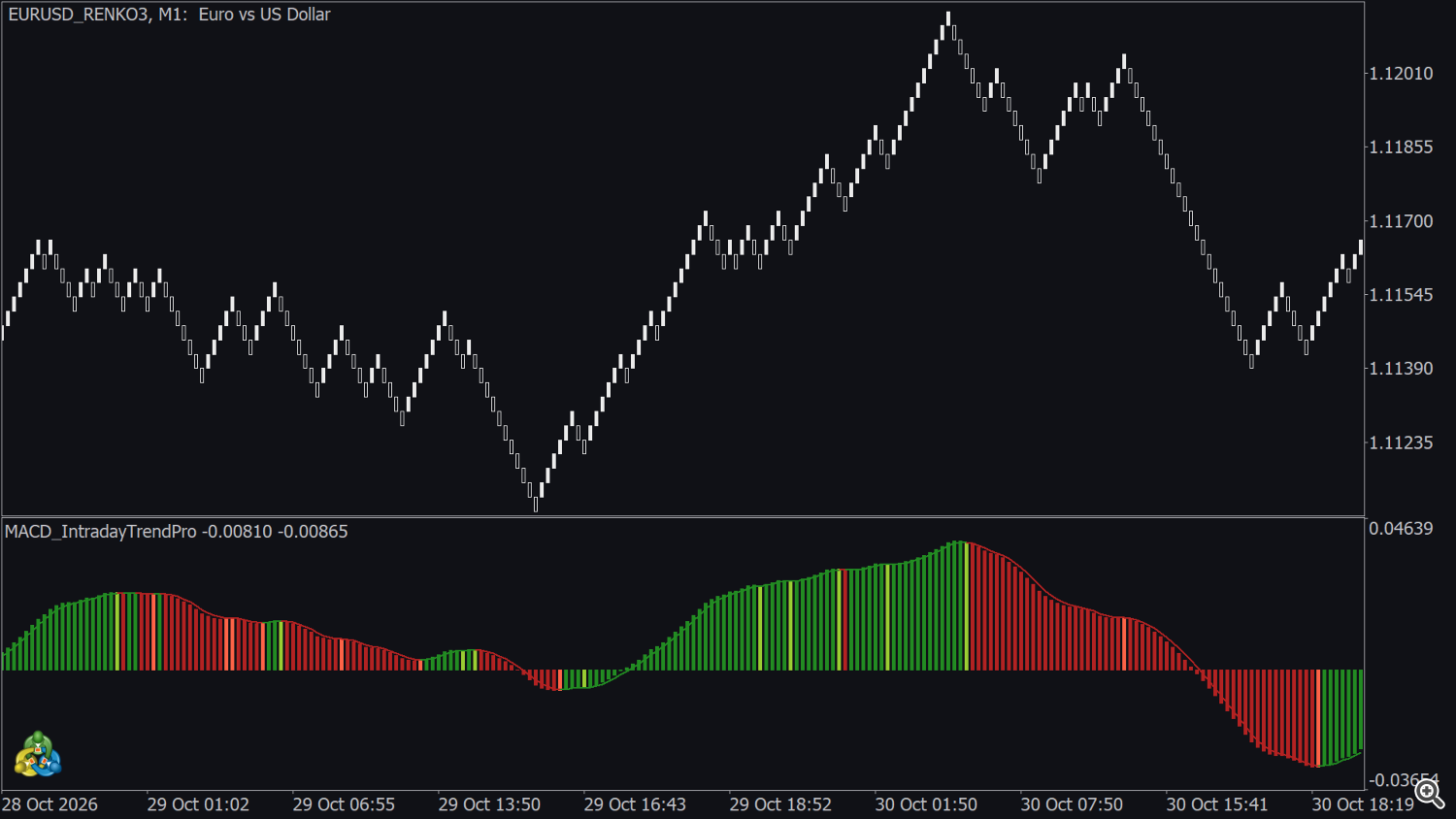
MetaTrader 5 has no built-in Renko chart; Renko charts are produced by a Renko tool as a custom symbol. Attach the indicator to that chart like to any other chart.
- Each brick is one bar, so a move of the same size gives the same reading at any speed of the market.
- Colours, crosses and alerts are evaluated when a brick is closed, that is when the next brick appears.
- If the Renko tool adds several bricks in one update, the events of every closed brick are filled and their alerts are sent. If it rebuilds the history, the event buffers are calculated again for all bricks, but no alerts are sent for past bricks.
- The brick size changes the rhythm of the indicator: with small bricks start with a slower Detection Speed; with large bricks the default is usually enough.
11. Free version and PRO
| MACD Intraday Trend (free) | MACD Intraday Trend PRO | |
|---|---|---|
| Intraday MACD histogram and signal line | yes | yes |
| Detection Speed (5 modes) | — | yes |
| 6 configurable alerts (pop-up, sound, push) | — | yes |
| Event buffers for Expert Advisors (12-17) | — | yes |
| MetaTrader 4 edition | MACD Intraday Trend MT4 | MACD Intraday Trend PRO MT4 |
The free version is a good way to learn how the histogram reads on your symbols. Move to PRO when you want to be alerted instead of watching the chart, tune the signal line or use the events in an Expert Advisor.
12. Tips
- Intraday: M5 to H1 are the usual timeframes. Read the direction on a higher timeframe (for example H1) in a second chart and follow the colour changes on M5 or M15.
- Zero level: add a level at 0 on the Levels tab to see the zero crosses clearly.
- Dark background: change the third colour of SIGNAL (black by default) so that flat segments of the line stay visible.
- Fewer alerts: use a slower Detection Speed, or turn on only the zero crosses (alerts 3 and 4), which are the least frequent events.
- Confirmation: waiting for two events in the same direction — for example a colour change of the histogram (alert 5) and a cross of the signal line (alert 2) — gives fewer, more filtered readings than acting on a single event.
- Two speeds: the indicator draws no objects, so two copies can run on the same chart, for example FASTEST and SLOW in two windows. Enable the alerts on one copy only to avoid duplicates.
13. Questions and troubleshooting
- Does it repaint? No closed bar is changed afterwards. The forming bar moves with each tick like any MACD, and its colour can change until it closes; alerts and event buffers use closed bars only.
- Does it predict where price will go? No. It describes the momentum of past prices. A colour change or a cross can be followed by a move in the opposite direction.
- Why are the values so different between symbols? They depend on the price scale of each symbol (section 3).
- The left part of the window looks different. The first bars of the chart are a warm-up period.
- The window is empty. The chart has too little history; load more bars (Tools → Options → Charts → Max bars in chart).
- No alerts. All alerts are NONE by default. Alerts arrive at the open of the next bar, not during the bar. Push notifications need the MetaQuotes ID.
- Can an EA read past events? Yes. Buffers 12-17 are calculated for every closed bar of the history (section 9).
- The signal line has gaps. Those are flat segments drawn in black; change the colour on the Colors tab.
- Strategy Tester. Works in visual and non-visual mode; pop-ups, sounds and notifications are not sent in the tester.
Appendix A. MetaTrader 4 edition
MACD Intraday Trend PRO MT4 (MQL5 Market product 67986, version 2.01) is rewritten from the MT5 source: the same behaviour, the same inputs and Detection Speed modes (FASTEST, FAST, NORMAL, SLOW, SLOWEST), the same six alerts with the seven notification types, and the same buffer numbers (5 MACD, 6 signal line, 12-17 alerts 1-6 with +1 / 0 / -1 ). The free MT4 edition is MACD Intraday Trend MT4 (product 67981). Differences:
- Sounds: MetaTrader 4 has no request sound, so each Sound Type offers 12 sounds: alert (default), alert2, connect, disconnect, email, expert, news, ok, stops, tick, timeout, wait.
- Installation: in MetaTrader 4 open Terminal (Ctrl+T) → Market → Purchased → Install; the indicator appears in the Navigator under Indicators → Market.
- Reading the buffers: MQL4 reads one value per call, with the buffer number and the shift as the last two parameters. With no inputs before them the defaults are used; to change inputs, pass them in the order of the inputs window. Check the exact file name in the Navigator.
mql4 // buffer 13 = MACD crosses the signal line, shift 1 = last closed bar double cross = iCustom(NULL, 0, "Market\\MACD Intraday Trend PRO MT4", 13, 1); if (cross != 0.0) Print("MACD crossed the signal line ", (int)cross);
Support: send a private message on MQL5 to the author.




