
My AI Golden H1 Titan: Three Strategies for Gold, One Dedicated Live Account

Three strategies. One gold chart. A dedicated live account.
My AI Golden H1 Titan brings three automated trading modules together in one MetaTrader 5 Expert Advisor. The reference setup is gold on H1, with separate strategy switches, volume settings and position-management controls, all presented through one chart panel.
The idea is practical: choose the strategies you want to run, configure their exposure and follow each module's contribution. You can start with one strategy and enable the others as you become familiar with their behaviour.
Explore My AI Golden H1 Titan on the MQL5 Market
Three modules, individual controls
Strategy 01: configurable trading windows, fixed or automatic lot sizing, stop-loss and take-profit settings, trailing-stop management and its own economic-calendar filter. Trading hours help tailor new entries to your chosen schedule.
Strategy 02: two trading components with their own direction and sizing controls. Available settings include fixed lots, balance-based sizing, optional recovery sizing for component A, weekday controls and strategy-specific drawdown protection.
Strategy 03: its own entry controls, fixed or automatic volume, configurable stops and an economic-calendar filter. It can be configured for a single position or for basket management. Basket additions and recovery settings change exposure and should be evaluated before enabling them.
The strategy switches and trade identifiers let you organise the three modules separately on a hedging account. The panel makes their individual and combined results easier to follow. Running several strategies does not guarantee diversification or reduce every type of risk: they can still be exposed to the same gold market.
News protection without switching off position management
Each strategy has its own news controls. A configured news block is intended to prevent new entries for that module while management of its existing positions continues. This allows an open position to retain its applicable trailing and exit management during the entry-blocking window. Keep the relevant strategy enabled while it has positions to manage.
A fresh live record for this EA
I have started a new account dedicated exclusively to My AI Golden H1 Titan. This separates the new EA's forward record from my earlier account, where several different robots traded together.
View the dedicated account's live monitoring on FX Blue
This is an external account-monitoring page, not an MQL5 Signals subscription or a copy-trading offer. The account is a real cent account, shown in USC. Cent-denominated balance and profit figures must not be read as the same amounts in standard USD.
The new record is recent. It provides a place to follow subsequent trading as the history develops; a short opening period does not establish long-term performance. Check the page's latest-update time when reviewing the account.
The earlier account: portfolio context
The two screenshots below belong to an older account that traded a mixture of robots. Their results cannot be attributed exclusively to My AI Golden H1 Titan and are not a standalone track record for this new EA.
The monthly chart shows July through November 2026. November is an incomplete month in this snapshot dated 3 November 2026. Both positive and negative figures are retained. The second image shows the older account's curve; it is presented as historical portfolio context, not as the curve of the dedicated new account.
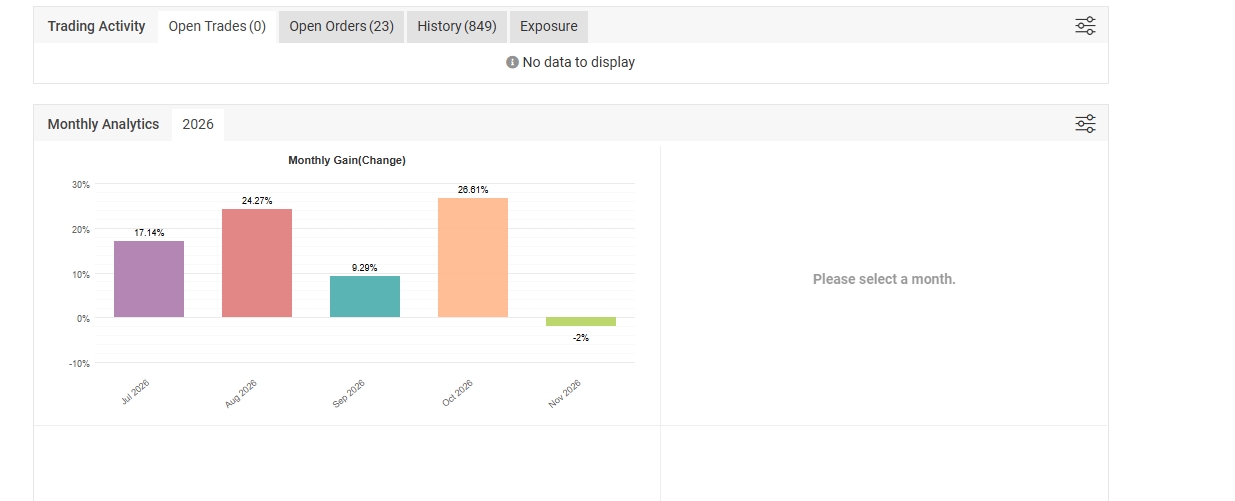
Earlier mixed-robot account. Account-level figures include other EAs and must not be treated as this product's standalone returns.
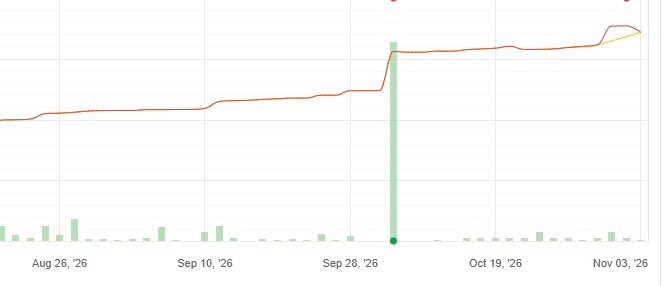
Earlier portfolio curve, supplied as historical context. The dedicated new EA account is monitored separately at the link above.
Set up for your broker, then follow the details
Use your broker's gold symbol, including its suffix, on H1. Review contract size, minimum lot, lot step, spread, commission and broker-server time before choosing the volume settings. Automatic sizing scales exposure; it does not make the account risk-free. Use distinct trade identifiers if you run other EAs on the same account.
For evaluating execution and trailing behaviour, use the broker's real ticks in the Strategy Tester and then compare with forward trading. Historical tests and live trading are separate records: spreads, fees, slippage and data can change the outcome.
Explore the controls. Start with settings you understand. Follow the dedicated record as it grows. My AI Golden H1 Titan combines three configurable modules in one place for traders who want an organised approach to automated gold trading.
View the product and its input parameters
Trading involves risk, including loss of capital. Stops may execute at a different price during gaps or slippage. Historical results, mixed-account screenshots and early forward results do not guarantee future returns.