Available on the MQL5 Market: SMC Structure and Liquidity PRO
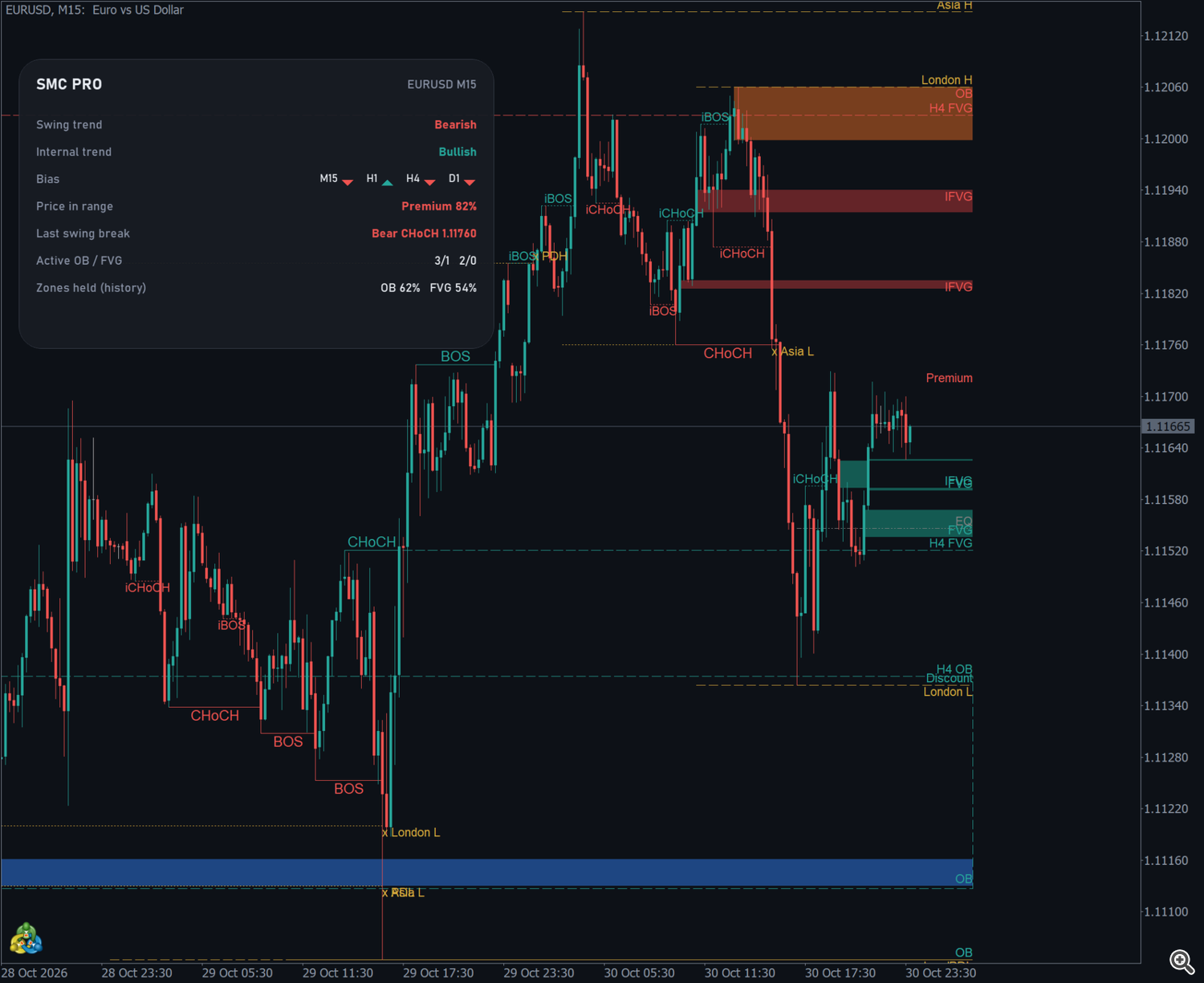
SMC Structure and Liquidity PRO is a Smart Money Concepts indicator for MetaTrader 5. It draws on one chart the swing and internal market structure (BOS and CHoCH), order blocks and breaker blocks, fair value gaps and inversion FVGs, liquidity levels and sweeps, premium and discount, and the zones of a higher timeframe. A panel sums up the trend, the bias on several timeframes and the state of the zones.
Everything is calculated on closed bars. A label, zone or level appears only after the bar that confirms it has closed, and it is not redrawn afterwards. The screenshots of this manual were taken on EURUSD M15 demo charts.
Risk notice. Trading involves risk of loss. This indicator is an analysis tool: it does not open trades and does not promise results. Always test your way of using it on a demo account first.
1. Installation
- Buy or rent the product on the MQL5 Market and install it from the Market tab of your MetaTrader 5 terminal (Toolbox → Market → Purchased → Install).
- Open a chart and drag SMC Structure and Liquidity PRO from the Navigator (Indicators → Market) onto it.
- Adjust the inputs if you want (section 10) and press OK.
The indicator works on any symbol and timeframe, on netting and hedging accounts, and in the Strategy Tester. By default it analyses the last 3000 bars (input Bars analysed).
2. Chart legend
| On the chart | Meaning |
|---|---|
| BOS / CHoCH (solid line, larger text) | Swing break of structure / change of character |
| iBOS / iCHoCH (dotted line, smaller text) | Internal break of structure / change of character |
| OB (filled box) | Order block from a swing break |
| OB i | Order block from an internal break (only if enabled) |
| BB | Breaker block: an order block that was closed through and changed side |
| FVG | Fair value gap |
| IFVG | Inversion FVG: a gap that was closed through and changed side |
| H4 OB, H1 FVG… (dashed outline) | Order block or FVG of the higher timeframe |
| EQH / EQL (dotted line) | Equal highs / equal lows |
| BSL / SSL | Buy-side / sell-side liquidity (swing highs / lows) |
| PDH / PDL, PWH / PWL | Previous day / previous week high and low |
| Asia H/L, London H/L | High and low of the Asia and London sessions |
| x before a level name (e.g. x London L) | The level was swept |
| Premium, EQ, Discount | Top, equilibrium (50%) and bottom of the current swing range |
Bullish items use the bullish color (teal by default) and bearish items the bearish color (red by default). Liquidity uses the liquidity color (gold by default). Hover a line or a box to see its tooltip with the exact prices.
3. Market structure
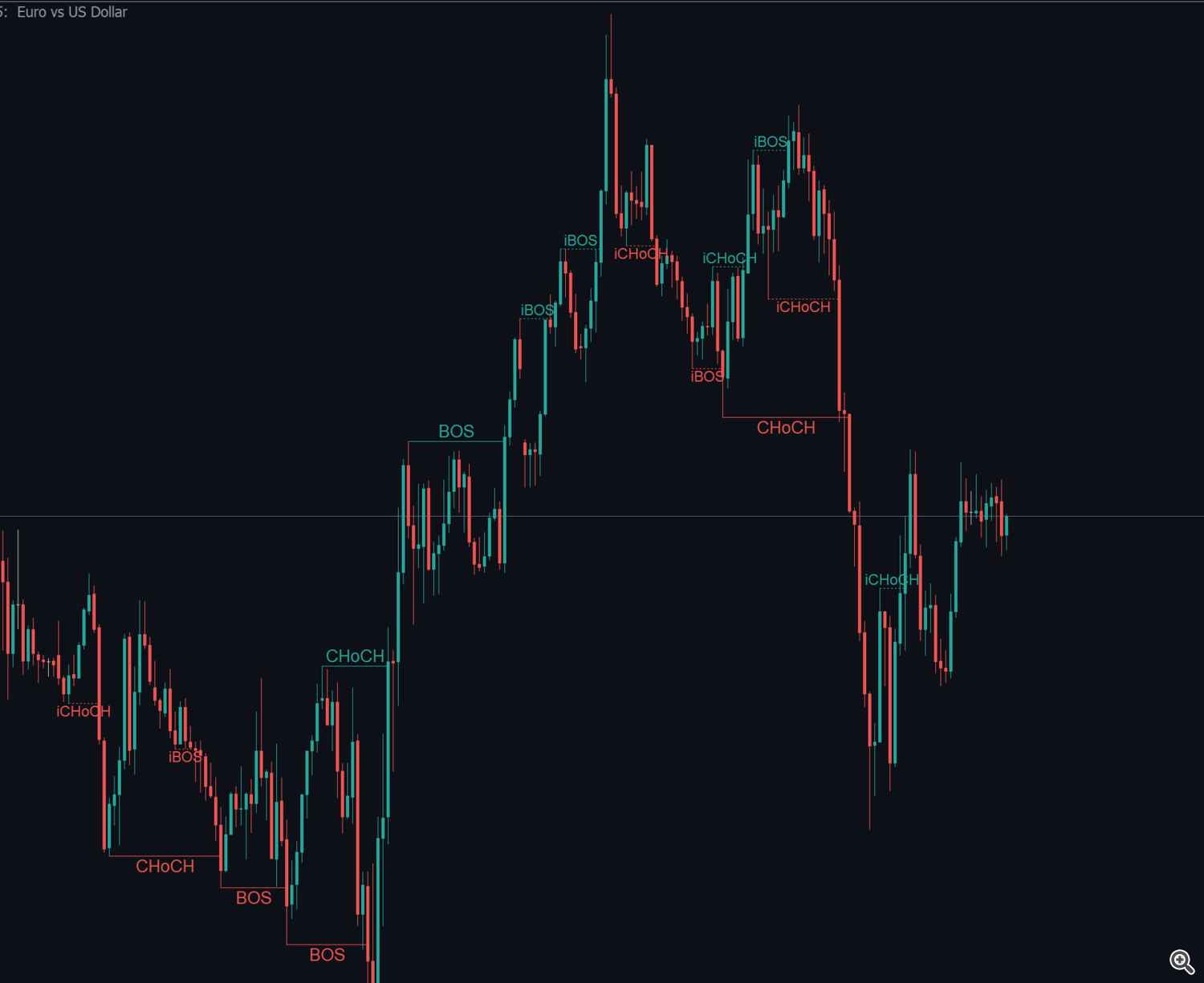
The indicator follows two scopes of structure at the same time:
- Swing structure: pivots confirmed by Swing structure strength bars on each side (10 by default). This is the main trend.
- Internal structure: pivots confirmed by Internal structure strength bars on each side (3 by default). It shows the moves inside the swing legs. The swing strength must be larger than the internal strength.
When a candle closes beyond the last pivot, a break is drawn from the pivot to the breaking candle:
- BOS (break of structure): the break is in the direction of the current trend, so the trend continues.
- CHoCH (change of character): the break is against the current trend, so the trend changes side.
Structure breaks shown limits how many of the latest breaks are drawn for each scope (10 by default). You can hide either scope with Swing BOS / CHoCH and Internal BOS / CHoCH; the calculation (trend, order blocks, panel) keeps running.
4. Order blocks and breaker blocks
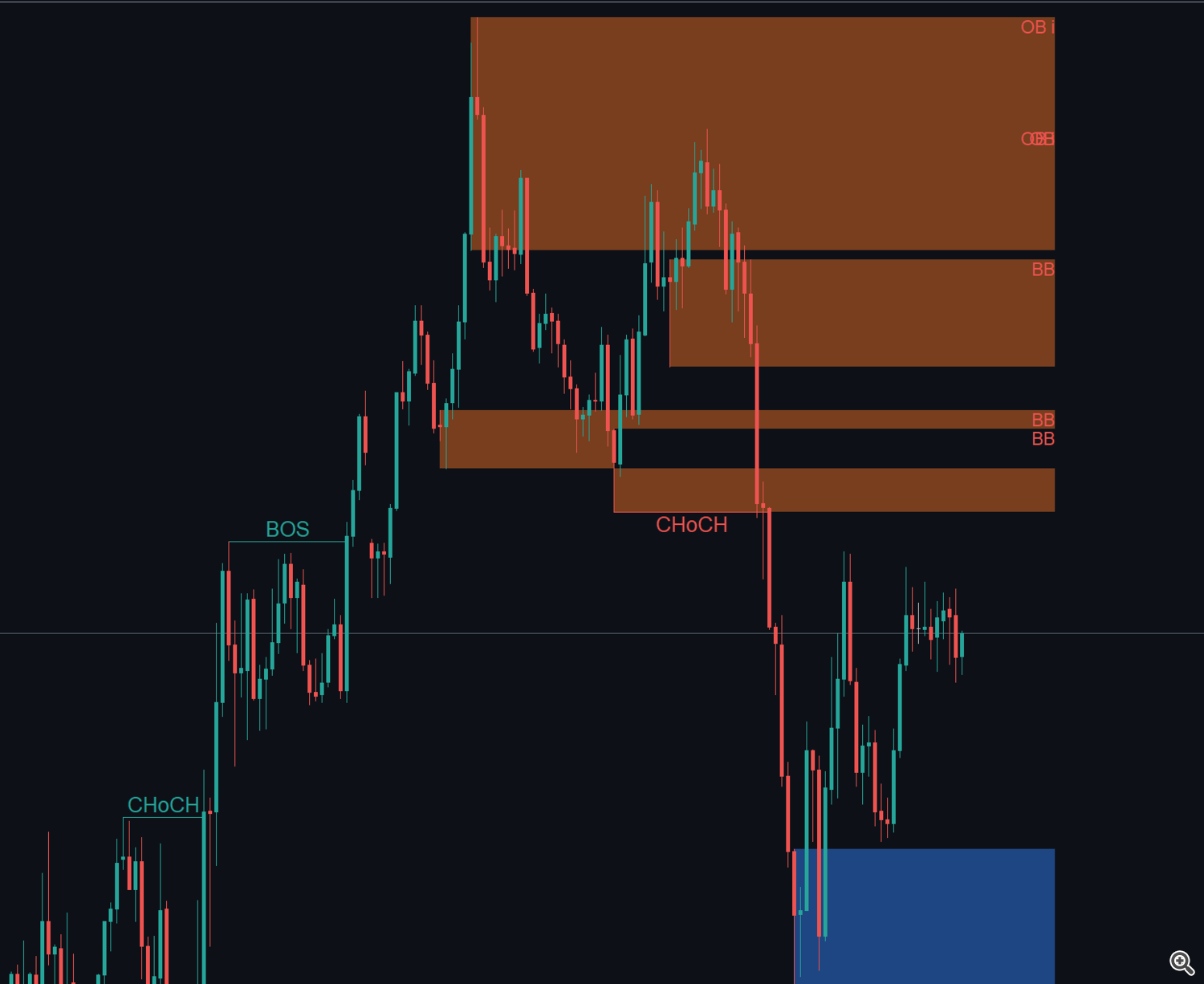
An order block is the last opposite candle at the origin of the move that broke structure: the last down candle before a bullish break, or the last up candle before a bearish break.
- By default order blocks come only from swing breaks. Turn on Order blocks also from internal breaks to get more, smaller zones (marked OB i).
- Order block on the candle body uses the body of the candle instead of the full range with the wicks, for tighter zones.
- When a candle closes through an order block, the block ends. With Breaker blocks on, it comes back as a BB on the other side: a broken bullish block becomes a bearish breaker, and the reverse.
5. Fair value gaps and inversion FVGs
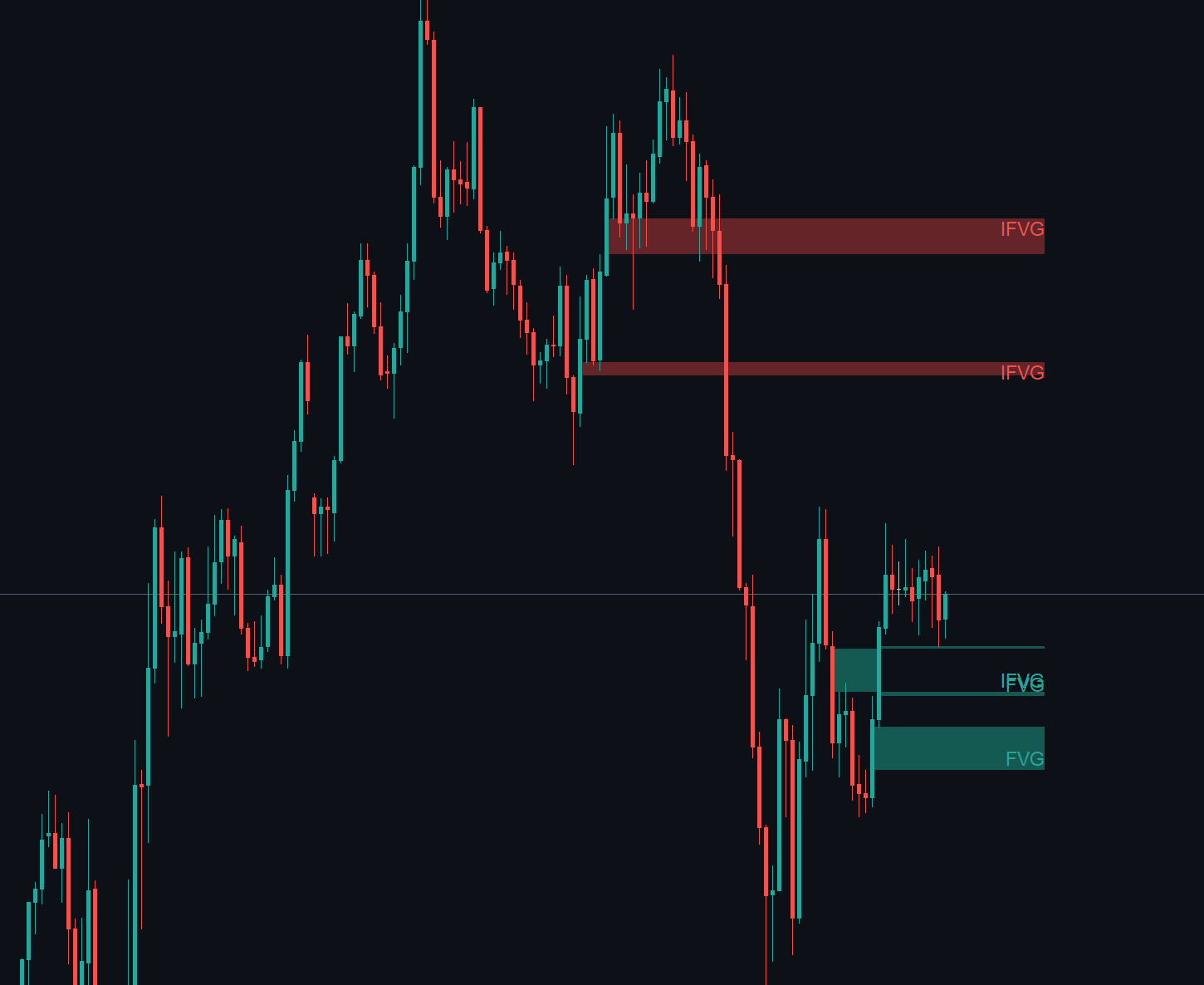
A fair value gap is a three-candle imbalance: the low of the third candle is above the high of the first one (bullish FVG), or the high of the third is below the low of the first (bearish FVG).
- Minimum FVG size (x ATR 14) filters out small gaps (0.15 × ATR by default). Raise it on noisy symbols to keep only clear gaps.
- While price trades into a gap, the box shrinks to the part that is still open.
- With Inversion FVGs on, a gap that is closed through comes back as an IFVG on the other side.
When a zone ends
The input Zone ends at applies to order blocks, breakers and FVGs:
| Option | The zone ends when |
|---|---|
| First touch | price comes back into the zone |
| 50% (consequent encroachment) | price reaches the middle of the zone |
| Full fill / close through (default) | a candle closes beyond the far side of the zone |
Whatever the option, a candle that closes through a zone is what creates the breaker or the inversion FVG. Active zones per type and side keeps only the newest zones on the chart (3 by default), and Active zones and levels extend right sets how many bars the active zones and levels extend beyond the last candle (15 by default).
6. Liquidity and sweeps

Liquidity levels are prices where stops are likely to rest. The indicator draws:
- Equal highs / lows (EQH / EQL): two pivots at about the same price. The tolerance is Equal highs / lows tolerance (x ATR 14) (0.1 × ATR by default).
- Swing highs / lows (BSL / SSL): buy-side liquidity above the swing highs and sell-side liquidity below the swing lows. Off by default, because it adds many lines.
- Previous day and week (PDH / PDL / PWH / PWL).
- Asia and London session highs / lows. In Auto mode they are drawn on forex, CFD and crypto symbols and switched off on B3 symbols, where those sessions have no meaning. You can force them On or Off.
Active levels per type and side limits the number of untouched levels (3 by default).
A level ends when price trades beyond it. If the candle that took the level closes back on the other side, it is a sweep (a liquidity grab): with Mark liquidity sweeps on, the level is kept up to that candle with an x in front of its name. The six most recent sweeps are shown.
7. Premium and discount
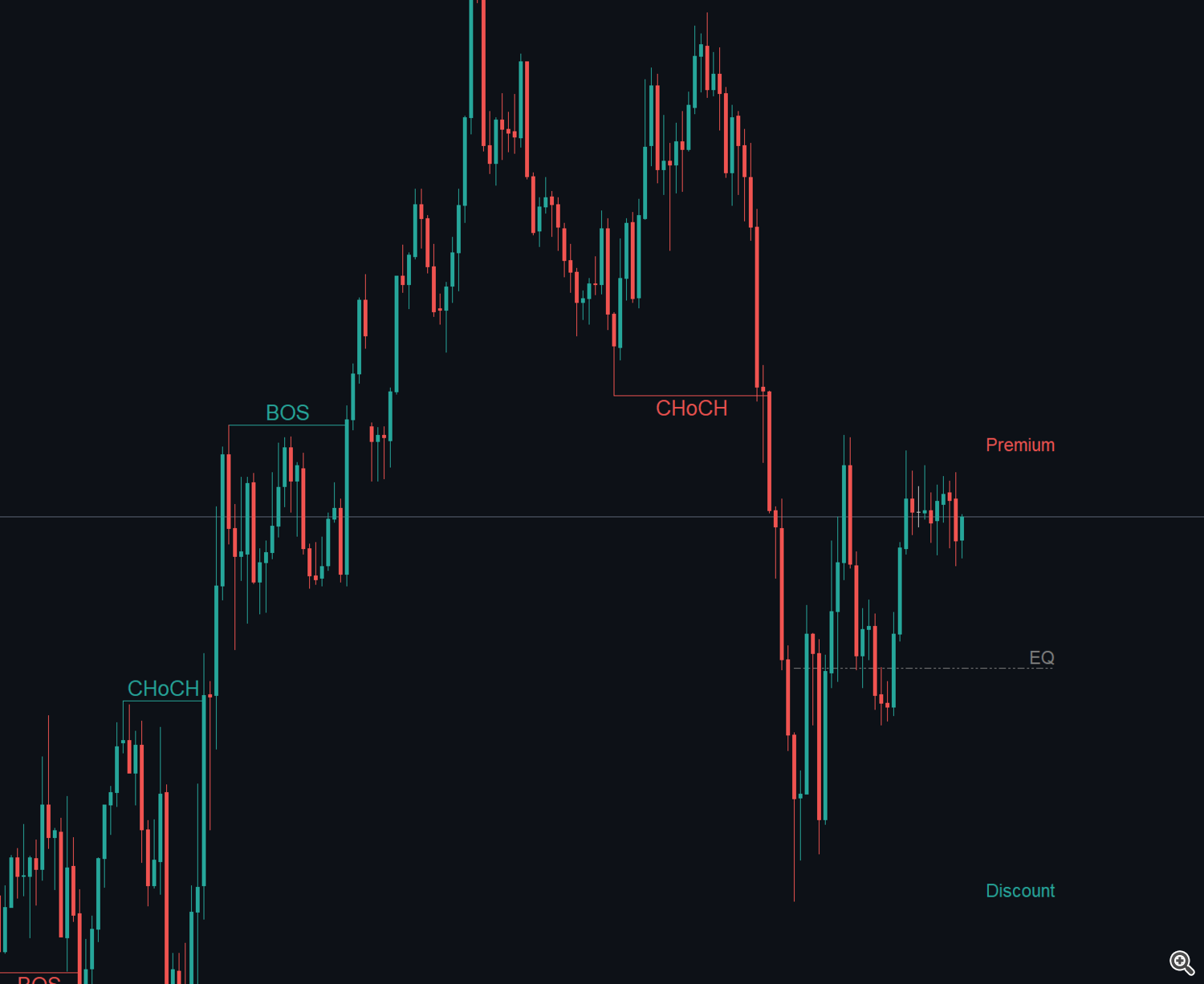
The current swing range goes from the last swing high to the last swing low. Its middle is the equilibrium (EQ):
- above the equilibrium price is in premium (expensive in the range);
- below it, price is in discount (cheap in the range).
The Price in range line of the panel gives the exact position, from 0% at the swing low to 100% at the swing high. Values above 100% or below 0% mean price is already outside the range, before a new swing pivot has been confirmed.
8. Higher timeframe
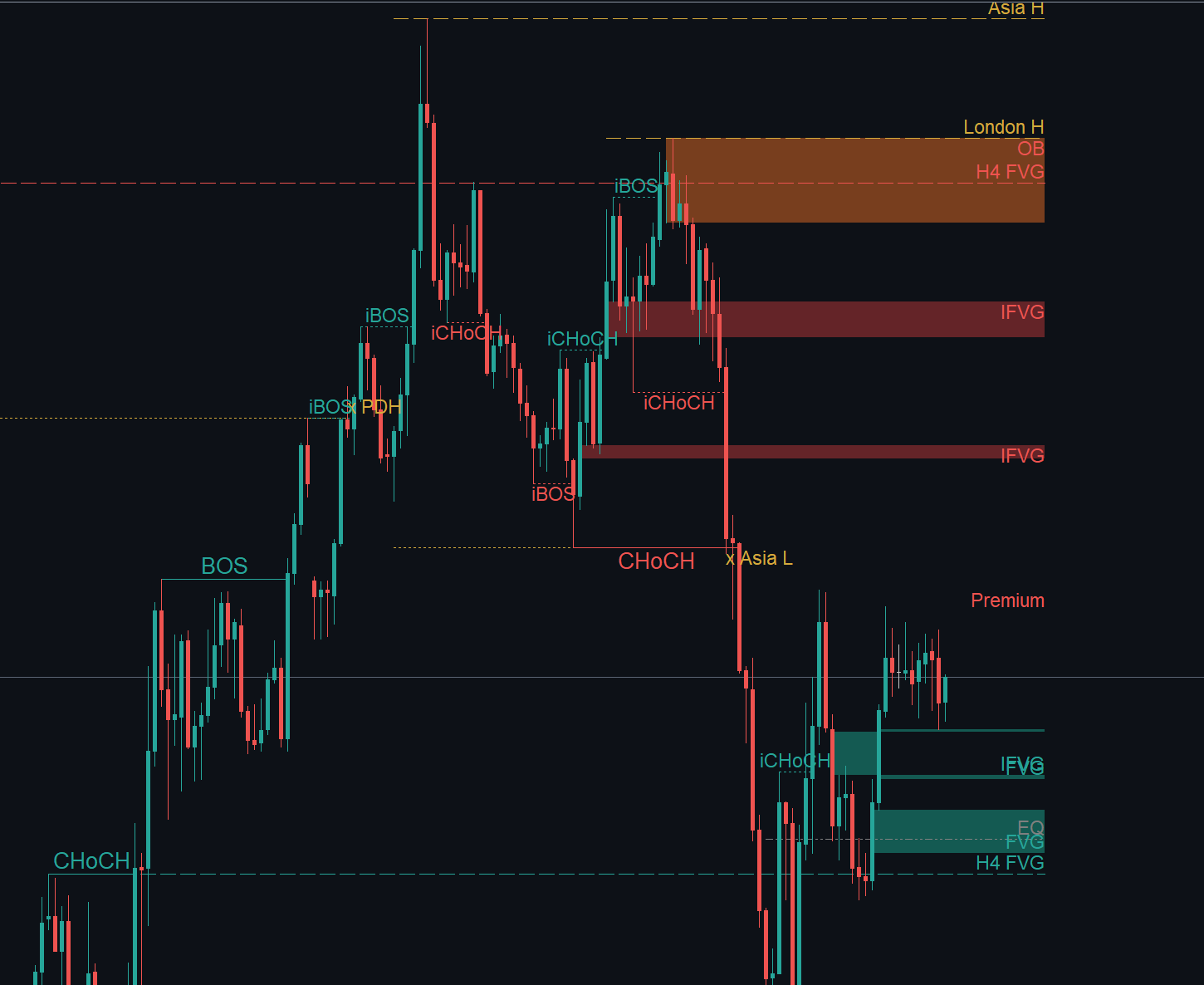
The indicator runs the same analysis on a higher timeframe and draws its order blocks and FVGs as dashed outlines, labelled with the timeframe (for example H4 OB, H4 FVG). Inversion FVGs of the higher timeframe are not drawn.
With Higher timeframe left on current, the timeframe is chosen automatically:
| Chart | Higher timeframe |
|---|---|
| M1 | M15 |
| M2 to M5 | H1 |
| M6 to M30 | H4 |
| H1 to H4 | D1 |
| above H4 | W1 |
You can choose a fixed timeframe instead; it is used only if it is higher than the chart timeframe. Show higher timeframe order blocks and FVGs turns the outlines off while keeping the bias in the panel.
9. The panel
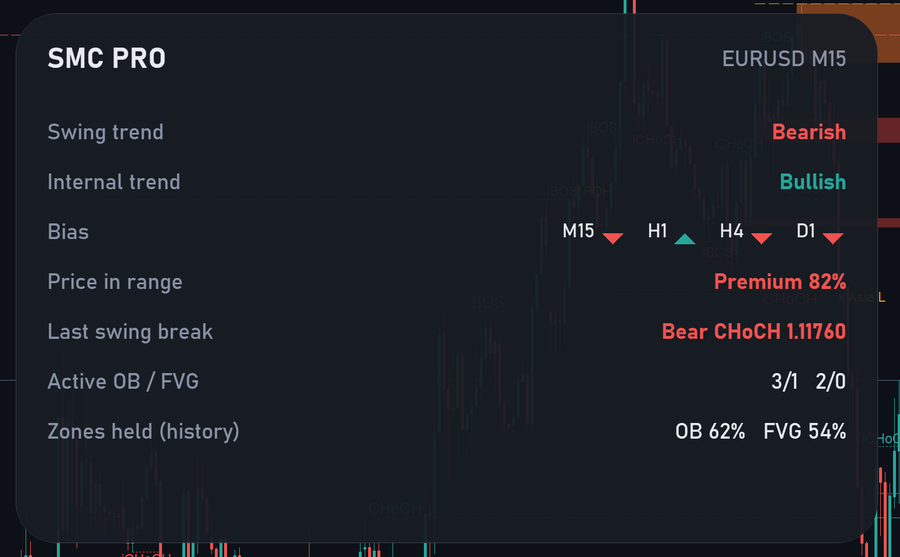
| Line | What it shows |
|---|---|
| Header | Indicator name, symbol and timeframe |
| Swing trend | Bullish or bearish, from the last swing break |
| Internal trend | Bullish or bearish, from the last internal break |
| Bias | Swing trend on M5, M15, H1, H4 and D1 (only the timeframes equal to or higher than the chart). Up triangle = bullish, down triangle = bearish |
| Price in range | Premium or discount, and the position in the swing range (section 7) |
| Last swing break | Direction, type (BOS or CHoCH) and price of the last swing break |
| Active OB / FVG | Active order blocks bullish/bearish, then active FVGs bullish/bearish |
| Zones held (history) | Share of the order blocks and FVGs that held after being touched, in the analysed history |
| Last events | The last five alerts (time and text), when alerts are enabled |
A zone counts as held when, after price touched it, price moved one ATR away from it before closing through it. This is a description of the history on your symbol and timeframe, not a forecast.
The panel can be dragged with the mouse; its position is kept for that chart. It follows the chart background (dark or light). Panel size (%) scales it, and Show panel hides it.
10. Inputs
Market structure
| Input | Default | Description |
|---|---|---|
| Internal structure strength (bars each side) | 3 | Bars on each side to confirm an internal pivot |
| Swing structure strength (bars each side) | 10 | Bars on each side to confirm a swing pivot (must be larger than the internal) |
| Swing BOS / CHoCH | true | Draw the swing breaks |
| Internal BOS / CHoCH | true | Draw the internal breaks |
| Structure breaks shown (each scope) | 10 | Number of recent breaks drawn |
| Bullish color / Bearish color | teal / red | Colors of the bullish and bearish items |
Order blocks and fair value gaps
| Input | Default | Description |
|---|---|---|
| Order blocks | true | Show order blocks |
| Order blocks also from internal breaks | false | Add order blocks from internal breaks |
| Order block on the candle body | false | Body instead of the full candle |
| Breaker blocks (broken order blocks) | true | Show breakers |
| Fair value gaps | true | Show FVGs |
| Inversion FVGs (closed-through gaps) | true | Show inversion FVGs |
| Minimum FVG size (x ATR 14) | 0.15 | Smaller gaps are ignored |
| Zone ends at | Full fill / close through | First touch, 50% or full fill (section 5) |
| Active zones per type and side | 3 | Newest zones kept on the chart |
| Bullish / bearish order block, bullish / bearish FVG | — | Fill colors of the zones |
Liquidity
| Input | Default | Description |
|---|---|---|
| Equal highs / lows | true | Show EQH / EQL |
| Swing highs / lows (buy-side / sell-side liquidity) | false | Show BSL / SSL |
| Previous day and week highs / lows | true | Show PDH / PDL / PWH / PWL |
| Asia and London session highs / lows | Auto | Auto (off on B3 symbols), On or Off |
| Mark liquidity sweeps | true | Mark the levels taken and closed back |
| Active levels per type and side | 3 | Untouched levels kept on the chart |
| Equal highs / lows tolerance (x ATR 14) | 0.1 | Maximum distance between two "equal" pivots |
| Liquidity color | gold | Color of the levels |
Premium / discount, higher timeframe and sessions
| Input | Default | Description |
|---|---|---|
| Equilibrium of the swing range | true | Show premium, EQ and discount |
| Higher timeframe for bias and zones | current (auto) | See the table in section 8 |
| Show higher timeframe order blocks and FVGs | true | Dashed outlines of the higher timeframe |
| Broker time zone | Auto | How the broker time zone is found for the sessions |
| Broker GMT offset (fixed mode and tester) | 2 | Offset used in fixed mode and in the Strategy Tester |
History and panel
| Input | Default | Description |
|---|---|---|
| Bars analysed | 3000 | History used (minimum 200). More bars take longer to load |
| Active zones and levels extend right (bars) | 15 | Extension beyond the last candle |
| Show panel | true | Show or hide the panel |
| Panel size (%) | 100 | Panel scale |
Alerts
| Input | Default | Description |
|---|---|---|
| Swing BOS / CHoCH | Off | Alert on each swing break |
| Liquidity sweep | Off | Alert when a level is swept |
| Price enters an order block or FVG | Off | Alert when price comes into an active zone |
| Sound | alert2 | Sound file used by the sound modes |
| Also send e-mail | false | Also send the alert by e-mail (configure e-mail in Tools → Options → Email) |
Each alert can be Off, Popup, Sound, Smartphone notification or a combination of two of them. Push notifications need your MetaQuotes ID in Tools → Options → Notifications. Alerts fire once per event, on the closed bar.
11. Buffers for Expert Advisors
The indicator exposes three buffers that can be read with iCustom and CopyBuffer . The trend buffers have a value on every bar. The event buffer is set only on the bar that confirmed a break (0 on the other bars); when a swing and an internal break happen on the same bar, the swing break is reported.
| Buffer | Content |
|---|---|
| 0 | Swing trend: +1 bullish, −1 bearish |
| 1 | Internal trend: +1 bullish, −1 bearish |
| 2 | Structure event: ±1 swing BOS, ±2 swing CHoCH, ±3 internal BOS, ±4 internal CHoCH (+ bullish, − bearish) |
Read the values on closed bars (shift 1 and older). The indicator draws its objects with the prefix JSMP_ .
12. Tips
- Too many objects on the chart? Turn off the internal breaks, keep Active zones per type and side at 1–2, and raise Minimum FVG size.
- Higher timeframe context first. Use the Bias line and the dashed higher timeframe zones to see where the chart timeframe sits inside the larger picture.
- Sweep, then change of character. A common way to read the chart is to wait for a sweep of a liquidity level, then a CHoCH in the other direction, and to look at the zones left by that move.
- Several charts. Each chart has its own copy of the indicator, its own panel position and its own alerts.
- Loading time. On the first load the indicator processes the history and the higher timeframe; on M1 with many bars it may take a few seconds.
Support: send a private message to the author on MQL5. Product page: SMC Structure and Liquidity PRO on the MQL5 Market.