Smart Octave Pro turns one confirmed price swing into a complete, rule-based trade plan: an entry, a stop and three targets, all derived from the size of that swing. Every level on the chart can be recomputed by hand from two numbers, the swing high and the swing low. This article shows that math, checks it against real XAUUSD charts, and explains where the method works and where it does not.
Most traders who draw retracement grids or angle lines face the same problem: which swing? Two traders anchor the same tool on different bars and get different levels. Smart Octave Pro removes that choice. It uses fixed rules to detect the swing, a fixed division into eighths, ATR-scaled angles and a fixed trigger. The result is repeatable, which is the precondition for testing it.
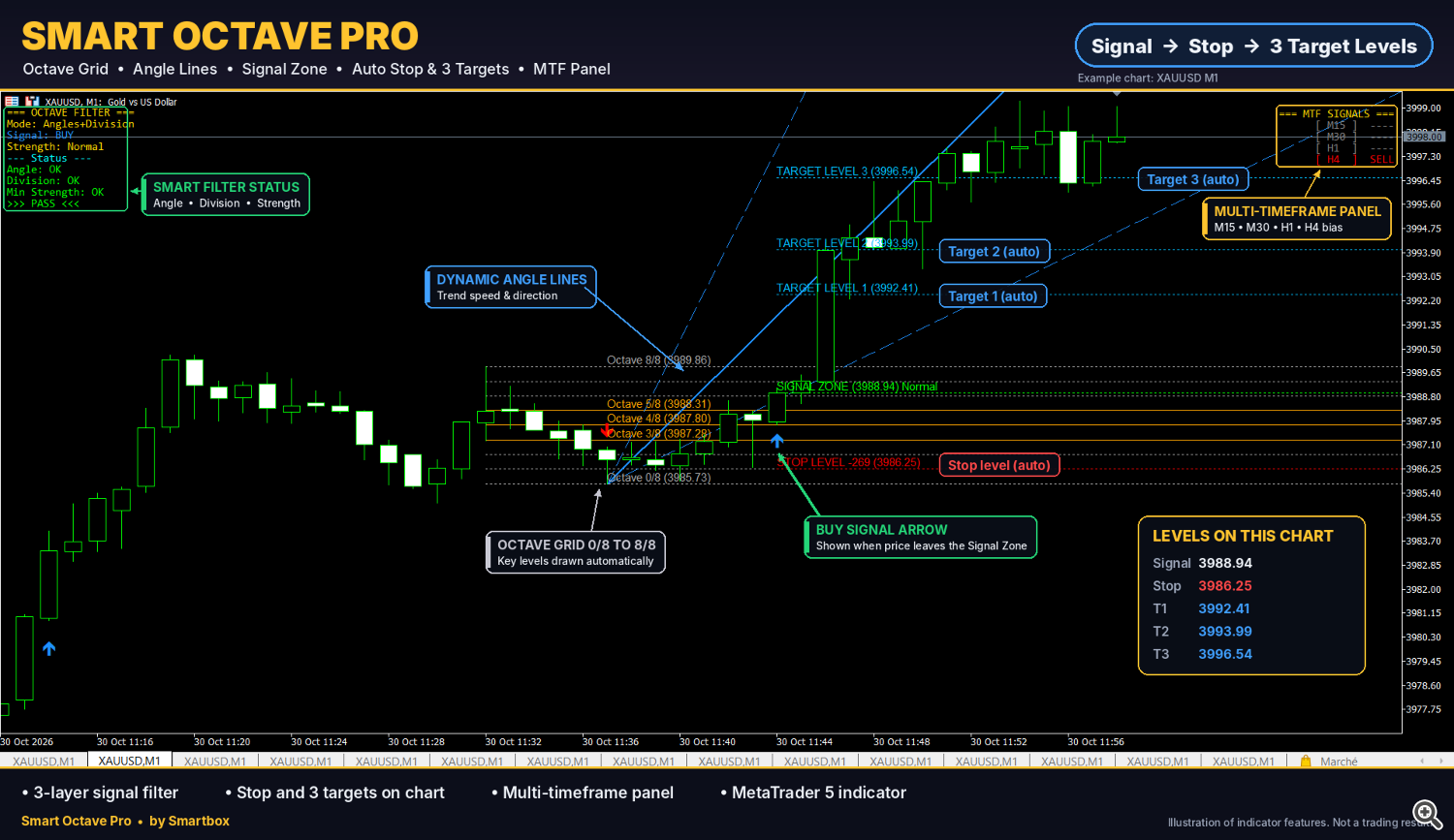
The indicator's chart elements on XAUUSD M1, 30 October 2026: octave grid 0/8 to 8/8, ATR-scaled angle lines, signal zone, automatic stop and three targets, filter panel (top left) and multi-timeframe panel (top right).
Step 1: Detecting a swing that deserves a grid
A swing high is a bar whose high is above the highs of the 5 bars to its left and the 3 bars to its right; a swing low is the mirror case. The right-side condition is a confirmation: a swing point only exists once 3 more bars have closed. This is why the indicator does not redraw. The cost is a built-in delay of 3 bars between the real turning point and the moment the grid appears.
A confirmed swing is only used if its range is at least 2 ATR. Small swings inside noise are ignored, so the grid is drawn only on moves that are large relative to current volatility. On a quiet M1 chart the 2 ATR threshold can be a few dollars on Gold; on H1 it is usually tens of dollars. The same rule adapts to both.
Step 2: The octave grid
The swing range R is split into eight equal parts. Level 0/8 is the swing origin (where the move started) and 8/8 is the swing end. For a swing with origin O and end E:
R = |E - O| Level k/8 = O + (k / 8) × (E - O), k = 0, 1, ..., 8
The 3/8, 4/8 and 5/8 levels are highlighted. Together they form the equilibrium zone: the middle quarter of the swing, where price is neither clearly continuing nor clearly reversing. The 4/8 level, the exact midpoint, is the line the signal trigger is built on.
Example from the XAUUSD H1 chart of 27 October 2026: origin 3989.20, end 4025.64, so R = 36.44 and one eighth = 4.555. The grid gives 3/8 = 4002.86, 4/8 = 4007.42 and 5/8 = 4011.98, exactly the values printed on the chart.
Step 3: Time-price angles scaled by ATR
Classic angle tools have a known flaw: a "45 degree" line depends on how the chart is zoomed. Smart Octave Pro fixes the scale with volatility. The 1x1 angle moves one unit of price per bar, where the unit is derived from ATR, so its slope means the same thing on any zoom level and any symbol.
1x1:  P(t) = P0 ± u × t
1x2:  P(t) = P0 ± (u / 2) × t
2x1:  P(t) = P0 ± 2u × t
Here P0 is the swing extreme, t the number of bars since it, and u the ATR-based unit. The 2x1 line is the steep fan line, the 1x2 the shallow one. The angle unit can be computed on a different timeframe than the chart, for example an H1-based unit on an M15 chart, so the fan reflects higher-timeframe volatility.
The angles also grade each signal. Its strength (Normal, Strong or Very Strong) depends on which fan line the signal close has crossed. In practice the grade tells you how decisively price came back through the swing relative to volatility. The strength is printed on the chart and is available to an EA through buffer 7 (values 1 to 3).
Step 4: The signal trigger
A signal requires three conditions, all evaluated on closed bars:
- A bar closes beyond the 4/8 level, in the direction that takes price back toward the swing end.
- This happens within the allowed number of bars after the swing is confirmed.
- Price has not already reached the first target. A move that has already run its target is not offered as a late entry.
Only one signal is produced per swing. If the first signal fails, the indicator does not keep firing on the same structure; it waits for a new swing.
The rule is deliberately simple. The midpoint of the swing is a natural line of control: above it, the buyers of that swing hold more than half of the move; below it, they do not. A close, not a wick, is required, which removes many intrabar spikes on Gold.
Step 5: Stop, targets and what the risk/reward really depends on
The stop sits at the 1/8 level (with the default risk multiplier). The three targets are projections beyond the swing end, at 0.618, 1.0 and 1.618 of the range. Written relative to the swing:
SL = O + (1/8) × (E - O) TPi = E + fi × (E - O), fi = 0.618, 1.0, 1.618
These formulas reproduce every level on the case-study charts below to the cent. On the H1 chart (origin 3989.20, end 4025.64, R = 36.44): SL = 3993.75, TP1 = 4048.16, TP2 = 4062.08, TP3 = 4084.60.
The less obvious consequence: the risk/reward ratio does not depend on the timeframe, the symbol or the size of the swing. It depends only on where inside the swing the signal bar closes. Call that position e, the entry's distance from the origin as a fraction of R (e is above 0.5, since the close must pass 4/8):
R:R at TPi = (1 + fi - e) / (e - 0.125)
| Entry position e | Grid level | R:R at TP1 | R:R at TP2 | R:R at TP3 |
|---|---|---|---|---|
| 0.500 | 4/8 | 2.98 | 4.00 | 5.65 |
| 0.625 | 5/8 | 1.99 | 2.75 | 3.99 |
| 0.750 | 6/8 | 1.39 | 2.00 | 2.99 |
| 0.875 | 7/8 | 0.99 | 1.50 | 2.32 |
The practical reading: a signal bar that closes just past 4/8 offers an excellent geometry, while a large signal candle that closes near 7/8 gives TP1 at roughly 1:1. Check e before taking a trade; it is visible on the chart at a glance.
The filters: trading fewer, better-defined signals
Every filter removes signals. None of them adds a signal or changes a level. The filter panel on the chart shows each active filter as PASS or WAIT, so you can see exactly why a setup was kept or skipped.
| Filter | What it requires | Trade-off |
|---|---|---|
| Filter mode | Off, angles only, divisions only, or angles and divisions must agree | Stricter modes produce fewer signals |
| Minimum strength | Signal grade at or above Normal, Strong or Very Strong | Higher grades skip slower reversals |
| Ninja method | Wave A: a strong candle closing in the signal direction. Wave B: a retest of the 4/8 level | Retest entries can be missed when price does not come back |
| Multi-timeframe match | Up to four timeframes agree with the signal direction | Fewer counter-trend trades, later entries |
| Session timer | Signals only between a start and a stop time | Avoids illiquid hours; may skip valid moves |
A sensible way to use them is to change one filter at a time in the Strategy Tester and record how the number of signals and the share reaching TP1 move together. A filter that halves the signals without improving that share is only costing you trades.
Three XAUUSD case studies, recomputed
The three trades below were selected to illustrate the mechanics. They are examples, not a statistical sample: they show how the levels are built, not how often signals succeed. Every number was recomputed from the swing high and low with the formulas above. Distances are in USD per ounce of price movement.
| SELL, M30, 30 Oct 2026 | BUY, M1, 30 Oct 2026 | BUY, H1, 27 Oct 2026 | |
|---|---|---|---|
| Swing 0/8 → 8/8 | 3999.26 → 3965.24 | 3985.73 → 3989.86 | 3989.20 → 4025.64 |
| Range R | 34.02 | 4.13 | 36.44 |
| Entry (position e) | 3974.47 (0.73) | 3988.94 (0.78) | 4012.58 (0.64) |
| Stop (risk) | 3995.01 (20.54) | 3986.25 (2.69) | 3993.75 (18.83) |
| TP1 (R:R) | 3944.22 (1.47) | 3992.41 (1.29) | 4048.16 (1.89) |
| TP2 (R:R) | 3931.22 (2.11) | 3993.99 (1.88) | 4062.08 (2.63) |
| TP3 (R:R) | 3910.20 (3.13) | 3996.54 (2.83) | 4084.60 (3.82) |
| Filter / strength | Angles + Division, Normal | Angles + Division, Normal | Division, Strong |
| Multi-timeframe panel | M15, M30, H1, H4 all SELL | H4 showed SELL against the BUY | M30 and H1 BUY |
| Outcome on the chart | TP1, TP2, TP3 reached; stop not touched | TP1, TP2, TP3 reached | TP1 and TP2 reached; TP3 still open on 28 Oct |
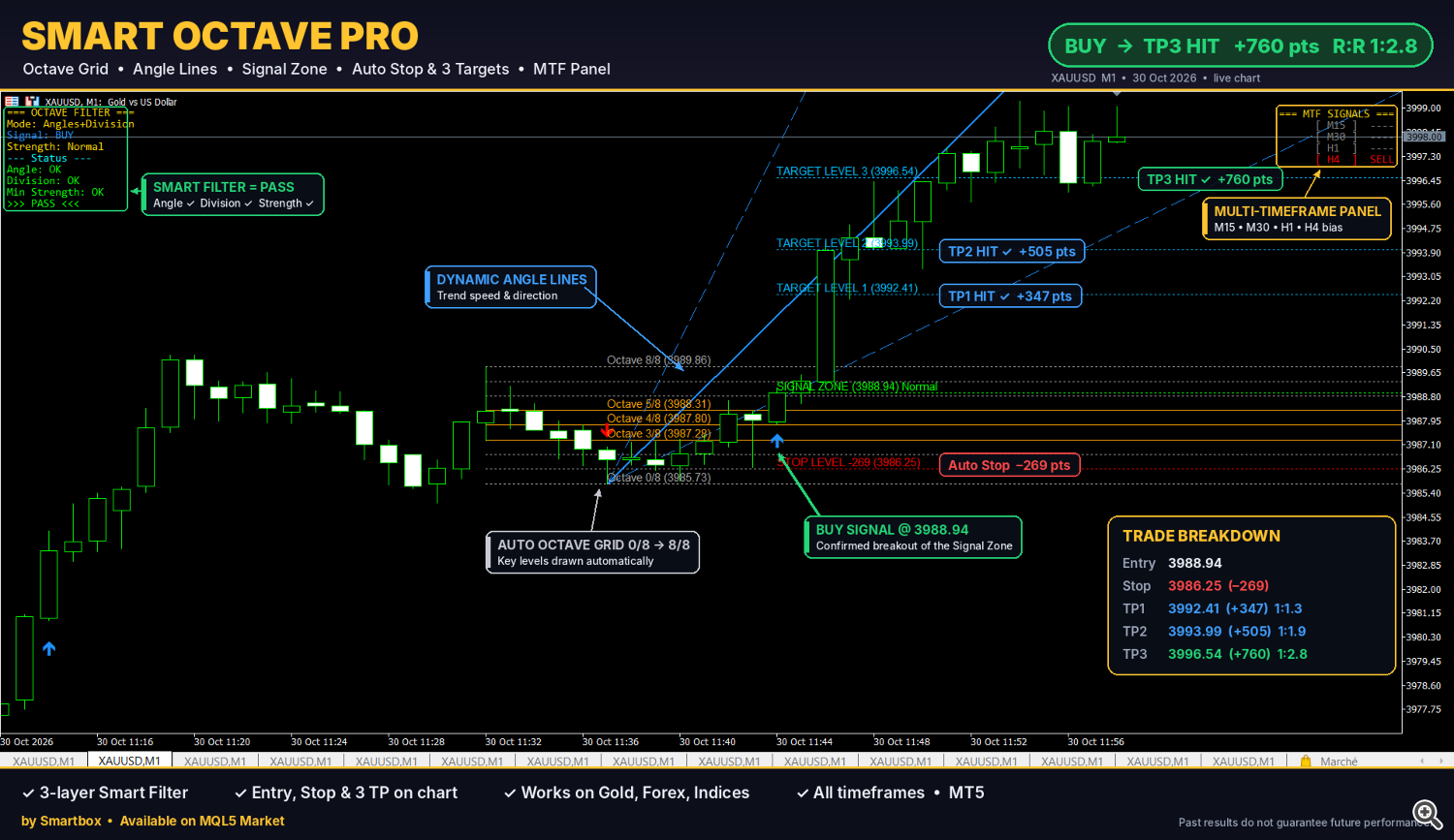
BUY on XAUUSD M1: entry 3988.94, stop 3986.25, TP1 3992.41, TP2 3993.99, TP3 3996.54. Note the H4 row of the multi-timeframe panel showing SELL against the signal.
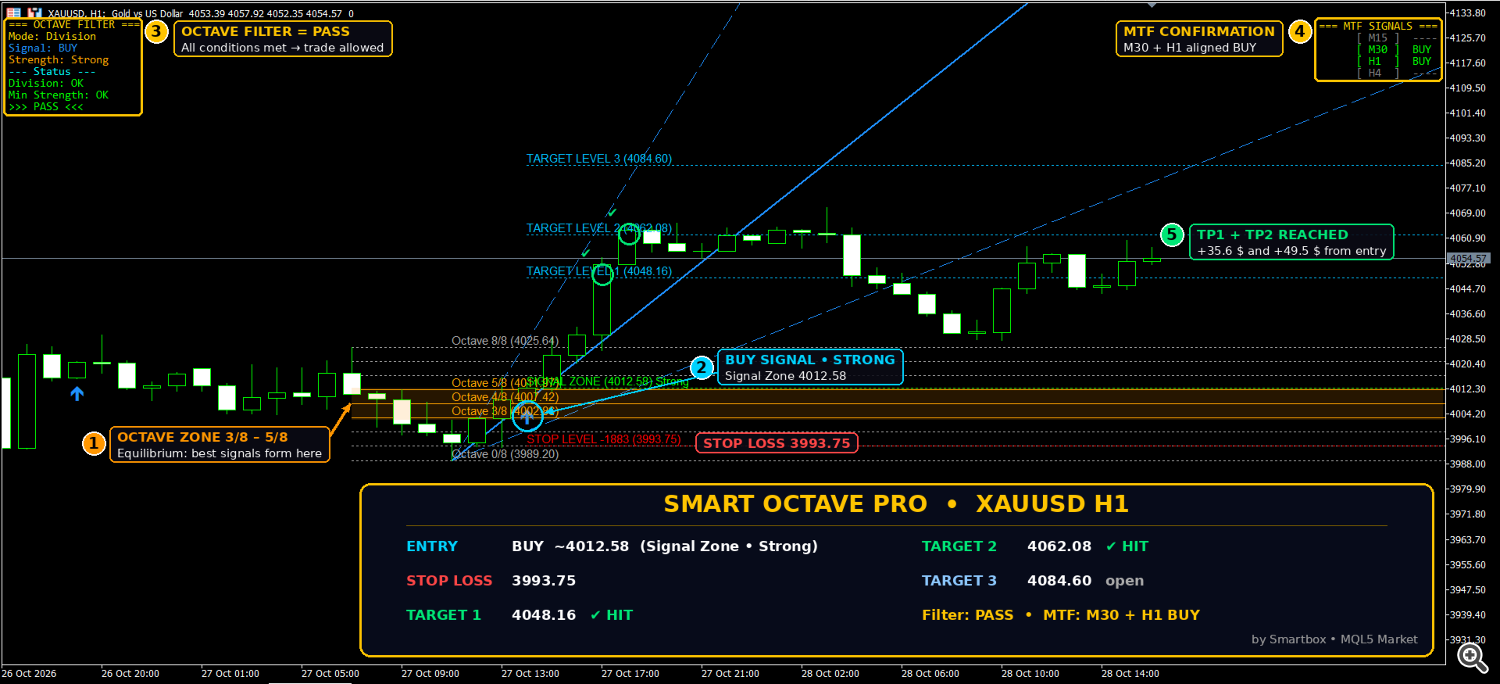
BUY on XAUUSD H1 (strength Strong): entry 4012.58, stop 3993.75, TP1 4048.16 and TP2 4062.08 reached, TP3 4084.60 still open at the time of the screenshot.
Three observations are more useful than the wins themselves. First, the M1 and H1 trades have almost the same geometry despite a 9x difference in swing size; the R:R table in Step 5 predicted that. Second, the H1 trade had the earliest entry (e = 0.64) and therefore the best ratios. Third, the M1 BUY was taken while the H4 panel showed SELL: with the multi-timeframe match switched on, that signal would have been filtered out. Whether that filter helps on your symbol is exactly what a backtest should answer.
Where the method fails
Knowing the failure modes is what separates a tool from a hope. These are structural, not occasional:
- Ranging markets. When price oscillates around the midpoint, a close beyond 4/8 is followed by a close back below it. The stop at 1/8 is then often reached before TP1.
- News spikes. A single release can travel from the entry to the stop in one bar, and the fill can be worse than the stop level. The session timer helps; it does not protect against unscheduled events.
- Late entries. A large signal candle closing near 7/8 leaves TP1 at about 1:1 (Step 5). The signal is valid by the rules, but the geometry is weak.
- Confirmation lag. A swing is confirmed 3 bars after its extreme. On fast moves part of the trend is already gone when the grid appears.
- One signal per swing. After a failed signal there is no second chance on the same structure, even if price later reverses in the original direction.
- Wide stops on higher timeframes. On the M30 example the stop was 20.54 USD away. That is normal for the method, and it must be handled by position size, not by moving the stop.
The targets are calculated reference levels, not forecasts. Price can reach TP3, stop between targets, or hit the stop.
Position sizing: the same risk on a 2-dollar and a 20-dollar stop
Because the stop distance varies by a factor of ten between timeframes, a fixed lot size makes no sense with this method. The indicator already shows a stop level; the lot follows from it:
Lots = (Balance × Risk%) / (Stop distance × Contract size)
Assume a 10,000 USD account risking 1% (100 USD) and a broker contract size of 100 ounces per lot. Check your own broker's contract specification; it varies.
| Trade | Stop distance | Loss per 1.00 lot | Lot size for 100 USD risk |
|---|---|---|---|
| SELL M30 | 20.54 USD | 2,054 USD | 0.04 (0.0487 rounded down) |
| BUY H1 | 18.83 USD | 1,883 USD | 0.05 (0.0531 rounded down) |
| BUY M1 | 2.69 USD | 269 USD | 0.37 (0.3717 rounded down) |
Always round down. Spread, slippage and gaps can make the real loss larger than the planned one, especially on Gold during news.
Reading the signals from an Expert Advisor
The indicator exposes eight buffers that any EA can read with iCustom. Empty values are EMPTY_VALUE: 0 Buy arrow, 1 Sell arrow, 2 Entry, 3 Stop, 4 TP1, 5 TP2, 6 TP3, 7 Strength (1 to 3).
The example below reads the last closed bar (shift 1), which matches how the indicator calculates signals. Called without extra parameters, iCustom uses the indicator's default inputs. A Market indicator is loaded from the Market subfolder, so the path starts with Market\\.
int hOctave = INVALID_HANDLE;

int OnInit()
{
   hOctave = iCustom(_Symbol, _Period, "Market\\Smart Octave Pro");
   if(hOctave == INVALID_HANDLE)
   {
      Print("Smart Octave Pro not found: ", GetLastError());
      return(INIT_FAILED);
   }
   return(INIT_SUCCEEDED);
}

// Returns +1 (buy), -1 (sell) or 0, and fills the trade levels
int ReadOctaveSignal(double &entry, double &sl, double &tp1, double &tp2, double &tp3, int &strength)
{
   double b[1];
   const int shift = 1;                       // last closed bar
   double buy=EMPTY_VALUE, sell=EMPTY_VALUE;

   if(CopyBuffer(hOctave, 0, shift, 1, b) == 1) buy  = b[0];
   if(CopyBuffer(hOctave, 1, shift, 1, b) == 1) sell = b[0];

   int dir = 0;
   if(buy  != EMPTY_VALUE && buy  != 0.0) dir = +1;
   if(sell != EMPTY_VALUE && sell != 0.0) dir = -1;
   if(dir == 0) return(0);

   if(CopyBuffer(hOctave, 2, shift, 1, b) != 1) return(0); entry = b[0];
   if(CopyBuffer(hOctave, 3, shift, 1, b) != 1) return(0); sl    = b[0];
   if(CopyBuffer(hOctave, 4, shift, 1, b) != 1) return(0); tp1   = b[0];
   if(CopyBuffer(hOctave, 5, shift, 1, b) != 1) return(0); tp2   = b[0];
   if(CopyBuffer(hOctave, 6, shift, 1, b) != 1) return(0); tp3   = b[0];
   if(CopyBuffer(hOctave, 7, shift, 1, b) != 1) return(0); strength = (int)b[0];
   return(dir);
}
Call ReadOctaveSignal once per new bar, not on every tick, and remember the time of the last bar you acted on so the same signal is not traded twice. Before sending an order, check the stop against the broker's minimum stop level and size the lot from the stop distance as shown above.
How to evaluate it yourself
Winning screenshots prove that the levels are computed correctly. They say nothing about how often signals work. Only a sample of consecutive signals can answer that, and the free demo is enough to build one:
- Load the demo in the MetaTrader 5 Strategy Tester, visual mode, on your symbol and timeframe, with your broker's data.
- Fix the settings before starting and do not change them during the test.
- Record every signal in order, not only the interesting ones: date, direction, entry position e, strength, and which level was reached first (stop, TP1, TP2 or TP3).
- Collect at least 50 signals. Fewer than that, and a lucky week dominates the result.
- Compute the share of signals reaching TP1 before the stop, and the average result in R across all signals.
- Repeat with one filter changed, and compare.
If the average result in R is not positive after costs on your symbol and timeframe, the signals are not worth trading there as they are, regardless of how good individual charts look.
Risk disclaimer
Smart Octave Pro is an analysis tool. It does not open trades. Its stop and target levels are calculated from past prices and are not predictions. The case studies in this article are selected examples that illustrate how the levels are built; they are not a representative sample and do not indicate future results. Trading leveraged instruments such as Gold involves substantial risk of loss. Test on a demo account first and only trade with capital you can afford to lose.
Product page: Smart Octave Pro on the MQL5 Market. For questions about the indicator, use the product comments or MQL5 private messages.