
How I Check My EAs Every Day in MT5 — With Notes and Scheduled Reviews

Albert Bolle · Creator of Front Row Castlist

Illustration from the daily-check video. The product screenshots below show the actual Castlist interface.
Every day, I want a clear picture of my EAs. Which strategies have been trading? Which review is due? And what did I want to investigate when I last looked at that strategy?
With a growing portfolio, the answers can end up spread across charts, spreadsheets and separate notes. Finding the numbers is one task. Remembering the context behind them is another.
I built Castlist to bring that context into the strategy overview, directly inside MetaTrader 5. Here is the daily routine I use: scan the portfolio, focus on a planned review, and keep the follow-up with the same EA.
Castlist is available free on the MQL5 Market. You can start with MT5 History, using one management chart.
I start with the portfolio overview
My first step is to look across the strategies. Castlist groups them by Magic Number and brings historical performance, recent activity and saved management information into one workspace.
That gives me a useful starting point: I can find a strategy, see its management status, and check whether there is a note or a scheduled review to return to. Search and filters help narrow the list when I want to focus.
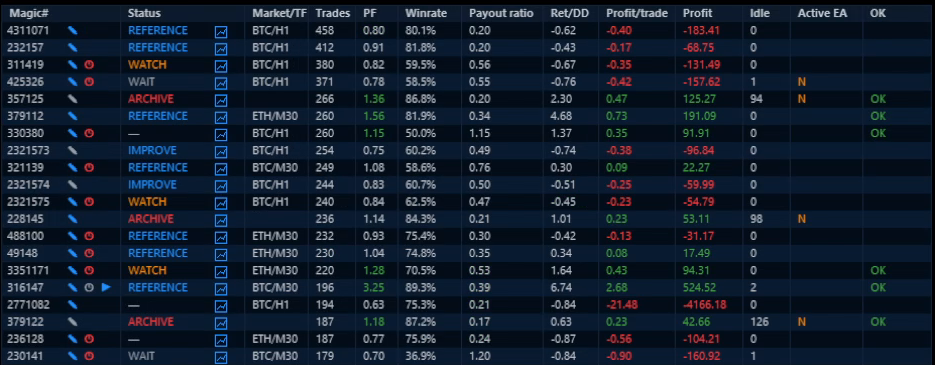
An excerpt from the recorded demo portfolio. The overview brings strategy identity, results and management context together.
The daily check is a scan. I investigate a strategy in more detail when there is a reason to do so. Keeping that distinction makes the routine easier to follow as the portfolio grows.
The red clock brings me back to a planned review
In this example, Magic Number 3351171 has a red review clock. It tells me that a review condition I set earlier has been reached.

Magic Number 3351171 is the first row. Its red clock marks a due review; WATCH is a saved management status.
The clock is a reminder of my own plan. It does not mean the EA is failing, and it is not an automatic verdict on the strategy. Castlist keeps the review visible so I can return to the question I wanted to examine.
A review can be scheduled after new trades, at a total trade count, or after a number of days. The choice depends on what I want to check and how often the strategy trades.
The note tells me what I wanted to check
When I open the note attached to the strategy, I have the context for the review. In this example, the question is:
Check how Profit Factor is developing over recent trades.
That is more useful than trying to remember why I marked an EA for attention. It gives the next investigation a specific purpose.
I then review the strategy in my preferred analysis tool, checking the relevant period and trades. The overview and reminder organise the work; the assessment remains mine.
After the review, I prepare the next check
Once I have completed the review, I update the note and choose the next review point. For this example, the follow-up is after twenty new trades.

The example note retains the Profit Factor question and adds “Review in 20 trades.” The review setting separately controls the reminder.
Writing “Review in 20 trades” in a note does not schedule it by itself. I also set the review condition. The note explains what I want to examine; the review records when I want to return.
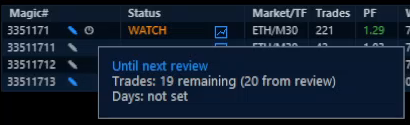
Later in the recorded example, one new trade has occurred and the tooltip shows 19 remaining. The next review is scheduled and is not yet due.
Twenty new trades is a follow-up condition for this example, not a universal rule or a guarantee of enough evidence. Another strategy may need a different interval.
The context stays with the Magic Number, ready for a later daily check. I can return to the overview knowing what I wanted to investigate next.
Try the routine with one EA
You can start with a strategy you already know. The first useful result is a checked strategy identity and a saved piece of context you can find again.
- Install Castlist from the MQL5 Market and attach it to one docked MT5 chart.
- Choose MT5 History and find one known Magic Number. Check its identity, trade count and latest activity.
- Save a short note with a specific observation or question. Reopen it after a refresh to confirm it was saved.
- Set a review condition that fits the strategy and what you want to examine next.
The Castlist Quick Start walks through installation and the first saved action. Use unique, non-zero Magic Numbers; the guide also explains the EA naming convention for active recognition and the account checks to make before relying on the overview.
Castlist works independently with MT5 History. Backstage is optional for persistent history. Management statuses and reviews do not start or stop EAs, close positions or make trading decisions.
Start your next portfolio check with one clear overview. Get Castlist free on the MQL5 Market, then use the Quick Start to save your first note and review.
Prefer to see the routine in motion? Watch the 90-second daily-check video.
What is hardest to keep track of in your portfolio: the strategy, the reason for a review, or when to check again?


![[EURUSD]: Weekly Liquidity Activation Points (LAP), October 12-16, 2026](https://c.mql5.com/6/1035/splash-preview-777305.png "[EURUSD]: Weekly Liquidity Activation Points (LAP), October 12-16, 2026")
![[XAUUSD]: Weekly Liquidity Activation Points (LAP), October 12-16, 2026](https://c.mql5.com/6/1035/splash-preview-777299.png "[XAUUSD]: Weekly Liquidity Activation Points (LAP), October 12-16, 2026")
![[Nasdaq]: Weekly Liquidity Activation Points (LAP), October 12-16, 2026](https://c.mql5.com/6/1035/splash-preview-777311.png "[Nasdaq]: Weekly Liquidity Activation Points (LAP), October 12-16, 2026")