
News Spike Pro: Beyond the Traditional News Grid — An Intelligent Approach to Trading High-Impact Economic Releases

News Spike Pro: Beyond the Traditional News Grid — An Intelligent Approach to Trading High-Impact Economic Releases
What if you could approach high-impact news spikes with a strategy designed specifically for the chaos they create?
Major economic releases can trigger some of the fastest and most aggressive price movements in the financial markets. For traders who know how to approach them, these moments can present interesting opportunities. But they also come with serious challenges: explosive spreads, slippage, violent whipsaws, false breakouts, and sudden reversals that can turn a promising trade into a losing one within seconds.
This is the challenge behind News Spike Pro, my MetaTrader 5 Expert Advisor developed specifically for automated news trading, with a primary focus on XAUUSD (Gold).
But this project is more than just another EA. It comes from years of personal experience, experimentation, and a determination to find a smarter way to approach high-impact news.
1. The Story Behind News Spike Pro: My Mission to Tame the Beast
For years, I've been fascinated by high-impact news spikes. I've traded them extensively, and honestly, I've also lost a lot of money trying to master them.
To me, these spikes always looked like a treasure lying on the table — tempting, full of opportunity, yet incredibly difficult and dangerous to approach safely.
The problem was never a lack of volatility. It was learning how to navigate the chaos that comes with it: spreads exploding, slippage, violent whipsaws, fake breakouts, and price movements that can reverse in the blink of an eye.
I wanted to find a smarter way to ride the spike without being destroyed by the beast.
That became the motivation behind News Spike Pro.
I invested a great deal of time developing, testing, and refining multiple strategies specifically designed for these extreme market conditions. My goal was not simply to place pending orders and hope for the best. I wanted to build a system that could prepare before the release, analyze the available economic data, identify a potential direction, and manage the difficult situations that often follow.
This led me to combine pre-news grid preparation, Actual-versus-Forecast analysis, intelligent directional execution, and dedicated whipsaw-management logic into one specialized MetaTrader 5 Expert Advisor.
The journey has involved experimentation, adjustments, and plenty of lessons learned. News trading is unforgiving, and no system can eliminate its risks. But every challenge has helped shape the approach behind News Spike Pro.
The mission is simple: tame the beast — not by pretending it is harmless, but by developing a smarter, more structured way to approach it.
And that's why I invite traders to see the EA in action, request a trial, and evaluate it for themselves during real economic releases.
2. The Core Idea: Prepare Before the News, Adapt After the Release
Many news-trading systems focus on placing Buy Stop and Sell Stop orders around the market and hoping that one side catches a strong move.
However, major economic announcements do not always produce a clean, one-directional spike. Price can initially move in one direction, reverse sharply, trigger orders on both sides, and create difficult exposure within seconds.
News Spike Pro approaches this problem through several coordinated stages.
Stage 1 — Monitor the Economic Calendar
The EA monitors the built-in MetaTrader 5 Economic Calendar for upcoming events matching your selected currencies and impact levels.
High-impact events can be enabled, while medium-impact events are optional. This allows you to configure the types of announcements you want to trade.
For example, a Gold trader may choose to focus on major USD releases, such as inflation data, employment reports, or other high-impact US economic announcements.
Stage 2 — Prepare the Grid Before the Release
As the selected event approaches, News Spike Pro prepares a configurable structure of Buy Stop and Sell Stop pending orders around the market.
The grid supports configurable entry distances, lot sizes, take-profit and stop-loss settings, and up to 15 active grid levels.
The objective is to have the execution structure ready before volatility begins, rather than waiting for the initial price movement and potentially missing the opportunity.
Stage 3 — Analyze the Released Economic Data
When the event is released, the EA waits for the configured delay and attempts to retrieve the Actual and Forecast values from the MT5 Economic Calendar.
If sufficient data is available and the difference reaches the configured threshold, News Spike Pro uses its directional logic to identify the relevant side of the market.
For example, stronger-than-expected USD data may indicate relative USD strength. For XAUUSD, the EA applies the corresponding inverse relationship, potentially favoring the sell side of Gold.
The important point is that the EA does not simply assume every news release should produce a buy or sell signal. The direction depends on the available release data, the configured threshold, and the relationship between the news currency and the traded symbol.
Economic data is not always straightforward, and a positive or negative surprise does not guarantee a particular market reaction. The EA's directional logic is a decision-making mechanism, not a prediction of certain price movement.
Stage 4 — Manage the Opposite Side
When a directional signal is established, News Spike Pro can cancel pending orders on the opposite side of the grid.
If the economic data does not provide a sufficient directional signal, the EA can use its configured OCO management logic. If release data remains unavailable within the waiting period, it can fall back to its configured pending-order management behavior.
This allows the pre-news grid to transition into a more selective execution mode rather than leaving both sides unmanaged.
3. Why I Use a Grid for News Trading — and Why Context Matters
Let's address an important point directly: grid trading can be dangerous.
A conventional grid strategy that repeatedly adds positions to losing trades, increases exposure, or relies on the market eventually reversing can accumulate substantial losses. An unrestricted grid should not be treated as a safe strategy for ordinary market conditions.
However, trading a scheduled economic release is a different context from running a grid continuously throughout the trading day.
News Spike Pro uses a configurable, event-driven grid designed around a specific volatility window. The objective is to prepare for a potential price expansion around a known catalyst and then manage the resulting positions according to the EA's execution and risk-management rules.
This is not simply a matter of placing more orders and hoping for the best.
The approach combines several elements:
-
Pre-news preparation: Pending orders are organized around the market before the scheduled release.
-
Directional intelligence: Actual-versus-Forecast data is used when available to identify a potentially relevant trading direction.
-
OCO management: The opposite pending-order side can be removed when directional confirmation occurs.
-
Structured trade management: Individual stop-loss and take-profit settings, break-even logic, and trailing stops help manage trade exits.
-
Whipsaw management: A dedicated hedge-management module addresses situations in which both buy and sell positions coexist.
-
Exposure protection: Configurable drawdown protection, timeouts, spread filtering, and execution safeguards help manage specific risks.
The grid itself is not the edge. The approach depends on how the grid is prepared, how the release is interpreted, and how the resulting exposure is managed.
Of course, none of these mechanisms eliminates the risks of news trading. Sudden gaps, slippage, widening spreads, insufficient liquidity, and fast reversals can still lead to losses.
4. The Whipsaw Problem: What Happens When Price Reverses?
One of the most difficult situations in news trading is the whipsaw.
Imagine a major USD announcement. Gold initially moves upward, triggers buy-side orders, and then reverses aggressively. In a sufficiently fast two-sided move, orders on both sides can be activated before the market establishes a clear direction.
A simple breakout EA may be left with opposing positions and growing exposure.
News Spike Pro includes an optional Whipsaw Hedge Mode designed to manage this situation.
When both buy and sell positions coexist, the EA can monitor their combined net result and apply configurable profit, maximum-loss, and timeout conditions. Its management logic also includes net trailing functionality for handling exposure as positions are closed.
These mechanisms are intended to provide a structured response to a difficult execution scenario instead of leaving the trader with unmanaged opposing positions.
It is important to understand that hedging does not erase losses or guarantee a profitable exit. Both sides can incur costs, and the combined exposure can remain negative. The outcome depends on market movement, execution conditions, position sizes, and the configured parameters.
The goal is to manage the situation according to predefined rules rather than rely entirely on manual intervention during an extremely volatile event.
5. Tested Primarily on Gold — Also Evaluated on NAS
My main focus with News Spike Pro has been XAUUSD / Gold, using the default configuration as the starting point for testing.
Gold is particularly interesting for this strategy because major US economic releases can produce substantial short-term price movements. However, these movements can also be extremely erratic, and no individual release guarantees a clean spike.
I have also tested the EA on NAS using a custom set file adapted to the instrument's trading characteristics.
The distinction matters: a configuration that behaves appropriately on Gold should not automatically be assumed to work equally well on a stock index. Entry distances, stop levels, spreads, contract specifications, and lot sizing must be evaluated against the broker's conditions for each instrument.
I will share platform screenshots and video demonstrations showing the EA in action, including its chart interface, order placement, and trade management.
Gold — Default Configuration
NFP 02/10/2026: +$810 Profit (demo account, shared by one of our Telegram members)


PMI 05/10/2026:
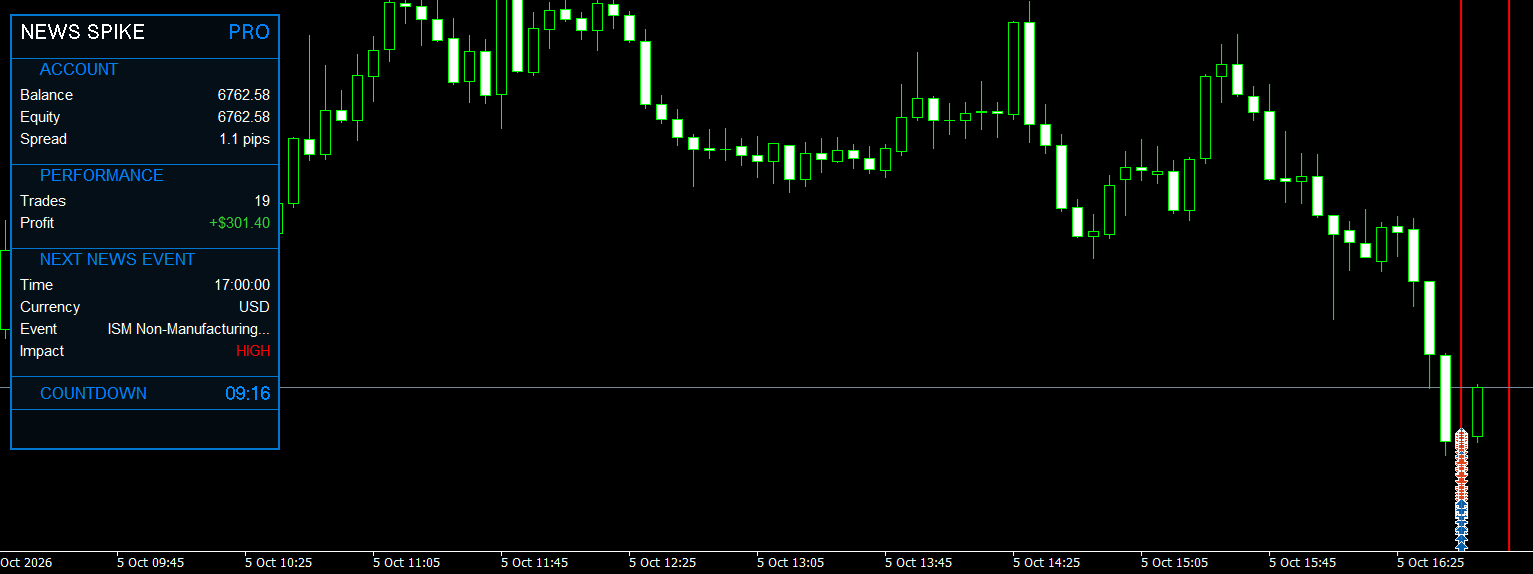
JOLTS 29/09/2026:

NAS — Custom Set File
Initial Jobless Claims (08/10/2026) effect on the NAS pair. (Shared by one of our Telegram members)
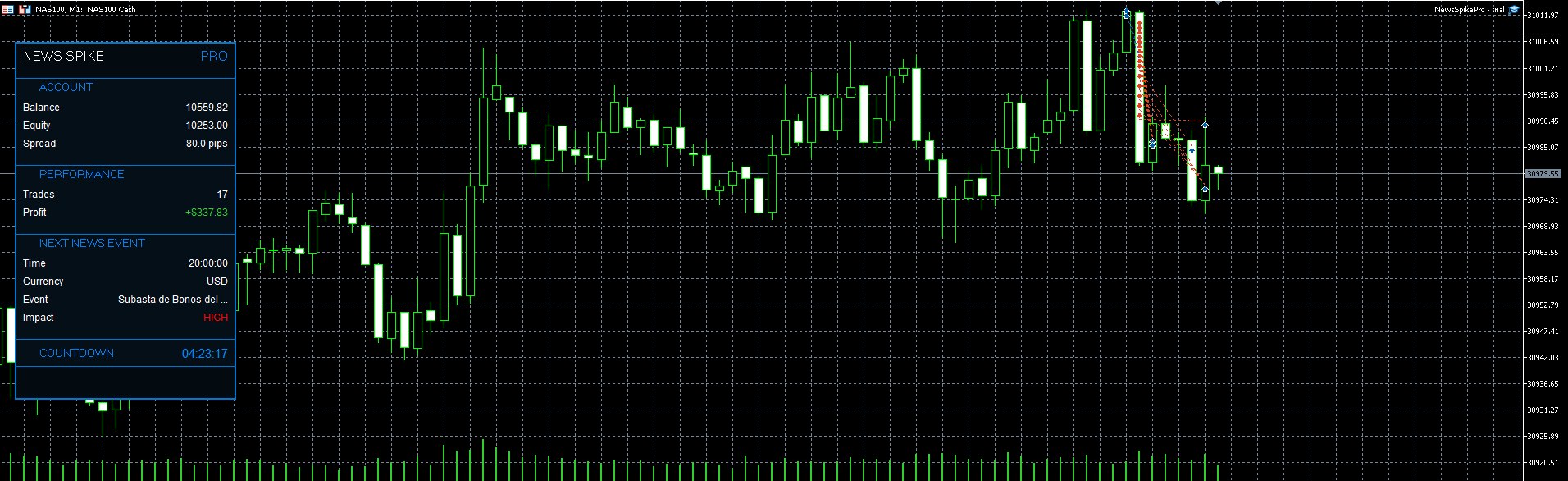
These examples allow you to observe the EA's behavior under the conditions shown. When evaluating any trading demonstration, consider the instrument, broker conditions, configuration, number of trades, and complete sequence of entries and exits.
Individual examples are not a guarantee of future performance. Results can vary substantially with market conditions and execution quality.
6. Important: Why You Cannot Properly Backtest the Complete Strategy
News Spike Pro is designed to trade actual economic releases. Its complete live news-trading strategy cannot be properly validated through conventional historical backtesting in the standard MT5 Strategy Tester.
This is an important distinction for anyone considering the EA.
News Spike Pro relies on the built-in MetaTrader 5 Economic Calendar to identify scheduled announcements and, when available, retrieve the Actual and Forecast values published at the time of the release.
Its directional execution logic uses this information, together with symbol-correlation rules, to identify a potentially relevant trading direction.
A conventional historical backtest does not reproduce the complete live environment required by this process. In particular, it cannot be relied upon to reproduce the original economic-release data, its precise availability and timing, and the EA's full live directional decision-making process.
The EA may run in a limited testing scenario using its fallback OCO logic. However, this is not equivalent to testing the complete strategy as it operates during real economic announcements.
For this reason, a conventional backtest alone cannot provide a meaningful validation of the EA's intended live news-trading performance.
So, How Should You Test News Spike Pro?
The appropriate approach is forward testing during actual economic releases.
-
Install the EA on MetaTrader 5 with access to the built-in Economic Calendar.
-
Attach it to your preferred instrument, starting with XAUUSD / Gold.
-
Configure the event filters and risk settings for your broker.
-
Run it on a demo account through multiple relevant high-impact releases, including US economic announcements.
-
Observe its pre-news preparation, directional processing, order execution, and trade management under real market conditions.
This allows you to evaluate the strategy in the environment for which it was designed, rather than relying on a historical simulation that cannot reproduce all its essential inputs.
I strongly recommend starting on a demo account and evaluating several different events, including unfavorable releases and difficult market conditions, before considering live trading.
Remember that successful forward tests do not guarantee future results. Spreads, slippage, liquidity, execution speed, and broker-specific restrictions can significantly affect news-trading outcomes.
7. Main Features at a Glance
News Spike Pro combines several functions in one MetaTrader 5 Expert Advisor:
-
Designed primarily for XAUUSD / Gold news trading.
-
Configurable high-impact and medium-impact economic-event filters.
-
Built-in MT5 Economic Calendar integration.
-
Configurable pre-news Buy Stop and Sell Stop grid.
-
Up to 15 active grid levels with adjustable distances and lot sizes.
-
Actual-versus-Forecast directional analysis when sufficient release data is available.
-
Automatic symbol-correlation logic, with manual correlation configuration available.
-
OCO-based pending-order management and configurable fallback behavior.
-
Individual take-profit and stop-loss settings.
-
Break-even and trailing-stop management.
-
Spread filtering and execution safeguards.
-
Optional whipsaw hedge management.
-
Configurable cooldowns, pending-order and position timeouts, and drawdown protection.
-
On-chart information panel and optional economic-event lines.
-
Support for common Gold symbol variations, including broker-specific suffixes.
Requirements
To use News Spike Pro, you need:
-
A MetaTrader 5 terminal with access to the built-in Economic Calendar.
-
A broker offering suitable conditions for news trading.
-
A hedging account for the intended management of simultaneous buy and sell positions.
-
Appropriate risk settings for your account size and instrument.
The EA can be attached to different chart timeframes. The selected timeframe does not change the Economic Calendar event detection or the underlying pending-order grid logic.
Always verify your broker's minimum stop distances, permitted order volumes, spreads, contract specifications, and margin requirements before trading.
8. Get News Spike Pro and Request a Trial
I believe the best way to evaluate an automated news-trading system is to observe it working on your own platform, with your own broker and account conditions.
That is why I invite interested traders to join my Telegram community.
Official MQL5 Product Page
News Spike Pro for MetaTrader 5
https://www.mql5.com/en/market/product/196742
Visit the product page to review the product details and purchase the EA.
Telegram Channel — Nad Trading Systems
https://t.me/NadTradingSystems
Join the channel to follow product updates, trading demonstrations, configuration information, and trial announcements.
Telegram Discussion Group
https://t.me/NadTradingSystems_Chat
Join the discussion group to ask questions, discuss the strategy, exchange observations, and request information about obtaining a trial file.
How to Get the Trial
-
Join the Telegram channel and discussion group.
-
Contact me to request the News Spike Pro trial file.
-
Install the EA on MetaTrader 5 and review its settings.
-
Forward-test it on a demo account during suitable economic releases.
-
Evaluate its behavior under your own broker conditions before deciding whether to purchase it.
Trial availability and conditions can be confirmed through the Telegram community.
You do not need to rely on marketing claims or a conventional backtest that cannot reproduce the complete strategy. Request the trial, observe the EA during actual news events, and make your own informed decision.
9. Ready to Explore a Different Approach to News Trading?
News Spike Pro was developed around a specific challenge: preparing for scheduled economic volatility while combining directional analysis, structured grid execution, and dedicated trade-management logic.
It is not a promise of easy profits, and it is not a substitute for risk management. It is an automated trading tool for traders who understand the opportunities and dangers associated with high-impact economic releases.
If you trade Gold, follow US economic news, or want to investigate an event-driven strategy for NAS using an appropriately configured set file, I invite you to explore News Spike Pro.
Watch the demonstrations. Request the trial. Test it during real economic releases. Decide based on what you observe.
Get News Spike Pro:
https://www.mql5.com/en/market/product/196742
Follow Nad Trading Systems:
https://t.me/NadTradingSystems
Join the discussion and request your trial:
https://t.me/NadTradingSystems_Chat
I look forward to hearing your feedback and seeing how News Spike Pro performs under your own broker conditions.
Risk Disclaimer: News trading involves substantial financial risk. Grid execution and hedging can increase market exposure, and stop-loss orders may not limit losses to the intended amount during gaps or extreme volatility. Execution may be affected by widening spreads, slippage, liquidity constraints, and broker-specific restrictions. Past performance does not guarantee future results. This Expert Advisor does not guarantee profitability. Always use appropriate risk controls and never trade money you cannot afford to lose.