
Aureon Nexus: XAUUSD Trading Modes, Dashboard and Backtest Results


Aureon Nexus: Three Independent Trading Engines for XAUUSD on MetaTrader 5
Three strategies. Separate trade management. A clear view of every trading mode.
Aureon Nexus brings three independently managed trading strategies into one MetaTrader 5 Expert Advisor for XAUUSD. Each strategy has its own identity, position-sizing settings and after-loss controls. Users can enable individual strategies or run all three together, with each engine evaluating its own trading opportunities.
This overview presents the trading modes, the on-chart interface and three developer-supplied Strategy Tester reports covering the same test period. It focuses on what users can configure and evaluate, while keeping the proprietary entry logic private.
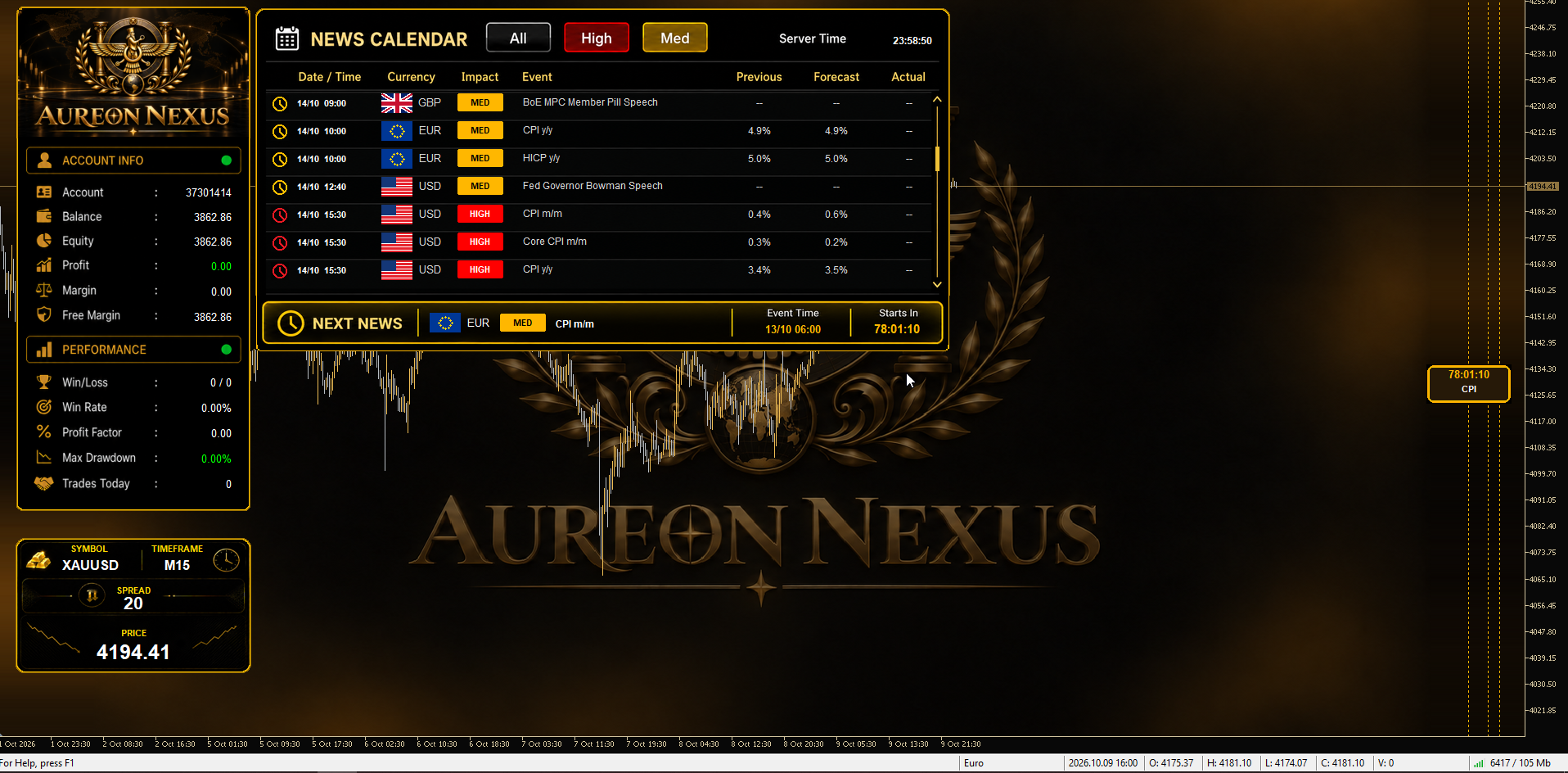
Aureon Nexus dashboard and news calendar. Interface shown on M15; the backtests below use M5.
One Expert Advisor, Three Separately Managed Strategies
- Enable or disable each strategy individually.
- Set normal trade volume independently for each strategy.
- Choose an after-loss mode for each strategy.
- Keep trade ownership and strategy profit accounting separate through distinct magic numbers.
- Follow positions and account conditions through the optional chart panels.
Separate strategy management does not remove shared account constraints: all strategies still use the same account equity and available margin. Running three engines together therefore requires evaluating the combined exposure, rather than treating their standalone results as independent account results.
Three After-Loss Modes, Three Different Behaviours
OFF — Continue with the normal strategy.
After a losing trade, the strategy continues to evaluate its normal signals. Its ordinary stop-loss, take-profit and trailing-stop management remain in place. OFF does not activate a recovery lot-doubling sequence or an immediate after-stop reversal.
Recovery — Target the outstanding loss.
Recovery uses increased trade volume after a qualifying loss, with recovery volume doubled relative to the preceding volume in the recovery sequence. The objective is to recover the outstanding loss and, if configured, an additional target. An extra target of zero requests loss recovery only; a positive value adds the configured extra target. The sequence returns to normal operation when its recovery objective is met. Lot escalation increases exposure, so this mode must be assessed separately from normal fixed-lot trading. Broker volume limits and available margin still apply.
Reverse After Stop Loss — Change direction after a qualifying stop.
After a qualifying losing stop-loss closure, the engine can request an opposite-direction trade: a stopped BUY can lead to a SELL, and a stopped SELL can lead to a BUY. Reversal depth, strategy controls and execution conditions govern the request. The mode responds to a stop event; it does not mean every stopped trade will be followed by an executable reversal in every broker environment.
For Strategy 1, the normal pending-order count and the after-loss order counts are separately configurable. This allows the user to choose the initial order count independently of the Recovery or Reversal count.
A Like-for-Like Backtest Comparison
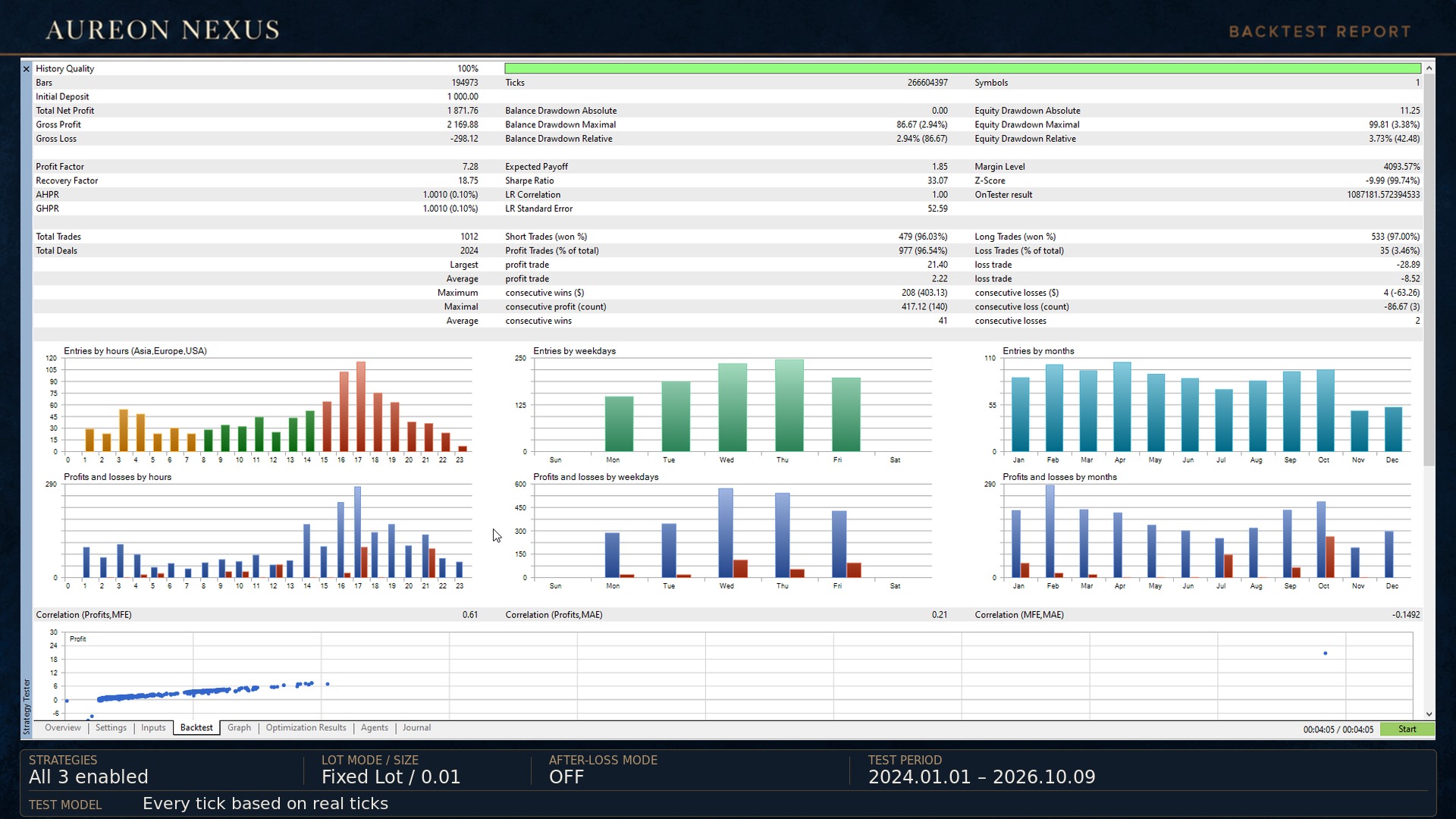
The following figures were extracted from three supplied MetaTrader 5 HTML reports. All three strategies were enabled in each test. The normal lot setting was fixed at 0.01 for each strategy; Recovery can increase subsequent recovery volume.
| Test condition | Reported setting |
|---|---|
| Instrument / timeframe | XAUUSD / M5 |
| Test period | 2024.01.01–2026.10.09 |
| Broker / server | RoboForex Ltd / RoboForex-Pro |
| Initial deposit / currency | 1,000.00 USD |
| Leverage | 1:500 |
| Normal lot setting | Fixed lot 0.01 per strategy |
| Reported history quality | 100% real ticks |
| Reported tick count | 266,604,397 |
| News filter | Disabled in these tests |
| Panels and chart background | Disabled in these tests |
| Metric | OFF | Recovery | Reverse After Stop Loss |
|---|---|---|---|
| Net profit (USD) | 1,871.76 | 2,477.67 | 1,875.23 |
| Profit factor | 7.28 | 4.27 | 7.15 |
| Winning trades | 96.54% | 96.57% | 95.27% |
| Total trades | 1,012 | 990 | 1,035 |
| Recovery factor | 18.75 | 9.17 | 18.79 |
| Maximum relative equity drawdown | 3.73% | 9.87% | 3.73% |
| Maximum equity drawdown (USD) | 99.81 | 270.13 | 99.81 |
What stands out? In these reports, OFF had the highest profit factor. Recovery produced the largest net profit, accompanied by a lower profit factor and a higher maximum relative equity drawdown. Reversal increased the trade count compared with OFF, with a broadly similar reported drawdown. The modes offer different behaviour and exposure; higher net profit alone does not identify the most suitable setting.
The maximum relative equity-drawdown percentage and the maximum equity-drawdown amount are separate report fields and may describe different drawdown episodes. For example, the OFF report shows a maximum relative equity drawdown of 3.73% (42.48 USD), while its maximum equity drawdown amount is 99.81 USD (3.38%). These figures should not be combined into a single episode.
OFF Mode — Backtest Report
Reading the Balance and Equity Curve
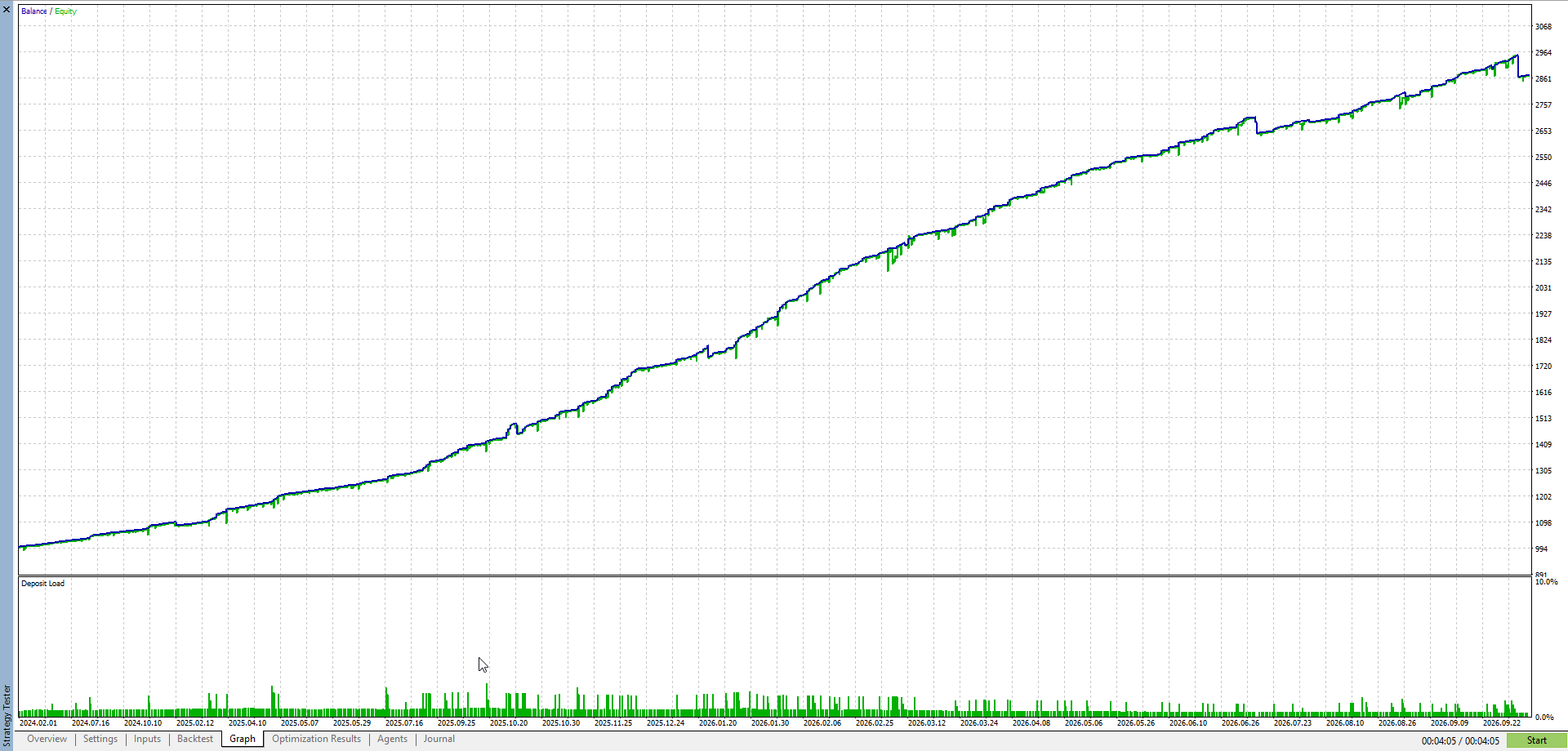
The supplied OFF graph shows an overall rising balance curve with visible pullbacks. Equity tracks balance closely across much of the chart, while the gaps between the two curves show periods of floating profit or loss. The final step down is also part of the displayed result and should remain visible when reviewing the test.
A graph helps explain the path of a test, while the report provides the measurable trade count and drawdown. These are historical simulations. Broker tick data, spread, commissions, slippage and execution conditions can change the results of another test or live run.
An Interface Built Around the Trading Workflow

- Main panel: account information and displayed performance statistics.
- Symbol panel: instrument, chart timeframe, spread and current price.
- News calendar: event time, currency, impact, previous value, forecast and actual value when supplied by the news feed.
- Next-news ribbon: the upcoming event and its countdown.
- Chart news markers: upcoming-event timing shown on the chart when enabled.
- Flexible layout: independently movable panels, optional background and individual display switches.
News controls let users select USD, EUR and GBP events, high and medium impact, and the pause windows before and after news. The calendar can also include the following week. These controls support the live trading workflow; the reports shown here had the news filter disabled, so their results do not demonstrate filtered-news performance.
Recommended Operating Setup
| Item | Setup |
|---|---|
| Platform | MetaTrader 5 |
| Instrument / chart | XAUUSD / M5 |
| Account mode | Hedging |
| Reference balance | 1,000 USD; evaluate margin and exposure for the chosen settings |
| Starting normal lot | 0.01 per strategy as used in the supplied comparison |
| Leverage used in the reports | 1:500; lower leverage changes available margin |
| Continuous operation | Stable connectivity; a VPS is recommended for uninterrupted operation |
| News data | Allow the configured news-feed address in MetaTrader WebRequest settings when using the live news feature |
Live Monitoring: A Separate View of Account Performance
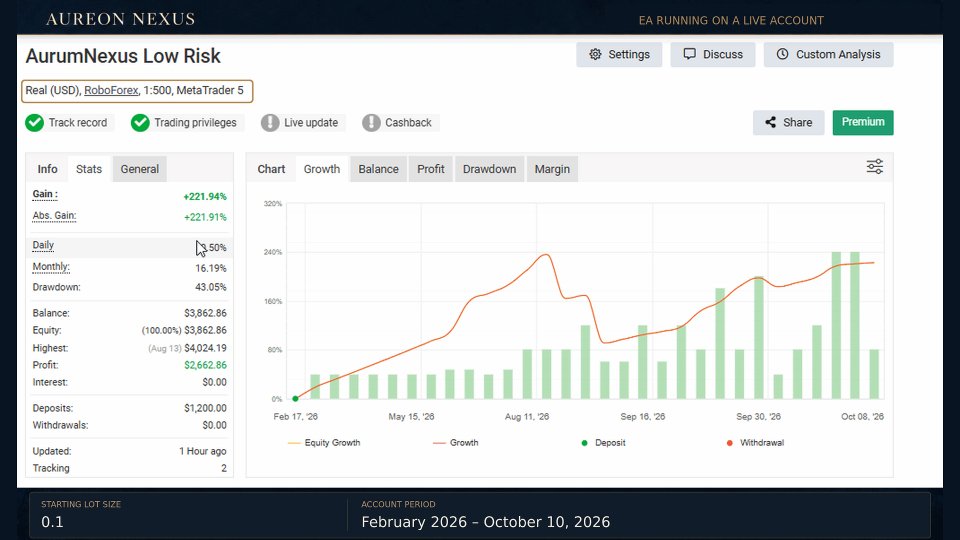
A developer-supplied Myfxbook screenshot shows an account named AurumNexus Low Risk, using the earlier product name. The developer identifies this as a monitoring account associated with the robot. The screenshot labels the account Real (USD), RoboForex, 1:500, MetaTrader 5, and displays green Track Record and Trading Privileges badges.
| Field visible in the screenshot | Snapshot value |
|---|---|
| Gain | +221.94% |
| Drawdown | 43.05% |
| Displayed balance / equity | 3,862.86 USD / 3,862.86 USD |
| Displayed deposits | 1,200.00 USD |
| Displayed profit | 2,662.86 USD |
Context matters. This screenshot is a historical snapshot, not a current independently retrieved account record. Its drawdown of 43.05% is materially higher than the drawdowns in the supplied fixed-normal-lot backtests. The starting-lot annotation also differs from the 0.01 normal-lot setting in the backtest comparison. The materials do not establish identical versions, after-loss modes or all other settings across the monitoring account and these tests. The monitoring history and backtests should therefore be read separately. The account name alone should not be used to describe its risk.
Explore Aureon Nexus
Review the available settings and evaluate the demo in the Strategy Tester using your intended broker environment. Begin with the operating mode and exposure you plan to use, then assess the combined behaviour of the enabled strategies.
View Aureon Nexus on the MQL5 Market
For product questions and setup support, use the product comments or MQL5 private messages.



![[iVISTscalp5]: XAUUSD. Forecast First. Market Reaction Afterwards](https://c.mql5.com/6/1035/splash-preview-777232.png "[iVISTscalp5]: XAUUSD. Forecast First. Market Reaction Afterwards")