

Stancel Tempo is a free indicator for MetaTrader 5. It draws one strip across the top of the chart that answers one question: where you are in the trading day, and what comes next. It gives no signals, makes no predictions and suggests no entries.
1. Installing and attaching
Download it from its page on the MQL5 Market. It appears in the Navigator under Indicators > Market. Drag it onto any chart and press OK.
No setting needs to be changed to start. All alerts come switched off.
- The timeframe does not matter for the strip: the whole day is always drawn.
- Above H4 the shading over the candles switches itself off, because one candle already contains all three sessions.
- You can put it on several charts; each keeps its own settings.
- It works on light and dark chart backgrounds: the strip picks a light or a dark theme from the chart's background colour.
To remove it: right-click the chart > Indicators List > select it > Delete. It removes its own lines and leaves nothing behind.
2. Time comes first
Most brokers change their clocks twice a year, usually so that their midnight falls at 17:00 New York time: GMT+2 in winter, GMT+3 in summer. An indicator that uses today's offset for every candle draws the sessions before the last change one hour out.
Tempo measures the offset instead of asking you to type it:
- right now, by comparing the server clock with your computer's clock;
- for every past week, from the price history of your own symbol. The currency market opens on Sunday at 17:00 New York; the first candle of each week, stamped in server time, tells what offset the broker had that week.
From the measured weeks it recognises the broker's rule (it follows the United States, it follows Europe, or it does not change) and uses it for dates it could not measure. Every candle is then shaded with the offset and the daylight saving of its own date.
The strip shows what it is drawing with, on its second text row:
Server GMT+3 · US DST on · EU DST on
If you ever doubt whether the sessions are in the right place, compare that line with your broker's time.
In the Strategy Tester, MetaTrader reports the server time as the real time, so comparing clocks would always give zero. Tempo does not use that: in the Tester it relies only on what it measured from the history, and if there is not enough history it says "Server time offset unknown" instead of drawing sessions in a made-up place. The economic calendar is not available in the Tester, and the strip says so.
3. The strip, row by row
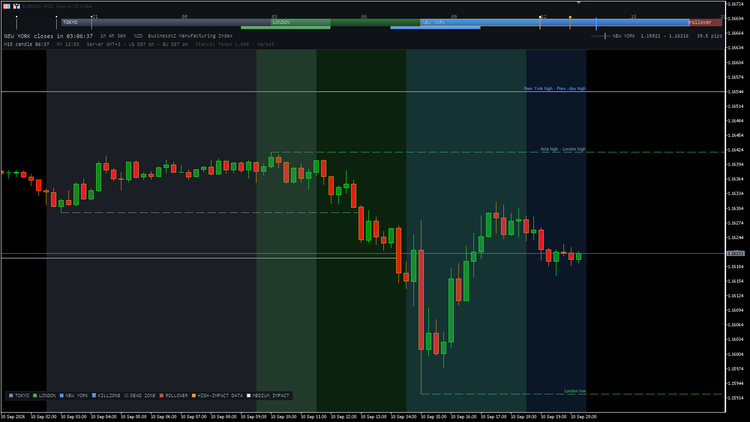
Hour ruler. Hours every three, in New York time. The whole bar is anchored to New York: the currency day starts and ends at 17:00 there. Small squares above the ruler are today's economic releases.
Day bar. Tokyo, London, New York, the dead zone (the New York afternoon after London closes) and the rollover (16:55 to 18:05 New York). The open session is brighter and framed. The bands are semi-transparent, so where London and New York overlap their colours add up. A vertical line marks the current moment. The day starts when the rollover ends, so no session is split across the ends.
Killzones. A thin line under the bar: London 02:00 to 05:00 and New York 07:00 to 10:00, New York time. Both start one hour before their session opens, which is when the move that prepares the open happens.
First text row. The countdown to the second ("LONDON closes in 02:14:33", "TOKYO opens in 01:46:06"; at the weekend, the countdown to the Sunday open), the next economic release with its currency and time left, and on the right the range of the live session with a gauge showing where price sits inside it.
Second text row. The countdown to the close of the current candle, the New York clock, the time model described above, and the version.
When the chart is narrow, items drop in order of importance instead of being cut: first the range (below about 1,000 pixels), then the New York clock (below 760), then the names inside the bands and the hour ruler (below 520). Below 320 pixels nothing is drawn.
4. The sessions
| Session | Opens | Closes | Local time of |
|---|---|---|---|
| Tokyo | 09:00 | 18:00 | Tokyo (no daylight saving) |
| London | 08:00 | 17:00 | London (EU daylight saving) |
| New York | 08:00 | 17:00 | New York (US daylight saving) |
Each session is computed in its own city's time. The broker's clock is used only to place the bands over your candles.
Europe and the United States do not change their clocks on the same day. For two or three weeks a year the London to New York gap is four or six hours instead of five; during those weeks the strip says so.
The market is treated as closed from Friday 17:00 to Sunday 17:00 New York. During that time no session is highlighted and no range is shown. The Sunday countdown uses the time New York will have on Sunday, so it is also right on the weekends of the US clock change.
5. Economic releases
Read from MetaTrader 5's own economic calendar; Tempo does not go online. Medium and high impact releases from all currencies are shown on the bar; high impact ones use the palette's warning colour. If you see none, check View > Calendar in the terminal: some brokers switch the calendar off.
6. Range and shading
While a session is open, its high and low so far are shown with a gauge. The shading over the candles uses each candle's own date. Strength is set with the shading setting (5 to 60 %, default 22); the style can be a fill or edges only (two thin lines per session). Saturated palettes are compensated so that they do not look heavier than muted ones.
7. Highs and lows
Tempo draws the high and low of the previous Asian, London and New York sessions and of the previous day. Each line starts at the candle where the extreme was made and runs right until price touches it, where it stops. Lines still running carry their name on the right; two names at the same price are joined.
- The previous session is the last complete one: while London is open, the previous London is yesterday's.
- The previous day is the currency day, 17:00 to 17:00 New York.
- Everything is computed from M1 candles, so the levels are the same on any timeframe.

8. Custom session
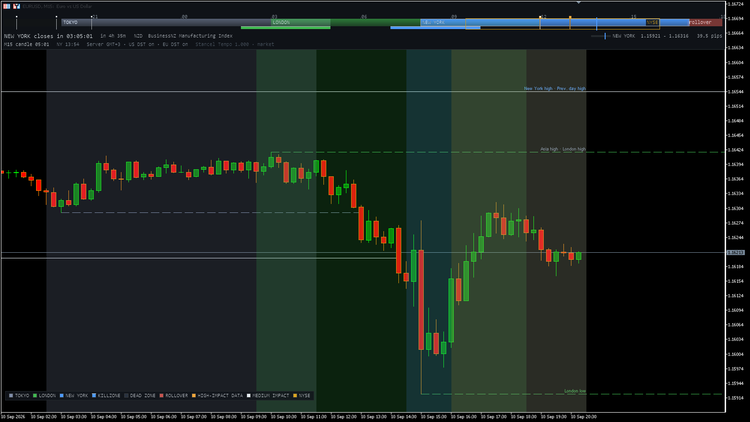
One extra session with minute precision, for example the NYSE from 09:30 to 16:00 New York time. Times are written as HH:MM. The time zone can be New York, London, Tokyo (each with its own daylight saving), UTC or Broker server. If the end is earlier than the start, the session crosses midnight. It is framed on the strip, shaded on the chart and listed in the legend.
9. Alerts
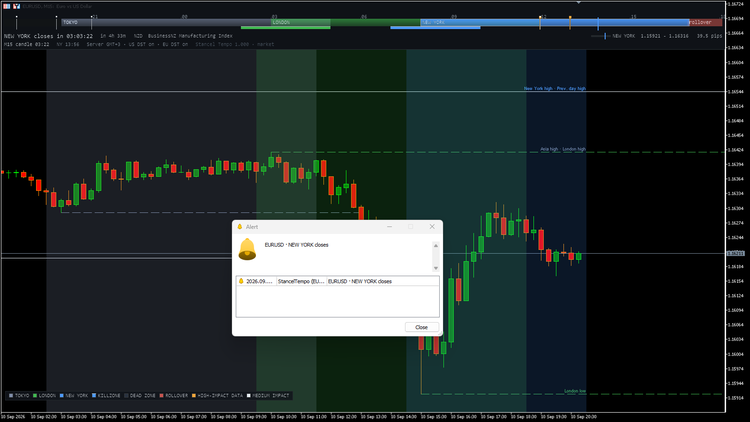
Three kinds, all off by default: a session opens or closes; a killzone starts or ends; an economic release is N minutes away (filtered by impact and, optionally, by the chart's two currencies). No alert fires when the indicator is attached, and none is repeated.
Channels: the MetaTrader alert window (on by default once an alert kind is enabled), a sound, a push notification, and email.
Push notifications: copy your MetaQuotes ID from the MetaTrader app on your phone (Settings > Messages), paste it in the desktop terminal under Tools > Options > Notifications and press Test. MetaTrader allows two notifications per second and ten per minute; Tempo queues them so none is lost. If the ID is not set, Tempo writes one line in the Experts journal and keeps working.
Email needs the mail server configured in Tools > Options > Email. Push and email do not exist in the Strategy Tester.
10. Settings
| Group | Setting in the dialog | Default |
|---|---|---|
| Colours | Palette (Stancel, Graphite, Amber, Neon) | Stancel |
| Colours | Tokyo, London, New York, Dead zone, Rollover colour (None = palette) | None |
| Display | Shade sessions over the candles | Yes |
| Display | Show killzones | Yes |
| Display | Show economic releases | Yes |
| Display | Show colour legend | Yes |
| Display | Shading strength, 5-60 % | 22 |
| Display | Session shading style (Fill, Edges only) | Fill |
| Display | Show candle close countdown | Yes |
| Levels | Previous Asia, London and New York high/low | Yes |
| Levels | Previous day high/low | Yes |
| Custom session | Show a custom session | No |
| Custom session | Custom session name | NYSE |
| Custom session | Starts at (HH:MM) / Ends at (HH:MM) | 09:30 / 16:00 |
| Custom session | Time zone of those hours | New York |
| Custom session | Custom session colour | Goldenrod |
| Alerts | Alert when a session opens or closes | No |
| Alerts | Alert when a killzone starts or ends | No |
| Alerts | Alert before economic releases | No |
| Alerts | Minutes before the release | 15 |
| Alerts | Releases to alert on (High impact only, Medium and high impact) | High |
| Alerts | Only releases for the chart currencies | Yes |
| Alerts | Channel: popup window / sound / push notification to phone / email | Yes / No / No / No |
| Alerts | Sound file | alert.wav |
New York is blue in all four palettes. A colour set to None uses the palette's.
11. If something looks wrong
- No strip: check it is in the Indicators List; the chart must be at least 320 pixels wide and about 110 tall.
- Items missing: normal on a narrow chart; widen it.
- Candles on top of the strip: your chart has *Chart on foreground* enabled (F8 > Common). Tempo does not change your chart settings.
- No releases: check View > Calendar in the terminal.
- "Market closed" while the broker quotes: Tempo uses market hours (Friday 17:00 to Sunday 17:00 New York), not the broker's.
- Bands look one hour out: read the time model on the second text row and compare it with the broker time. During the two or three weeks when Europe and the United States are out of step, the strip says so.
- No push notifications: set the MetaQuotes ID and press Test in Tools > Options > Notifications.
- No high/low lines: the terminal may still be downloading M1 history.
12. What it does not do
It does not trade and cannot: an indicator has no access to the trading functions. It does not go online, uses no DLLs and does not read your account, balance or trades. It is free and complete; nothing is locked.
13. Updates
New versions are published on the product's page on MQL5, and each one lists what changed in its "What's new" field.
Questions and bug reports: please use the comments or the discussion on the product's page on MQL5, with your broker, the version shown on the strip and a screenshot.


![[EURUSD]: Weekly Liquidity Activation Points (LAP), October 12-16, 2026](https://c.mql5.com/6/1035/splash-preview-777305.png "[EURUSD]: Weekly Liquidity Activation Points (LAP), October 12-16, 2026")
![[Nasdaq]: Weekly Liquidity Activation Points (LAP), October 12-16, 2026](https://c.mql5.com/6/1035/splash-preview-777311.png "[Nasdaq]: Weekly Liquidity Activation Points (LAP), October 12-16, 2026")
![[XAGUSD]: Weekly Liquidity Activation Points (LAP), October 12-16, 2026](https://c.mql5.com/6/1035/splash-preview-777308.png "[XAGUSD]: Weekly Liquidity Activation Points (LAP), October 12-16, 2026")