Your lot calculator reads the balance. Your prop firm reads what is left.

A typical position-size calculator does one sum: a percent of your balance, divided by the distance to your stop. For an ordinary account that is the right sum. A funded account is not judged against your balance. It is judged against the allowance you have left today and in total, with floating losses counted. On a quiet morning those two numbers are close. After a bad hour they are far apart, and that gap is where funded accounts are lost.
The same 1% trade, three times in one day
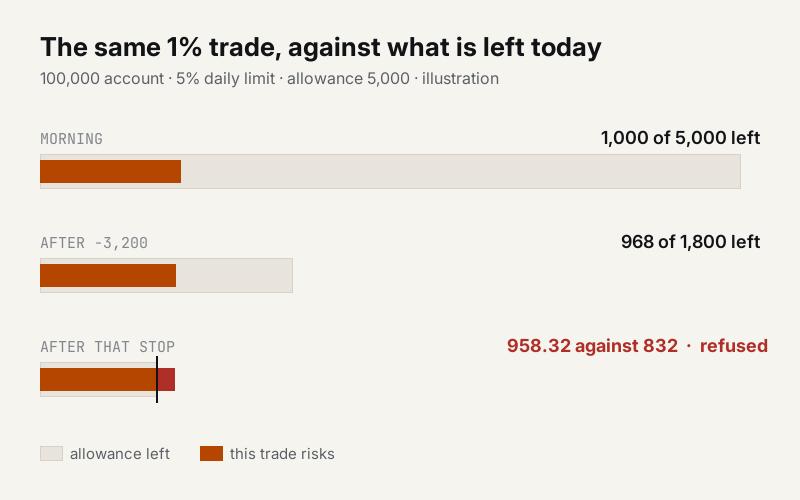
Take a 100,000 account with a 5% daily loss limit. The day's allowance is 5,000.
Morning. Nothing lost yet. A 1% trade risks 1,000, a fifth of the allowance.
After a bad hour. You are down 3,200 on the day. The balance is 96,800, so the calculator sizes the next 1% trade at 968, almost the same as the morning's. But only 1,800 of the allowance is left. That one stop-out would use more than half of it.
After that stop. 832 left. The calculator offers 958.32 for the next 1% trade. If that stop hits as well, the account goes through the daily floor. Nothing on the calculator's screen warned you, because it never looked at the floor.
None of that is a strategy problem. It is a manual click, sized from the wrong number.
What Order Gatehouse does with the number that matters
Order Gatehouse is a free order panel for MetaTrader 5, and we built it for exactly this. It sits between your click and the broker. Before you send anything, it shows the consequence in money: what this trade risks, how much of today's allowance a stop-out would use, and how far you would stand from your maximum-drawdown floor. Floating losses count, the way a funded account is measured. Deposits and withdrawals are reconciled first, so a withdrawal never reads as a trading loss.
In the third case above it does not show a warning. It refuses, and says why in one sentence: this trade risks 958.32, but only 832 of today's allowance is left.
Three refusals
No stop, no order. Every order goes out with a real stop on the broker's server. There are no virtual or hidden stops. If the broker refuses the stop after the fill, the position is closed at market and the panel says why. A watcher checks the stop on every pass, also after a terminal restart, and puts back a stop you deleted by hand.
No headroom, no order. If a trade would risk more than the daily or maximum-drawdown allowance you have left, it is refused. When the allowance is spent, the buttons lock, with the numbers on screen.
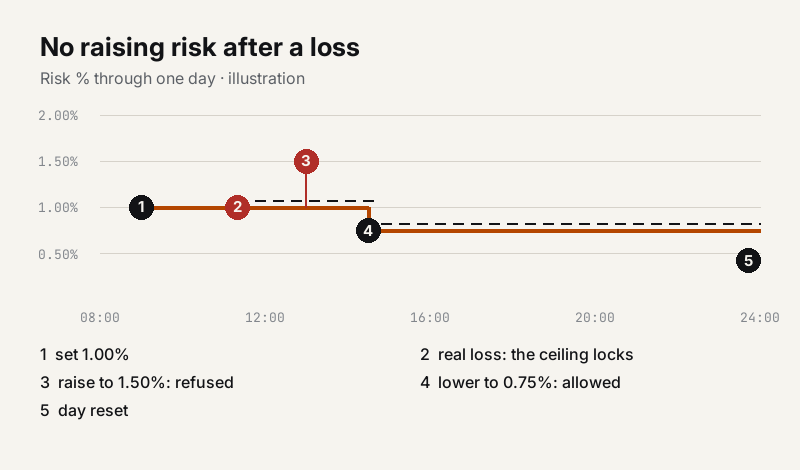
No raising risk after a loss. Once today's realized loss is real, your risk percent locks as a ceiling until the day resets. You can lower it, and every lowering lowers the ceiling too. A token scratch does not lock the day: the loss has to be larger than a tenth of the daily allowance.
Each refusal names the rule it defended. You never get a bare "not allowed".
The lot is never typed
There is no lot field. The lot is computed from the stop distance, your risk percent and the symbol's own contract data: contract size, tick size, tick value, volume step and your deposit currency. Drag the stop line on the chart and the lot recomputes as you drag. If the broker's minimum lot would risk more than you asked for, the panel shows both numbers and asks you to confirm at the real risk, and the headroom check runs on the real number.
What the free version does not do
We would rather you read the limits here than find them on a funded account.
One symbol per chart. The headroom projection covers this panel's own trades on this symbol. If you trade several symbols at once, it cannot see the whole account. An account-wide version is planned, with no date promised.
A static maximum-drawdown floor. The free version measures that floor from your balance when you first attached it. If your firm trails the floor from your equity peak, set the limit with that in mind.
No Strategy Tester trading, because a click panel cannot be clicked in the tester. And it does not share a chart with another Expert Advisor, because MetaTrader 5 runs one per chart.
A gate, not a trade manager. It uses its own magic number and never touches positions it did not open.
Before you rely on it
Attach it on a demo account first. Set your risk percent and your firm's daily and maximum-drawdown limits, check that the day's reset hour matches your firm's, drag the stop line and read the projection before the first click.
Order Gatehouse on the MQL5 Market: https://www.mql5.com/en/market/product/189067



