PropFlow setup guide: right chart, right clock, ready for the next event day

After this guide PropFlow runs on your broker's FTSE 100 chart, and on USDJPY if you want the second module. The panel shows the next event day, and you know which journal lines to expect on a trade day and what they mean. Time needed: about ten minutes, plus one strategy tester run if you want to see the trades first.
| You get | PropFlow on your broker's FTSE 100 chart, and on USDJPY if you want the second module, with the next event day on the panel and a checked clock. |
| Time | About ten minutes, plus one strategy tester run. |
| You need | MetaTrader 5, PropFlow, your broker's FTSE 100 CFD and USDJPY, and a terminal or VPS that runs on the trade days. |
What you need
- PropFlow installed (after purchase it appears under Market in the Navigator).
- Your broker's FTSE 100 CFD in Market Watch (UK100, FTSE100, UKX or similar), and USDJPY for the Tokyo module.
- Algo Trading switched on (the button in the toolbar) and a terminal that runs on the trade days. The index trades happen late in the London session, the Tokyo trades in the Tokyo morning, which is night in Europe. A VPS is the simple answer.
- A correct computer clock. PropFlow calculates London and Tokyo time from the UTC clock of your computer, so keep the Windows time synchronisation on and the time zone set correctly.
Step 1: one chart per module
PropFlow picks its module from the chart symbol. On a FTSE 100 chart it runs the index rebalancing module, on a USDJPY chart the Tokyo fix module. Attach it to one chart per module; the timeframe does not matter. Both modules can run in the same terminal on the same account, because every rule has its own magic number (base magic plus 0 for the index trade, plus 1 to 4 for the Tokyo rules).
A FTSE 100 symbol is recognised when its name contains UK100, FTSE, UKX, GB100, GBRIDX or FT100, whatever the case, separators or suffix. USDJPY is recognised with any suffix. If your broker calls the FTSE 100 something else, set The chart symbol is a FTSE 100 CFD or future with another name to true. On any other symbol PropFlow stays idle and says so in the journal.
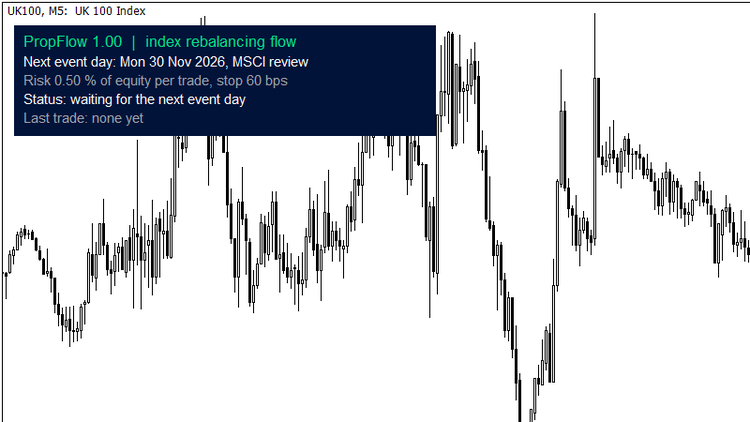
The status panel on the FTSE 100: next event day and its type, risk per trade and stop, status, last trade.
Step 2: check the start line in the journal
When PropFlow starts, it writes one line to the Experts journal, for example:
PropFlow 1.00: UK100, module index rebalancing, server clock GMT+3.0, calendars 2026-09-29 (MSCI dates known until 20280831), risk 0.50 %
Check three things. The module is the one you expect for that chart. The server clock is your broker's offset to UTC, measured automatically; for most MT5 brokers it is GMT+2 in winter and GMT+3 in summer. If it looks wrong, the clock or the time zone of your computer is off, and that has to be fixed before the first event day. Third, the calendar version.
Step 3: risk per trade and the protective stop
By default PropFlow sizes every trade so that it loses 0.50 % of equity if the protective stop is hit. The stop is placed at the broker together with the order: 60 basis points (0.60 %) from entry on the FTSE 100, 80 basis points on USDJPY. It is a safety net for an extreme day. The trades are closed by time, and in the historical data the stop was reached on at most about 2 % of the trades.
Because the stop is wide, a typical trade wins or loses much less than the risk figure. In the journal further down, the index trade made +13.3 basis points against a 60 basis point stop, about a fifth of the amount at risk. On a prop account, choose the risk so that one full stop-out stays well inside your daily loss limit, together with whatever else trades on that account the same day. If you prefer a fixed size, switch Sizing mode to Fixed lots.
Step 4: the Tokyo module, if you want it
On a USDJPY chart PropFlow runs three rules, each with its own switch: Month-end rule, Gotobi rule (into the fix and after it, so two trades on one day) and Japanese holiday rule. The calendar of Japanese business days, gotobi days and holidays is built in.
This module is the weaker of the two, and I want you to know that before you switch it on. On real broker ticks from April 2023 to June 2026 the three rules made +5.1, +4.5 and +5.6 basis points per trade before commission, but the module did not pass my global multiple-testing check, and its rules run as a pre-registered forward test until September 2027. If you only want the index module, do not attach PropFlow to USDJPY, or switch the three rules off.
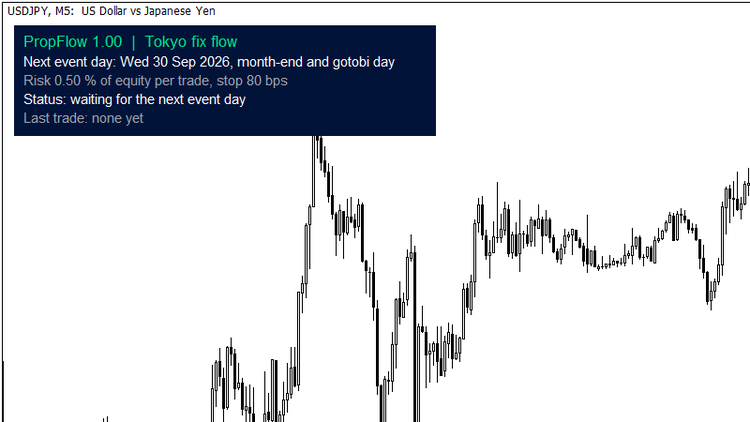
The Tokyo fix module on USDJPY: the next event day here is a month-end that is also a gotobi day.
On a netting account only one position per symbol is possible. On month-end days that are also gotobi days, the gotobi short is then skipped while the month-end short runs; the start line in the journal says so.
Step 5: the event calendar
The index calendar covers the quarterly FTSE 100 and STOXX reviews (third Friday of March, June, September and December) and the MSCI index reviews with their published dates up to August 2028. UK bank holidays are skipped, there is no auction on those days. The next two index event days are Monday 30 November 2026 (MSCI) and Friday 18 December 2026 (FTSE 100 and STOXX).
If an index provider moves a date, use Extra index event days and Index event days to skip: format yyyy.mm.dd, several dates separated by semicolons. After August 2028 the journal reminds you to update PropFlow or to add the MSCI dates by hand.
Step 6: try it in the strategy tester first
Select your broker's FTSE 100 or USDJPY symbol and the model Every tick based on real ticks. Then set Strategy tester only: your broker's server clock. The tester has no real UTC clock, so PropFlow has to be told how your broker's server time relates to London and Tokyo:
- GMT+2 / GMT+3 with US daylight saving: most MT5 brokers, the default
- GMT+1 / GMT+2 with EU daylight saving
- GMT+0 / GMT+1 with UK daylight saving
- Fixed offset: enter the hours in the next input
A wrong clock shifts every trade by one or more hours, most visibly around the daylight saving changes in March and October. On any other symbol the tester runs a demo schedule with one trade every weekday, so you can watch the order handling. That run says nothing about the strategy.
What your broker has to provide
The index module needs a FTSE 100 CFD whose price follows the London closing auction and which trades through the London close. You find the trading hours under Market Watch, right click on the symbol, Specification. The most direct check is step 6 on your broker's own real ticks. The Tokyo module works with any USDJPY feed.
Spread matters as well. While the spread is wider than 5 basis points (input Skip the entry while the spread is wider), PropFlow waits; if it stays wider for the whole short entry window, that day has no trade.
The inputs that matter
| Input | Default | What it does |
|---|---|---|
| Sizing mode | Risk % of equity | Risk at the protective stop, or fixed lots. |
| Risk per trade | 0.50 | % of equity lost if the protective stop is hit, 0.01 to 5. |
| Fixed lots | 0.10 | Only in sizing mode Fixed lots. |
| FTSE 100: protective stop | 60 | Basis points of price, 10 to 500. |
| USDJPY: protective stop | 80 | Basis points of price, 10 to 500. |
| Skip the entry while the spread is wider | 5 | Basis points. |
| Maximum slippage for market orders | 50 | Points. |
| Month-end / Gotobi / Japanese holiday rule | on / on / on | The three Tokyo rules, see step 4. |
| Extra / skip index event days | empty | yyyy.mm.dd, separated by semicolons, see step 5. |
| The chart symbol is a FTSE 100 CFD or future with another name | false | See step 1. |
| Strategy tester only: your broker's server clock | GMT+2 / GMT+3 with US DST | See step 6. Live trading ignores it. |
| Strategy tester only: fixed server GMT offset | 2 | Only with the fixed clock. |
| Magic number | 26010100 | The rules use this number plus 0 to 4. |
| Show the status panel | true | The panel from step 1. |
| Push notification on entry and exit | false | Needs your MetaQuotes ID under Tools, Options, Notifications. |
Typical journal lines
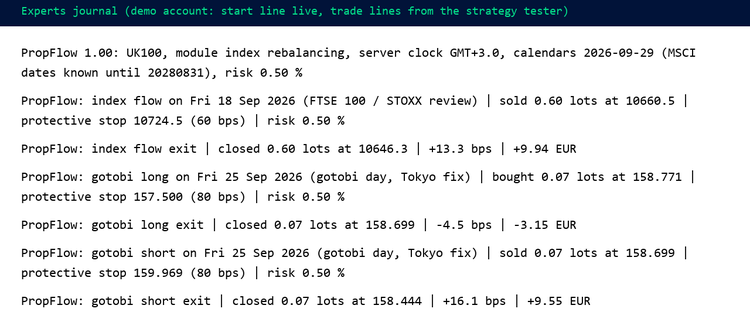
The start line and two trade days on a demo account: one index event day, one gotobi day with the trade into the fix and the trade after it.
- ... on Fri 18 Sep 2026 (FTSE 100 / STOXX review) | sold ... | protective stop ... | risk 0.50 %: the entry, with event type, size, stop and risk.
- ... exit | closed ... | +13.3 bps | +9.94 EUR: the time exit. The money figure includes commission and swap.
- ... skipped, trading is not allowed, ... is not open for trading, ... position size below the broker minimum, ... not enough free margin, ... netting account with an open position: that event day is skipped, and the line says why.
- ... closed by the protective stop or ... closed by hand or broker: the position ended before its time exit.
PropFlow is restart safe. It trades each rule once per day, recognises an open position after a restart and closes it at its scheduled time.
Get it: PropFlow on the Market · the research behind the index module: index event days in the FTSE 100 · guards the account while it runs: PropGuardian
Questions: the Comments tab of the product or a message.
More guides: my blog · Tools for prop firm accounts: all my products