SMC Pilot AI – Non-Repaint SMC Indicator with AI Filter for MT5

Smart Money Concepts has become one of the most popular ways to read the market: follow the structure, respect the swing highs and lows, and trade with the side that is in control. The hard part is doing it consistently, candle after candle, without second-guessing every setup. That is why I built SMC Pilot AI, a non-repaint Smart Money Concepts indicator for MetaTrader 5 that turns market structure into clear buy and sell signals, rates each one with a trained AI model and draws a complete trade plan on the chart.
In this post I will show how the indicator works, how to read its signals and dashboard, and how to set it up for your own trading.
Why Non-Repaint Matters
Many signal indicators look perfect on history. The reason is often simple: their arrows move, change or disappear after the fact, so only the winning signals are left on the chart. In real time, you would have seen something very different.
SMC Pilot AI is designed so that this cannot happen:
- Closed candles only. A signal is created only after its signal candle has closed. The live, still-forming candle is never used.
- No redrawing. Once a signal appears, its arrow, Entry, Stop Loss and Take Profit levels stay where they are.
- No look-ahead. Every swing high and swing low is confirmed by bars that had already closed, never by future bars.
- Honest history. Historical signals are calculated exactly the same way as live ones, so what you see on the past bars is what you would have seen in real time.
This also means the statistics on the dashboard are calculated from signals that really would have appeared, not from a history that was cleaned up afterwards.
How the AI Helps
Not every structure signal is worth taking. SMC Pilot AI includes a trained AI model that runs inside MetaTrader 5, with no external connection, and does two jobs:
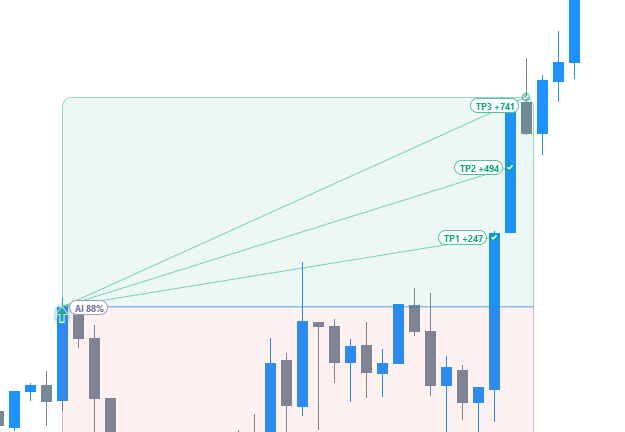
- Signal rating and filter. Each setup gets an AI score from 0 to 100. With the AI Confidence % setting you choose the minimum score, and only signals that pass it are shown.
- Stop-loss check. Stop losses taken from structure are sometimes too tight for current market conditions. When that happens, the AI widens the stop to give the trade more room.
The AI score is an estimate, not a promise. A higher minimum score gives fewer signals; a lower one gives more. Try a few values on your own symbol and timeframe and compare the results on the dashboard.
A Complete Trade Plan for Every Signal
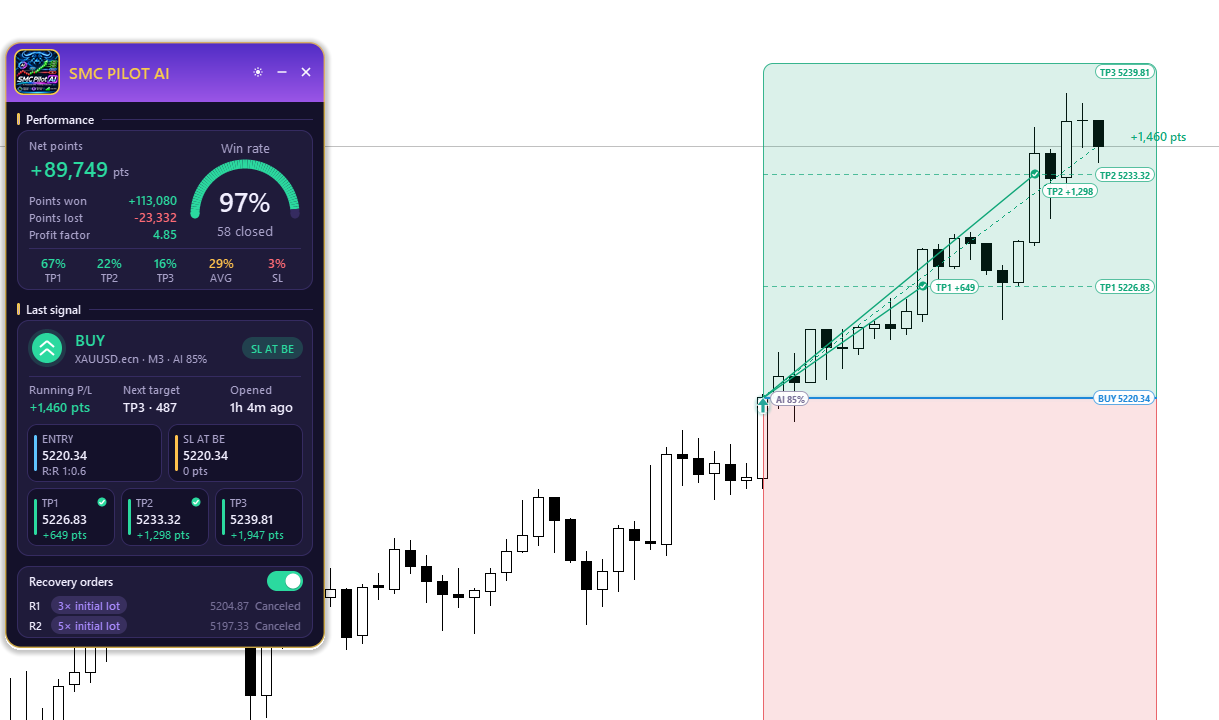
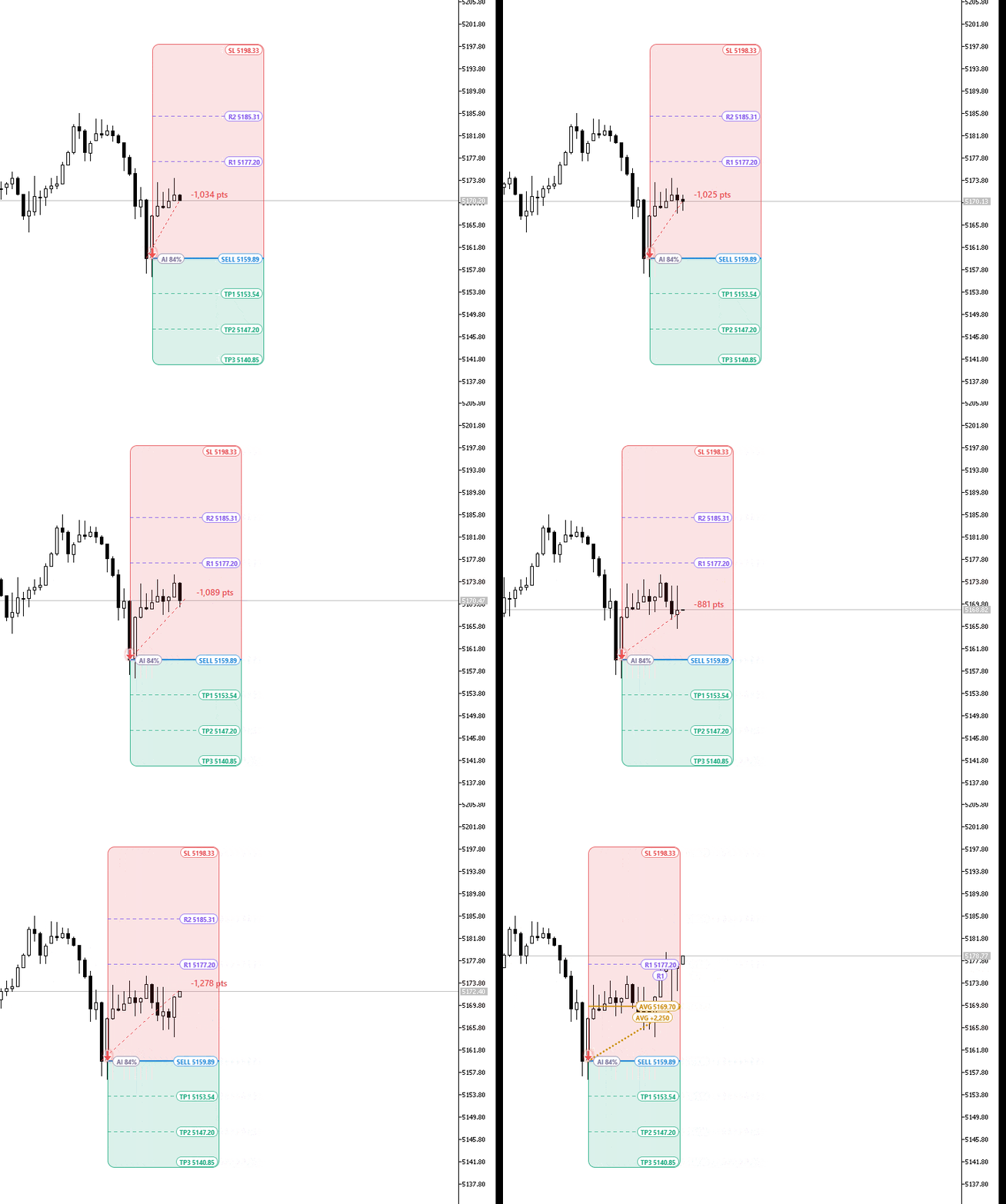
Each signal comes with a ready-made plan drawn directly on the chart:
- Entry price
- Stop Loss from market structure, checked by the AI
- Three Take Profit targets: TP1, TP2 and TP3
- Green profit zone and red risk zone so the risk/reward is visible immediately
- Exact price labels in clean, rounded tags that match the panel style
As price moves, the indicator marks each TP or SL at the exact candle and price where it was reached, shows the points won or lost, and connects the entry to the result with a history line. You can scroll back through the chart and see how every past signal played out.
The Performance Dashboard
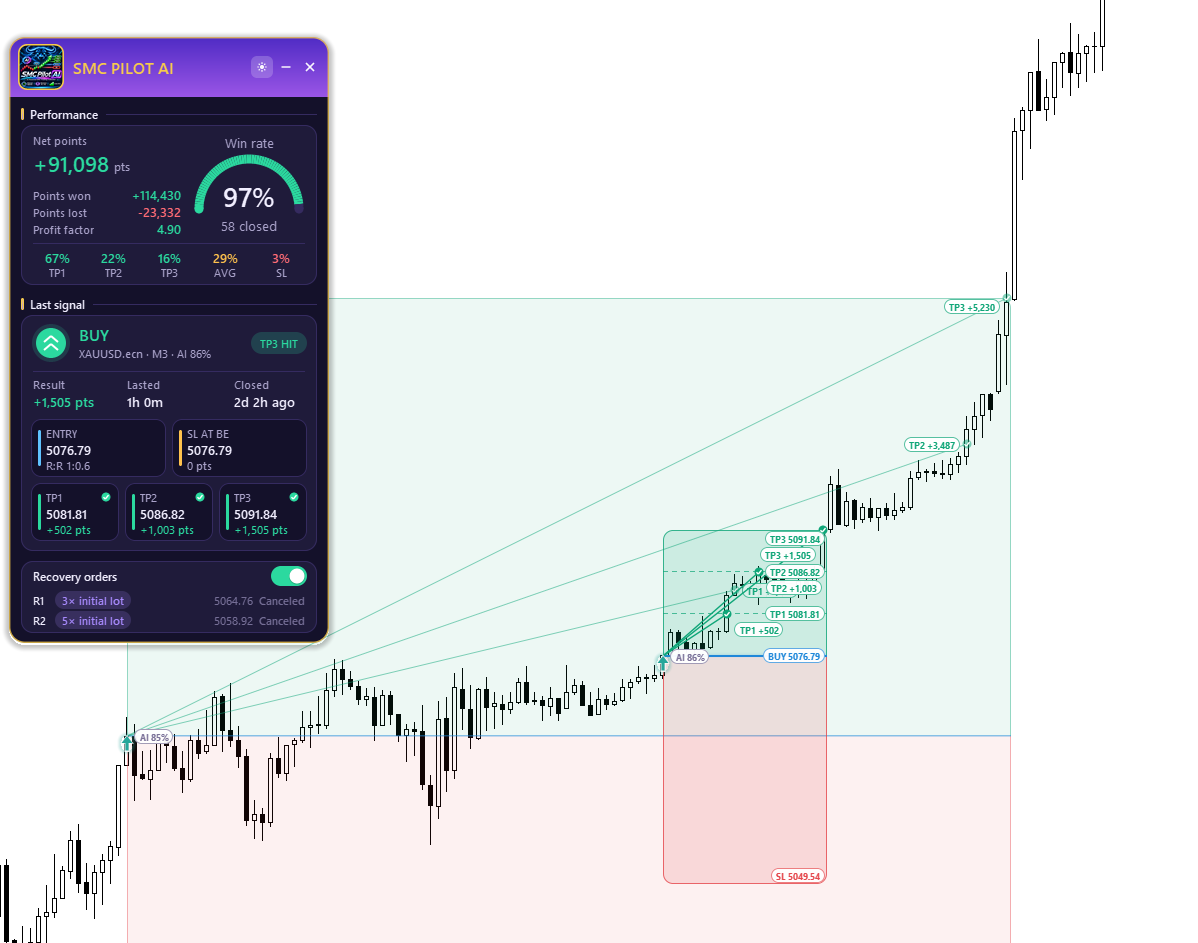
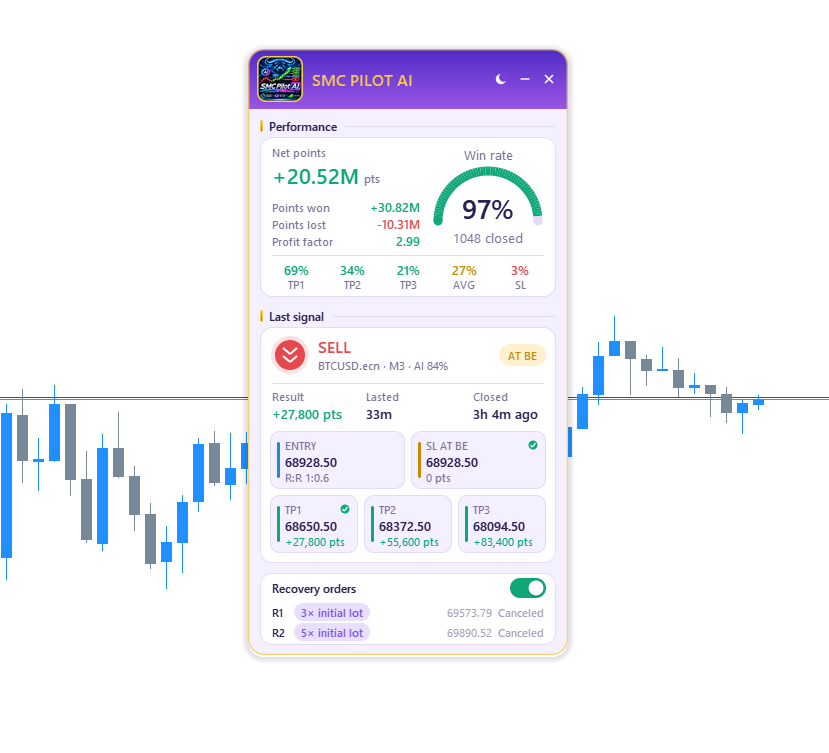
The panel is movable, can be minimized and comes in light and dark themes. At the top you see the win rate gauge and profit factor, followed by:
- TP1, TP2, TP3 and SL hit rates
- Winning, losing and net points
- The Last signal card with Entry, SL and TP prices, the AI score and the recovery status
The statistics count closed trades only. A trade that is still running is never counted as a win or a loss until it finishes, so the numbers do not jump around with every tick.
Optional Recovery Orders
For traders who use averaging, the indicator can show two recovery orders for each signal: R1 with 3x the first lot and R2 with 5x the first lot. Each one is shown in plain words as Waiting, Filled or Canceled. As soon as the trade reaches TP1, moves to break-even or closes, the remaining recovery orders are canceled automatically.
You can switch recovery on or off at any time, and the statistics are recalculated instantly, so you can compare both approaches on your own symbol. Keep in mind that recovery orders use larger lots and increase risk; use them only if they fit your money management.
Alerts
You do not need to watch the chart all day. SMC Pilot AI can notify you with a popup signal card, a sound alert, a mobile push notification or an email when a new signal appears. On-chart notices also tell you when a Take Profit or Stop Loss is reached.
Quick Setup Guide
- Attach the indicator to any chart: Forex, Gold (XAUUSD), indices or crypto, on any timeframe from M1 to D1.
- Choose the theme (Light or Dark) and your bullish and bearish colors.
- Set History Bars to the amount of history you want analysed (0 = all available). More bars give more statistics but take longer to calculate.
- Set TP Distance to control how far the Take Profit targets are placed.
- Set AI Confidence %. Start with the default, then raise it for fewer signals or lower it for more.
- Turn on the alerts you want: popup, sound, push or email. For push notifications, enter your MetaQuotes ID under Tools > Options > Notifications.
Tips for Using SMC Pilot AI
- Read the structure first. Signals in the direction of the larger trend are usually easier to manage than counter-trend ones.
- Compare settings on the dashboard. Because the history is non-repaint, changing the AI Confidence % or TP Distance and comparing the statistics is a fair test.
- Mind the spread and commission. The dashboard counts points from chart prices and does not include commission. On low timeframes, costs matter more.
- Test on a demo account first before trading real money.
Get SMC Pilot AI
SMC Pilot AI is available on the MQL5 Market for MetaTrader 5:
https://www.mql5.com/en/market/product/206824
If you have questions, suggestions or ideas for new features, leave a comment below or send me a message. I read all feedback.
Risk notice: SMC Pilot AI is a signal and market analysis indicator. It is not an Expert Advisor and does not open, close or manage trades. AI scores are estimates and do not guarantee profitable trades. Recovery orders increase risk. The dashboard statistics are calculated by the indicator from chart history and are not verified trading results. Past performance does not guarantee future results.