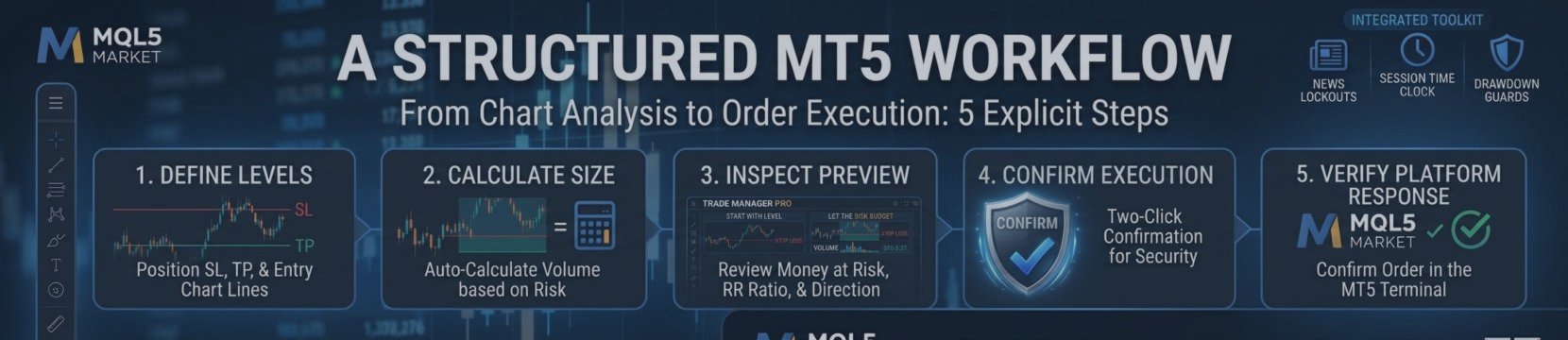

From Chart Analysis to Order Execution: A Structured MT5 Workflow
A trading idea can be clear on the chart but become messy during execution: the wrong order type, an outdated pending price, an incorrect stop direction or an accidental click can turn a planned trade into an operational mistake.
Trade Manager PRO brings the planning and execution steps together on the MetaTrader 5 chart.
PLAN WITH PRICE LEVELS
The panel uses chart lines for entry, stop loss and take profit. For a market order, define the stop and target around the current price. For a pending order, switch the order mode to Pending and position the blue Entry line at the intended price. The panel selects the corresponding pending order type based on the relationship between the entry and market price.
REVIEW THE ORDER BEFORE SENDING
The preview displays the trade direction, calculated volume, money at risk, stop and target distances, gross reward-to-risk and net reward-to-risk after costs. This creates a final review step before the order is transmitted.
SPLIT THE EXECUTION
If a strategy requires several separate tickets, enter the desired number in the Orders field. The panel divides the calculated total volume across the orders, subject to the broker's minimum volume rules. Each order initially uses the same stop and target.
USE OCO FOR TWO-SIDED BREAKOUTS
The OCO function places a Buy Stop above the market and a Sell Stop below it, using the selected stop distance and risk. When one order is triggered, the other is deleted automatically. The default distance can be adjusted in the settings.
REDUCE ACCIDENTAL INPUT
Two-click confirmation requires a second click within four seconds before an order is sent. Keyboard shortcuts are also available for common actions, including Buy, Sell, Close All, Flip and Kill. Traders who frequently type into panel fields should review the shortcut settings to avoid unintended actions.
The result is a more explicit execution sequence: define levels, calculate size, inspect the preview, confirm and verify the platform response. Trade Manager PRO supports this workflow; it does not validate the trading idea or guarantee a fill at the requested price.
IMPORTANT:
⏳ LIMITED TIME OFFER: $75 FOR 10 ACTIVATIONS.
- Price will go to $150 soon!
Ready to upgrade your trading?
Check out the complete user guide here.
👉 Try the FREE demo version on the MQL5 Market today! [Trade Manager PRO]📉📈