Building a Prop-Firm Risk Layer in MQL5: Daily Locks, Trailing Drawdown and Breach-Aware Entries

Introduction
Most prop-firm challenges are not failed on a bad entry. They are failed on one oversized day. A trader finds a good entry, sizes it too big, and gives one bad day the room to breach the account.
The rules that keep a funded account alive are not entry rules. They are limits. Limits enforced by willpower fail at the worst moment: after two losers, on a fast day, when "just one more" feels reasonable.
Every prop firm sets the same test in different words. Trade our capital, stay inside our limits, and you keep a share of the profit. The limits are some mix of a daily loss cap, an overall drawdown cap and a minimum number of trading days.
Firms rarely say the next part, because it is not their job. The limits are the strategy. A trader with an average edge and strict limits passes more often than a brilliant trader with none. The challenge does not test how much you can make. It tests how little you lose on your worst day.
This changes how we build. It is tempting to spend the effort on the entry and add risk control at the end. Professionals do the reverse. The entry decides how often you are right. The risk layer decides whether being wrong ends the account.
The dangerous moments are the ones where judgement fails. So the risk layer cannot live in the trader's head. It must be code that runs whether the trader agrees with it or not.
This article builds that code one rule at a time, in plain MQL5. At the end you will have a small include file, RiskLayer.mqh. You can attach it to any Expert Advisor or drive it from a manual panel. Both files are attached to the article, and the demo EA runs a self-test for every rule.
The daily loss lock
Most firms set a daily loss limit. It is a percentage of the balance at the start of the day. The key detail is the baseline. We capture it once, when the server day begins, and hold it until the next day.
input double InpDailyLossPct = 4.0;   // Daily loss limit, % of the day's opening balance (0 = off)

datetime gDayStamp   = 0;
double   gDayOpenBal = 0.0;

datetime DayStart(const datetime t)
  {
   return((datetime)((long)t - (long)t % 86400));
  }

void RollDay()
  {
   datetime d = DayStart(TimeCurrent());
   if(d != gDayStamp)
     {
      gDayStamp   = d;
      gDayOpenBal = AccountInfoDouble(ACCOUNT_BALANCE);
      GVSet("dayStamp", (double)gDayStamp);
      GVSet("dayOpen", gDayOpenBal);
     }
  }

double DayPL()
  {
   return(AccountInfoDouble(ACCOUNT_EQUITY) - gDayOpenBal);
  }

bool DailyLocked()
  {
   if(InpDailyLossPct <= 0.0 || gDayOpenBal <= 0.0)
      return(false);
   return(DayPL() <= -gDayOpenBal * InpDailyLossPct / 100.0);
  }
Two decisions hide in this short code. The first is the baseline. A daily limit must measure from a fixed point. If you recompute the baseline as the balance changes, the limit drifts and never triggers.
The second decision is what counts as a loss. Balance only records a loss when a position closes. A trader could hold a position 6% underwater and show no daily loss at all. Equity closes that gap. Floating losses count the moment they exist. A lock you can dodge by refusing to close a loser is not a lock.
Note the day boundary too. Brokers run their server clock in one time zone, and most firms reset the daily limit at server midnight. We roll the day on server time, not local time, so our lock stays in step with the firm's.
One more choice deserves a sentence. The baseline here is the balance at rollover. If a losing position is held overnight, its floating loss already counts against the new day. Some firms use the larger of balance and equity at rollover instead. Check your firm's rule and change this line if it differs.
The weekly loss lock
Some firms add a weekly limit on top of the daily one. It has the same shape, with a baseline taken on Monday. In MQL5, day_of_week is 0 on Sunday, so we shift it to count days since Monday.
input double InpWeeklyLossPct = 0.0;   // Weekly loss limit, % of the week's opening balance (0 = off)

datetime gWeekStamp   = 0;
double   gWeekOpenBal = 0.0;

datetime WeekStart(const datetime t)
  {
   MqlDateTime s;
   TimeToStruct(t, s);
   int daysSinceMonday = (s.day_of_week + 6) % 7;   // day_of_week: 0 = Sunday
   return(DayStart(t) - daysSinceMonday * 86400);
  }

void RollWeek()
  {
   datetime w = WeekStart(TimeCurrent());
   if(w != gWeekStamp)
     {
      gWeekStamp   = w;
      gWeekOpenBal = AccountInfoDouble(ACCOUNT_BALANCE);
      GVSet("weekStamp", (double)gWeekStamp);
      GVSet("weekOpen", gWeekOpenBal);
     }
  }

bool WeeklyLocked()
  {
   if(InpWeeklyLossPct <= 0.0 || gWeekOpenBal <= 0.0)
      return(false);
   double wpl = AccountInfoDouble(ACCOUNT_EQUITY) - gWeekOpenBal;
   return(wpl <= -gWeekOpenBal * InpWeeklyLossPct / 100.0);
  }
Max drawdown: static or trailing
"Max drawdown" means two different things, and firms use both. A static rule measures from the starting balance. The floor never moves. A trailing rule follows every new equity high, so the floor rises as the account grows. One piece of state drives both rules: the equity high-water mark.
input double InpMaxDDPct     = 8.0;    // Max drawdown, % below the high-water mark (0 = off)
input bool   InpTrailingDD   = true;   // true = floor trails new equity highs; false = static
input double InpStartBalance = 0.0;    // Challenge starting balance (0 = equity at first run)

double gHWM = 0.0;

void UpdateHWM()
  {
   double eq = AccountInfoDouble(ACCOUNT_EQUITY);
   if(gHWM <= 0.0)
     {
      gHWM = (InpStartBalance > 0.0) ? InpStartBalance : eq;
      GVSet("hwm", gHWM);
     }
   else
      if(InpTrailingDD && eq > gHWM)
        {
         gHWM = eq;
         GVSet("hwm", gHWM);
        }
  }

double DDFloor()
  {
   return((InpMaxDDPct > 0.0) ? gHWM * (1.0 - InpMaxDDPct / 100.0) : 0.0);
  }

bool DrawdownLocked()
  {
   if(InpMaxDDPct <= 0.0 || gHWM <= 0.0)
      return(false);
   return(AccountInfoDouble(ACCOUNT_EQUITY) <= DDFloor());
  }
The InpStartBalance input matters for a static rule. The firm measures from the balance the challenge began with. If you attach the EA after a losing day, the current equity is the wrong starting point. Enter the challenge balance, and the floor sits where the firm puts it.
The difference between the two rules changes which trades are safe. Under a static rule, profit moves you away from the floor. Under a trailing rule, the floor follows you up. Take a 10,000 account with an 8% trailing limit. Equity peaks at 10,500, so the floor rises to 9,660. A fall to 9,650 breaches the account, even though it is only 3.5% below where it started.
This is why the high-water mark must be exact. It is seeded once. Under a trailing rule it only ever moves up. We store it rather than recompute it from recent history. The floor then means what the firm means: distance below the best the account has ever been.
Sizing the trade to the risk
Position sizing turns a risk percentage into a lot size. First, decide what share of the account to risk. Next, turn that share into money. Finally, turn the money and the stop distance into a lot the broker will accept.
input double InpRiskPercent = 1.0;   // Risk per trade, % of balance

// Money lost per 1.0 lot if a stop stopPoints away is hit.
double LossPerLot(const double stopPoints)
  {
   double tickVal = SymbolInfoDouble(_Symbol, SYMBOL_TRADE_TICK_VALUE);
   double tickSz  = SymbolInfoDouble(_Symbol, SYMBOL_TRADE_TICK_SIZE);
   double point   = SymbolInfoDouble(_Symbol, SYMBOL_POINT);
   if(stopPoints <= 0.0 || tickVal <= 0.0 || tickSz <= 0.0)
      return(0.0);
   return(stopPoints * point / tickSz * tickVal);
  }

// Largest broker-valid lot whose loss at the stop does not exceed money.
// Returns 0 when even the minimum lot would risk too much.
double LotForRisk(const double money, const double stopPoints)
  {
   double perLot = LossPerLot(stopPoints);
   if(perLot <= 0.0 || money <= 0.0)
      return(0.0);
   double step = SymbolInfoDouble(_Symbol, SYMBOL_VOLUME_STEP);
   double minV = SymbolInfoDouble(_Symbol, SYMBOL_VOLUME_MIN);
   double maxV = SymbolInfoDouble(_Symbol, SYMBOL_VOLUME_MAX);
   if(step <= 0.0)
      return(0.0);
   // round DOWN to the step; the epsilon stops 0.3/0.01 = 29.999... losing a step
   double lot = MathFloor(money / perLot / step + 1e-9) * step;
   if(lot < minV)
      return(0.0);                  // an honest zero, never a rounded-up minimum
   lot = MathMin(lot, maxV);
   int digits = (int)MathMax(0, MathCeil(-MathLog10(step)));
   return(NormalizeDouble(lot, digits));
  }

double RiskLot(const double stopPoints)
  {
   double riskMoney = AccountInfoDouble(ACCOUNT_BALANCE) * InpRiskPercent / 100.0;
   return(LotForRisk(riskMoney, stopPoints));
  }
Four details here carry more weight than they seem to.
- The value of a point comes from the symbol. We read SYMBOL_TRADE_TICK_VALUE and SYMBOL_TRADE_TICK_SIZE instead of assuming them. A "1% risk" that works on EURUSD is wrong on gold or an index CFD if the point value is guessed.
- We always round down. Rounding up looks harmless, but the real risk is then always a little more than asked. "A little more, every time" is how a 1% rule quietly becomes 1.3%.
- We never round up to the minimum lot. If the correct size is below the broker's minimum, the function returns zero. Sending the minimum instead would risk more than the input allows.
- A small epsilon guards the division. In floating point, 0.3 / 0.01 can come out as 29.999... and MathFloor would drop a whole step. Adding 1e-9 before flooring prevents that.
Breach-aware entry
A lock that fires after the account is already down does half the job. The more useful check runs before the order is sent. Would this trade's risk at its stop, plus what today has already lost, cross the daily limit? If so, trim the trade to what is left, or refuse it.
Floating P/L alone is not enough here. Two open trades may each be small losers now, but each can still lose more before its stop is hit. So we also add the risk still open in other positions. OrderCalcProfit gives the exact loss from the current price to each stop.
double OpenRiskToStops()
  {
   double total = 0.0;
   for(int i = PositionsTotal() - 1; i >= 0; i--)
     {
      if(!Managed(PositionGetTicket(i)))
         continue;
      double sl = PositionGetDouble(POSITION_SL);
      if(sl <= 0.0)
         continue;
      ENUM_ORDER_TYPE type = (PositionGetInteger(POSITION_TYPE) == POSITION_TYPE_BUY)
                             ? ORDER_TYPE_BUY : ORDER_TYPE_SELL;
      double pl = 0.0;
      if(OrderCalcProfit(type, PositionGetString(POSITION_SYMBOL),
                         PositionGetDouble(POSITION_VOLUME),
                         PositionGetDouble(POSITION_PRICE_CURRENT), sl, pl))
         total += MathMax(0.0, -pl);
     }
   return(total);
  }

bool EntryFits(double &lot, const double stopPoints, string &why)
  {
   if(InpDailyLossPct <= 0.0 || gDayOpenBal <= 0.0)
      return(true);
   double allowance = gDayOpenBal * InpDailyLossPct / 100.0 + DayPL() - OpenRiskToStops();
   if(allowance <= 0.0)
     {
      why = "no daily allowance left";
      return(false);
     }
   double risk = lot * LossPerLot(stopPoints);
   if(risk <= allowance)
      return(true);
   double trimmed = LotForRisk(allowance, stopPoints);
   if(trimmed <= 0.0)
     {
      why = "allowance below minimum lot";
      return(false);
     }
   RiskLog(StringFormat("entry trimmed %.2f -> %.2f lots to fit allowance %.2f", lot, trimmed, allowance));
   lot = trimmed;
   return(true);
  }
Note that EntryFits changes the lot itself, not just a money figure. The trimmed lot is what reaches the broker. A position with no stop has no defined risk, so it adds nothing to OpenRiskToStops. That is one more reason every trade should carry a stop.
Protecting a good day: the profit target
The same idea protects the upside. Once the day is up by a set amount, stop trading. A green day then cannot be handed back.
input double InpProfitTargetPct = 0.0;   // Stop trading once up this % on the day (0 = off)

bool ProfitTargetHit()
  {
   if(InpProfitTargetPct <= 0.0 || gDayOpenBal <= 0.0)
      return(false);
   return(DayPL() >= gDayOpenBal * InpProfitTargetPct / 100.0);
  }
Position, lot and spread caps
Locks protect the account over time. Caps protect it from a single reckless moment: too many positions, a lot far above the plan, or an entry when the spread is wide.
input int    InpMaxPositions = 3;     // Max simultaneous positions (0 = off)
input double InpMaxLot       = 0.0;   // Hard lot ceiling (0 = off)
input int    InpMaxSpreadPts = 0;     // Refuse entry above this spread in points (0 = off)
input long   InpMagic        = 0;     // Magic number to manage (0 = all positions)

bool CapsAllowEntry(const double lot, string &why)
  {
   if(InpMaxPositions > 0 && CountPositions() >= InpMaxPositions)
     {
      why = "position cap";
      return(false);
     }
   if(InpMaxLot > 0.0 && lot > InpMaxLot)
     {
      why = "lot cap";
      return(false);
     }
   if(InpMaxSpreadPts > 0 && (int)SymbolInfoInteger(_Symbol, SYMBOL_SPREAD) > InpMaxSpreadPts)
     {
      why = "spread cap";
      return(false);
     }
   return(true);
  }
CountPositions counts only the positions this layer manages. With InpMagic set to 0 it counts every position on the account, which suits a manual panel. With a magic number it counts only that EA's trades.
Stacking is the quiet killer. Several signals agree at once. Each is inside its own risk, but together they are far past what the account can hold. A position cap is the simplest guard against it.
Sessions and weekends
Some firm rules have nothing to do with profit or loss. Some firms ban holding trades over the weekend. Some only allow trading in certain hours. These belong in the same layer, because they are also conditions under which a new trade must be refused.
input bool InpUseWindow  = false;   // Only allow entries inside a server-time window
input int  InpFromHour   = 7;       // Server hour the window opens
input int  InpToHour     = 21;      // Server hour the window closes
input bool InpFridayFlat = false;   // Block new entries from 20:00 server time on Friday

bool SessionAllowsEntry()
  {
   MqlDateTime t;
   TimeToStruct(TimeCurrent(), t);
   if(InpUseWindow && (t.hour < InpFromHour || t.hour >= InpToHour))
      return(false);
   if(InpFridayFlat && t.day_of_week == 5 && t.hour >= 20)
      return(false);
   return(true);
  }
Many firms also restrict trading around high-impact news. A news rule fits in the same place. The CalendarValueHistory function returns upcoming events with their importance, so a news window is one more condition in this function. It is left out here to keep the layer short.
The entry gate
Every entry passes through one function. It returns false with a reason, so the EA can log why a trade was refused.
bool RiskAllowsEntry(double &lot, const double stopPoints, string &why)
  {
   why = "";
   if(DailyLocked())       { why = "daily loss lock";       return(false); }
   if(WeeklyLocked())      { why = "weekly loss lock";      return(false); }
   if(DrawdownLocked())    { why = "drawdown lock";         return(false); }
   if(ProfitTargetHit())   { why = "profit target reached"; return(false); }
   if(!SessionAllowsEntry()) { why = "outside session";     return(false); }
   if(lot <= 0.0)          { why = "zero lot";              return(false); }
   if(!CapsAllowEntry(lot, why))
      return(false);
   if(!EntryFits(lot, stopPoints, why))
      return(false);
   return(true);
  }
Acting on a lock: block or flatten
A tripped lock can do one of two things. The mild option blocks new entries and leaves open trades to their stops. The strict option closes everything the moment the lock fires.
input bool InpFlattenOnLock = true;   // Close positions the moment a loss lock fires

void EnforceLocks()
  {
   string state = DailyLocked() ? "daily loss lock" :
                  WeeklyLocked() ? "weekly loss lock" :
                  DrawdownLocked() ? "drawdown lock" : "";
   if(state != gLockState)
     {
      if(state != "")
         RiskLog(state + " fired");
      gLockState = state;
     }
   if(state != "" && InpFlattenOnLock && CountPositions() > 0)
      CloseAllPositions();
  }
For a challenge, flattening is usually right. The point is to stop the bleeding, not to hope the open trades recover. The lock is logged once when it fires, not on every tick.
Surviving a restart
None of this helps if a restart resets the baselines. A trader in the middle of a breach could simply reload the chart. Terminal global variables persist across restarts. So we mirror the state there, keyed by account, and restore it in OnInit.
string gPfx = "";

void GVSet(const string k, const double v)
  {
   GlobalVariableSet(gPfx + k, v);
   GlobalVariablesFlush();          // write to disk now, so a crash does not lose it
  }

double GVGet(const string k, const double def)
  {
   return(GlobalVariableCheck(gPfx + k) ? GlobalVariableGet(gPfx + k) : def);
  }

void RiskRestore()
  {
   gDayStamp    = (datetime)GVGet("dayStamp", 0);
   gDayOpenBal  = GVGet("dayOpen", 0.0);
   gWeekStamp   = (datetime)GVGet("weekStamp", 0);
   gWeekOpenBal = GVGet("weekOpen", 0.0);
   gHWM         = GVGet("hwm", 0.0);
  }

void RiskInit(const long magic)
  {
   gPfx = StringFormat("RISK_%I64d_", AccountInfoInteger(ACCOUNT_LOGIN));
   gRiskTrade.SetExpertMagicNumber((ulong)magic);
   RiskRestore();
   RollDay();
   RollWeek();
   UpdateHWM();
  }
RollDay, RollWeek and UpdateHWM each save their values the moment they change. A lock set at 11:00 is still set after a restart at 11:05. GlobalVariablesFlush writes to disk at once, so a crash does not lose the state either.
Why the order of checks matters
The tick loop runs the rules in a fixed order. First it rolls the day and week. Then it updates the high-water mark and enforces the locks. Only then, if nothing is locked, does a new entry go through the gate.
Figure 1 shows the order and why each step must come where it does.
Figure 1. The order of checks, and the dependency that fixes each step's place
This order is not cosmetic. The high-water mark must update before the drawdown lock reads it, or the lock tests a stale floor. The locks must run before sizing, so a locked account never sends an order. The entry-fit check comes last, because it may trim the lot that the earlier steps proposed.
A tidy-up that reorders these steps can change behaviour without any error. That is the most dangerous kind of bug in risk code. The source file comments each ordering dependency, so the next person to edit it does not break them.
The complete tick loop
With the layer in an include file, the EA stays short. The strategy proposes a trade. The risk layer decides whether it happens.
#include "RiskLayer.mqh"

int OnInit()
  {
   RiskInit(InpMagic);
   // ... create indicator handles ...
   return(INIT_SUCCEEDED);
  }

bool TryEnter(const int dir, string &why)
  {
   double lot = RiskLot(InpStopPts);
   if(!RiskAllowsEntry(lot, InpStopPts, why))
      return(false);
   // ... send the order with lot, a stop InpStopPts away, and a target ...
   return(true);
  }

void OnTick()
  {
   RiskOnTick();                    // roll day/week, update HWM, enforce locks
   int dir = Signal();              // your strategy: +1 buy, -1 sell, 0 none
   if(dir == 0)
      return;
   string why;
   if(!TryEnter(dir, why) && why != "")
      RiskLog("entry refused: " + why);
  }
Swap the strategy and the protection stays the same. The attached RiskLayerDemo.mq5 is the full, compilable version of this loop with a simple moving-average signal.
Proving it works in the Strategy Tester
Risk code is exactly the code you must not find broken on a live account. So we test each rule on its own. We force the state that should trip the rule. Then we check that the gate refuses the entry, and that it gives that rule's reason.
Checking the reason matters. Without it, a test can pass because some other rule refused the trade, such as the spread cap.
void ExpectRefusal(const string name, const string expected)
  {
   double lot = RiskLot(InpStopPts);
   string why;
   bool allowed = RiskAllowsEntry(lot, InpStopPts, why);
   Check(name, !allowed && why == expected, allowed ? "entry allowed" : "refused: " + why);
  }

// inside RunSelfTests():
   gHWM = eq * 2.0;                                  // an impossible high-water mark
   ExpectRefusal("drawdown lock", "drawdown lock");
   gHWM = saveHWM;
The demo EA has nine such tests: a baseline entry, the daily, weekly and drawdown locks, the profit target, the entry trim, rounding down, restart persistence, and the Monday week start. Set InpSelfTest to true and run one pass in the Strategy Tester. Figure 2 shows the result.
Figure 2. All nine rule tests pass (the same lines are printed to the tester Journal)
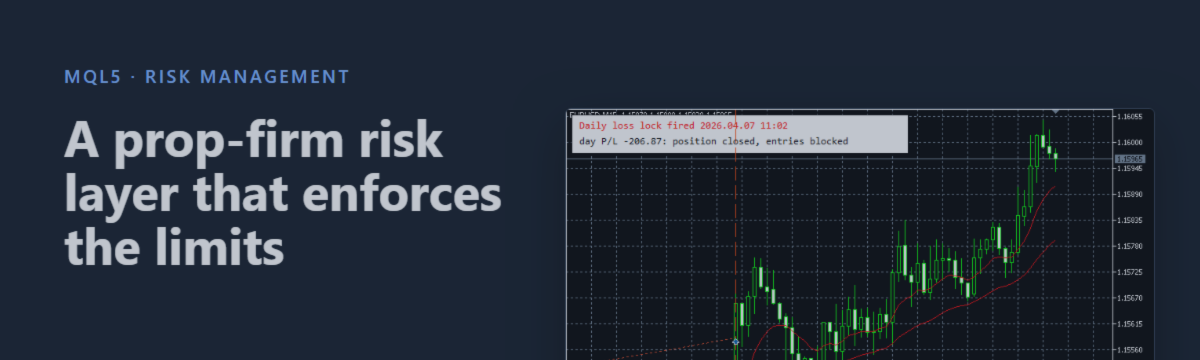
The layer also works in a normal run. Figure 3 shows EURUSD M15 from 6 April 2026, with 2% risk per trade and a 2% daily limit. At 09:45 on 7 April, EntryFits already refuses a new entry because no daily allowance is left. At 11:02 the daily lock fires at a day loss of 206.87. The open position is closed, and no further entries are made that day.
Figure 3. The daily loss lock fires at 11:02, closes the position and blocks the rest of the day
The honest limits of a software risk layer
Be clear about what this layer can and cannot promise. Every check runs on a tick. It acts on the next price the terminal receives, not continuously. If the market gaps through a level, the account can be past it before any code runs.
A real test run showed this. With an 8% drawdown limit, the lock fired with equity at 9,269.91 against a floor of 9,281.98. The layer stopped the account 12.07 past the line, because the price moved between two ticks.
A software lock is a floor the EA aims for, not a guarantee to the cent. The fixes are ordinary risk habits:
- Close positions before the weekend and before scheduled news, rather than trusting a stop to hold through a gap.
- Set your daily limit a margin inside the firm's, so a small overshoot still lands inside their number.
- Size positions so that one slipped stop is survivable.
Log every event
The last piece is plain but essential. When a lock fires, a cap blocks a trade, or an entry is trimmed, write it to the log with the numbers behind it.
void RiskLog(const string what)
  {
   PrintFormat("[RISK] %s | day P/L %.2f | equity %.2f | DD floor %.2f",
               what, DayPL(), AccountInfoDouble(ACCOUNT_EQUITY), DDFloor());
  }
When a firm queries a breach, this log is the only record of what the layer saw when it decided. A real line from the test run looks like this:
[RISK] entry trimmed 1.24 -> 0.58 lots to fit allowance 87.02 | day P/L -101.25 | equity 9312.25 | DD floor 9281.98
A day, from the account's point of view
Let us walk one day through the layer. The account opens at 10,000. RollDay captures that as the baseline. With a 4% daily limit, the day can lose 400. The high-water mark sits at 10,200 from an earlier good run, so the 8% trailing floor is at 9,384.
The strategy fires three times in the morning. Each entry passes through EntryFits. The first two are small and pass unchanged. By midday the account is down 250. The third signal wants to risk 200, but only 150 of the daily allowance remains. EntryFits trims the lot to fit 150 and lets it through. The trade happens, but it cannot breach the day by itself.
In the afternoon the market turns. Equity slides to 9,600, a loss of 400. DailyLocked returns true. EnforceLocks closes the position, and every further signal is refused for the rest of the server day. The account closes at or just past its limit. That small gap is why your limit sits under the firm's.
Tomorrow, RollDay sees a new date and captures the new opening balance. The limits reset. None of this depended on the trader watching the screen.
Presets and three pitfalls
Firms disagree on the details. Some measure daily loss from balance, some from equity. Some reset at a fixed server hour, some on a rolling 24 hours. Drawdown is static at one firm and trailing at the next. So every rule is an input. You match the inputs to your challenge instead of rewriting the EA. Table 1 gives a starting point for the common 5% daily and 10% maximum structure.
| Rule | Firm limit | Input | Suggested value |
|---|---|---|---|
| Daily loss | 5% | InpDailyLossPct | 4.0 (fires before theirs) |
| Max drawdown | 10% trailing | InpMaxDDPct / InpTrailingDD | 8.0 / true |
| Starting balance | Challenge size | InpStartBalance | Your challenge balance |
| Profit target lock | None | InpProfitTargetPct | 0 (off during the challenge) |
| Action on lock | n/a | InpFlattenOnLock | true |
| Position cap | n/a | InpMaxPositions | 3 |
| Risk per trade | n/a | InpRiskPercent | 0.5 to 1.0 |
Table 1. Suggested inputs for a 5% daily, 10% maximum drawdown challenge
Three mistakes to avoid:
- Measuring loss on closed balance only. Floating losses count. Use equity, or a held loser dodges every lock.
- Not saving state. A lock that forgets itself on restart is not a lock.
- Relying on caps without a daily limit, or the reverse. They cover different failures: the slow bleed and the single oversized moment. You need both.
Conclusion
We built a risk layer that is independent of any strategy. It enforces daily and weekly loss locks, a static or trailing drawdown, breach-aware sizing, caps and session rules. Its state survives a restart, and each rule has a test that proves it in the Strategy Tester.
Attach RiskLayer.mqh to any EA or manual panel. Whatever generates the trades, the account is protected the same way.