
Why Most Prop Firm Accounts Blow Up on One Number — and How to Guard It

Ask any funded trader what ended their account and the answer is almost always the same: a daily loss limit or a maximum drawdown breach. Not a bad strategy. Not a single catastrophic trade, usually. Just a slow slide past an invisible line, one position too many, on a day that got away.
The problem is rarely a lack of discipline. It is a lack of visibility. Most terminals show you profit and floating P/L, but they do not tell you, in plain numbers, how close you are to the exact line your prop firm will use to fail you — right now, this second, including commission and swap.
That gap is what Tachi Prop Guard MT5 was built to close.
================================
What Tachi Prop Guard actually does
Tachi Prop Guard is a risk management utility for MetaTrader 5. You attach it to one chart and it monitors your entire account in real time. It answers four questions at a glance:
- Which rule and formula am I being measured against?
- How much risk budget do I have left today, and overall?
- What happens if every open Stop Loss gets hit right now?
- And if something went wrong, what exactly did the tool do, and when?
It is not a lot-size calculator and it does not open trades. Its whole job is clarity and control.
Transparent limits you can actually read
Instead of a vague red warning, the panel prints the real math:
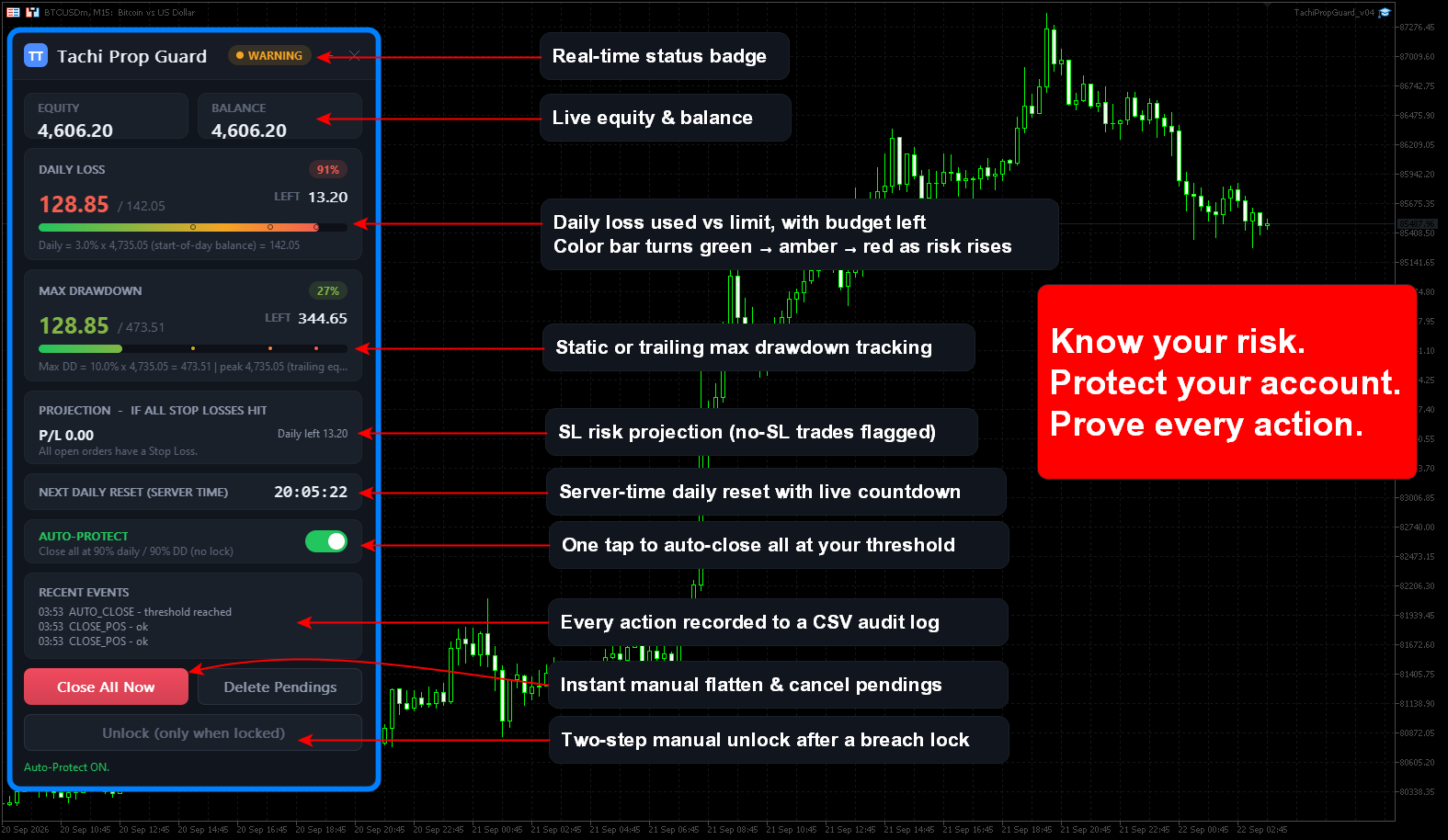
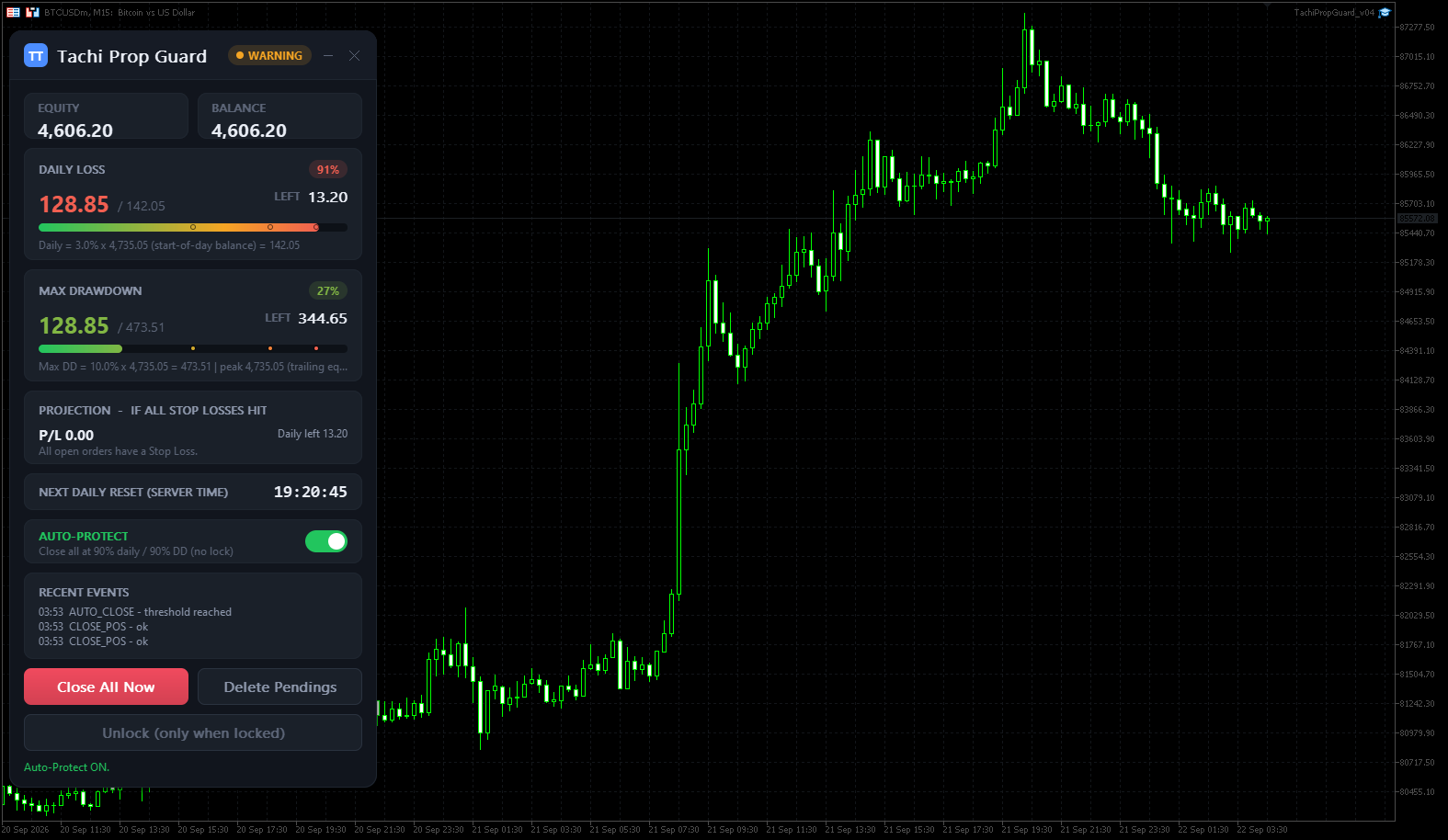
Daily = 3.0% x 10,000.00 (start-of-day balance) = 300.00, Used 115.25, Left 184.75.
The daily loss limit can be set in percent or account currency, with a selectable day baseline: start-of-day balance, start-of-day equity, or max(balance, equity) at reset. Floating profit and loss, commission and swap are all included, because your prop firm includes them too.
The maximum drawdown can run as static from your initial balance, or trailing by equity peak or balance peak, with an optional lock at the initial balance level. A profit target progress bar is available when you want to see how close you are to passing.
Risk you can see before it happens
Two open trades with no Stop Loss are not the same as two trades protected by stops, and Tachi Prop Guard refuses to pretend otherwise. It calculates your projected loss if every Stop Loss is hit, per symbol, using the terminal's own profit engine — and it lists any positions or pending orders without a stop separately as unbounded risk, so unknown exposure is never hidden inside a single tidy number.
Protection you stay in control of
Run it in Monitor mode to simply observe, or in Protect mode to act on a breach: close positions, delete pending orders, and lock trading until the next reset or a manual, two-step unlock. There is also an on-panel Auto-Protect toggle that closes everything when your usage reaches a threshold you choose, with a cooldown to avoid repeated closes. A configurable hard-stop buffer lets it act a chosen percentage earlier to help absorb slippage and gaps. Order closing uses retry logic with proper error handling for requotes, off quotes, closed markets and disabled trading, and every attempt is logged with its result code.
You choose the scope: all symbols, the current chart symbol only, or by magic number.
================================
A reset clock that survives real life
The daily reset runs on server time, with a timezone offset so it lines up with your firm's schedule, and a live countdown shows exactly when it happens. Close the terminal over the reset time and the day baseline is reconstructed from your account history and logged. Baselines, equity and balance high-water marks, and lock state are all saved across restarts and tied to your account login and server, so nothing is lost and nothing gets mixed up between accounts.
An audit log you can trust
Every meaningful event is written as one line in a CSV file: startup, daily reset, deposit and withdrawal, warnings, breaches, each order closed, close errors, unlocks and input changes. The panel shows the most recent events; the full file lives in your terminal's Files folder. If you ever need to review a decision — or discuss one with your prop firm — the record is there.
A dashboard that stays out of your way
The interface is a clean Canvas panel with light and dark themes, DPI scaling, and a draggable, collapsible layout that remembers its position. Risk bars shift from green to amber to red as usage climbs, with markers at your warning levels. Alerts are configurable as popup, push notification and sound, each independently, with anti-repeat protection so you are informed, not spammed.
Honest limits — because your account deserves the truth
MetaTrader 5 has no pre-trade hook, so no utility can block another EA's order before it is sent. Tachi Prop Guard detects and closes such an order after it appears, and logs it. It cannot guarantee a fill during gaps, weekends, or when the market is closed or trading is disabled, and it does not promise an absolute, un-defeatable lock. It will not make you a profitable trader and it cannot guarantee you pass any evaluation. What it does is give you an accurate, real-time picture of your risk and a set of tools to act on it — which is exactly what a disciplined process needs.
Who it is for
Prop firm challenge takers, funded traders, and any discretionary or EA trader who wants a hard risk framework and a clear, honest view of their daily loss and maximum drawdown budget on MetaTrader 5.
Requirements
MetaTrader 5, hedging or netting accounts. Attach to one chart to monitor the whole account. Enable AutoTrading for Protect and Auto-Protect actions to close orders. No DLLs, no internet access, and no external files — it runs entirely inside the MetaTrader 5 sandbox.
================================
Get Tachi Prop Guard MT5
Trade the setup, not the anxiety. Let the tool watch the line while you focus on the chart.
Get it here: https://www.mql5.com/en/market/product/197316