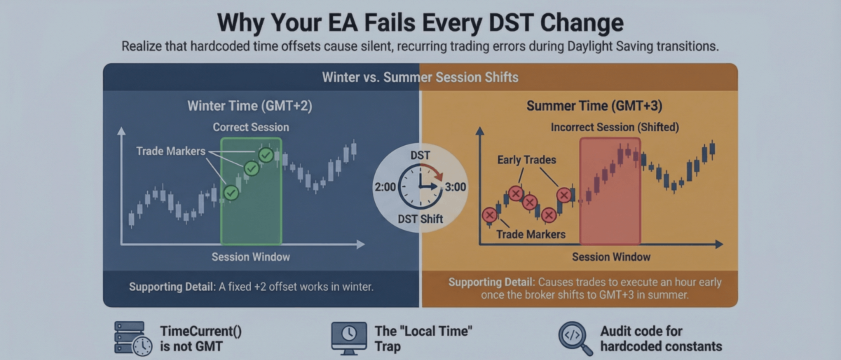
Three Ways Your Session Filter Gets Time Wrong (And the Permanent Fix)

Every March and October, the same production failures surface in EA support channels: session filters that worked perfectly start letting trades through at the wrong hours. The root cause is almost always the same — hardcoded timezone offsets that silently break when DST transitions change the broker's server-to-GMT relationship.
After 13 years of building and debugging EAs for clients, I've found that nearly every session-filter bug falls into one of three categories.
Hardcoded GMT offset
The most common failure. The EA converts server time to GMT using a fixed constant:
This is correct only when the broker server runs GMT+2. The moment DST shifts the server to GMT+3, the session window is off by one hour. The EA opens trades at the wrong time for six months until the next transition silently "fixes" it — then breaks in the opposite direction.
The problem is widespread. I've found it in freelancer code, commercial products, and AI-generated EAs. The code compiles and works most of the year, which makes it especially dangerous.
Using TimeLocal() for server-side decisions
TimeLocal() returns the clock time of the machine running MetaTrader — your PC or VPS. If your VPS is in Amsterdam and the broker's server is in New York, TimeLocal() and TimeCurrent() return different times. Any session logic using TimeLocal() is wrong from the first tick.
This bug frequently appears to work during development. If your local timezone happens to match the broker's server timezone, the session filter behaves correctly. Deploy to a VPS in a different timezone, and the session window shifts by the difference between the two clocks.
Sunday/Monday bar edge cases
Not all brokers open at the same time. Some start the trading week on Sunday evening server time, others on Monday. An EA that checks TimeDayOfWeek(TimeCurrent()) == 1 at a hardcoded hour can miss the entire first session on one broker, or fire trades on Sunday that should wait until Monday on another.
Backtesting won't catch this unless you specifically compare results across the Sunday-Monday boundary on different broker data.
The permanent fix: dynamic offset detection
The production-safe approach avoids hardcoded offsets entirely. It reads the broker's daily bar open timestamp and compares it against the known New York close time in GMT.
The forex trading day resets at the New York session close — 17:00 Eastern Time. Most brokers align their daily bar to open at 00:00 server time on that reset. For a GMT+2 broker in winter, 00:00 server time = 22:00 GMT. For GMT+3 in summer, 00:00 server time = 21:00 GMT.
The technique:
This is illustrative — the actual implementation needs to handle broker-specific variations in weekly open times and confirm the daily bar alignment. But the core idea is the same: let the broker's own data tell you the current offset, instead of hardcoding it.
A note on TimeGMTOffset() : this MQL5 function returns the offset between GMT and the terminal machine's local clock — not the broker server's clock. If your VPS timezone doesn't match the broker, TimeGMTOffset() gives you the wrong value for server-to-GMT conversion.
Self-diagnostic
Three checks you can run on your EA today:
- Search the source code for hardcoded offsets: +2 , +3 , -5 , or any * 3600 in time-related logic.
- Compare session log output before and after a DST change. If logged session boundaries didn't shift but your intended GMT window did, the EA uses a stale offset.
- Backtest across the March 2026 DST boundary. Check the trade log for entries appearing one hour off around those dates.
If any check reveals a problem, a simple offset input swap buys six months. The dynamic offset technique described above fixes it permanently.