
Stop Letting One Bad Exit Wreck Your Account with Equity Protector Pro MT5

The story behind Equity Protector Pro MT5, and why account-level risk control is the one thing most traders set up last - but should set up first.
💎 TL;DR
Running multiple positions on XAUUSD without a drawdown guard is like driving without brakes. Equity Protector Pro MT5 watches your balance, equity, floating P&L, and exposure stress in real time - and either warns you, blocks new trades, or closes everything before losses can escalate further. Works alongside any EA or manual trading style, on any broker, any account size.

🔔 The Session I Still Think About
I was running three concurrent positions on XAUUSD M5. A news spike hit. The first trade went against me, then the second. I hesitated - because the third was still in profit.
By the time I moved to close, I'd given back everything I'd made that morning. Then some.
The positions weren't wrong. The timing of my exit was.
Here's what I didn't have: an automated system that would have said, clearly and without emotion, "Your daily drawdown just crossed 4%. Stand down."
That experience is why Equity Protector Pro MT5 exists. Not as a trading signal. Not as a profit machine. As the risk floor every serious XAUUSD account should have before anything else goes on the chart.
🔥 The Real Problem Nobody Talks About
Most traders obsess over entry signals. They test, optimize, and refine setups for months.
Then they attach a new EA, add a second position layer, or trade through a high-volatility session - and one bad hour wipes out three weeks of gains.
Why? Because there was nothing watching the account as a whole.
Individual trade stop-losses are not account protection.
A 20-pip SL on each position doesn't stop you from opening five new trades after a loss. It doesn't prevent your EA from stacking exposure during a volatile Asian session. It doesn't lock you out when your daily limit has already been hit.
What you need is a layer above the trade level - something that watches your account, not just your positions.
🏆 What Equity Protector Pro MT5 Actually Does
1. Daily Drawdown Guard
You configure a daily loss limit - by percentage of session starting equity or by dollar amount. When your account crosses that threshold, EPP can:
- Warn you via popup, sound, push notification, or email
- Block new trade entries on other EAs via a GlobalVariable lock signal
- Close all open positions and pending orders automatically
- Lock the account until the next trading day, depending on how you configure the protection mode
The lock behavior depends on your settings. When configured to hold until the next calendar day, it will not clear mid-session regardless of what happens to your equity afterward.
2. Maximum Drawdown Guard
Same mechanics, but measured against the highest equity recorded since the tool was initialized - not just today's starting balance. This is the safeguard for prop firm traders who need to protect a hard max drawdown ceiling across the life of the account.
3. Composite Stress Score (0–100)
This is the feature most people don't expect from a risk utility.
The panel shows a live Stress Score that combines three risk dimensions:
- Exposure risk - total lot size relative to account size
- Margin risk - how much free margin is being consumed
- Floating risk - unrealized loss as a percentage of equity
As the score rises, the panel transitions through internal zones - Normal, Elevated, Warning - before any configured limit is actually breached. It gives you time to act, not just a notification that it's already too late.
4. Account-Wide Lock Signal for Other EAs
When EPP triggers a protection state, it writes a GlobalVariable signal that other Expert Advisors on the same terminal can read. For automatic trade blocking, the receiving EA must be programmed to check that signal - but once it is, the entire terminal operates as a coordinated risk system.
No single EA has to carry all the risk logic. EPP handles it centrally, and any EA that checks the signal respects it.
5. Inventory Monitoring Panel
The panel shows, in real time:
- Total open positions and direction breakdown (e.g., "3 Positions - B1 / S2")
- Net Lots - your directional exposure net of any hedges
- Day Lots - cumulative lot volume opened today
Critical context when running hedged or multi-layer inventory strategies on gold, where gross exposure and net exposure can tell very different stories.
🚀 A Real Scenario: What the Panel Was Showing
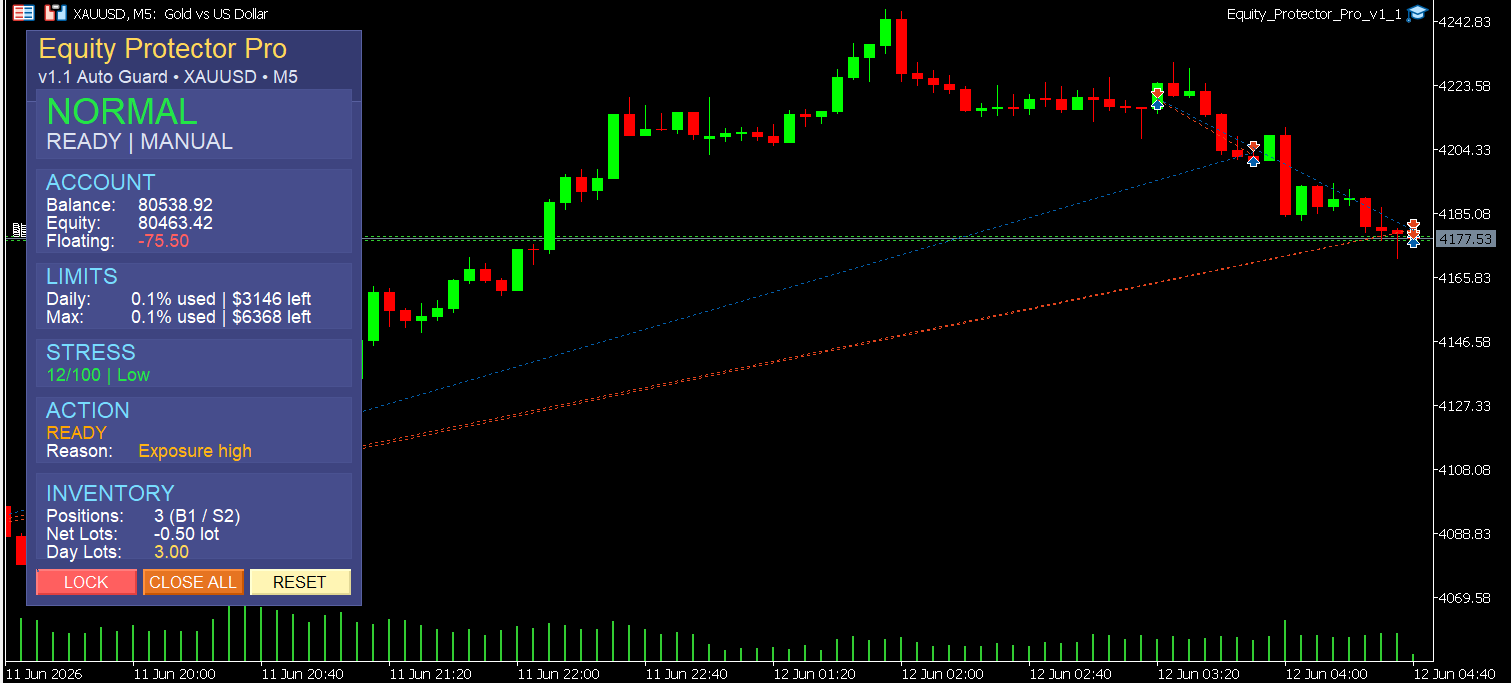
Here's exactly what EPP was displaying at the moment captured in the screenshot:
- Balance: $80,538.92 | Equity: $80,463.42 | Floating: −$75.50
- Daily Drawdown Used: 0.1% - $3,146 of daily limit remaining
- Max Drawdown Used: 0.1% - $6,368 of max limit remaining
- Stress Score: 12/100 - Low
- Action State: READY - Reason: Exposure high
- Inventory: 3 open positions (1 Buy, 2 Sells) | Net Lots: −0.50 | Day Lots: 3.00
At that moment, the account remained within all configured risk limits - floating loss was minor, drawdown buffers were almost untouched, and stress was low. But EPP had already flagged "Exposure high" in the Reason field.
That's the system doing its job: surfacing context before a problem develops, not just reacting after a threshold is crossed.
The three buttons at the bottom - LOCK, CLOSE ALL, RESET - give the trader immediate manual control with one click.
This is what a properly instrumented trading session looks like.
🔎 What This Tool Does Not Do
Every tool description should include its limitations. Here are mine.
Equity Protector Pro MT5 is not:
- A trading signal generator
- A profit-making EA
- A substitute for position-level stop-losses
- A guarantee against slippage during high-impact news events
- A guarantee of any particular risk outcome
It is a monitoring and enforcement utility. Its job is to enforce the rules you configure - not to replace your trading judgment.
When a protection condition is detected, EPP issues the close request immediately. But execution depends on your broker - spread, slippage, and latency still apply. In extreme market conditions, plan for that.
🎁 Who This Tool Is For
🏅 You'll get the most from Equity Protector Pro MT5 if:
- You run one or more automated EAs and want account-level oversight above them
- You trade XAUUSD manually and know your worst enemy is yourself after a bad trade
- You're on a prop firm challenge with a hard daily or maximum drawdown limit
- You run multiple EAs on the same MT5 terminal and need a shared lock mechanism
- You've come close to a blowup due to uncapped exposure during a volatile session
🏅 This tool is probably not for you if:
- You want a hands-off EA that trades for you
- You're looking for protection that compensates for poor position sizing habits
- You trade small fixed lot sizes with hard SLs and never add to open positions
🏅 Setting It Up: Less Than 5 Minutes
- Attach EPP to any chart - one instance per terminal is sufficient, and it monitors the entire account by default regardless of which chart it runs on
- Set your Daily DD limit - 3–5% is typical for active XAUUSD accounts
- Set your Max DD limit - usually 2× your daily limit
- Choose your Protection Mode: Block Only, or Close All
- Enable the keep-lock-until-next-day option if you want lockout enforcement to hold through the session
- Turn on Push/Email alerts if you trade away from the screen
- Done - the panel activates and starts monitoring immediately
The panel automatically adapts its layout to fit different screen resolutions, including the lower-resolution displays common on VPS and RDP setups.
📝 Checklist: Before You Start Any Trading Session
Use this as a 60-second pre-session habit:
In my experience, spending 60 seconds reviewing account risk before opening a trade has been more valuable than endlessly searching for a better entry signal.
🖼️ The Bigger Picture: Why Risk Infrastructure Comes First
The traders who survive long enough to compound are not the ones with the best entry signals. They're the ones who almost never blow up.
Avoiding blowup is not about being afraid to trade. It's about having infrastructure in place that enforces discipline mechanically - so that your judgment doesn't have to be perfect in every moment of every session.
Equity Protector Pro is that infrastructure. It doesn't generate signals. It doesn't promise returns. It just makes sure the account is still there tomorrow.
And some days, that's the entire job.
👉 Equity Protector Pro MT5 on MQL5 Market: https://www.mql5.com/en/market/product/172456
One terminal license covers all pairs, all EAs, all sessions.
Managing risk before entry as well as during the session? Pair EPP with Gold ATR Risk Calculator MT5 - position sizing on entry, account protection throughout.
❓ FAQ
✅ Does it work with any EA, or only Gold Algo Lab EAs? It works alongside any EA running on the same MT5 terminal. For automatic trade blocking, the EA must be programmed to check the GlobalVariable lock signal that EPP writes when a protection state is active.
✅ What happens if it closes all my trades during a winning run? It won't - unless your configured drawdown limits are already breached. The tool only acts when your thresholds are hit. If your positions are profitable and no limit has been reached, EPP does nothing except display the panel.
✅ Can I disable it manually mid-session? Yes. The RESET button clears the current guard state. However, if the keep-lock-until-next-day option is enabled after a breach, the reset will not take effect until the next calendar day - this is intentional behavior to prevent emotional overrides.
✅ Does it work on accounts smaller than $10,000? Yes. All drawdown limits work as percentages, so they scale to any account size. The logic is identical regardless of balance.
✅ Will it interfere with my EA's order execution? No. EPP does not intercept or modify any EA's order flow. It can close all positions via its own Close All action, but it does not block or alter individual trade requests from other EAs unless those EAs are coded to check its GlobalVariable lock signal.
✅ Does the panel work on VPS or Remote Desktop? Yes. The panel automatically adapts its layout to different chart sizes and screen resolutions, including the constrained display environments common on VPS and RDP setups.
🎁 New to Gold Algo Lab?
Start with the Gold Algo Lab Tool Map - a practical guide that organizes our MT5 tools into 6 connected stages: market context, setup selection, risk planning, trade execution, position management and account protection.
→ Gold Algo Lab Tool Map: Where to Actually Start With MT5 Tools for XAUUSD
https://www.mql5.com/en/blogs/post/771930
Do not choose a tool by its name alone. Start with the part of your trading process that needs the most control, then build your workflow one layer at a time.
Gold Algo Lab builds practical, risk-first MT5 tools for serious XAUUSD traders, shaped by 8 years of developing and trading real systems to help traders identify clearer setups, manage risk with greater confidence and execute with more discipline.



![[iVISTscalp5]: XAUUSD. Forecast First. Market Reaction Afterwards](https://c.mql5.com/6/1035/splash-preview-777232.png "[iVISTscalp5]: XAUUSD. Forecast First. Market Reaction Afterwards")
