FX Monitor Studio: a desktop environment for testing and analyzing trading strategies

Anyone who develops trading systems knows the feeling: the backtest is done, in front of you is a MetaTrader HTML report with a dozen numbers, and now the manual work begins. Copy the profit factor into a spreadsheet, eyeball the drawdown, open a second report, compare them, try to remember which of fifteen runs used which parameters. Sound familiar? FX Monitor Studio grew out of exactly this routine.
Studio is a free desktop application that turns scattered MetaTrader reports into a complete research environment. It runs MT5 backtests, breaks down every trade, builds portfolios from multiple strategies, and syncs everything with the FX Monitor cloud. In essence, it's QuantAnalyzer-level analytics and a tester launcher combined into one native app.
In this article we'll look at what Studio does, who it's for, and how to work with it.
The problem Studio solves
A typical EA developer's workflow looks like this: the terminal runs the Strategy Tester, produces an HTML report, and then comes "life in two windows" — between the terminal and a spreadsheet where numbers are transferred by hand. It's slow, easy to get wrong, and more importantly, this approach never gives a complete picture.
A single report shows what happened in one particular run. But it doesn't answer the key questions: how robust is the result, what happens if the sequence of trades plays out differently, how this strategy behaves alongside others, and whether a pretty backtest will diverge from real execution. Studio was built to close exactly this gap — between a raw report and an informed decision.
Built-in MT5 tester launcher
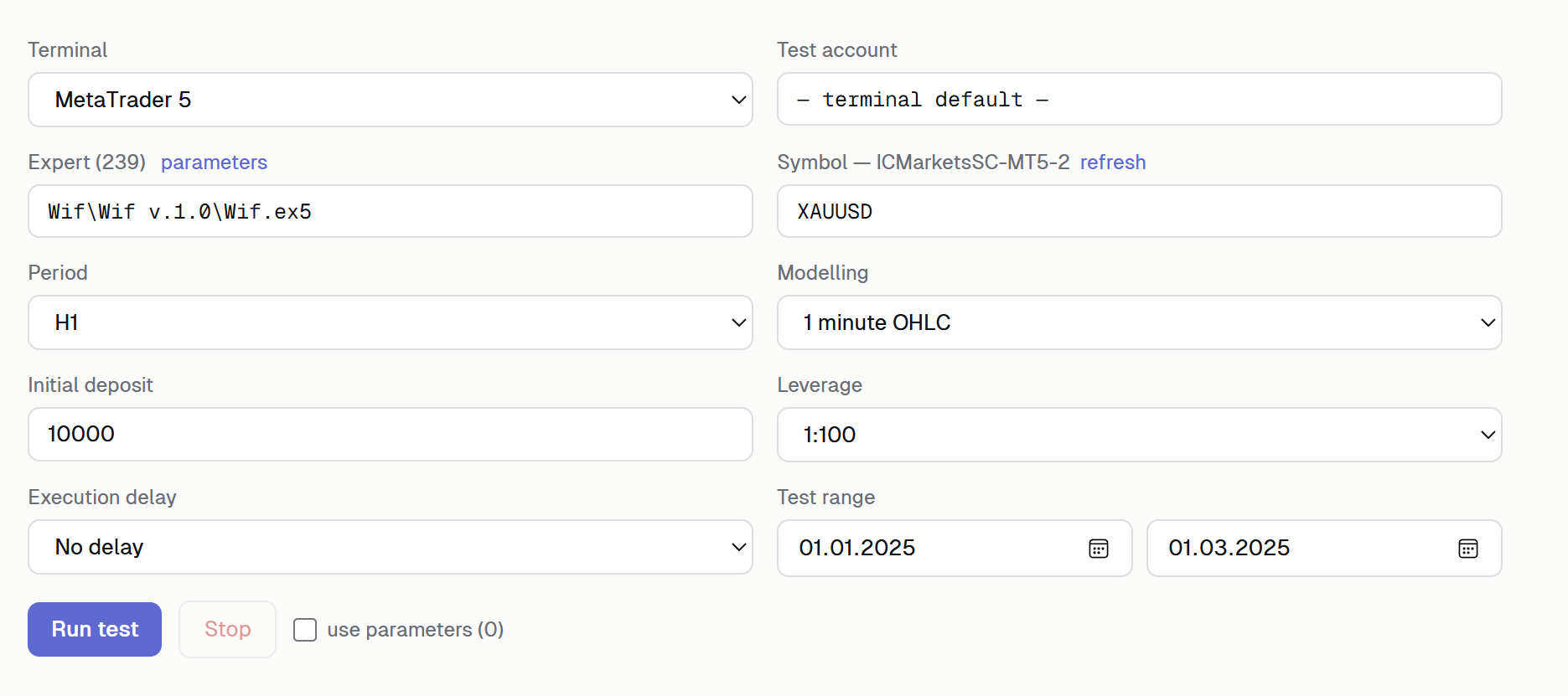
The first thing you notice in use is that you don't need to export reports manually. You configure the symbol, timeframe, testing model and input parameters right inside Studio, launch the Strategy Tester, and the app pulls the result automatically as soon as the test finishes. The report is parsed and lands in the analytics module on its own.
This removes the most tedious part of iterative development: run → review → change a parameter → run again. When there's no manual export and import between runs, the cycle of testing hypotheses speeds up dramatically.
Importing MT4 and MT5 reports
If you already have a backtest, you can simply drag it into the window — Studio accepts HTML reports from both MT4 and MT5. Trades, deals and statistics are parsed and normalized instantly, regardless of platform. This is handy both for analyzing your own strategies and for checking someone else's reports — for example, before buying a ready-made EA, when you'd rather not take the picture at face value and instead look at the data yourself.
Deep analytics
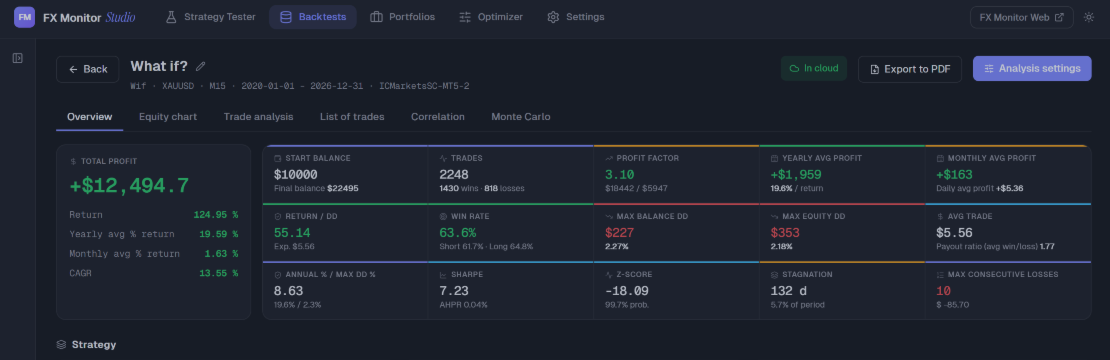
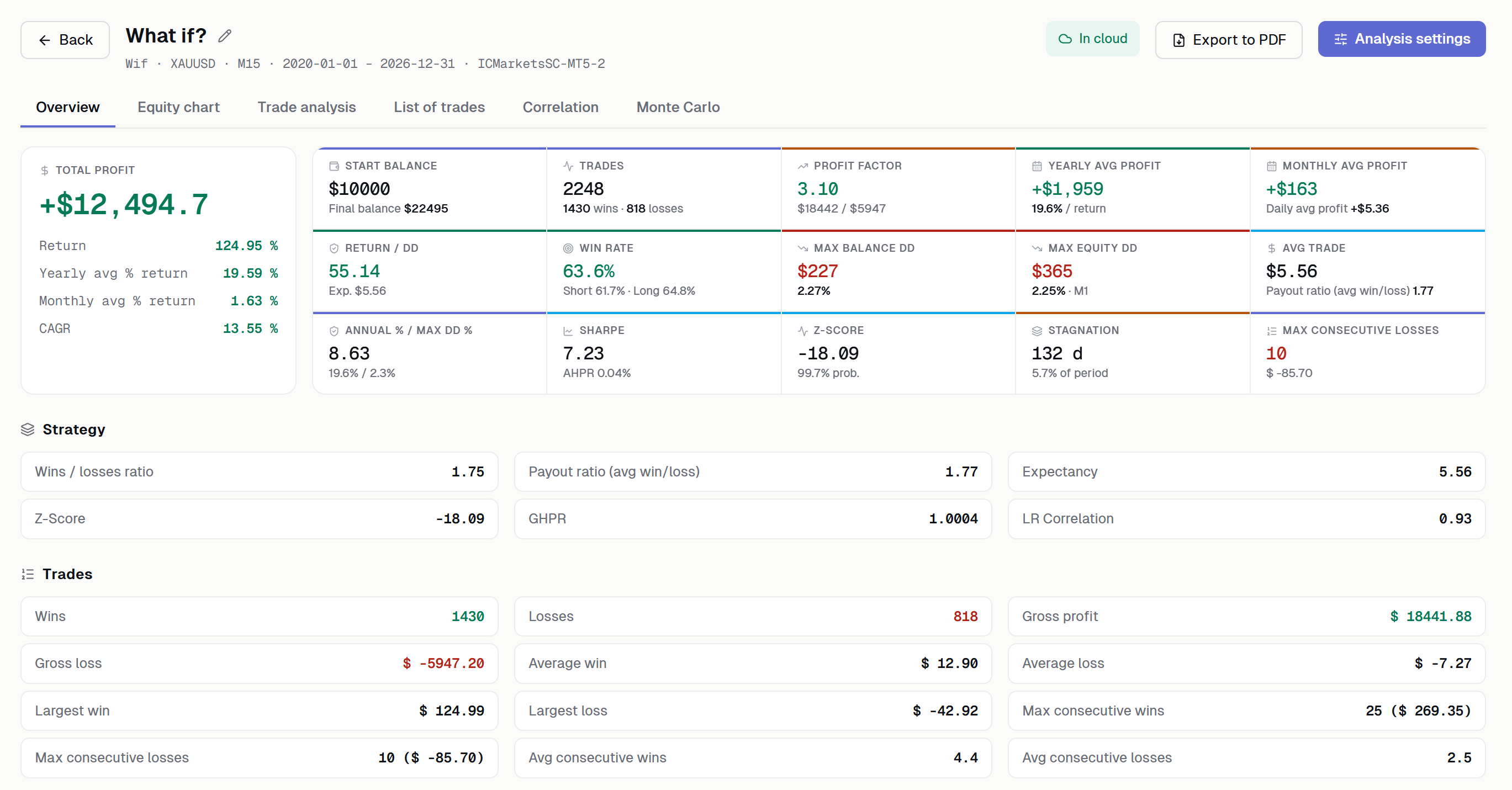
This is where the core value begins. Studio breaks a strategy down into dozens of metrics: equity and drawdown curves, profit factor, expectancy, Z-score, Sharpe ratio, stagnation periods, winning and losing streaks, monthly and yearly returns. All of it in a single dashboard, with nothing to calculate by hand.
Especially useful are the metrics beginners rarely look at but which are critical for understanding robustness: Z-score reveals whether there's a non-random dependency in the sequence of trades; stagnation periods tell you how long a strategy can stay "silent"; and the monthly breakdown immediately exposes whether the whole result rests on one or two lucky months.
Monte Carlo simulation
A single backtest is just one specific realization out of many possible ones. Real trading will almost certainly follow a different sequence of trades. Monte Carlo answers the question of "how much can the result be trusted at all": Studio shuffles and replays the trades thousands of times, building a distribution of outcomes.
The output gives you the risk of ruin, the distribution of drawdowns, and the odds of reaching a target balance. This shifts the conversation from "the backtest showed +40%" to the more honest "here's the range of what can realistically happen, and here's the probability of a serious drawdown." For risk assessment — especially when working with prop firms — it's an indispensable tool.
Multi-strategy portfolios
A single strategy rarely trades in a vacuum. Studio lets you combine several backtests with assigned weights and view them as one portfolio: aggregated equity, combined drawdown, and correlation between strategies.
Correlation is the key figure here. Two strategies that are individually profitable but draw down at the same time don't deliver the diversification you might count on. The portfolio module makes this clear: you can see whether the strategies genuinely complement each other or simply duplicate the same risk.
Portfolio optimizer
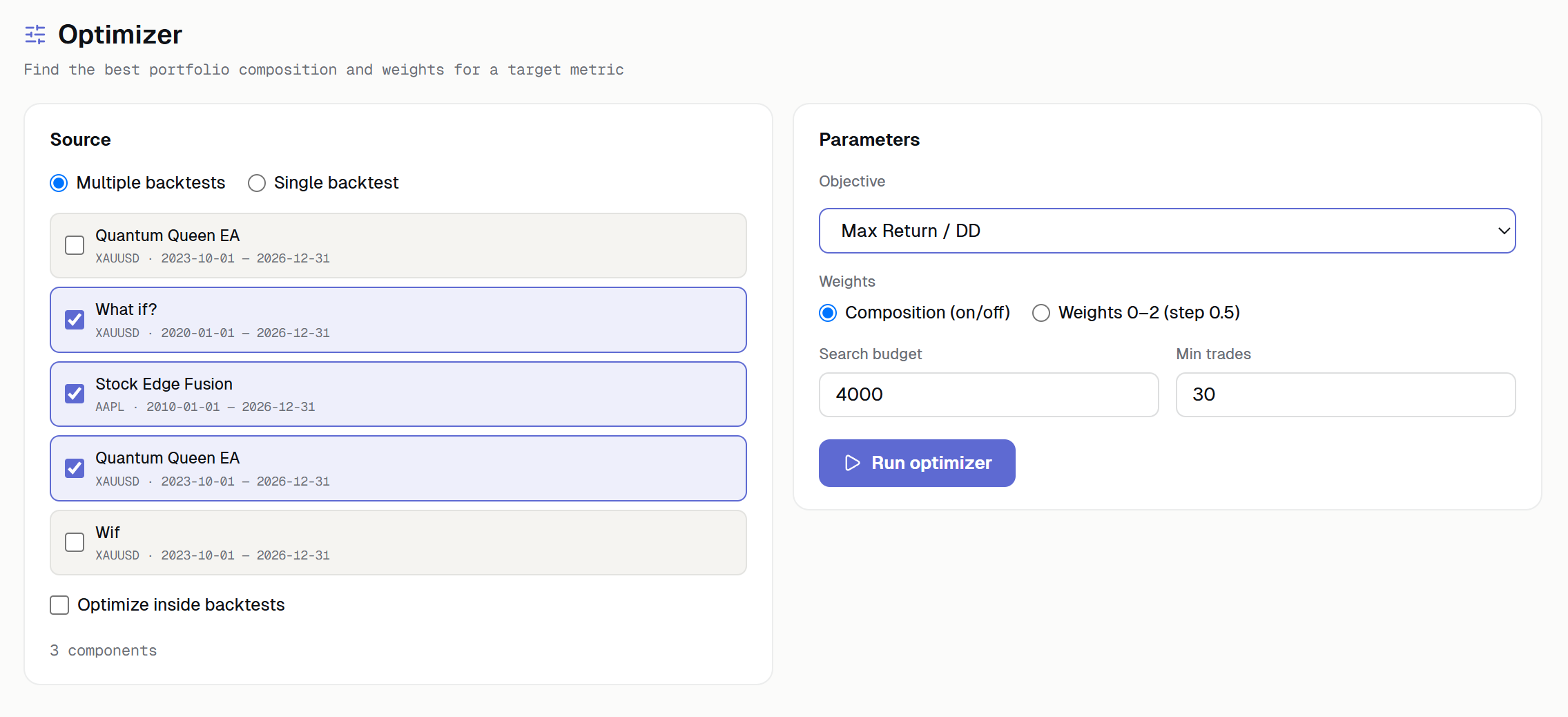
When you have several strategies, the question becomes — in what proportions to combine them. The optimizer takes this on: you set a goal (maximum profit, minimum drawdown, maximum profit factor, maximum Return/DD, or minimum correlation), and Studio searches through combinations and weights looking for the optimum.
An important detail is support for out-of-sample validation (deep split): the result is validated on data outside the training period. This protects against the classic optimization trap, where the fitted weights describe the past perfectly and fail completely in the future. In addition, a single report can be broken down into components by symbol or trade comment — convenient for multi-symbol and multi-module advisors.
Backtest vs. reality analysis
A pretty backtest and real trading are two different things, and the difference often hides in execution. Studio performs an M1 equity reconstruction and trade-level analysis, showing how a strategy would have behaved under real conditions — where slippage and spread begin to eat into the result. This helps you understand in advance how sensitive a strategy is to execution quality, before going live.
Cloud sync with FX Monitor
Studio doesn't exist in isolation — it's connected to the FX Monitor web platform through a single API key. Any backtest or portfolio is pushed to the cloud with one click and opens on any other machine along with all its analyses. Start your research on a desktop, continue on a laptop — the data follows you. This also lets you keep a single archive of all your tested strategies instead of a scattering of HTML files across folders.
Additional features
Beyond the core functionality, Studio has one-click PDF export — a clean performance report for clients or your own archive. Updates arrive automatically over the air, with signed artifacts, so there's nothing to reinstall by hand. The interface is available in 10 languages, with light and dark themes.
Who will find this useful
EA developers save the most time with Studio: the tester launcher, the optimizer and the real-execution divergence analysis cover the whole cycle from idea to validation. Prop firm traders will appreciate the portfolio analysis and Monte Carlo — understanding portfolio risk before risking real capital or a challenge fee. And buyers of ready-made advisors get the ability to verify someone else's report against the data, rather than trusting marketing charts.
Technical details and how to start
Studio is a native app built on Tauri (not the heavyweight Electron): the installer is around 12 MB and it runs on Windows 10/11 (x64). Setup takes a single step: download the app, paste in your API key from the portal (Profile → API key) — and you're ready. The app is free with an FX Monitor account; limits on the number of backtests and portfolios depend on your plan, and a free base tier is available too.
Claude Code integration
One capability deserves a separate mention, as it will be especially interesting to developers: Studio integrates with Claude Code through its own CLI ( fxm-studio ). This means all your analysis can be done not only through the interface but from the command line as well — and, more importantly, delegated to an AI agent. There are commands for listing backtests ( list ), examining a specific report in detail ( show ), working with portfolios ( portfolio ), running optimization ( optimize ), breaking a result down into components ( breakdown ), and saving a backtest ( save-backtest ).
In practice this opens up an entirely different workflow. Instead of clicking through dashboards by hand, you can ask Claude Code: "run an optimization on these strategies targeting minimum drawdown, then show me the breakdown by symbol and save the best portfolio." The agent runs the chain of commands, reads the results, and returns a meaningful analysis — not just numbers. For those who've already built Claude Code into their EA development, this turns Studio from an app you operate by hand into a tool you can drive in natural language.
You can download it and read more on the service page: fx-monitor.com/features/studio.php