
[Русский] - [English] - [中文] - [Español] - [Português] - [日本語] - [Deutsch] - [한국어] - [Français] - [Italiano] - [Türkçe]
Download the Demo Version of the VR Trade Panel Product for MetaTrader 4 and MetaTrader 5
Download the archive:
[ VR Trade Panel ]
Trial version description:
- The archive contains versions for MetaTrader 4 and MetaTrader 5.
- You can use VR Trade Panel without restrictions on Demo accounts.
- You can use VR Trade Panel without restrictions on Demo accounts for educational purposes for schools, companies, and communities.
- For Real accounts, you will have 30 calendar days.
- For questions regarding trial period extension, please contact the author’s profile.
- For VR Trade Panel to work on a Real account, DLL imports must be allowed in the MetaTrader terminal settings.
How to Install the Demo Version of VR Trade Panel in the MetaTrader Terminal
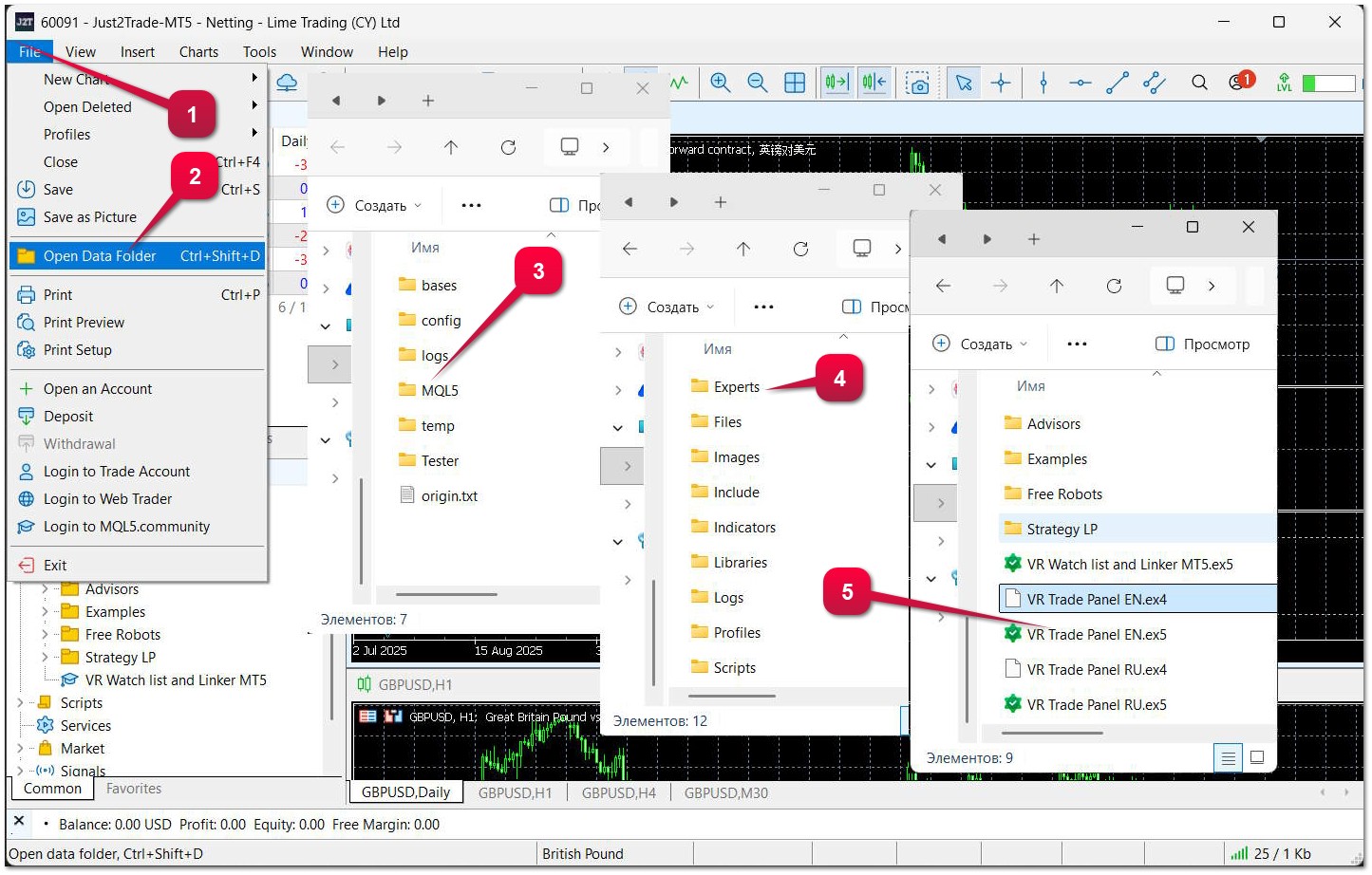
Open the terminal where you want to install VR Trade Panel; the instructions are the same for MetaTrader 4 and MetaTrader 5.
- File — (top left)
- Open Data Folder
- MQL5 for MetaTrader 5 or MQL4 for MetaTrader 4.
- Open the "Experts" folder
- Copy the files from the vr-trade-panel.zip archive to the "Experts" folder
- Restart the terminal
In the Navigator, under Expert Advisors, you will see VR Trade Panel En or VR Trade Panel Ru.
To start using the trading panel, simply drag the trading panel from the Navigator onto the chart.
Official Product Pages of VR Trade Panel in the MQL5 Market:
MetaTrader 5 - https://www.mql5.com/en/market/product/140502
MetaTrader 4 - https://www.mql5.com/en/market/product/6838
💥 By purchasing products from official sources, you will get:
1️⃣ Gifts, bonuses, and other programs.
2️⃣ The opportunity to use programs for free.
3️⃣ Settings and set files for free.
4️⃣ Free technical support.
5️⃣ All updates for free.
Friends, in my profile you will find even more educational materials and useful applications!
Sincerely, Vladimir!