Smart Multi Timeframe Fractals – User Guide
https://www.mql5.com/en/market/product/179594?source=Site+Market+MT4+Indicator+New+Rating006
1. Indicator Overview
Smart Multi Timeframe Fractals is an advanced Multi-Timeframe fractal indicator for MetaTrader 4.
The indicator detects:
-
Confirmed BUY fractals
-
Confirmed SELL fractals
-
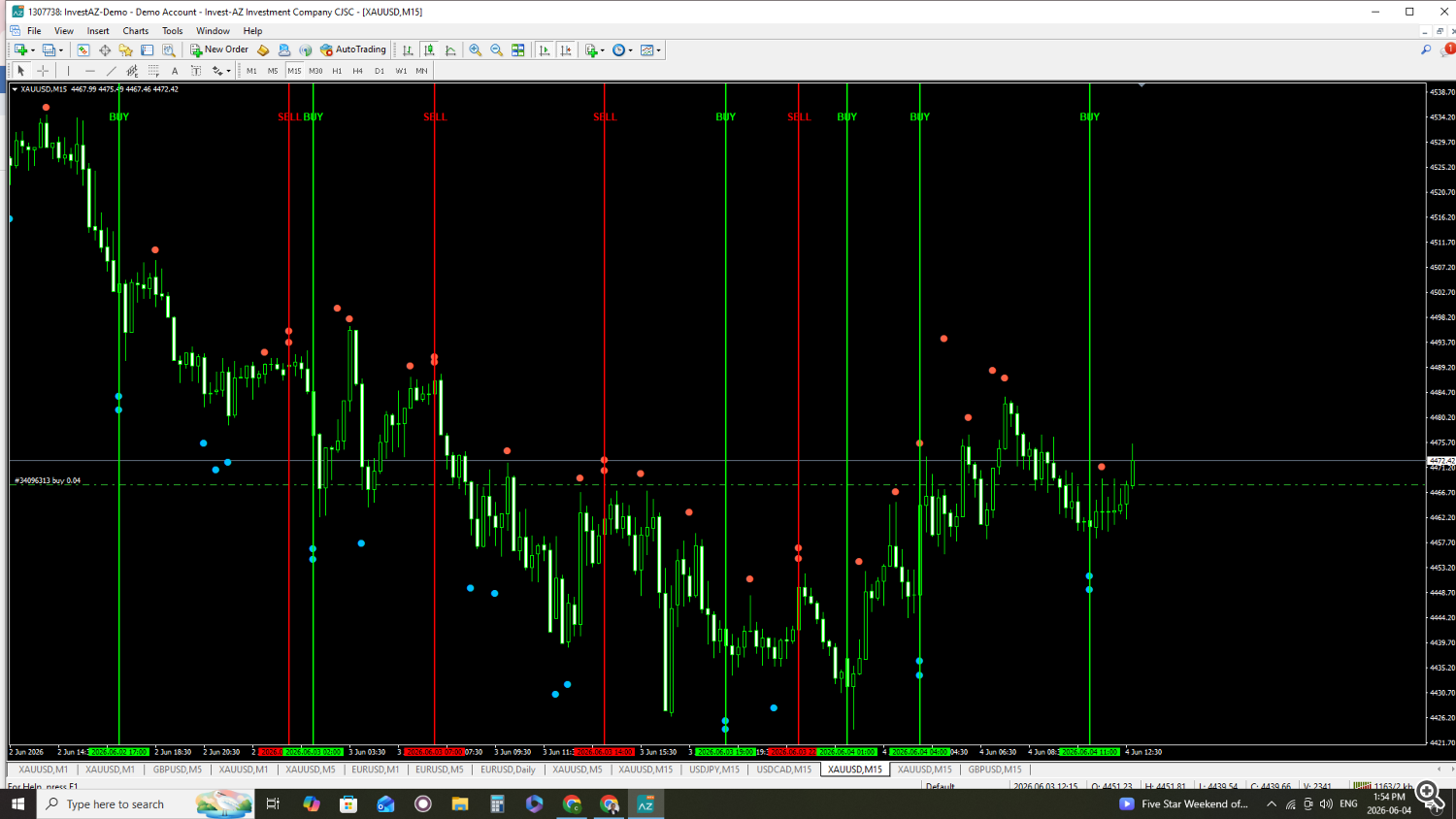
Multi-timeframe fractal circles
-
MTF confluence zones
-
Vertical BUY/SELL signals
-
Non-repaint fractal confirmations
The system is designed for traders who want to identify strong reversal zones using multiple timeframe fractal confirmations.
2. Main FeaturesConfirmed Non-Repaint Fractals
The indicator only confirms fractals after the required right-side bars are completed.
This helps reduce repainting problems.
Multi-Timeframe Fractals
The indicator can display fractals from:
-
M5
-
M15
-
M30
-
H1
-
H4
-
D1
All higher timeframe fractals can appear on a single chart.
MTF Circle Confluence Detection
One of the most powerful features.
If 2 or more MTF fractals appear on the same chart bar:
-
A vertical signal line is created
-
BUY or SELL text appears at the top of the chart
BUY Confluence
If multiple lower fractals align together:
-
Green vertical line appears
-
BUY text is displayed
SELL Confluence
If multiple upper fractals align together:
-
Red vertical line appears
-
SELL text is displayed
This helps identify strong reversal zones.
3. Installation
-
Open MetaTrader 4
-
Click:
File → Open Data Folder -
Open:
MQL4 → Indicators -
Copy the indicator file into this folder
-
Restart MT4
-
Drag the indicator onto the chart
4. Input Settings
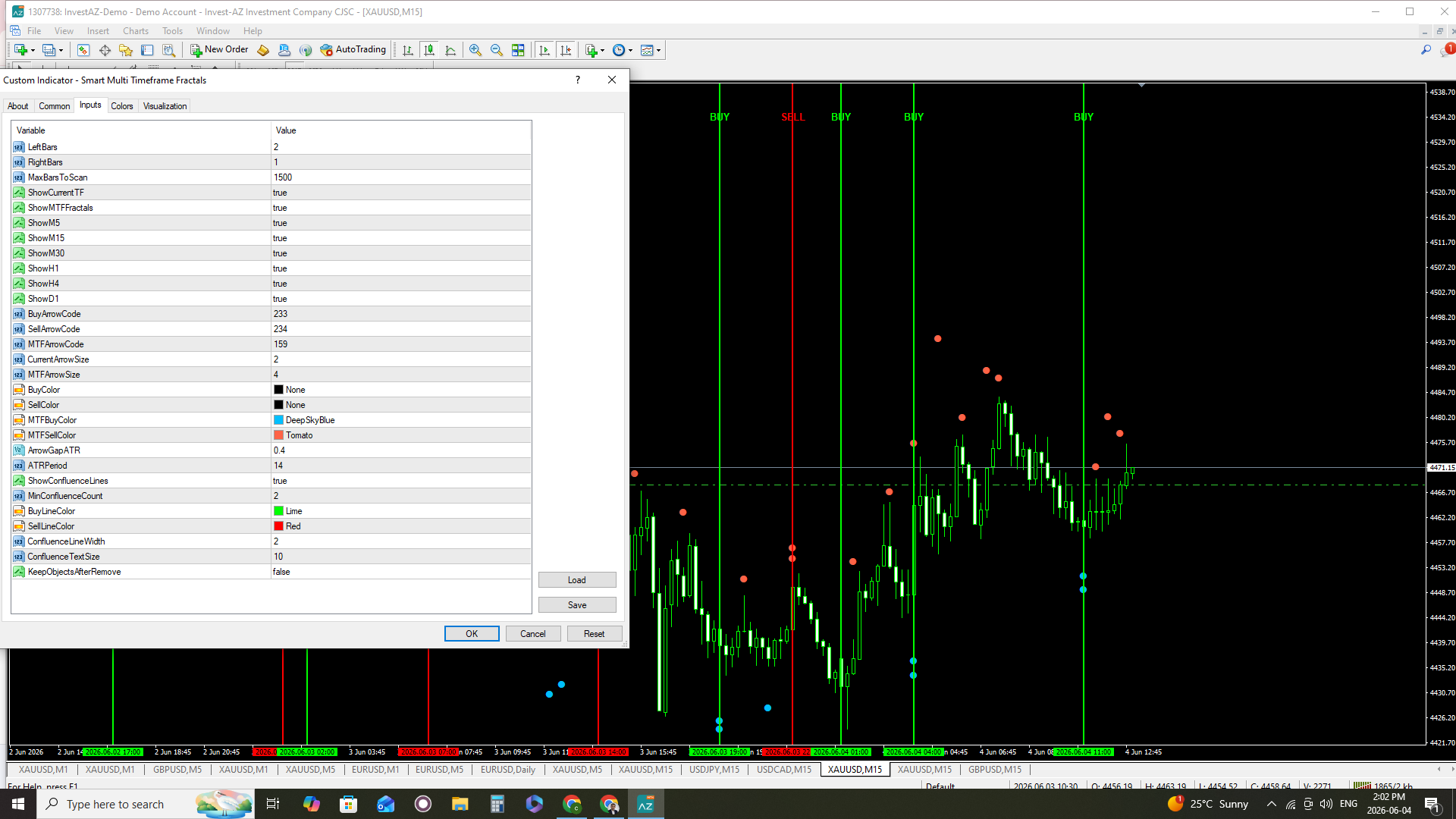
Fractal Settings
LeftBars
Number of candles on the left side required to confirm a fractal.
RightBars
Number of candles on the right side required to confirm a fractal.
Lower values:
-
Faster signals
-
More signals
Higher values:
-
Stronger confirmations
-
Fewer signals
MaxBarsToScan
Maximum number of historical bars scanned by the indicator.
Higher value:
-
More history
-
More CPU usage
5. Current Timeframe Settings
ShowCurrentTF
Shows current timeframe fractals.
true = enabled
false = disabled
6. Multi-Timeframe Settings
ShowMTFFractals
Enables higher timeframe fractals.
ShowM5 / ShowM15 / ShowM30 / ShowH1 / ShowH4 / ShowD1
Enable or disable individual timeframe fractals.
Example:
-
ShowH1 = true
-
ShowH4 = false
7. Arrow Settings
BuyArrowCode
Arrow code used for BUY fractals.
SellArrowCode
Arrow code used for SELL fractals.
MTFArrowCode
Arrow code used for MTF fractal circles.
CurrentArrowSize
Arrow size for current timeframe fractals.
MTFArrowSize
Arrow size for MTF fractals.
8. Color Settings
BuyColor
Current timeframe BUY fractal color.
SellColor
Current timeframe SELL fractal color.
MTFBuyColor
Higher timeframe BUY fractal color.
MTFSellColor
Higher timeframe SELL fractal color.
9. ATR Distance Settings
ArrowGapATR
Distance between fractal and arrow.
Higher values move arrows further from candles.
ATRPeriod
ATR period used for spacing calculations.
10. Confluence Signal Settings
ShowConfluenceLines
Enable/disable BUY/SELL vertical signal lines.
MinConfluenceCount
Minimum number of MTF fractals required to create a signal.
Example:
-
2 = signal after 2 matching fractals
-
3 = stronger filtering
BuyLineColor
BUY vertical line color.
SellLineColor
SELL vertical line color.
ConfluenceLineWidth
Vertical line thickness.
ConfluenceTextSize
BUY/SELL text size.
11. Object Management
KeepObjectsAfterRemove
If true:
-
Objects remain on chart after indicator removal
If false:
-
All indicator objects are deleted automatically
12. Trading Usage Ideas
Reversal Trading
Use BUY/SELL confluence signals as reversal zones.
Support & Resistance
MTF fractals often create strong support and resistance areas.
Trend Confirmation
Combine with:
-
EMA
-
Trendlines
-
Fibonacci
-
Volume
-
Liquidity concepts
13. Best Timeframes
Recommended:
-
M1
-
M5
-
M15
Especially effective for:
-
Gold (XAUUSD)
-
Scalping
-
Intraday trading
14. Non-Repaint Logic
The indicator confirms fractals only after completion.
This means:
-
Signals do not disappear after confirmation
-
Refreshing the chart keeps objects stable
-
Timeframe changes do not remove confirmed signals
15. Important Notes
-
Use proper risk management
-
Test on demo account first
-
Best results usually appear during London and New York sessions
-
Avoid low-volatility market conditions
16. Recommended Strategy
Example:
-
Wait for multiple MTF fractals
-
Vertical BUY or SELL line appears
-
Confirm with market structure
-
Enter after candle confirmation
-
Use stop-loss below/above fractal zone
17. Final Notes
Smart MTF Fractals No Repaint is designed to help traders visualize strong multi-timeframe reversal zones using advanced fractal confluence logic.
The indicator is best used together with:
-
Price Action
-
Market Structure
-
Trend Confirmation
-
Risk Management
Always test settings according to your broker and trading style.
Feedback:
I would really appreciate it if traders could download the demo version and test it in real market conditions. Your feedback is very important for improving the indicator.
If you notice any missing features, weaknesses, or have recommendations for additional functions, please feel free to share your ideas. I’m continuously working on upgrades and improvements based on trader feedback.
Thank you for your support and testing.