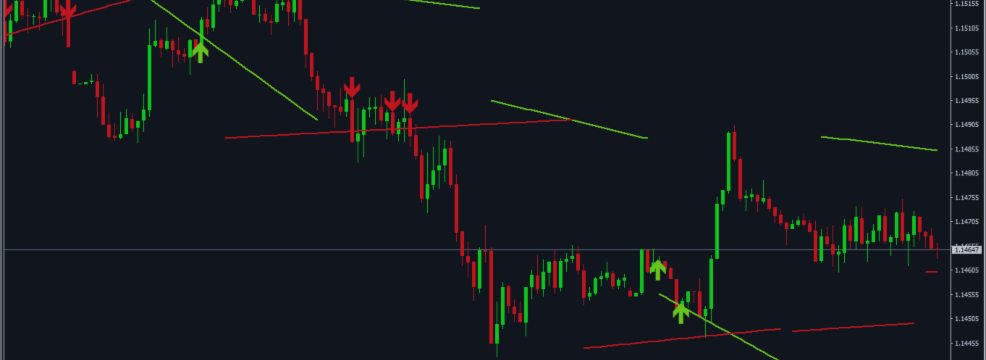

MT4 Version: Trendlines with Breaks MT4
MT5 Version: Trendlines with Breaks MT5
Complete User Documentation — MT4 & MT5
1. OVERVIEW
The Trendlines with Breaks indicator automatically draws dynamic trendlines on swing highs and lows, signaling potential trend reversals or continuations. It helps traders identify breakout setups with clear visual cues, enhancing decision-making in trading.
Who Should Use It: This indicator is ideal for retail forex traders looking to improve their technical analysis and identify key market movements.
Main Benefit: Gain a significant edge in your trading strategy by visually identifying critical trendline breaks that can signal profitable entry or exit points.
2. INPUT PARAMETERS & SETTINGS
This product shares a common set of general input settings with all Indicator products in this series. The following sections are covered in the common guide: Alert Settings (popup alert, push notification, email alert) and Display Settings (arrow size, colors). For full details refer to the Common General Input Settings Guide. The sections below cover only the product-specific inputs unique to this product.
Indicator Settings
This section covers the settings specific to the Trendlines with Breaks indicator, allowing you to customize its functionality to suit your trading style.
| Setting Name | Type | Default Value | Description | Example |
|---|---|---|---|---|
| Swing Detection Lookback | int | 14 | Defines the number of bars to look back for detecting swing highs and lows, helping to establish trendlines. Adjusting this can refine your trendline accuracy. | 10 - Use a shorter lookback for more responsive trendlines in volatile markets. |
| 'Slope', minval = 0, step = .1 | double | 1.0 | Sets the slope value for trendlines, influencing their angle. A higher value results in steeper trendlines, which may help in identifying stronger trends. | 1.5 - Use a steeper slope for aggressive market conditions to capture rapid price movements. |
| Calcmethod | ENUM | LINREG | See options explained below. | LINREG - Use this method for linear regression trendlines that adapt to price movements. |
| Backpaint | bool | true | Allows the indicator to repaint past trendlines based on current market data, which can provide clearer signals but may mislead if not used cautiously. | false - Disable backpainting for a more accurate historical representation of trendlines. |
| Showext | bool | true | Controls whether extended trendlines are displayed beyond the current price, helping traders visualize potential future price movements. | false - Turn off extensions for a cleaner chart focused on current price action. |
Calculation Method — Options Explained
This setting determines how the slope of the trendlines is calculated, impacting their responsiveness to price changes.
ATR: The Average True Range method uses volatility to adjust the slope, making it suitable for dynamic market conditions. This method is ideal for traders who want to account for market fluctuations.
STDDEV: The Standard Deviation method calculates the slope based on price variability, providing a more conservative trendline approach. This is beneficial for traders focusing on stable price movements.
LINREG: The Linear Regression method provides a straight-line trendline based on historical price data, allowing traders to identify trends effectively. This is often preferred for its simplicity and reliability in trend detection.
3. HOW IT WORKS
Core Calculation & Logic
The Trendlines with Breaks indicator automatically identifies swing highs and lows in the market, drawing dynamic trendlines that adapt to price movements. It monitors price action to signal potential trend reversals or continuations based on these trendlines.
This indicator utilizes mathematical calculations such as linear regression to determine the slope of the trendlines, providing traders with visual cues when price breaks these lines, indicating significant market shifts.
BUY and SELL Signal Conditions
BUY Signal — When does it appear? A BUY signal is generated when the price breaks above a downward trendline, indicating a potential upward reversal.
SELL Signal — When does it appear? A SELL signal occurs when the price breaks below an upward trendline, suggesting a possible downward reversal.
Signal Confirmation: Traders will see a color change in the trendline, an arrow pointing up for a BUY signal, or down for a SELL signal, along with alerts if enabled.
Recommended Action: It is advisable to confirm signals with higher time frame analysis and place stop-loss orders just beyond the trendline for risk management.
Step-by-Step Workflow
Step 1: Set Up the Indicator Install the Trendlines with Breaks indicator on your trading platform and apply it to your desired chart.
Step 2: Adjust Settings Customize the input parameters such as lookback period and slope calculation method to fit your trading strategy.
Step 3: Monitor Trendlines Observe the automatically drawn trendlines as price action unfolds, looking for breaks that indicate potential trading opportunities.
Step 4: Confirm Signals Use additional indicators or price action analysis to confirm the validity of the BUY or SELL signals generated by the indicator.
Step 5: Execute Trades Place trades based on confirmed signals, ensuring to set appropriate stop-loss and take-profit levels.
Step 6: Manage Trades Continuously monitor the trades, adjusting stop-loss levels as necessary to secure profits or minimize losses.
Step 7: Review Performance After closing trades, analyze the outcomes to refine your strategy and improve future trading decisions.
4. USAGE TIPS & BEST PRACTICES
Utilizing the Trendlines with Breaks indicator effectively can enhance your trading strategy.
| Feature | Description |
|---|---|
| Swing Detection Lookback | Defines how far back the indicator looks to identify swing highs and lows, crucial for trendline accuracy. |
| Slope Calculation Method | Selects the method for calculating trendline slope, impacting how trend strength is assessed. |
| Backpaint Option | Allows the indicator to redraw past trendlines, providing a clearer historical context for analysis. |
| Alerts Settings | Enables notifications for trendline breaks, ensuring you don’t miss potential trading opportunities. |
| External Trendline Display | Option to show external trendlines, enhancing visual analysis and decision-making. |
Quick Start Guide
Follow these steps to get started in under 5 minutes:
- Download the Indicator: Obtain the Trendlines with Breaks indicator from the MQL marketplace.
- Install on Platform: Add the indicator to your MetaTrader platform and apply it to your chart.
- Adjust Settings: Modify the input parameters to suit your trading style and preferences.
- Observe Trendlines: Watch as the indicator draws trendlines based on market swings.
- Look for Breaks: Identify key price breaks above or below trendlines for potential signals.
- Confirm with Analysis: Use other indicators or price action to validate signals before trading.
- Execute Trades: Enter positions based on confirmed signals and manage them effectively.
- Review Trading Performance: After trading, analyze outcomes to refine your approach.
You may also be interested in these related products:
Installation Guide for MQL Products | Updating Purchased MQL Products on MT4/MT5 | General Troubleshooting Guide
Check all my products: https://www.mql5.com/en/users/biswait50/seller
Contact me for support: https://www.mql5.com/en/users/biswait50




