Backtesting Real Telegram Signals in MetaTrader: why it matters and how Becktester TG Signals works (MT4/MT5)

That’s why the “test before you trust” approach helps: take the actual message history from a channel, convert it into structured trades, and run it through the Strategy Tester. This makes it easier to separate marketing from statistics.
What the utility does
Becktester TG Signals is a two-part workflow:
- Python app — connects to Telegram, loads message history from a selected channel/chat, parses signals, and exports them to a CSV file.
- MetaTrader EA (MT4/MT5) — reads that CSV and reproduces trades in the Strategy Tester, producing performance metrics and an equity curve on historical data.

Why traders may need this
- Validate signal channels before copying. Check trade frequency, drawdown, losing streaks, and stability across periods.
- Compare multiple sources. Same test environment → easier comparison of Win Rate / Profit Factor / Drawdown.
- Measure sensitivity. Understand how spread/slippage and entry precision affect results.
- Reduce “trust-based” decisions. Numbers help avoid emotional trading based on a channel’s claims.
Key advantages of the approach
- Uses real message history (not curated examples).
- Runs inside MT4/MT5 Strategy Tester: familiar reports, visuals, and period-to-period comparisons.
- Flexible parsing via keyword and symbol-alias configurations.
- Safety filters: skip duplicates, weekend signals, time windows, risk limits.
High-level workflow
- Select a Telegram channel/chat and a date range in the Python app.
- Parse messages and generate signals.csv (commonly into Terminal/Common/Files so the terminal can access it).
- Open the Strategy Tester in MT4 or MT5, attach the EA, and point it to the signals file.
- Review statistics and (optionally) export a results report to a separate CSV file.
CSV structure (what gets exported)
The export keeps the data structured: date/time, command type, symbol, entry/SL/TP, lot size, and service fields (message ID, edit flag, error field for unparsable messages). Multiple take-profit levels can be stored as a list separated by | .

Main EA settings overview (MT4/MT5)
1) File & parser basics
- SignalFile — CSV filename (e.g., signals.csv ).
- DebugLogs, DebugCsvRows — extra logs + print first CSV rows.
- BrokerUTCOffset — broker UTC offset (helps align timestamps).
- SkipDuplicates — skip duplicated signals.
- SkipWeekendSignals — ignore weekend signals if needed.
2) Lot sizing & risk
- LotMode — fixed / risk-based / per-symbol rules / lot-by-TP slots.
- FixedLotValue, RiskPercent, RiskPercentPerSymbol — core sizing controls.
- LotSizePerSymbol, LotSizeSpecificPair — fixed lots per instrument.
- DivideLotByTPCount — split size across multiple TP targets.
3) SL/TP interpretation
- SLMode, TPMode — use values from the signal or custom levels.
- CustomSL, CustomTP — custom targets (depending on units).
- SLUnit, TPUnit — Price / Pips / Points.
- AllTPInOneLine, SLMerged, TPMerged — handle specific formatting styles in messages.
- RejectOrdersWithoutSL, RejectOrdersWithoutTP — optionally ignore signals missing SL/TP.
- TPToCopy — choose which TP levels to include (e.g., only TP1 and TP3).
4) Execution & slippage behavior
- ForceMarketExecution — always enter at market.
- MaxSlippage — maximum allowed price deviation.
- HandleSlippage — ignore the signal or place a pending order when out of range.
- PendingOrderExpiration — pending order expiry (minutes).
- EntryRangeMode, EntriesInZoneOnly — how to interpret “entry zone”.
5) Management (breakeven & trailing)
- ActivateBreakeven, BreakevenAfterPoints — move to breakeven after X points.
- ActivateTrailingStop, SLTrailingMode, TrailingStartPoints, TrailingStepPoints, TrailingDistancePoints — trailing options.
- BreakevenToSignalEntryPrice — use the entry price from the signal for BE when applicable.
6) Risk limits & time filter
- MaxTradesPerDay, MaxLossesPerDay — daily caps.
- MaxDailyLoss, MaxWeeklyLoss, MaxMonthlyLoss — loss limits (percentage or currency).
- LossExceedAction — stop copying or close & stop if limits are exceeded.
- UseTimeFilter, StartTime, EndTime, AllowedTradingDays — trade window & weekdays.
7) Stats & report
- ShowStats — show statistics.
- ExportReport, ReportFile — export results to CSV (e.g., results.csv ).
Python-side configuration (keywords & symbols)
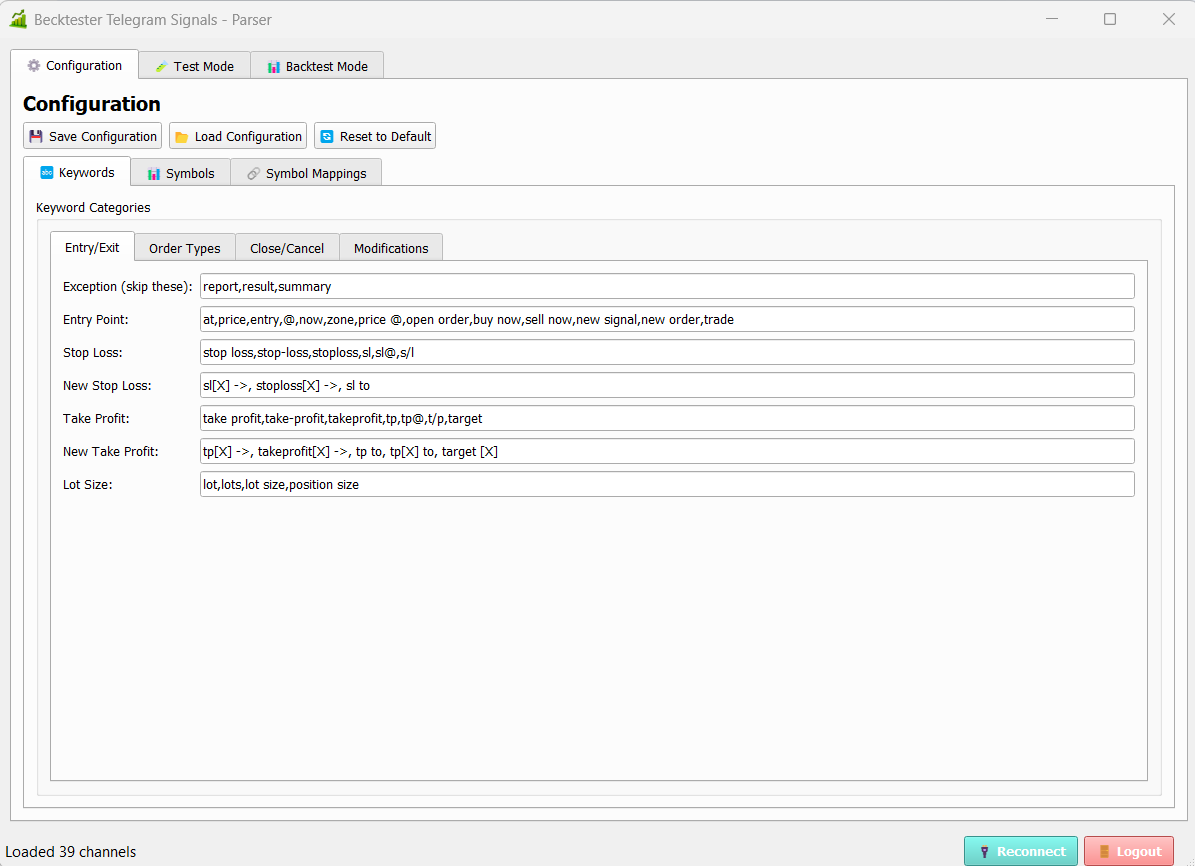
The source includes several configuration files that make parsing adaptable:
- app_config.json — Telegram connection settings (api_id/api_hash/session) and output preferences.
- backtest_settings.json — last channel, date range, and output CSV path.
- configs/default.json (and other configs) — keyword sets for BUY/SELL, SL/TP, modifications, closes, etc., plus symbol lists and aliases (e.g., GOLD → XAUUSD).
- config/current_config.json — the active parsing configuration.
This matters because channels format messages differently (TP1/TP2 vs “targets”, GOLD vs XAUUSD, etc.). Configurable keywords and symbol aliases help fit the parser to the channel’s style.
Update: MT5 release
The typical walkthrough is often shown on MT4, but the workflow is the same for MT5: the same CSV concept, the same Strategy Tester approach. A dedicated MetaTrader 5 version of the EA is now available.
Download
To keep this educational, links are placed at the end. Replace placeholders with your actual product pages:
- MT4 version: Becktester TG Signals (MT4)
- MT5 version: Becktester TG Signals (MT5)
Disclaimer: Educational content only. Backtesting is a model and does not guarantee future results. Real trading includes latency, slippage, varying spreads, and execution differences.