
Drop & Volatility Shield Monitor (News/Volatility Filter Status Bar)
11 December 2025, 22:51

0
298
Hi,
After releasing the free grid visualizer “Grid Vision TP&NP”, I wanted a simple tool that tells me
“is the market calm or dangerous right now?” at a glance – especially when running grid / martingale EAs or scalping GOLD. :contentReference[oaicite:0]{index=0}
That’s why I made this free indicator:
==================================================
Free MT4 Indicator – Drop & Volatility Shield Monitor
==================================================
This indicator shows a small status bar at the top of the chart, like:
Drop Shield: NORMAL | ATRx1.05 | Spr: 0.30/0.60
The text color changes according to market conditions: :contentReference[oaicite:1]{index=1}
- 🟩 **NORMAL** – usual market conditions, “business as usual”
- 🔴 **COOL** – high volatility or sudden drop / spread spike detected → “cool down”
- 🟧 **RECOV** – market is recovering after a volatile period
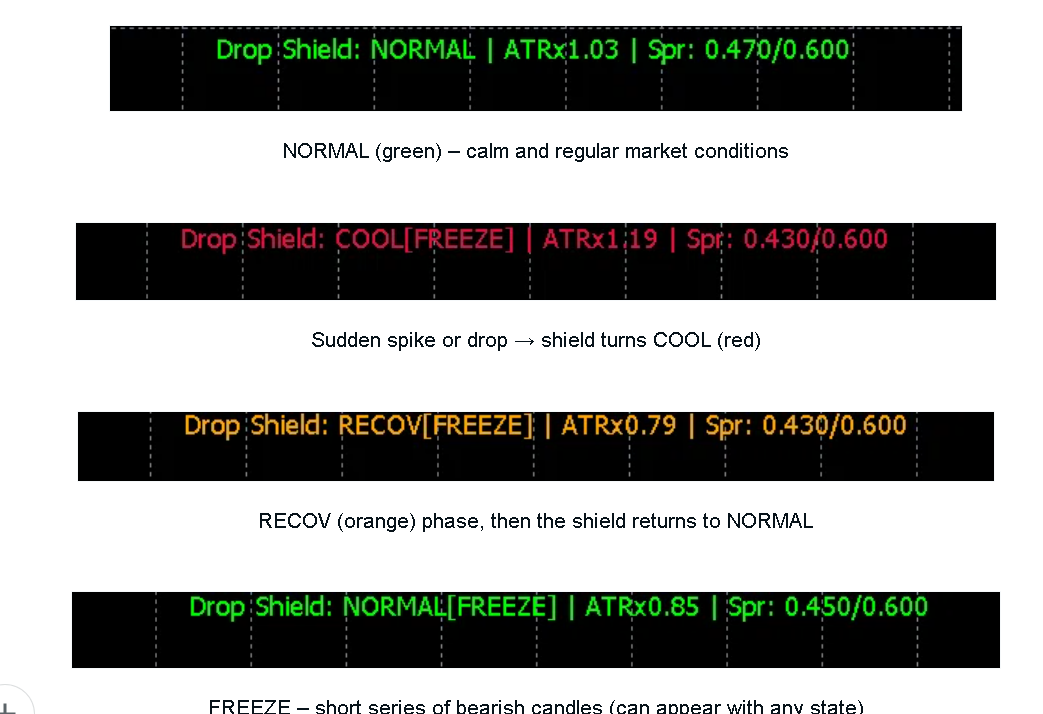
Additionally, when the indicator detects a short burst of consecutive bearish M1 candles,
it internally enters a **FREEZE** state.
In FREEZE time you usually don’t want to add serious new positions.
The idea is not to generate entries, but to visualize *when we should slow down or pause*.
--------------------------------------------------
Core logic (simplified)
--------------------------------------------------
1. **Drop filter (ΔClose on higher timeframe)**
- Monitors the last 2 closed candles on a chosen timeframe (default: M15).
- If the close-to-close difference is greater than `DropThreshold_USD`, the status becomes **COOL**.
- Example: `DropTF = M15`, `DropThreshold_USD = 10.0` →
if M15 close drops more than 10 USD, we regard it as a dangerous move.
2. **ATR based volatility filter (M1)**
- Calculates ATR on M1 with period `ATR_Period`.
- Builds a baseline from the last `ATR_BaseBars` M1 bars.
- If the current ATR is more than `ATR_CoolMultiplier` times the baseline, status switches to **COOL**
(e.g. ATRx2.5 = “2.5x normal volatility”).
3. **Spread gate**
- If `Ask - Bid` exceeds `SpreadMax_USD`,
the status goes to **COOL** even if candles look calm.
- This catches news spikes / low-liquidity periods where spread explodes.
4. **RECOV (recovery) logic**
- After some time in COOL, the state automatically changes to **RECOV**.
- Optionally (`RequireRebound = true`), status only returns to NORMAL when:
- recent M1 candles are bullish,
- spread is back below `SpreadMax_USD`,
- close is above EMA20 + `ReboundOffset_USD`.
So the indicator tries to detect:
- sudden drops,
- abnormal volatility,
- bad spread,
and then waits for a reasonable recovery before telling you “OK, back to NORMAL”.
--------------------------------------------------
Typical use cases
--------------------------------------------------
**1) Scalping / day trading (M1–M15)**
For manual traders in GOLD or FX who think:
- “I want to reduce size around news”
- “I don’t want to add new positions right after a big dump”
You can use the color as a simple rule trigger:
- **NORMAL (green)** → trade with your usual strategy / size
- **COOL (red)** → stop new entries, halve your lot, or avoid counter-trend scalps
- **RECOV (orange)** → restart with smaller size and see if conditions really calm down
**2) EA monitoring / grid systems**
If you run grid / martingale EAs and want an extra layer of safety without touching the EA code:
- When the bar shows **COOL**, you can:
- temporarily disable AutoTrading,
- reduce lots,
- or avoid turning on a new EA.
It’s a separate “market mood” layer that helps you decide when to be aggressive or defensive.
--------------------------------------------------
Input parameters (short overview)
--------------------------------------------------
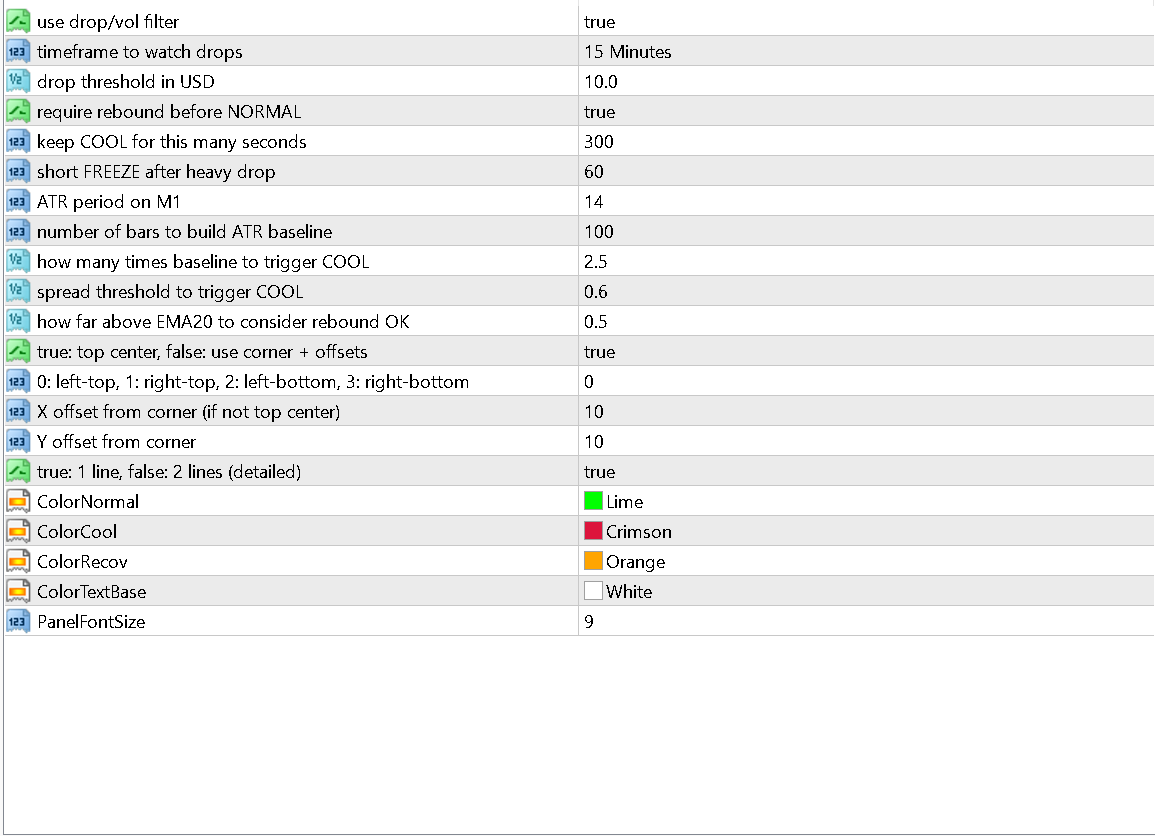
- **UseDropFilter** – enable / disable all drop & volatility logic (true by default)
- **DropTF** – timeframe used for close-to-close drop detection (M15 recommended)
- **DropThreshold_USD** – how many dollars of drop to trigger COOL
- **ATR_Period** – ATR period on M1
- **ATR_BaseBars** – number of M1 bars to build the ATR baseline
- **ATR_CoolMultiplier** – required ratio vs baseline to trigger COOL (e.g. 2.5)
- **SpreadMax_USD** – spread threshold to trigger COOL
- **RequireRebound** – if true, require a rebound before returning to NORMAL
- **ReboundOffset_USD** – how far above EMA20 the price must be to count as “rebounded”
- **PanelTopCenter** – show status bar at top center (recommended)
- **MinimalMode** – 1 line only (true) or 2 lines with more details (false)
- plus basic colors / font size options
All money values are in account currency (typically USD).
--------------------------------------------------
How to use
--------------------------------------------------
1. Copy the compiled `DropVolShieldMonitor.ex4` into:
`…/MQL4/Indicators/`
2. Restart MetaTrader 4.
3. Attach **Drop & Volatility Shield Monitor** to any chart you like
(GOLD M1–M15 is a good starting point).
4. Watch the color and text of the status bar while trading or running EAs.
Test it first on a demo account and tune thresholds for your broker’s volatility / spread.
--------------------------------------------------
Download
--------------------------------------------------
The indicator is completely **free** for both demo and real accounts.
You can download it directly from this blog post (attached file) and use or share the link with other traders.
Re-selling the file itself is not allowed, but sharing the link to this page is very welcome.
Hope this little tool helps you stay out of the worst volatility and trade a bit more comfortably.
If you have questions or ideas for the next free utility, feel free to leave a comment.
Happy trading!




