

Welcome to the installation and features guide of Martini AI Expert Advisor.
About
Martini AI EA is an advanced trading Expert Advisor designed for AUDUSD, EURUSD, GBPUSD, NZDUSD, and USDCHF. It focuses on safety, consistent returns, and scalable profitability. Martini AI EA integrates a disciplined scalping strategy enhanced by neural networks, machine learning, and AI-powered analytics built on the latest ChatGPT technology. This ensures adaptive decision-making, precision trading, and an exceptional trading experience.
- Connect with other traders by joining our MQL5 community of over 7000 members. Stay updated with the latest product releases, trading tips, and exclusive insights.
Features
- Night-Time FX Mastery: "Martini AI EA" thrives in quiet, low-volume trading hours. It capitalizes on the unique behavior of the forex market during optimal night windows.
- Scalping Excellence: Specialized for night trading on the 5-minute timeframe, delivering swift and precise scalping for major forex pairs.
- Precision with Pending Orders: Masterfully executes trades with pending orders to ensure optimal entries and exits.
- AI-Driven Neural Intelligence: Continuously adapts to market conditions using deep learning algorithms, keeping strategies sharp and relevant.
- Hidden Profit Booking: An advanced mechanism secures gains discreetly, even while you sleep.
- Real Data Optimization: Strategy fine-tuned with real tick data for authentic and reliable performance.
- Strict Risk Management: Advanced AI-driven risk control ensures safety across trades, minimizing exposure.
- News-Free Zone: Focused on stable, news-free trading periods to avoid unpredictable volatility.
- FX Expertise: Specifically engineered to unlock the full potential of night-time forex trading.
Trade confidently with "Martini AI EA" and convert quiet hours into profitable opportunities.
Promo Price: $599 until 5 purchases | Next Price: $799 | Final Price: $2999
Promotional Offer: Users will also get a free complementary EA as a gesture of saying thank you from our side.
Recommendations
- Initial Capital: $1000
- Time Frame: Any
- Recommended Currency Pairs: AUDUSD | EURUSD | GBPUSD | NZDUSD | USDCHF
- Brokers: Use low-spread brokers such as Tickmill, ICMarkets, RoboForex, FPMarkets, etc.
- VPS: Recommended for uninterrupted 24/7 trading
- Settings: Pre-optimized, plug-and-play with no extra setup required
INSTALLATION GUIDE
- Download the EA from the marketplace in your MT4/MT5 terminal after your purchase.
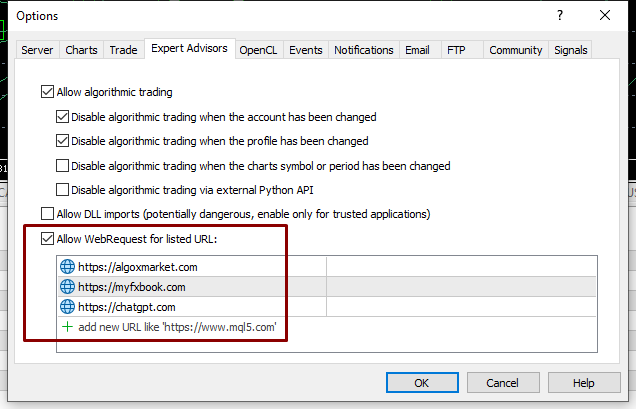
- In your terminal upper menu go to "Tools"
- Click "Options"
- Select "Expert Advisors" tab
- Make sure "Allow WebRequest for listed URL:" is checked
- Now, add the following URLs in the URLs list
- https://algoxmarket.com
- https://perplexity.ai/
- After adding click "OK" to save
- Once you are done with adding up the URLs, open the charts of the supported pairs individually
- Drag and drop the expert advisor on each chart and use the "Set Files" provided in the attachments of this blog, or ask the developer for proper settings as per your account.
Reference URLs Picture
Detailed Features
- Magic Number : A magic number is the number which helps the EA to differentiate between the trades from the two different EAs, if you are using two EAs on same pair, then the magic number of both the EAs should be different.
SMART AI CORE SETTINGS
- Smart AI Connector : This features allows the EA to establish the connection between Open AI server and the EA itself by taking small connection trades after a long interval of times, when set to "true" means this feature is enabled.
- Smart AI Model : This feature allows the user to select the AI model from the available models, which are Auto-Select AI, Next-Gen GPT-5 and High-Speed GPT Turbo, when set to "Auto-Select AI" mode the EA automatically switches between Next-Gen GPT-5 and High-Speed GPT Turbo mode.
INTELLIGENT LOT CONTROL
- AI Lot Mode : This feature allows the user to choose the lot type between the "AI Auto Lot" and "Manual Fixed Lot".
- AI Position Mode : When "AI Lot Mode" is set to "AI Auto Lot", then this feature allows the user to choose from 4 different auto lot sizing settings where "Aggressive Mode" mode is highest in terms of risk and "Low Risk Mode" mode is safest.
- Manual Lot Size : When "AL Lot Mode" is set to "Manual Fixed Lot", then the user can input the desired or custom lot size in this setting.
AI PROP FIRM COMPLIANCE
- Funded Account Mode : If a user is trading a prop firm account with this EA, then this feature allows the user to convert this EA into a prop firm trader by setting this to "Active".
- Firm Drawdown Limit : This input feature allows the user to input the maximum drawdown threshold on the prop firm trading account, the value is taken by the EA in percentage which means (e.g 5 means 5%) max dd.
AI TRADING SCHEDULE
- Enable Monday Trading : When set to "true" this feature allows the EA to execute trades on that particular day.
- Enable Tuesday Trading : When set to "true" this feature allows the EA to execute trades on that particular day.
- Enable Wednesday Trading : When set to "true" this feature allows the EA to execute trades on that particular day.
- Enable Thursday Trading : When set to "true" this feature allows the EA to execute trades on that particular day.
- Enable Friday Trading : When set to "true" this feature allows the EA to execute trades on that particular day.
- Enable Saturday Trading : When set to "true" this feature allows the EA to execute trades on that particular day.
- Enable SundayTrading : When set to "true" this feature allows the EA to execute trades on that particular day.
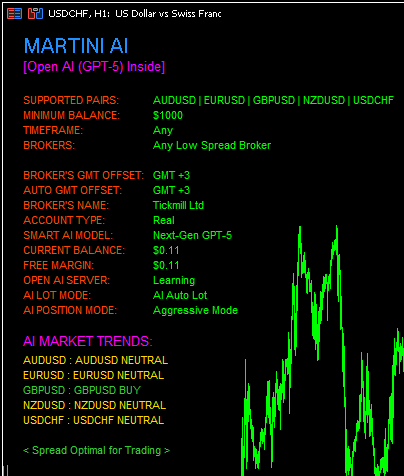
- Neural Insight Display : This feature is responsible for displaying the information panel over the chart which contains all the important information regarding the settings of the EA and broker information as well. To enable it, set it to "true".
-
SMART ALERT SYSTEM
- Enable Email Alerts : Allow alerts through email when set to "true".
- Enable Audible Alerts : Allow audible alerts when set to "true".
- Enable Push Notifications : Allow the alerts to be received on mobile app, when set to "true".
GENERAL AI SETTINGS
- Hedging : Through this feature, a user can decide whether there will be or there will not be hedging allowed while trading, by default it is set to "true", it can be disabled by setting it to "false". Advice is, keep it on "true" if your broker allows hedging.
PRODUCT LINKS MQL5 PLATFORM