T Trading Simulator

Demo version

T Trading Simulator doesn't work in the strategy tester. The Strategy Tester does not support the processing of ChartEvent. It does not support most of the panel's functionality.

Contact me for any questions or ideas for improvement or in case of a bug found.

Hi everyone, Trobotrader here.

By T Trading Simulator, You can go back to past then analysis and trade with this simulator to develop trading skill.

We are going to walk through step-by-step how  you can use T Trading Simulator.


HOW DOES IT WORK?

Have several parameter that work with this simulator :

  • Back to history = B, When you press shift + B Key, It create custom symbol with suffix .T. then copy next 100 candlestick that set by count bar =100 prepare display.
  • Default speed = 500, When you play history,  It will show next candlestick, timer is speed = 500 millisecond.
  • Maximum speed = 1000, you can increase speed up to 1000 millisecond.
  • Minimize speed = 100, you can decrease speed up to 100 millisecond.
  • Speed interval = 100, step that you increase or decrease speed.
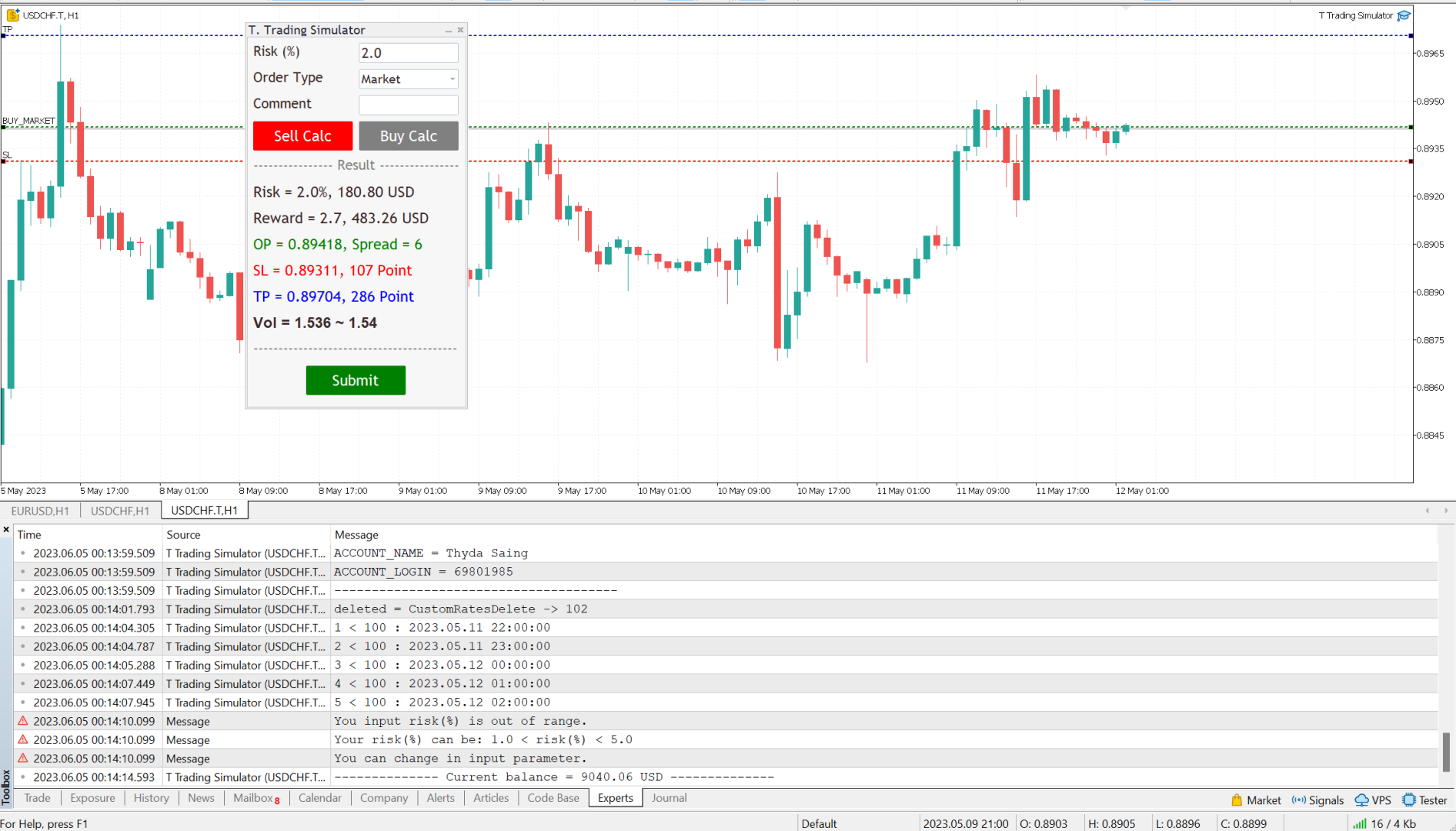
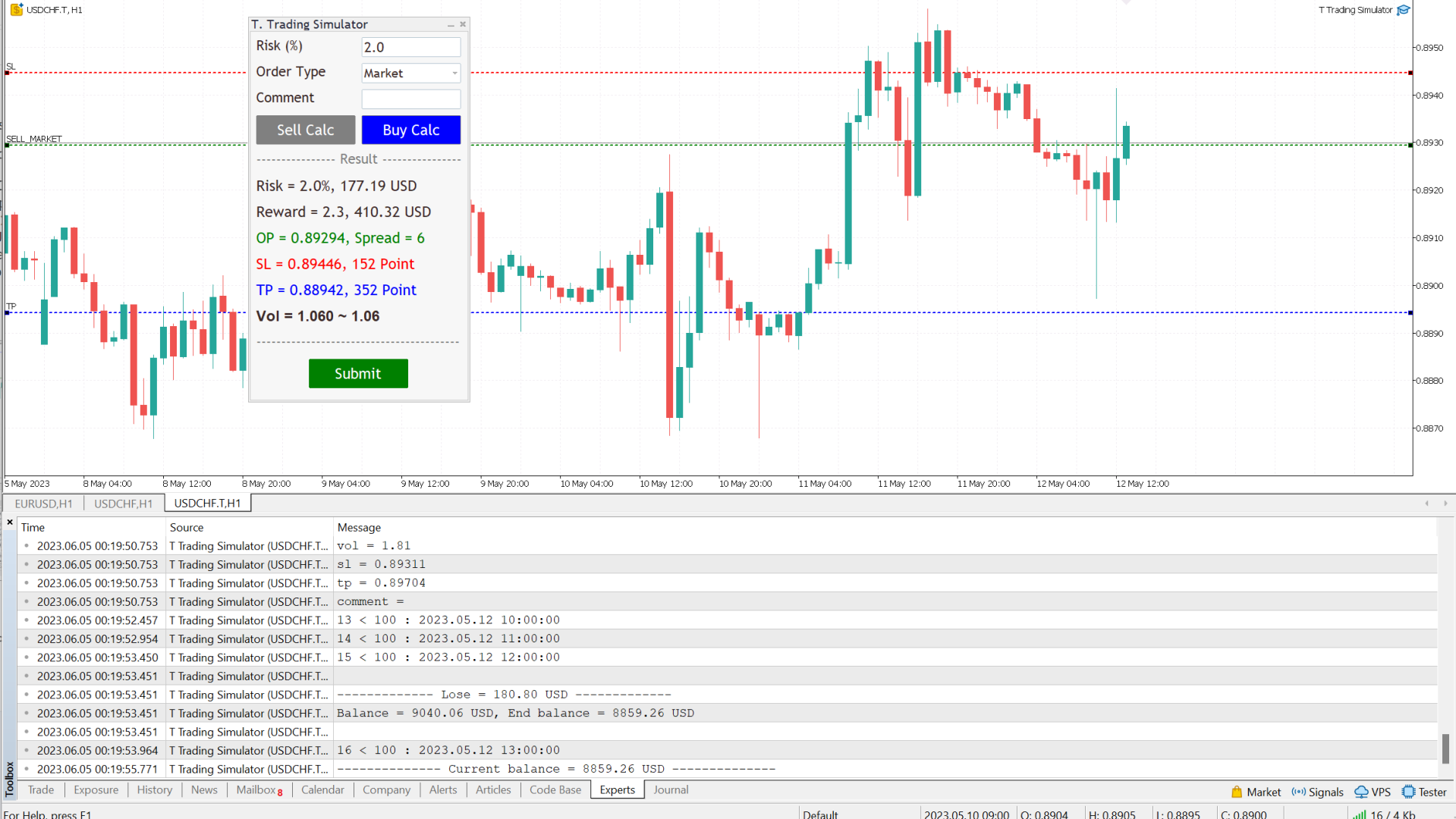
Follow a few steps in Dialog Panel to submit order to market :
  • Simply enter the percentage you’re risking in Risk % of the box, 2 mean that 2%.

  • Select order type (can be Market, Limit, Stop).

  • Press the “Sell Calc” or “Buy Calc” button.

    This will trigger (show) 3 lines on your current chart. You can drag and drop the lines (Order Line, Stop Line, Profit Line) to determine your risk / reward. 

Then this tool will automatically calculate volume (position size) instantly and result will show in this dialog panel.
  • When you agree, press Submit button to execute the trade (submit your order to market) .

    Note that submitting can be failed so you try press Submit button a gain.

    That’s it! – It even works on future pending orders too!

ADDITIONAL FUNCTION

  1. Dialog Manager

  • Width app : 320, You can change width app by try this option.

  • Toggle minimize : m, When you press M key, dialog will minimize. Press M key gain, dialog will maximize.

  • Risk (%) min : 1.0

  • Risk (%) max : 5.0

    If you input risk(%) is in of range, min and max. The this tool will accept your input then calculate after click on the button.

  1. Trading Lines Manager - Order Line, Stop Line, Profit Line

  • Distance (%), Order and Stop : 5, We set the default value, distance from order price to stop price, is five percent of chart's high.

  • Reward ratio : 3.0, Reward radio is 3 time of the distance.

  • Line width : 2

  • Line color :

  • Line style :

  • Bring to back : true

  • Z-order : 0

    Properties of the lines.

  • Deviation (avoid requotes) : 5, It is important to note that requotes will still occur if the price change is more than the set range of deviation.

Shortcut Key

Below instruction have some functions work with shortcut key to manage your task faster than normal.

Note that you can change or add more value.

    Timeframe Manager
    • Timeframe : H1=1,H4=2,D1=3,W1=4,MN=5

      When you press 1 key then your timeframe chart change to H1, Press 2 change to H4,...

      However you can add more timeframe with the key.

    Chart Manager
      • Goto name : GOTO-DATE, define the name of vertical line for navigate chart.

      • Goto to date (GOTO-DATE) : g

        When you press G key, the chart will navigate to GOTO-DATE

      • Update goto : G

        When you press shift + G key, It will update goto-date position to current screen at first bar (left corner).

      • Goto all open charts : true, Synchronize all charts navigate to GOTO-DATE.

      • Open watch-list : M

        When you press shift + M key, Open all symbols in watch-list, max = 20.

      • Max Symbols in watch-list : 20, Maximum symbols can be opened when press M key.

      Synchronize Chart Manager
      • Synchronize other charts : S,

        When you press shift + S key, It will synchronize all open charts with current chart.

      • Synchronize crosshair : true, Show crosshair (vertical and horizontal lines) in synchronize charts when middle mouse click. If you toggle click, show and hide.

      Template Manager
      • Save current template : T

        When you press shift + T key, Save template's name with the symbol's name both master and slave chart, Path : \MQL5\Files\Templates

        Note that if want to save template by manual, you need to minimize dialog before.

      • Apply current template : t

        When you press shift + t key, Apply the template is saved. If not found it apply with DEFAULT-TEMPLATE

      • Default template :DEFAULT-TEMPLATE

      • Slave chart : true, 

      When you drag symbol on watchlist to drop on the chart then press shift + T key, Save template's name with the symbol's name both master and slave chart.

      When you drag symbol on watchlist to drop on the chart then press shift + t key, it will apply the template is saved to all opened charts. if not found it will apply DEFAULT-TEMPLATE before you must save it.

      Window Manager

        • Hide / Show indicators : i, Press I key, hide / show indicators.

        • Equal height indicators : /, Press / key, set equal height all indicators.

        • Clear fixed height indicators : I, Press shift + I key, remove fixed height indicators.

        • Double click left or right corner chart or indicator window to toggle maximize the window.

        Object Tool Manager
          • Delete all objects : D, Press shift + D key, delete all objects tool on the current chart.

          • Delete recent (stack) object : Z, Press shift + Z key, delete a recent object by order.

          • Synchronize objects properties : true, When change properties current object, It will change all the same object type with changed properties.

          • Toggle LOW TIMEFRAME object visibility : L, Press shift + L key, hide/show all object that you draw in lower than current timeframe.

          • Toggle CURRENT TIMEFRAME object visibility : C, Press shift + C key, hide/show all object that you draw in current timeframe.

          • Toggle HIGH TIMEFRAME object visibility : H, Press shift + H key, hide/show all object that you draw in higher than current timeframe.


          推荐产品
          Sc MTF Volume MT5
          Krisztian Kenedi
          5 (1)
          具有多时间框架支持、可自定义视觉信号和可配置警报系统的成交量(Volume)指标。 免费编程服务、更新及其他 TrueTL 产品请访问 MQL5 个人主页 。 非常感谢您的反馈和评价! 什么是成交量(Volume)? 成交量是技术分析中最基本的指标之一。它代表在特定K线或时间段内交易的合约、股票或手数总量。在 MetaTrader 中,默认使用 tick 成交量 — 计算每根K线内的价格 tick 数量 — 这与大多数市场的实际交易量高度相关。 成交量不显示价格方向 — 它衡量市场活动和参与度。成交量增加确认价格走势的强度,而低成交量可能表明趋势较弱或不可持续。交易者使用成交量来验证突破行情(高成交量突破更可靠)、识别趋势枯竭(价格与成交量背离)以及检测积累或分布阶段。成交量骤增通常先于或伴随着重大价格波动。 功能特点: 带箭头标记和垂直线的视觉信号标记 具有可配置触发条件的三个独立信号缓冲区 信号检测选项:方向变化、峰值/谷值 每个信号可配置警报功能(邮件、推送、声音、弹窗) 支持插值方法的多时间框架(MTF)功能 直方图或折线绘制模式 多种颜色模式(简单、方向型) 支持 Ex
          FREE
          Key Features: 200+ Fully Implemented Patterns   across all categories Advanced Market Structure Analysis Smart Money Integration   (Wyckoff, Order Blocks, Liquidity) Professional Risk Management Multi-Timeframe Analysis AI-Powered Confidence Scoring Advanced Visualization Real-time Alerts Pattern Categories: Single Candle Patterns (Hammer, Doji, Marubozu, etc.) Multi-Candle Patterns (Engulfing, Stars, Harami, etc.) Chart Patterns (Head & Shoulders, Cup & Handle, Triangles, etc.) Harmonic Pattern
          FREE
          多时间周期RSI指标 使用我们直观的RSI指标,释放多时间周期分析的强大功能! 在一个图表上全面了解不同时间周期的市场动量。我们的多时间周期RSI指标允许您在五个可自定义的时间周期中以一致的周期跟踪相对强弱指数(RSI),使您能够做出更明智的交易决策。 主要特点: 同步多时间周期视图: 在一个图表上同时监控多达五个不同时间周期的RSI,无需在窗口之间切换。 可自定义时间周期: 定义您喜欢的时间周期以适应您的交易策略,从M1到MN。 统一的RSI周期: 在所有选定的时间周期中保持一致的RSI计算周期,以便进行直接比较。 清晰的视觉表示: 轻松识别超买/超卖情况以及多个市场周期中的动量变化。 增强的决策制定: 发现时间周期之间的背离和趋同,提供对市场趋势的更深入洞察。 用户友好的界面: 简单直观的设置,可立即使用。 为什么选择我们的多时间周期RSI? 该指标是寻求改善市场分析的交易者不可或缺的工具。通过提供跨各种时间周期的RSI的整体视图,您可以更好地理解资产的潜在强度或弱点,并预测潜在的价格变动。无论您是日内交易者、波段交易者还是长期投资者,该指标都将显著提高您的分析能力。
          Short Description Swing Timing Breakout EA is a smart Expert Advisor for MetaTrader 5 that combines trend filtering, momentum timing, and dynamic risk management to capture high-probability swing and breakout opportunities. Full Description Swing Timing Breakout EA is a professional trading robot designed for MetaTrader 5, suitable for traders who want a balance between automation, control, and disciplined risk management. This EA uses a trend-following and momentum confirmation approach ,
          賺錢和研究的工具。 交易信號和策略的核心是基於作者的價格預測模式形成算法。適用於任何樂器!輔以基於 MA "九尾狐" 的控制系統,盡可能準確地更新和調整市場、儀器和工作期間的信號。 合格:所有市場中的所有工具(有例外)。 適用對象:對沖基金、基金和資產經理、投資經理、投機者、投資者和利益相關者。 ..................................................................................................................................................................................
          CloseAllOrders at once
          Lamont Simone Reynecke
          Simple program i created, to help close all your orders instantly when you are busy scalping the market or if you want to avoid news days but still have a lot of orders and pending orders open and can't close them in time.. with this script all you're problems will be solved. Simple drag and drop and the script automatically does it's thing, quick and easy  also a very good tool to use when scalping
          FREE
          Gold Prophet
          Raphael Schwietering
          Gold Prophet 是一款全自動智慧交易系統 (EA),專為在 H1 時間範圍下交易 XAUUSD(黃金)而開發。 此策略經過 18 年的廣泛回測,涵蓋多個市場週期、高波動時期和流動性變化,展現出長期穩定性和穩健性。 所有交易均採用預設的停損和止盈,確保嚴格的風險管理。該 EA 已通過壓力測試和穩健性測試,以驗證其在各種市場環境下的可靠性能。 主要功能 常規設定 回測最佳化模式,加快策略測試速度 圖表上資訊豐富的統計面板 自訂訂單註釋和獨特的魔術數字 交易方向控制:對沖、僅做多或僅做空 資金管理 固定手數或基於百分比的風險(餘額或淨值) 可指定每筆交易的固定貨幣風險 進階交易管理 每個部位自動停損及止盈 追蹤停損,起始點、距離和步長可調 追蹤止盈,動態鎖定利潤 損益平衡功能,可設定安全緩衝 入場保護過濾器 點差過濾器,避免不利的交易條件 限制: 最大持倉數量 最大手數 每條K線交易筆數 每日和帳戶保護 每日虧損限額和回撤控制 最低和最高淨值保護 每日自動重置,確保持續安全交易 交易時段控制 可設定的交易時段每日 可選擇關閉
          Algo Pumping
          Ihor Otkydach
          4.76 (21)
          PUMPING STATION – 您的专属“全包式”交易策略 我们为您推出PUMPING STATION —— 一款革命性的外汇指标,它将使您的交易变得更加有趣且高效。这不仅仅是一个辅助工具,而是一套完整的交易系统,具备强大的算法,帮助您开始更加稳定的交易。 购买本产品,您将免费获得: 专属设置文件:用于自动配置,实现最大化性能。 逐步视频教程:学习如何使用PUMPING STATION策略进行交易。 Pumping Utility:专为PUMPING STATION打造的半自动交易机器人,让交易变得更加方便和简单。 购买后请立即联系我,我将为您提供所有额外资源的访问权限。 PUMPING STATION如何工作: 趋势监控:能够即时识别市场趋势方向。趋势是您最好的朋友。 进场信号:图表上的箭头会提示您何时进场以及交易方向。 明确的交易目标:指标会自动识别最佳的平仓时机。 回调交易:内置的基于布林带的价格通道可检测修正结束并发出新趋势开始的信号。 效率分析:如果当前设置效果较差,系统会自动提示。只需调整PUMPING STATION,即可获得最佳性能。 交易資產:我推薦我親自測試過的
          LL Gold Miner EA
          Leopoldo Licari
          5 (1)
          Advanced Hedging Strategy with Intelligent Lot Management LL Gold Miner EA is a professional Expert Advisor designed for MT5 hedging accounts. It combines simultaneous buy/sell positioning with controlled lot progression and customizable risk management. Built originally for XAUUSD, it can also operate on other symbols such as EURUSD. Core Strategy Logic • Opens BUY and SELL positions simultaneously • Independent profit target per direction (in account currency) • When one side reaches targe
          1.7*24小时全时在线,安全,可靠,低延时ping; 2.按券商要求智能跟单,详见英文简介   3.本系统仅提供跟单软件服务,不提供交易策略,不代单操作; 4.不限交易手数,客户自行设置A仓手机app端即可,不额外收费 5.客户可按月,季,年付费方式,不同方式,不同优惠,先付费后使用; 6.因券商MT5服务器异常,导致断网后跟单异常,客户需自行风控处理,本系统不提供风控处理 7.券商下单规则改变,会自动更新最新跟单系统 8.详细购买流程,请咨询  wehcat  :zfflyer; 9.再次强调,本系统,仅保障以技术层面实现跟单功能,不参与客户的下单,交易策略,以及风控措施。 10.本系统已稳定运行9个月,经历各种复杂行情考验,稳定,可靠
          Arbitrage365
          Themichl LLC
          3 (1)
          The Arbitrage365 EA is a basic script for MetaTrader that implements a triangular arbitrage strategy. It identifies and exploits price discrepancies between EURUSD, GBPUSD, and EURGBP to profit from temporary market mispricing. This EA capitalizes on the law of one price by simultaneously buying and selling currency pairs. Its advantages include speed, accuracy, scalability, consistency, cost-effectiveness, contribution to market liquidity, and portfolio diversification. However, it's a basic E
          FREE
          Statistical Arbitrage Spread Generator for Cointegration [MT5] What is Pair Trading? Pair trading is a market-neutral strategy that looks to exploit the relative price movement between two correlated assets — instead of betting on the direction of the market. The idea? When two assets that usually move together diverge beyond a statistically significant threshold, one is likely mispriced. You sell the expensive one, buy the cheap one , and profit when they converge again. It’s a statistica
          FREE
          PREngulfing
          Slobodan Manovski
          PR EA - 吞没形态交易系统 自动识别吞没形态,均线确认信号 PR EA是一款MetaTrader 5专家顾问,专门用于识别并交易看涨/看跌吞没形态,并通过移动平均线过滤确认信号。优化适用于30分钟图表,同时兼容M15和H1时间框架。 核心功能: 形态识别 - 精准检测有效的吞没K线形态 趋势确认 - 238周期SMA过滤器(参数可调) 风险管理 - 自定义止损、止盈 + 可选追踪止损 时间框架优化 - 专为M30图表设计(兼容M15/H1) 仓位控制 - 同一时间仅持有一个仓位 推荐设置: 最佳表现:M30时间框架 不建议使用:高于H1的时间框架 自定义选项: 可调整交易手数 灵活设置止损/止盈值 追踪止损功能 均线周期调节 点差过滤,避免低效执行 适合以下交易者: 偏好自动K线形态交易 需要均线确认的反转策略 波段交易(30分钟-1小时图表) 规则明确的交易系统 "通过均线确认的吞没形态交易信号" MT5专用 • 需MetaTrader 5平台 • 兼容所有经纪商
          Base Core
          Sahil Mukhtar
          5 (1)
          Base Core 专家顾问 Base Core 是一款下一代多币种交易机器人,专为高效交易而构建:   EURCHF,USDJPY,AUDUSD,GBPUSD,USDCAD,AUDCAD,EURUSD,GBPCHF,AUDJPY.   该系统在 M15 时间框架下运行,集成了先进的关联建模和精确剥头皮技术,以提供高概率的交易进入点并最大化一致性。 与单一货币对系统不同,Base Core 同时监控多个货币对,识别隐藏的关系和同步的价格波动。这为交易者提供了持续的可操作机会,增加了交易活动,同时保持了严格的风险管理。 1 份可用,售价 198$,然后价格将为 245$  输入描述:  https://www.mql5.com/en/blogs/post/765620 为什么选择 Base Core •   货币对专家 – 设计用于交易 EURCHF,USDJPY,AUDUSD,GBPUSD,USDCAD,AUDCAD,EURUSD,GBPCHF,AUDJPY •   高级关联引擎 – 在多个货币对之间对齐交易,提高准确性 •   剥头皮精度 – 检测微小波动以优化进出场 •   高
          该滤波器基于贝塞尔多项式。它的主要优点是时间延迟小。这个过滤器的另一个特点是它对金融时间序列的最新值的高度敏感。正因为如此,该指标突出了活跃的价格走势,同时消除了噪音偏差。 除了经典变体之外,贝塞尔系数的对数已作为加权函数添加到指标中。在这种情况下,指标变得更平滑,但同时当价格活跃时它可能会滞后。 在计算贝塞尔多项式时,会使用阶乘。因此,指标的周期从下方和上方受到限制。使用普通贝塞尔滤波器时,最好注意指标的小周期。由于随着周期的增加,指标的行为变得越来越稳定,差异变得越来越不明显。 这些图显示了两种过滤器类型的行为。 指标参数: TypeFilter - 正常/对数滤波器类型选择 iPeriod - 指标周期,有效值 3 - 85。
          该指标建立当前报价,可以与历史报价进行比较,并在此基础上进行价格走势预测。指示器有一个文本字段,用于快速导航到所需日期。 选项: 符号 - 选择指标将显示的符号; SymbolPeriod - 选择指标从中获取数据的时段; IndicatorColor - 指示器颜色; HorisontalShift - 由指标绘制的报价移动指定的柱数; Inverse - true 反转引号,false - 原始视图; ChartVerticalShiftStep - 图表垂直移动(键盘上的向上/向下箭头); 接下来是文本字段的设置,您可以在其中输入日期,您可以通过按“回车”立即跳转到该日期。 接下来是文本字段的设置,您可以在其中输入日期,您可以通过按“回车”立即跳转到该日期。
          Advisor for hedging trading or pair trading. A convenient panel allows you to open positions on the necessary trading instruments and lots. Automatically determines the type of trading account - netting or hedging. Advisor can close all its positions upon reaching profit or loss (determined in the settings). A negative value is required to control losses (for example, -100, -500, etc.). If the corresponding fields are 0, the EA will not use this function.   Settings: Close profit (if 0 here
          https://www.mql5.com/en/users/gedeegi/seller    The GEN indicator is a multifunctional technical analysis tool for the MetaTrader 5 (MT5) platform. It is designed to automatically identify and display key Support and Resistance (S&R) levels and detect False Breakout signals, providing clear and visual trading cues directly on your chart. Its primary goal is to help traders identify potential price reversal points and avoid market traps when the price fails to decisively break through key levels
          FREE
          MT4 版本: https://www.mql5.com/en/market/product/128965 MT5 版本: https://www.mql5.com/en/market/product/128966 “一击必杀”——黄金(XAU/USD)精准交易 通过安全且有利可图的交易策略掌握黄金市场 “一击必杀”是一款专业级专家顾问 (EA),专门针对黄金 (XAU/USD) 交易进行了优化,同时还具有足够的灵活性来交易主要外汇对。此 EA 遵循严谨的方法,对每笔订单使用严格的获利 (TP) 和止损 (SL) 风险管理系统,确保交易的安全性和一致性。 与依赖马丁格尔、网格或平均的风险策略不同,“一击必杀”以预定义的风险和回报水平执行高精度交易。对于希望从黄金波动中获利同时保持严格风险控制的交易者来说,它是完美的解决方案。 主要特点和优势 针对黄金 (XAU/USD) 进行了优化 – 旨在利用黄金的高波动性实现最大利润。 严格的获利和止损 – 每笔交易都遵循严格的风险回报率。 无马丁格尔、无网格、无对冲 – 一种专业、风险控制的交易方式。 可定制
          Gold EA: Proven Power for 1-Minute Gold Trading Transform your trading with our Gold EA, meticulously crafted for 1-minute charts and delivering over 2000% growth in 5 years from just $100-$1000 . No Martingale, No AI Gimmicks : Pure, time-tested strategies with robust money management, stop loss, and take profit for reliable performance across multiple charts. Flexible Trading Modes : Choose Fixed Balance for safe profits, Mark IV for bold growth, or %Balance for high rewards—combine Mark IV an
          MSD Utility MT5
          Kevin Beltran Keena
          Multi Strategy Dashboard Utility MT5        Some functions of the MSD Utility can only be used on the full version. Multi instrument and multi time frame scanner, with the best indicators.  Comes with an order management panel. The MSD Utility can be used for manual trading. Click on the '?' button on the dashboard to obtain information about the various elements of the MSD Utility. Uses ATR Take Profits, ATR Stop Losses and ATR Trailing Stops. Comes with an FX Currency Strength meter and a Mar
          Gioteen Volatility Index (GVI) - your ultimate solution to overcoming market unpredictability and maximizing trading opportunities. This revolutionary indicator helps you in lowering your losing trades due to choppy market movements. The GVI is designed to measure market volatility, providing you with valuable insights to identify the most favorable trading prospects. Its intuitive interface consists of a dynamic red line representing the volatility index, accompanied by blue line that indicate
          释放Aureus Quantum Surge-H1的黄金自动交易潜力 特别优惠:现价$799(限时优惠)!下一个价格:899美元 真实账户信号地址: https://www.mql5.com/en/signals/2297864?source=Site+Profile+Seller Aureus Quantum Surge-H1是一款尖端的专家顾问(EA),专为在H1时间框架内交易XAUUSD(黄金)而设计。它结合了多种技术指标和稳健的风险管理策略,在动荡的黄金市场中提供了持续的表现。 关于EA: Aureus Quantum Surge-H1在2003年至2018年期间进行了严格的开发和优化,使用了4-6个优化阶段的渐进式正向优化方法。该方法确保了出色的鲁棒性,避免了过度优化,并使其在真实交易环境中高度可靠。此外,自2020年之前以来,EA一直在实时使用,您可以信任它的性能,而不必担心“线性”回溯测试结果或伪造数据。 主要特点 高级多指标策略 使用Ichimoku云图MACD ATR、布林带和LWMA的复杂组合确定了高概率的交易机会。 基于价格行为
          Magic EA MT5
          Kyra Nickaline Watson-gordon
          Magic EA is an Expert Advisor based on Scalping, Elliot Waves and with filters such as RSI, Stochastic and 3 other strategies managed and decided with the robot smartly. Large number of inputs and settings are tested and optimized and embedded in the program thus inputs are limited and very simple. Using EA doesn't need any professional information or Forex Trading Knowledge. EA can trade on all symbols and all time frames, using special and unique strategies developed by the author. The EA w
          Free automatic Fibonacci is an indicator that automatically plots a Fibonacci retracement based on the number of bars you select on the BarsToScan setting in the indicator. The Fibonacci is automatically updated in real time as new highest and lowest values appears amongst the selected bars. You can select which level values to be displayed in the indicator settings. You can also select the color of the levels thus enabling the trader to be able to attach the indicator several times with differe
          FREE
          ️   Ex-Calibur   EA is Professional Trading Robot with Inside Bar Strategy.   Key Features:   Powerful Inside Bar Strategy - Automatic Inside Bar pattern detection for precise entry points - Colored indicator box visualization for easier analysis - Automated entry system with pending orders to capture breakouts   Advanced Risk Management - Flexible Trailing Stop system to secure profits - Automatic Break Even to protect capital - Adaptive Stop Loss and Take Profit based on market vol
          The utility is designed to display on the chart the margin zones built on the basis of margin requirements for futures of the Chicago Mercantile exchange (CME). These margin zones are good levels of resistance and support, as seen in the screenshots. How to use To trade on margin zones, use the following rules: buy after the day has closed above one of the zones to the next zone; sell after the day has closed below one of the zones to the next zone; after opening a sell trade, place limit sell
          Imagine flying a real aircraft without ever stepping into a flight simulator. That's what trading is like. You have to simulate your strategy before you can take it to a live market. It is good if you can simulate things speedily before even stepping into any live market, or before coming up with an automated system.  People don't have all day to stare at a higher timeframe chart until the entry signal finally arrives. That's why I built this so that you can simulate your strategy with speed. Th
          FREE
          King Ruay Scalper GOLD Plus EA King Ruay Scalper GOLD Plus EA is based on a true breakout strategy No AI, No Grid, No Martingale, and No Averaging. It calculates precise entry levels using wave structure analysis, Fibonacci retracement zones, and RSI momentum confirmation to identify high-probability buy and sell opportunities. The EA automatically places pending stop orders at key breakout points, and once activated, its advanced scalper engine manages the position with speed and precision. It
          该产品的买家也购买
          Farmed Hedge Yield Farming - Professional Pair Trading Dashboard (Manual - Hybrid - Semi/Automated EA) VERSION 3 - WILD HARVEST UPDATE Trading Approach: - Manual Trading: Primary focus - Auto Pilot: Optional supplementary feature - Full Automation: Not the main purpose Recommended Timeframe: H1-H4 DEMO VERSION Download the free demo to test functionality. Use Strategy Tester with Visual Mode to see how it works. VERSION 3 - NEW FEATURES Summary Dashboard (SRA Panel) - Quick pair selection w
          Ultimate Extractor
          Clifton Creath
          5 (9)
          Ultimate Extractor - Professional Trading Analytics for MT5 *****this is the local HTML version of Ultimate Extractor. Check out Ultimate Extractor Cloud on mql5 for the Cloud version****** Ultimate Extractor transforms your MetaTrader 5 trading history into actionable insights with comprehensive analytics, interactive charts, and real-time performance tracking. What It Does Automatically analyzes your MT5 trading history across all Expert Advisors and generates detailed HTML reports with inte
          YuClusters
          Yury Kulikov
          4.93 (43)
          Attention: You can view the program operation in the free version  YuClusters DEMO .  YuClusters is a professional market analysis system. The trader has unique opportunities to analyze the flow of orders, trade volumes, price movements using various charts, profiles, indicators, and graphical objects. YuClusters operates on data based on Time&Sales or ticks information, depending on what is available in the quotes of a financial instrument. YuClusters allows you to build graphs by combining da
          The product will copy all telegram signal to MT5 ( which you are member) , also it can work as remote copier.  Easy to set up, copy order instant, can work with almost signal formats, image signal,  s upport to translate other language to English Work with all type of channel or group, even channel have "Restrict Saving Content", work with  multi channel, multi MT5 Work as remote copier: with signal have ticket number, it will copy exactly via ticket number. Support to backtest signal. How to s
          ManHedger MT5
          Peter Mueller
          4.8 (5)
          THIS EA IS A SEMI-AUTO EA, IT NEEDS USER INPUT. Manual & Test Version Please TEST this product before BUYING  and watch my video about it. The price of the ManHedger will increase to 250$ after 20 copies sold. Contact me for user support or bug reports or if you want the MT4 version! MT4 Version  I do not guarantee any profits or financial success using this EA. With this Expert Advisor, you can: Implement your own Zone Recovery strategy to capitalize on trending markets. Create Grid trading s
          Telegram Broadcast MT5
          Volodymyr Hrybachov
          3.67 (3)
          TELEGRAM BROADCAST 實用程序可幫助您立即將您的交易發佈到 Telegram 頻道。如果您一直想用外匯信號創建自己的電報頻道,那麼這就是您所需要的。 TELEGRAM BROADCAST 可以發送消息: 開啟和關閉交易; 放置和刪除掛單; 修改止損和準備金(最後訂單); 止損和取證觸發; 掛單的激活和刪除: 發送交易報告; 發送存款和取款信息; 當回撤或利潤達到N值時發送消息; 賬戶監控 - 每 N 分鐘發送一次統計信息。 您可以在每條消息中添加自己的文本並以分鐘為單位發布延遲。所有消息都是靈活的。該實用程序僅安裝在一張圖表上,但它會從所有交易品種發送消息。您可以隱藏設置中的任何符號。 實用程序配置: 服務 -> 設置 -> EA 交易 -> 允許以下 URL 的 WebRequest(添加 URL: https://api.telegram.org ); 在 @BotFather 的 Telegram 上創建您自己的機器人。記住令牌,它看起來像這樣 - 1280210427:AAG-6Piwk7rdmxMUJwlL9N8oXYlYPajtWy8; 創建您的
          Footprint Chart Pro — Professional Order Flow EA for MetaTrader 5 Version 6.34 | Professional tool for real traders | Institutional-Grade Visualization DEMO USERS - PLEASE SELECT EVERY TICK / REAL TICK WHEN TESTING AND YOU HAVE DOWNLOADED HISTORICAL DATA. IF YOU SEE A WAITING SCREEN AND IT IS NOT DOWNLOADING, IT MEANS YOU HAVE LOW HISTORICAL DATA. TRY 1 MIN AND 5 MIN FIRST ON 1 DAY DATA. ONE DAY DATA SHOULD BE THE NEWEST AND MOST CURRENT DATE. PLEASE WAIT UNTIL THE MARKET HAS ROLLED OVER PERIOD
          Custom Alerts AIO:多市场智能监控,一键启动,无需设置 概述 Custom Alerts AIO 是一款“开箱即用”的高级市场扫描工具,无需额外安装任何其他指标或进行复杂设置。它内置了 Stein Investments 的所有核心指标(FX Power、FX Volume、FX Dynamic、FX Levels 和 IX Power),可帮助您轻松监控所有主要资产类别,如外汇、黄金、指数和加密货币。如果您的经纪商支持股票,您也可以手动添加个股进行监控。 1. 为什么选择 Custom Alerts AIO? 无需额外购买任何指标 • 所有关键指标均已内置,开箱即用。 • 专注于实时预警,不包含任何图形元素,性能高效,界面简洁。 全面覆盖所有主要市场 • 支持监控外汇、金属、加密货币和指数市场。 • 无需手动输入任何交易品种,只需在设置中勾选资产类别即可启用。 • 股票并不属于默认类别,如有需要可手动通过参数输入添加。 高效、专业、便捷 • 无需图表模板和手动加载,适合自动化或远程交易环境。 • 非常适合 VPS 上长期运行,或作为后台市场预警工具使用。 2
          The product will copy all  Discord  signal   to MT5   ( which you are member  ) , also it can work as remote copier.  Easy to set up. Work with almost signal formats, support to translate other language to English Work with multi channel, multi MT5. Work with Image signal. Copy order instant, auto detect symbol. Work as remote copier: with signal have ticket number, it will copy exactly via ticket number. How to setup and guide: Let read all details about setup and download Discord To MetaTrader
          EasyInsight AIO MT5
          Alain Verleyen
          4.92 (12)
          EASY Insight AIO – 全能智能交易一站式解决方案 概述 想象一下,您可以在几秒钟内扫描整个市场——外汇、黄金、加密货币、指数,甚至股票——无需手动筛选图表、繁琐安装或配置指标。 EASY Insight AIO 是您专为 AI 交易打造的即装即用数据导出工具。它将整个市场快照一次性输出为简洁的 CSV 文件,直接支持 ChatGPT、Claude、Gemini、Perplexity 等各类 AI 平台的即时分析。 无需窗口切换,无需图表叠加,也没有任何杂乱。只需纯净、结构化的数据自动导出,让您专注于基于数据的高效决策,无需再盯盘耗时。 为什么选择 EASY Insight AIO? 真正的一体化 • 无需设置,无需安装指标,无图表叠加。只需安装、运行并导出——就是这么简单。 多资产全覆盖 • 扫描分析外汇、金属、加密货币、指数、股票——您的券商所能提供的一切市场。 AI 专属数据导出 • 高度结构化、针对 AI 优化的 CSV 文件,直接适配主流智能工具和平台。 完整导出内容: • 三个可选周期的货币强度分析 • 净多头头寸变化体现市场情绪 • 成交量变化、
          Dynamic Fibonacci Grid
          Tsvetan Tsvetanov
          5 (1)
          推出最新版本的 MT5 动态斐波那契网格仪表盘(Dynamic Fibonacci Grid Dashboard)。 全新版本配备了众多新功能,为您的交易体验带来彻底升级,并让您从全新的角度观察市场和价格行为。通过同时分析多个时间周期和多个交易品种,探索更多可能性。界面友好,支持手动交易和持仓管理,并大幅扩展了预设自动化策略的应用能力。此外,DFG 现在在策略测试器中可作为交易模拟器全面运行,您可以使用历史数据重现不同的交易环境。在可视化模式中练习手动交易,在高速模式中测试自动化策略。 主要功能 • 基于动态斐波那契通道(Dynamic Fibonacci Bands)的多周期、多品种高级技术分析。 通过我们的实时市场监控仪表盘,体验前所未有的高效分析能力。我们将来自 M1、M5、M15 和 H1 图表的复杂数据合成为易于理解的网格水平。这种独特呈现方式让交易者能够在同一个屏幕上监控 10 个不同品种的价格行为,而无需依赖传统图表。结果是更快速的决策过程,以及更简洁、不杂乱的交易环境。 • 可自定义且用户友好的界面,集成最重要的功能。 包括账户状态与信息、快捷手动交易与持仓管理按
          HINN Lazy Trader
          ALGOFLOW OÜ
          5 (2)
          Lazy Trader is your personal risk management assistant that independently finds the best market entries, manages positions, and helps you extract maximum profit from every trading idea! It monitors charts from M1 to W1 , finds optimal entry points based on your parameters, and manages trades without your involvement: - Got an idea on the daily chart? No need to wait for lower timeframes to form a signal — Lazy Trader will check everything and open all necessary positions while you live your lif
          Mentfx Mmanage mt5
          Anton Jere Calmes
          4.25 (8)
          The added video will showcase all functionality, effectiveness, and uses of the trade manager. Drag and Drop Trade Manager. Draw your entry and have the tool calculate the rest. Advanced targeting and close portions of a trade directly available in tool (manage trades while you sleep). Market order or limit order on either side with factored spread. Just draw the entry, the tool does the rest. Hotkey setup to make it simple. Draw where you want to enter, and the stop loss, the tool calculates al
          Trade Copier for MT5   Supports multiple master and slave terminals   Local operation without DLL usage   Optional slow monitoring mode   Compatible with prop firm and personal accounts   IMPORTANT – SYMBOL SUFFIX & SYMBOL MAPPING If your Master and Slave accounts are on different brokers, symbol suffixes may differ (e.g. XAUUSD vs XAUUSD.m). In such cases, trades will NOT be copied unless Symbol Mapping is configured correctly in the Expert settings. Example: XAUUSD:XAUUSD.m MT5 to MT5
          VOLUME BUBBLES ORDERFLOW FOOTPRINT PROFESSIONAL Expert Advisor for MetaTrader 5 Complete Feature Documentation Introduction: Volume Bubbles OrderFlow Footprint Professional is an advanced order flow visualization tool designed for the MetaTrader 5 platform. It provides institutional-grade market analysis through real-time volume bubbles visualization, volume profiling, and sophisticated order flow analysis. This Expert Advisor transforms raw market data into actionable trading intelligence, hel
          Unlimited Trade Copier Pro MT5 is a tool to copy trade remotely to multiple MT4, MT5 and cTrader accounts at different computers/locations over internet. This is an ideal solution for you if you are a signal provider and want to copy your trades to other receivers globally on your own rules. One provider can copy trades to multiple receivers and one receiver can get trade from multiple providers as well. The provider can even set the subscription expiry for each receiver, so that receiver will n
          部分平仓专家 是一款将多种功能整合到一个自动化系统中的工具。该 EA 提供多种风险管理选项,并最大化潜在收益,从而帮助交易者更有效地管理仓位。 使用部分平仓专家,交易者可以设置   部分关闭   锁定利润的水平,     追踪止损   保护利润和限制损失的水平,     收支平衡   水平,以确保即使价格朝着不利于交易的方向变动,交易也能实现盈亏平衡,以及其他一些功能。 使用这款一体化智能交易系统,交易者可以节省时间和精力,因为他们无需时刻监控交易。相反,EA 会根据市场情况执行预设指令,从而为交易者提供更大的灵活性和对交易的控制力。 附加部分关闭专家,     按下键盘上的“p”   ,更改设置,然后就可以开始了。 部分关闭专家   安装和输入指南 如果您想收到有关 EA 的通知,请添加 URL(   http://www.betasoft.dev   )MT4/MT5 终端(见截图)。 MT4版本 https://www.mql5.com/en/market/product/14965 MT5版本 https://www.mql5.com/en/market/product/15
          Spot vs Future Arbitrage EA  is a sophisticated, fully automated Expert Advisor engineered for MT5, delivering consistent profits through pure price arbitrage on Gold (XAUUSD). Spot vs Future Arbitrage EA  Requirement - Your Broker should provide SPOT and FUTURE for trading. This EA deploys a market-neutral hedge by simultaneously opening one long position in Gold spot and one short position in Gold futures. Risk is minimized via perfect offset—market swings affect both equally—while profits a
          Mt5 To InterativeBrokers Copier allows you to copy deals from MT5 account to Interactive Brokers. With this, you can run your EA strategy on a MT5 Demo/Real Account, then copy all the deals to Interactive Brokers account real time. Features: 1. Copy or Invert-Copy deals Realtime from MT5 to IB Account. 2. Synchronizing positions of both accounts periodicaly, in case any missing copying. 3. You can choose only Buy position or Sell position. Symbols Setup: General Format:  {MT Symbol} -> {IB S

          Crystal Trade Manager – Advanced MT5 Risk and Trade Control Utility Overview Crystal Trade Manager (CTM) is a professional MetaTrader 5 utility designed for risk management, trade automation, and instant execution control. It provides traders with an integrated system for protecting equity, managing daily drawdowns, controlling lot sizes, and applying automation features such as automatic SL/TP, break-even, and trailing stop. The tool is suitable for manual traders, prop-firm challenge particip
          Crypto Charting
          Rajesh Kumar Nait
          5 (5)
          Crypto Charting for MT5 – MetaTrader 5 加密货币图表集成工具 概述 Crypto Charting for MT5 通过 WebSocket 提供实时 OHLC 图表数据。支持多家交易所,并可在 MT5 中自动更新历史数据。 功能 实时 WebSocket 数据传输 自动历史数据同步 网络中断后的计划更新 兼容所有 MT5 时间周期 支持 OHLCV 数据格式 支持策略测试器 自动重新连接 支持的交易所 Binance, Bybit, OKX, KuCoin, MEXC, Gate.io, Bitget, XT.com 补充说明 如需获取 Tick 数据和深度数据,可查看名为 Crypto Ticks 的相关产品。 注意事项 不使用 DLL,适用于 VPS 环境。 Strategy Tester 不支持 WebRequest 功能。 如需试用版本,请通过 MQL5 私信联系作者。 Full Documentation & Setup Guide : Click Here
          Bots Builder Pro MT5
          Andrey Barinov
          4.17 (6)
          This is exactly what the name says. Visual strategy builder . One of a kind. Turn your trading strategies and ideas into Expert Advisors without writing single line of code. Generate mql source code files with a few clicks and get your fully functional Expert Advisors, which are ready for live execution, strategy tester and cloud optimization. There are very few options for those who have no programming skills and can not create their trading solutions in the MQL language. Now, with Bots Builde
          SSFx Ultimate Hedge Manager EA 产品描述: SSFx Ultimate Hedge Manager EA 是MT5平台上最先进的交易管理工具。它将 SSFx Hedge Manager EA 的高级交易管理功能与 SSFx Manual Backtester 的全面回测功能相结合,为交易者提供了无与伦比的灵活性和优化交易策略的能力。 此EA采用基于对冲的风险管理方法,为交易者提供了替代止损的动态解决方案。凭借实时交易管理和回测模拟的双重功能, SSFx Ultimate Hedge Manager EA 是精确、高效风险控制的理想伴侣。 主要功能: 无缝回测集成: 在回测环境中测试您的交易策略,同时EA全自动处理交易管理,评估对冲策略的效果,而非依赖传统止损。 自动化交易管理: EA动态监控并管理交易,利用盈利头寸逐步平仓亏损头寸,平衡买入和卖出订单。 盈利优化: 自动分配部分盈利交易的收益来抵消亏损交易,最大限度地减少账户回撤,同时保持整体盈利能力。 动态再平衡: 根据当前市场条件调整交易量和对冲策略,实现持续有效的交易管理。 产品优势: 测试
          Trading Chaos Expert
          Gennadiy Stanilevych
          5 (11)
          世界上没有本软件的同等产品,它代表一个覆盖交易信号的通用交易 "控制台",自动入场,设置止损和止盈,还有在单一窗口里同时进行多交易尾随终止。EA 的 "三次点击" 直观控制,确保在不同计算机上全方位使用所有功能,包括平板电脑。 与附加的信号指标交互来标记图标,给出实际市场的全貌,EA 令您做出正确的选择,以及在大多数情况下成为胜者一方。内置资金管理算法, 还有自动计算手数, 虚拟订单交易, 以及一些其它从崩溃账户里挽救交易者的 "诀窍"。它不是一个 "黑盒子"。而是一个深思熟虑的交易员的不可或缺的助理, 至少要尝试一次它的动作。 注,在面板上形成的 EA 不能在策略测试员中测试。可以在您的模拟账户里以实时模式检查它, 您可以下载本 EA 的免费版 - 混沌交易 EA 演示 。 EA 表现为一个面板,带有内置功能的交易机器人的,自动基于交易者可直观检查的交易信号入场,完全按照比尔·威廉姆斯的策略“混沌交易:第二版”和“新贸易维度”。在单独的窗口里,EA 识别价格走势的导向,用于指定品种和时间帧的全自动交易模式,也可以多品种并发。 它同时分析 MetaTrader 5“市场观察”窗口中显示
          The  Easy Strategy Builder (ESB)  is a " Do It Yourself " solution that allows you to create a wide range of the automated trading strategies without any line of codes. This is the world’s easiest method to automate your strategies that can be used in STP, ECN and FIFO brokers. No drag and drop is needed. Just by set conditions of your trading strategy and change settings on desired values and let it work in your account. ESB has hundreds of modules to define unlimited possibilities of strategi
          GRat Crypto
          Ivan Titov
          4.5 (2)
          Trade on crypto exchanges in MT5! GRat_Crypto is a tool for manual and automated trading , including ANY available EA, ANY  cryptocurrency  on most popular crypto exchanges in the familiar MT5 environment 24/7. Features 1. ALL instruments of the 9 most popular crypto exchanges are available: Binance, BingX, Bybit, Coinbase, CoinEx, Kraken,   KuCoin, MEXC and OKX . 2. The ability to place ANY type of order available in MT5, both market and pending, to modify orders and positions, to delete order
          HotkeyTrader
          Leonardo Andriulli
          5 (1)
          HotkeyTrader V5 – Your Ultimate Fast Trading Ally! ️ Enter the market, exit in profit – all with one key! Ever dreamed of buying, selling, setting break-even, or closing all trades with a simple keyboard shortcut or Stream Deck button? With HotkeyTrader V5, it's reality. No clicks, no distractions. Just pure speed. Description HotkeyTrader V5 is an advanced utility for manual traders, designed to simplify and execute scaling IN/OUT strategies precisely, quickly, and in a structured way
          HYT utility
          Sergey Batudayev
          HYT(Help Your Trading)是一款帮助您对亏损持仓进行加仓操作的工具,支持两种主要策略: 标准加仓(Martingale); 对冲并顺势建仓。 该工具能够处理多个方向相反的订单,无论是买入还是卖出。 HYT 可自动计算下一笔订单的手数、挂单价格、加仓方向以及以设定的止盈水平平仓的逻辑。 此外,您还可以通过 Buy 和 Sell 按钮手动开仓,只需设置所需的止盈点位和初始手数。 使用方法非常简单:将工具拖入图表,设置止盈价格,点击 “Start Averaging” 按钮即可开始。 请确保初始订单手数不过大,并做好资金管理准备,因为在加仓过程中,工具会逐步增加持仓量。 HYT 同时具备自动交易功能。启用后,它将按照您设定的参数自动开平仓。 为什么选择 HYT 实用程序? HYT 是一款专为应对亏损局面而设计的智能工具,它通过系统化策略帮助您更有效地管理订单。无论是通过加仓,还是通过对冲后顺势开单,HYT 都能自动计算下单方向、手数和价格,协助您理性出场。 该工具支持混合持仓(买单和卖单同时存在)、可通过 Buy/Sell 按钮快速开仓、可设置止盈目标,同时也支持完全自动的
          CRT Pro Trading EA Ultimate v10 - 专业模式扫描器 概述 CRT Pro Trading EA Ultimate v10 是由 Helios Technologies 开发的高级多品种专家顾问,专门检测和交易 CRT(盘整-操纵-分配)模式,并具有智能趋势对齐功能。该 EA 将机构交易概念与智能信号管理相结合,在多个市场提供高概率交易机会。 主要功能 趋势对齐信号生成 智能趋势分析:仅生成与主导市场趋势一致的信号 多时间框架确认:使用更高时间框架分析来过滤低概率设置 自适应信号方向:看涨趋势 = 仅买入信号,看跌趋势 = 仅卖出信号,中性趋势 = 允许双向 多品种市场扫描器 支持 12+ 种工具:监控 EURUSD、GBPUSD、USDJPY、USDCHF、AUDUSD、USDCAD、EURGBP、XAUUSD、US30、GER40、US100、UK100 实时模式检测:持续扫描所有配置品种的 CRT 模式 经纪商品种自动检测:自动适应不同经纪商的品种命名约定 智能信号管理 止损冷却系统:通过可配置的冷却期防止报复性交易(默认:30 分钟)
          RiskGuard Management
          MONTORIO MICHELE
          5 (22)
          注意 :要获取免费试用版,请访问我的网站。 使用手册 用户手册 RiskGuard Management — 您进行无妥协交易的终极盟友。 Lot Calculator — 自动计算手数。 Quantum — 自动风险控制,最大化利润并减少回撤。 Automatic Journal — 包含并可从我的网站免费下载。 Automatic Screenshot — 两张截图:开仓时一张,平仓时一张。 Partial Profit — 智能管理的部分平仓功能。 Smartphone Trading — 可通过手机下单,自动管理。 Stop Loss & DD Block — 每日资金的全面保护。 Automatic Break-Even — 轻松降低风险。 Closing Time — 精准控制交易时间。 Automatic Spread — 实时正确设置止损和止盈。 详细的多语言文档以及意大利语和英语的视频教程,可在我的网站上获取。
          作者的更多信息
          Demo version T Position Size Calculator   doesn't work in the strategy tester. The Strategy Tester does not support the processing of ChartEvent. It does not support most of the panel's functionality. Contact me for any questions or ideas for improvement or in case of a bug found. Control and manage your trading like a professional trader with T Position Size Calculator. T Position Size Calculator – an MT5 Expert Adviser, is a user-friendly custom tools (Dialog Panel and Three Lines, Order Line
          筛选:
          无评论
          回复评论