T Position Size Calculator

Demo version

T Position Size Calculator doesn't work in the strategy tester. The Strategy Tester does not support the processing of ChartEvent. It does not support most of the panel's functionality.

Contact me for any questions or ideas for improvement or in case of a bug found.

Control and manage your trading like a professional trader with T Position Size Calculator.

T Position Size Calculator – an MT5 Expert Adviser, is a user-friendly custom tools (Dialog Panel and Three Lines, Order Line, Stop Line, Profit Line) on the chart. It allows you to determine your required trading.

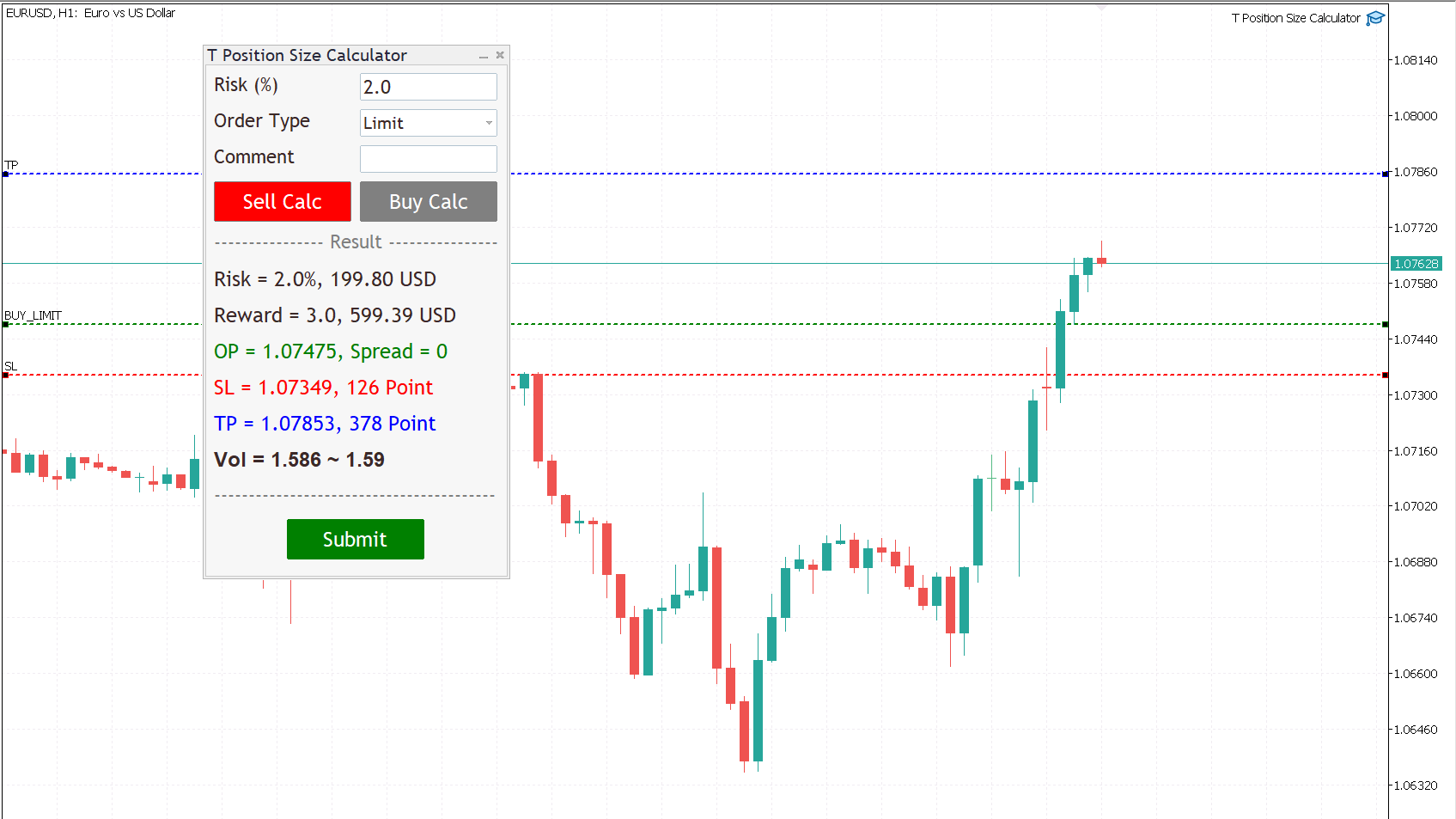
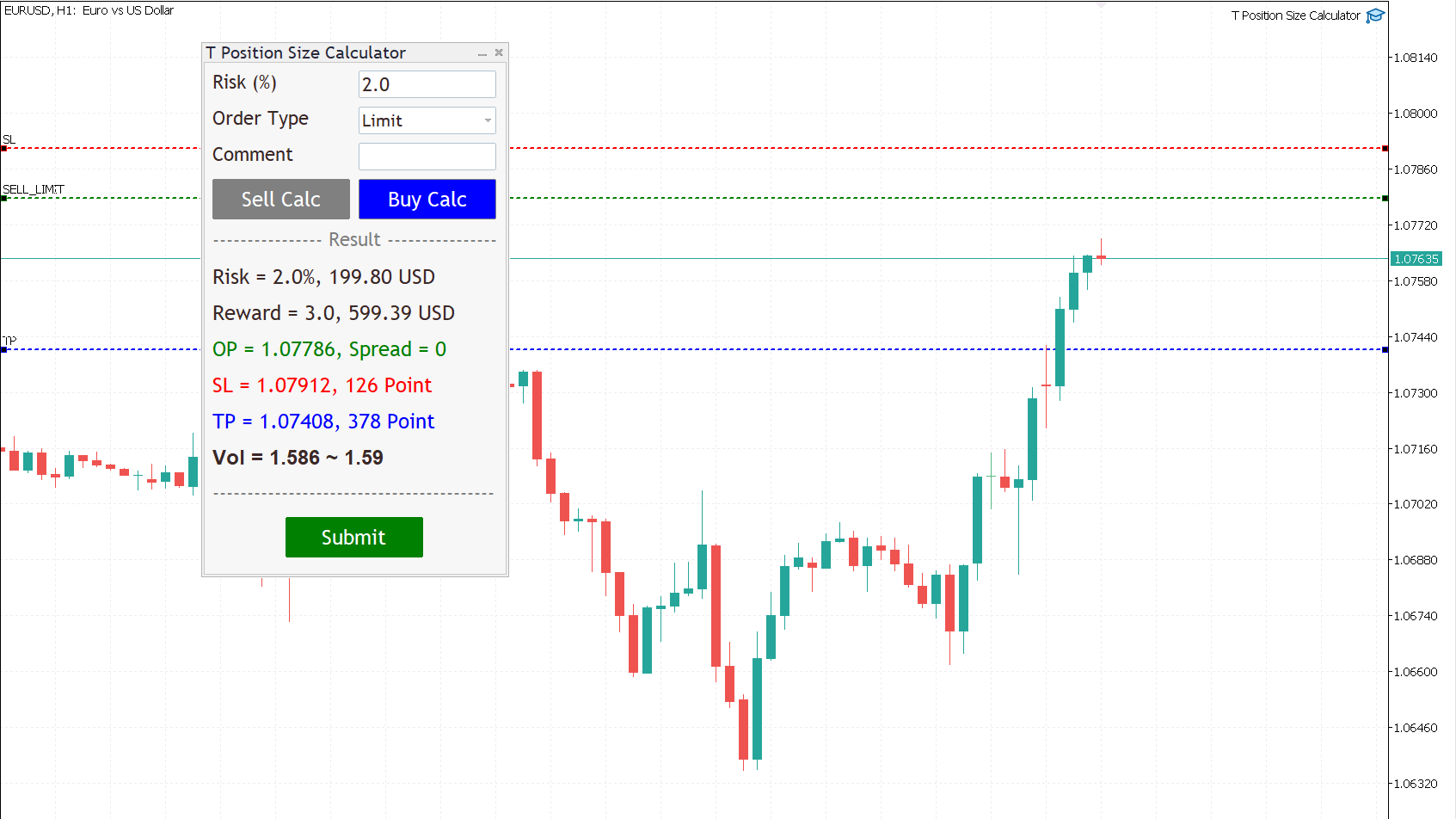
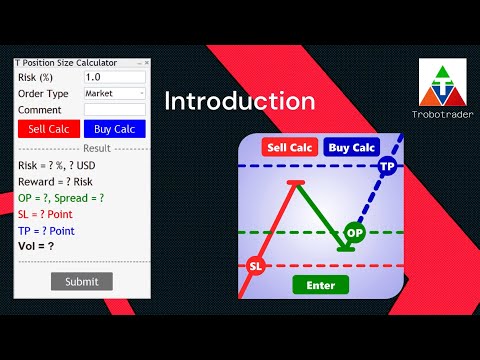
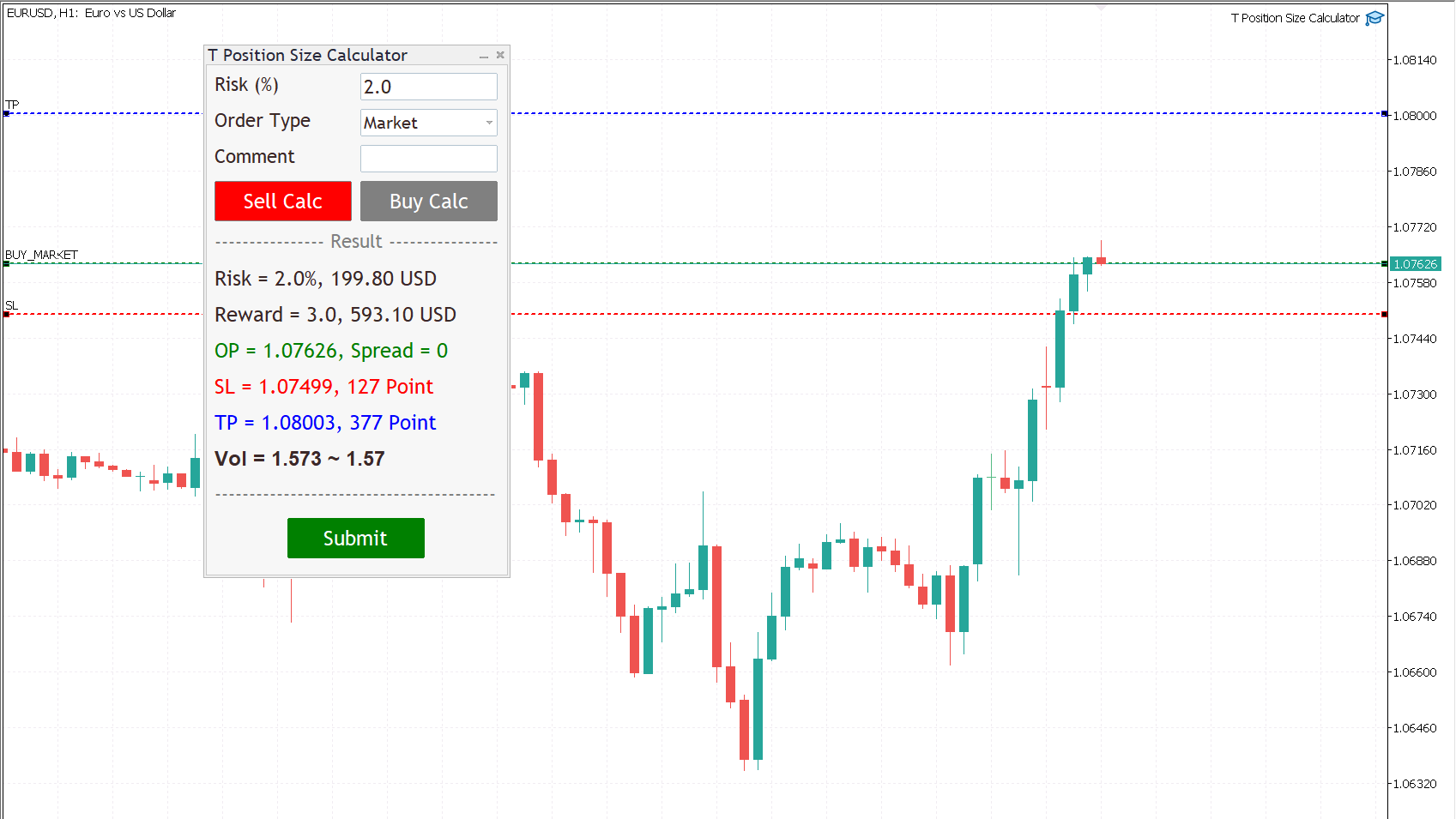
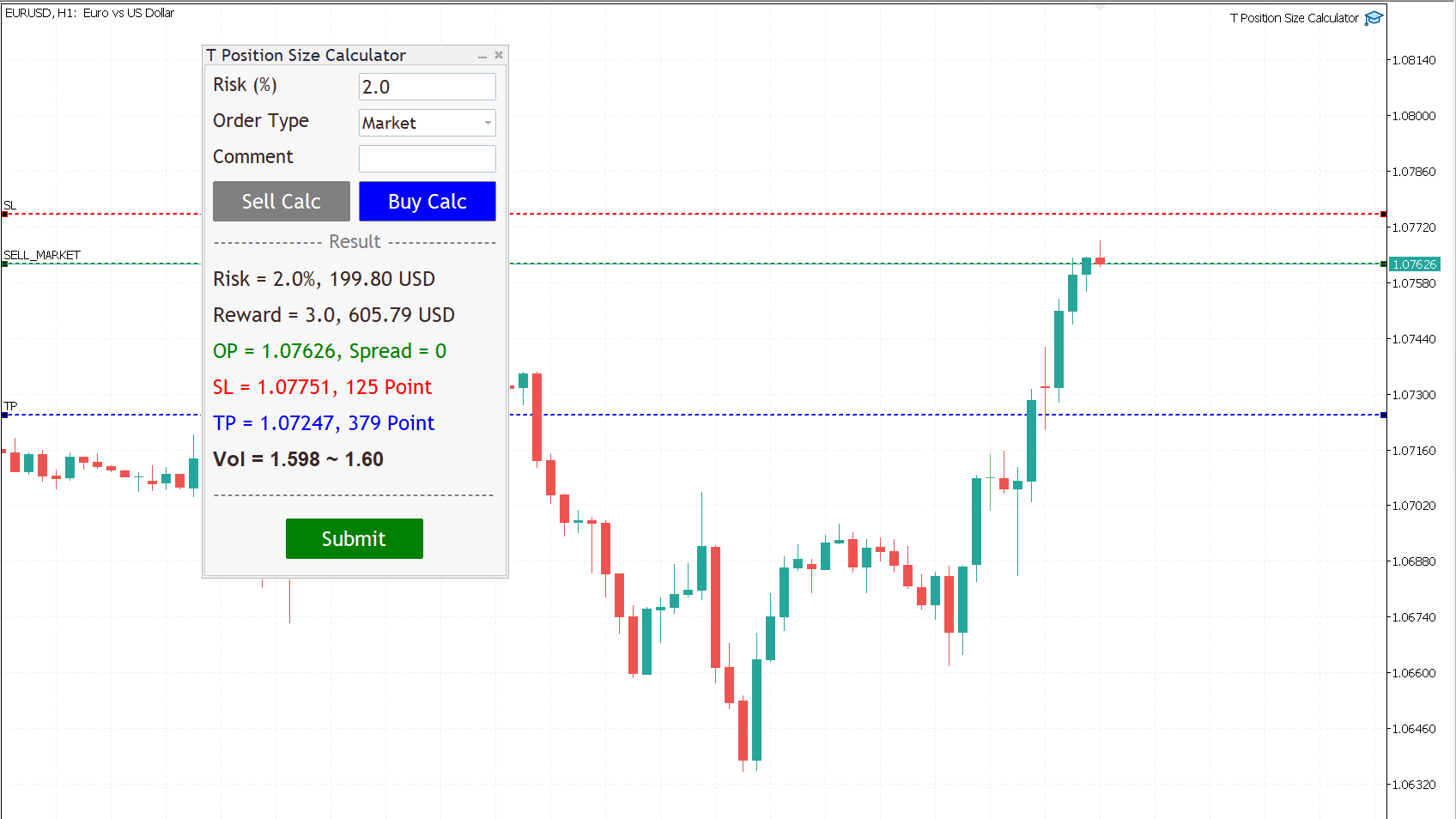
By using T Position Size Calculator you can automatically calculate position size instantly by click on Sell Calc or Buy Calc button then you can drag and drop the lines at your levels for each trading.

You can trade without worrying about calculating incorrectly.

Expands the standard terminal capabilities with this utility.

T Position Size Calculator works on any trading instruments: forex, stocks, indices, cryptocurrency, CFD, Spread Betting and more.


HOW DOES IT WORK?

We need to check two box for working with T Position Size Calculator

  1. Go to menu MT5, Tool => Options => Check on box, Allow algorithmic trading.

  2. Check on the box, Allow algo trading, when attach T Position Size Calculator with Chart.

Follow a few steps in Dialog Panel to submit order to market :

  • Simply enter the percentage you’re risking in Risk % of the box, 2 mean that 2%.

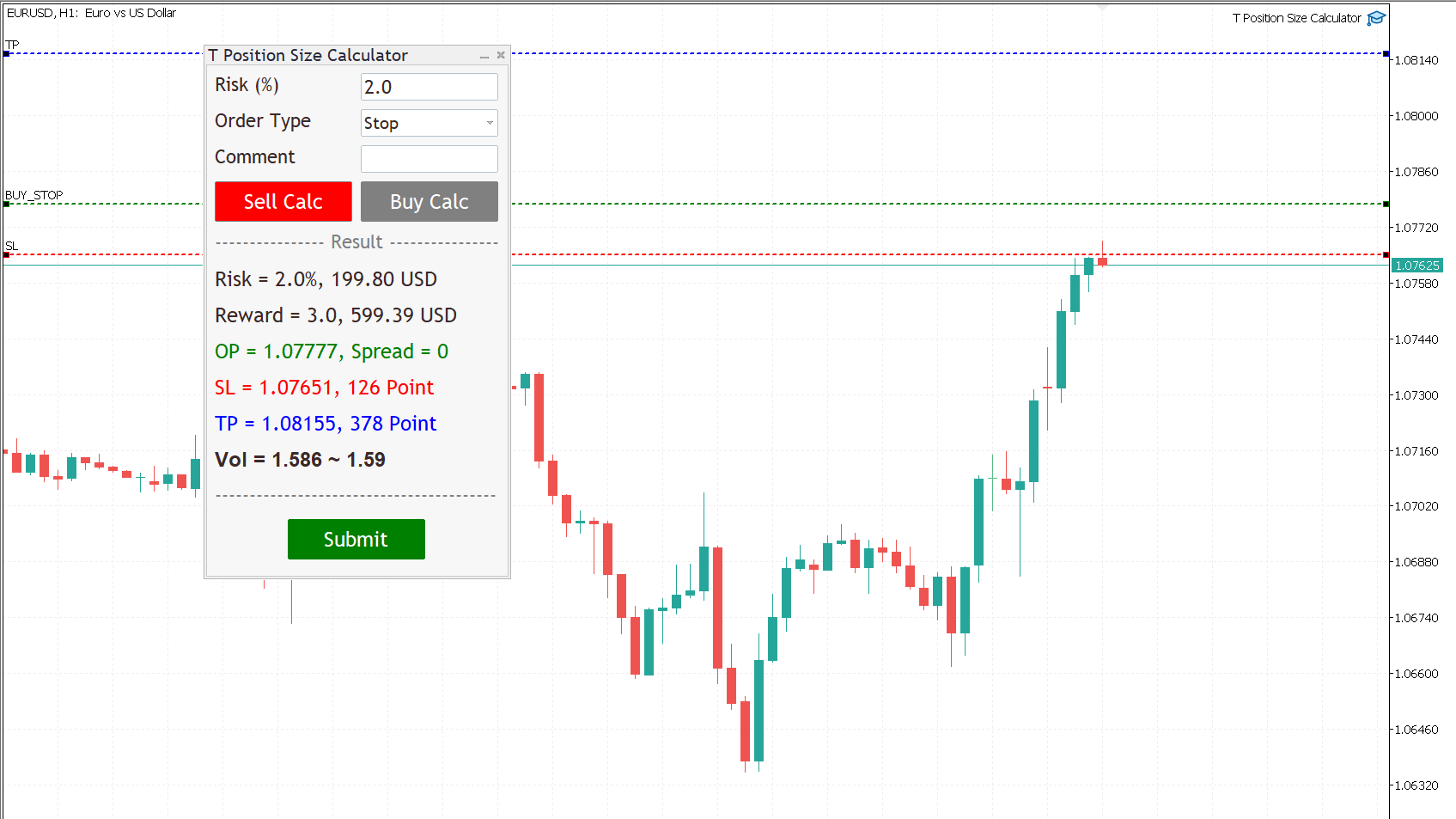
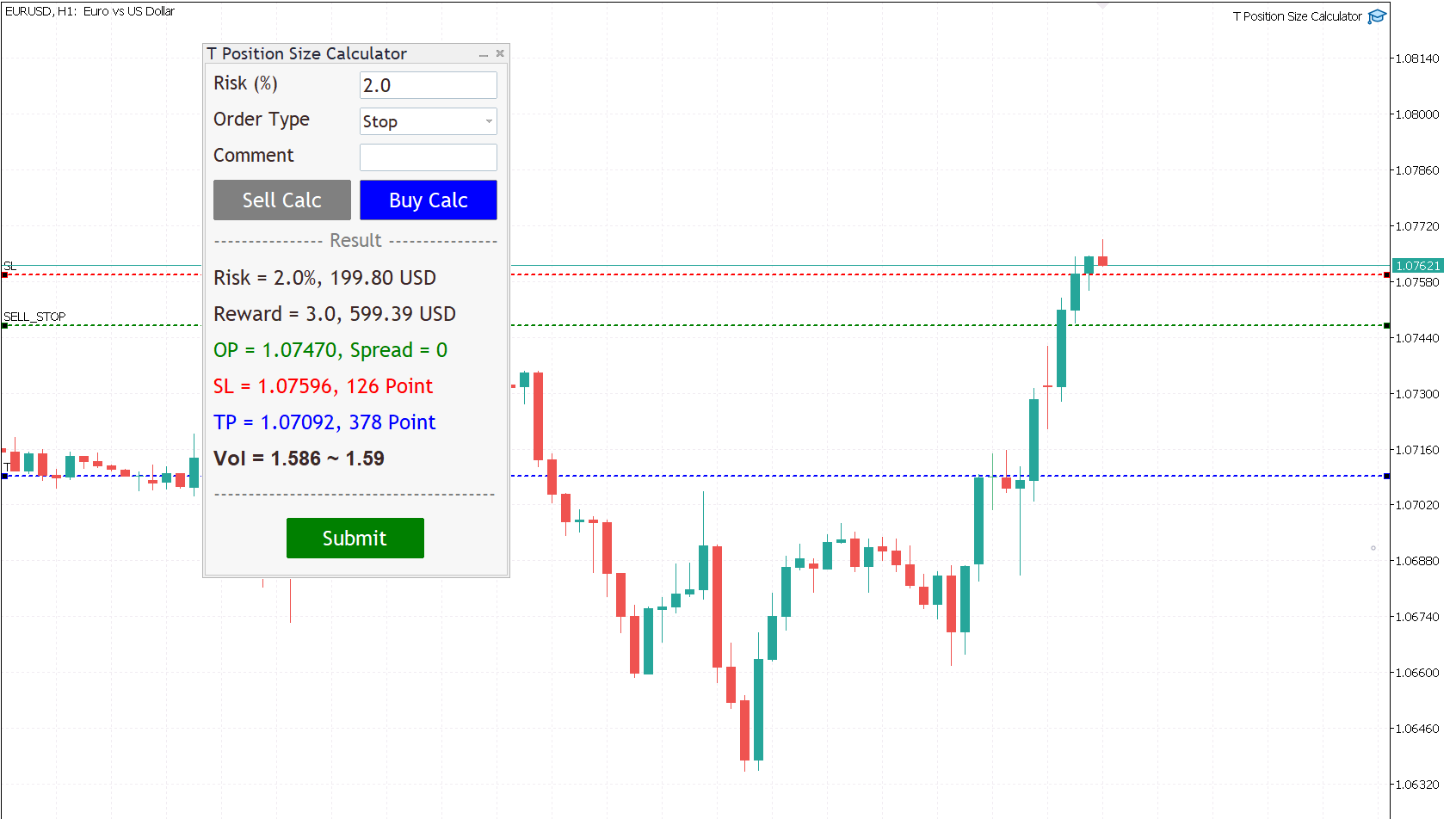
  • Select order type (can be Market, Limit, Stop).

  • Press the “Sell Calc” or “Buy Calc” button.

    This will trigger (show) 3 lines on your current chart. You can drag and drop the lines (Order Line, Stop Line, Profit Line) to determine your risk / reward. 

Then this tool will automatically calculate volume (position size) instantly and result will show in this dialog panel.
  • When you agree, press Submit button to execute the trade (submit your order to market) .

    Note that submitting can be failed so you try press Submit button a gain.

    That’s it! – It even works on future pending orders too!

ADDITIONAL FUNCTION

  1. Dialog Manager

  • Width app : 320, You can change width app by try this option.

  • Toggle minimize : m, When you press M key, dialog will minimize. Press M key gain, dialog will maximize.

  • Risk (%) min : 1.0

  • Risk (%) max : 5.0

    If you input risk(%) is in of range, min and max. The this tool will accept your input then calculate after click on the button.

  1. Trading Lines Manager - Order Line, Stop Line, Profit Line

  • Distance (%), Order and Stop : 5, We set the default value, distance from order price to stop price, is five percent of chart's high.

  • Reward ratio : 3.0, Reward radio is 3 time of the distance.

  • Line width : 2

  • Line color :

  • Line style :

  • Bring to back : true

  • Z-order : 0

    Properties of the lines.

  • Deviation (avoid requotes) : 5, It is important to note that requotes will still occur if the price change is more than the set range of deviation.

Shortcut Key

Below instruction have some functions work with shortcut key to manage your task faster than normal.

Note that you can change or add more value.

    Timeframe Manager
    • Timeframe : H1=1,H4=2,D1=3,W1=4,MN=5

      When you press 1 key then your timeframe chart change to H1, Press 2 change to H4,...

      However you can add more timeframe with the key.

    Chart Manager
      • Goto name : GOTO-DATE, define the name of vertical line for navigate chart.

      • Goto to date (GOTO-DATE) : g

        When you press G key, the chart will navigate to GOTO-DATE

      • Update goto : G

        When you press shift + G key, It will update goto-date position to current screen at first bar (left corner).

      • Goto all open charts : true, Synchronize all charts navigate to GOTO-DATE.

      • Open watch-list : M

        When you press shift + M key, Open all symbols in watch-list, max = 5.

      • Max Symbols in watch-list : 20, Maximum symbols can be opened when press M key.

      Synchronize Chart Manager
      • Synchronize other charts : S,

        When you press shift + S key, It will synchronize all open charts with current chart.

      • Synchronize crosshair : true, Show crosshair (vertical and horizontal lines) in synchronize charts when middle mouse click. If you toggle click, show and hide.

      Template Manager
      • Save current template : T

        When you press shift + T key, Save template's name with the symbol's name both master and slave chart, Path : \MQL5\Files\Templates

        Note that if want to save template by manual, you need to minimize dialog before.

      • Apply current template : t

        When you press shift + t key, Apply the template is saved. If not found it apply with DEFAULT-TEMPLATE

      • Default template :DEFAULT-TEMPLATE

      • Slave chart : true, 

      When you drag symbol on watchlist to drop on the chart then press shift + T key, Save template's name with the symbol's name both master and slave chart.

      When you drag symbol on watchlist to drop on the chart then press shift + t key, it will apply the template is saved to all opened charts. if not found it will apply DEFAULT-TEMPLATE before you must save it.

        Window Manager
          • Hide / Show indicators : i, Press I key, hide / show indicators.

          • Equal height indicators : /, Press / key, set equal height all indicators.

          • Clear fixed height indicators : I, Press shift + I key, remove fixed height indicators.

          • Double click left or right corner chart or indicator window to toggle maximize the window.

          Object Tool Manager
            • Delete all objects : D, Press shift + D key, delete all objects tool on the current chart.

            • Delete recent (stack) object : Z, Press shift + Z key, delete a recent object by order.

            • Synchronize objects properties : true, When change properties current object, It will change all the same object type with changed properties.

            • Toggle LOW TIMEFRAME object visibility : L, Press shift + L key, hide/show all object that you draw in lower than current timeframe.

            • Toggle CURRENT TIMEFRAME object visibility : C, Press shift + C key, hide/show all object that you draw in current timeframe.

            • Toggle HIGH TIMEFRAME object visibility : H, Press shift + H key, hide/show all object that you draw in higher than current timeframe.
            推荐产品
            Episode Health Monitor Episode Health Monitor is a trading utility for MetaTrader 5 designed to analyze the real-time condition of active trading positions directly on the chart. The tool evaluates the current “trading episode” - a group of open positions - and provides a structured view of risk, stability, and distance to potential failure. Instead of relying only on profit/loss or price movement, it helps identify whether the current position is stable, weakening, or approaching a critical st
            Lock Bot
            Artem Alekseev
            This utility is designed to automatically maintain a "locking" position and reopen it when necessary, which is suitable for position maintenance and protection strategies. A simple utility (hereinafter referred to as the bot) that implements a locking strategy with an infinitely reloadable locking trade. How the bot works: - When launched, select a buy or sell order with a specified TP - Set the SL parameter for the locking trade - The bot monitors the distance between the opening price of the f
            Expert TP SL v04 - Professional Trading Assistant with AI Motivation System Advanced manual trading tool with automatic risk management, overtrading protection, and intelligent psychological support for disciplined trading. PRODUCT OVERVIEW Expert TP SL v04 is a comprehensive trading assistant designed for manual traders who want to maintain emotional discipline while automating risk calculations. This isn't just another order placement tool - it's a complete trading psychology system that pr
            Inverted_Chart_EA Utility Expert Advisor Inverted_Chart_EA creates and maintains a mirror-inverted chart of any symbol and timeframe. It automatically generates a custom instrument (e.g. US30_INV ) and keeps its price history updated in real time, with bars mirrored around a chosen pivot. This utility gives traders a new way to analyze the market from a different perspective by flipping the chart upside down. Why use an inverted chart? Highlight hidden patterns – price formations that look ordin

            Bober Real MT5
            Arnold Bobrinskii
            4.88 (16)
            Bober Real MT5 是一个全自动的外汇交易智能交易系统(EA)。该机器人创建于 2014 年 ,在此期间完成了大量盈利交易,在我的个人账户上实现了超过 7000% 的收益增长 。经过多次更新, 2019 年版本 是最稳定、最优秀的。机器人可用于任何交易品种,但在 EURGBP、GBPUSD(M5 周期) 上表现最佳。使用错误的参数会导致较差结果。 真实账户的 set 文件仅提供给购买者。 ️ 主要优势 无马丁格尔、无对冲、无加仓,始终使用 SL/TP 。 高速测试与优化。 可选 Dynamic Take-Profit ,自动适应价格通道高低点。 内置 新闻日历过滤器 ,自动避开重大事件。 自动检测 GMT 偏移 。 针对实盘交易长期优化,结果稳定。 设置后可自动运行,无需干预。 参数说明 Core / Trading type_order — 订单执行类型 (默认 ORDER_FILLING_FOK)。 ReverseTrade — 反转交易方向。 ToolEnter — 入场工具 (RSI 或 None)。 RSI304 / NoRSIbars — RSI 周期与
            Overview Mirror Signals EA is a powerful monitoring Expert Advisor that automatically sends real-time Telegram notifications for all important trade events on your MetaTrader 5 account. It is engineered specifically for signal providers , trade-copier operators , auditors , educators , and professional trading services that require immediate, detailed, and reliable reporting. Everything from entries, exits, SL/TP changes, comment changes, trailing stop activations, pending order modifications
            Manus Pro
            Itumeleng Mohlouwa Kgotso Tladi
            MANUS PRO EA The Trading Revolution You've Been Waiting For Are you TIRED of watching other traders make consistent profits while your account bleeds red?   The financial markets don't wait for anyone – and neither should you. MANUS PRO isn't just another Expert Advisor... it's your   TICKET TO FINANCIAL FREEDOM . Why MANUS PRO is Different (And Why Everyone's Talking About It) FOR BEGINNERS: Your Trading Mentor That Never Sleeps Zero Learning Curve   – Install, activate, and watch it wo
            | Fully-automated Smart Money Concept (ICT) inspired trading solution with multi-strategy capabilities | Built by a grid trader >> for grid traders.  This is MT5 version, click  here  for  Blue CARA MT4  (settings and logics are same in both versions)     Real monitoring signal  -->  Cara Gold Intro Blue CARA EA   ('CARA') - short for  C omprehensive  A lgorithmic   R esponsive   A dvisor is a next-gen  multi-currency    multi-timeframe  EA base on the widely known (and perhaps the most popul
            Universal Trend
            Maryna Shulzhenko
            The Universal Trend indicator was created to detect trends in price movement and allows you to quickly determine not only the direction of the trend, but also understand the levels of interaction between buyers and sellers. The indicator works on all timeframes and currency pairs. The indicator gives fairly accurate signals and it is customary to use it both in trending and flat markets. It is advisable to use the indicator in combination with other tools for more reliable signals and making a
            Exclusive Imperium MT5 — 自动化交易系统 Exclusive Imperium MT5 是一款用于 MetaTrader 5 的智能交易顾问(EA),基于市场分析算法和风险管理。该顾问完全自动运行,几乎不需要交易者的干预。 注意!购买后请立即联系我 ,以获取安装和设置说明! 重要提示: 所有示例、截图和测试仅用于演示目的。如果某个货币对在某个经纪商处表现良好,并不意味着在其他经纪商处也会如此。每个经纪商都有自己的报价、点差和交易条件。因此, 每个货币对必须由用户自行优化 ,并且在真实账户上 只能以单一货币模式运行 —— 每个货币对单独运行。多货币模式的截图仅供参考。建议至少 每年优化一次 ,因为市场条件会发生变化。 重要信息: 顾问的演示版本仅供试用。未经优化的测试结果不能反映算法的真实表现。完整使用需要针对经纪商、资金和所选工具进行个性化优化。无论如何,优化必须由用户自行完成,并且至少 每年重复一次 。 请记住:最终结果直接取决于您的经验以及您在优化后设置的参数。 主要特点 分析算法: 指标与过滤器的组合,用于寻找交易机会。 灵活性: 可适应不断变化的市场条件
            Classic Market Surfer EA - A Timeless, Proven Strategy for Gold Trading For years, this powerful trading strategy has been hidden from the public-reserved for a select few. Now, for the first time, the Classic Market Surfer EA is available to traders like you.   Built on pure, time-tested trading principles, this EA doesn't rely on trendy gimmicks like AI or machine learning. Instead, it harnesses a classic, robust strategy that has consistently delivered results over the years. This is not a "g
            The Gold Buyer
            Moses Aboliwen Aduboa
            Ride the Gold Trend with a Simple Buy-Only EA The  EA is a fully automated Buy-Only Expert Advisor for MetaTrader 5. It is designed to capture upward market opportunities with safe risk management and seamless execution. Why Traders Choose It: Best performance on Gold (XAUUSD) – highly liquid and trending. Buy-Only EA – focuses purely on long positions. Plug & Play setup – attach and let it trade automatically. Built-in Stop Loss & Take Profit protection. Smart one-position contro
            Breakevan Utility
            Jose Luis Thenier Villa
            BreakEvan Utility  Is a simple tool in a panel with this utilities: This utility will draw a Golden Line in the chart applied showing the breakeven price, considering all the positions opened for that specific symbol. Also the information panel shows: Balance Breakeven Price for that chart Force Breakeven (for that symbol) as ON/OFF Force Breakeven Global (takes into account all trades opened) as ON/OFF Total Lots opened for Symbol Total Lots opened Global And two buttons: Force Breakeven: Whe
            Bneu Execution Scaling System
            Marvinson Salavia Caballero
            Bneu Execution and Scaling System — Professional Trading Command Center Premium on-chart command center with 5 dashboard tabs. 28-pair opportunity radar scans every 8 seconds. Dual-gate qualification: indicator engine + AI confidence scoring. One-click execution with auto SL/TP and smart lot sizing. Full autopilot mode with 6 built-in safeguards. Multi-account trade copier (publisher or receiver in one EA). Adaptive Money Management protects every position automatically. WHAT IT DOES Attach
            ProTrade EA
            Jim Ariel Camarce Ignao
            Key Features   Automated Candle Pattern Recognition 10 Professional Patterns : Detects Bullish/Bearish Engulfing, Hammer/Shooting Star, Morning/Evening Star, Piercing/Dark Cloud, and 6 additional professional candlestick patterns Smart Filtering : Combine multiple patterns with configurable confirmation logic Volume Confirmation : Optional volume filter to validate pattern strength Multi-Timeframe Analysis : Separate execution and bias timeframes for better timing   Trading Dashboard Int
            Classic SNR EA MetaTrader 5 智能交易系统 | 多品种支撑阻力交易,基于趋势逻辑 概述 Classic SNR Breakout EA 是一款专业的交易机器人,使用日线摆动点识别结构性支撑与阻力水平(Support & Resistance),并根据 H1 价格行为相对于这些水平的表现执行交易。EA 应用 双重逻辑 :在上涨趋势中,当 H1 收盘于 SNR 水平下方(拒绝信号)时做空;在下跌趋势中,当 H1 收盘于 SNR 水平上方(拒绝信号)时做多。当 H1 收盘价果断突破水平时,也会交易突破信号。 EA 可同时扫描多达 14 个交易品种,自动解析经纪商特定的品种名称和后缀。 本策略适用于理解结构性水平可根据市场环境既充当支撑/阻力又充当突破触发器的交易者。 工作原理 EA 分析日线收盘价,在可配置的回溯期内识别高点和低点。这些摆动点成为结构性的支撑和阻力水平。然后 EA 监控 H1 K线收盘价相对于每个 SNR 水平的表现,并应用 基于趋势的逻辑 来确定交易方向。 核心交易逻辑 EA 并非简单地单向交易突破。相反,它会评估价格位置和 H1 收盘行为: 价格
            RSI Grid MT5
            Joseph Anthony Aya-ay Yutig
            免费获得其他 EA!!!免费获得其他 EA!!!免费获得其他 EA!!!免费获得其他 EA!!!免费获得其他 EA!!! RSI 网格基于 RSI 的超买和超卖情况,并在交易处于市场亏损的一侧时打开一个网格。 RSI 为技术交易者提供有关看涨和看跌价格动能的信号,它通常绘制在资产价格图表下方。当 RSI 高于 70% 时,资产通常被认为是超买,而当 RSI 低于 30% 时,资产通常被认为是超卖。 参数: 时间过滤器 周一 周二 周三 周四 星期五 周六 星期日 开始时间 时间结束 RSI 设置 RSI 周期 超买 超卖 大体时间 金钱管理 自动售货机 最大手数 获利 网格大小 乘数 尾随期权 追踪止损 尾随步骤 轨迹偏移 设置文件 v1.8 英镑兑美元 SET 1 https://youtu.be/a7PfCr1jYXQ https://drive.google.com/file/d/1dP1sZvSQddY_D0meY6vul4Kk78cqoNcU/view?usp=sharing v1.8 英镑兑美元套
            Overview Mirror Signals Service EA (Text only)   is a powerful monitoring Expert Advisor that automatically sends   real-time Telegram notifications   for all important trade events on your MetaTrader 5 account. It is engineered specifically for   signal providers ,   trade-copier operators ,   auditors ,   educators , and   professional trading services   that require immediate, detailed, and reliable reporting. Everything from   entries, exits, SL/TP changes, comment changes, trailing sto
            SolarTrade Suite 金融机器人:LaunchPad 市场专家 - 专为开启交易而设计! 这是一个使用特殊创新和先进算法来计算其价值的交易机器人,是您在金融市场世界中的助手。 使用我们来自 SolarTrade Suite 系列的指标集来更好地选择启动此机器人的时机。 在描述底部查看我们来自 SolarTrade Suite 系列的其他产品。 您想自信地驾驭投资和金融市场的世界吗? SolarTrade Suite 金融机器人:LaunchPad 市场专家是一款创新软件,旨在帮助您做出明智的投资决策并增加您的利润。 SolarTrade Suite 金融机器人的优势:LaunchPad 市场专家: - 准确计算:我们的机器人使用先进的算法和分析方法来准确预测市场走势。 计算购买和出售资产的最佳时机。 - 用户友好界面:直观的界面将使您能够轻松掌握程序并在安装后立即开始享受其好处。 - 专家支持:我们的专业团队随时准备为您解答任何问题,并为您提供有关使用该程序的建议。 立即试用 SolarTrade Suite 金融机器人:LaunchPad Market
            SL TP Manager Utility MT5
            AL MOOSAWI ABDULLAH JAFFER BAQER
            SL-TP Manager Utility for MT5 - Professional Risk Management Tool Advanced Position Protection & Profit Management SL-TP Manager Utility is a powerful, intuitive tool designed for traders who want precise control over their risk management. This utility provides a sleek interface for setting, modifying, and managing your Stop Loss, Take Profit, and Trailing Stop levels with just a few clicks. Key Features: Dual Mode Operation: Set values in pips or absolute price with a simple toggle Independent
            DDKiller Pro
            Njaratahiry Michael Randrianiaina
            Stop Blowing Your Account. Once and For All. DDKiller Pro is the MT5 risk guardian that runs silently on your chart and shuts down trading the moment you hit a limit — whether you're grinding a prop firm challenge or managing your own CFD account. The problem every trader knows: You set your rules. You break them anyway. One revenge trade. One overleveraged position. One session that erases a month of gains. DDKiller Pro removes that decision from your hands entirely. What it does: The second yo
            AI Trade Copier
            Heri Yusufu Kaniugu
            AI Trade Copier – Real time Copy Trading, Prop Firm Hedging & Adaptive Equity Curve Trading AI Trade Copier is a professional Expert Advisor designed to automatically copy trades across multiple accounts while adapting to market conditions and account performance. With advanced AI logic, it supports prop firm hedging ,  adaptive   equity curve trading , exponential growth compounding , and robust account risk management. Price increases by $100 for every 10 purchases, up to $2000. Private Messag
            Gold Smc Apex Scalping h1
            Chaibadee Dechtanankul
            Here is a breakdown of how the GOLD SMC APEX SCALPER (H1 BUY EDITION) operates specifically on the H1 (1-Hour) timeframe. This Expert Advisor (EA) uses a hybrid approach , combining Smart Money Concepts (SMC) for entry zones with a Grid & Martingale system for trade execution and recovery. 1. Execution on the H1 Timeframe (The "New Bar" Rule) Strict H1 Lock: The EA checks its environment during initialization ( OnInit ). If you attach it to any timeframe other than H1, it will trigger an alert a
            TradePilotmt5
            Hossein Khalil Alishir
            TradePilot Expert Advisor (EA) for MetaTrader 5 TradePilot is a professional and user-friendly Expert Advisor (EA) for MetaTrader 5 (MT5) . It simplifies automated trading , risk management , and trade execution with a smart trading panel . Perfect for beginners and experienced traders looking for a reliable trade manager EA with automated lot size calculation and smart position management. Key Advantages User-Friendly Trading Panel: Customizable panel with buttons and hotkeys for fast ex
            Crash 5 EA
            Wayne Ysel
            Crash5 EA ,I s a automatic robot that has the level of professional decision when to take a trade without any emotion. The bot will help in your scalping decision making with its own TP (take profit) and SL (stop loss) with the trail stop when in profit. This is a trend based spike catching ,looking on whats happening in real time charts no repainting of any signals. The robot helps in making decisions on the candle stick pattern opened and closed lat price with the help of RSI ,MACD and the EMA
            CRIFLOW SCALPER PRO  Advanced Trade Management & Smart Scaling System CRIFLOW SCALPER PRO   is an Expert Advisor designed to transform any manual operation into an advanced professional management system, automating scaling, capital protection and profit maximization. It's not just an input EA: is an intelligent order management engine designed for serious traders, scalpers and professionals. ⸻ Smart Trade Detection • Automatically detect manual trades • Intervenes in real time wit
            Sonic R Pro Enhanced
            Huu Thuong Nguyen
            Sonic R Pro Enhanced EA - 2025 版本 $249 仅限前5名购买者! 实时信号 查看 Sonic R Pro Enhanced 的实时表现: 交易策略 Sonic R Pro Enhanced 是经典 Sonic R 策略的升级版,通过 Dragon Band(EMA 34 和 EMA 89)进行自动化交易,并结合先进算法以提高盈利能力。 时间周期:M15, M30 支持货币对:XAUUSD, BTCUSD, AUDJPY, USDJPY 交易风格:回调交易 & 反趋势交易 最低资金要求:500 USD 杠杆比例:1:200 起 用户指南 设置:只需配置一个参数 - RiskAmount 如果 RiskAmount < 0:按账户余额的百分比计算风险 如果 RiskAmount > 0:每笔交易的固定风险金额 (USD) 示例: RiskAmount = -1 : 风险为账户余额的 1% RiskAmount = -2.5 : 风险为账户余额的 2.5% RiskAmount = 50 : 每笔交易固定风险 50 USD RiskAmou
            TradePad
            Ruslan Khasanov
            5 (1)
            TradePad 是一種既可用於手動交易又可用於演算法交易的工具。我們為您提供一個簡單的解決方案,用於快速交易操作和控制多種交易工具的持股。 注意,該應用程式不適用於策略測試器! 模擬帳戶應用程式的試用版和所有工具的描述 應用程式介面適應高解析度顯示器,簡單直覺。為了方便工作,我們為交易者提供了以下工具: 熱鍵管理器,用於管理交易操作、在主圖表的週期之間切換、在 TradePad 工具之間切換; 標記交易等級的工具,用於在開倉或設定掛單時評估虧損風險並計算潛在利潤; MultiCharts 工具用於直觀地監控多個交易符號,以及接收演算法交易的交易訊號。為了方便起見,您可以組織交易對的集合,這將使您有機會在多個時間範圍內監控價格並進行多幣種交易; 用於查看任何歷史時期的交易統計資料的資訊模組,能夠產生擴展的 HTML 報告、查看交易符號的特徵和有關交易帳戶的資訊; 掛單管理器用於管理掛單 - 設定單一或一組(網路)掛單,可按訂單類型和單一符號或交易帳戶上的所有類型進行分組刪除; 設定賣出停損限價和買入停損限價掛單的工具; 頭寸管理器用於管理一個或多個頭寸(取決於帳戶類型) - 全部
            适用于MT5平台的“WPR双均线指标”,无重绘。 - WPR本身就是短线交易的最佳震荡指标之一。 - “WPR双均线指标”允许您查看WPR震荡指标的快慢均线。 - 该指标能够帮助您及早发现价格回调。 - 此指标的参数设置非常简单,适用于任何时间周期。 - 您可以在图片中看到买入和卖出的入场条件。 - 通过 PC 和移动设备接收 WPR MAs 交叉警报。 买入信号示例: (1) - 如果快均线向上穿过慢均线,且WPR值低于-50:开立买单。 (2) - 一旦WPR值进入超买区域,高于-20:平仓。 卖出信号示例: (1) - 如果快均线向下穿过慢均线,且WPR值高于-50:开立卖单。 (2) - 一旦 WPR 值低于 -80 进入超卖区域:平仓卖单。 点击这里查看高质量的交易机器人和指标! 这是仅在 MQL5 网站上提供的原创产品。
            Trading Utility for Forex Currency Pairs Only not for Gold  Functions Auto Lot Calculation based on Risk Auto stoploss  Auto TakeProfit Breakeven Auto Close Half % Close in percentage with respect to the PIPs Pending Orders BuyLimit Sell Limit with distances BuyStop Sell Stop    with distances Trading Informations Risk in percentage For Multiple trades Combine Takeprofit and Combine Stoplosses
            该产品的买家也购买
            Farmed Hedge Yield Farming | All Markets (Manual - Hybrid - Semi/Automated EA) MULTI-ASSET SUPPORT Trade any asset available on your broker - Forex: Major, Minor, Exotic pairs - Crypto: BTC, ETH, XRP, SOL, BNB - Stocks: Apple, Tesla, Amazon, Google, etc. - Commodities: Gold, Silver, Oil, Gas - Indices: US30, NAS100, SPX500, DAX40 - Any CFD your broker offers VERIFIED TRADING RESULTS - Farmed Hedge Yield Axi Copy:  https://www.mql5.com/en/signals/2356376 - Farmed Hedge Yield Exn Copy:   https:/
            YuClusters
            Yury Kulikov
            4.93 (43)
            Attention: You can view the program operation in the free version  YuClusters DEMO .  YuClusters is a professional market analysis system. The trader has unique opportunities to analyze the flow of orders, trade volumes, price movements using various charts, profiles, indicators, and graphical objects. YuClusters operates on data based on Time&Sales or ticks information, depending on what is available in the quotes of a financial instrument. YuClusters allows you to build graphs by combining da
            The product will copy all telegram signal to MT5 ( which you are member) , also it can work as remote copier.  Easy to set up, copy order instant, can work with almost signal formats, image signal,  s upport to translate other language to English Work with all type of channel or group, even channel have "Restrict Saving Content", work with  multi channel, multi MT5 Work as remote copier: with signal have ticket number, it will copy exactly via ticket number. Support to backtest signal. How to s
            HINN Lazy Trader
            ALGOFLOW OÜ
            5 (2)
            The core idea: using the user interface, you configure the parameters the chart must meet before entering a position (or positions), choose which entry models to use, and set the rules for when trading and planning should end. Lazy Trader  handles the rest: it  takes over all the routine chart watching and execution! full description  :: 3 key videos [1] ->  [2]   ->  [3] What can it do? - Understands Larry Williams market structure - Understands swing market structure by Michael Huddleston
            Custom Alerts AIO:多市场智能监控,一键启动,无需设置 概述 Custom Alerts AIO 是一款“开箱即用”的高级市场扫描工具,无需额外安装任何其他指标或进行复杂设置。它内置了 Stein Investments 的所有核心指标(FX Power、FX Volume、FX Dynamic、FX Levels 和 IX Power),可帮助您轻松监控所有主要资产类别,如外汇、黄金、指数和加密货币。如果您的经纪商支持股票,您也可以手动添加个股进行监控。 1. 为什么选择 Custom Alerts AIO? 无需额外购买任何指标 • 所有关键指标均已内置,开箱即用。 • 专注于实时预警,不包含任何图形元素,性能高效,界面简洁。 全面覆盖所有主要市场 • 支持监控外汇、金属、加密货币和指数市场。 • 无需手动输入任何交易品种,只需在设置中勾选资产类别即可启用。 • 股票并不属于默认类别,如有需要可手动通过参数输入添加。 高效、专业、便捷 • 无需图表模板和手动加载,适合自动化或远程交易环境。 • 非常适合 VPS 上长期运行,或作为后台市场预警工具使用。 2
            FUTURES ORDERFLOW FOOTPRINT CHART Professional OrderFlow EA for MetaTrader 5 Version 1.01| Professional tool for real traders | Institutional-Grade Visualization STRATEGY TESTER USERS - PLEASE SELECT EVERY REAL TICK WHEN TESTING AND YOU HAVE DOWNLOADED HISTORICAL DATA. IF YOU SEE A WAITING SCREEN AND IT IS NOT DOWNLOADING, IT MEANS YOU HAVE LOW HISTORICAL DATA. TRY 1 MIN AND 5 MIN FIRST ON 1 DAY DATA. ONE DAY DATA SHOULD BE THE NEWEST AND MOST CURRENT DATE. PLEASE WAIT UNTIL THE MARKET HAS ROL
            PineChart
            Muhammad Minhas Qamar
            Developed by MMQ —  PineChart: Run PineScript Inside MT5 With A Modern Charting Experience An MQL5 Expert Advisor that runs Pine Script indicators and strategies directly inside MetaTrader 5. PineChart includes a full Pine Script interpreter so you can use your existing Pine Script v5/v6 source code without manually rewriting anything in MQL5. Links [  Website  |  Documentation  |  Demo ] NOTE: Downloading demo through MQL5 will give you limited functionality. To experience PineChart fully, dow
            EA Performance Logger Telegram
            Abdulqudus Tomiwa Akande-owoo
            The Performance Logger is a utility for MetaTrader 5 designed to track and report account metrics. It identifies trades based on specific criteria and provides summaries of account activity. Main Functions Automated Reporting : Generates summaries of account performance and sends them to specified communication channels (Telegram or Discord) on a weekly, monthly, or yearly basis. Strategy Analysis : Organizes performance data based on the specific Expert Advisor or strategy used for each trade.
            Gamma Edge Pro MT5 — GexBot Classic API Integration Gamma Edge Pro   brings institutional-grade   Gamma Exposure (GEX) data   directly onto your MetaTrader 5 chart — the same data used by professional options traders to anticipate price magnets, hedging flows, and dealer positioning. Powered by the   GexBot Classic API , this indicator automatically maps options market data from US-listed instruments onto any   MT5 CFD instrument   — Forex pairs, Gold, indices, and more — with intelligent price
            Mt5 To InterativeBrokers Copier allows you to copy deals from MT5 account to Interactive Brokers. With this, you can run your EA strategy on a MT5 Demo/Real Account, then copy all the deals to Interactive Brokers account real time. Features: 1. Copy or Invert-Copy deals Realtime from MT5 to IB Account. 2. Synchronizing positions of both accounts periodicaly, in case any missing copying. 3. You can choose only Buy position or Sell position. Symbols Setup: General Format:  {MT Symbol} -> {IB S
            The product will copy all  Discord  signal   to MT5   ( which you are member  ) , also it can work as remote copier.  Easy to set up. Work with almost signal formats, support to translate other language to English Work with multi channel, multi MT5. Work with Image signal. Copy order instant, auto detect symbol. Work as remote copier: with signal have ticket number, it will copy exactly via ticket number. How to setup and guide: Let read all details about setup and download Discord To MetaTrader
            ManHedger MT5
            Peter Mueller
            4.83 (6)
            THIS EA IS A SEMI-AUTO EA, IT NEEDS USER INPUT. Manual & Test Version Please TEST this product before BUYING  and watch my video about it. The price of the ManHedger will increase to 250$ after 20 copies sold. Contact me for user support or bug reports or if you want the MT4 version! MT4 Version  I do not guarantee any profits or financial success using this EA. With this Expert Advisor, you can: Implement your own Zone Recovery strategy to capitalize on trending markets. Create Grid trading s
            EasyInsight AIO MT5
            Alain Verleyen
            4.92 (12)
            EASY Insight AIO – 全能智能交易一站式解决方案 概述 想象一下,您可以在几秒钟内扫描整个市场——外汇、黄金、加密货币、指数,甚至股票——无需手动筛选图表、繁琐安装或配置指标。 EASY Insight AIO 是您专为 AI 交易打造的即装即用数据导出工具。它将整个市场快照一次性输出为简洁的 CSV 文件,直接支持 ChatGPT、Claude、Gemini、Perplexity 等各类 AI 平台的即时分析。 无需窗口切换,无需图表叠加,也没有任何杂乱。只需纯净、结构化的数据自动导出,让您专注于基于数据的高效决策,无需再盯盘耗时。 为什么选择 EASY Insight AIO? 真正的一体化 • 无需设置,无需安装指标,无图表叠加。只需安装、运行并导出——就是这么简单。 多资产全覆盖 • 扫描分析外汇、金属、加密货币、指数、股票——您的券商所能提供的一切市场。 AI 专属数据导出 • 高度结构化、针对 AI 优化的 CSV 文件,直接适配主流智能工具和平台。 完整导出内容: • 三个可选周期的货币强度分析 • 净多头头寸变化体现市场情绪 • 成交量变化、
            Mentfx Mmanage mt5
            Anton Jere Calmes
            4.25 (8)
            The added video will showcase all functionality, effectiveness, and uses of the trade manager. Drag and Drop Trade Manager. Draw your entry and have the tool calculate the rest. Advanced targeting and close portions of a trade directly available in tool (manage trades while you sleep). Market order or limit order on either side with factored spread. Just draw the entry, the tool does the rest. Hotkey setup to make it simple. Draw where you want to enter, and the stop loss, the tool calculates al

            Unlimited Trade Copier Pro MT5 is a tool to copy trade remotely to multiple MT4, MT5 and cTrader accounts at different computers/locations over internet. This is an ideal solution for you if you are a signal provider and want to copy your trades to other receivers globally on your own rules. One provider can copy trades to multiple receivers and one receiver can get trade from multiple providers as well. The provider can even set the subscription expiry for each receiver, so that receiver will n
            GRat Crypto
            Ivan Titov
            4.5 (2)
            Trade on crypto exchanges in MT5! GRat_Crypto is a tool for manual and automated trading , including ANY available EA, ANY  cryptocurrency  on most popular crypto exchanges in the familiar MT5 environment 24/7. Features 1. ALL instruments of the 9 most popular crypto exchanges are available: Binance, BingX, Bybit, Coinbase, CoinEx, Kraken,   KuCoin, MEXC and OKX . 2. The ability to place ANY type of order available in MT5, both market and pending, to modify orders and positions, to delete order
            FiboPlusWaves MT5
            Sergey Malysh
            5 (1)
            FiboPlusWave Series products Ready-made trading system based on Elliott waves and Fibonacci retracement levels . It is simple and affordable. Display of the marking of Elliott waves (main or alternative option) on the chart. Construction of horizontal levels, support and resistance lines, a channel. Superposition of Fibonacci levels on waves 1, 3, 5, A Alert system (on-screen, E-Mail, Push notifications).    Features: without delving into the Elliott wave theory, you can immediately open one of
            Crystal Trade Manager – Advanced MT5 Risk and Trade Control Utility Overview Crystal Trade Manager (CTM) is a professional MetaTrader 5 utility designed for risk management, trade automation, and instant execution control. It provides traders with an integrated system for protecting equity, managing daily drawdowns, controlling lot sizes, and applying automation features such as automatic SL/TP, break-even, and trailing stop. The tool is suitable for manual traders, prop-firm challenge particip
            System Overview The Golden Remote Trade Copier MT5 is a professional-grade cloud-based system for global signal distribution. It consists of two components: the Master (paid broadcaster) and the Client (free receiver). Together, they synchronize trades across unlimited accounts, brokers, and VPS providers worldwide with millisecond execution accuracy, requiring no local network connection. THE MASTER COMPONENT: WHAT IT DOES This is the core broadcasting component for signal providers who want
            EA price is reduced to 50% discount for limited time period. Spot vs Future Arbitrage EA for MT5 Spot vs Future Arbitrage EA is an automated Expert Advisor designed for MetaTrader 5 that operates using price differences between Gold spot and Gold futures instruments. The strategy opens positions on both instruments simultaneously to take advantage of temporary differences between spot and futures prices. Requirements The trading account must provide both Gold spot and Gold futures instruments
            ENGLISH VERSION TICK CHART SERVICE - Professional Tick Chart Service
            ******************************* ***************** ********************** ***************** ********************** ************************* GoldMine Train 是一款针对黄金的趋势交易策略 EA。 操作员确定主要趋势方向并指示Train前进。 Train 将在该方向连续买入/卖出, 手数取决于账户余额和预设的杠杆比率。 当操作员改变趋势方向时,Train将停止并锁定利润。 用户可以使用图表上的按钮轻松选择趋势方向。 ******************************* ***************** ********************** ***************** ********************** *************************
            Introduction Our system is more than just a tool—it’s your personal guide in the dynamic trading landscape. Expertly developed and optimized using advanced strategies, this groundbreaking predictor gives traders a powerful edge. It’s not just about the features; it’s about a trading journey that stands out from the crowd. Get ready for an enhanced trading experience like never before! What It Does Next Candle Prediction: Imagine gaining insights into the market’s next move before it happens. Our
            Here is the corrected, MQL5-compliant version of your second product description. I have removed the custom bullet point symbols, cleaned up the list formatting to use standard markdown, and organized the setup guide into clean, numbered steps. PropFolio Command Manager Pro is an advanced, multi-symbol execution terminal designed to automate your custom arrow indicators. Simply enter the name of your arrow indicator into the settings, and the Command Manager will monitor up to 30 currency pairs
            SSFx Ultimate Hedge Manager EA 产品描述: SSFx Ultimate Hedge Manager EA 是MT5平台上最先进的交易管理工具。它将 SSFx Hedge Manager EA 的高级交易管理功能与 SSFx Manual Backtester 的全面回测功能相结合,为交易者提供了无与伦比的灵活性和优化交易策略的能力。 此EA采用基于对冲的风险管理方法,为交易者提供了替代止损的动态解决方案。凭借实时交易管理和回测模拟的双重功能, SSFx Ultimate Hedge Manager EA 是精确、高效风险控制的理想伴侣。 主要功能: 无缝回测集成: 在回测环境中测试您的交易策略,同时EA全自动处理交易管理,评估对冲策略的效果,而非依赖传统止损。 自动化交易管理: EA动态监控并管理交易,利用盈利头寸逐步平仓亏损头寸,平衡买入和卖出订单。 盈利优化: 自动分配部分盈利交易的收益来抵消亏损交易,最大限度地减少账户回撤,同时保持整体盈利能力。 动态再平衡: 根据当前市场条件调整交易量和对冲策略,实现持续有效的交易管理。 产品优势: 测试
            Reward Multiplier is a semi-automatic trade manager based on pyramid trading that opens additional orders with the running profit of your trades to maximize return exponentially without increasing the risk. Unlike other similar EAs, this tool shows potential profit/loss and reward to risk ratio before even entering the first trade! Download Demo here  (starting lot is fixed at 0.01) Guide + tips here MT4 version   here You only open the first order. When your trade goes into profit RM opens a ne
            Trading Chaos Expert
            Gennadiy Stanilevych
            5 (11)
            世界上没有本软件的同等产品,它代表一个覆盖交易信号的通用交易 "控制台",自动入场,设置止损和止盈,还有在单一窗口里同时进行多交易尾随终止。EA 的 "三次点击" 直观控制,确保在不同计算机上全方位使用所有功能,包括平板电脑。 与附加的信号指标交互来标记图标,给出实际市场的全貌,EA 令您做出正确的选择,以及在大多数情况下成为胜者一方。内置资金管理算法, 还有自动计算手数, 虚拟订单交易, 以及一些其它从崩溃账户里挽救交易者的 "诀窍"。它不是一个 "黑盒子"。而是一个深思熟虑的交易员的不可或缺的助理, 至少要尝试一次它的动作。 注,在面板上形成的 EA 不能在策略测试员中测试。可以在您的模拟账户里以实时模式检查它, 您可以下载本 EA 的免费版 - 混沌交易 EA 演示 。 EA 表现为一个面板,带有内置功能的交易机器人的,自动基于交易者可直观检查的交易信号入场,完全按照比尔·威廉姆斯的策略“混沌交易:第二版”和“新贸易维度”。在单独的窗口里,EA 识别价格走势的导向,用于指定品种和时间帧的全自动交易模式,也可以多品种并发。 它同时分析 MetaTrader 5“市场观察”窗口中显示
            Features   With MT5 to Interactive Brokers(IB) Trader, you can: 1. Load chart data from IB to MT5, and Analyze with all standard or customer Indicators. 2. Place Orders to IB Account Directly in MT5. 3. Make your Own EAs upon IB Securities by only making minus changes of the trading function. Usage 1) Installation Copy the "Mt5ToIBTraderEn.ex4" and sample files to [MT5 Data Folder]->MQL5->Experts.  2)  MT5 Settings Add the IP Address to the MT5 Allowed URLs in 'Tools->Options->Expert Adviso
            Online Accounts Manager MT5
            Kyra Nickaline Watson-gordon
            5 (1)
            OneClick Online Account Manager is a powerful utility that helps you to manage all your accounts from a centralized panel. It is suitable for all single account traders and specially for multiple accounts traders. The utility help you to : Monitor status of all accounts on a private web page. Some information such as account connection status, account profit, DD, Balance, Equity, Margin Level, Number of positions and orders, Daily and Weekly profit/loss and also overall summation of all these p
            The product will copy all WhatsApp signal to MT5 ( which you are member).  Easy to set up, copy order instant, can work with almost signal formats,  image signal. Work with all type of channel or group, work with  multi channel, multi MT5 Support to translate other language to English How to setup and guide: Let read all details about setup and download WhatsAppCopier apps   here Recommend to all: try install demo version from market to your PC/ VPS because some time you maybe have problem with
            作者的更多信息
            Demo version T Trading Simulator   doesn't work in the strategy tester. The Strategy Tester does not support the processing of ChartEvent. It does not support most of the panel's functionality. Contact me for any questions or ideas for improvement or in case of a bug found. Hi everyone, Trobotrader here. By T Trading Simulator , You can go back to past then analysis and trade with this simulator to develop trading skill. We are going to walk through step-by-step how  you can use T Trading Simul
            筛选:
            无评论
            回复评论