T Trading Simulator

Demo version

T Trading Simulator doesn't work in the strategy tester. The Strategy Tester does not support the processing of ChartEvent. It does not support most of the panel's functionality.

Contact me for any questions or ideas for improvement or in case of a bug found.

Hi everyone, Trobotrader here.

By T Trading Simulator, You can go back to past then analysis and trade with this simulator to develop trading skill.

We are going to walk through step-by-step how  you can use T Trading Simulator.


HOW DOES IT WORK?

Have several parameter that work with this simulator :

  • Back to history = B, When you press shift + B Key, It create custom symbol with suffix .T. then copy next 100 candlestick that set by count bar =100 prepare display.
  • Default speed = 500, When you play history,  It will show next candlestick, timer is speed = 500 millisecond.
  • Maximum speed = 1000, you can increase speed up to 1000 millisecond.
  • Minimize speed = 100, you can decrease speed up to 100 millisecond.
  • Speed interval = 100, step that you increase or decrease speed.
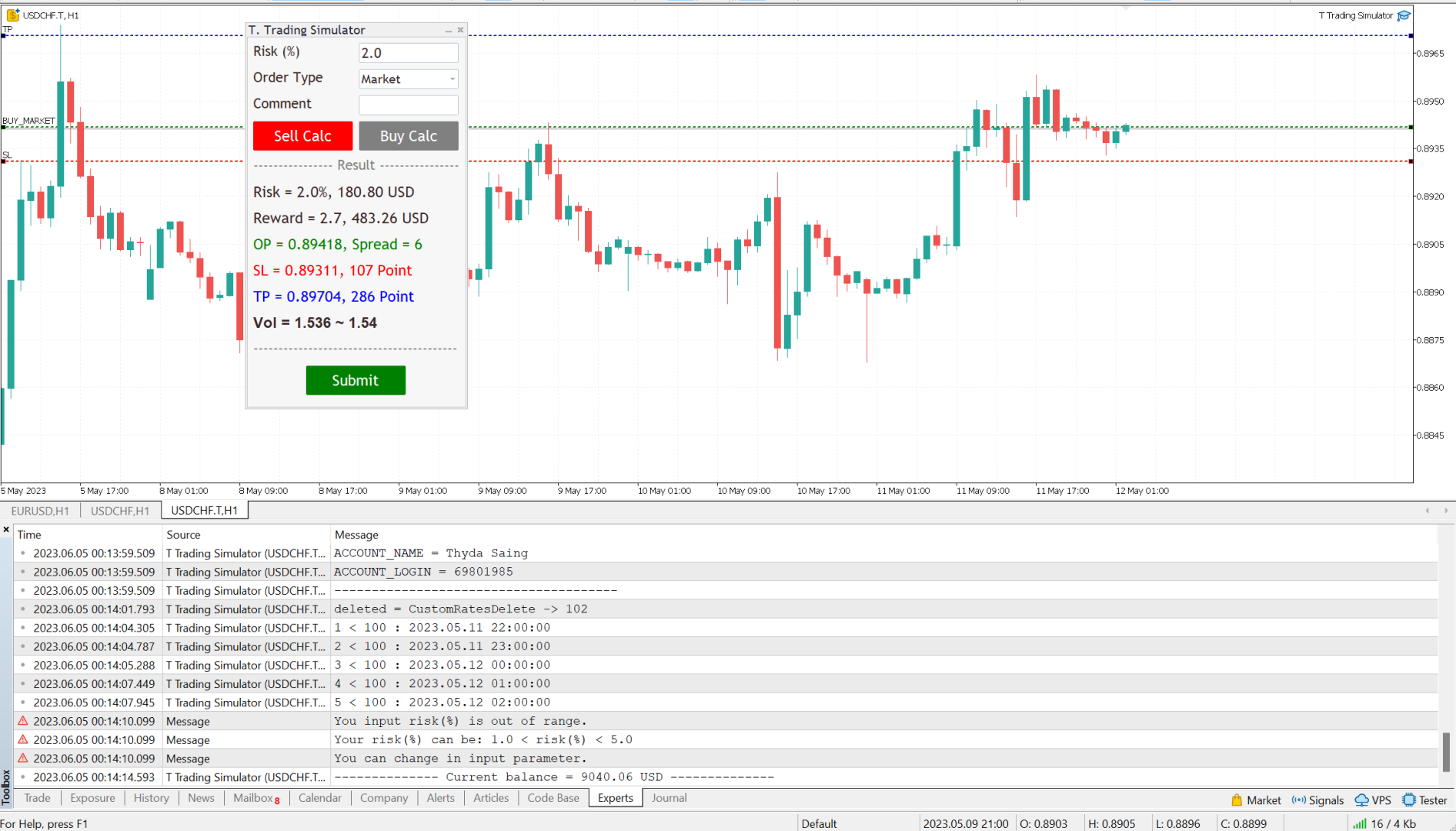
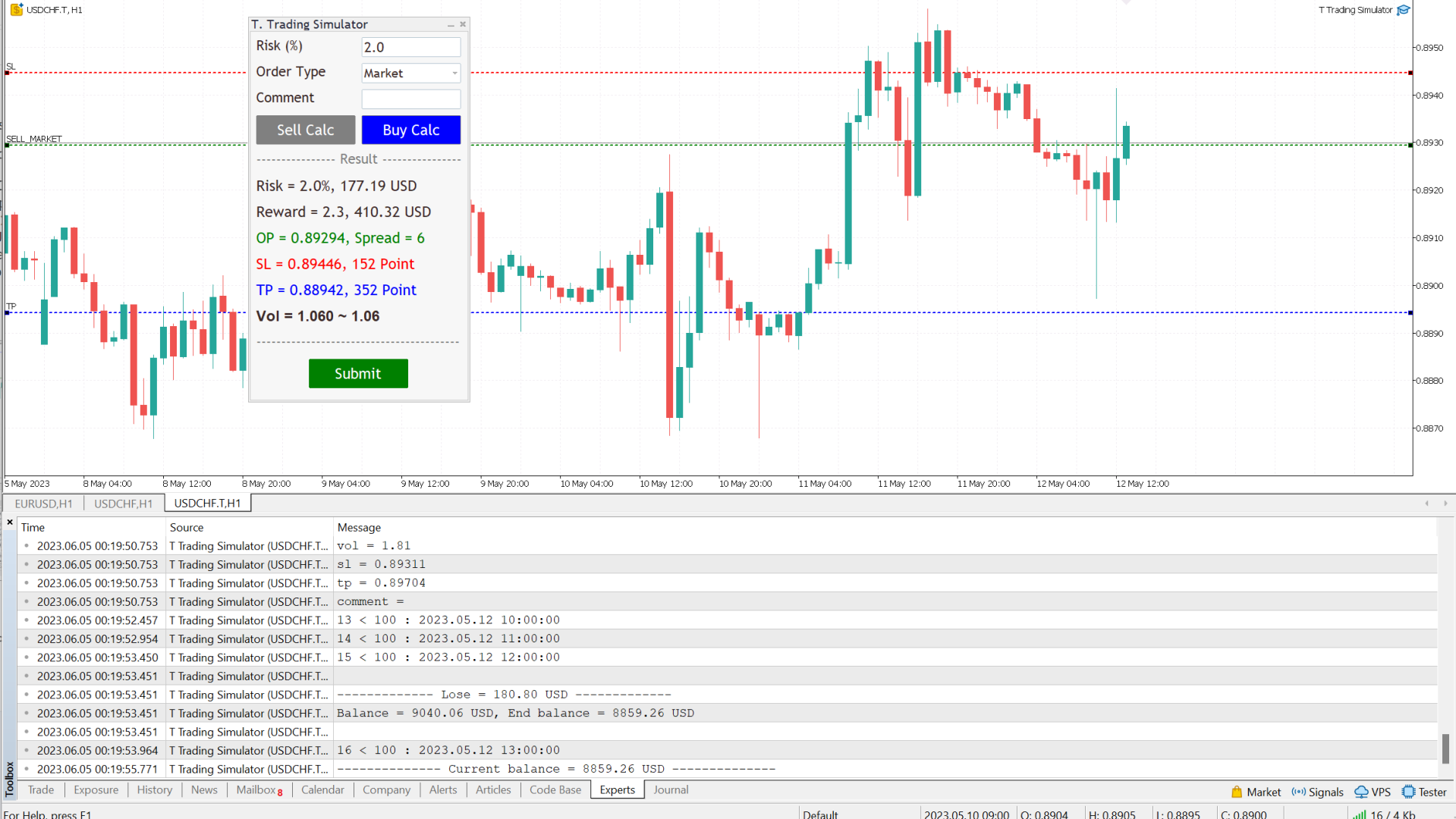
Follow a few steps in Dialog Panel to submit order to market :
  • Simply enter the percentage you’re risking in Risk % of the box, 2 mean that 2%.

  • Select order type (can be Market, Limit, Stop).

  • Press the “Sell Calc” or “Buy Calc” button.

    This will trigger (show) 3 lines on your current chart. You can drag and drop the lines (Order Line, Stop Line, Profit Line) to determine your risk / reward. 

Then this tool will automatically calculate volume (position size) instantly and result will show in this dialog panel.
  • When you agree, press Submit button to execute the trade (submit your order to market) .

    Note that submitting can be failed so you try press Submit button a gain.

    That’s it! – It even works on future pending orders too!

ADDITIONAL FUNCTION

  1. Dialog Manager

  • Width app : 320, You can change width app by try this option.

  • Toggle minimize : m, When you press M key, dialog will minimize. Press M key gain, dialog will maximize.

  • Risk (%) min : 1.0

  • Risk (%) max : 5.0

    If you input risk(%) is in of range, min and max. The this tool will accept your input then calculate after click on the button.

  1. Trading Lines Manager - Order Line, Stop Line, Profit Line

  • Distance (%), Order and Stop : 5, We set the default value, distance from order price to stop price, is five percent of chart's high.

  • Reward ratio : 3.0, Reward radio is 3 time of the distance.

  • Line width : 2

  • Line color :

  • Line style :

  • Bring to back : true

  • Z-order : 0

    Properties of the lines.

  • Deviation (avoid requotes) : 5, It is important to note that requotes will still occur if the price change is more than the set range of deviation.

Shortcut Key

Below instruction have some functions work with shortcut key to manage your task faster than normal.

Note that you can change or add more value.

    Timeframe Manager
    • Timeframe : H1=1,H4=2,D1=3,W1=4,MN=5

      When you press 1 key then your timeframe chart change to H1, Press 2 change to H4,...

      However you can add more timeframe with the key.

    Chart Manager
      • Goto name : GOTO-DATE, define the name of vertical line for navigate chart.

      • Goto to date (GOTO-DATE) : g

        When you press G key, the chart will navigate to GOTO-DATE

      • Update goto : G

        When you press shift + G key, It will update goto-date position to current screen at first bar (left corner).

      • Goto all open charts : true, Synchronize all charts navigate to GOTO-DATE.

      • Open watch-list : M

        When you press shift + M key, Open all symbols in watch-list, max = 20.

      • Max Symbols in watch-list : 20, Maximum symbols can be opened when press M key.

      Synchronize Chart Manager
      • Synchronize other charts : S,

        When you press shift + S key, It will synchronize all open charts with current chart.

      • Synchronize crosshair : true, Show crosshair (vertical and horizontal lines) in synchronize charts when middle mouse click. If you toggle click, show and hide.

      Template Manager
      • Save current template : T

        When you press shift + T key, Save template's name with the symbol's name both master and slave chart, Path : \MQL5\Files\Templates

        Note that if want to save template by manual, you need to minimize dialog before.

      • Apply current template : t

        When you press shift + t key, Apply the template is saved. If not found it apply with DEFAULT-TEMPLATE

      • Default template :DEFAULT-TEMPLATE

      • Slave chart : true, 

      When you drag symbol on watchlist to drop on the chart then press shift + T key, Save template's name with the symbol's name both master and slave chart.

      When you drag symbol on watchlist to drop on the chart then press shift + t key, it will apply the template is saved to all opened charts. if not found it will apply DEFAULT-TEMPLATE before you must save it.

      Window Manager

        • Hide / Show indicators : i, Press I key, hide / show indicators.

        • Equal height indicators : /, Press / key, set equal height all indicators.

        • Clear fixed height indicators : I, Press shift + I key, remove fixed height indicators.

        • Double click left or right corner chart or indicator window to toggle maximize the window.

        Object Tool Manager
          • Delete all objects : D, Press shift + D key, delete all objects tool on the current chart.

          • Delete recent (stack) object : Z, Press shift + Z key, delete a recent object by order.

          • Synchronize objects properties : true, When change properties current object, It will change all the same object type with changed properties.

          • Toggle LOW TIMEFRAME object visibility : L, Press shift + L key, hide/show all object that you draw in lower than current timeframe.

          • Toggle CURRENT TIMEFRAME object visibility : C, Press shift + C key, hide/show all object that you draw in current timeframe.

          • Toggle HIGH TIMEFRAME object visibility : H, Press shift + H key, hide/show all object that you draw in higher than current timeframe.


          추천 제품
          Manus Pro
          Itumeleng Mohlouwa Kgotso Tladi
          MANUS PRO EA The Trading Revolution You've Been Waiting For Are you TIRED of watching other traders make consistent profits while your account bleeds red?   The financial markets don't wait for anyone – and neither should you. MANUS PRO isn't just another Expert Advisor... it's your   TICKET TO FINANCIAL FREEDOM . Why MANUS PRO is Different (And Why Everyone's Talking About It) FOR BEGINNERS: Your Trading Mentor That Never Sleeps Zero Learning Curve   – Install, activate, and watch it wo
          다중 시간 프레임 RSI 지표 직관적인 RSI 지표로 다중 시간 프레임 분석의 힘을 발휘하십시오! 단일 차트에서 다양한 시간 프레임에 걸쳐 시장 모멘텀에 대한 포괄적인 관점을 얻으십시오. 당사의 다중 시간 프레임 RSI 지표를 사용하면 5개의 사용자 지정 가능한 시간 프레임에서 일관된 기간으로 상대 강도 지수(RSI)를 추적하여 보다 정보에 입각한 거래 결정을 내릴 수 있습니다. 주요 특징: 동시 다중 시간 프레임 보기: 단일 차트에서 최대 5개의 다른 시간 프레임에 대한 RSI를 동시에 모니터링하여 창 전환의 필요성을 없앱니다. 사용자 지정 가능한 시간 프레임: M1에서 MN까지 거래 전략에 맞게 선호하는 시간 프레임을 정의합니다. 통합 RSI 기간: 직접 비교를 위해 선택한 모든 시간 프레임에서 일관된 RSI 계산 기간을 유지합니다. 명확한 시각적 표현: 여러 시장 주기에서 과매수/과매도 조건 및 모멘텀 변화를 쉽게 식별합니다. 향상된 의사 결정: 시간 프레임 간의 발산 및 수렴
          수입과 연구를 위한 도구. 거래 신호 및 전략의 핵심은 가격 예측 패턴의 형성을 위한 저자의 알고리즘을 기반으로 합니다. 모든 악기에 적용 가능! MA "Nine-Tailed Fox" 에 기반한 제어 시스템으로 보완되어 시장, 장비 및 작업 기간에 대해 가능한 한 정확하게 신호를 업데이트 및 조정합니다. 적격: 모든 시장의 모든 상품(예외 있음). 대상: 헤지 펀드, 펀드 및 자산 관리자, 투자 관리자, 투기꾼, 투자자 및 이해 관계자. .............................................................................................................................................
          Simple program i created, to help close all your orders instantly when you are busy scalping the market or if you want to avoid news days but still have a lot of orders and pending orders open and can't close them in time.. with this script all you're problems will be solved. Simple drag and drop and the script automatically does it's thing, quick and easy  also a very good tool to use when scalping
          FREE
          Algo Pumping
          Ihor Otkydach
          4.75 (20)
          PUMPING STATION – 당신만을 위한 올인원(All-in-One) 전략 PUMPING STATION은 당신의 외환 거래를 더욱 흥미롭고 효과적으로 바꿔줄 혁신적인 인디케이터입니다. 단순한 보조 도구가 아니라, 강력한 알고리즘을 갖춘 완전한 거래 시스템으로서 보다 안정적인 트레이딩을 시작할 수 있도록 도와줍니다. 이 제품을 구매하시면 다음의 혜택을 무료로 받으실 수 있습니다: 전용 설정 파일: 자동 설정으로 최대의 퍼포먼스를 제공합니다. 단계별 동영상 가이드: PUMPING STATION 전략으로 거래하는 법을 배워보세요. Pumping Utility: PUMPING STATION과 함께 사용하도록 설계된 반자동 거래 봇으로, 거래를 더욱 쉽고 편리하게 만들어줍니다. ※ 구매 후 바로 저에게 메시지를 보내주세요. 추가 자료에 대한 접근 권한을 제공해드립니다. PUMPING STATION은 어떻게 작동하나요? 트렌드 컨트롤: 시장의 추세 방향을 즉시 파악합니다. 추세는 최고의
          Based on the trading model/strategy/system of gold double-position hedging and arbitrage launched by Goodtrade Brokers, problems encountered in daily operations: 1. Account B immediately places an order immediately following account A. 2: After account A places an order, account B will automatically copy the stop loss and take profit. 3: Account A closes the position of Account B and closes the position at the same time. 4: When account B closes the position, account A also closes the position.
          Arbitrage365
          Themichl LLC
          3 (1)
          The Arbitrage365 EA is a basic script for MetaTrader that implements a triangular arbitrage strategy. It identifies and exploits price discrepancies between EURUSD, GBPUSD, and EURGBP to profit from temporary market mispricing. This EA capitalizes on the law of one price by simultaneously buying and selling currency pairs. Its advantages include speed, accuracy, scalability, consistency, cost-effectiveness, contribution to market liquidity, and portfolio diversification. However, it's a basic E
          FREE
          Statistical Arbitrage Spread Generator for Cointegration [MT5] What is Pair Trading? Pair trading is a market-neutral strategy that looks to exploit the relative price movement between two correlated assets — instead of betting on the direction of the market. The idea? When two assets that usually move together diverge beyond a statistically significant threshold, one is likely mispriced. You sell the expensive one, buy the cheap one , and profit when they converge again. It’s a statistica
          FREE
          PREngulfing
          Slobodan Manovski
          PR EA - Engulfing Pattern Trading System Automated Engulfing Pattern Detection with MA Confirmation The PR EA is a Meta Trader 5 expert advisor that identifies and trades bullish/bearish engulfing candlestick patterns when confirmed by a moving average filter. Designed for swing trading on 30-minute charts with compatibility for M15 and H1 time frames. Key Features: Pattern Recognition - Detects valid bullish/bearish engulfing candle formations Trend Confirmation - 238-period SMA filter
          이 필터는 베셀 다항식을 기반으로 합니다. 주요 장점은 시간 지연이 적다는 것입니다. 이 필터의 또 다른 기능은 금융 시계열의 최신 값에 대한 높은 민감도입니다. 이 때문에 지표는 활성 가격 변동을 강조하는 동시에 노이즈 편차를 완화합니다. 고전적인 변형 외에도 Bessel 계수의 로그가 가중치 함수로 지표에 추가되었습니다. 이 경우 지표가 더 매끄럽게 나타나지만 동시에 가격이 활발하게 움직일 때 지연될 수 있습니다. 베셀 다항식을 계산할 때 계승이 사용됩니다. 이러한 이유로 지표의 기간은 아래에서 위로 제한됩니다. 일반 베셀 필터를 사용할 때는 지표의 작은 주기에 주의하는 것이 좋습니다. 기간이 증가함에 따라 표시기의 동작이 점점 더 안정되고 그 차이가 점점 더 눈에 띄지 않게 되기 때문입니다. 그림은 두 필터 유형의 동작을 보여줍니다. 표시 매개변수: TypeFilter - 일반/대수 필터 유형 선택 iPeriod - 표시 기간, 유효한 값 3 - 85.
          Phoenix Plus
          Dang Cong Duong
          At first, I got my teeth into  Phoenix  Ultra   Expert Advisor. This   Expert Advisor  will support automatic close order if the direction is correct and perform recovery if the direction is wrong. If you enter an order: 1. The price goes in the right direction and hits the   Min Profit Point ,   trailing stop 20% of the current profit. 2. The price goes in the opposite direction, the Expert Advisor will place the order with the volume is   Recovery Volume Percent  at the input, the distance to
          표시기는 현재 시세를 작성하여 과거 시세와 비교할 수 있으며 이를 바탕으로 가격 변동을 예측합니다. 표시기에는 원하는 날짜로 빠르게 이동할 수 있는 텍스트 필드가 있습니다. 옵션: 기호 - 표시기가 표시할 기호 선택. SymbolPeriod - 지표가 데이터를 가져올 기간 선택. IndicatorColor - 표시기 색상. HorisontalShift - 지시자가 그린 따옴표를 지정된 막대 수만큼 이동합니다. Inverse - true는 인용 부호를 반대로, false - 원래 보기를 반전합니다. ChartVerticalShiftStep - 차트를 수직으로 이동합니다(키보드의 위/아래 화살표). 다음은 날짜를 입력할 수 있는 텍스트 필드의 설정으로, '엔터'를 누르면 즉시 이동할 수 있습니다.
          Advisor for hedging trading or pair trading. A convenient panel allows you to open positions on the necessary trading instruments and lots. Automatically determines the type of trading account - netting or hedging. Advisor can close all its positions upon reaching profit or loss (determined in the settings). A negative value is required to control losses (for example, -100, -500, etc.). If the corresponding fields are 0, the EA will not use this function.   Settings: Close profit (if 0 here
          MT4 버전: https://www.mql5.com/en/market/product/128965 MT5 버전: https://www.mql5.com/en/market/product/128966 "One Shot One Kill" - 금(XAU/USD)에 대한 정밀 거래 안전하고 수익성 있는 거래 전략으로 금 시장을 마스터하세요 "One Shot One Kill"은 금(XAU/USD) 거래에 특별히 최적화된 전문가 수준의 전문가 자문(EA)이며 주요 외환 쌍을 거래할 수 있을 만큼 다재다능합니다. 이 EA는 모든 주문에 엄격한 이익 실현(TP) 및 손절매(SL) 위험 관리 시스템을 사용하여 엄격한 접근 방식을 따르므로 거래의 안전성과 일관성이 보장됩니다. 마팅게일, 그리드 또는 평균에 의존하는 위험한 전략과 달리 "One Shot One Kill"은 미리 정의된 위험 및 보상 수준으로 고정밀 거래를 실행합니다. 금의 변동성에서 이익을 얻고자 하는 동시에 엄격한 위험 관리를
          Gold EA: Proven Power for 1-Minute Gold Trading Transform your trading with our Gold EA, meticulously crafted for 1-minute charts and delivering over 2000% growth in 5 years from just $100-$1000 . No Martingale, No AI Gimmicks : Pure, time-tested strategies with robust money management, stop loss, and take profit for reliable performance across multiple charts. Flexible Trading Modes : Choose Fixed Balance for safe profits, Mark IV for bold growth, or %Balance for high rewards—combine Mark IV an
          MSD Utility MT5
          Kevin Beltran Keena
          Multi Strategy Dashboard Utility MT5        Some functions of the MSD Utility can only be used on the full version. Multi instrument and multi time frame scanner, with the best indicators.  Comes with an order management panel. The MSD Utility can be used for manual trading. Click on the '?' button on the dashboard to obtain information about the various elements of the MSD Utility. Uses ATR Take Profits, ATR Stop Losses and ATR Trailing Stops. Comes with an FX Currency Strength meter and a Mar
          ET9 for MT5
          Hui Qiu
          3 (4)
          ET9 New on the Market, Launch promo! Only a few copies left at: $699 Next price: $799 Final price: $1599 The Best Expert Advisor  on   XAUUSD   any timeframes! ET9  for MT5 Updated v4.80 !!      Important update:  Merge Dragon Ball's H4 breakout strategy, Optimize parameters ,     Add MaxStopLoss and MaxTakeProfit parameters Include Free ET1 for MT5:  https://www.mql5.com/en/market/product/113131 Dragon Ball MT5 Updated v1.80 !!  https://www.mql5.com/en/market/product/116514 Descriptions ET9
          Gioteen Volatility Index (GVI) - your ultimate solution to overcoming market unpredictability and maximizing trading opportunities. This revolutionary indicator helps you in lowering your losing trades due to choppy market movements. The GVI is designed to measure market volatility, providing you with valuable insights to identify the most favorable trading prospects. Its intuitive interface consists of a dynamic red line representing the volatility index, accompanied by blue line that indicate
          Aureus Quantum Surge-H1의 금 자동 거래 잠재력 확보 특별 할인: 현재 가격 $799 (한정 할인)!다음 가격: 899달러 실제 계정 신호 주소: https://www.mql5.com/en/signals/2297864?source=Site+ 소개 + 판매자 Aureus Quantum Surge-H1은 H1 타임프레임 내에서 XAUUSD(금)를 거래하도록 설계된 첨단 전문가 컨설턴트(EA)입니다.다양한 기술 지표와 안정적인 위험 관리 전략을 결합하여 불안정한 금 시장에서 지속적인 성과를 제공합니다. EA 정보: Aureus Quantum Surge-H1은 2003년부터 2018년까지 4~6개의 최적화 단계의 점진적 순방향 최적화 방법을 사용하여 엄격하게 개발되고 최적화되었습니다.이 방법은 뛰어난 노봉성을 확보하고 과도한 최적화를 피하며 실제 거래 환경에서 매우 신뢰할 수 있도록 한다.또한 2020 년까지 EA는 실시간으로 사용되어 왔으며 테스트 결과
          The Goat Scalper
          Giordan Cogotti
          The Goat Scalper EA — Smart, Fast, and Built for Real Market Performance Overview The Goat Scalper EA is a next-generation trading system built to capture decisive market moves with surgical precision. Unlike typical scalpers that rely on risky methods such as martingale, grid, hedging, or arbitrage, The Goat uses a pure breakout logic based on advanced supply and demand zone detection, ensuring stable and transparent results in any condition. Core Strengths Smart Risk Management Stop Loss on
          Magic EA MT5
          Kyra Nickaline Watson-gordon
          Magic EA is an Expert Advisor based on Scalping, Elliot Waves and with filters such as RSI, Stochastic and 3 other strategies managed and decided with the robot smartly. Large number of inputs and settings are tested and optimized and embedded in the program thus inputs are limited and very simple. Using EA doesn't need any professional information or Forex Trading Knowledge. EA can trade on all symbols and all time frames, using special and unique strategies developed by the author. The EA w
          Free automatic Fibonacci is an indicator that automatically plots a Fibonacci retracement based on the number of bars you select on the BarsToScan setting in the indicator. The Fibonacci is automatically updated in real time as new highest and lowest values appears amongst the selected bars. You can select which level values to be displayed in the indicator settings. You can also select the color of the levels thus enabling the trader to be able to attach the indicator several times with differe
          FREE
          Trend Catcher EA Pro MT5
          Issam Kassas
          4.88 (17)
          Trend Catcher EA Pro — 가장 사랑받는 지표 Trend Catcher 를 기반으로, 많은 요청 끝에 마침내 Trend Catcher EA 가 출시되었습니다. 알고리즘 기반 자동매매와 트레이더의 직접 수동 제어를 결합한 차세대 EA. 시장에 대한 완전한 주도권 을 제공합니다. 빠르고, 적응력이 뛰어나며 명확성, 성능, 선택의 자유 를 중요시하는 트레이더를 위해 설계되었습니다. EURUSD 에 대해 실틱(99.9%) 데이터로 최적화 및 검증되었으며, 재도색 없음 / 재계산 없음 / 지연 없음 으로 안정적인 매매를 제공합니다. [사용 설명서, 추천 설정] 및 [테스트된 프리셋] 링크를 확인하세요. 핵심 전략 구성: EA 내부에는 두 가지 거래 모드가 포함되어 있습니다: I. Smart Trend Mode – 한 방향으로만 거래하여 트렌드 모멘텀을 깔끔하고 구조적인 진입으로 따라갑니다. 낮은 리스크, 높은 정확도, 무헤지. II. Dynamic Dual Mode (공격형)
          FREE
          ️   Ex-Calibur   EA is Professional Trading Robot with Inside Bar Strategy.   Key Features:   Powerful Inside Bar Strategy - Automatic Inside Bar pattern detection for precise entry points - Colored indicator box visualization for easier analysis - Automated entry system with pending orders to capture breakouts   Advanced Risk Management - Flexible Trailing Stop system to secure profits - Automatic Break Even to protect capital - Adaptive Stop Loss and Take Profit based on market vol
          The utility is designed to display on the chart the margin zones built on the basis of margin requirements for futures of the Chicago Mercantile exchange (CME). These margin zones are good levels of resistance and support, as seen in the screenshots. How to use To trade on margin zones, use the following rules: buy after the day has closed above one of the zones to the next zone; sell after the day has closed below one of the zones to the next zone; after opening a sell trade, place limit sell
          Imagine flying a real aircraft without ever stepping into a flight simulator. That's what trading is like. You have to simulate your strategy before you can take it to a live market. It is good if you can simulate things speedily before even stepping into any live market, or before coming up with an automated system.  People don't have all day to stare at a higher timeframe chart until the entry signal finally arrives. That's why I built this so that you can simulate your strategy with speed. Th
          FREE
          - وصف المنتج - مؤشر احترافي متكامل لا يعد KING Fusion MACD-Vol من KING TRADING EA مجرد MACD آخر — فهو عبارة عن مجموعة أدوات تداول كاملة تجمع بين مؤشرات احترافية متعددة في نافذة فرعية واحدة أنيقة. لم تعد بحاجة إلى تحميل مخططك بأدوات منفصلة. يجمع هذا المؤشر بين: MACD مع خطوط مزدوجة ورسم بياني مكبر رسم بياني ملون ومثبت بالحجم ملصقات ديناميكية مع قيم المؤشرات في الوقت الفعلي (ATR، ADX، RSI، Volume) عداد تنازلي للبار التنبيهات المتقاطعة (مرئية + صوتية) كل ما تحتاجه من الوضوح والسرعة والدقة -
          FREE
          GoldCruiseAI
          Alexander Matthew Arcay-cachia
          GoldCruiseAI – Premium AI-Enhanced Gold Trading Expert Advisor (MT5) PROFESSIONAL XAUUSD AUTOMATION – BUILT FOR CONSISTENCY & CAPITAL PRESERVATION GoldCruiseAI is a professional-grade Expert Advisor designed exclusively for XAUUSD (Gold) trading on MetaTrader 5 . The system is engineered around low-frequency, high-confidence trading , prioritising capital protection, drawdown control, and long-term consistency rather than aggressive trade volume. GoldCruiseAI has been validated using multi-y
          SMT Divergences MT5
          Diego Arribas Lopez
          MT4 Version SMT Divergences MT5 SMT Divergences is one of the most innovative indicators in the market. It offers the possibility of analyzing price divergences between 2 pairs. These divergences highlight and help to foresee what banks and institutions are planning to do. SMT divergences also provides you with a kill zones indicator and the possibility of filtering divergences occurring during these kill zones.  This indicator is specially powerful if applied in 2 highly correlated pairs. A pri
          이 제품의 구매자들이 또한 구매함
          Ultimate Extractor
          Clifton Creath
          5 (7)
          Ultimate Extractor - Professional Trading Analytics for MT5 Ultimate Extractor transforms your MetaTrader 5 trading history into actionable insights with comprehensive analytics, interactive charts, and real-time performance tracking. What It Does  Phase 1: Automatically analyzes your MT5 trading history across all Expert Advisors and generates detailed HTML reports with interactive visualizations. Tracks live performance metrics including open positions, floating P/L, and drawdown in real-time.
          YuClusters
          Yury Kulikov
          4.93 (42)
          Attention: You can view the program operation in the free version  YuClusters DEMO .  YuClusters is a professional market analysis system. The trader has unique opportunities to analyze the flow of orders, trade volumes, price movements using various charts, profiles, indicators, and graphical objects. YuClusters operates on data based on Time&Sales or ticks information, depending on what is available in the quotes of a financial instrument. YuClusters allows you to build graphs by combining da
          Crypto Charting
          Rajesh Kumar Nait
          5 (5)
          Crypto Charting for MT5 – MetaTrader 5용 암호화폐 차트 통합 도구 개요 Crypto Charting for MT5는 WebSocket을 통해 실시간 OHLC 차트 데이터를 제공합니다. 여러 거래소를 지원하며 MT5에서 자동으로 데이터가 동기화됩니다. 기능 WebSocket을 통한 실시간 차트 자동 역사 데이터 업데이트 네트워크 중단 시 예약된 동기화 모든 MT5 타임프레임 지원 OHLCV 데이터 지원 전략 테스터 지원 자동 재연결 기능 지원 거래소 Binance, Bybit, OKX, KuCoin, MEXC, Gate.io, Bitget, XT.com 추가 정보 Crypto Ticks 라는 별도 제품에서 틱 데이터와 오더북 정보를 제공합니다. 참고 사항 DLL 미사용, VPS 환경에 적합합니다. Strategy Tester에서는 WebRequest 기능이 작동하지 않습니다. 데모가 필요하신 경우 MQL5의 개인 메시지를 통해 문의하십시오. Full
          EasyInsight AIO MT5
          Alain Verleyen
          4.91 (11)
          EASY Insight AIO – 스마트하고 손쉬운 트레이딩을 위한 올인원 솔루션 개요 외환, 금, 암호화폐, 지수, 심지어 주식까지 — 전 시장을 몇 초 만에, 수동 차트 확인이나 복잡한 설치, 인디케이터 설정 없이 스캔할 수 있다고 상상해 보세요. EASY Insight AIO 는 AI 기반 트레이딩을 위한 궁극의 플러그 앤 플레이(Plug & Play) 데이터 내보내기 도구입니다. 단 하나의 깔끔한 CSV 파일로 전체 시장 스냅샷을 제공하며, ChatGPT, Claude, Gemini, Perplexity 등 다양한 AI 플랫폼에서 즉시 분석할 수 있습니다. 창 전환, 복잡함, 차트 오버레이는 더 이상 필요 없습니다. 자동으로 내보내지는 순수하고 구조화된 데이터 인사이트만으로, 반복적인 차트 감시 대신 데이터 기반의 스마트한 의사결정에 집중할 수 있습니다. 왜 EASY Insight AIO인가요? 진정한 올인원 • 별도의 설정, 인디케이터 설치, 차트 오버레이가 필요 없습
          The product will copy all telegram signal to MT5 ( which you are member) , also it can work as remote copier.  Easy to set up, copy order instant, can work with almost signal formats, image signal,  s upport to translate other language to English Work with all type of channel or group, even channel have "Restrict Saving Content", work with  multi channel, multi MT5 Work as remote copier: with signal have ticket number, it will copy exactly via ticket number. Support to backtest signal. How to s
          Crypto Ticks and Depth
          Rajesh Kumar Nait
          5 (1)
          MetaTrader 5용 Crypto Ticks – 실시간 암호화폐 틱 데이터 및 오더북 통합 개요 Crypto Ticks는 주요 암호화폐 거래소의 실시간 틱 데이터와 오더북 깊이를 MetaTrader 5에 직접 스트리밍합니다. 스캘핑, 알고리즘 트레이딩, 전략 테스트를 위한 정밀 데이터를 원하는 트레이더를 위해 설계되었습니다. 지원 거래소 Binance: 스팟 (차트창에 오더북 표시) 및 선물 (다중 종목 오더북 지원) KuCoin: 스팟 및 선물 (차트 오더북 지원) Bybit: 선물 및 역방향 선물 XT.com: 스팟 및 선물 주요 기능 WebSocket을 통한 실시간 틱 스트리밍 Binance 스트림 지원: @trade, @ticker, @bookTicker, @aggTrade API를 통한 완전한 OHLCV 히스토리 업데이트 오더북 시각화 (최고 매수/매도 + 레벨) 자동 재연결로 안정성 유지 정확한 캔들 차트를 위한 예약 데이터 교체 MT5 재시작 시 자동 히스토리 업데
          Strategy Builder offers an incredible amount of functionality. It combines a trade panel with configurable automation (covert indicators into an EA), real-time statistics (profit & draw down) plus automatic optimization of SL, TP/exit, trading hours, indicator inputs. Multiple indicators can be combined into an single alert/trade signal and can include custom indicators, even if just have ex4 file or purchased from Market. The system is easily configured via a CONFIG button and associated pop-u
          HINN Lazy Trader
          ALGOFLOW OÜ
          5 (2)
          Lazy Trader is your personal risk management assistant that independently finds the best market entries, manages positions, and helps you extract maximum profit from every trading idea! It monitors charts from M1 to W1 , finds optimal entry points based on your parameters, and manages trades without your involvement: - Got an idea on the daily chart? No need to wait for lower timeframes to form a signal — Lazy Trader will check everything and open all necessary positions while you live your lif
          Remote Trade Copier is an advanced tool designed for efficiently copying trades between accounts in both local and remote modes. It allows for lightning-fast order replication from a master account to a slave account. In local mode, trades are copied instantly, while in remote mode, the copying process takes less than 1 second. MT4 Version (Only Local) MT5 Version (Only Local) MT4 Full Version (Local & Remote) Local mode refers to both MetaTrader platforms being installed on the same system,
          Bots Builder Pro MT5
          Andrey Barinov
          4.17 (6)
          This is exactly what the name says. Visual strategy builder . One of a kind. Turn your trading strategies and ideas into Expert Advisors without writing single line of code. Generate mql source code files with a few clicks and get your fully functional Expert Advisors, which are ready for live execution, strategy tester and cloud optimization. There are very few options for those who have no programming skills and can not create their trading solutions in the MQL language. Now, with Bots Builde
          Custom Alerts AIO: 다중 시장을 동시에 모니터링 – 설정 없이 즉시 사용 가능 개요 Custom Alerts AIO 는 복잡한 설정 없이 즉시 사용할 수 있는 통합 시장 모니터링 도구입니다. FX Power, FX Volume, FX Dynamic, FX Levels, IX Power 등 필요한 모든 지표가 내장되어 있어 별도의 설치나 구성 없이 알림 기능을 바로 사용할 수 있습니다. 차트 그래픽 없이 작동하며, Forex, 금속, 지수, 암호화폐 등 주요 자산군을 모두 지원합니다. 주식(Symbols)은 별도로 입력하여 추가할 수 있으나, MetaTrader에서는 일반적으로 제한적으로만 사용됩니다. 1. 왜 Custom Alerts AIO를 선택해야 하나요? 추가 라이선스가 필요 없습니다 • 모든 Stein Investments 지표가 내장되어 있어 별도 구매가 필요 없습니다. • 즉시 알림 기능을 시작할 수 있어 빠르고 간편합니다. 모든 시장을 하나의 도구로
          Mentfx Mmanage mt5
          Anton Jere Calmes
          4.25 (8)
          The added video will showcase all functionality, effectiveness, and uses of the trade manager. Drag and Drop Trade Manager. Draw your entry and have the tool calculate the rest. Advanced targeting and close portions of a trade directly available in tool (manage trades while you sleep). Market order or limit order on either side with factored spread. Just draw the entry, the tool does the rest. Hotkey setup to make it simple. Draw where you want to enter, and the stop loss, the tool calculates al
          Timeless Charts
          Samuel Manoel De Souza
          Timeless Charts is an advanced charting solution designed for professional traders seeking for custom charts / custom timeframes , including seconds charts / seconds timeframe, renko charts / renko bars, cluster charts / footprint charts and advanced tools present in most of the popular platforms. Unlike traditional offline charts or simplistic custom indicators, this solution constructs fully custom bars with true timestamp accuracy , down to miliseconds, allowing for a powerful and precise tr
          HYT utility
          Sergey Batudayev
          HYT(Help Your Trading)   는 두 가지 주요 기술을 사용하여 손실 포지션의   평균을 낮추는 데   도움이 되도록 설계된 도구입니다. 표준 평균화. 추세 방향으로 포지션을 개시하여 헤지하는 방식입니다. 이 도구를 사용하면 매수와 매도 모두에서 여러 방향으로 개설된 여러 포지션을 관리할 수 있습니다. HYT는 다음 포지션의 크기, 주문 가격, 평균화 방향, 지정된 이익 실현 수준으로 포지션을 마감하는 것을 자동으로 계산합니다. 또한 매수 및 매도 버튼을 사용하여 포지션을 개설하고, 원하는 이익 실현 수준과 초기 로트를 지정하는 옵션도 제공합니다. 사용을 시작   하려면 도구를 차트로 끌어다 놓고, 이익 실현 수준을 설정한 후 "평균화 시작" 버튼을 클릭하면 됩니다. 초기 포지션이 너무 크지 않도록   주의하고, 평균화할 때 도구가 포지션 크기를 늘리므로 추가 비용이 발생할 수 있음을 대비하세요. HYT는   자동 거래   도 가능합니다. 자동 거래가 활성화되면, 도구
          Mt5 To InterativeBrokers Copier allows you to copy deals from MT5 account to Interactive Brokers. With this, you can run your EA strategy on a MT5 Demo/Real Account, then copy all the deals to Interactive Brokers account real time. Features: 1. Copy or Invert-Copy deals Realtime from MT5 to IB Account. 2. Synchronizing positions of both accounts periodicaly, in case any missing copying. 3. You can choose only Buy position or Sell position. Symbols Setup: General Format:  {MT Symbol} -> {IB S
          Renko Builder GLX1
          Eranga Thilina Dhanushka Gallage
          GLX1 Renko Builder   Expert Advisor (EA) can create the Renko bar charts on any symbol. The Renko charts are generated as real-time custom symbol charts which can be further used for technical analysis with any MT5 compatible indicator.  Find the free   GLX1 Renko Euro   Expert Advisor from here.  https://www.mql5.com/en/market/product/115074 Included Features: Truly responsive Renko Charting on a custom symbol chart Accurate automatic live chart update Ability to attach any MT5 indicator Abi
          Live Forex Signals 사이트 신호에 거래를 위해 설계   https://live-forex-signals.com/en 그리고  https://foresignal.com/en . Live Forex Signal for MetaTrader 4   https://www.mql5.com/en/market/product/81445 매개 변수 사용자 이름 및 암호는 사이트에 가입 한 경우 live-forex-signals.com/foresignal.com 구독이 없으면 필드를 비워 둡니다; 댓글 개설 된 거래에 대한 댓글 위험 위험 거래에 대한 예금의 백분율로,위험=0 인 경우,다음 값 많이 사용됩니다 거래에 대한 많은 고정 볼륨 사이트에서 이익을 가져 가라 웹 사이트에서 정지 손실을 사용 빈도신호업데이트고문의 사이트 방문 빈도 분 최대 스프레드무역에 허용되는 최대 스프레드를 거래합니다.스프레드가 더 높으면 보류 중인 주문 세트가 취소됩니다 사용트레일링 사용 후행 정지 트레일링
          I present to your attention a powerful utility for predicting the future movement of an asset based on W.D. Ganna’s law of vibration. This utility analyzes the selected market model and provides codes for future possible market movement patterns. If you enter the selected code into the appropriate box, you will receive a forecast of the potential market movement. The utility has the ability to display several potential forecast models. The forecast is not yet tied to time and price and gives th
          ManHedger MT5
          Peter Mueller
          4.8 (5)
          THIS EA IS A SEMI-AUTO EA, IT NEEDS USER INPUT. Manual & Test Version Please DON'T BUY this product before TESTING  and watching my video about it. The price of the ManHedger will increase to 250$ after 20 copies sold. Contact me for user support or bug reports or if you want the MT4 version! MT4 Version  I do not guarantee any profits or financial success using this EA. With this Expert Advisor, you can: Implement your own Zone Recovery strategy to capitalize on trending markets. Create Grid
          DoIt Trade Coach AI (MT5/MT4) — AI Trade Validator for Manual Traders You are the trader. The AI is your second opinion. Intro price valid until 26.12.2025. After that, price updates to 197 USD. DoIt Trade Coach AI is a MetaTrader utility that helps you validate your trade ideas before you enter: you propose direction + Entry/SL/TP, the AI analyzes the setup, explains what’s strong/weak, suggests improvements, and lets you execute directly from the panel. This is NOT an automated trading EA.
          The  Easy Strategy Builder (ESB)  is a " Do It Yourself " solution that allows you to create a wide range of the automated trading strategies without any line of codes. This is the world’s easiest method to automate your strategies that can be used in STP, ECN and FIFO brokers. No drag and drop is needed. Just by set conditions of your trading strategy and change settings on desired values and let it work in your account. ESB has hundreds of modules to define unlimited possibilities of strategi
          The product will copy all  Discord  signal   to MT5   ( which you are member  ) , also it can work as remote copier.  Easy to set up. Work with almost signal formats, support to translate other language to English Work with multi channel, multi MT5. Work with Image signal. Copy order instant, auto detect symbol. Work as remote copier: with signal have ticket number, it will copy exactly via ticket number. How to setup and guide: Let read all details about setup and download Discord To MetaTrader
          MT5 To Tradovate
          Laurent Xavier Richer
          MT5 → Tradovate Bridge (Prop-Firm Ready) Mirror your MT5 trades into Tradovate in real time—perfect for running your favorite Expert Advisor (EA) on MT5 while executing on prop-firm compliant futures accounts (e.g., Apex, Topstep) that clear via Tradovate. Click here to read the Full Manual & Setup Guide Key Features Live Mirroring: Replicates MT5 market executions (open/close) to Tradovate as market orders in milliseconds. Smart Symbol Routing: Automatically maps your chart (e.g., US100, UST
          MT5용 바이낸스 거래 도구 1. 이 제품은 웹소켓 실시간 차트, 과거 차트, 그리고 MT5 터미널 재시작 시 자동 업데이트 기능을 제공하여 수동 개입 없이 원활하게 작동하여 바이낸스 거래를 원활하게 진행할 수 있도록 지원합니다. 현물 및 선물 거래, 실시간 차트 및 과거 데이터 제공 차트 기능: 1. 웹소켓(WSS)을 통한 실시간 OHLC 차트 2. API를 통한 과거 데이터 업데이트 3. MT5를 열 때마다 차트에 과거 데이터 자동 업데이트 4. M1부터 MN1까지 모든 시간대 지원 5. 사용 가능한 데이터: 시가 고점, 저점, 종가, 실제 거래량 및 틱 거래량 6. 전략 테스터를 사용하여 암호화폐 데이터를 기반으로 모든 전략을 EA(Expert Advisor)로 백테스트할 수 있습니다. 차트 및 과거 데이터 지침: 1. MT5 옵션에 URL을 추가합니다. 2. 모든 차트에 유틸리티를 로드하고 모드를 라이브로 선택한 후, 거래소(예: 바이낸스 현물)를 선택하고, 최초
          Trade Copier Pro MT5
          Vu Trung Kien
          3.67 (3)
          Trade Copier Pro MT5 is a tool to copy trade remotely to multiple MT4, MT5 and cTradfer accounts at different computers/locations over internet. This is an ideal solution for you if you are a signal provider and want to copy your trades to other receivers globally on your own rules. One provider can copy trades to multiple receivers and one receiver can get trade from multiple providers as well. The provider can even set the subscription expiry for each receiver, so that receiver will not be abl
          What Exactly Is A Smart Trading Tool? Smart Trading Tool   was developed for fast and comfortable trading of the financial markets especially for   ORDER BLOCKS TRADERS .   It provides traders functionalities, such as: A Drawing Tool One-Click Trading Panel Automated Lot Sizes Calculation   based on your risk appetite & Money Management ( Watch this video , how this tool can help manage your risk per trade better!) Built in PRICE LEVELS (Fibonacci, Round Numbers, Daily hi-low, etc) Shows Trading
          GRat Crypto
          Ivan Titov
          4.5 (2)
          Trade on crypto exchanges in MT5! GRat_Crypto is a tool for manual and automated trading , including ANY available EA, ANY  cryptocurrency  on most popular crypto exchanges in the familiar MT5 environment 24/7. Features 1. ALL instruments of the 9 most popular crypto exchanges are available: Binance, BingX, Bybit, Coinbase, CoinEx, Kraken,   KuCoin, MEXC and OKX . 2. The ability to place ANY type of order available in MT5, both market and pending, to modify orders and positions, to delete order
          FTMO Protector 8
          Vyacheslav Izvarin
          PROTECT YOUR FTMO Account in a simplest way Must-Have Account Protector for any Prop-trading Account and Challenge MT4 / MT5 Expert Advisor that protects your Forex Prop Trading account from an unexpected drawdown! FTMO Protector  is a Tool that lets you manage trades and control your profit and loss across multiple Robots and currency pairs using a simple parameters and settings. Use as many EAs and Instruments you need, the Protector will: 1.   Calculate your midnight (01:00 System time) Balan
          Unlimited Trade Copier Pro MT5 is a tool to copy trade remotely to multiple MT4, MT5 and cTrader accounts at different computers/locations over internet. This is an ideal solution for you if you are a signal provider and want to copy your trades to other receivers globally on your own rules. One provider can copy trades to multiple receivers and one receiver can get trade from multiple providers as well. The provider can even set the subscription expiry for each receiver, so that receiver will n
          제작자의 제품 더 보기
          Demo version T Position Size Calculator   doesn't work in the strategy tester. The Strategy Tester does not support the processing of ChartEvent. It does not support most of the panel's functionality. Contact me for any questions or ideas for improvement or in case of a bug found. Control and manage your trading like a professional trader with T Position Size Calculator. T Position Size Calculator – an MT5 Expert Adviser, is a user-friendly custom tools (Dialog Panel and Three Lines, Order Line
          필터:
          리뷰 없음
          리뷰 답변