T Trading Simulator

Demo version

T Trading Simulator doesn't work in the strategy tester. The Strategy Tester does not support the processing of ChartEvent. It does not support most of the panel's functionality.

Contact me for any questions or ideas for improvement or in case of a bug found.

Hi everyone, Trobotrader here.

By T Trading Simulator, You can go back to past then analysis and trade with this simulator to develop trading skill.

We are going to walk through step-by-step how  you can use T Trading Simulator.


HOW DOES IT WORK?

Have several parameter that work with this simulator :

  • Back to history = B, When you press shift + B Key, It create custom symbol with suffix .T. then copy next 100 candlestick that set by count bar =100 prepare display.
  • Default speed = 500, When you play history,  It will show next candlestick, timer is speed = 500 millisecond.
  • Maximum speed = 1000, you can increase speed up to 1000 millisecond.
  • Minimize speed = 100, you can decrease speed up to 100 millisecond.
  • Speed interval = 100, step that you increase or decrease speed.
Follow a few steps in Dialog Panel to submit order to market :
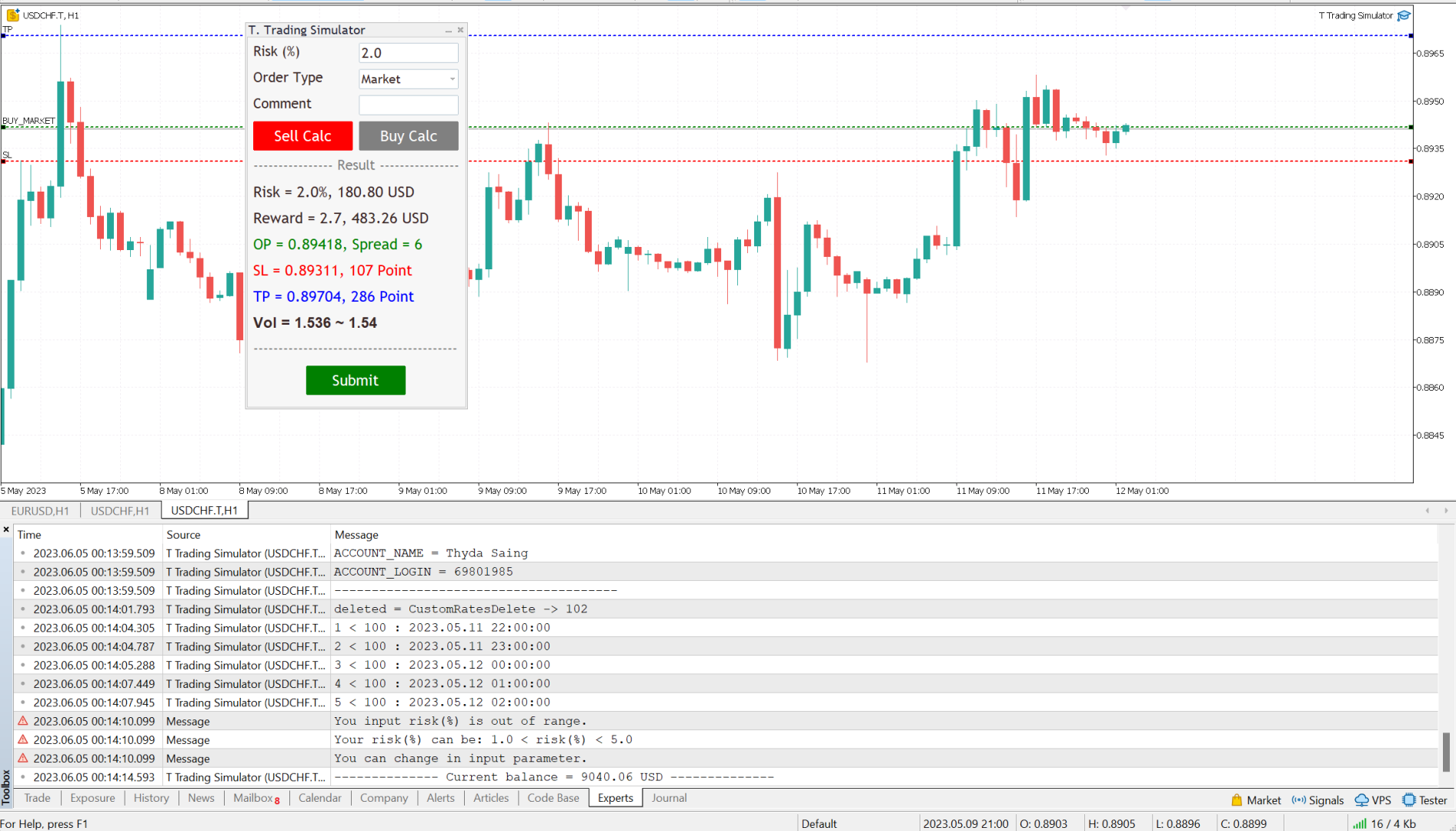
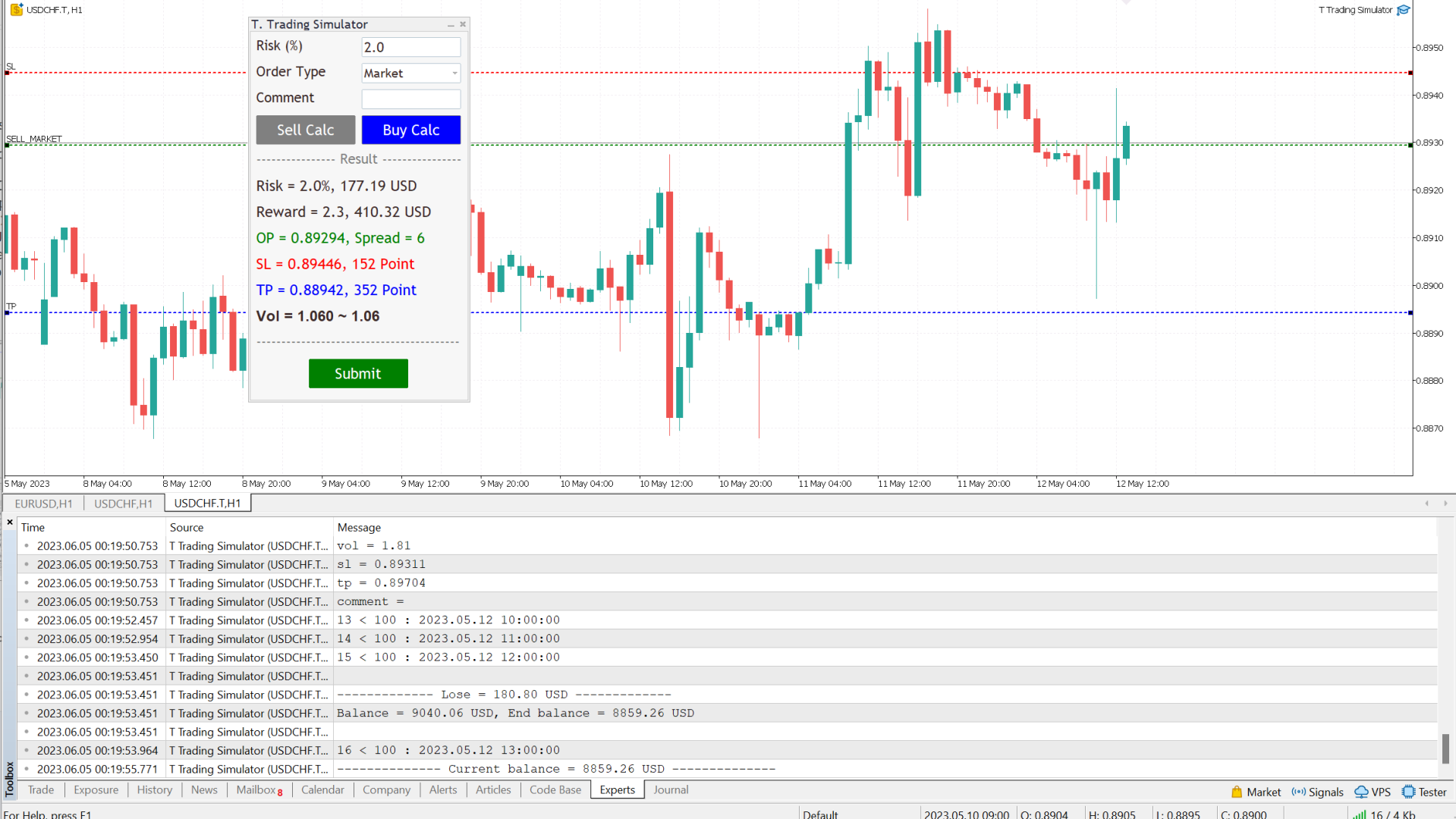
  • Simply enter the percentage you’re risking in Risk % of the box, 2 mean that 2%.

  • Select order type (can be Market, Limit, Stop).

  • Press the “Sell Calc” or “Buy Calc” button.

    This will trigger (show) 3 lines on your current chart. You can drag and drop the lines (Order Line, Stop Line, Profit Line) to determine your risk / reward. 

Then this tool will automatically calculate volume (position size) instantly and result will show in this dialog panel.
  • When you agree, press Submit button to execute the trade (submit your order to market) .

    Note that submitting can be failed so you try press Submit button a gain.

    That’s it! – It even works on future pending orders too!

ADDITIONAL FUNCTION

  1. Dialog Manager

  • Width app : 320, You can change width app by try this option.

  • Toggle minimize : m, When you press M key, dialog will minimize. Press M key gain, dialog will maximize.

  • Risk (%) min : 1.0

  • Risk (%) max : 5.0

    If you input risk(%) is in of range, min and max. The this tool will accept your input then calculate after click on the button.

  1. Trading Lines Manager - Order Line, Stop Line, Profit Line

  • Distance (%), Order and Stop : 5, We set the default value, distance from order price to stop price, is five percent of chart's high.

  • Reward ratio : 3.0, Reward radio is 3 time of the distance.

  • Line width : 2

  • Line color :

  • Line style :

  • Bring to back : true

  • Z-order : 0

    Properties of the lines.

  • Deviation (avoid requotes) : 5, It is important to note that requotes will still occur if the price change is more than the set range of deviation.

Shortcut Key

Below instruction have some functions work with shortcut key to manage your task faster than normal.

Note that you can change or add more value.

    Timeframe Manager
    • Timeframe : H1=1,H4=2,D1=3,W1=4,MN=5

      When you press 1 key then your timeframe chart change to H1, Press 2 change to H4,...

      However you can add more timeframe with the key.

    Chart Manager
      • Goto name : GOTO-DATE, define the name of vertical line for navigate chart.

      • Goto to date (GOTO-DATE) : g

        When you press G key, the chart will navigate to GOTO-DATE

      • Update goto : G

        When you press shift + G key, It will update goto-date position to current screen at first bar (left corner).

      • Goto all open charts : true, Synchronize all charts navigate to GOTO-DATE.

      • Open watch-list : M

        When you press shift + M key, Open all symbols in watch-list, max = 20.

      • Max Symbols in watch-list : 20, Maximum symbols can be opened when press M key.

      Synchronize Chart Manager
      • Synchronize other charts : S,

        When you press shift + S key, It will synchronize all open charts with current chart.

      • Synchronize crosshair : true, Show crosshair (vertical and horizontal lines) in synchronize charts when middle mouse click. If you toggle click, show and hide.

      Template Manager
      • Save current template : T

        When you press shift + T key, Save template's name with the symbol's name both master and slave chart, Path : \MQL5\Files\Templates

        Note that if want to save template by manual, you need to minimize dialog before.

      • Apply current template : t

        When you press shift + t key, Apply the template is saved. If not found it apply with DEFAULT-TEMPLATE

      • Default template :DEFAULT-TEMPLATE

      • Slave chart : true, 

      When you drag symbol on watchlist to drop on the chart then press shift + T key, Save template's name with the symbol's name both master and slave chart.

      When you drag symbol on watchlist to drop on the chart then press shift + t key, it will apply the template is saved to all opened charts. if not found it will apply DEFAULT-TEMPLATE before you must save it.

      Window Manager

        • Hide / Show indicators : i, Press I key, hide / show indicators.

        • Equal height indicators : /, Press / key, set equal height all indicators.

        • Clear fixed height indicators : I, Press shift + I key, remove fixed height indicators.

        • Double click left or right corner chart or indicator window to toggle maximize the window.

        Object Tool Manager
          • Delete all objects : D, Press shift + D key, delete all objects tool on the current chart.

          • Delete recent (stack) object : Z, Press shift + Z key, delete a recent object by order.

          • Synchronize objects properties : true, When change properties current object, It will change all the same object type with changed properties.

          • Toggle LOW TIMEFRAME object visibility : L, Press shift + L key, hide/show all object that you draw in lower than current timeframe.

          • Toggle CURRENT TIMEFRAME object visibility : C, Press shift + C key, hide/show all object that you draw in current timeframe.

          • Toggle HIGH TIMEFRAME object visibility : H, Press shift + H key, hide/show all object that you draw in higher than current timeframe.


          Prodotti consigliati
          BOT NOTIF - 6 - DUAL MODE - BB is a Notifier-type Expert Advisor (EA) specifically designed to monitor market saturation points (Overbought/Oversold) with high accuracy through a three-layer filter: RSI, Wick Validation (Candle Tail), and Bollinger Bands. This bot does not execute automated trades (Auto-Trade); instead, it acts as a smart assistant that sends visual signals and comprehensive Telegram notifications, including real-time chart screenshots. It is ideal for traders seeking price reve
          Sc MTF Volume MT5
          Krisztian Kenedi
          5 (1)
          Indicatore Volume con supporto multi-timeframe, segnali visivi personalizzabili e sistema di alert configurabile. Servizi di programmazione freelance, aggiornamenti e altri prodotti TrueTL sono disponibili sul mio profilo MQL5 . Feedback e recensioni sono molto apprezzati! Cos'è il Volume? Il volume è uno degli indicatori più fondamentali nell'analisi tecnica. Rappresenta il numero totale di contratti, azioni o lotti scambiati durante una candela o un periodo di tempo specifico. In MetaTrader
          FREE
          Modern Dark Chart Theme for MT5 Upgrade your MetaTrader 5 chart into a clean, dark, professional trading workspace. Your chart is your trading office. It is where you analyze the market, test Expert Advisors, review setups, record videos, share screenshots, and make trading decisions. If your MT5 chart looks old, bright, noisy, or unprofessional, your trading environment can feel distracted before you even start your analysis. Modern Dark Chart Theme for MT5 helps you create a cleaner, darker,
          FREE
          Orbit Range Pro
          Nikolai Konovalov
          Proprietary, fully automated MT5 Expert Advisor with confidential trading logic. GBPUSD tested on 100% real ticks. Orbit Range Pro is a proprietary trading robot for MetaTrader 5. Its decision logic is confidential and is not disclosed - you get a ready-to-run EA, tuned and verified by the author. Verified GBPUSD backtest (MT5 Strategy Tester, real ticks 100%, $10,000 deposit, 0.03 lots): - Full period 2026.04.20-2026.10.17: net profit +$996.28 (~+9.96%), max equity drawdown 5.00%, profit fact
          Bar CSV Import Check
          Rustan Nino Mallari
          Check the file before it becomes your backtest history. A CSV can look tidy in a spreadsheet and still contain a repeated minute, an impossible candle or a date that silently changes when parsed. Bar CSV Import Check gives you a read-only inspection inside MT5 before you import a file into a custom symbol. Find the rows worth reviewing - Detect unsupported field layouts, malformed dates and numeric values, integer overflow and inconsistent open/high/low/close bounds. - Count backwards ordering
          RPM Trade Guard
          Pablo Matias Rodriguez
          RPM Trade Guard v2.6 Market Analysis, Execution and Risk Management in One Tool for MetaTrader 5 Analyze the market. Execute your decisions. Manage your risk. RPM Trade Guard is an Expert Advisor developed for traders who trade manually on MetaTrader 5, especially those using scalping and intraday strategies. It combines Smart Money Concepts-based technical analysis tools, a fast execution panel, virtual trade management and automated trading-discipline controls. Its purpose is to simplify
          Phantom Quant Momentum AI-Inspired 6-Agent Scoring Indicator with Buy/Sell Arrows for MetaTrader 5 Tired of simple moving-average crossovers that give too many false signals? Phantom Quant Momentum- is a next-generation indicator built on quantitative logic originally designed for institutional AI trading systems. Instead of relying on a single indicator, this system runs 6 independent scoring agents- simultaneously — each analyzing a different dimension of the market. Only when the majority
          Set Stop Loss to Breakeven Instantly
          Muhammad Usman Siddique
          4.6 (5)
          Lo script UZFX - Set Stop Loss to Breakeven Instantly per MetaTrader 5 (MT5) è un potente strumento che consente ai trader di spostare rapidamente lo stop loss di tutte le posizioni aperte al loro prezzo di entrata, assicurando operazioni prive di rischio. Questo script è particolarmente utile per gestire in modo efficiente le operazioni attive, assicurando che una volta che una posizione si muove favorevolmente, il trader sia protetto da potenziali perdite. (Visitate il profilo e controllate
          FREE
          Key Features: 200+ Fully Implemented Patterns   across all categories Advanced Market Structure Analysis Smart Money Integration   (Wyckoff, Order Blocks, Liquidity) Professional Risk Management Multi-Timeframe Analysis AI-Powered Confidence Scoring Advanced Visualization Real-time Alerts Pattern Categories: Single Candle Patterns (Hammer, Doji, Marubozu, etc.) Multi-Candle Patterns (Engulfing, Stars, Harami, etc.) Chart Patterns (Head & Shoulders, Cup & Handle, Triangles, etc.) Harmonic Pattern
          FREE
          PatternDetector
          Thien Thanh Tran
          PatternScope — Multi-Pattern Recognition for MT5 PatternScope is a multi-pattern recognition indicator for MetaTrader 5. It scans price action for classic chart patterns, confirms breakouts, and draws clear   Entry, Stop Loss and Take Profit   levels. A compact dashboard shows the latest pattern, bias and Risk:Reward. Patterns:   Double Top/Bottom, Triple Top/Bottom, Head and Shoulders (and inverted), Bullish & Bearish Flag, Pennant, Rising & Falling Wedge, Triangle, Rectangle, Cup and Handle —
          Indicatore RSI Multi-Timeframe Scatena la potenza dell'analisi multi-timeframe con il nostro intuitivo Indicatore RSI! Ottieni una prospettiva completa sull'andamento del mercato su vari timeframe, tutto su un unico grafico. Il nostro Indicatore RSI Multi-Timeframe ti consente di tracciare l'Indice di Forza Relativa (RSI) con un periodo costante su cinque timeframe personalizzabili, consentendoti di prendere decisioni di trading più informate. Caratteristiche Principali: Visualizzazione Multi-Ti
          Short Description Swing Timing Breakout EA is a smart Expert Advisor for MetaTrader 5 that combines trend filtering, momentum timing, and dynamic risk management to capture high-probability swing and breakout opportunities. Full Description Swing Timing Breakout EA is a professional trading robot designed for MetaTrader 5, suitable for traders who want a balance between automation, control, and disciplined risk management. This EA uses a trend-following and momentum confirmation approach ,
          Strumenti per il guadagno e la ricerca. Il nucleo dei segnali e della strategia di trading si basa sull'algoritmo dell'autore per la formazione di modelli di previsione dei prezzi. Applicabile a qualsiasi strumento! Integrato con un sistema di controllo basato sull'MA "Volpe a nove code" , aggiornando e regolando il segnale nel modo più accurato possibile per il mercato, lo strumento e il periodo di lavoro. Idoneo: tutti gli strumenti in tutti i mercati (ci sono eccezioni). A chi è rivolto: h
          Grid Chande Momentum Oscillator EA
          AL MOOSAWI ABDULLAH JAFFER BAQER
          Test it free first: open Grid Chande Momentum Oscillator EA in the MetaTrader 5 Strategy Tester, turn on visual mode, and watch which momentum readings it accepts and which it turns down. ONE BIG CANDLE IS NOT MOMENTUM. Tushar Chande built his Momentum Oscillator to weigh every rise against every fall over a window of closes. It is honest arithmetic, with one blind spot: it adds up sizes, so a single news candle can push it through a level while the other bars did very little. Grid Chande Moment
          Gold Prophet
          Raphael Schwietering
          Gold Prophet è un Expert Advisor completamente automatizzato, sviluppato per il trading su XAUUSD (Oro) sul timeframe H1. La strategia è stata ampiamente testata per oltre 18 anni, coprendo molteplici cicli di mercato, periodi di elevata volatilità e mutevoli condizioni di liquidità, dimostrando stabilità e robustezza a lungo termine. Tutte le operazioni vengono eseguite con Stop Loss e Take Profit predefiniti, garantendo una gestione del rischio disciplinata e controllata. L'EA è stato sottop
          Algo Pumping
          Ihor Otkydach
          4.77 (22)
          PUMPING STATION – La tua strategia personale "all inclusive" Ti presentiamo PUMPING STATION — un indicatore Forex rivoluzionario che trasformerà il tuo modo di fare trading in un’esperienza efficace ed entusiasmante. Non si tratta solo di un assistente, ma di un vero e proprio sistema di trading completo con potenti algoritmi che ti aiuteranno a operare in modo più stabile. Acquistando questo prodotto, riceverai GRATUITAMENTE: File di configurazione esclusivi: per un'impostazione automatica e pr
          Iconic BTC AI
          Maurice Prang
          5 (1)
          ICONIC BTC AI+ | SYNAPSE.PHENOTYPE S6 ENGINE (Versione 15.00) Prezzo di lancio Prezzo attuale: 599 USD. Licenze disponibili: 10. Livello di prezzo successivo: 699 USD. Prezzo finale: 1699 USD. Il prezzo di accesso anticipato riflette la fase attuale del lancio del prodotto. Il prezzo aumenterà man mano che il contingente di licenze attuale si esaurirà e si apriranno i livelli successivi. Non è prevista una data dopo la quale il prezzo attuale cesserà di essere disponibile. Bitcoin non è una copp
          Automated Timeframe cycling with Symbols centered.  Force every timeframe onto one clock window, so the story you see on Daily is the same story you are slicing on H4, H1, and M1.  Traders usually flip timeframes and lose the span. A Daily chart shows a few weeks, then M15 shows a few hours, and the eye treats them as different markets. This indicator locks the window to N bars of the highest enabled timeframe — default 10 Daily — and maps every lower timeframe to that same stretch. You stay ins
          FREE
          Based on the trading model/strategy/system of gold double-position hedging and arbitrage launched by Goodtrade Brokers, problems encountered in daily operations: 1. Account B immediately places an order immediately following account A. 2: After account A places an order, account B will automatically copy the stop loss and take profit. 3: Account A closes the position of Account B and closes the position at the same time. 4: When account B closes the position, account A also closes the position.
          [b]Titan Pro V7 Institutional Dashboard[/b] is an advanced quantitative HUD terminal engineered for MetaTrader 5, designed for institutional market analysis, quantitative prop-firm verification, and disciplined intraday execution. Unlike conventional single-formula indicators that suffer from lag and market regime shifts, Titan Pro V7 synthesizes a multi-strategy quantitative consensus model combining Trend Momentum, Volatility Breakout, Intraday VWAP, and Smart Money Concepts (SMC) into a sin
          DESCRIPTION Liquidity Counter Pro   is an advanced automated trading system for MetaTrader 5 that specializes in detecting and capitalizing on institutional liquidity sweeps and retail stop-hunting events. The EA uses pure price action and market structure analysis without relying on traditional lagging indicators. The system applies a   multi-layered scoring methodology   with a base threshold of   90 points , requiring strong confirmation from multiple market factors before any entry. It i
          PROMETHEUS TECHNICAN VERSION Free | By THE SONS A gift from The Sons — no strings, no trial, no expiry. Every trader deserves access to professional-grade market intelligence. That belief is why Prometheus Technical Version exists, and why it costs nothing. Consider it our handshake to the trading community. What You're Getting This is not a simplified tool dressed up as a gift. Prometheus Technican Version is a fully built, institutional-quality technical analysis indicator running a dual-model
          FREE
          LL Gold Miner EA
          Leopoldo Licari
          5 (1)
          Advanced Hedging Strategy with Intelligent Lot Management LL Gold Miner EA is a professional Expert Advisor designed for MT5 hedging accounts. It combines simultaneous buy/sell positioning with controlled lot progression and customizable risk management. Built originally for XAUUSD, it can also operate on other symbols such as EURUSD. Core Strategy Logic • Opens BUY and SELL positions simultaneously • Independent profit target per direction (in account currency) • When one side reaches targe
          Questo filtro si basa sui polinomi di Bessel. Il suo principale vantaggio è un piccolo ritardo. Un'altra caratteristica di questo filtro è la sua elevata sensibilità agli ultimi valori delle serie temporali finanziarie. Per questo motivo, l'indicatore evidenzia i movimenti di prezzo attivi, attenuando le deviazioni del rumore. Oltre alla variante classica, all'indicatore sono stati aggiunti come funzione di ponderazione i logaritmi dei coefficienti di Bessel. In questo caso, l'indicatore risult
          Trendline EA MT5
          Carlos Oliveira
          4.8 (15)
          Trendline EA MT5 Trendline EA MT5 è un Expert Advisor semi-automatico per MetaTrader 5, progettato per eseguire azioni di trading o generare avvisi basati sulle linee di tendenza disegnate dall’utente. MetaTrader 5 non fornisce nativamente funzionalità per piazzare o gestire operazioni direttamente dalle linee di tendenza. Questo Expert Advisor estende il comportamento standard della piattaforma monitorando le linee di tendenza definite dall’utente ed eseguendo azioni predefinite quando il prezz
          Backtested performance (USDJPY M5, 2020–2026): Win Rate: ~75% Max Drawdown: ~1% This EA is a scalping strategy specialized for the Asian trading session (range market focused). The Asian market is characterized by relatively low volatility and a tendency to form range-bound conditions. This system is designed to take advantage of stable price movements, aiming for consistent entries while minimizing unnecessary risk. Features Optimized entries for the Asian session Simple and stable logic base
          FREE
          MyFxDesk
          Truong Nguyen
          MyFxDesk è un potente indicatore di analisi delle inversioni e delle continuazioni, progettato per individuare cambiamenti emergenti nella direzione del mercato prima che diventino evidenti. MyFxDesk è stato sviluppato combinando ricerca quantitativa di nuova generazione guidata dall’IA, market intelligence e analisi maturata attraverso anni di esperienza reale nel trading. Struttura del grafico. Timeframe multipli. Timing di ingresso. Rischio. Come trader discrezionali dedichiamo già molta att
          Versione MT4: https://www.mql5.com/en/market/product/128965 Versione MT5: https://www.mql5.com/en/market/product/128966 "One Shot One Kill" - Trading di precisione per l'oro (XAU/USD) Domina il mercato dell'oro con una strategia di trading sicura e redditizia "One Shot One Kill" è un Expert Advisor (EA) di livello professionale specificamente ottimizzato per il trading dell'oro (XAU/USD) e al tempo stesso abbastanza versatile da negoziare le principali coppie di valute. Questo EA segue un
          News Spike EA Auto Pro
          Mohan Shivaji Shivtare
          News Spike EA Pro Professional Automated Trading for High-Impact Economic News News Spike EA Pro is a professional Expert Advisor designed specifically for trading scheduled high-impact economic events. It continuously monitors a Real-Time Economic Calendar during live trading, prepares the market according to your configuration, executes trades autom
          Gli utenti di questo prodotto hanno anche acquistato
          Telegram to MT5 MultiChannel Copier
          Sergio Marquez Uroz
          4.73 (26)
          Telegram to MT5 Multi-Channel Copier   copia automaticamente i segnali di trading dai tuoi canali Telegram e Discord direttamente su MetaTrader 5. Niente bot, niente estensioni del browser, niente copia manuale. Il segnale arriva su Telegram o Discord e l'EA apre l'operazione nel tuo terminale in pochi secondi. E prima di copiare un canale, il backtester integrato ti mostra cosa avrebbe fatto quel canale sul tuo conto. Il prodotto include due componenti: un'applicazione Windows che ascolta i tuo
          REVDEN AI Desk: gestisci il tuo trading da un'unica conversazione con la tua IA, sul contesto di mercato di REVDEN Immagina di gestire il tuo trading da un'unica conversazione. REVDEN AI Desk porta tutto questo in MetaTrader 5: chiedi alla tua IA come legge il mercato, e lei risponde partendo dal contesto completo di REVDEN sui simboli che operi, con il loro stato, il loro quadro di rischio e le pubblicazioni in arrivo. Le sue proposte arrivano con ingresso, stop, target e rischio, e tu approvi
          EA Overfitter
          Stephen J Martret
          5 (5)
          That backtest looks great. But will it still be making money tomorrow, next week, next month? EA Overfitter re-runs your EA on 100 price histories it has never seen. One score tells you if the edge is real. A backtest tells you what an EA did on one price history — the one that happened to occur. What you cannot tell from it is how much of that result was the strategy and how much was the particular path. EA Overfitter answers that. It builds up to 100 synthetic price histories your EA has n
          FarmedHedge Pair Trading Dashboard
          Tanapisit Tepawarapruek
          5 (7)
          Farmed Hedge Yield Farming | All Markets (Manual - Hybrid - Semi/Automated EA) VERIFIED TRADING RESULTS - Farmed Hedge Yield Axi Copy:  https://www.mql5.com/en/signals/2356376 - Farmed Hedge Yield Exn Copy:   https://www.mql5.com/en/signals/2356404 - Farmed Hedge Yield V Copy:  https://www.mql5.com/en/signals/2357156 IMPORTANT NOTICE: FarmedHedge is a MANUAL-FOCUSED TRADING UTILITY ,not a fully automated EA. Results shown on this Signal include manual trades and overall strategic management.
          EA Auditor
          Stephen J Martret
          5 (7)
          EA Auditor is an independent analysis tool for traders evaluating Expert Advisors and trading signals on MetaTrader 5. It audits backtest reports, reviews posted developer signals, and cross-verifies the two against each other to help traders assess strategies before committing capital. The MQL5 market offers a wide range of Expert Advisors from many developers, with varying approaches, quality, and transparency. EA Auditor provides a consistent, data-driven framework for reviewing them, answer
          AI Agents Supervisor
          Ho Tuan Thang
          5 (1)
          AI Agent Supervisor is NOT an Expert Advisor. AI Agent Supervisor   is a   multi-agent AI risk & portfolio supervisor   that watches every EA on your account and intervenes in real time.  WANT AN AI PORTFOLIO MANAGER WATCHING YOUR FLEET 24/7?   Run your fleet on the same brokers I do:   IC MARKETS , IC TRADING   .  Unlike the centralized stock market, Forex has no single, unified price feed.  Every broker sources liquidity from different providers, creating unique data streams. The Supervisor r
          ================================================================================ POC BREAKOUT - V20.72. Full Professional Grade Toolkit ================================================================================ POC Breakout is a full MetaTrader 5 trading dashboard for discretionary traders who want breakout signals, Point of Control (POC) context, volume profiles, order flow, market structure, news, alerts, and advanced trade planning in one professional workspace. Attached directly to you
          News Trade EA MT5
          Konstantin Kulikov
          4.55 (11)
          Presento un utile robot che io stesso utilizzo da diversi anni. Questo robot può essere utilizzato sia in modalità semiautomatica che completamente automatica. >>> Chat <<< Il programma contiene le impostazioni flessibili per fare trading sulle notizie del calendario economico. Non può essere verificato nel tester delle strategie. Soltanto il vero lavoro. Scarica l'ultimo archivio di impostazioni: https://www.mql5.com/en/blogs/post/747929 Monitoraggio dei segnali: https://www.mql5.com/en/signa
          EA Slipstream
          Stephen J Martret
          5 (1)
          Your backtest filled every order at the price it asked for. Your account does not. EA Slipstream measures what execution costs your EA, using your own fills, slippages and spreads to show you the true performance of your EA. A backtest prices every trade at the level the EA named. In live trading a pending order fills at whatever price is available when it triggers, a stop closes wherever the market is when it is hit, and the spread at that moment is whatever the account was quoting. The differ
          Unlimited Trade Copier Pro MT5 is a tool to copy trade remotely to multiple MT4, MT5 and cTrader accounts at different computers/locations over internet. This is an ideal solution for you if you are a signal provider and want to copy your trades to other receivers globally on your own rules. One provider can copy trades to multiple receivers and one receiver can get trade from multiple providers as well. The provider can even set the subscription expiry for each receiver, so that receiver will n
          GRat Crypto
          Ivan Titov
          4.5 (2)
          Trade on crypto exchanges in MT5 with no limits! GRat_Crypto is a tool for manual and automated trading , including ANY available EA, ANY  cryptocurrency  on most popular crypto exchanges in the familiar MT5 environment 24/7. Features 1. ALL instruments of the 9 most popular crypto exchanges are available: Binance, BingX, Bybit, Coinbase, CoinEx, Kraken,   KuCoin, MEXC and OKX . 2. The ability to place ANY type of order available in MT5, both market and pending, to modify orders and positions,
          RETAILBERG FOOTPRINT CHART PRO — Order-Flow Workspace for MetaTrader 5 Version 7.00  |  Professional System  |  31 tools  |  One chart A full 150-page illustrated User Manual is included. Please read the full manual to understand this feature packed footprint chart elements and ui. https://www.mql5.com/en/blogs/post/777982 DEMO / STRATEGY TESTER — PLEASE READ FIRST
          Strategy Builder offers an incredible amount of functionality. It combines a trade panel with configurable automation (covert indicators into an EA), real-time statistics (profit & draw down) plus automatic optimization of SL, TP/exit, trading hours, indicator inputs. Multiple indicators can be combined into an single alert/trade signal and can include custom indicators, even if just have ex4 file or purchased from Market. The system is easily configured via a CONFIG button and associated pop-u
          Bots Builder Pro MT5
          Andrey Barinov
          4.17 (6)
          This is exactly what the name says. Visual strategy builder . One of a kind. Turn your trading strategies and ideas into Expert Advisors without writing single line of code. Generate mql source code files with a few clicks and get your fully functional Expert Advisors, which are ready for live execution, strategy tester and cloud optimization. There are very few options for those who have no programming skills and can not create their trading solutions in the MQL language. Now, with Bots Builde
          Gamma Edge Pro MT5
          Xuan Nam Diep
          1 (1)
          Gamma Edge Pro MT5 — GexBot Classic API Integration Gamma Edge Pro brings institutional-grade Gamma Exposure (GEX) data directly onto your MetaTrader 5 chart — the same data used by professional options traders to anticipate price magnets, hedging flows, and dealer positioning. Powered by the GexBot Classic API, this indicator automatically maps options market data from US-listed instruments onto any MT5 CFD instrument — Forex pairs, Gold, indices, and more — with intelligent price conversion bu
          The Patch
          Mian Rameez Ali
          The Patch It never opens a trade. It walks behind the ones that did. Every open position, every pending order — checked twice a second for the one thing that's easy to forget: a stop, a target. Found bare, it doesn't ask. It writes the missing number in, measured in points from wherever the position began, and moves on to the next. No strategy, no opinion on direction. Just the quiet assumption that nothing should ever sit on the market unprotected — not because someone decided it shouldn't,
          MT5 Trading Deck
          Manuel Michiels
          5 (2)
          One button. One trade. MT5 Trading Deck is a hotkey trading panel for MetaTrader 5 that turns the platform into a keyboard-driven execution cockpit. Stop loss, take profit and lot size are pre-calculated for every key; the moment you press, a market order is live on the broker. A complete technical user manual is attached in the product Comments section. It documents every input parameter, the full hotkey map, the recommended Stream Deck XL layout, and the advanced workflows for Pre-Limit orders
          Floor Watch
          Syed Tauqeer Hussain Shah
          Floor Watch One number, watched every thirty seconds: how far equity has fallen since the day began — or since its highest point, if it's told to trail the peak instead of the open. Cross the line and it doesn't argue. Every open position closes, every pending order vanishes, and anything that slips through afterward gets shut the moment it appears. Not asked. Removed. The floor holds until the clock turns 5 AM Pakistan time — then, and only then, does the day start over. One rule. No except
          YuClusters
          Yury Kulikov
          4.93 (43)
          Attention: You can view the program operation in the free version  YuClusters DEMO .  YuClusters is a professional market analysis system. The trader has unique opportunities to analyze the flow of orders, trade volumes, price movements using various charts, profiles, indicators, and graphical objects. YuClusters operates on data based on Time&Sales or ticks information, depending on what is available in the quotes of a financial instrument. YuClusters allows you to build graphs by combining da
          FUTURES ORDERFLOW FOOTPRINT CHART Professional OrderFlow EA for MetaTrader 5 Version 1.01| Professional tool for real traders | Institutional-Grade Visualization STRATEGY TESTER USERS - PLEASE SELECT EVERY REAL TICK WHEN TESTING AND YOU HAVE DOWNLOADED HISTORICAL DATA. IF YOU SEE A WAITING SCREEN AND IT IS NOT DOWNLOADING, IT MEANS YOU HAVE LOW HISTORICAL DATA. TRY 1 MIN AND 5 MIN FIRST ON 1 DAY DATA. ONE DAY DATA SHOULD BE THE NEWEST AND MOST CURRENT DATE. PLEASE WAIT UNTIL THE MARKET HAS ROL
          The product will copy all  Discord  signal   to MT5   ( which you are member  ) , also it can work as remote copier.  Easy to set up. Work with almost signal formats, support to translate other language to English Work with multi channel, multi MT5. Work with Image signal. Copy order instant, auto detect symbol. Work as remote copier: with signal have ticket number, it will copy exactly via ticket number. How to setup and guide: Let read all details about setup and download Discord To MetaTrader
          EasyInsight AIO MT5
          Alain Verleyen
          4.92 (12)
          EASY Insight AIO – La soluzione all-in-one per un trading intelligente e senza sforzo Panoramica Immagina di poter analizzare l’intero mercato — Forex, Oro, Cripto, Indici e persino Azioni — in pochi secondi, senza dover controllare manualmente i grafici, installare indicatori o affrontare configurazioni complicate. EASY Insight AIO è il tuo strumento definitivo di esportazione per il trading alimentato dall’IA, pronto all’uso. Offre una panoramica completa del mercato in un unico file CSV pul
          Un solo acquisto. Tutti i miei indicatori per MT4 e MT5, disponibili oggi e pubblicati in futuro, senza costi aggiuntivi. Dopo l’acquisto, contattami per sapere come riceverli. È previsto un aumento di 50$ ogni 10 acquisti, fino a 999$. Si applica il prezzo del Market al momento del pagamento. Mantieni l’indicatore di cui ti fidi. Automatizza il lavoro che lo circonda. Il tuo segnale. Le tue regole. La tua esecuzione. Hai già un indicatore MT5 su cui fai affidamento, ma devi ancora sorvegliare
          Ultimate Extractor
          Clifton Creath
          5 (7)
          Ultimate Extractor - Professional Trading Analytics for MT5 *****this is the local HTML version of Ultimate Extractor. !!!!!it is not compatible with Cloud!!!! For the online version please reach out to me directly****** Ultimate EA manager also now available when you use cloud pro and above for free!! Ultimate Extractor transforms your MetaTrader 5 trading history into actionable insights with comprehensive analytics, interactive charts, and real-time performance tracking. What It Does Automa
          Master Your Trading Discipline   Stop losing your hard-earned gains to overtrading and emotional decisions. The Discipline Tool is your ultimate trading assistant, ensuring strict risk management in real-time. Key Protection Features: Advanced Drawdown Defense : Automatically halts trading if your daily drawdown exceeds a preset threshold (percentage or dollar amount). Real-Time Equity Lock : Safeguard profits by referencing peak equity, ensuring drawdown stays within control. Hard Profit Target
          Trading Chaos Expert
          Hennadii Stanilevych
          5 (11)
          This software has no equals in the world and represents a universal trade "console" covering trading signals, automated market entry, setting of Stop Loss and Take Profit, as well as Trailing Profit for multiple trades at the same time in a single open window. Intuitive control of the Expert Advisor in "three clicks" ensures a comprehensive use of all its functions on different computers, including tablets PCs. Interacting with additional signal indicators that mark the chart to give a real mark
          Dealer Panel
          Mian Rameez Ali
          Dealer's Panel No signal decides anything here — a hand does. One click, and the panel calculates what's underneath: lot size from risk, target from a 30-step balance ladder that remembers exactly how far an account has climbed. Toggle between market and pending without touching an input field. Set a stop, and the take-profit can write itself — a fixed share of the balance, translated into price with no arithmetic left for the trader to get wrong. One trade live at a time; it won't let a seco
          Copy your MT5 trades to Interactive Brokers You keep using MT5. Every order you open or close is sent to your IB account. In real time. No coding. No changes to your strategy or EA. Try it first Rent 1 month: $30. Test on a live or paper account. What it does Real-time copying: same direction, reverse, or one side only. Map any MT5 symbol to any IB symbol. Set a lot ratio for each. Forex, Futures, Stocks, CFDs, Metals and Crypto. Position sync: both accounts checked, any difference fixed. Optio
          Quant AI Agents
          Ho Tuan Thang
          5 (1)
          Quant AI Agents are independent trading Expert Advisors. Instead of trading using a fixed strategy like other conventional EAs, Quant AI Agents   is a   multi-agent AI trading framework   that turns natural-language strategy prompts into live.  WANT THE SAME RESULTS AS MY LIVE SIGNAL?   Use the exact same brokers I do:   IC MARKETS , IC TRADING   .  Unlike the centralized stock market, Forex has no single, unified price feed.  Every broker sources liquidity from different providers, creating un
          Global Investing FX Terminal
          Santiago Nicolas Pla Casuriaga
          5 (1)
          Il Global Investing FX Terminal è una dashboard FX tutto-in-uno per MetaTrader 5 — tassi di politica monetaria delle banche centrali, posizionamento COT del CFTC, ranking carry, sorprese economiche, skew delle opzioni, sentiment retail e correlazioni, tredici pannelli in totale — resa su un singolo overlay canvas privo di sfarfallio e aggiornata ogni 10 secondi da un singolo EA allegato. Nessun software esterno richiesto. L'analisi FX professionale richiede accesso simultaneo a dati che normalme
          Altri dall’autore
          Demo version T Position Size Calculator   doesn't work in the strategy tester. The Strategy Tester does not support the processing of ChartEvent. It does not support most of the panel's functionality. Contact me for any questions or ideas for improvement or in case of a bug found. Control and manage your trading like a professional trader with T Position Size Calculator. T Position Size Calculator – an MT5 Expert Adviser, is a user-friendly custom tools (Dialog Panel and Three Lines, Order Line
          Filtro:
          Nessuna recensione
          Rispondi alla recensione