AI Titanium
- 专家
- 版本: 1.0

AI Titanium
Only H1 XAUUSD
No grid or martingale. Both strategies use take-profit and stop-loss rules to manage trades.
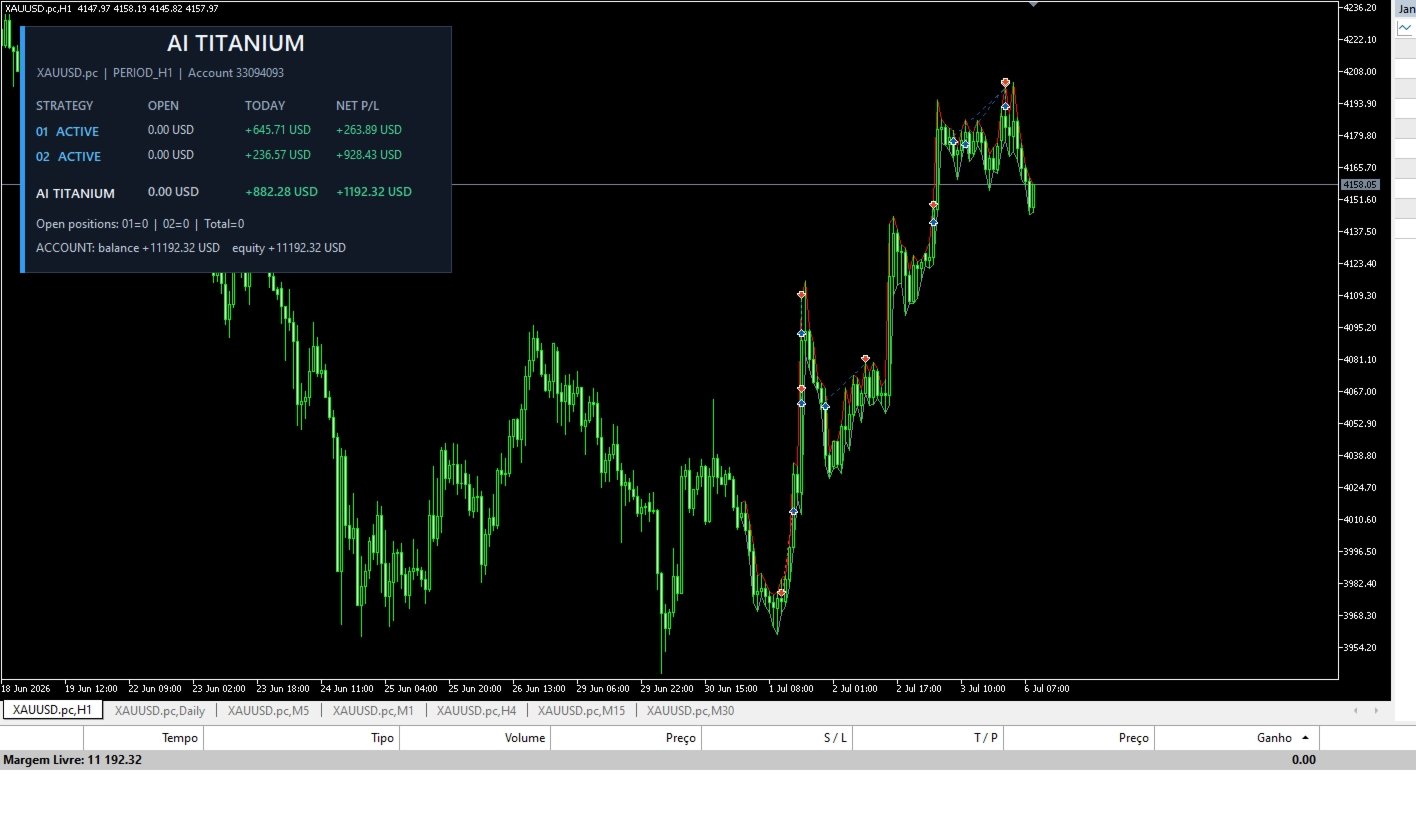
AI Titanium combines two independently configurable trading strategies in one Expert Advisor. Run either strategy on its own or enable both. Each strategy has its own entry controls, position sizing and risk settings. The on-chart status panel summarizes activity and can be hidden.
Results depend on the broker, symbol specifications, account type, spread, execution, available margin and market conditions. Test settings on a demo account before using them live.
Status panel
- Show status panel — displays or hides the on-chart panel.
- Panel corner — selects which chart corner anchors the panel.
- Panel horizontal and vertical offset — adjusts the panel position in pixels.
- Panel scale — changes the panel size.
Strategy 01
Enable Strategy 01 and set its entries, lot sizing, schedule, trade protection and filters.
- Enable strategy — turns Strategy 01 on or off.
- Entries per signal — number of entries placed for each signal.
- Signal delay — enables a delay before entry execution.
- Delay in seconds — sets the signal delay duration.
- Allow buys / allow sells — controls which trade directions are permitted.
- Order comment / magic number — identifies this strategy’s trades.
- Lot size — fixed lot size; 0 selects automatic sizing.
- Automatic lot factor — factor used by automatic lot sizing.
- Balance step — balance increment used by step-based lot sizing.
- Risk profile — selects the automatic lot-sizing profile.
- Recovery sizing — enables or disables recovery sizing after a losing trade.
- Start time / end time — trading window in broker server time.
- Automatic GMT adjustment — adjusts the schedule for the broker’s GMT offset.
- Friday filter / Friday cutoff — applies the configured Friday entry cutoff.
- Wednesday filter / Wednesday cutoff — applies the configured Wednesday entry cutoff.
- Take-profit / stop-loss distance — sets exit distances in points.
- Maximum spread / maximum slippage — limits spread and execution deviation for new entries.
- Trailing stop — enables trailing and sets its start, offset and adjustment step.
- News filter — blocks new entries around selected scheduled events.
- Minutes before / after news — sets the event exclusion window.
- High-impact / moderate-impact events — selects which event levels are filtered.
Strategy 02
Enable Strategy 02 and configure its two independent components, A and B.
Strategy 02 A
- Enable A — turns component A on or off.
- Order comment / magic number — identifies component A’s trades.
- Long only / short filter — configures component A’s permitted trade direction and bearish filter.
- Trading profile — selects component A’s operating profile.
- Volume mode / risk level — selects how component A calculates trade volume.
- Risk percentage — percentage used by percentage-based sizing.
- Fixed lot — fixed lot size for component A.
- Lots per 1,000 balance — balance-based lot factor.
- Balance step — balance increment used for step sizing.
- Recovery / recovery multiplier — enables recovery sizing and sets its volume multiplier.
- Entry tolerance / maximum overshoot — sets the entry-price tolerance and maximum distance in points.
Strategy 02 B
- Enable B — turns component B on or off.
- Order comment / magic number — identifies component B’s trades.
- Allow buys / allow sells — controls component B’s trade directions.
- Volume mode / risk level — selects how component B calculates trade volume.
- Risk percentage — percentage used by percentage-based sizing.
- Fixed lot — fixed lot size for component B.
- Lots per 1,000 balance — balance-based lot factor.
- Balance step — balance increment used for step sizing.
Strategy 02 risk and schedule
- Maximum drawdown (%) — drawdown threshold; 0 disables this limit.
- Pause until next day — pauses new entries until the next day after protection activates.
- Close before weekend — requests closure of managed positions before the weekend when the market session allows it.
- Trading weekdays — enables or disables new entries for each weekday.
- Avoid NFP / FOMC event days — avoids new entries on scheduled US NFP or FOMC days.
Position management targets only positions assigned to the relevant strategy. Closing requests are sent only for an existing matching position while the symbol’s trading session is open and the volume complies with broker rules.
Risk notice: Trading leveraged products involves substantial risk. Past performance and strategy tester results do not guarantee future results.