Grid Triple Exponential Average EA
- 专家
- 版本: 3.11
- 激活: 5

- Magic isolation: every saved state is kept separately per account, symbol and magic number, so several copies never share or sweep each other's data
- On-chart panel design introduced in 3.10, kept and refined
- Honest margin check: valid grid levels are no longer refused
- Test it free in the Strategy Tester first
Try it free before anything else: load Grid Triple Exponential Average EA into the MetaTrader 5 Strategy Tester, switch on visual mode, and watch the panel follow every level, every banked closure and every partial slice as it happens.
A grid that lets triple-smoothed momentum decide when a cycle may begin, measures its steps with the market's own volatility, and then retires the oldest exposure piece by piece instead of waiting for one big recovery.
WHY TRIPLE EXPONENTIAL AVERAGE
Most price noise disappears when you smooth it once. Some survives a second pass. Almost nothing survives three. The Triple Exponential Average, known as TRIX, is momentum that has been filtered three times, so when it turns, the turn usually means something. This EA uses that calm reading only as a door: it decides when a fresh grid cycle is allowed to start. From that moment a full management engine takes over, builds the ladder, banks small profits, slices away old positions and keeps the account breathing. The signal is read from closed bars, so what you see in the tester is what the EA saw at the time.
WHAT IS NEW IN VERSION 3.11
Magic isolation. Every piece of stored state now carries the account, the symbol, the grid magic number and the hedge magic number in its key. Two copies of the EA on two symbols, or two copies on one symbol with different magic numbers, keep completely separate memories: separate counters, separate anchors, separate retry queues. One copy can never read, overwrite or close what belongs to another. The grid only ever touches positions with its own magic, and the hedge module refuses to start if its magic equals the grid magic.
Carried over from 3.10. The redesigned on-chart panel and the reworked money check that asks a single honest question about free margin instead of rejecting valid levels on larger accounts.
ONE CYCLE, FROM START TO FINISH
1. The door opens. TRIX turns on the signal timeframe. The EA accepts a new signal only after a quiet spacing of bars since the last accepted one (30 by default), so a choppy session cannot trigger a burst of cycles. A signal stays valid for a few bars while the other conditions line up.
2. The ladder grows. A BUY grid and a SELL grid can run side by side, each with its own anchor and counter, or you can keep to one direction. Steps follow ATR with a floor and a ceiling, or a fixed point distance if you prefer. You may freeze the ATR step for the whole cycle so the spacing never drifts underneath you.
3. The harvest. The scanner studies groups made of the oldest and the newest orders on each side and closes the group as soon as the combined net result, after swap and commission, clears your target. If an old order is still too heavy to close whole, target slicing closes only a part of it, paid for by profit already sitting in newer orders. Bounce after bounce, the heaviest positions shrink.
4. The guard. A reopen guard rejects any closure that would immediately reopen the same level, the quiet habit that makes many grids feed their balance to commission. Every closure is checked against the deal history, failed legs go to a retry queue, and a plan is cancelled if the book changed between the scan and the send.
5. Optional hedge cycle. Off by default. When enabled, it holds a perfectly balanced pair on a symbol you choose and retires it in equal slices funded by a small, capped surcharge on closures the grid already makes. A timer checks that both legs stay equal and repairs a naked leg automatically.
THE PANEL
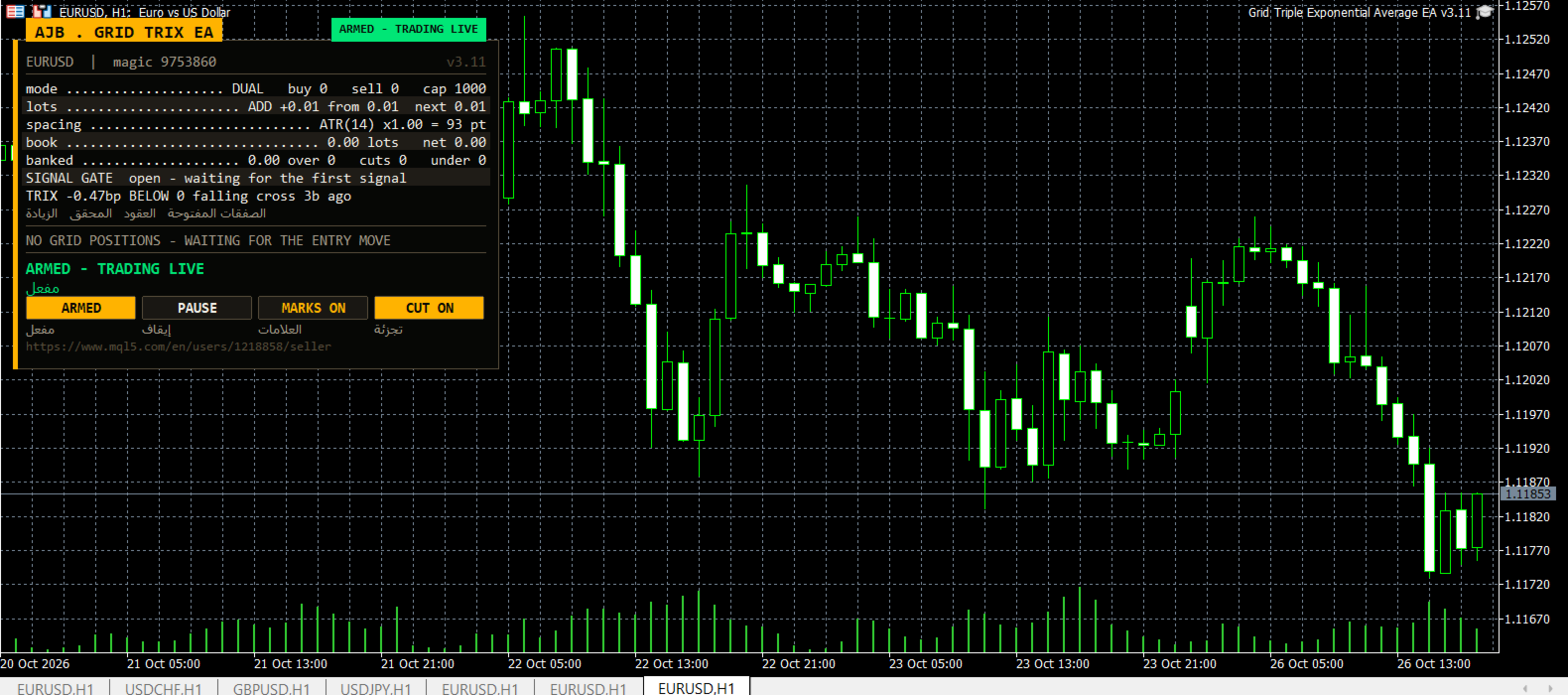
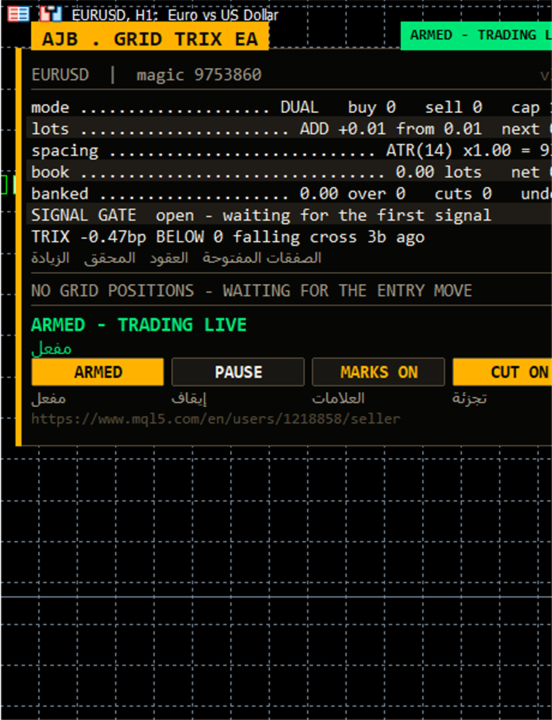
The panel sits on the chart and shows symbol and magic number, a status pill (ARMED, SCAN ONLY or PAUSED), grid mode, lot step, ATR spacing, banked profit, the book in lots and net result, the current closing plan of each side with its own close button, and the list of open orders. Buttons switch armed or scan only, pause or resume, chart marks and the slicing cutter. It can be dragged and minimised, adapts to the screen, offers an optional Arabic line under each English label, and draws nothing in a non-visual backtest so optimisation stays fast.
SAFETY THAT STAYS IN YOUR HANDS
There is no stop loss and no forced close-all; protection works by blocking new levels, never by dumping the book at the worst moment. Every limit is a visible input: maximum levels per grid, maximum orders per side, maximum lot per order, a margin-level floor, a floating-loss ceiling, a spread filter, and on netting accounts a cap on the margin of the merged position as a percent of equity. The lot ladder stops growing at the level limit, so partial closes can never push sizes beyond what you allowed. Scan Only mode shows every decision without sending a single order.
HOW TO START
Step 1: In MetaTrader 5 open Tools, Options, Expert Advisors and make sure algorithmic trading is allowed.
Step 2: Open the chart and timeframe you want to trade; EURUSD H1 or XAUUSD are comfortable first choices.
Step 3: Drag the EA from the Navigator onto the chart and tick Allow Algo Trading in the Common tab.
Step 4: In Inputs set RunMode to scan only for your first session, keep the 0.01 starting lot with the additive ladder, and leave the hedge cycle off.
Step 5: Watch the plans on the panel, then press the button to arm it when you are comfortable.
Step 6: If you run several copies, give each one its own EAMagicNumber and HedgeMagicNumber; version 3.11 keeps their states apart automatically.
Step 7: Before trading live, run the Strategy Tester on your own broker's data, because spreads, swaps and commissions differ from broker to broker.
EVERY SETTING EXPLAINED
Grid
TradeMode: dual grid (BUY and SELL side by side) or a single direction.
GridSpacePoints: base step in points when fixed spacing is used (default 25).
GridSpaceMultiplier: widens each next step by this factor; 1.0 keeps steps equal.
MaxGridLevels: maximum levels per grid (default 1000).
UpDirectionIsBuy: when true an upward signal arms the BUY side.
EAMagicNumber: magic number of the grid orders; also part of the isolated state key in 3.11.
GridOrderComment: comment written on grid orders.
OneOrderPerBar: at most one new level per candle.
Lot ladder
InitialLotSize: first lot of a cycle (default 0.01).
LotSizingMode: additive or multiplicative growth of deeper levels.
LotMultiplier: factor per level in multiply mode (default 1.25).
LotAddStep: lot added per level in additive mode; 0 uses the starting lot.
MaxOrderVolume: largest lot allowed for any single order.
UseAutoLot: scales the starting lot with the balance.
AutoLotBaseBalance: reference balance for that scaling.
AutoLotAllowDecrease: allows scaling below the starting lot when the balance falls.
ATR spacing
GridSpacingMode: fixed points or ATR (default ATR).
ATRTimeframe: timeframe of the ATR reading.
ATRPeriod: ATR averaging length.
ATRSpacingFactor: step equals ATR times this value.
ATRBarShift: bar read for ATR; 1 is the last closed bar.
ATRMinSpacingPts: floor for the step in points; 0 means none.
ATRMaxSpacingPts: ceiling for the step in points; 0 means none.
ATRFreezeOnStart: keeps the first step for the whole cycle.
Profit target
DesiredProfitPerClosure: base money target for one closure.
ProfitMultiplier: final multiplier between 1.00 and 2.00.
ProfitTargetMode: flat target or scaled by volume and depth.
ProfitVolumePower: how strongly volume raises a scaled target; 0 off, 1 proportional.
ProfitDepthBonus: extra target for each additional open level.
ProfitMaxMultiple: ceiling of the scaled target as a multiple of the base.
ProfitMaxReachFraction: keeps the target reachable within a fraction of one grid step.
Fragment scanner
UseMultiLegScan: scans multi-order combinations before the plain pair.
MaxOldestLegs: maximum oldest orders in one closure.
MaxNewestLegs: maximum newest orders in one closure.
ScanPriority: how qualifying combinations are ranked.
NeverBankLessThanPair: a combination must also clear the plain pair target.
RequireCloseVolumeExceedsTarget: newest volume must exceed oldest volume.
MinCloseVolumeRatio: minimum ratio of closing volume to target volume.
Target slicing
EnableTargetSlicing: closes a slice of an old order when the whole order is out of reach.
FragProfitWeightPower: how the profit requirement grows with the closing lot.
FragMinSlicePercent: smallest slice as a percent of the target order.
FragAllowMultiCloser: lets several newer orders pay for one slice together.
FragPreferFullClosure: prefers a full closure when both a full closure and a slice qualify.
Reopen guard and account protection
ReopenGuard: blocks closures that would immediately reopen a level.
ReopenGuardCushion: safe distance as a fraction of one step.
MinMarginLevelPercent: no new levels below this margin level; 0 off.
MaxAccountRiskPercent: no new levels above this floating loss percent of balance; 0 off.
NetMaxMarginPercent: netting accounts only, margin cap of the net position as percent of equity (default 5).
MaxTotalOrders: absolute cap on grid orders per side.
Execution and verification
RunMode: start armed or in scan only.
CloseSequence: order in which legs are sent.
MaxSlippagePoints: maximum slippage.
MaxSpreadPoints: blocks trading above this spread.
MinSecondsBetweenClosures: pause between two closures on one side.
CloseAttemptsPerLeg: send attempts before a leg joins the retry queue.
VerifyTimeoutSeconds: how long a stuck leg keeps being verified.
DeferWhenMarketClosed: waits for the session instead of halting when quotes are missing.
MarketClosedRetrySeconds: retry interval while the book refuses orders.
AutoResumeAfterSeconds: clears a halt automatically; 0 waits for the panel.
AbortIfBookChanged: cancels a plan if the book changed between scan and send.
UseFullCommission: counts commission for both sides of a trade.
CommissionPerLot: fallback commission when history does not report it.
CloseOrderComment: comment written on closing deals.
Hedge cycle
EnableHedgeCycle: turns the hedge cycle on.
HedgeSymbols: comma-separated hedge symbols; repeating one gives it more turns.
HedgeSymbolRotation: how the next cycle symbol is chosen.
HedgeMaxSymbolsInTester: limits rotation in the tester only.
HedgeCycleLots: lots on each side of the balanced pair.
HedgeSliceLots: lots retired from each side per slice.
HedgeFragmentBonus: bonus on top of the slice cost.
HedgeBonusIsPercent: bonus as percent of slice cost, or flat money when false.
HedgeMaxSurcharge: money cap on the surcharge per closure; 0 none.
HedgeMaxSurchargePercent: maximum percent the hedge may raise a closure target.
HedgeMagicNumber: hedge magic; must differ from the grid magic and is part of the isolated state key.
HedgeReopenOnFinish: opens a fresh cycle when one finishes.
HedgeStartRequiresTrade: waits for the grid to open a position before the first cycle.
HedgeIntegritySeconds: how often both legs are checked for balance.
HedgeAutoRepair: repairs a naked leg automatically.
HedgeNakedAction: what the repair does.
HedgeMaxSpreadPoints: spread limit for hedge orders; 0 off.
HedgeSlippagePoints: maximum slippage on hedge orders.
HedgeAttemptsPerLeg: send attempts per hedge leg.
HedgeVerifyTimeout: verification time for a stuck hedge leg.
HedgeCommissionPerLot: fallback commission for hedge cost.
HedgeOrderComment: comment on hedge deals.
Weekly cash day
WeeklyCashDay: no new cycle and no slice over your withdrawal window.
CashDayOfWeek: the banking day, 0 Sunday, 1 Monday and so on.
CashCutoffHour: server hour after which no new slice is fired.
Panel and chart
ShowPanel: shows the panel.
PanelX and PanelY: offsets from the chart edges.
PanelFontSize: base font size.
ShowArabic: Arabic line under the English labels.
ShowChartMarks: draws levels and plans on the chart.
MaxTableRows: order rows shown per grid.
PanelCorner: chart corner the panel is anchored to.
Entry trigger and signal
EntryTriggerMode: TRIX signal or immediate start for the first level.
SignalBarShift: bar evaluated for the signal; 1 is the last closed bar.
SignalBarsDelay: bars required between accepted signals (default 30).
SignalValidBars: how many bars a signal stays valid.
SignalAllowBuy and SignalAllowSell: which directions the signal may arm.
SignalReverse: inverts the signal direction.
InpTrixTF: TRIX timeframe.
InpTrixPeriod: TRIX period.
InpTrixPrice: applied price for TRIX.
InpShowSignalArrows: arrows on candles where a signal arms.
DebugMode: detailed log messages for troubleshooting.
HONEST EXPECTATIONS
A grid manages a position; it does not predict the future. This EA chooses carefully when to begin and then works to keep each cycle short and each old order shrinking. Pick a lot size your account can carry through a long trend, test on your own broker first, and let the Strategy Tester show you its rhythm before going live. It works on any symbol and timeframe and needs no DLLs or extra files.
If you use the EA and find it useful, an honest review describing your own experience helps other traders decide.